
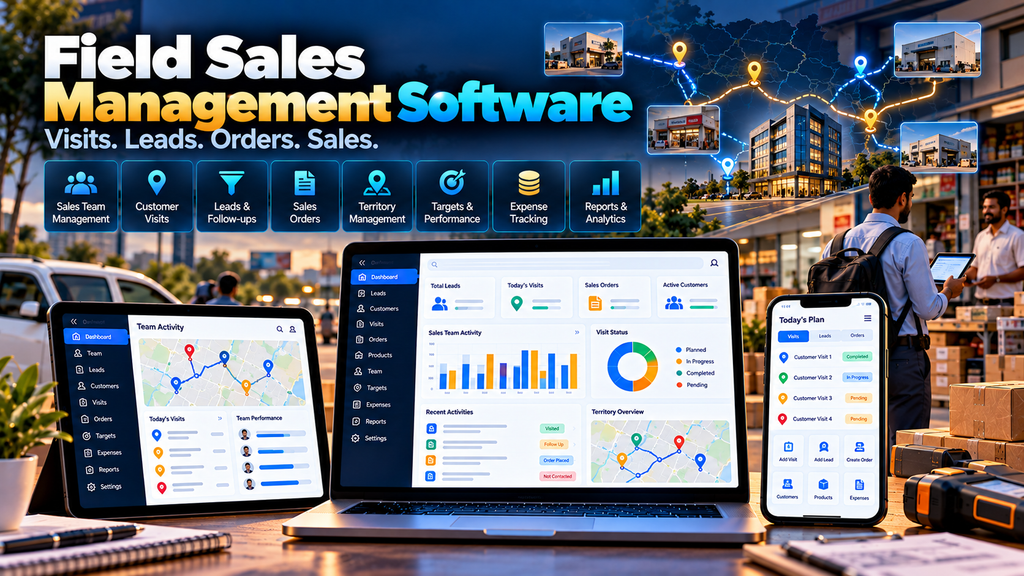
Field Sales Management Software for Businesses in Erode can help companies organize leads, customers, sales visits, follow-ups, territories, orders, quotations, expenses, targets and field-team reporting through a centralized digital platform.
For businesses that depend on sales representatives visiting customers, dealers, distributors, retailers, factories or project locations, a large part of the sales process happens outside the office.
A sales representative may begin the day with several customer visits.
During those visits, they may discuss products, collect requirements, follow up on quotations, receive orders or identify new sales opportunities.
Managers then need to understand what happened in the field and what should happen next.
When these activities are managed through notebooks, spreadsheets, phone calls and scattered messages, important sales information can become difficult to organize.
A properly planned Field Sales Management System can connect field activities with the company’s broader sales process.
At Greap Technologies, we develop custom business software, sales platforms, portals and web applications for organizations in Erode and nearby areas.
What Is Field Sales Management Software?
Field sales management software is a digital platform designed to help businesses manage sales employees and customer-facing activities that take place outside the office.
Depending on business requirements, the software can include:
- Sales employee management
- Customer management
- Lead management
- Sales visit planning
- Customer visit records
- Follow-up management
- Tasks and reminders
- Territory management
- Product catalogue
- Quotation workflows
- Sales order entry
- Dealer and distributor information
- Sales targets
- Expense claims
- Field attendance where appropriate
- Manager approvals
- Sales dashboards
- Field activity reports
- CRM or ERP integration
The system should be designed around how the sales team actually works rather than simply collecting large amounts of field data.
Which Erode Businesses Can Use Field Sales Software?
Field sales management software can be useful for businesses where employees regularly meet customers away from the office.
Examples can include:
- Manufacturers
- Wholesalers
- Distributors
- Industrial suppliers
- Building-material suppliers
- Textile businesses
- FMCG distributors
- Machinery suppliers
- Equipment businesses
- B2B service companies
- Companies with dealer networks
- Companies with territory-based sales teams
The right modules depend on the company’s sales model.
Field Sales Software vs CRM Software
CRM software generally focuses on managing customer relationships, leads, opportunities and sales pipelines.
Field sales software focuses more directly on activities performed by representatives working outside the office.
| CRM | Field Sales Management |
|---|---|
| Leads and opportunities | Customer visits |
| Customer records | Visit planning |
| Sales pipeline | Field activities |
| Follow-ups | Territory workflows |
| Sales communication | Orders from the field |
| Opportunity reports | Field-team reports |
For many businesses, these functions can be combined within one custom sales platform.
1. Map the Existing Field Sales Process
Development should begin by understanding how a salesperson currently moves from a lead to a customer order.
A typical workflow might look like:
Lead → Customer Contact → Visit → Requirement → Follow-Up → Quotation → Order → Repeat Follow-Up
Businesses should identify:
- How leads are assigned
- How customer visits are planned
- What information salespeople need during visits
- How visit outcomes are recorded
- How quotations are prepared
- How orders are submitted
- How managers review sales activity
- How field information reaches ERP or accounting systems
2. Sales Representative Management
The system can maintain profiles for authorized field sales employees.
Relevant information can include:
- Employee ID
- Name
- Sales team
- Assigned territory
- Reporting manager
- Branch
- Employment status
Employee information should be accessible only according to appropriate permissions.
3. Sales Team Management
Businesses can organize sales representatives into teams based on:
- Region
- Branch
- Product division
- Customer segment
- Sales manager
The hierarchy should reflect the company’s actual sales organization.
4. Territory Management
Field sales teams often divide customers by sales territory.
A territory can be configured around relevant business areas, routes or customer groups.
Territory management can help clarify which sales representative or team is responsible for particular accounts.
5. Customer Management
A centralized customer database can maintain relevant information required by the sales team.
This can include:
- Customer or business name
- Contact information
- Customer category
- Assigned salesperson
- Territory
- Relevant sales history
- Follow-up information
Only business information required for legitimate sales activities should be collected.
6. Dealer and Distributor Management
Businesses selling through dealer or distributor networks may connect field sales software with dealer-management workflows.
Sales representatives can potentially access relevant information such as:
- Assigned dealers
- Distributor relationships
- Product information
- Orders
- Approved pricing
- Follow-up tasks
For larger distribution networks, a dedicated dealer and distributor management system may be more appropriate.
Read our guide on Dealer and Distributor Management Software Development in Erode.
7. Lead Management
Field sales software can maintain new business leads and assign them to appropriate representatives.
Lead information can include:
- Lead source
- Customer or company
- Contact information
- Interested product or service
- Assigned representative
- Current status
- Next follow-up
8. Lead Assignment
Leads can be assigned manually or according to configured business rules.
Assignment may depend on:
- Territory
- Product
- Branch
- Sales team
- Customer type
Automatic assignment should be used only where the business has clear rules.
9. Lead Status Management
The company can configure lead stages that match its sales process.
For example:
New → Contacted → Visit Planned → Requirement Identified → Quotation → Follow-Up → Converted / Closed
Statuses should help the sales team understand the next action rather than becoming unnecessary administrative work.
10. Sales Visit Planning
Representatives can plan customer visits for a day or future period.
A visit plan can include:
- Customer
- Date
- Expected time
- Visit purpose
- Related lead or opportunity
- Notes
11. Daily Sales Plan
A mobile-friendly interface can show a salesperson the day’s relevant activities.
For example:
- Planned visits
- Pending follow-ups
- Customer callbacks
- Open quotations
- Pending order-related tasks
This can give representatives a clear working list without requiring them to search across multiple applications.
12. Customer Visit Records
After a meeting, representatives can record relevant information about the visit.
A visit record can include:
- Customer
- Date
- Visit purpose
- Discussion summary
- Customer requirement
- Products discussed
- Next action
- Next follow-up date
The goal is to capture useful sales information, not unnecessary details about customers.
13. Visit Outcome Management
Configured visit outcomes can help managers understand what happened during customer interactions.
Examples might include:
- Follow-up required
- Quotation required
- Product information requested
- Order received
- Meeting rescheduled
- Opportunity closed
14. Follow-Up Management
Consistent follow-up is important in many B2B sales processes.
The system can create follow-up tasks with:
- Customer
- Responsible salesperson
- Due date
- Purpose
- Priority
- Status
This helps important customer actions remain visible after the original visit.
15. Follow-Up Reminders
Representatives can receive reminders for upcoming or overdue sales activities.
Notifications should prioritize meaningful actions rather than overwhelming users with unnecessary alerts.
16. Sales Task Management
Managers or representatives can create tasks related to:
- Customer calls
- Visits
- Quotations
- Product demonstrations
- Order follow-ups
- Payment-related follow-ups where appropriate
17. Product Catalogue for Field Sales
A salesperson may need quick access to the company’s current product information while meeting customers.
A digital catalogue can provide relevant:
- Product name
- Product code
- Category
- Product image
- Description
- Specifications
- Approved pricing where applicable
Product information should be managed centrally so representatives use current data.
18. Customer-Specific Pricing
B2B businesses may have different approved pricing for different customer groups, dealers or distributors.
The field sales interface can display authorized pricing according to the company’s configured rules.
Sensitive pricing information should have appropriate access controls.
19. Quotation Request Workflow
A field representative may need to request a quotation after understanding a customer’s requirement.
A possible workflow can be:
Customer Visit → Requirement → Quotation Request → Office Review → Quotation Prepared → Customer Follow-Up
This can be useful when pricing requires internal approval.
20. Quotation Management
Where sales representatives are authorized to create quotations, the system can provide a controlled quotation workflow.
Quotations can include relevant:
- Customer
- Products or services
- Quantity
- Approved pricing
- Terms
- Validity
- Approval status
21. Sales Order Entry from the Field
Authorized representatives can potentially submit customer orders directly through the field sales platform.
A simple process can be:
Customer → Products → Quantities → Approved Price → Review → Submit Order
This can reduce the need to send handwritten or message-based order information back to the office.
22. Sales Order Approval
Some businesses may require orders to be reviewed before confirmation.
Approval may be necessary for situations involving:
- Special pricing
- Large quantities
- Credit conditions
- Other business-defined exceptions
23. Order Status Tracking
Field representatives may need visibility into the status of orders they submitted.
Depending on system integration, relevant statuses can be made available such as:
- Submitted
- Under review
- Confirmed
- Processing
- Dispatched
- Completed
The actual status model should match the company’s order process.
24. B2B Ecommerce Integration
Companies operating a B2B ecommerce platform can connect relevant field sales and digital ordering workflows.
For example, a salesperson may assist a dealer during onboarding, while repeat orders can later be placed through a dealer portal.
Learn more about B2B Ecommerce Website Development for Wholesalers and Manufacturers in Erode.
25. Sales Target Management
Businesses can configure appropriate sales targets for relevant employees or teams.
Targets might be organized by:
- Salesperson
- Team
- Territory
- Product category
- Period
Target dashboards should use verified business data and clearly state the period being measured.
26. Sales Performance Dashboard
Authorized managers can review field-sales information through dashboards.
Depending on requirements, dashboards can summarize:
- Visits completed
- Pending follow-ups
- Leads by stage
- Quotations
- Orders
- Targets
- Territory activity
Activity volume should not automatically be treated as employee quality or sales effectiveness. Managers should interpret the data in business context.
27. Expense Management
Field representatives may incur approved business expenses while travelling or meeting customers.
An expense workflow can allow employees to submit:
- Expense category
- Date
- Amount
- Business purpose
- Supporting document where required
28. Expense Approval
Submitted expenses can be routed to an authorized manager or accounts user.
A workflow might be:
Employee Submission → Manager Review → Accounts Review if Required → Approved / Rejected
Rules should follow company policy.
29. Field Attendance
Some organizations may want attendance functions within the field-sales platform.
If included, attendance should follow the employer’s approved policy and be clearly separated from customer-visit records.
For broader employee attendance and payroll requirements, businesses can use a dedicated HR platform.
Read about Employee Attendance and Payroll Software Development in Erode.
30. Location-Based Visit Verification
Where genuinely necessary for a legitimate business workflow, an organization may consider location-assisted visit verification.
This requires careful planning because employee location information can be sensitive.
Businesses should define:
- Why location information is necessary
- When it is collected
- What precision is required
- Who can access it
- How long it is retained
- How employees are informed
The system should avoid collecting continuous or excessive location information when the business requirement can be met with less intrusive data.
31. Customer Location Information
Where appropriate, authorized customer business locations can be associated with customer records.
This can support visit planning and territory organization.
Only location information required for legitimate business activities should be stored.
32. Route Planning
Field teams with several customer visits may benefit from route-planning functionality or integration with a suitable mapping service.
Route functionality should be treated as an operational aid rather than a guarantee of the fastest possible journey because traffic and real-world conditions can change.
33. Sales Manager Dashboard
A manager dashboard can provide an overview of the team’s current sales workflow.
Relevant information can include:
- Today’s planned visits
- Completed activities
- Pending follow-ups
- Open leads
- Quotation activity
- Orders
- Pending approvals
34. Field Sales Representative Dashboard
A salesperson’s dashboard should focus on actions rather than management-level analytics.
It can display:
- Today’s visits
- Upcoming follow-ups
- Assigned leads
- Open quotations
- Customer tasks
- Recent orders
35. Customer Visit History
Authorized representatives can review previous sales interactions before meeting a customer.
This can provide continuity when:
- Multiple representatives work with an account
- A salesperson changes territory
- A manager joins a customer discussion
36. Sales Notes
Representatives can maintain concise business notes related to legitimate customer requirements and sales activities.
Notes should avoid unnecessary personal or sensitive information.
37. Document and Attachment Management
Relevant business documents can be associated with leads, customers, quotations or sales activities where required.
Examples may include:
- Approved product documents
- Customer requirements
- Quotation documents
- Order-related documents
Document access should follow user permissions.
38. Multi-Branch Field Sales Management
Businesses operating several branches can organize field teams separately while maintaining authorized centralized reporting.
The platform can support:
- Branch sales teams
- Branch territories
- Branch customers
- Branch managers
- Central sales management
39. Distributor Sales Representative Workflows
Manufacturers may work with both internal sales employees and distributor teams.
Where appropriate, software can provide separate user roles for each group.
The information available to distributor users should be carefully separated from internal company information.
40. Field Sales Reports
Authorized managers can access reports such as:
- Visit report
- Lead report
- Follow-up report
- Quotation report
- Order report
- Territory report
- Salesperson activity report
- Expense report
Reports should clearly identify the date range, filters and data definitions used.
41. Territory Reports
Territory-level reporting can help managers understand customer and sales activity across assigned regions.
This can support territory planning without automatically treating raw activity counts as performance rankings.
42. Product-Wise Sales Reports
When order data is available, authorized users can review relevant sales information by product or category.
This can help teams understand what customers are ordering across different territories and periods.
43. Follow-Up Reports
A follow-up report can identify:
- Upcoming follow-ups
- Overdue follow-ups
- Completed follow-ups
- Follow-ups by representative
- Follow-ups by customer
This can help managers identify sales activities that still require attention.
44. Role-Based Access Control
Different sales users should receive different permissions.
| User | Example Access |
|---|---|
| Sales Representative | Assigned leads, customers, visits and sales activities |
| Sales Manager | Authorized team activities, approvals and reports |
| Accounts User | Approved financial or expense workflows |
| Sales Administrator | Configured sales-management functions |
| Management | Authorized consolidated reports |
45. Audit Trail
Important changes can be recorded through an audit trail.
This may include changes to:
- Lead assignments
- Customer information
- Orders
- Special pricing approvals
- Expenses
- User permissions
An audit trail can record who performed an action and when it occurred.
46. CRM Integration
If a business already uses CRM software, field sales functionality can potentially integrate with it.
A possible workflow can be:
CRM Lead → Field Representative → Customer Visit → Updated Opportunity → Follow-Up → Order
Integration feasibility depends on the CRM’s available APIs and technical capabilities.
47. ERP Integration
Businesses may need confirmed field orders to move into an ERP system for subsequent processing.
A possible architecture can be:
Field Sales → Order Approval → ERP → Inventory / Dispatch / Billing
The exact integration depends on the ERP architecture and supported APIs.
48. Inventory Visibility
Sales representatives may benefit from relevant stock availability while discussing orders.
Where appropriate, inventory information can be retrieved from an ERP, warehouse or inventory system.
The interface should clearly distinguish live inventory from delayed or periodically synchronized information.
49. Dealer Management Integration
Companies with structured distribution networks can connect field sales activities to dealer and distributor accounts.
This can create a broader workflow:
Manufacturer → Sales Representative → Distributor / Dealer → Order → Fulfilment
For more complex distribution networks, see Dealer and Distributor Management Software Development in Erode.
50. Attendance and Payroll Integration
When appropriate, employee information can integrate with the company’s HR system.
Sales activity should not automatically be treated as payroll attendance unless that workflow has been explicitly designed and approved by the organization.
Learn more about Employee Attendance and Payroll Software Development in Erode.
51. Data Import and Migration
Businesses moving from spreadsheets or another sales system may need to migrate:
- Customers
- Leads
- Sales representatives
- Territories
- Products
- Relevant historical activities
Existing data should be reviewed before migration so duplicate and outdated information is not simply transferred into the new system.
52. Field Sales Data Security
A field sales platform may contain confidential customer, product, pricing and sales information.
Security planning can include:
- Authentication
- Role-based authorization
- Secure communications
- Session controls
- Audit logging
- Secure APIs
- Backup procedures
- Software updates
53. Mobile-Friendly Field Sales Software
Because field representatives work away from desks, mobile usability should be treated as a primary requirement.
Common field actions should require as few steps as practical.
For example:
Open Customer → Record Visit → Add Follow-Up → Save
A complex desktop interface simply compressed onto a phone may not provide a good field-sales experience.
54. Field Sales Mobile App vs Responsive Web App
A dedicated mobile app is not automatically necessary for every sales team.
A responsive web application may be sufficient for:
- Customer records
- Visit entry
- Follow-ups
- Orders
- Expenses
- Dashboards
A dedicated application may be worth considering when the project requires specific device capabilities, carefully designed offline workflows, push notifications or other app-specific functionality.
55. Offline Field Sales Requirements
Some field teams may work in locations with unreliable connectivity.
If offline functionality is genuinely required, it should be designed carefully.
The project needs clear rules for:
- What data is stored on the device
- What can be edited offline
- When synchronization occurs
- How conflicting changes are handled
- How sensitive information is protected
56. Backup and Recovery
A backup strategy should cover relevant sales data, configuration and uploaded business documents.
Recovery procedures should also be documented and tested according to the organization’s operational requirements.
57. Testing Before Launch
Field sales software should be tested with real business workflows before company-wide rollout.
Testing can include:
- Lead assignment
- Customer management
- Visit workflows
- Follow-ups
- Quotation workflows
- Order submission
- Approvals
- Expenses
- Permissions
- Mobile responsiveness
- Integrations
- Reports
Actual sales representatives and managers should participate in user acceptance testing because they understand the field workflow.
Field Sales Management Software Modules
| Module | Purpose |
|---|---|
| Sales Team | Manage authorized field representatives and teams |
| Customers | Maintain relevant customer information |
| Leads | Manage prospective customer opportunities |
| Visits | Plan and record customer visits |
| Follow-Ups | Track future sales actions |
| Territories | Organize field-sales responsibility |
| Products | Provide current product information |
| Quotations | Support approved quotation workflows |
| Orders | Capture authorized customer orders |
| Expenses | Manage approved field expenses |
| Targets | Maintain configured sales targets |
| Reports | Provide authorized sales reporting |
| Integrations | Connect supported CRM, ERP or dealer systems |
Field Sales Software vs Employee Tracking Software
A useful field sales system should focus on helping employees and managers manage customer-facing work.
It should not be designed primarily as a surveillance platform.
Customer visits, leads, orders, follow-ups and tasks are often more useful operational information than collecting continuous employee location data.
Where location features are legitimately required, organizations should define a specific business purpose, limit collection appropriately and establish suitable privacy and access controls.
Field Sales Software vs Dealer Management Software
Field sales software primarily supports sales representatives and customer-facing activities.
Dealer management software focuses on the structured relationship between a manufacturer or brand and its dealers or distributors.
Businesses with both requirements can potentially connect the systems.
For example:
Sales Rep → Dealer Visit → Order → Dealer Management System → ERP / Fulfilment
Custom Field Sales Software vs Ready-Made Sales App
A ready-made sales application can work well when its workflows already match the business.
Custom field sales software can be considered when the company requires:
- Specific sales workflows
- Custom territory structures
- Dealer or distributor integration
- Special pricing workflows
- Custom order processes
- ERP integration
- Industry-specific forms
- Custom reports
- Special approval workflows
Neither approach is automatically better for every business.
How Much Does Field Sales Management Software Cost in Erode?
There is no single development price suitable for every field sales system.
Development cost can depend on:
- Number of sales users
- Customer and lead workflows
- Territory management
- Visit-management requirements
- Quotation functionality
- Order workflows
- Expense management
- Location features
- Offline functionality
- Mobile application requirements
- CRM integration
- ERP integration
- Dealer-system integration
- Reports
- Data migration
A simple customer-visit and follow-up system has a different scope from a complete field sales platform connected to CRM, ERP, inventory and dealer-management systems.
How Long Does Field Sales Software Development Take?
The development timeline depends on the scope and complexity of the platform.
Factors can include:
- Requirement analysis
- Sales workflow mapping
- UI/UX design
- Number of modules
- Mobile requirements
- Offline functionality
- External integrations
- Data migration
- Testing
- User acceptance
A realistic timeline should be prepared after understanding the company’s field sales workflow.
Should Field Sales Software Be Developed in Phases?
For larger projects, a phased rollout can be practical.
One possible sequence is:
- Sales users and territories
- Customers and leads
- Visit planning and visit records
- Follow-ups and tasks
- Products and quotations
- Sales orders
- Expenses and approvals
- Dashboards and reports
- CRM, ERP or dealer integrations
- Advanced mobile or offline functionality
The actual sequence should follow business priorities and technical dependencies.
Field Sales Software for Manufacturers in Erode
Manufacturers often use field representatives to meet distributors, dealers, industrial customers and other businesses.
A custom field sales platform can connect:
Manufacturer → Sales Representative → Distributor / Dealer / Customer → Requirement → Quotation → Order
This can be especially useful when combined with a structured B2B or dealer-management platform.
Explore B2B Ecommerce Website Development for Manufacturers and Wholesalers in Erode.
Field Sales Software for Distributors and Wholesalers
Distributors and wholesalers may use field representatives to regularly visit retailers or business customers.
The system can help organize:
- Assigned customers
- Visit schedules
- Product information
- Orders
- Follow-ups
- Territory activity
Field Sales Software for Service Businesses
Field-sales workflows are not limited to product companies.
B2B service businesses can also use the platform to manage:
- Leads
- Customer meetings
- Site visits
- Requirements
- Proposals
- Follow-ups
- Sales opportunities
Field Sales Management Software in Erode and Nearby Areas
Greap Technologies can develop custom field sales management systems for businesses in Erode, Perundurai, Bhavani, Gobichettipalayam, Sathyamangalam, Anthiyur, Chennimalai, Modakkurichi, Kavindapadi, Nambiyur, Kodumudi and nearby areas.
The software should be designed around each company’s sales workflow rather than creating near-identical systems simply for different nearby locations.
Why Choose Greap Technologies for Field Sales Management Software in Erode?
Greap Technologies provides custom software development, business web applications and digital solutions for organizations in Erode and nearby areas.
Depending on project requirements, a field sales platform can include:
- Sales representative management
- Sales team hierarchy
- Customer management
- Lead management
- Territory management
- Visit planning
- Visit records
- Follow-up management
- Tasks and reminders
- Product catalogue
- Quotation workflows
- Sales order entry
- Expense management
- Targets
- Sales dashboards
- Sales reports
- Role-based access
- CRM integration
- ERP integration
- Dealer-management integration
- Data migration
- Mobile-friendly interfaces
- Ongoing technical support
The objective is not simply to monitor sales representatives. The platform should make it easier for the sales team to manage customers, remember follow-ups, submit orders and keep useful sales information available to the business.
Explore Greap Technologies, Website Development Services, Ecommerce Development, SEO Services in Erode and Digital Marketing Services.
Conclusion
Field sales management software can help businesses organize the activities that happen between the office, sales representatives and customers.
A practical system should follow the real sales journey:
Lead → Visit → Requirement → Follow-Up → Quotation → Order → Customer Relationship
Depending on the business, this workflow can then connect with:
- CRM
- Dealer management
- B2B ecommerce
- Inventory
- ERP
- Order fulfilment
- HR and attendance
The strongest field-sales systems focus on helping representatives complete sales work efficiently while giving managers relevant business visibility without collecting unnecessary employee or customer data.
Need Field Sales Management Software in Erode?
If your sales representatives currently manage customer visits, follow-ups, orders and daily activities through notebooks, spreadsheets, phone calls and scattered messages, a custom field sales platform may help organize the process.
Greap Technologies develops custom field sales software, CRM systems, dealer-management platforms and business applications for organizations in Erode and nearby areas.
Discuss Your Field Sales Software Project on WhatsApp
Frequently Asked Questions
1. What is field sales management software?
Field sales management software is a digital platform used to manage sales representatives, customers, leads, visits, follow-ups, territories, quotations, orders and related field-sales activities.
2. Can field sales software manage customer visits?
Yes. Representatives can plan customer visits and record relevant visit outcomes, requirements and next follow-up actions.
3. Can sales representatives place customer orders from the field?
Yes. A custom platform can allow authorized representatives to select products, enter quantities and submit orders according to the company’s sales workflow.
4. Can field sales software manage leads?
Yes. Leads can be captured, assigned to representatives, moved through configured sales stages and connected with follow-up activities.
5. Can the software manage sales territories?
Yes. Representatives and customers can be organized according to territories, branches, teams or other structures used by the business.
6. Can field sales software integrate with CRM?
Potentially. A custom field-sales platform can integrate with an existing CRM when the CRM provides suitable APIs or other supported integration methods.
7. Can it integrate with ERP software?
Potentially. Confirmed sales orders and other approved information can be exchanged with an ERP where technically supported.
8. Can field sales software integrate with dealer management?
Yes, where the systems support appropriate integration. This can connect sales representatives, dealers, distributors, orders and related workflows.
9. Does field sales software need continuous employee GPS tracking?
No. Many useful field-sales workflows can be built around customer visits, follow-ups, tasks and orders without continuous location collection. Location functionality should only be used when there is a defined legitimate business requirement and appropriate privacy controls.
10. Can the software manage field expenses?
Yes. Employees can submit approved business expenses with relevant information and supporting documents, followed by manager or accounts review.
11. How much does field sales management software cost in Erode?
Development cost depends on users, customer and lead workflows, visits, territories, quotations, orders, mobile requirements, offline functionality, integrations, reporting and overall project complexity.
12. Does Greap Technologies develop field sales management software in Erode?
Yes. Greap Technologies develops custom field sales, CRM, dealer-management and business software for organizations in Erode and nearby areas.


