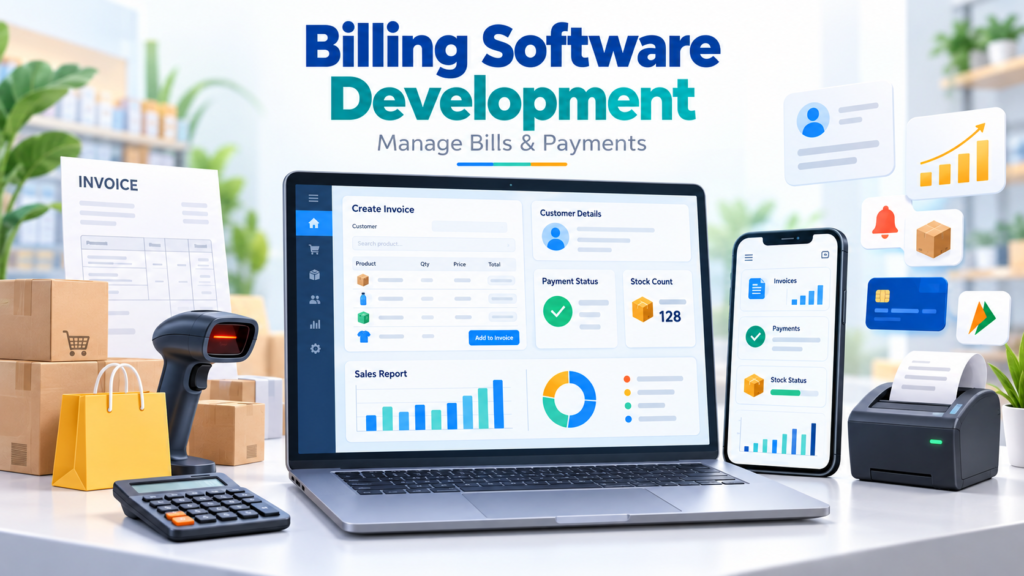
Billing software development for shops in Erode is becoming increasingly important for retail stores, textile shops, grocery stores, supermarkets, hardware businesses, pharmacies, electronics shops and other local businesses that want to manage billing, payments, products, stock and reports in a more organized way.
Many shops still depend on handwritten bills, notebooks, calculators, Excel sheets or basic billing tools. These methods may work when transaction volume is low, but as the business grows, manual billing can create calculation errors, missing payment records, stock mismatches, customer-data problems and slow reporting.
A properly developed billing system can help shop owners create invoices quickly, maintain product information, track payments, monitor inventory and understand daily business performance through one dashboard.
At Greap Technologies, we provide billing and custom software development for businesses in Erode. Billing systems can be planned based on your shop type, invoice workflow, product catalogue, inventory requirements, payment methods and reporting needs.
Why Billing Software Development for Shops in Erode Is Important
Billing is one of the most frequently used processes in a retail business. The system needs to be fast enough for daily operations while also maintaining accurate records for owners and accounts teams.
Without a proper billing system, businesses may face:
- Manual calculation mistakes
- Slow invoice creation
- Missing bill records
- Unclear payment status
- No centralized customer history
- Stock mismatches
- Difficulty checking daily sales
- Time-consuming monthly reporting
- Duplicate product entries
- Difficulty tracking credit customers
- Dependence on individual staff
A good billing software system can help businesses:
- Create invoices quickly
- Calculate totals automatically
- Maintain product records
- Manage customers
- Track payment status
- Monitor stock
- Track purchases
- Generate daily reports
- Generate monthly reports
- Control employee access
- Reduce repeated manual work
For growing retail businesses, billing software can become more than an invoice-printing tool. It can act as a simple retail-management system.
What Is Billing Software?
Billing software is a digital system used to create invoices, receipts, payment records and sales records.
Depending on the business requirement, a billing system can also include inventory, suppliers, customers, purchases, expenses and reporting.
A billing dashboard can help business owners answer questions such as:
- How much did we sell today?
- How many invoices were created?
- Which products sold the most?
- Which customers have pending balances?
- What payment methods were used?
- Which products are running low?
- How much stock is currently available?
- What were the monthly sales?
- Which employee generated each invoice?
Who Needs Billing Software in Erode?
Billing software can be useful for many product-based and service-based businesses.
1. Textile Shops
Textile retailers can manage categories, garments, prices, stock, customer bills, payment details and sales reports.
2. Grocery Stores and Supermarkets
Grocery businesses often need fast billing, barcode support, inventory updates and large product catalogues.
Useful features can include:
- Barcode scanning
- Quick product search
- Multiple payment modes
- Stock deduction after sale
- Low-stock alerts
- Daily cash reports
3. Pharmacies and Medical Stores
Medical stores may need additional product-management fields such as batch information, expiry information and stock tracking depending on their operational and regulatory requirements.
Any tax, invoicing or pharmacy-specific compliance functionality should be configured according to the business’s applicable requirements.
4. Hardware Shops
Hardware businesses can manage products, quantities, suppliers, purchases, quotations, invoices and customer balances.
5. Electronics Shops
Electronics retailers may need billing software that stores models, serial information, warranty-related notes, prices and customer purchase history.
6. Furniture Shops
Furniture businesses can manage estimates, invoices, advance payments, delivery status and customer orders.
7. Gift Shops
Gift businesses can manage products, seasonal collections, discounts, invoices and customer purchase information.
8. Stationery and Book Shops
Stationery stores can manage school supplies, books, office products, bulk orders, inventory and daily billing.
9. Garment Stores
Garment retailers can manage product variations such as:
- Size
- Colour
- Brand
- Category
- Price
- Stock quantity
10. Service-Based Businesses
Repair centres, salons, agencies, consultants and other service businesses can use billing software for service invoices, payments and customer records.
Benefits of Billing Software for Shops
1. Faster Invoice Creation
A billing system can significantly simplify invoice creation.
A typical billing screen can include:
- Customer selection
- Product selection
- Quantity
- Rate
- Discount
- Tax
- Total
- Payment method
- Invoice print
This reduces repeated manual calculation and helps the billing counter operate faster.
2. Reduce Calculation Errors
Manual billing can create errors in quantity, discount, tax or final total. Software can perform these calculations automatically based on configured rules.
3. Maintain Customer Records
Customer information can include:
- Name
- Phone number
- Address
- Purchase history
- Outstanding balance
- Payment history
- Notes
This can be particularly useful for retailers that regularly serve repeat or credit customers.
4. Track Multiple Payment Methods
Billing software can record payments received through:
- Cash
- UPI
- Card
- Bank transfer
- Credit
- Partial payment
This helps owners understand how each invoice was settled.
5. Inventory and Stock Control
Product-based shops can connect billing with inventory so that stock changes automatically after sales.
Inventory functions can include:
- Opening stock
- Stock inward
- Stock sold
- Current stock
- Low-stock alerts
- Out-of-stock status
- Damaged stock
- Returned stock
6. Better Sales Reports
Billing software can generate reports such as:
- Daily sales report
- Weekly sales report
- Monthly sales report
- Product-wise report
- Category-wise report
- Customer-wise report
- Payment-mode report
- Employee-wise billing report
- Pending payment report
7. GST and Invoice Structure Support
Where applicable to the business, billing systems can be configured to support structured tax invoices, tax calculations, customer tax information, product tax fields and invoice reports.
Tax configuration should always match the business’s current accounting and compliance requirements.
8. Better Business Control
Instead of checking different notebooks or spreadsheets, owners can view important information through one dashboard.
Still Creating Bills Manually?
Greap Technologies can help you build billing software with invoices, products, customers, stock, payments and reports based on your shop workflow.
Important Features Needed in Billing Software
1. Invoice Creation
The invoice module is the core of billing software.
It can include:
- Invoice number
- Invoice date
- Customer information
- Product or service selection
- Quantity
- Price
- Discount
- Applicable tax fields
- Total
- Payment mode
- Print option
- PDF option
2. Product Management
Product-management fields can include:
- Product name
- SKU or product code
- Category
- Purchase price
- Selling price
- Stock
- Barcode
- Tax information
- Supplier
3. Customer Management
A centralized customer database can store purchase and payment information for future reference.
4. Payment Management
Payment records can include:
- Invoice amount
- Paid amount
- Pending amount
- Payment method
- Payment date
- Due date
- Reference information
5. Inventory Management
Inventory functions can connect sales, purchases and stock into the same system.
6. Supplier Management
Supplier records can include:
- Supplier name
- Company
- Phone number
- Products supplied
- Purchase history
- Outstanding payment
- Notes
7. Business Dashboard
A management dashboard can show:
- Today’s sales
- Monthly revenue
- Total invoices
- Pending payments
- Low-stock products
- Best-selling products
- Payment summary
8. Role-Based Access
Different employees may need different permissions.
Example roles:
- Super Admin
- Manager
- Billing Staff
- Accounts Staff
- Inventory Staff
9. Barcode Billing
Barcode functionality can improve billing speed for shops with large product catalogues.
It can support:
- Barcode scanner input
- Automatic product lookup
- Quick quantity entry
- Stock deduction
- Faster checkout
10. Print and PDF Invoices
Businesses can generate invoices for:
- Thermal printing
- Standard printing
- PDF download
- Email sharing
- Supported messaging workflows
Advanced Billing Software Features
1. POS Billing System
A POS billing interface is designed for fast counter sales.
POS functionality can include:
- Quick product search
- Barcode scanning
- Quantity editing
- Discounts
- Multiple payment modes
- Receipt printing
- Cash-counter report
2. Purchase Management
Purchase-management functions can include:
- Purchase invoice
- Supplier
- Product quantity
- Purchase rate
- Tax details
- Payment status
- Stock update
3. Credit Customer Management
For businesses that offer credit, software can maintain:
- Customer balance
- Credit limit
- Invoice due date
- Partial payments
- Payment history
- Outstanding report
4. Expense Tracking
Optional expense-management modules can record business expenses such as:
- Rent
- Salary
- Electricity
- Transportation
- Maintenance
- Other operational expenses
5. Multi-Branch Billing
Businesses operating multiple outlets can use centralized branch management.
Features can include:
- Branch users
- Branch-wise invoices
- Branch sales reports
- Branch inventory
- Stock transfers
- Central management dashboard
6. WhatsApp Invoice Workflow
Based on the selected integration method, invoices can be prepared for convenient digital sharing with customers.
For more advanced integrations, Greap Technologies also provides API integration services.
7. Mobile-Friendly Dashboard
Owners can access important reports through a responsive browser interface.
Mobile dashboard information can include:
- Today’s sales
- Payments
- Pending balances
- Stock alerts
- Invoices
- Reports
8. Billing with CRM Integration
Some businesses need billing connected with customer relationship management.
A connected system can move customers through:
Enquiry → Follow-Up → Quotation → Customer → Invoice → Payment
Businesses needing a larger customer-management system can explore Greap’s CRM and ERP development solutions.
9. Billing with Ecommerce Integration
Retail businesses operating both physical shops and ecommerce websites may require common product, order or stock management.
This can reduce duplicate product management and improve stock visibility across online and offline operations.
Billing Software vs Manual Billing
| Feature | Manual Billing | Billing Software |
|---|---|---|
| Invoice Creation | Manual | Fast and structured |
| Calculation | Manual | Automatic |
| Customer History | Difficult | Centralized |
| Inventory | Separate tracking | Can be integrated |
| Reports | Manual calculation | Generated from system data |
| Payment Tracking | Manual | Structured |
Custom Billing Software vs Ready-Made Billing Software
Not every shop needs custom software. A ready-made billing solution can be appropriate for standard requirements.
Ready-Made Billing Software May Be Suitable When:
- Your billing process is simple
- You need quick deployment
- Standard reports are enough
- Your business can follow the existing workflow
- No special integrations are required
Custom Billing Software May Be Better When:
- Your shop has a unique billing workflow
- You need customized invoice formats
- You need special reports
- You need industry-specific fields
- You need CRM integration
- You need custom inventory workflows
- You need multiple branches
- You need ecommerce integration
- You need special employee permissions
Greap Technologies provides both custom business systems and ready-to-deploy solutions depending on the actual business requirement.
Billing Software Development Process at Greap Technologies
Step 1: Requirement Analysis
We first understand:
- Type of shop
- Products
- Current billing process
- Payment methods
- Stock process
- Number of users
- Required reports
- Branches
Step 2: Module Planning
The system is divided into modules such as:
- Billing
- Products
- Customers
- Inventory
- Purchases
- Suppliers
- Payments
- Reports
- Users
Step 3: UI/UX Design
The billing interface should prioritize speed, clarity and ease of daily use.
Step 4: Database Planning
Products, invoices, payments, customers, stock and reports are structured properly before development.
Step 5: Software Development
The approved modules and billing logic are developed based on the project requirements.
Step 6: Testing
Testing can include:
- Invoice calculations
- Discount calculations
- Payment records
- Stock updates
- User permissions
- Reports
- Invoice printing
- Responsive access
Step 7: Data Setup
Initial products, users and required master information can be configured based on the project scope.
Step 8: Training and Launch
Shop staff can be trained to create invoices, add products, check reports and manage stock.
Step 9: Maintenance and Improvements
Additional modules and integrations can be developed as the business grows.
Billing Software with Inventory Management
For many retailers, billing and stock should work together.
A typical workflow can be:
Purchase Entry → Stock Added → Customer Sale → Invoice Created → Stock Reduced → Sales Report Updated
This helps reduce duplicate work and gives business owners better inventory visibility.
Billing Software with POS System
A Point of Sale system is useful for stores that handle frequent counter transactions.
A POS screen should focus on:
- Speed
- Fast product lookup
- Barcode input
- Easy discounts
- Multiple payment modes
- Quick receipt printing
Greap’s current website lists Billing Software as a featured solution for retailers, wholesalers, pharmacies, supermarkets and service businesses.
SEO for Billing Software Development in Erode
This page should focus specifically on local billing and POS software intent rather than trying to rank for every custom-software keyword.
Primary SEO Keyword
Billing software development Erode
Supporting Keywords
- Billing software development for shops in Erode
- Billing software in Erode
- Billing software for shops in Erode
- Retail billing software in Erode
- POS billing software in Erode
- GST billing software in Erode
- Invoice software in Erode
- Inventory billing software in Erode
- Shop billing software Erode
- Custom billing software Erode
Useful Supporting Blog Topics
To build stronger topical authority, future articles can include:
- POS Billing Software for Retail Shops in Erode
- Billing Software vs Excel for Small Shops
- Inventory Management Software for Erode Businesses
- Billing and Inventory Software for Textile Shops
- Billing Software for Supermarkets in Erode
- How Barcode Billing Helps Retail Stores
- Custom Billing Software vs Ready-Made Billing Tools
Common Problems Shops Face Without Billing Software
1. Calculation Errors
Manual calculations increase the possibility of quantity, price and total errors.
2. Missing Invoice Records
Paper bills can become difficult to search later.
3. Stock Mismatch
When billing and inventory are maintained separately, sold products may not be deducted correctly.
4. Difficult Credit Tracking
Shop owners may struggle to remember how much each customer owes.
5. Slow Monthly Reporting
Manual sales totals can take significant time to prepare.
6. Limited Business Visibility
Owners may know current cash but not have clear product, stock or customer information.
How Greap Technologies Helps Shops in Erode
Greap Technologies develops custom billing and business-management software for retailers and service businesses.
Our billing software development can include:
- Invoice creation
- Billing dashboard
- Product management
- Customer management
- Payment tracking
- Inventory management
- Supplier management
- Purchase management
- POS billing
- Barcode support
- Credit customer tracking
- User-role management
- Sales reports
- Stock reports
- PDF invoice
- Admin dashboard
- Multi-branch functionality
- API integrations
- Responsive access
- Maintenance and upgrades
Businesses that need broader operational systems can also explore our custom software development services.
Need Billing Software for Your Shop?
Tell us your billing process, product count, inventory requirements and reports. We can help plan a suitable billing or POS system.
Areas We Serve in Erode District
Greap Technologies provides billing software development, CRM development, custom software development, website development, ecommerce development and mobile app development for businesses across Erode and nearby locations.
- Erode
- Perundurai
- Bhavani
- Anthiyur
- Gobichettipalayam
- Sathyamangalam
- Modakkurichi
- Kodumudi
- Nambiyur
- Thalavadi
- Chennimalai
- Nearby areas
Why Choose Greap Technologies?
Shop-Focused Requirement Planning
The system is planned after understanding your actual billing-counter workflow.
Custom Billing Features
Features can be configured around products, invoice formats, payment methods, users and reports.
Simple User Interface
Billing software needs to be easy for employees to learn and fast enough for everyday use.
Inventory Integration
Billing can be connected with stock, purchases and suppliers when required.
Custom Reports
Reports can be planned based on the information management needs to review regularly.
Role-Based Access
Employees can receive permissions based on their responsibilities.
Integration Support
Supported external systems can be connected using API integration services.
Future Expansion
Billing systems can later be extended with inventory, CRM, ecommerce, customer portals, mobile applications or branch-management modules depending on architecture and business needs.
Billing Software Development for Shops in Erode – Conclusion
Billing software can help retail businesses manage invoices, products, payments, inventory and reports in a much more organized way than manual billing systems.
For textile stores, supermarkets, grocery shops, hardware stores, electronics shops, furniture businesses, gift stores and other retailers, a structured billing system can improve speed, accuracy and management visibility.
Greap Technologies provides billing software development for shops in Erode, including invoice management, POS billing, inventory tracking, customer records, payments, reports and custom business workflows.
The right billing system should not make daily work more complicated. It should make billing faster and give the business owner better control over operations.
Build Billing Software for Your Erode Shop
Greap Technologies can help you build a custom billing system with invoices, products, POS billing, inventory, customer balances and business reports.
Frequently Asked Questions
1. Why does a shop in Erode need billing software?
Billing software can help a shop create invoices faster, reduce manual calculation errors, manage customer records, track payments, monitor stock and generate daily or monthly reports.
2. What features should billing software include?
Billing software can include invoice creation, product management, customer records, payment tracking, inventory management, supplier management, reports, user permissions and an admin dashboard.
3. Can billing software support GST invoices?
Yes. Where applicable, billing software can be configured with tax fields, tax calculations, customer tax details and structured invoice formats based on the business’s accounting requirements.
4. Can billing software manage inventory?
Yes. Billing can be connected with stock inward, sales stock deduction, low-stock alerts, purchase records, returns and inventory reports.
5. Can billing software work for supermarkets and retail stores?
Yes. Retail billing systems can support POS billing, product search, barcode scanning, inventory, payment methods and receipt printing.
6. Can invoices be shared digitally?
Yes. The system can generate PDF invoices that can be downloaded, emailed or shared through supported communication workflows.
7. Can shop owners check billing reports from mobile?
Yes. A responsive web-based billing dashboard can allow authorized owners to view important sales, payment and stock reports from mobile devices.
8. Can billing software support multiple branches?
Yes. Custom software can include branch users, branch-wise sales, stock transfers and centralized reports when multi-branch functionality is part of the project scope.
9. Can billing software be connected with CRM or ecommerce?
Yes. Depending on the software architecture and available APIs, billing systems can be connected with CRM, inventory, ecommerce and other business systems.
10. Can Greap Technologies build billing software in Erode?
Yes. Greap Technologies provides billing software and custom business-software development for shops and other businesses in Erode and nearby areas.