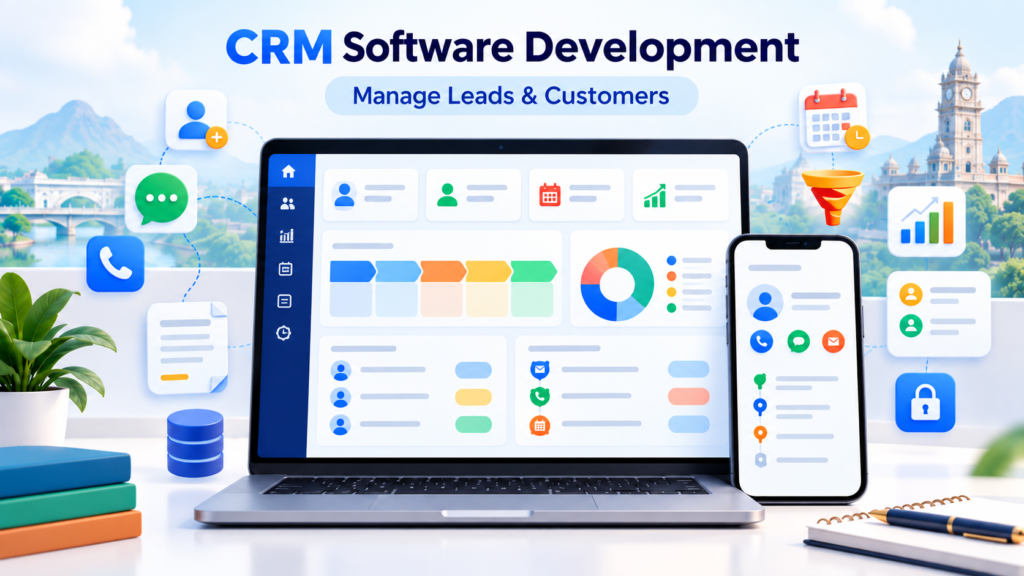
CRM software development for businesses in Erode is becoming increasingly important for companies that want to manage leads, customers, follow-ups, sales activities and business communication through one organized system.
Businesses today receive enquiries from many different channels, including phone calls, WhatsApp, website forms, Google Business Profile, Meta Ads, Google Ads, referrals, social media and walk-in customers. When these enquiries are managed through separate phones, notebooks, Excel sheets and WhatsApp chats, important leads can easily be missed.
A properly developed CRM system brings customer information, follow-up activities, sales stages, staff assignments and reporting into one centralized dashboard.
Instead of depending on memory or manually checking multiple spreadsheets, your sales team can understand exactly which customers need follow-up, which quotations are pending and which leads are close to conversion.
At Greap Technologies, we provide custom CRM software development for businesses in Erode. We build CRM systems based on your actual sales process, customer journey, team structure, enquiry sources and reporting requirements.
Why CRM Software Development for Businesses in Erode Is Important
Generating enquiries is only the beginning of the sales process.
The real challenge is managing every enquiry correctly until the customer either converts, requires future follow-up or is marked as a lost opportunity.
Many businesses lose potential customers because of:
- Missed phone enquiries
- Delayed follow-ups
- No centralized lead database
- Customer details stored on individual employee phones
- No reminder system
- No structured sales pipeline
- Unclear staff responsibility
- No enquiry-source tracking
- No quotation tracking
- No follow-up history
- Limited reporting
A custom CRM software system can solve many of these problems by providing a structured sales-management workflow.
With a CRM, businesses can:
- Store all leads in one system
- Assign leads to sales employees
- Track follow-up dates
- View complete customer history
- Manage sales pipeline stages
- Set reminders
- Track quotation status
- Record call and meeting notes
- Identify enquiry sources
- Monitor employee activity
- Generate sales reports
- Track conversions
- Reduce missed opportunities
For businesses handling regular enquiries, CRM software can become the central system for managing sales and customer relationships.
What Is CRM Software?
CRM stands for Customer Relationship Management.
CRM software is a system designed to help businesses organize customer information, leads, sales opportunities, follow-ups and communication.
A good CRM helps answer important business questions such as:
- How many enquiries came today?
- Where did those leads come from?
- Which salesperson is handling each enquiry?
- Which customers need follow-up today?
- Which leads are interested?
- Which quotations are pending?
- Which leads converted?
- Which leads were lost?
- Which marketing channel gives better-quality leads?
- How is each salesperson performing?
Instead of checking separate Excel files or asking individual employees for updates, business owners can view this information through a centralized CRM dashboard.
Who Needs CRM Software in Erode?
CRM software is useful for almost any organization that receives enquiries or follows a structured sales process.
1. Real Estate Businesses
Real estate companies can use CRM software to manage:
- Property enquiries
- Buyer information
- Property interest
- Site visit schedules
- Sales follow-ups
- Budget preferences
- Agent assignments
- Booking status
2. Schools, Colleges and Training Institutes
Educational institutions can use CRM software for admission management.
An education CRM can track:
- Student enquiries
- Parent details
- Course interest
- Counsellor assignment
- Follow-up status
- Campus visit
- Application status
- Admission conversion
3. Hospitals and Clinics
Healthcare businesses can use CRM functionality for:
- Appointment enquiries
- Service enquiries
- Patient follow-up
- Reminder management
- Communication history
- Customer support enquiries
4. Construction Companies
Builders and contractors can manage:
- Construction enquiries
- Project type
- Customer budget
- Site location
- Site visit
- Quotation status
- Follow-up schedule
- Project conversion
5. Retail Businesses
Retail companies can use CRM systems to manage customer information, repeat customers, product enquiries, offers, loyalty programs and WhatsApp leads.
6. Ecommerce Businesses
Ecommerce businesses may use CRM systems to organize:
- Product enquiries
- Customer support
- Abandoned-cart follow-up
- Repeat customers
- Order-related communication
- Customer segmentation
7. Manufacturing Companies
B2B manufacturers can use CRM software for:
- Dealer enquiries
- Distributor enquiries
- Bulk orders
- Product interest
- Quotation tracking
- Sales follow-up
- Customer history
8. Digital Marketing Agencies
Marketing agencies can manage:
- New enquiries
- Discovery calls
- Proposal status
- Follow-ups
- Service interest
- Client onboarding
- Renewal opportunities
9. Service-Based Businesses
Consultants, salons, repair businesses, travel agencies, financial service providers and other service companies can use CRM systems for enquiries, bookings and follow-ups.
10. Startups
Startups can use CRM systems to manage demo requests, early customers, onboarding, partnerships and sales opportunities.
Benefits of CRM Software Development for Businesses
1. Better Lead Management
Lead management is one of the most important functions of CRM software.
Each lead can include:
- Customer name
- Phone number
- Email address
- Location
- Company name
- Enquiry source
- Product or service interested in
- Lead stage
- Follow-up date
- Assigned salesperson
- Expected value
- Notes
This helps employees understand the complete context before contacting the customer.
2. Reduce Missed Follow-Ups
Many sales opportunities are lost simply because the customer was not contacted again at the right time.
CRM software can create reminders such as:
- Call customer today
- Follow up tomorrow
- Send quotation
- Follow up after quotation
- Schedule demo
- Schedule site visit
- Payment reminder
- Renewal reminder
3. Create a Clear Sales Pipeline
A sales pipeline allows teams to visually understand where every enquiry is in the buying process.
Example CRM pipeline:
- New Enquiry
- Contacted
- Qualified
- Interested
- Demo / Meeting Scheduled
- Quotation Sent
- Negotiation
- Won
- Lost
The exact stages can be customized according to your business workflow.
4. Improve Sales Team Management
When multiple sales employees handle enquiries, managers need clear visibility.
CRM software can show:
- Leads assigned to each employee
- Pending follow-ups
- Completed calls
- Quotations sent
- Converted leads
- Lost leads
- Response times
- Sales performance
This improves accountability and makes sales management easier.
5. Keep Customer History in One Place
A CRM should preserve customer interaction history.
History can include:
- Previous enquiries
- Phone-call notes
- WhatsApp follow-up notes
- Meetings
- Quotations
- Documents
- Purchases
- Service requests
- Previous follow-up dates
When another employee handles the customer later, they can understand previous interactions without asking the customer to repeat everything.
6. Improve Business Reporting
CRM software turns lead activity into useful business reports.
Reports can include:
- Daily leads
- Weekly leads
- Monthly enquiries
- Source-wise leads
- Salesperson-wise leads
- Conversions
- Conversion rate
- Pending follow-ups
- Lost leads
- Quotation value
- Sales value
7. Track Lead Sources
Businesses often invest money in multiple marketing channels.
A CRM can record sources such as:
- Website
- Google Business Profile
- Google organic search
- Google Ads
- Meta Ads
- Referral
- Phone call
- Walk-in
This can help management understand which channels are producing enquiries and conversions.
If your business also needs lead-generation campaigns, Greap Technologies provides digital marketing services that can be connected with a structured CRM workflow.
8. Improve Customer Experience
When employees have the right customer information, conversations can become faster and more relevant.
A CRM can improve customer experience through:
- Faster response
- Scheduled follow-ups
- Better customer history
- Clear ownership of enquiries
- Reduced repeated questioning
- More organized service support
Still Managing Leads Through Excel and WhatsApp?
Greap Technologies can help you build a CRM system that brings leads, customers, follow-ups, quotations and sales reports into one dashboard.
Important Features Needed in CRM Software
1. Lead Management Dashboard
The CRM dashboard should summarize important sales activity in a simple format.
Dashboard cards can include:
- Total leads
- New leads
- Today’s follow-ups
- Overdue follow-ups
- Converted leads
- Lost leads
- Total pipeline value
- Salesperson performance
- Lead-source summary
2. Customer Database
The customer database can store:
- Name
- Phone number
- Address
- Company name
- Customer type
- Services interested in
- Products interested in
- Notes
- Communication history
3. Follow-Up Reminder System
Follow-up reminders should allow sales employees to schedule their next action clearly.
Reminder types can include:
- Call
- WhatsApp follow-up
- Meeting
- Demo
- Quotation
- Payment
- Renewal
4. Sales Pipeline Management
The sales pipeline should be customizable based on your actual process instead of forcing your team to use irrelevant stages.
5. Team Assignment
New leads can be assigned manually or automatically to:
- Sales executives
- Counsellors
- Support teams
- Relationship managers
- Field employees
6. Activity Logs and Notes
Each lead can maintain an activity timeline showing:
- Lead creation
- Assigned staff
- Calls
- Meetings
- Notes
- Quotation updates
- Follow-up changes
- Status changes
7. Quotation Management
Businesses that send quotations can include quotation functionality inside the CRM.
Features can include:
- Create quotation
- Quotation number
- Customer details
- Products or services
- Quotation value
- Sent status
- Accepted status
- Rejected status
- Revision history
- Follow-up date
8. WhatsApp and Call Integration
Because many Erode businesses communicate heavily through calls and WhatsApp, CRM software can provide quick communication actions.
Possible functionality includes:
- Click-to-call
- Click-to-WhatsApp
- Saved message templates
- Communication notes
- Follow-up scheduling
More advanced workflows can also use supported APIs. Greap provides API integration services for businesses that need connected systems and automated data flows.
9. Reports and Analytics
Useful CRM reports can include:
- Lead report
- Source report
- Sales report
- Employee report
- Follow-up report
- Conversion report
- Lost-lead analysis
- Quotation report
- Monthly enquiry trend
10. Role-Based Access Control
Different users can receive different permissions.
Example roles include:
- Super Admin
- Administrator
- Manager
- Sales Executive
- Support Employee
- Accounts Team
- Field Staff
A salesperson may only see assigned leads while management can view overall reports and staff performance.
11. Mobile-Friendly CRM
A responsive CRM allows business owners and sales teams to access important information from mobile phones and tablets.
Mobile functionality can include:
- Add leads
- View today’s follow-ups
- Update lead status
- Read customer history
- Call customers
- Open WhatsApp
- Add notes
- View dashboards
12. Secure Login and Data Management
CRM systems contain valuable business and customer data, so security should be considered from the beginning.
Important controls can include:
- Secure authentication
- Password hashing
- Role permissions
- Input validation
- Session management
- Activity logs
- Backup strategy
- Administrative controls
Advanced CRM Features for Growing Businesses
1. Automatic Lead Capture
CRM systems can automatically receive leads from supported sources.
Possible sources include:
- Website enquiry forms
- Landing pages
- Meta lead forms
- External APIs
- Google Sheets
- Manual lead creation
This can reduce repetitive data entry and speed up lead assignment.
2. Automatic Lead Assignment
New leads can be distributed based on:
- Round-robin assignment
- Location
- Product category
- Service type
- Sales team
- Branch
3. CRM with WhatsApp Workflow
Businesses that rely heavily on WhatsApp can design CRM workflows around customer follow-ups.
Possible features can include:
- Message shortcuts
- Approved message templates
- Follow-up reminders
- Conversation notes
- Lead-stage updates
4. Email and SMS Notifications
Depending on integrations, automated alerts can be sent for:
- New lead assignment
- Appointment confirmation
- Quotation follow-up
- Payment reminder
- Meeting reminder
- Service updates
5. CRM with Billing
Some businesses need the sales process to continue after conversion.
CRM and billing integration can connect:
- Customer
- Quotation
- Invoice
- Payment status
- Service history
- Repeat purchase
6. CRM with Inventory and Orders
Ecommerce, retail and manufacturing businesses can connect CRM workflows with:
- Product information
- Stock availability
- Customer orders
- Delivery status
- Repeat orders
7. Customer Portal
Businesses with more advanced requirements can provide customers with login access.
A customer portal can display:
- Quotation
- Invoice
- Payment status
- Order status
- Service status
- Documents
- Support tickets
8. Workflow Automation
CRM automation can perform actions when specific conditions occur.
Examples:
- Automatically assign a new lead
- Create a follow-up task
- Notify a manager about an overdue lead
- Update pipeline stage
- Schedule a reminder
- Trigger supported notifications
CRM Software vs Excel Sheets
Many small businesses begin managing leads using Excel or Google Sheets. This can work when enquiry volume is low, but limitations become more noticeable as the business grows.
| Requirement | Excel / Sheets | Custom CRM |
|---|---|---|
| Lead Storage | Manual rows | Structured lead profiles |
| Follow-Up Reminders | Mostly manual | Built-in reminders |
| Team Assignment | Limited | Structured assignment |
| Sales Pipeline | Manual | Visual pipeline |
| Activity History | Difficult | Centralized timeline |
| Permissions | Basic | Role-based access |
| Reports | Manual formulas | Automated dashboards |
Excel is still useful for many tasks. The decision to move to CRM software usually becomes stronger when enquiry volume, staff count and reporting requirements increase.
Custom CRM vs Ready-Made CRM Software
Ready-Made CRM Can Be Suitable When:
- Your sales workflow is standard
- You need a fast setup
- Your team can adapt to existing features
- You do not require deep customization
- Available integrations already meet your needs
Custom CRM Can Be Better When:
- Your sales process is unique
- You need custom lead stages
- You need custom fields
- You need industry-specific workflows
- You want specialized dashboards
- You need custom reports
- You need CRM connected to other business software
- You need specific permissions
- You expect to add more modules later
Greap’s CRM and ERP development services are designed around customized workflows, automation, role-based access, reporting and integrations rather than forcing every business into the same operating model.
CRM Software Development Process at Greap Technologies
Step 1: Requirement Discovery
We begin by understanding your current sales process, enquiry channels, team structure, problems and expected outcome.
Step 2: Workflow Mapping
We define:
- Lead stages
- User roles
- Follow-up process
- Customer journey
- Quotation workflow
- Required reports
- Integrations
Step 3: Module Planning
The CRM is divided into clear modules such as leads, customers, tasks, quotations, users, reports and settings.
Step 4: UI/UX Design
Dashboards, forms, pipelines and tables are designed to make daily CRM usage simple for employees.
Step 5: Database and Backend Development
Customer records, activities, user permissions, reporting logic and CRM workflows are developed through the backend system.
Step 6: CRM Development
The approved modules and workflows are implemented based on project requirements.
Step 7: Integrations
Supported website forms, APIs, payment systems, communication tools or other applications can be connected where required.
Step 8: Testing
The CRM is tested for:
- User permissions
- Lead workflows
- Follow-up reminders
- Forms
- Reports
- Mobile responsiveness
- Integrations
- Security-related controls
Step 9: Deployment and User Setup
The CRM is deployed and user accounts, permissions and required system settings are configured.
Step 10: Training and Support
Relevant employees can be trained to use the system, and future improvements can be planned as business requirements change.
CRM Integration with Website and Digital Marketing
One of the biggest advantages of CRM is connecting marketing enquiries with the sales team.
A typical workflow can look like:
Google / Meta Ads → Landing Page → Enquiry Form → CRM → Salesperson Assignment → Follow-Up → Quotation → Conversion
Website forms can also send information directly into the CRM instead of requiring staff to copy leads manually.
Businesses that need a broader customized platform can also explore Greap’s custom software development services.
SEO for CRM Software Development in Erode
This blog should target CRM-specific searches rather than trying to rank broadly for every software-development keyword.
Primary SEO Keyword
CRM software development Erode
Secondary Keywords
- CRM software development for businesses in Erode
- CRM software in Erode
- Custom CRM development in Erode
- Lead management software in Erode
- Sales CRM software in Erode
- CRM development company in Erode
- Customer management software in Erode
- Lead tracking software in Erode
- Business CRM software in Erode
Create Supporting CRM Content
To build stronger topical authority, related blog topics can include:
- CRM Software vs Excel for Small Businesses
- Best CRM Features for Real Estate Businesses
- CRM Software for Schools and Admission Teams
- How to Track Meta Ads Leads in CRM
- How CRM Helps Manufacturing Sales Teams
- WhatsApp CRM for Local Businesses
- CRM vs ERP: What Is the Difference?
Common Problems Businesses Face Without CRM Software
1. Missed Leads
Enquiries coming through different channels can disappear if there is no central lead database.
2. Forgotten Follow-Ups
Employees may rely on memory, notebooks or WhatsApp reminders.
3. Customer Data Stored on Employee Phones
This creates operational dependency and makes it harder for management to maintain customer history.
4. No Sales Visibility
Owners may know the number of leads but not how many are qualified, quoted, pending or close to conversion.
5. No Source Tracking
Without proper source information, it can become difficult to compare marketing channels.
6. No Team Accountability
Managers may struggle to identify who owns each lead and whether follow-up happened.
7. Difficult Reporting
Monthly sales reviews can require manually combining spreadsheets and employee updates.
How Greap Technologies Helps Businesses in Erode
Greap Technologies provides CRM software development for companies that need a more structured way to manage customer relationships and sales.
Our CRM software development services can include:
- Requirement analysis
- CRM workflow planning
- Lead management
- Customer database
- Follow-up reminders
- Sales pipeline
- Quotation tracking
- Staff assignment
- Activity history
- Lead-source tracking
- Reports and analytics
- Role-based permissions
- Admin dashboard
- Mobile-responsive CRM
- Website-form integration
- API integration
- Workflow automation
- Testing
- Deployment
- Maintenance and future enhancements
Want to Stop Missing Business Leads?
Build a custom CRM where your team can manage leads, follow-ups, quotations, sales stages and customer history from one dashboard.
Areas We Serve in Erode District
Greap Technologies provides CRM development, ERP development, custom software, website development, ecommerce development, mobile app development and digital marketing services for businesses in Erode and surrounding areas.
- Erode
- Perundurai
- Bhavani
- Anthiyur
- Gobichettipalayam
- Sathyamangalam
- Modakkurichi
- Kodumudi
- Nambiyur
- Thalavadi
- Chennimalai
- Nearby areas
Why Choose Greap Technologies for CRM Development?
Business-Focused CRM Planning
We begin by understanding your actual lead-management and sales workflow instead of starting with a generic CRM template.
Custom Lead Stages
Your lead stages can match your real sales process.
Custom Fields and Modules
Different industries need different customer information, reports and workflows. These can be planned according to your business.
Simple User Experience
CRM dashboards should be easy enough for sales employees to use consistently every day.
Role-Based Access
Permissions can be controlled according to staff responsibilities.
Reporting and Analytics
Management dashboards can provide clear visibility into leads, follow-ups, sources and sales performance.
Integration Support
CRM systems can be connected with supported third-party systems through Greap’s API integration solutions.
Expandable CRM and ERP Architecture
If your needs grow beyond CRM, additional ERP modules such as inventory, operations or HR can be planned through our CRM and ERP development services.
CRM Software Development for Businesses in Erode – Conclusion
CRM software can help businesses manage enquiries, customers, sales follow-ups and team activities in a far more structured way than scattered notebooks, spreadsheets and individual WhatsApp chats.
For real estate companies, educational institutions, healthcare businesses, construction companies, manufacturers, ecommerce brands, agencies and other service businesses, CRM software can improve visibility across the entire sales process.
The biggest advantage is not simply storing customer details. A good CRM tells your team who needs attention, what needs to happen next and where every sales opportunity currently stands.
Greap Technologies provides CRM software development for businesses in Erode, including lead management, customer databases, follow-up reminders, sales pipelines, quotation tracking, role-based access, reports and custom workflow automation.
If your business receives regular enquiries and your team is still managing sales through Excel, notebooks and individual WhatsApp messages, now may be the right time to move toward a structured CRM system.
Need Custom CRM Software in Erode?
Greap Technologies can build a CRM based on your actual lead flow, sales team, follow-up process and reporting requirements.
Contact Greap Technologies today to discuss your CRM software requirement.
Frequently Asked Questions About CRM Software Development
1. What is CRM software?
CRM software is a Customer Relationship Management system that helps businesses organize leads, customer information, follow-ups, sales activities and communication through one centralized platform.
2. Why does a business in Erode need CRM software?
A business may need CRM software when enquiries are regularly missed, follow-ups are delayed, customer information is scattered or management needs clearer visibility into the sales process.
3. What features should CRM software include?
Common CRM features include lead management, customer database, follow-up reminders, sales pipeline, staff assignment, notes, quotation tracking, source tracking, reports, role-based access and management dashboards.
4. Can CRM software replace Excel sheets?
CRM software can replace Excel for structured lead and sales management when a business has regular enquiries, multiple users, follow-up requirements and reporting needs. Excel can still remain useful for other business tasks.
5. Can CRM software include WhatsApp follow-up?
Yes. CRM software can provide WhatsApp shortcuts, follow-up workflows, communication notes and supported WhatsApp integrations depending on project requirements and the APIs being used.
6. Can CRM software be customized for my business?
Yes. Custom CRM software can be designed around your lead stages, customer information, user roles, sales process, reports and integration requirements.
7. Can leads from website forms automatically enter the CRM?
Yes. Website and landing-page forms can be connected so supported enquiry data is automatically created as a CRM lead.
8. Can CRM software track Meta Ads and Google Ads leads?
CRM software can record and report lead sources when the required marketing forms, tracking parameters or integrations are properly configured.
9. Can CRM include billing and inventory later?
Yes. A scalable CRM can be extended with modules such as quotations, billing, payments, inventory, customer portals and ERP functionality depending on the system architecture.
10. Can Greap Technologies build CRM software in Erode?
Yes. Greap Technologies provides custom CRM and ERP software development for businesses in Erode and nearby areas.