Recruitment Agency Website Development in Erode: Job Portal and Candidate Management Features
Recruitment agencies need a professional digital platform to connect job seekers with employers and manage hiring enquiries efficiently. For placement consultancies, staffing agencies, HR recruitment firms and manpower service providers in Erode, a website can support job discovery, resume collection and recruitment operations.
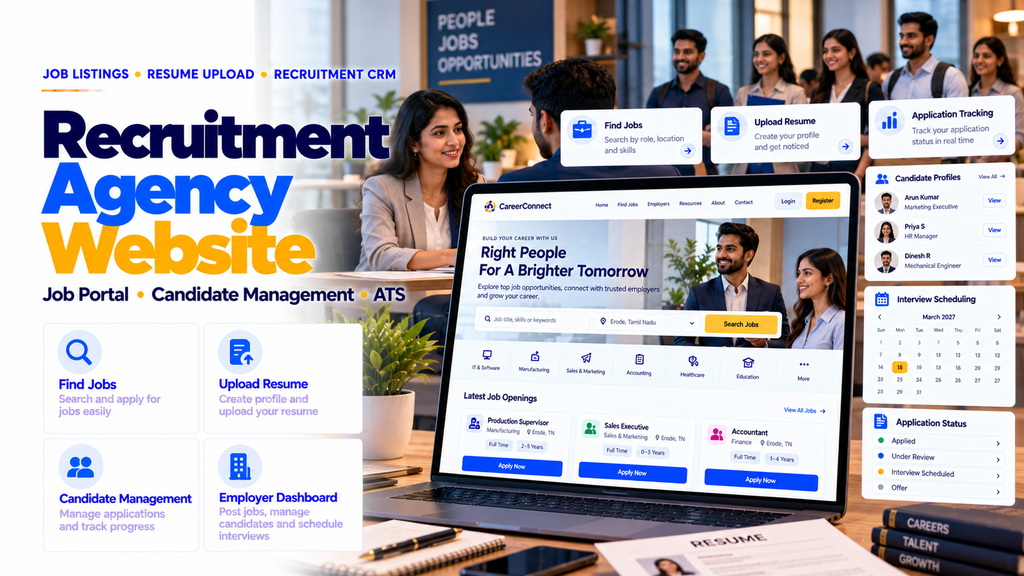
Effective recruitment agency website development in Erode combines job listings, candidate registration, resume uploads, employer enquiries, applicant tracking, recruitment dashboards, mobile-responsive design and search engine optimization.
Whether your agency recruits for textile companies, manufacturing businesses, IT organizations, educational institutions or other industries, a well-structured website can help organize vacancies, applications and employer requirements.
A recruitment agency website should include company information, recruitment service pages, searchable job listings, candidate registration, resume uploads, job application forms, employer enquiry options, contact details, mobile-responsive design and SEO. Advanced platforms may include an applicant tracking system (ATS), candidate database, recruiter dashboard, employer portal, interview scheduling, recruitment CRM and automated notifications.
This guide explains the essential website features, job portal modules, candidate management workflows, recruitment SEO strategies, development cost considerations and software options for recruitment agencies in Erode and Tamil Nadu.
1. What Is a Recruitment Agency Website?
A recruitment agency website is an online platform that presents recruitment services, job opportunities, employer hiring solutions and candidate application options.
It can help job seekers discover relevant vacancies and allow employers to submit staffing requirements.
Depending on the business model, the website may function as a basic company website, a job portal or an integrated recruitment management platform.
2. Why Recruitment Agencies in Erode Need a Website
Recruitment agencies often manage enquiries from both job seekers and employers.
A professional website can help:
- Showcase recruitment services
- Publish current job vacancies
- Collect candidate applications
- Receive employer hiring enquiries
- Organize resume submissions
- Explain recruitment processes
- Provide accurate contact information
A website can support recruitment operations and online discovery, but it cannot guarantee job placements or employer contracts.
3. Types of Recruitment Businesses That Need Websites
- Placement consultancies
- Staffing agencies
- Manpower recruitment companies
- HR consultancies
- IT recruitment agencies
- Manufacturing recruitment agencies
- Textile industry recruitment firms
- Executive search consultancies
- Temporary staffing providers
- Campus recruitment agencies
Each business type may need different job categories, candidate workflows and employer management features.
4. Recruitment Agency Website vs Job Portal
| Feature | Recruitment Agency Website | Advanced Job Portal |
|---|---|---|
| Primary purpose | Promote agency services | Manage job discovery and applications |
| Job listings | Optional or basic | Searchable and filterable |
| Candidate registration | Optional | Candidate account system |
| Resume management | Basic upload | Searchable candidate database |
| Employer access | Enquiry form | Employer dashboard |
| ATS | Optional integration | Integrated or connected system |
5. Design a Professional Recruitment Website Homepage
The homepage should communicate the agency’s recruitment focus and provide clear paths for candidates and employers.
Recommended sections include:
- Company introduction
- Find Jobs button
- Submit Resume button
- Hire Candidates button
- Recruitment service categories
- Featured job vacancies
- Industries served
- Recruitment process overview
- Contact information
6. Create Separate Candidate and Employer Journeys
Recruitment websites serve two different audiences.
Candidates need job search, resume upload and application options.
Employers need recruitment service information, hiring enquiry forms and suitable candidate sourcing options.
Separate navigation paths can improve clarity and usability.
7. Add a Searchable Job Listings Page
A job listings page helps candidates explore current vacancies.
Useful information includes:
- Job title
- Hiring company name when authorized
- Job location
- Employment type
- Experience requirements
- Salary information when available
- Application deadline
- Apply Now button
Keep vacancy information accurate and remove expired listings.
8. Add Advanced Job Search Filters
Search filters help candidates find relevant opportunities.
Possible filters include:
- Keyword
- Location
- Industry
- Job category
- Experience level
- Employment type
- Salary range
- Work arrangement
Only show filters supported by accurate vacancy data.
9. Create Individual Job Detail Pages
Each vacancy should have a dedicated page containing useful information.
Recommended fields include:
- Job title
- Job description
- Responsibilities
- Required qualifications
- Experience requirements
- Skills
- Work location
- Employment type
- Application instructions
Provide clear and truthful job descriptions without misleading employment claims.
10. Add Candidate Registration
Candidate registration allows job seekers to create accounts when ongoing access is useful.
Possible fields include:
- Full name
- Email address
- Phone number
- Preferred job category
- Location preference
- Experience level
- Resume
Collect only information necessary for the recruitment process.
11. Add Resume Upload Functionality
Resume upload is a core feature for many recruitment websites.
Recommended capabilities include:
- PDF and supported document uploads
- File size limits
- File type validation
- Secure storage
- Candidate association
- Authorized recruiter access
Uploaded resumes should not be publicly accessible.
12. Build Candidate Profile Management
Candidate profiles can help organize recruitment information.
Possible fields include:
- Candidate name
- Contact details
- Education
- Skills
- Work experience
- Preferred location
- Employment preferences
- Resume
- Application history
Use appropriate privacy notices, access controls and retention policies.
13. Add Online Job Application Forms
Each job page can include an application option.
A typical application form may collect:
- Candidate identification
- Contact details
- Resume
- Relevant experience
- Required screening answers
Avoid unnecessary sensitive questions and explain how application data will be used.
14. Add Application Status Tracking
Candidate accounts may show application progress.
Example statuses include:
- Application submitted
- Under review
- Shortlisted
- Interview scheduled
- Selected
- Not selected
- Position closed
Only show accurate statuses and avoid suggesting a candidate has been selected before employer confirmation.
15. Add Candidate Dashboard Features
An advanced candidate dashboard may include:
- Profile management
- Resume updates
- Saved jobs
- Submitted applications
- Application status
- Interview schedules
- Notification preferences
16. Add Saved Jobs and Job Alerts
Registered candidates may save vacancies and receive relevant notifications.
Possible features include:
- Save job
- Manage saved jobs
- Keyword-based alerts
- Location-based alerts
- Email notification preferences
Provide clear opt-in and unsubscribe options where applicable.
17. Add Employer Hiring Enquiry Forms
Employers should have a clear method to submit recruitment requirements.
Recommended fields include:
- Company name
- Contact person
- Business email
- Phone number
- Job role
- Number of vacancies
- Work location
- Experience requirements
- Expected hiring timeline
18. Add Employer Registration
Advanced recruitment portals may allow employers to create accounts.
Possible features include:
- Company profile
- Authorized user accounts
- Employer verification
- Job posting permissions
- Hiring enquiry history
Employer verification can help reduce misleading or fraudulent vacancy postings.
19. Add an Employer Dashboard
Employer dashboards can support recruitment collaboration.
Possible features include:
- Manage job requirements
- View authorized applications
- Review shortlisted candidates
- Provide interview feedback
- Track hiring progress
Candidate information should be shared only when authorized and appropriate.
20. Add a Recruitment Admin Dashboard
An admin panel can help agency staff manage the recruitment platform.
Possible modules include:
- Job management
- Candidate management
- Employer management
- Application management
- Recruiter assignment
- Interview management
- Content management
- Reports
21. Build an Applicant Tracking System (ATS)
An ATS helps recruitment teams organize job applications throughout the hiring process.
Possible features include:
- Application records
- Recruiter assignment
- Pipeline stages
- Screening notes
- Interview scheduling
- Candidate communication history
- Hiring status
An ATS may be built into the platform or integrated with a suitable third-party system.
22. Create Recruitment Pipeline Management
A recruitment pipeline can help recruiters track progress for each vacancy.
Example stages include:
- New application
- Resume screening
- Initial contact
- Shortlisted
- Interview
- Employer feedback
- Offer stage
- Hired or closed
Pipeline stages should reflect the agency’s actual recruitment process.
23. Add Candidate Search and Filtering
Recruiters may need to search authorized candidate records.
Possible filters include:
- Skills
- Experience
- Preferred location
- Industry
- Qualification
- Availability
- Application status
Search access should be restricted to authorized staff.
24. Add Resume Parsing Integration
Advanced platforms may use resume parsing tools to extract structured information from uploaded documents.
Possible extracted fields include:
- Name
- Contact details
- Education
- Skills
- Work experience
Parsing accuracy varies. Allow human review and candidate correction, and assess privacy implications before using external services.
25. Add Candidate Shortlisting Tools
Recruiters may need to create candidate shortlists for specific vacancies.
Possible features include:
- Manual shortlist
- Candidate notes
- Recruiter assignment
- Employer review
- Shortlist history
Shortlisting criteria should be job-related, consistent and reviewed for unfair bias.
26. Add Interview Scheduling
Interview scheduling tools can help coordinate candidates and employers.
Possible features include:
- Interview date
- Interview time
- Meeting location
- Online meeting link
- Assigned interviewer
- Reminder notifications
- Rescheduling
27. Add Email and SMS Notifications
Notifications can support candidate communication.
Examples include:
- Application confirmation
- Interview invitation
- Interview reminder
- Application status update
- Job alert
Use appropriate consent, communication preferences and compliant messaging providers.
28. Add WhatsApp Recruitment Enquiries
WhatsApp contact links can help job seekers and employers contact the agency.
Useful placements include:
- Homepage
- Recruitment service pages
- Employer enquiry page
- Contact page
A WhatsApp click does not necessarily represent a completed application or confirmed placement.
29. Add Recruitment CRM Features
A recruitment CRM helps manage employer relationships and recruitment opportunities.
Possible features include:
- Employer contact records
- Hiring requirements
- Follow-up reminders
- Client communication history
- Recruitment agreements
- Placement status
30. Add Recruiter Role Management
Recruitment teams may require multiple user roles.
Possible roles include:
- Super administrator
- Recruitment manager
- Recruiter
- Employer user
- Candidate
Apply role-based permissions to protect candidate information and business records.
31. Add Recruitment Reports
Recruitment dashboards can help teams understand operational activity.
Possible reports include:
- Open vacancies
- Applications received
- Applications by job
- Shortlisted candidates
- Interview schedules
- Placements recorded
- Recruiter workload
Reports should use accurate system data and clearly defined metrics.
32. Recruitment Agency SEO in Erode
Search engine optimization can help relevant recruitment website pages become discoverable.
Important activities include:
- Keyword research
- Recruitment service page optimization
- Job page optimization
- Internal linking
- Local SEO
- Technical SEO
- Search Console monitoring
SEO does not guarantee specific rankings, applications or placements.
33. Recruitment Website SEO Keyword Examples
Potential keyword patterns include:
- Recruitment agency website development Erode
- Placement consultancy website design
- Job portal development Erode
- Staffing agency website development
- Candidate management software Erode
- Recruitment ATS development
- Employer dashboard development
These are illustrative keywords. Validate search demand and commercial relevance before prioritizing them.
34. Local SEO for Recruitment Agencies
Eligible recruitment agencies can maintain accurate Google Business Profiles.
Important details include:
- Real business name
- Correct office address or eligible service-area information
- Relevant business category
- Contact number
- Business hours
- Genuine office photographs
Follow Google’s eligibility rules and avoid fake location listings.
35. Target Relevant Areas Around Erode
Recruitment agencies based in Erode may serve nearby areas depending on their actual coverage.
Examples include:
- Erode
- Perundurai
- Bhavani
- Anthiyur
- Gobichettipalayam
- Sathyamangalam
- Chennimalai
- Kavindapadi
- Modakkurichi
- Ammapettai
Describe genuine service coverage without claiming nonexistent branches.
36. Create Useful Recruitment Location Pages
Location pages can explain recruitment services available in specific areas.
Useful information may include:
- Industries served
- Relevant recruitment services
- Current vacancies
- Employer enquiry options
- Candidate registration
- Accurate contact details
Avoid near-identical pages created only to target different town names.
37. Use JobPosting Structured Data Correctly
Individual public job detail pages may qualify for JobPosting structured data when they meet Google’s requirements.
Structured data should accurately reflect visible job information, including relevant hiring details.
Remove or update expired vacancies promptly and follow Google’s current job posting policies.
Structured data does not guarantee job search visibility or rich results.
38. Optimize Recruitment Service Page Titles
Service page titles should accurately describe the services offered.
Examples include:
- Manufacturing Recruitment Services in Erode
- Textile Industry Recruitment Services
- IT Staffing and Recruitment Services
- Employer Hiring Solutions
Only publish pages for services the agency actually provides.
39. Create Industry-Specific Recruitment Pages
Recruitment agencies may specialize in particular industries.
Possible pages include:
- Textile recruitment
- Manufacturing recruitment
- Engineering recruitment
- IT recruitment
- Healthcare recruitment
- Retail recruitment
- Logistics recruitment
Explain actual recruitment expertise and available services.
40. Add Recruitment Blog Content
Educational content can help candidates and employers understand recruitment processes.
Possible topics include:
- How to prepare a professional resume
- How to apply for jobs online
- Interview preparation tips
- How employers can prepare job descriptions
- What to expect from a recruitment agency
- How recruitment shortlisting works
Avoid misleading job guarantees or unsupported employment claims.
41. Mobile-Responsive Recruitment Website
Job seekers may browse vacancies and submit applications using smartphones.
Important mobile features include:
- Responsive job listings
- Easy search filters
- Readable job descriptions
- Mobile-friendly application forms
- Resume upload support
- Accessible navigation
42. Recruitment Website Speed Optimization
Fast-loading pages can improve usability for candidates and employers.
Useful techniques include:
- Optimized images
- Efficient database queries
- Pagination for large job lists
- Appropriate caching
- Optimized scripts
- Core Web Vitals monitoring
43. Add Recruitment Website CMS Features
A content management system allows authorized staff to update website content.
Useful functions include:
- Manage recruitment services
- Publish blog articles
- Update company information
- Manage testimonials
- Update FAQs
- Manage SEO metadata
44. Track Recruitment Website Leads With GA4
Google Analytics 4 can help measure configured website interactions.
Useful events include:
- Successful employer enquiry submission
- Successful candidate registration
- Completed job application
- Phone link click
- WhatsApp link click
Track meaningful completed actions rather than assuming every button click represents a successful application.
45. Google Tag Manager for Recruitment Tracking
Google Tag Manager can help configure analytics events.
For example, a successfully submitted employer enquiry may trigger a GA4 generate_lead event.
Do not send candidate names, email addresses, phone numbers, resumes or other personally identifiable information to GA4.
46. Google Search Console for Recruitment SEO
Google Search Console helps website owners monitor search performance and indexing.
Useful reports include:
- Search queries
- Organic clicks
- Search impressions
- Service page performance
- Job page indexing
- Technical issues
47. Recruitment Website Security
Recruitment platforms may store resumes, contact information and employment history.
Important security measures include:
- HTTPS
- Secure authentication
- Role-based access
- Secure resume storage
- Upload validation
- Regular software updates
- Secure backups
- Activity logging where appropriate
48. Candidate Data Privacy and Consent
Recruitment websites should clearly explain how candidate data is collected, used, shared and retained.
Important considerations include:
- Clear privacy notice
- Appropriate consent or other lawful basis
- Restricted resume access
- Candidate data correction options
- Retention and deletion procedures
- Secure employer data sharing
Review applicable Indian data protection requirements with qualified legal advisers when implementing candidate data processing.
49. Avoid Unfair Automated Hiring Decisions
Automated screening tools may help organize applications, but they should not be treated as infallible hiring decision-makers.
Use job-relevant criteria, test for errors and unfair bias, and retain appropriate human oversight.
Candidates should not be misled about how automated screening is used.
50. Recommended Recruitment Agency Website Pages
- Home
- About Us
- Recruitment Services
- Industries Served
- Find Jobs
- Job Detail Pages
- Candidate Registration
- Submit Resume
- For Employers
- Hire Candidates
- Recruitment Process
- Testimonials
- Blog
- FAQs
- Contact
- Privacy Policy
Advanced platforms may also include authenticated candidate, employer and recruiter dashboards.
51. Recruitment Agency Website Development Cost in Erode
Development costs depend on job portal functionality, candidate database requirements, ATS features and integrations.
The following are illustrative budgeting estimates, not verified market averages or an official Greap Technologies quotation.
| Website Package | Indicative Cost | Typical Features |
|---|---|---|
| Basic recruitment website | ₹12,000–₹25,000 | Company pages, services, vacancies and enquiry forms |
| Professional recruitment website | ₹25,000–₹60,000 | Job listings, candidate registration, resume uploads and CMS |
| Advanced recruitment portal | ₹60,000–₹1,50,000 | Candidate dashboard, employer portal, ATS and notifications |
| Custom recruitment management platform | ₹1,50,000–₹5,00,000+ | Recruitment CRM, advanced ATS, resume parsing and custom workflows |
Domain, hosting, storage, messaging services, third-party integrations, maintenance and applicable taxes may be additional.
52. Factors Affecting Recruitment Website Cost
- Number of website pages
- Job listing volume
- Candidate registration
- Resume storage
- Employer dashboard
- ATS requirements
- Recruitment CRM
- Interview scheduling
- Resume parsing
- Email and SMS integrations
- Reporting requirements
- Security and compliance scope
53. WordPress vs Custom Recruitment Portal
| Factor | WordPress | Custom Development |
|---|---|---|
| Best for | Agency websites and smaller job boards | Advanced recruitment operations |
| Job listings | Plugins or custom content types | Custom job management |
| Candidate accounts | Plugins and integrations | Custom candidate portal |
| ATS | Integration or plugin | Integrated or connected ATS |
| Recruitment CRM | Third-party integration | Custom workflow or integration |
| Maintenance | Core, theme and plugin updates | Application and dependency updates |
Choose technology based on recruitment volume, operational complexity, budget and long-term maintenance needs.
54. Recruitment Website Development Process
- Gather agency requirements.
- Identify candidate and employer journeys.
- Plan job categories and data fields.
- Design responsive website layouts.
- Develop job listing pages.
- Build candidate registration.
- Implement secure resume uploads.
- Create employer enquiry forms.
- Build admin and recruiter dashboards.
- Configure ATS workflows where required.
- Implement access controls.
- Configure technical SEO.
- Set up analytics.
- Test applications and notifications.
- Launch and train authorized users.
55. Common Recruitment Website Mistakes
- Publishing outdated vacancies
- Using incomplete job descriptions
- Making application forms unnecessarily long
- Failing to protect resumes
- Not separating employer and candidate journeys
- Ignoring mobile usability
- Using misleading job claims
- Failing to manage application statuses
- Not tracking completed applications
- Ignoring technical SEO
- Failing to plan data retention
56. How to Choose a Recruitment Website Developer
Before selecting a development company, ask:
- Can the website support searchable job listings?
- Can candidates upload resumes securely?
- Can employers submit hiring requirements?
- Can recruiters manage applications?
- Is an ATS available or integrable?
- Will the website work on mobile?
- Can job pages support appropriate structured data?
- How will candidate information be protected?
- What are the hosting requirements?
- What are the recurring maintenance costs?
57. Recruitment Website Development Services in Erode
Recruitment agencies in Erode may require different website solutions depending on their services and hiring workflows.
Possible solutions include:
- Placement consultancy websites
- Staffing agency websites
- Job portal development
- Candidate registration systems
- Resume management systems
- Employer dashboards
- Applicant tracking systems
- Recruitment CRM
- Interview scheduling systems
- Local SEO
- Website maintenance
58. How Greap Technologies Can Help
Greap Technologies provides website development, custom software, SEO and digital growth solutions.
Recruitment agencies can discuss requirements for responsive recruitment websites, job portals, candidate databases, resume management, employer dashboards, applicant tracking systems and recruitment CRM integrations.
Website features and development costs depend on the agreed project scope.
Visit Greap Technologies to learn more about website development services.
Conclusion
Recruitment agency website development in Erode should focus on helping candidates discover legitimate opportunities, enabling employers to submit hiring requirements and supporting efficient recruitment workflows.
A professional recruitment website combines job listings, resume uploads, candidate management, employer enquiries, mobile responsiveness, technical SEO and appropriate security controls.
For placement consultancies, staffing agencies and HR recruitment companies, the right platform should match actual recruitment operations rather than adding unnecessary complexity.
Professional Recruitment Website + Job Portal + Candidate Database + ATS + Employer Dashboard + SEO = A stronger foundation for recruitment operations and enquiries.
Need a Recruitment Agency Website in Erode?
Planning a recruitment consultancy website, staffing agency portal or custom job application management system?
Discuss job listings, candidate registration, resume management, ATS workflows, SEO and recruitment dashboards with Greap Technologies.
Get Recruitment Website QuoteWebsite: www.greap.in
Phone: +91 70923 30168
Frequently Asked Questions About Recruitment Agency Websites
1. What features should a recruitment agency website have?
Important features include job listings, candidate registration, resume uploads, employer enquiries, application management, mobile-responsive design and SEO.
2. What is the difference between a recruitment website and a job portal?
A recruitment website promotes agency services and may include vacancies, while an advanced job portal provides searchable listings, candidate accounts, applications and employer tools.
3. Can candidates upload resumes online?
Yes. Recruitment websites can support secure resume uploads and authorized recruiter access.
4. Can employers post jobs on a recruitment website?
Yes. An employer portal can allow verified employers to submit job requirements or manage authorized job postings.
5. How much does recruitment agency website development cost in Erode?
Illustrative estimates range from ₹12,000–₹25,000 for basic websites to ₹1,50,000–₹5,00,000 or more for advanced custom recruitment platforms. Actual pricing depends on scope.
6. What is an applicant tracking system?
An ATS helps recruiters organize job applications, shortlists, interview schedules and recruitment pipeline stages.
7. Can recruitment websites send interview notifications?
Yes. Email, SMS or suitable messaging integrations can support interview invitations and reminders.
8. Can recruiters search candidate resumes?
Yes. Authorized recruiters can use candidate search and filtering tools when these features are included in the platform.
9. Is SEO important for recruitment agencies?
SEO can help relevant service and job pages become discoverable through search engines. Rankings are not guaranteed.
10. Which is better: WordPress or custom recruitment software?
WordPress can suit agency websites and smaller job boards, while custom development may be more appropriate for advanced ATS, CRM and employer workflows.
11. How should candidate data be protected?
Use secure authentication, role-based permissions, protected resume storage, privacy notices and appropriate retention and deletion procedures.
12. Can Greap Technologies develop recruitment websites?
Recruitment businesses can contact Greap Technologies to discuss job portals, candidate management systems, employer dashboards, ATS integrations, custom software and SEO requirements.