
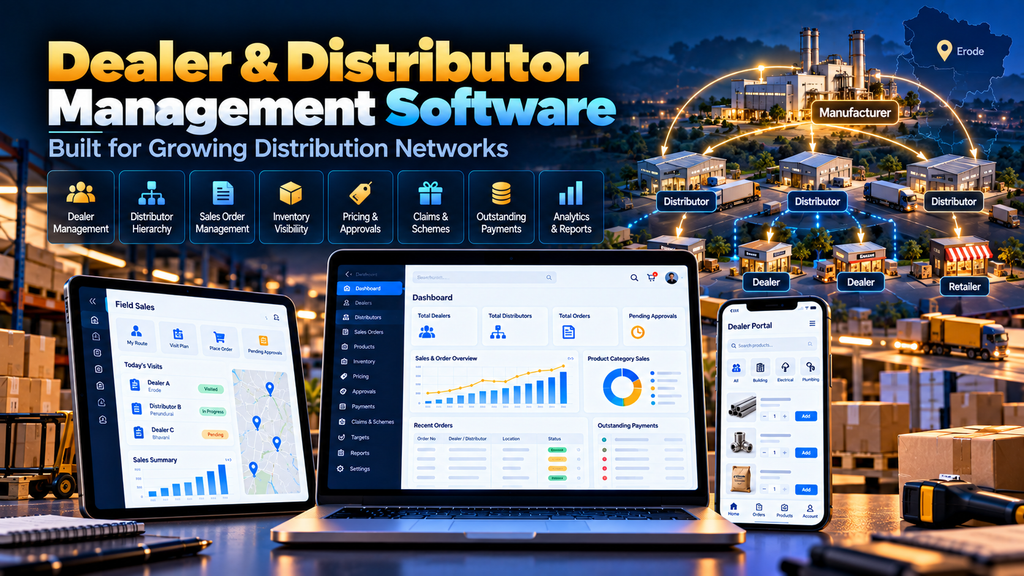
Dealer and Distributor Management Software Development in Erode can help manufacturers, wholesalers, brands and distribution businesses manage dealer networks, orders, pricing, territories, inventory information, payments, targets and reporting through a centralized digital system.
As a distribution network grows, managing every dealer through phone calls, WhatsApp messages, spreadsheets, emails and separate accounting reports can become difficult.
A sales representative may have one spreadsheet.
The accounts team may maintain another report.
Dealers may send orders through WhatsApp.
Distributors may call to check product availability.
Management may need to combine information from several sources just to understand current sales activity.
A properly planned dealer and distributor management system can bring relevant workflows into one connected platform.
At Greap Technologies, we develop custom websites, business software, ecommerce systems and digital solutions for companies in Erode and nearby areas.
What Is Dealer and Distributor Management Software?
Dealer and Distributor Management Software is a business system designed to help companies manage relationships and transactions across their distribution network.
Depending on the business model, the software can support:
- Dealer onboarding
- Distributor onboarding
- Customer accounts
- Product catalogues
- Dealer-specific pricing
- Order placement
- Order approvals
- Order tracking
- Inventory visibility
- Outstanding payment information
- Credit information
- Sales targets
- Territory management
- Scheme management
- Claims
- Returns
- Reports
- Notifications
- ERP or accounting integrations
The exact modules should reflect the company’s existing distribution workflow.
Who Can Use Distributor Management Software?
A DMS can be useful for businesses operating through multi-level sales and distribution networks.
Examples can include:
- Manufacturers
- Wholesalers
- Distributors
- Brands
- Industrial suppliers
- Building material suppliers
- Textile businesses
- FMCG distribution businesses
- Electrical suppliers
- Hardware suppliers
- Automotive component businesses
- Equipment suppliers
However, software should be selected or developed according to the company’s actual processes rather than simply because it operates through dealers.
Why Do Growing Dealer Networks Become Difficult to Manage?
A small dealer network may initially be manageable using calls, spreadsheets and messaging applications.
As the network expands, problems can appear.
For example:
- Orders arrive through different channels
- Pricing information becomes inconsistent
- Dealers repeatedly ask about stock
- Order status is difficult to communicate
- Sales targets are maintained manually
- Outstanding payments are difficult to track across teams
- Territory information becomes unclear
- Management reports take time to prepare
The purpose of a DMS is not simply to replace spreadsheets with another screen.
It should improve the underlying workflow.
1. Map the Existing Distribution Process First
Custom software development should begin by understanding the current business process.
Document how:
- Dealers are appointed
- Distributors are appointed
- Products are assigned
- Prices are determined
- Orders are received
- Orders are approved
- Stock is allocated
- Invoices are generated
- Payments are recorded
- Claims are handled
- Returns are handled
- Sales targets are monitored
The software architecture can then be designed around those workflows.
2. Dealer Registration and Onboarding
A digital onboarding process can help organize new dealer applications.
Depending on business requirements, registration can capture relevant information such as:
- Business name
- Contact person
- Phone number
- Business location
- Billing details
- Shipping details
- Dealer type
- Assigned territory
- Required documents
Applications can then move through an internal approval workflow.
3. Distributor Registration
Distributor onboarding may require different information and permissions from ordinary dealer registration.
The software can maintain separate account types for:
- Distributors
- Dealers
- Retail partners
- Sales representatives
- Managers
- Administrators
Each role should see only the information and actions relevant to it.
4. Dealer Approval Workflow
Not every registration needs to become an active dealer account immediately.
A workflow can follow:
Application → Verification → Internal Review → Approval → Account Activation
This can help businesses maintain control over who receives dealer access and commercial information.
5. Dealer Master Management
A centralized dealer master can maintain important account information.
This may include:
- Dealer ID
- Company details
- Contact information
- Territory
- Assigned distributor
- Pricing group
- Credit information
- Account status
- Sales representative
Centralizing this information can reduce dependence on separate spreadsheets maintained by different departments.
6. Distributor Hierarchy Management
Some businesses use a multi-level distribution structure.
For example:
Manufacturer → Distributor → Dealer → Retailer
The software can represent these relationships so relevant orders, territories and reports follow the company’s actual structure.
7. Territory Management
Businesses can organize dealer and distributor networks by territories.
Territories might be based on:
- State
- District
- City
- Sales zone
- Custom business region
Territory information can also be linked to responsible sales employees where required.
8. Product Catalogue Management
Dealers should be able to find products without depending on outdated PDF catalogues.
A digital product catalogue can contain:
- Product name
- SKU
- Product code
- Category
- Images
- Specifications
- Variants
- Pack sizes
- MOQ
- Relevant documents
Product information should come from a defined source so multiple departments do not maintain conflicting versions.
9. Dealer-Specific Pricing
Different dealer groups may operate under different commercial terms.
The software can potentially support:
- Standard dealer price
- Distributor price
- Customer-specific price
- Quantity-based price
- Contract price
- Promotional price
Pricing rules should be defined carefully before development.
10. Price List Management
Instead of manually sending revised price sheets to every dealer, a centralized system can maintain relevant price lists.
Depending on requirements, the system can control:
- Effective date
- Product pricing
- Dealer group
- Distributor group
- Region
- Price revisions
Historical pricing requirements should also be considered when designing the system.
11. Dealer Order Placement
A dealer portal can allow authorized dealers to place orders digitally.
A typical process could be:
Login → Browse Products → Enter Quantities → Review Order → Submit
This can reduce manual order entry when it matches the company’s business process.
12. Quick Order by Product Code
Experienced dealers may already know the products they purchase regularly.
A quick-order interface can allow them to:
- Search by SKU
- Enter product code
- Enter quantity
- Add multiple products rapidly
This can be more practical for repeat B2B customers than visually browsing the complete catalogue every time.
13. Bulk Order Functionality
Wholesale orders may contain many products and large quantities.
A dealer management system can provide interfaces designed specifically for bulk ordering.
Depending on requirements, this could include:
- Multi-product order forms
- Quantity grids
- SKU ordering
- Saved order lists
- Repeat-order tools
14. Minimum Order Rules
Manufacturers and distributors may use commercial rules such as:
- Minimum order quantity
- Minimum carton quantity
- Minimum order value
- Pack multiples
The system can validate applicable rules before an order is submitted.
15. Order Approval Workflow
Not every dealer order needs to move directly into fulfilment.
A business may require:
Dealer Order → Sales Review → Credit Review → Approval → Processing
Approval rules can depend on factors such as order value, customer status, commercial terms or internal business policies.
16. Order Status Tracking
Dealers frequently contact suppliers to ask:
“What is the status of my order?”
A portal can show appropriate order statuses such as:
- Submitted
- Under review
- Approved
- Processing
- Dispatched
- Completed
The actual status workflow should reflect the company’s operations.
17. Repeat Ordering
Repeat orders are common in distribution businesses.
The system can help dealers access previous orders and create a new order from relevant historical purchases.
This can reduce repetitive product searching and manual order preparation.
18. Inventory Visibility
Where appropriate, dealers can be provided with relevant stock information.
Businesses should first decide whether to display:
- Exact quantity
- Available / unavailable status
- Limited availability
- Expected availability
The correct approach depends on inventory accuracy and commercial policy.
19. Warehouse Integration
If inventory is maintained in another warehouse or ERP system, the dealer portal may need to exchange data with that system.
Before development, identify:
- Inventory source of truth
- Warehouse structure
- Update frequency
- Order allocation process
- Integration capabilities
Do not create a second independent stock system unless the business genuinely requires one.
20. Outstanding Payment Visibility
Depending on accounting integration and company policy, dealers may be able to view relevant account information.
This could include:
- Outstanding amount
- Invoice information
- Payment status
- Credit information
Financial data access should be designed with appropriate permissions and security.
21. Credit Limit Management
Some distribution businesses provide approved credit limits to customers.
Where relevant, the software can incorporate credit information into order workflows.
For example, orders exceeding defined business rules could require additional approval.
The exact logic should follow the company’s finance policies.
22. Invoice Access
A dealer portal may provide access to relevant invoice information when integrated with the company’s accounting or ERP system.
This can reduce repeated requests to the accounts team for copies of available documents.
23. Sales Target Management
Businesses can define sales targets for relevant:
- Dealers
- Distributors
- Territories
- Sales representatives
- Product categories
Dashboards can compare recorded performance against configured targets where reliable data is available.
24. Dealer Performance Dashboard
A dealer dashboard can summarize information such as:
- Orders
- Order value
- Recent purchases
- Target progress
- Outstanding information
- Claims
- Account notifications
Only metrics that support real business decisions should be displayed.
25. Distributor Performance Dashboard
Distributor dashboards can provide a broader view of relevant network activity.
Depending on the system, this can include:
- Dealer activity
- Orders
- Products
- Territory performance
- Sales trends
- Targets
Dashboard data is only useful when the underlying information is accurate and current.
26. Sales Representative Management
The system can assign sales representatives to:
- Dealers
- Distributors
- Territories
- Accounts
This can help clarify responsibility for customer follow-up and sales activity.
27. Field Sales Support
Where appropriate, field sales employees can use a mobile-friendly interface to access relevant information while visiting customers.
This can include:
- Dealer information
- Products
- Order history
- Outstanding information
- Targets
- Notes
The interface should prioritize tasks field employees actually perform.
28. Scheme and Promotion Management
Some distribution businesses use dealer schemes or promotions.
A custom system can potentially manage:
- Scheme period
- Eligible products
- Dealer eligibility
- Quantity conditions
- Configured benefits
Commercial rules should be clearly documented before they are automated.
29. Dealer Claims Management
Businesses that operate dealer claims can create a structured workflow.
For example:
Claim Submission → Document Review → Internal Approval → Resolution
The system can retain the status and relevant supporting information for each claim.
30. Returns Management
If the company accepts certain business returns, the system can support a controlled return workflow.
Depending on policy, this can include:
- Order reference
- Product
- Quantity
- Return reason
- Approval status
- Resolution status
Return functionality should match the company’s actual commercial policy.
31. Notifications
Notifications can help users know when an action requires attention.
Examples can include:
- New order
- Order approval
- Order status update
- Dealer application
- Claim update
- Important account notice
Avoid excessive notifications that users eventually ignore.
32. Role-Based Access Control
A distributor management platform can contain commercially sensitive information.
Different users may require different access levels.
| User | Example Access |
|---|---|
| Dealer | Own products, orders and account information |
| Distributor | Relevant distribution and dealer information |
| Sales Representative | Assigned accounts and sales information |
| Manager | Relevant team and territory reporting |
| Administrator | Configured system administration |
Permissions should follow the principle of giving users only the access necessary for their role.
33. ERP Integration
For many established businesses, a dealer management platform should not replace the ERP unnecessarily.
Instead, it may need to integrate with it.
Depending on the systems involved, integration can exchange information such as:
- Products
- Prices
- Customers
- Inventory
- Orders
- Invoices
- Payment information
The ERP’s available APIs or integration methods should be investigated before finalizing the project architecture.
34. CRM Integration
A CRM can complement dealer management by supporting sales and relationship workflows.
For example:
Dealer Lead → CRM → Qualification → Dealer Application → Approval → Active Account
The correct integration depends on which system should own each piece of data.
35. Accounting Software Integration
Some projects may need integration with accounting software for relevant financial information.
Potential integration areas can include:
- Customers
- Invoices
- Payments
- Outstanding amounts
- Orders
Integration feasibility depends on the accounting software’s supported capabilities.
36. B2B Ecommerce Integration
A dealer management platform can also connect with a B2B ecommerce website.
For example:
B2B Catalogue → Dealer Login → Dealer Price → Order → DMS/ERP → Processing
This can create a connected experience between online product discovery and internal distribution operations.
Read our B2B Ecommerce Website Development for Wholesalers and Manufacturers in Erode guide.
37. Mobile-Friendly Dealer Portal
Dealers may use smartphones more often than desktop computers for routine tasks.
A responsive dealer portal should make important actions easy on smaller screens.
These can include:
- Product search
- Order placement
- Quick reorder
- Order status
- Account information
- Notifications
- Support contact
Mobile responsiveness should be part of the initial design, not an afterthought.
38. Dealer Mobile App vs Web Portal
Not every dealer management project requires a separate mobile app.
A responsive web portal may be sufficient when users primarily need straightforward access to products, orders and account information.
A dedicated mobile application can be considered when requirements justify capabilities specific to that delivery model.
The decision should be based on user workflows rather than creating an app simply because competitors have one.
39. Management Reports
Management reporting can consolidate operational information into useful views.
Reports may cover:
- Sales
- Orders
- Dealer performance
- Distributor performance
- Territory performance
- Product performance
- Outstanding information
- Targets
Reports should answer specific management questions rather than simply displaying every available field.
40. Audit Trail
For important workflows, the software may need to record relevant changes.
An audit trail can help identify:
- What changed
- Who made the change
- When it changed
This can be useful for sensitive areas such as pricing, approvals and account status.
41. Search and Filtering
Users should be able to find information efficiently.
Search and filtering can be useful across:
- Dealers
- Distributors
- Products
- Orders
- Invoices
- Claims
- Territories
Filters should reflect how employees actually work with the data.
42. Data Import and Migration
Businesses moving from spreadsheets or an older system may need to migrate existing information.
This can include:
- Dealer records
- Distributor records
- Products
- Prices
- Territories
- Opening account information
Existing data should be reviewed and cleaned before migration where necessary.
43. Software Security
Dealer management software can contain customer, pricing, order and financial information.
Security planning should therefore include appropriate:
- Authentication
- Authorization
- Role permissions
- Secure communication
- Data validation
- Backup processes
- Monitoring
- Software updates
Security should be considered throughout development and maintenance rather than added only at launch.
44. Backup and Recovery
A backup strategy should match the importance and frequency of changing business data.
Depending on architecture, backups may cover:
- Database
- Uploaded files
- Configuration
- Application data
Businesses should also understand how restoration would work if recovery becomes necessary.
45. Performance and Scalability
A dealer system should be designed around realistic usage requirements.
Planning can consider:
- Number of dealers
- Number of distributors
- Number of products
- Order volume
- Concurrent users
- Integration activity
- Report complexity
Scalability should be based on expected business growth rather than vague claims that a system can handle unlimited usage.
Dealer and Distributor Management Software Modules
| Module | Purpose |
|---|---|
| Dealer Management | Manage dealer accounts and information |
| Distributor Management | Manage distributors and hierarchy |
| Product Management | Maintain product catalogue |
| Pricing | Manage applicable commercial pricing |
| Order Management | Receive and process dealer orders |
| Inventory | Provide relevant stock information |
| Accounts | Display configured financial information |
| Targets | Track configured sales targets |
| Territories | Organize geographic or sales regions |
| Claims | Manage dealer claim workflows |
| Reports | Provide operational and management insights |
| Integrations | Connect relevant external business systems |
Dealer Management Software vs ERP
A dealer management system and ERP are not necessarily the same thing.
An ERP may manage broader internal business operations such as:
- Finance
- Procurement
- Inventory
- Production
- Accounting
A dealer management platform can focus more specifically on external distribution-network workflows.
In many businesses, the two systems can work together rather than one replacing the other.
Dealer Management Software vs CRM
A CRM generally focuses on customer relationships, leads, opportunities and sales interactions.
A DMS can focus more heavily on operational dealer activities such as:
- Dealer accounts
- Orders
- Pricing
- Territories
- Inventory visibility
- Claims
- Targets
Depending on the business, CRM and DMS systems can exchange relevant information.
Dealer Portal vs B2B Ecommerce Website
A B2B ecommerce website primarily supports digital product discovery and purchasing.
A dealer portal can extend further into ongoing business relationships, including:
- Account-specific information
- Pricing
- Order history
- Outstanding information
- Targets
- Claims
- Documents
For some businesses, both can be combined into a single B2B digital platform.
Custom Software vs Ready-Made DMS
A ready-made dealer management system may work when the company’s processes fit the software’s existing workflow.
Custom development can be considered when the business requires:
- Unique pricing rules
- Specific approval workflows
- Existing ERP integration
- Special dealer hierarchy
- Custom reports
- Industry-specific processes
- Unique user roles
Custom software should not be selected merely for the sake of customization.
The additional development should solve meaningful business requirements.
How Much Does Dealer Management Software Development Cost in Erode?
There is no single development cost suitable for every dealer management system.
Cost can depend on:
- Number of modules
- User roles
- Dealer hierarchy
- Order workflows
- Pricing complexity
- Inventory requirements
- Reporting
- ERP integration
- CRM integration
- Accounting integration
- Mobile application requirements
- Data migration
- Security requirements
A simple dealer ordering portal and a fully integrated multi-level distribution management platform are very different software projects.
How Long Does DMS Development Take?
The development timeline depends on project scope.
Important factors include:
- Requirement analysis
- Workflow complexity
- UI/UX design
- Number of modules
- Integrations
- Data migration
- Testing
- User acceptance
A realistic timeline should be established after the core workflows and integration requirements are documented.
Should You Build the Entire DMS at Once?
Not necessarily.
For complex projects, a phased approach can make implementation easier to manage.
For example:
- Dealer and distributor accounts
- Product catalogue
- Ordering
- Pricing
- Order status
- ERP integration
- Reports
- Additional workflows
The exact phases should be prioritized according to business value and technical dependencies.
Dealer Management Software for Manufacturers in Erode
Manufacturers with regional dealer or distributor networks can use a DMS to create a more structured connection between the company and its channel partners.
Potential requirements can include:
- Product catalogue
- Dealer orders
- Distributor orders
- Price lists
- Stock visibility
- Order status
- Sales targets
- Claims
- ERP integration
The system should support the manufacturer’s existing distribution strategy rather than forcing a generic workflow.
Dealer Management Software for Wholesalers
Wholesalers can use dealer software to simplify high-frequency ordering and customer account management.
Useful features may include:
- Quick orders
- Bulk quantities
- Customer pricing
- Previous orders
- Reordering
- Inventory visibility
- Account information
Dealer Management Software Development in Erode and Nearby Areas
Greap Technologies can develop custom dealer and distributor management solutions for businesses in Erode, Perundurai, Bhavani, Gobichettipalayam, Sathyamangalam, Anthiyur, Chennimalai, Modakkurichi, Kavindapadi, Nambiyur, Kodumudi and nearby areas.
The software architecture should be based on the company’s distribution workflow rather than creating artificial differences for every location.
Why Choose Greap Technologies for Dealer Management Software Development in Erode?
Greap Technologies provides custom software development, ecommerce development, website development and digital solutions for businesses in Erode and nearby areas.
Depending on project requirements, a dealer and distributor management solution can include:
- Requirement analysis
- Dealer onboarding
- Distributor management
- Role-based accounts
- Product catalogue
- Customer-specific pricing
- Bulk ordering
- Order approvals
- Order tracking
- Inventory visibility
- Outstanding information
- Territory management
- Sales targets
- Claims
- Management dashboards
- ERP integration
- CRM integration
- Accounting integration
- Responsive dealer portal
- Custom reports
- Ongoing technical support
The objective is to understand the current dealer and distribution process first and then design software around the workflows that genuinely need to be digitized.
Explore our Greap Technologies, Website Development Services, Ecommerce Development Services and SEO Services in Erode.
Conclusion
Dealer and distributor management software can help growing businesses organize complex distribution workflows into a more structured digital system.
The most useful DMS is not necessarily the one with the largest number of features.
It is the one that correctly supports important processes such as:
- Dealer onboarding
- Distributor hierarchy
- Products
- Pricing
- Orders
- Inventory visibility
- Payments and account information
- Territories
- Targets
- Claims
- Reporting
- ERP and CRM integrations
Start by documenting how your distribution network currently works.
Then identify where manual work, duplicate data and disconnected communication are creating real operational problems.
Those requirements should become the foundation of the software.
Need Dealer and Distributor Management Software in Erode?
If your business currently manages dealers, distributors, orders, pricing, targets and account information through a combination of spreadsheets, calls, WhatsApp and separate systems, a custom dealer management platform may help centralize the workflows that matter.
Greap Technologies develops custom business software, dealer portals, B2B ecommerce systems, business integrations and digital solutions for companies in Erode and nearby areas.
Discuss Your Dealer Management Software Project on WhatsApp
Frequently Asked Questions
1. What is dealer and distributor management software?
Dealer and distributor management software is a business system for managing channel partners and related workflows such as dealer accounts, products, pricing, orders, territories, inventory information, targets, claims and reports.
2. What is DMS software?
In this context, DMS refers to a distribution or dealer management system designed to support the operational relationship between a company and its dealer or distributor network.
3. Can dealers place orders directly through the software?
Yes. A dealer portal can be designed to allow authorized customers to browse products, enter quantities and submit orders according to the company’s ordering rules.
4. Can different dealers have different prices?
Yes. Custom systems can support pricing groups or customer-specific pricing when this reflects the company’s commercial model.
5. Can the software integrate with our ERP?
Potentially. Integration depends on the ERP system, its APIs or supported integration methods, required data flows and the company’s technical architecture.
6. Can dealers see inventory?
Relevant stock information can be shown when reliable inventory data is available. Businesses can decide whether dealers see exact quantities or simpler availability information.
7. Can the software track outstanding payments?
Relevant account information can be displayed when the DMS is appropriately integrated with the company’s financial or ERP systems and users have suitable permissions.
8. Can the system manage sales targets?
Yes. Targets can be configured for relevant dealers, distributors, territories or sales teams when the business requires this functionality.
9. Do we need a mobile app for dealer management?
Not necessarily. A responsive web portal may cover many dealer workflows. A dedicated mobile application should be considered when specific user or operational requirements justify it.
10. Is custom DMS better than ready-made dealer software?
Neither approach is universally better. Ready-made software can work when its workflows fit the business, while custom development can be considered when unique processes, integrations or commercial rules require a tailored solution.
11. How much does dealer management software development cost?
Cost depends on modules, user roles, order and pricing workflows, reports, integrations, mobile requirements, data migration, security and overall software complexity.
12. Does Greap Technologies develop dealer management software in Erode?
Yes. Greap Technologies develops custom business software, dealer and distributor portals, B2B ecommerce systems and related integrations for businesses in Erode and nearby areas.


