
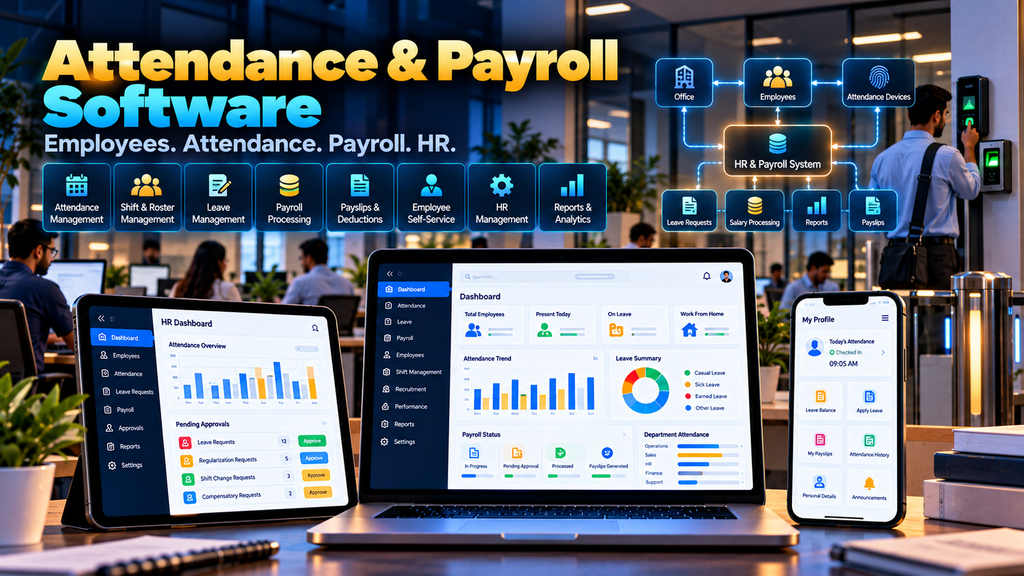
Employee Attendance and Payroll Software Development in Erode can help businesses organize employee records, attendance, working shifts, leave, salary structures, payroll processing, payslips, deductions, approvals and HR reporting through a centralized digital system.
Managing employees becomes increasingly difficult when attendance and payroll information is spread across biometric devices, registers, spreadsheets, WhatsApp messages and separate accounting records.
Employees record attendance.
Supervisors review working hours.
HR manages leave and employee information.
Accounts processes salaries.
Management needs workforce and payroll reports.
If these workflows are disconnected, HR teams may spend significant time collecting and reconciling information before every payroll cycle.
A properly planned Employee Attendance and Payroll Management System can connect relevant HR workflows while keeping employee and salary information accessible only to authorized users.
At Greap Technologies, we develop custom business software, web applications, management platforms and digital systems for organizations in Erode and nearby areas.
What Is Employee Attendance and Payroll Software?
Employee attendance and payroll software is a digital system designed to help businesses manage employee time records and payroll-related workflows.
Depending on business requirements, the software can include:
- Employee management
- Department management
- Designation management
- Attendance
- Check-in and check-out
- Shift management
- Leave management
- Holiday calendars
- Overtime records
- Attendance regularization
- Salary structures
- Payroll processing
- Earnings and deductions
- Payslips
- Payroll approvals
- Employee self-service
- HR dashboards
- Payroll reports
- Attendance-device integrations
- Accounting integrations
The exact modules should be designed around the company’s employment, attendance and payroll processes.
Who Can Use Attendance and Payroll Software?
A custom attendance and payroll platform can be useful for organizations such as:
- Manufacturing companies
- Textile businesses
- Engineering companies
- IT companies
- Retail businesses
- Wholesalers and distributors
- Service companies
- Educational institutions
- Healthcare organizations
- Warehouses
- Logistics businesses
- Multi-branch organizations
The requirements of a small office may be very different from those of a factory operating several shifts and attendance devices.
Attendance Software vs Payroll Software vs HRMS
| System | Primary Purpose |
|---|---|
| Attendance Software | Manage employee attendance, shifts and working-time records |
| Payroll Software | Manage salary calculations and payroll workflows |
| HRMS | Connect broader employee and HR-management processes |
A custom HR system can combine attendance, leave, employee management and payroll into one platform when that matches the organization’s requirements.
1. Understand the Existing HR and Payroll Workflow
Software development should begin by documenting how attendance becomes payroll information.
A simplified workflow may look like:
Employee → Attendance → Shift/Leave Review → Payroll Inputs → Payroll Processing → Approval → Payslip
Important questions include:
- How is attendance currently recorded?
- Does the company operate shifts?
- How are late arrivals handled?
- How is leave approved?
- How is overtime recorded?
- How are salary structures configured?
- Which deductions and earnings are applicable?
- Who prepares payroll?
- Who approves payroll?
- How are payslips distributed?
- Which reports are required?
These answers should determine the software workflow.
2. Employee Master Management
A centralized employee master can maintain information required for legitimate HR and payroll operations.
Depending on requirements, this can include:
- Employee ID
- Employee name
- Department
- Designation
- Joining date
- Employment status
- Assigned branch
- Shift information
- Authorized payroll information
Sensitive employee information should be available only to users with appropriate permissions.
3. Unique Employee ID
Each employee can be assigned a unique employee identifier.
This identifier can connect attendance, leave, payroll and other relevant records without depending only on employee names.
4. Department Management
The software can organize employees into departments according to the company’s structure.
Examples might include:
- Administration
- Sales
- Production
- Warehouse
- Accounts
- Human Resources
- Other business-defined departments
Department structures should reflect the actual organization.
5. Designation Management
Employee roles or designations can be configured separately from departments.
This can support filtering, approvals, reporting and access-control requirements.
6. Branch and Location Management
Businesses operating multiple offices, factories, stores or branches may require location-level employee management.
The system can associate employees with their relevant work locations and provide authorized branch-level reports.
7. Employee Attendance Management
Attendance functionality can maintain daily employee attendance information.
Depending on the organization, attendance statuses can include configured values such as:
- Present
- Absent
- Leave
- Holiday
- Weekly off
- Other organization-defined status
The attendance rules should follow the employer’s approved policies.
8. Check-In and Check-Out Records
Where the organization records working times, the system can maintain check-in and check-out information.
This information may come from:
- Authorized manual entry
- Web-based attendance
- Mobile workflows where appropriate
- Biometric attendance devices
- Other supported attendance systems
9. Biometric Attendance Integration
Businesses already using biometric attendance devices may be able to integrate them with the HR platform.
A possible workflow is:
Attendance Device → Attendance Data → HR System → Attendance Review → Payroll Input
Integration feasibility depends on the device, vendor software, API, database or supported data-exchange method.
Compatibility should be assessed before promising direct integration.
10. Shift Management
Manufacturers, hospitals, logistics companies and other organizations may operate multiple shifts.
A shift module can maintain:
- Shift name
- Start time
- End time
- Break configuration
- Applicable employees
- Other organization-defined rules
Shift rules should reflect the employer’s actual workplace policies.
11. Employee Shift Assignment
Employees can be assigned to appropriate shifts according to business requirements.
The software can support fixed or configured rotating assignments where needed.
12. Shift Roster Management
Organizations with changing schedules may require a shift roster.
Authorized managers can plan employee shifts for relevant periods and make approved changes when required.
13. Late Arrival Management
If the organization has defined attendance rules for late arrival, the system can identify records according to those configured rules.
The software should not invent workplace penalties or deductions.
Any payroll impact should follow policies and rules approved by the organization and applicable requirements.
14. Early Departure Management
Where relevant, the system can also identify early departures according to configured shift rules.
Authorized HR users can review exceptions before they affect payroll calculations.
15. Attendance Regularization
Attendance records can sometimes be incomplete or require correction.
A regularization workflow can allow an employee or manager to submit a correction request.
A possible workflow is:
Request → Manager/HR Review → Approved or Rejected → Attendance Updated
An audit history should preserve important changes.
16. Leave Management
A leave module can help employees and HR teams manage leave requests through a structured workflow.
Depending on company policy, the system can support:
- Leave types
- Leave balances
- Leave applications
- Approvals
- Rejections
- Cancellation workflows
- Leave reports
17. Leave Types
Organizations can configure leave categories according to their approved policies and applicable requirements.
The software should not assume the same leave rules apply to every company or employee category.
18. Leave Approval Workflow
Leave requests can be routed to appropriate managers or HR users.
For example:
Employee Request → Reporting Manager → HR Review if Required → Final Status
Approval levels should reflect the organization’s hierarchy.
19. Holiday Calendar
The organization can maintain relevant holidays for each year.
Businesses with multiple locations can configure different calendars where required.
20. Weekly Off Management
Weekly-off patterns can vary between organizations, departments or shifts.
The attendance engine should therefore use configured workplace rules rather than assuming every employee follows the same weekly schedule.
21. Overtime Management
Where the employer uses approved overtime workflows, the system can record relevant overtime information.
This may include:
- Employee
- Date
- Approved duration
- Approver
- Payroll treatment according to configured rules
Overtime eligibility and calculation rules should be defined by the organization in accordance with requirements applicable to it.
22. Attendance Approval
Some organizations may want attendance to be reviewed before payroll begins.
A workflow can be:
Attendance Captured → Exceptions Reviewed → Corrections Approved → Attendance Locked for Payroll
This can reduce accidental changes during payroll processing.
23. Monthly Attendance Summary
Before payroll processing, HR can review a monthly attendance summary containing relevant information such as:
- Working days
- Recorded attendance
- Leave
- Configured holidays
- Approved overtime
- Attendance exceptions
The exact fields depend on company policy.
24. Salary Structure Management
Payroll software can maintain configured salary structures for employees.
A structure can include applicable:
- Earning components
- Deduction components
- Fixed components
- Variable components
- Other approved payroll elements
Salary information is sensitive and should have strict access controls.
25. Earnings Management
Organizations can configure the earnings used in their payroll process.
The software should allow the company to define calculation methods rather than hard-coding assumptions that may not apply to its workforce.
26. Deduction Management
Authorized payroll users can configure deductions that legitimately apply to the organization’s payroll process.
Rules affecting employee pay should be reviewed by the employer and appropriate payroll, accounting or legal professionals where necessary.
27. Variable Payroll Inputs
Some payroll components may change between payroll periods.
Authorized users can enter or import approved variable information before payroll processing.
Changes should be recorded through appropriate audit controls.
28. Payroll Processing
Once attendance and payroll inputs are reviewed, the system can process payroll according to configured rules.
A simplified workflow can be:
Attendance Finalized → Payroll Inputs Reviewed → Salary Calculated → Payroll Reviewed → Approved → Payslip Generated
Payroll should include review and approval controls rather than relying entirely on automatic calculation.
29. Payroll Preview
Before finalizing payroll, authorized users should be able to review calculated salary information.
This provides an opportunity to identify unexpected attendance, earnings or deduction values before approval.
30. Payroll Approval Workflow
Businesses may require one or more approval levels before payroll is finalized.
For example:
HR Preparation → Accounts Review → Authorized Approval → Payroll Finalization
The workflow should reflect the organization’s internal controls.
31. Payroll Locking
After payroll is approved, the organization may choose to lock the payroll period against ordinary editing.
Any subsequent correction can then follow a controlled adjustment process with appropriate authorization and audit history.
32. Payslip Generation
After payroll has been reviewed and finalized, the system can generate employee payslips using the organization’s approved format.
A payslip can display relevant:
- Employee information
- Payroll period
- Earnings
- Deductions
- Net salary
- Other approved payroll information
Payslips should only be accessible to the relevant employee and authorized administrative users.
33. Employee Self-Service Portal
An Employee Self-Service portal, commonly called ESS, can provide employees with authenticated access to selected HR information.
Depending on requirements, employees may be able to:
- View attendance
- View assigned shifts
- Apply for leave
- Review leave status
- Submit attendance regularization requests
- Access payslips
- View approved profile information
34. Manager Self-Service
Managers may need access to workflows involving their team.
This can include:
- Team attendance
- Leave requests
- Regularization requests
- Shift information
- Other approved HR workflows
Managers should not automatically receive access to sensitive salary information unless their role requires it.
35. Employee Mobile Interface
Employees may need to access selected HR functions from smartphones.
A responsive employee interface can provide quick access to:
- Attendance
- Leave
- Shift information
- Payslips
- HR announcements
Mobile attendance features should be implemented only when they match the organization’s attendance policy and security requirements.
36. HR Dashboard
An HR dashboard can summarize information that requires attention.
Depending on permissions, this can include:
- Employee counts
- Today’s attendance
- Pending leave requests
- Attendance exceptions
- Payroll processing status
- Operational HR alerts
The dashboard should prioritize actionable information rather than unnecessary charts.
37. Payroll Dashboard
Authorized payroll users may need a separate dashboard focused on the current payroll cycle.
It can show relevant information such as:
- Payroll period
- Employees awaiting processing
- Pending inputs
- Payroll review status
- Approval status
- Finalized payroll
38. Attendance Reports
The system can provide attendance reports using filters such as:
- Employee
- Department
- Branch
- Shift
- Date range
- Attendance status
Reports should clearly identify the date range and rules applied.
39. Leave Reports
Authorized HR users can review leave information according to:
- Employee
- Department
- Leave type
- Period
- Approval status
40. Payroll Reports
Payroll reports can provide authorized users with relevant salary-processing information.
Examples may include:
- Payroll summary
- Employee-wise payroll
- Department-wise payroll
- Earnings report
- Deduction report
- Payroll adjustment report
Payroll reports contain sensitive financial information and should have restricted permissions.
41. Employee Document Management
Where required, relevant employee documents can be associated with employee profiles.
Document management should include appropriate:
- Access restrictions
- Secure storage
- Retention rules
- Audit controls
42. Role-Based Access Control
HR and payroll systems contain personal and financial information, making role-based access essential.
| User | Example Access |
|---|---|
| Employee | Own authorized attendance, leave and payslip information |
| Manager | Approved team attendance and request workflows |
| HR User | Authorized employee, attendance and leave functions |
| Payroll User | Authorized salary and payroll functions |
| Management | Approved workforce and payroll reports |
| Administrator | Configured system administration |
Permissions should follow the principle that users receive only the access required for their responsibilities.
43. Multi-Branch Attendance and Payroll
Businesses with several locations may require centralized HR management with branch-level separation.
The software can potentially support:
- Branch employees
- Branch attendance
- Different shift configurations
- Location-specific holiday calendars
- Branch HR users
- Central payroll processing
- Authorized consolidated reports
44. Manufacturing Employee Attendance
Manufacturing businesses in Erode may have requirements involving:
- Multiple shifts
- Production employees
- Office employees
- Attendance devices
- Shift rosters
- Overtime workflows
- Multiple departments
A custom system can be designed around the manufacturer’s actual workforce structure rather than assuming an office-only attendance model.
45. Attendance Device Integration
Different organizations may already use different attendance hardware or software.
Before development, integration should be assessed based on:
- Device model
- Vendor
- Available API
- Supported export format
- Database access where appropriate
- Network architecture
- Authentication requirements
Not every device supports direct real-time integration.
46. Accounting Software Integration
Payroll information may need to connect with an accounting system.
The integration should define which platform owns:
- Payroll calculations
- Salary expense entries
- Payments
- Accounting records
Clear system ownership helps avoid duplicate financial information.
47. ERP Integration
Organizations already using ERP software may need HR or payroll information to integrate with existing business systems.
A possible architecture can be:
Attendance System → HR/Payroll → Approved Payroll Data → ERP/Accounting
Integration feasibility depends on the external system’s APIs and supported data-exchange methods.
48. API Integration
A custom HR platform may integrate with external systems such as:
- Attendance devices
- ERP systems
- Accounting software
- Approved communication services
- Other authorized HR systems
Integrations should exchange only the information required for the intended workflow.
49. Audit Trail
Important HR and payroll changes should be traceable where appropriate.
An audit trail can record:
- User
- Action
- Relevant record
- Previous information where appropriate
- Updated information
- Date and time
Audit trails can be particularly useful for attendance corrections, salary changes and payroll approvals.
50. Employee Data Privacy
Attendance and payroll software can contain sensitive personal and financial information.
Privacy planning should consider:
- What employee information is collected
- Why it is required
- Who can access it
- How long it is retained
- How information is shared
- How employee accounts are authenticated
- How exported payroll information is protected
The employer should determine the legal, contractual, employment and regulatory requirements applicable to its workforce and payroll processes.
51. HR and Payroll Software Security
Security should be treated as a core requirement because payroll systems contain employee and salary information.
Depending on architecture, security controls can include:
- Secure authentication
- Role-based authorization
- Secure communications
- Session management
- Input validation
- Audit logging
- Secure file handling
- Backup procedures
- Software updates
- Integration security
52. Backup and Recovery
A backup strategy should consider relevant:
- Employee records
- Attendance data
- Leave information
- Payroll records
- Payslips
- Configuration
- Uploaded documents
Recovery procedures should also be documented and tested according to the organization’s operational requirements.
53. Data Import and Migration
Businesses moving from spreadsheets or older HR software may need to migrate existing information.
Potential migration data can include:
- Employees
- Departments
- Designations
- Salary structures
- Leave balances
- Historical attendance where required
- Historical payroll where required
Data should be reviewed before migration to identify duplicates, outdated records and inconsistent formats.
54. Responsive HR and Payroll Software
HR employees, managers and employees may use different devices.
A responsive system should work appropriately across:
- Desktop computers
- Laptops
- Tablets
- Smartphones
Interfaces should be adapted to the role. An employee checking a payslip does not need the same dashboard as a payroll administrator.
55. Testing Before Payroll Software Launch
Payroll calculations should be carefully validated before production rollout.
Testing can include:
- Employee data testing
- Attendance-rule testing
- Shift testing
- Leave testing
- Salary-component testing
- Payroll calculation testing
- Permission testing
- Integration testing
- Payslip testing
- Report testing
- User acceptance testing
Before relying on a new payroll system, organizations should compare test payroll outputs with verified expected calculations.
Employee Attendance and Payroll Software Modules
| Module | Purpose |
|---|---|
| Employee Management | Maintain authorized employee records |
| Attendance | Manage employee attendance information |
| Shift Management | Configure and assign working shifts |
| Leave Management | Manage leave requests and approvals |
| Overtime | Maintain approved overtime records where applicable |
| Payroll | Process configured salary calculations |
| Payslips | Generate employee payroll statements |
| ESS Portal | Provide authorized employee self-service |
| Manager Portal | Manage approved team workflows |
| Reports | Provide authorized HR and payroll reports |
| Integrations | Connect supported attendance, ERP or accounting systems |
Attendance and Payroll Software vs HRMS
Attendance and payroll software can focus primarily on:
- Working-time records
- Shifts
- Leave
- Salary processing
- Payslips
A broader Human Resource Management System may additionally include workflows such as:
- Recruitment
- Onboarding
- Employee documents
- Training
- Performance-management workflows
- Employee lifecycle management
A company should implement the modules it genuinely requires rather than adding complexity simply to call the platform an HRMS.
Custom Payroll Software vs Ready-Made Payroll Software
Ready-made payroll software can be suitable when its attendance and salary workflows closely match the organization’s requirements.
Custom software can be considered when the business requires:
- Unique shift rules
- Specific attendance workflows
- Existing biometric integration
- Custom approval processes
- Multiple locations
- Special payroll workflows
- ERP or accounting integration
- Custom reports
- Employee or manager portals
Neither option is automatically better for every business.
The decision should consider functional requirements, security, maintenance, implementation effort and total long-term cost.
Does Payroll Software Automatically Guarantee Compliance?
No. Payroll software can implement configured calculations, rules, reports and workflows, but software alone does not guarantee that an employer meets every applicable employment, payroll, tax or statutory obligation.
The organization should establish its applicable rules with appropriate payroll, accounting, HR and legal professionals where necessary.
The software can then be configured and tested against those approved requirements.
How Much Does Attendance and Payroll Software Development Cost in Erode?
There is no universal development price because requirements can vary significantly between organizations.
Cost can depend on:
- Number of employees
- Number of branches
- Attendance workflows
- Shift complexity
- Leave rules
- Payroll structure
- Approval workflows
- Biometric integration
- Employee self-service
- Reports
- ERP or accounting integrations
- Data migration
- Security requirements
A basic attendance and payslip system has a different development scope from a multi-location HRMS connected to attendance devices, complex shift workflows, payroll and an ERP.
How Long Does Payroll Software Development Take?
The timeline depends on project scope.
Factors can include:
- Requirement analysis
- Attendance-rule documentation
- Payroll-rule documentation
- UI/UX design
- Number of modules
- Device integrations
- External system integrations
- Data migration
- Payroll testing
- User acceptance
A realistic timeline should be prepared after the organization’s attendance and payroll workflows are documented.
Should HR and Payroll Software Be Developed in Phases?
For larger systems, phased implementation can reduce rollout complexity.
A possible implementation sequence is:
- Employee and organization setup
- Attendance
- Shift management
- Leave management
- Attendance review
- Salary structures
- Payroll processing
- Payslips and employee self-service
- Biometric or external integrations
- Additional HR modules and reports
The actual sequence should follow business priorities and technical dependencies.
Employee Attendance and Payroll Software for Manufacturers in Erode
Manufacturing companies can have more complex attendance requirements because production may operate across several shifts and departments.
A custom system can support relevant workflows involving:
- Factory employees
- Office employees
- Shift rosters
- Attendance devices
- Leave
- Approved overtime
- Payroll processing
- Department reports
The platform should be configured around the manufacturer’s actual workforce policies.
Attendance and Payroll Software for SMEs in Erode
Small and medium-sized businesses may not require a large enterprise HR platform.
A focused system may instead combine:
- Employee records
- Attendance
- Leave
- Payroll
- Payslips
- Basic HR reports
Additional modules can be introduced as operational requirements grow.
Multi-Branch Payroll Management
Businesses operating in several locations may want centralized payroll while allowing selected HR functions to remain branch-specific.
A properly designed permission model can provide local HR teams with relevant access while keeping sensitive payroll administration centralized.
Employee Attendance and Payroll Software Development in Erode and Nearby Areas
Greap Technologies can develop custom attendance, payroll and employee management systems for businesses in Erode, Perundurai, Bhavani, Gobichettipalayam, Sathyamangalam, Anthiyur, Chennimalai, Modakkurichi, Kavindapadi, Nambiyur, Kodumudi and nearby areas.
Each implementation should be based on the organization’s real HR and payroll requirements rather than creating near-identical software solutions solely for different nearby locations.
Why Choose Greap Technologies for Attendance and Payroll Software Development in Erode?
Greap Technologies provides custom software development, web application development and digital solutions for businesses in Erode and nearby areas.
Depending on project requirements, employee attendance and payroll software can include:
- Employee management
- Department and designation management
- Branch management
- Attendance
- Shift management
- Shift rosters
- Leave management
- Attendance regularization
- Overtime workflows
- Salary structures
- Payroll processing
- Payroll approvals
- Payslips
- Employee self-service
- Manager workflows
- HR dashboards
- Attendance reports
- Payroll reports
- Biometric integrations where supported
- ERP and accounting integrations where supported
- Data migration
- Role-based access
- Ongoing technical support
The objective is to understand how employee attendance currently moves into the payroll process and then develop software around the workflows that genuinely need better organization, visibility and control.
Explore Greap Technologies, Website Development Services, SEO Services in Erode and Digital Marketing Services.
Conclusion
Employee attendance and payroll software can help businesses connect HR and salary-processing workflows through one structured digital platform.
A useful system should begin with the real employee-to-payroll process:
Employee → Attendance → Shift & Leave Review → Payroll Inputs → Payroll Processing → Approval → Payslip
Depending on requirements, the platform can then connect:
- Biometric attendance
- Multiple branches
- Employee self-service
- Manager approvals
- Accounting systems
- ERP software
- HR reports
Because payroll involves personal and financial information, privacy, role-based access, audit history, backups and careful payroll testing should be treated as core requirements.
Need Attendance and Payroll Software in Erode?
If your business currently manages attendance, leave, shifts and salary processing through registers, spreadsheets and disconnected applications, a custom HR and payroll platform may help centralize relevant workflows.
Greap Technologies develops custom attendance software, payroll systems, HR platforms and business applications for organizations in Erode and nearby areas.
Discuss Your Attendance & Payroll Software Project on WhatsApp
Frequently Asked Questions
1. What is employee attendance and payroll software?
It is a digital system used to manage employee attendance, shifts, leave, salary structures, payroll processing, payslips and related HR workflows.
2. Can attendance automatically connect with payroll?
Yes. Once attendance information has been reviewed and finalized, approved attendance inputs can be used by configured payroll calculations.
3. Can payroll software integrate with biometric attendance machines?
Potentially. Integration depends on the attendance device, vendor, API, supported export methods and technical architecture.
4. Can the software manage multiple shifts?
Yes. A custom system can support configured shifts, employee assignments and shift rosters according to the organization’s requirements.
5. Can employees apply for leave online?
Yes. An employee self-service portal can provide leave applications, status tracking and other approved HR functions.
6. Can employees access payslips online?
Yes. Authenticated employees can be given access to their own finalized payslips through a secure self-service portal.
7. Can the software calculate overtime?
It can process approved overtime information according to rules configured and validated by the organization where overtime is applicable.
8. Can attendance and payroll software support multiple branches?
Yes. A custom platform can support branch-level employee and attendance workflows with centralized payroll and authorized reporting where required.
9. Can payroll software integrate with accounting or ERP software?
Potentially. Integration depends on the external accounting or ERP system’s available APIs and supported data-exchange methods.
10. Does payroll software automatically ensure statutory compliance?
No. Software can implement approved payroll rules and calculations, but the employer remains responsible for determining and maintaining the legal, payroll, tax and employment requirements that apply to its organization.
11. How much does attendance and payroll software development cost in Erode?
Development cost depends on employee volume, attendance and shift workflows, payroll complexity, user roles, biometric integrations, reports, data migration, external integrations and security requirements.
12. Does Greap Technologies develop attendance and payroll software in Erode?
Yes. Greap Technologies develops custom employee attendance, payroll, HR and business management software for organizations in Erode and nearby areas.


