
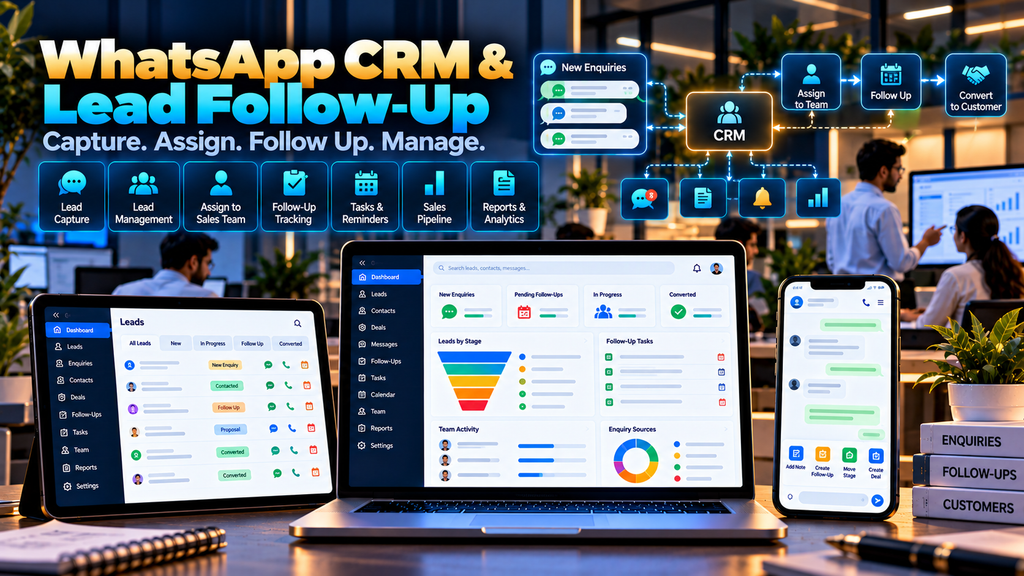
WhatsApp CRM and Lead Follow-Up Software for Businesses in Erode can help companies organize customer enquiries, sales conversations, lead assignments, follow-up tasks, reminders and pipeline information through a structured CRM workflow.
For many businesses, WhatsApp has become an important communication channel for customer enquiries.
A potential customer may find a business through Google Search, Google Maps, a website, social media, advertising or a referral and then start a conversation through WhatsApp.
Receiving the enquiry is only the beginning.
The business still needs to understand the requirement, assign the lead, follow up at the right time, maintain relevant notes, prepare a quotation and track what happens next.
When enquiries are handled through individual phones and disconnected conversations, sales teams may find it difficult to maintain a consistent lead-management process.
A properly designed WhatsApp CRM and Lead Follow-Up System can connect supported business messaging workflows with structured customer and sales information.
At Greap Technologies, we develop custom CRM systems, lead-management platforms, sales software and business applications for organizations in Erode and nearby areas.
What Is WhatsApp CRM Software?
WhatsApp CRM software combines supported WhatsApp business messaging workflows with customer relationship management functions.
Instead of treating every conversation as an isolated chat, relevant enquiries can be connected with CRM records such as:
- Lead
- Customer
- Assigned salesperson
- Lead source
- Lead stage
- Follow-up date
- Tasks
- Sales notes
- Quotation
- Order information
- Conversation history where appropriate
The exact messaging capabilities depend on the official WhatsApp Business Platform, the chosen provider, account configuration, permissions and applicable messaging rules.
Why Do Businesses Need Lead Follow-Up Software?
Generating an enquiry does not automatically create a sale.
Many B2B and service enquiries require several interactions before a customer makes a decision.
A lead may require:
- Initial response
- Requirement collection
- Product or service information
- Quotation
- Second discussion
- Price clarification
- Internal customer approval
- Follow-up
Lead follow-up software helps keep these next actions visible to the responsible sales user.
WhatsApp Business vs WhatsApp CRM
| Business Messaging | WhatsApp CRM Workflow |
|---|---|
| Customer conversations | Customer conversations connected with CRM records |
| Messaging-focused | Lead-management focused |
| Customer contacts | Leads, customers and opportunities |
| Conversation handling | Lead assignment and ownership |
| Messaging tools | Tasks and follow-up management |
| Communication history | Sales pipeline and reports |
A CRM does not replace the messaging platform. It adds a structured sales-management layer around supported communication workflows.
1. Map the Existing Lead Journey
Before developing CRM software, the business should understand how enquiries currently move through the sales process.
A typical journey may look like:
Enquiry → Lead → Assignment → Requirement → Follow-Up → Quotation → Negotiation → Order / Closed
Important questions include:
- Where do enquiries come from?
- Who receives them?
- Who assigns leads?
- How quickly should a salesperson respond?
- How are follow-ups currently remembered?
- How are quotations prepared?
- How are lost leads recorded?
- What information does management actually need?
2. Centralized Lead Management
A CRM can maintain sales enquiries in one structured lead database.
A lead record can include:
- Customer or company name
- Contact information
- Lead source
- Interested product or service
- Assigned salesperson
- Current stage
- Next follow-up
- Relevant sales notes
Only information genuinely required for customer and sales workflows should be collected.
3. WhatsApp Enquiry Capture
Where supported by the configured WhatsApp Business Platform integration, incoming customer conversations can be connected with the CRM workflow.
A new enquiry can potentially create or update an appropriate customer or lead record according to configured rules.
The implementation should use supported business messaging methods rather than unofficial automation techniques.
4. Website-to-WhatsApp Leads
Businesses can provide a WhatsApp contact option on their website so interested visitors can start a conversation.
A potential journey can be:
Google Search → Website → Service Page → WhatsApp Enquiry → CRM Lead → Sales Follow-Up
This is why CRM planning should also consider the quality of the company’s website and landing pages.
Explore Website Development Services from Greap Technologies.
5. Digital Marketing Lead Integration
Businesses may generate leads through several digital channels.
Depending on the platforms and available integrations, CRM software can potentially bring relevant lead information into a common sales workflow.
This can help connect marketing enquiries with actual follow-up activity.
Learn more about Digital Marketing Services.
6. Lead Source Tracking
Each lead can be associated with an appropriate source where the information is available.
Examples can include:
- Website
- Google Business Profile
- Referral
- Direct enquiry
- Campaign
- Sales representative
- Existing customer
Source attribution should use available evidence rather than guessing where a customer came from.
7. Lead Assignment
New enquiries can be assigned to the appropriate sales representative.
Assignment can be performed manually or through configured rules based on factors such as:
- Product or service
- Sales team
- Territory
- Branch
- Customer category
8. Automatic Lead Assignment
When a business has clear assignment rules, the CRM can automatically route leads to the relevant team or representative.
Automatic routing should remain transparent so managers can understand why a lead was assigned to a particular user.
9. Lead Ownership
Every active lead should have a clearly identified responsible user or team where appropriate.
This helps avoid situations where several employees assume somebody else is handling the enquiry.
10. Lead Stage Management
The business can configure stages that match its actual sales process.
For example:
New → Contacted → Requirement Identified → Quotation → Follow-Up → Negotiation → Converted / Closed
The CRM should avoid unnecessary stages that create administrative work without helping the sales process.
11. Custom Sales Pipelines
Different businesses may require different pipelines.
A manufacturer may use:
Enquiry → Requirement → Technical Discussion → Quotation → Approval → Order
A service business may use:
Enquiry → Consultation → Proposal → Follow-Up → Confirmation
Custom CRM development allows the workflow to reflect the actual business model.
12. Lead Priority
Businesses can configure appropriate lead priorities when this is useful to their sales team.
Priority should be based on defined business criteria rather than unsupported assumptions about a customer’s likelihood of purchasing.
13. Lead Follow-Up Management
Follow-up management is one of the most important CRM functions.
A follow-up can include:
- Lead
- Responsible salesperson
- Follow-up date
- Follow-up purpose
- Priority
- Status
- Relevant notes
14. Follow-Up Reminders
The CRM can remind sales users about upcoming or overdue follow-up tasks.
This can reduce reliance on memory, personal notebooks or scattered reminders.
15. Today’s Follow-Ups
A salesperson dashboard can provide a clear list of activities that require attention today.
This may include:
- New enquiries
- Customer callbacks
- Quotation follow-ups
- Pending meetings
- Overdue follow-ups
16. Overdue Follow-Ups
When a scheduled follow-up passes without completion, the CRM can identify it as overdue according to configured rules.
This gives sales users and managers visibility into leads that still require attention.
17. Next Follow-Up Date
After each meaningful customer interaction, the salesperson can record the next action and appropriate date.
This creates continuity between conversations.
18. Follow-Up History
The CRM can maintain a history of completed follow-up activities.
Authorized users can review:
- Previous interaction date
- Responsible salesperson
- Outcome
- Relevant notes
- Next action
19. Customer Conversation Context
When messaging integration permits, authorized sales users can access relevant conversation context alongside the lead record.
This can help avoid asking the customer to repeatedly provide the same business requirement.
Access to conversation data should be limited to users who genuinely require it.
20. Shared Team Inbox
Businesses with several salespeople may require a team-based messaging workflow instead of relying on one person’s device.
Where supported by the messaging setup, conversations can be routed to authorized users according to configured responsibilities.
21. Conversation Assignment
An enquiry can be assigned to an appropriate salesperson so responsibility is clear.
Managers can also reassign a lead when responsibilities change.
22. Internal Notes
CRM users can maintain internal sales notes that are not part of the customer-facing conversation.
Examples include:
- Requirement summary
- Quotation requested
- Decision-maker information relevant to the sale
- Next action
- Internal sales instructions
Notes should remain professional and limited to information required for legitimate business purposes.
23. Sales Tasks
Sales activities can be converted into structured tasks.
Examples include:
- Call customer
- Send product information
- Prepare quotation
- Schedule meeting
- Arrange demonstration
- Follow up quotation
24. WhatsApp Message Templates
Businesses using supported WhatsApp Business Platform messaging may use approved message templates where required by the platform.
Templates can support appropriate business workflows such as follow-up notifications or transactional communication.
Template availability, approval and usage requirements depend on the official platform and configured provider.
25. Saved Sales Responses
CRM users may benefit from approved reusable response content for common questions.
This can include information about:
- Services
- Product categories
- Business hours
- Required customer details
- Quotation process
Salespeople should still adapt responses when the customer’s question requires individual attention.
26. Automated Acknowledgement
Where supported and appropriate, an incoming enquiry can receive an automated acknowledgement.
The acknowledgement should not pretend that a salesperson has personally reviewed the enquiry when that has not happened.
27. Business-Hours Workflow
The system can potentially use different responses or routing logic based on configured business hours.
For example, an enquiry received outside working hours can be acknowledged and placed into the appropriate follow-up queue.
28. Customer Segmentation
Businesses can categorize leads or customers according to useful business criteria.
Examples can include:
- New lead
- Existing customer
- Dealer
- Distributor
- Manufacturer
- Retail customer
- Service customer
Segments should serve a clear operational purpose.
29. Product or Service Interest
CRM leads can be associated with the product or service the customer is interested in.
This can help route the enquiry to the correct sales team and support relevant reporting.
30. Quotation Request Workflow
Once a customer’s requirement is understood, the salesperson may need to prepare or request a quotation.
A connected workflow can be:
WhatsApp Enquiry → CRM Lead → Requirement → Quotation → Follow-Up → Order
For a dedicated commercial-document workflow, read Quotation and Invoice Management Software Development in Erode.
31. Quotation Status Inside CRM
The CRM can display relevant quotation status without requiring the salesperson to search through separate documents.
Depending on integration, this may include:
- Quotation requested
- Draft
- Pending approval
- Sent
- Accepted
- Rejected
32. Order Conversion
When a lead becomes a confirmed customer transaction, the CRM can mark the relevant sales opportunity as converted according to the business workflow.
Order information can then move into an order-management, ERP, ecommerce or other supported system.
33. Field Sales Integration
Some WhatsApp enquiries may require an in-person customer visit.
A connected workflow can be:
WhatsApp Enquiry → CRM Lead → Field Salesperson → Customer Visit → Follow-Up → Quotation → Order
Explore Field Sales Management Software for Businesses in Erode.
34. Dealer and Distributor CRM
Manufacturers and brands may receive enquiries from dealers, distributors or prospective channel partners.
The CRM can potentially classify these leads separately and connect qualified accounts with dealer-management workflows.
Read about Dealer and Distributor Management Software Development in Erode.
35. B2B Ecommerce Integration
Some leads may eventually become registered B2B ecommerce customers.
A connected customer journey could be:
Enquiry → CRM → Qualification → Customer Account → B2B Ordering → Repeat Orders
Explore B2B Ecommerce Website Development for Wholesalers and Manufacturers in Erode.
36. Sales Representative Management
The CRM can maintain authorized sales users and their responsibilities.
Information can include:
- Salesperson
- Team
- Reporting manager
- Territory
- Assigned products or services
- User status
37. Sales Team Management
Businesses can organize CRM users by sales team, branch, territory or product division.
This can support structured lead routing and permissions.
38. Branch-Wise Lead Management
Companies operating multiple branches may route enquiries according to relevant branch rules.
Management can then receive authorized consolidated reporting while branch teams focus on their own leads.
39. Territory-Based Lead Assignment
Businesses with geographic sales territories can route suitable leads to representatives responsible for those areas.
Territory assignment should use information actually supplied or verified rather than guessing a customer’s location.
40. Lead Dashboard
A CRM dashboard can summarize current lead activity.
Depending on requirements, it can show:
- New leads
- Unassigned leads
- Leads by stage
- Today’s follow-ups
- Overdue follow-ups
- Open quotations
- Recently converted leads
41. Salesperson Dashboard
A salesperson dashboard should prioritize actions.
It can show:
- Assigned new leads
- Today’s follow-ups
- Overdue tasks
- Customer conversations requiring attention
- Quotation follow-ups
- Upcoming meetings
42. Sales Manager Dashboard
Managers may require broader visibility into team workflows.
A manager dashboard can summarize:
- Lead assignments
- Open leads
- Pipeline stages
- Pending follow-ups
- Quotation activity
- Team workload
Activity counts should be interpreted in context and should not automatically be treated as a complete measure of salesperson quality.
43. Lead Reports
Authorized users can review lead reports by:
- Date range
- Lead source
- Salesperson
- Team
- Product or service
- Lead stage
- Branch
44. Follow-Up Reports
Follow-up reports can help sales managers identify:
- Scheduled follow-ups
- Completed follow-ups
- Overdue follow-ups
- Follow-ups by salesperson
- Follow-ups by lead stage
45. Lead Source Reports
Where source data is reliable, businesses can compare enquiries received from different channels.
Reports should distinguish between leads, qualified opportunities, orders and revenue rather than treating all enquiries as equivalent outcomes.
46. Pipeline Reports
A pipeline report can show how many recorded opportunities are currently at each configured stage.
This can provide sales-process visibility without claiming that open opportunities will necessarily become customers.
47. Lost Lead Reasons
When a lead is closed without conversion, the salesperson can select an appropriate configured reason where known.
Examples may include:
- Requirement changed
- Budget mismatch
- Product or service mismatch
- Timing changed
- No response after appropriate follow-up
- Other verified reason
Users should avoid inventing a reason when the actual reason is unknown.
48. Duplicate Lead Management
The same customer may contact a business more than once or through different channels.
The CRM can help identify potential duplicate records based on appropriate identifiers.
Users should review potential matches before records are merged.
49. Existing Customer Identification
When appropriate identifiers match, the system can help users determine whether an enquiry is from an existing customer.
This can provide useful sales context and reduce duplicate customer records.
50. Customer Timeline
A CRM timeline can provide an authorized chronological view of relevant customer activities.
This can include:
- Lead creation
- Follow-ups
- Sales notes
- Meetings
- Quotation activity
- Order-related events
Only information required for legitimate business purposes should be included.
51. Role-Based Access Control
Not every employee should have access to every customer conversation or lead.
| User | Example Access |
|---|---|
| Sales Representative | Assigned leads, customers and follow-ups |
| Sales Manager | Authorized team leads, assignments and reports |
| Customer Support User | Configured customer-service conversations |
| Management | Authorized consolidated reports |
| Administrator | Configured CRM administration |
52. Conversation and Customer Data Privacy
CRM and messaging systems can contain customer names, contact information, business requirements and conversation content.
Businesses should define:
- What information is collected
- Why it is required
- Who can access it
- How long relevant information is retained
- How user access is removed when responsibilities change
Access should be based on legitimate business responsibilities.
53. Audit Trail
Important CRM activities can be recorded through an audit trail.
Examples can include:
- Lead assignment
- Lead reassignment
- Stage changes
- Customer information changes
- Quotation status changes
- User permission changes
54. CRM Data Security
CRM software can contain valuable customer and commercial information.
Security planning can include:
- Authentication
- Role-based authorization
- Secure communications
- Session controls
- Input validation
- Secure API integrations
- Audit logging
- Backup procedures
- Software updates
55. Official WhatsApp Business Platform Integration
Businesses requiring CRM integration should use supported WhatsApp business technologies and authorized integration methods.
The implementation can depend on factors such as:
- Business account setup
- Platform availability
- Provider configuration
- Messaging permissions
- Approved templates where required
- Webhook and API capabilities
- Current platform policies
Exact capabilities should be confirmed during technical assessment because external platform features and policies can change.
56. Avoid Unofficial WhatsApp Automation
A business CRM should not depend on fragile automation that imitates a personal user, scrapes interfaces or relies on unsupported messaging methods.
For a business-critical system, supported APIs and documented integrations provide a more appropriate foundation.
57. CRM API Integration
Custom APIs can connect the CRM with other authorized business systems.
Potential integrations may include:
- Website enquiry forms
- Quotation software
- Field sales software
- Dealer management
- B2B ecommerce
- ERP
- Order management
- Other supported business platforms
58. ERP Integration
A converted lead may eventually become a customer or order in an ERP system.
A connected workflow can be:
WhatsApp Enquiry → CRM → Quotation → Sales Order → ERP → Fulfilment
Integration feasibility depends on the ERP’s APIs, permissions and technical architecture.
59. Quotation Software Integration
Salespeople often need to move quickly from customer requirement to commercial quotation.
Integrating CRM with quotation software can create a workflow such as:
Lead → Requirement → Quotation → Customer Follow-Up → Accepted Quotation → Order
Read Quotation and Invoice Management Software Development in Erode.
60. Website CRM Integration
Website contact forms and enquiry pages can potentially create CRM leads automatically.
A useful digital journey can be:
Google → Website → Enquiry → CRM → Salesperson → Follow-Up
This connects lead generation with the process used to manage those leads after they arrive.
61. SEO Lead Journey
Businesses investing in local SEO should also consider what happens after a visitor discovers the company.
A potential journey can be:
Google Search → Useful Service or Blog Page → Website CTA → WhatsApp / Form Enquiry → CRM → Follow-Up
Explore SEO Services in Erode.
62. Mobile-Friendly CRM
Sales representatives may need to access leads and follow-ups while away from a desktop computer.
A responsive CRM can provide appropriate functions across laptops, tablets and smartphones.
Common mobile actions can include:
- View assigned leads
- Check today’s follow-ups
- Add sales notes
- Update lead stage
- Create the next follow-up
63. CRM Mobile App vs Responsive Web Application
A dedicated mobile application is not automatically necessary.
A responsive web CRM may be sufficient for many sales workflows.
A dedicated app can be considered when there is a clear requirement for device-specific functionality, carefully designed offline capabilities, push notifications or other app-specific features.
64. Data Import and CRM Migration
Businesses already maintaining customer information in spreadsheets or another CRM may need to migrate relevant data.
This can include:
- Customers
- Leads
- Salespeople
- Lead stages
- Products or services
- Relevant follow-up information
Existing data should be cleaned and reviewed before migration.
65. Backup and Recovery
A CRM backup strategy should consider relevant:
- Customer records
- Lead records
- Follow-ups
- Sales notes
- Configuration
- Integration-related records
Recovery procedures should also be documented and tested.
66. Testing Before CRM Launch
The system should be tested using realistic sales scenarios before rollout.
Testing can include:
- New enquiry capture
- Lead creation
- Lead assignment
- Follow-up reminders
- Lead-stage changes
- Quotation workflows
- Messaging integrations
- User permissions
- Reports
- Mobile responsiveness
- External integrations
Sales representatives and sales managers should participate in user acceptance testing.
WhatsApp CRM and Lead Follow-Up Software Modules
| Module | Purpose |
|---|---|
| Lead Management | Organize sales enquiries |
| Customer Management | Maintain relevant customer information |
| Messaging Integration | Connect supported business messaging workflows |
| Lead Assignment | Assign responsibility to sales users |
| Pipeline | Track leads through configured sales stages |
| Follow-Ups | Schedule and manage future sales actions |
| Tasks | Manage salesperson activities |
| Quotations | Connect leads with commercial-document workflows |
| Sales Teams | Organize users and responsibilities |
| Dashboards | Provide current sales-workflow visibility |
| Reports | Provide authorized lead and follow-up reporting |
| Integrations | Connect supported websites, ERP and sales systems |
WhatsApp CRM vs Traditional CRM
A traditional CRM may already provide strong lead, customer and pipeline management.
A WhatsApp-focused CRM places additional emphasis on connecting supported business messaging conversations with those CRM workflows.
If a company already uses a capable CRM, integrating WhatsApp may be more appropriate than replacing the entire CRM.
WhatsApp CRM vs Bulk Messaging Software
A CRM is primarily designed to manage customer relationships, enquiries and sales workflows.
It should not be confused with software whose main purpose is sending large quantities of unsolicited messages.
Business messaging should follow applicable platform rules, customer communication preferences and relevant legal requirements.
WhatsApp CRM vs Field Sales Software
WhatsApp CRM focuses on digital enquiries, conversations, leads and follow-ups.
Field sales software focuses on representatives visiting customers and managing activities outside the office.
The two systems can be connected:
WhatsApp Lead → CRM → Field Visit → Quotation → Follow-Up → Order
Custom WhatsApp CRM vs Ready-Made CRM
A ready-made CRM can be a good choice when its sales workflow already fits the organization.
Custom development can be considered when the business requires:
- Specific lead stages
- Custom lead-routing rules
- Special follow-up workflows
- Custom quotation processes
- Dealer or distributor workflows
- Field sales integration
- ERP integration
- Industry-specific fields
- Custom dashboards
- Special reports
Neither approach is automatically better for every business.
How Much Does WhatsApp CRM Software Development Cost in Erode?
There is no single price suitable for every CRM project.
Development scope can depend on:
- Number of users
- Lead-management requirements
- Sales pipeline complexity
- Follow-up workflows
- Team inbox requirements
- WhatsApp Business Platform integration
- Quotation integration
- Field sales integration
- ERP integration
- Website integration
- Reports
- Data migration
- Security requirements
External messaging providers may also have their own platform or usage charges, which should be evaluated separately from custom software-development costs.
How Long Does WhatsApp CRM Development Take?
The development timeline depends on project scope and integration requirements.
Factors can include:
- Requirement analysis
- Sales-process mapping
- CRM UI/UX design
- Number of modules
- WhatsApp integration setup
- External approvals or configuration
- Quotation or ERP integration
- Data migration
- Testing
- User acceptance
A realistic timeline should be prepared after the business’s lead and follow-up process has been documented.
Should WhatsApp CRM Be Developed in Phases?
For larger CRM projects, phased development can make implementation easier to test.
A possible sequence is:
- Customers and leads
- Sales users and lead assignment
- Sales pipeline
- Follow-ups and tasks
- WhatsApp Business Platform integration
- Quotation workflows
- Dashboards and reports
- Website and marketing integrations
- ERP or other business integrations
The actual sequence should follow business priorities and technical dependencies.
WhatsApp CRM for Manufacturers in Erode
Manufacturers may receive enquiries from industrial customers, dealers, distributors and other businesses through WhatsApp.
A CRM can help connect these enquiries with:
- Sales representatives
- Product requirements
- Customer visits
- Quotations
- Dealer workflows
- Orders
A broader workflow can be:
Enquiry → CRM → Sales → Quotation → Order → Production / Inventory → Dispatch
WhatsApp CRM for Wholesalers and Distributors
Wholesalers and distributors may receive frequent product, price and availability enquiries.
A CRM can help maintain customer ownership, follow-ups and quotation workflows while inventory and order information remains connected to the appropriate operational system.
WhatsApp CRM for Service Businesses
Service companies can use CRM workflows to manage:
- New service enquiries
- Consultation requests
- Requirements
- Meetings
- Proposals
- Follow-ups
- Customer confirmation
WhatsApp CRM for Local Businesses in Erode
Local businesses receiving enquiries through their website, Google presence, advertising, referrals and WhatsApp can benefit from bringing those enquiries into a structured sales process.
The goal is not simply to generate more messages.
The business needs a clear process for handling the enquiries it already receives.
WhatsApp CRM Software in Erode and Nearby Areas
Greap Technologies can develop custom CRM and lead-management systems for businesses in Erode, Perundurai, Bhavani, Gobichettipalayam, Sathyamangalam, Anthiyur, Chennimalai, Modakkurichi, Kavindapadi, Nambiyur, Kodumudi and nearby areas.
The CRM should be designed around the company’s actual sales workflow rather than creating separate near-identical software or pages for every nearby town.
Why Choose Greap Technologies for WhatsApp CRM Development in Erode?
Greap Technologies provides custom software development, CRM development, business applications and digital growth solutions for companies in Erode and nearby areas.
Depending on project requirements, a CRM platform can include:
- Lead capture
- Customer management
- WhatsApp Business Platform integration
- Lead assignment
- Sales pipelines
- Follow-up management
- Reminders
- Tasks
- Sales notes
- Team workflows
- Quotation integration
- Field sales integration
- Dealer-management integration
- Website integration
- ERP integration
- Dashboards
- Reports
- Role-based access
- Audit trails
- Data migration
- Mobile-friendly interfaces
- Ongoing technical support
The objective is not to automate every customer conversation. A useful CRM should help the sales team respond to enquiries, maintain context, schedule the next action and keep the sales process organized.
Explore Greap Technologies, Website Development Services, SEO Services in Erode and Digital Marketing Services.
Conclusion
WhatsApp CRM and lead follow-up software can connect business messaging with a structured sales-management process.
A practical workflow can be:
Enquiry → Lead → Assignment → Conversation → Requirement → Follow-Up → Quotation → Order
Depending on the organization, the CRM can then connect with:
- Website enquiries
- Digital marketing leads
- Field sales
- Quotation management
- Dealer management
- B2B ecommerce
- ERP
- Order-management systems
The goal should be to make lead ownership and follow-up clearer while using supported messaging integrations and appropriate controls for customer information.
Need WhatsApp CRM and Lead Follow-Up Software in Erode?
If your sales team currently manages WhatsApp enquiries, customer details and follow-ups through individual phones, spreadsheets or scattered notes, a custom CRM may help organize the process.
Greap Technologies develops custom CRM, lead-management, field-sales and business software for organizations in Erode and nearby areas.
Discuss Your CRM Project on WhatsApp
Frequently Asked Questions
1. What is WhatsApp CRM software?
WhatsApp CRM software connects supported WhatsApp business messaging workflows with CRM functions such as leads, customers, sales assignments, follow-ups, tasks, pipeline stages and reporting.
2. Can WhatsApp enquiries automatically become CRM leads?
Potentially. When supported by the configured WhatsApp Business Platform integration, incoming enquiries can be connected with lead or customer records according to defined business rules.
3. Can the CRM remind salespeople about customer follow-ups?
Yes. Salespeople can schedule follow-up dates, and the CRM can display upcoming and overdue activities.
4. Can several salespeople manage WhatsApp enquiries?
Depending on the official messaging setup and provider capabilities, a business can implement team-based workflows that assign conversations or leads to authorized users.
5. Can leads be automatically assigned to salespeople?
Yes. When clear rules exist, leads can be routed according to factors such as product, service, branch, territory or sales team.
6. Can WhatsApp CRM connect with quotation software?
Yes. A lead can move from customer requirement to quotation and follow-up through an integrated sales workflow.
7. Can WhatsApp CRM integrate with a website?
Yes. Website enquiry forms and appropriate WhatsApp contact journeys can be connected with the CRM, depending on the website architecture and integration requirements.
8. Can the CRM integrate with ERP software?
Potentially. Converted customers, orders or other approved information can be exchanged with an ERP when suitable APIs or supported integration methods are available.
9. Is WhatsApp CRM the same as bulk WhatsApp messaging software?
No. CRM software focuses on customer relationships, enquiries, sales pipelines and follow-ups. Business messaging should use supported platform functionality and follow applicable messaging requirements.
10. Can WhatsApp CRM be used by manufacturers and distributors?
Yes. Manufacturers, wholesalers and distributors can use CRM workflows to manage customer, dealer and distributor enquiries, sales follow-ups, quotations and related activities.
11. How much does WhatsApp CRM development cost in Erode?
Development cost depends on users, lead workflows, WhatsApp integration, pipelines, quotation functionality, website or ERP integrations, reports, data migration and overall project complexity. External platform or provider charges may apply separately.
12. Does Greap Technologies develop WhatsApp CRM software in Erode?
Yes. Greap Technologies develops custom CRM, lead-management, field-sales and business software for organizations in Erode and nearby areas.


