
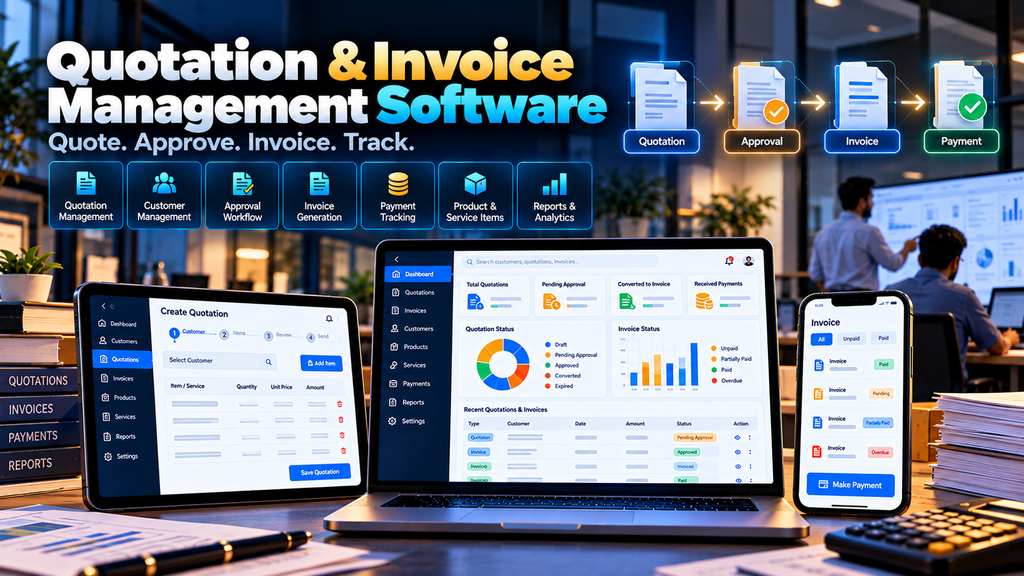
Quotation and Invoice Management Software Development in Erode can help businesses organize customer quotations, estimates, approvals, invoices, payment records, products, services and sales documents through a centralized digital platform.
For many businesses, the sales process does not begin with an invoice.
A customer first asks for pricing.
The sales team prepares a quotation.
Pricing may require internal approval.
The customer may request revisions.
Once the quotation is accepted, the business may proceed with an order, project or service.
An invoice is then generated according to the organization’s billing process.
When these activities are managed through spreadsheets, word-processing documents, PDFs, emails and messaging applications, keeping every document and revision connected can become difficult.
A custom Quotation and Invoice Management System can organize this workflow from the initial customer request through quotation, approval, invoicing and payment tracking.
At Greap Technologies, we develop custom business software, sales platforms, web applications and management systems for organizations in Erode and nearby areas.
What Is Quotation and Invoice Management Software?
Quotation and invoice management software is a digital system designed to help businesses create, manage and track commercial documents used during sales and billing workflows.
Depending on business requirements, the system can include:
- Customer management
- Product and service management
- Quotation creation
- Estimate creation
- Quotation revisions
- Quotation approvals
- Discount approvals
- Quotation PDF generation
- Customer acceptance workflows
- Sales order conversion
- Invoice generation
- Payment records
- Outstanding tracking
- Credit notes where required
- Document templates
- Salesperson management
- Dashboards
- Reports
- Accounting or ERP integration
The exact workflow should match the company’s sales, finance and accounting processes.
Who Can Use Quotation and Invoice Software?
A quotation and invoicing platform can be useful for many types of businesses in Erode.
- Manufacturers
- Wholesalers
- Distributors
- Industrial suppliers
- Machinery businesses
- Building-material suppliers
- Engineering companies
- Contractors
- Service businesses
- IT companies
- Agencies
- B2B suppliers
- Multi-branch businesses
The software should be configured around the organization’s actual quotation and billing process.
Quotation Software vs Invoice Software
| Quotation Management | Invoice Management |
|---|---|
| Prepared before a confirmed sale or billing event | Created according to the business’s billing workflow |
| Communicates proposed products, services and pricing | Records amounts billed according to the applicable transaction |
| May go through several revisions | Should follow controlled accounting processes |
| May require pricing approval | May require finance approval |
| Can lead to an order or project | Can connect with payment records |
A custom platform can connect both processes while keeping their purposes clearly separated.
1. Map the Existing Quotation-to-Invoice Process
Development should begin by understanding the company’s current sales-document workflow.
A typical process may look like:
Enquiry → Quotation → Revision → Approval → Customer Acceptance → Order / Work → Invoice → Payment
Important questions include:
- Who creates quotations?
- Who can change prices?
- Who approves discounts?
- How are quotation revisions managed?
- How does a customer accept a quotation?
- When should an invoice be generated?
- Who can approve invoices?
- How are payments recorded?
- Does the business already use accounting software?
- Does the system need ERP integration?
2. Customer Management
A centralized customer master can maintain information required for legitimate sales and billing workflows.
Depending on requirements, customer information can include:
- Customer or company name
- Billing information
- Shipping information where required
- Contact information
- Customer category
- Assigned salesperson
- Approved payment terms
- Relevant tax-related information
Customer information should be protected with appropriate access controls.
3. Customer Search
Authorized users should be able to locate customers quickly while preparing quotations or invoices.
Search can use relevant fields such as customer name, customer code or other approved identifiers.
4. Product and Service Master
The system can maintain products and services commonly used in quotations and invoices.
Relevant fields may include:
- Item code
- Product or service name
- Description
- Unit
- Approved base price
- Applicable classification information
- Configured tax information
Product and tax configuration should follow the business’s approved accounting requirements.
5. Product Categories
Businesses with larger catalogues can organize products or services into categories.
This can make quotation preparation faster and improve reporting.
6. Price Management
Businesses may maintain different approved prices according to their commercial model.
Pricing can potentially vary by:
- Product
- Customer
- Customer category
- Quantity
- Dealer level
- Contract
- Other business-defined conditions
Pricing rules should be explicitly defined before they are automated.
7. Customer-Specific Pricing
B2B companies may negotiate different prices for particular customers or dealers.
The system can display applicable authorized pricing while preparing a quotation.
Sensitive commercial pricing should not be available to users who do not require access.
8. Quotation Creation
Authorized sales users can create quotations by selecting a customer and adding required products or services.
A simplified workflow can be:
Customer → Items → Quantity → Price → Discount if Applicable → Terms → Review → Save
The interface should reduce repetitive manual entry while still allowing users to review the document carefully.
9. Automatic Quotation Numbering
The system can generate quotation identifiers according to the company’s approved numbering format.
Businesses with multiple branches or divisions may require separate numbering sequences.
10. Quotation Templates
Businesses can use standardized quotation templates containing their approved branding and commercial information.
A template can include:
- Business identity
- Customer information
- Quotation number
- Date
- Line items
- Quantities
- Pricing
- Applicable taxes
- Terms and conditions
- Validity
- Authorized information
11. Quotation Validity
Businesses may specify a validity period for quotations where appropriate.
The system can display the relevant validity information and help users identify quotations that require review before reuse.
12. Quotation Status Management
A quotation can move through configured statuses.
For example:
Draft → Pending Approval → Approved → Sent → Accepted / Rejected / Expired
The exact statuses should match the company’s process.
13. Draft Quotations
Salespeople may need to prepare a quotation before it is ready to send to a customer.
Draft status can allow editing without presenting the document as an approved quotation.
14. Quotation Approval Workflow
Some businesses may require quotations to be approved before they can be sent.
A possible workflow is:
Salesperson → Sales Manager → Authorized Approval → Customer
The approval structure should reflect the company’s internal controls.
15. Discount Approval
Businesses may allow salespeople to offer discounts only within approved limits.
If a quotation exceeds those limits, the software can route it for additional approval.
For example:
Quotation → Discount Rule Check → Approval if Required → Final Quotation
16. Quotation Revision Management
B2B quotations often change after customer discussions.
Instead of overwriting the original quotation, the system can maintain controlled revisions.
This can help users understand:
- Original quotation
- Current revision
- What changed
- Who changed it
- When the change occurred
17. Quotation Version History
Version history can be particularly useful for quotations involving multiple pricing or specification changes.
Older versions should remain appropriately restricted and clearly identified so users do not accidentally send an outdated document.
18. Quotation PDF Generation
After approval, the system can generate a standardized quotation document for the customer.
The PDF should use the organization’s approved template and display only finalized information.
19. Sending Quotations
Depending on requirements and available integrations, approved quotations can be shared through supported communication methods.
The software should record relevant delivery or sharing status only where technically available and useful.
20. Customer Quotation Acceptance
Businesses may want to record whether a customer has accepted or rejected a quotation.
This can be entered by an authorized salesperson or handled through a suitable customer-facing workflow.
For transactions requiring formal contracts or legally significant electronic acceptance, appropriate legal and technical requirements should be considered separately.
21. Convert Quotation to Sales Order
When a quotation is accepted, businesses with an order-management workflow can convert approved quotation information into a sales order.
A possible process is:
Accepted Quotation → Sales Order → Fulfilment → Invoice
This reduces repeated entry of the same customer and product information.
22. Convert Quotation to Invoice
For businesses where direct conversion is appropriate, approved quotation information can be used as the starting point for an invoice.
The system should still allow authorized users to verify the invoice because the final billed quantities, services, taxes or other details may differ from the original quotation.
23. Invoice Creation
Authorized users can create invoices according to the company’s approved billing workflow.
An invoice can contain relevant:
- Customer information
- Invoice number
- Invoice date
- Products or services
- Quantity
- Approved price
- Discount where applicable
- Configured tax information
- Payment terms
- Total
24. Invoice Numbering
Invoice numbering should follow the organization’s approved accounting and statutory requirements.
The software can implement the configured numbering sequence but the business should determine the correct structure applicable to its operations.
25. Tax Configuration
The system can apply tax rules configured and validated by the business.
Tax-related calculations should not be based on assumptions made by the software developer.
The organization should establish applicable classifications, rates, invoice requirements and accounting treatment with qualified accounting or tax professionals where needed.
26. GST-Related Configuration
Indian businesses may require GST-related information in their invoicing workflows.
A custom system can provide configurable fields and calculations based on requirements supplied and validated by the business.
Because tax requirements can change and depend on the transaction, the software should be maintainable rather than permanently hard-coding assumptions.
27. Invoice Approval Workflow
Some organizations may require an invoice to be reviewed before finalization.
A workflow can be:
Invoice Draft → Finance Review → Authorized Approval → Finalized Invoice
The approval process should match the organization’s accounting controls.
28. Invoice PDF Generation
Once an invoice is finalized, the software can generate a standardized document using the organization’s approved invoice template.
Finalized invoices should be protected from ordinary editing.
29. Payment Terms
Businesses can maintain approved payment terms for relevant customers.
These terms can be carried into quotations or invoices according to configured rules.
30. Payment Recording
Authorized users can record payments received against relevant invoices.
Payment information can include:
- Invoice
- Payment date
- Amount
- Approved payment method
- Reference information
- Notes where required
31. Partial Payment Management
Some customers may pay an invoice in more than one transaction.
The system can maintain multiple payment records against the same invoice and calculate the remaining amount according to the recorded transactions.
32. Outstanding Invoice Tracking
Authorized users can review invoices with recorded outstanding balances.
A dashboard can categorize information according to:
- Customer
- Invoice
- Due date
- Recorded amount
- Recorded payment
- Outstanding amount
Outstanding information is only as accurate as the payment data synchronized or entered into the system.
33. Payment Follow-Up
Where appropriate, sales or accounts teams can create follow-up tasks for outstanding invoices.
Follow-up workflows should be designed according to the company’s customer-service and finance policies.
34. Payment Reminders
The system can potentially send approved payment reminders using supported communication services.
Messages should clearly identify the relevant invoice without exposing unnecessary financial information.
35. Advance Payment Records
If the organization’s business model includes advance payments, the software can maintain relevant records and connect them with subsequent billing workflows.
The accounting treatment should follow the organization’s approved process.
36. Credit Note Workflows
Where credit notes are required, the software can provide a controlled workflow for authorized finance users.
Rules for issuing and accounting for credit notes should be established by the organization’s accounting team.
37. Salesperson Management
Quotations can be associated with the responsible salesperson where useful.
This can help organize:
- Customer responsibility
- Quotation activity
- Follow-ups
- Sales reports
38. Field Sales Integration
Businesses with representatives meeting customers outside the office can connect quotation workflows with field sales activities.
A possible workflow can be:
Customer Visit → Requirement → Quotation Request → Approval → Customer Follow-Up → Order
Learn more about Field Sales Management Software for Businesses in Erode.
39. Quotation Dashboard
A sales dashboard can show relevant quotation activity.
Depending on requirements, it can include:
- Draft quotations
- Pending approvals
- Approved quotations
- Sent quotations
- Accepted quotations
- Rejected quotations
- Quotations requiring follow-up
40. Invoice Dashboard
An authorized finance dashboard can summarize relevant invoice information.
This may include:
- Draft invoices
- Finalized invoices
- Invoices by period
- Recorded payments
- Outstanding invoices
- Invoices requiring review
41. Quotation Reports
Authorized sales managers can access quotation reports using filters such as:
- Date range
- Customer
- Salesperson
- Quotation status
- Product
- Branch
42. Invoice Reports
Finance users can access invoice reports according to appropriate permissions.
Reports can be filtered by:
- Invoice period
- Customer
- Branch
- Invoice status
- Payment status
43. Customer Outstanding Reports
A customer outstanding report can help authorized teams review recorded unpaid balances by customer.
Businesses should reconcile this information with their official accounting records where the quotation and invoice system is not the accounting system of record.
44. Product-Wise Quotation Reports
Businesses can analyze quotation activity by product or category where useful.
This can help identify which products are being quoted during a particular period without treating quotations themselves as confirmed sales.
45. Quotation Conversion Reporting
Where the company records reliable quotation outcomes, reports can compare quotation statuses and accepted transactions.
Metrics should use clearly defined data and time periods.
A quotation marked as accepted should not automatically be treated as completed revenue unless the organization’s process supports that interpretation.
46. Multi-Branch Quotation and Invoice Management
Businesses operating multiple branches may require branch-specific document workflows.
The platform can potentially support:
- Branch customers
- Branch salespeople
- Branch quotations
- Branch invoices
- Branch numbering rules
- Central management reporting
47. Multiple Business Divisions
A company operating several business divisions may require different:
- Products
- Quotation templates
- Approval rules
- Document numbering
- Sales teams
The software architecture can account for these differences where necessary.
48. Dealer and Distributor Integration
Manufacturers and brands working through dealers or distributors may connect quotation and order workflows with a dealer-management platform.
For example:
Dealer Requirement → Sales Representative → Quotation → Approval → Order → Fulfilment
Read our guide to Dealer and Distributor Management Software Development in Erode.
49. Inventory Integration
Before preparing or confirming certain quotations, sales teams may need visibility into inventory.
A quotation system can potentially retrieve relevant stock information from an inventory, warehouse or ERP platform.
Users should be able to understand whether the displayed stock information is real-time or periodically synchronized.
50. Warehouse Management Integration
Businesses using warehouse software can connect confirmed order information with fulfilment workflows.
A broader process can be:
Quotation → Order → Warehouse → Picking → Packing → Dispatch → Invoice
Explore Warehouse Management Software Development in Erode.
51. B2B Ecommerce Integration
A B2B ecommerce platform may allow approved customers or dealers to place repeat orders digitally.
Custom quotation functionality can complement ecommerce when customers require negotiated pricing, large quantities or products that need consultation before ordering.
Learn more about B2B Ecommerce Website Development for Wholesalers and Manufacturers in Erode.
52. Accounting Software Integration
A quotation and invoice platform does not necessarily need to replace the company’s accounting software.
In many projects, a better architecture may be:
Sales / Quotation System → Approved Transaction → Accounting System
This allows each platform to remain responsible for the information it manages best.
Integration feasibility depends on the accounting software’s APIs, supported import/export methods and technical architecture.
53. ERP Integration
Businesses already using ERP software may need quotations, orders or invoices to exchange approved information with the ERP.
A possible workflow can be:
CRM / Sales → Quotation → Order → ERP → Inventory / Dispatch / Accounting
The actual architecture should be determined after assessing the ERP’s capabilities.
54. API Integration
APIs can allow quotation and invoice software to communicate with approved external systems.
Potential integrations can include:
- CRM
- ERP
- Accounting software
- Inventory systems
- Warehouse software
- Payment providers
- Approved communication services
Integration availability depends on the external provider’s supported technical methods.
55. Online Payment Integration
Where appropriate, invoices can potentially connect with a supported online payment provider.
The system should use the payment provider’s secure integration methods rather than directly storing sensitive payment credentials.
56. Role-Based Access Control
Sales and financial information should be available according to user responsibilities.
| User | Example Access |
|---|---|
| Salesperson | Assigned customers and authorized quotation workflows |
| Sales Manager | Team quotations and sales approvals |
| Accounts User | Authorized invoice and payment workflows |
| Management | Approved business reports |
| Administrator | Configured system administration |
Sensitive pricing and financial information should not automatically be visible to every user.
57. Audit Trail
Important changes should be traceable where appropriate.
An audit trail can record actions involving:
- Quotation prices
- Discounts
- Quotation approvals
- Quotation revisions
- Invoice changes
- Payment records
- User permissions
This can provide useful accountability for commercial and financial workflows.
58. Document Security
Quotations and invoices can contain confidential customer and pricing information.
Security planning can include:
- Authentication
- Role-based access
- Secure communications
- Session controls
- Secure document access
- Audit logging
- Backup procedures
- Software updates
59. Backup and Recovery
A backup strategy should consider:
- Customers
- Products
- Quotations
- Invoices
- Payment records
- Templates
- Uploaded documents
- Application configuration
Recovery procedures should also be tested according to business continuity requirements.
60. Data Import and Migration
Businesses moving from spreadsheets or existing software may need to migrate relevant information.
Potential migration data can include:
- Customers
- Products
- Price lists
- Open quotations
- Relevant historical quotations
- Invoices where appropriate
- Outstanding information where appropriate
Data should be cleaned and validated before migration.
61. Mobile-Friendly Quotation Software
Sales representatives may need to review or create quotations while meeting customers.
A responsive interface can support appropriate workflows across:
- Desktop computers
- Laptops
- Tablets
- Smartphones
The mobile interface should prioritize common sales actions rather than reproducing a complex desktop screen at a smaller size.
62. Testing Before Launch
Quotation and invoice software should be tested against real business scenarios before production use.
Testing can include:
- Customer creation
- Product pricing
- Quotation calculations
- Discount rules
- Approval workflows
- Quotation revisions
- Quotation-to-order conversion
- Invoice calculations
- Configured tax calculations
- Payment records
- Permissions
- PDF documents
- Integrations
- Reports
Finance and sales users should participate in user acceptance testing before rollout.
Quotation and Invoice Management Software Modules
| Module | Purpose |
|---|---|
| Customers | Maintain authorized customer information |
| Products & Services | Maintain items used in commercial documents |
| Pricing | Manage approved pricing structures |
| Quotations | Create and manage customer quotations |
| Approvals | Control pricing and document approvals |
| Revisions | Maintain quotation version history |
| Orders | Convert approved quotations into sales workflows |
| Invoices | Manage approved billing documents |
| Payments | Record authorized payment information |
| Outstanding | Track recorded unpaid balances |
| Reports | Provide authorized sales and billing reports |
| Integrations | Connect supported CRM, ERP and accounting systems |
Quotation Software vs Accounting Software
Quotation software focuses on customer pricing, proposals, revisions and sales approvals.
Accounting software typically has a broader financial role.
A business does not necessarily need to replace its accounting software simply because it needs a better quotation workflow.
A custom quotation platform can potentially integrate approved transactions with the accounting system already used by the business.
Quotation Software vs CRM
A CRM typically manages leads, customers, opportunities and follow-ups.
Quotation software manages the commercial document and pricing workflow.
When combined, a sales process can look like:
Lead → Opportunity → Quotation → Approval → Order → Invoice
This can also connect with your Field Sales Management Software workflow.
Custom Quotation Software vs Ready-Made Billing Software
Ready-made billing or quotation software can be suitable when its existing workflow already matches the business.
Custom development can be considered when the organization requires:
- Custom quotation templates
- Complex approval workflows
- Customer-specific pricing
- Multiple quotation revisions
- Special product configuration
- Field sales integration
- Dealer integration
- ERP integration
- Custom reports
- Industry-specific workflows
Neither approach is automatically better for every company.
How Much Does Quotation and Invoice Software Development Cost in Erode?
There is no universal development price because project requirements vary.
Cost can depend on:
- Number of users
- Customer-management requirements
- Product catalogue complexity
- Pricing rules
- Quotation templates
- Approval workflows
- Revision management
- Invoice requirements
- Payment workflows
- Tax configuration
- Multi-branch requirements
- Accounting integration
- ERP integration
- Data migration
- Reports
- Security requirements
A simple quotation generator has a very different scope from a complete quotation, sales order, invoice and payment-management platform integrated with ERP and accounting software.
How Long Does Quotation and Invoice Software Development Take?
The development timeline depends on the scope of the project.
Factors can include:
- Requirement analysis
- Sales workflow mapping
- Accounting workflow mapping
- UI/UX design
- Document templates
- Approval rules
- External integrations
- Data migration
- Testing
- User acceptance
A realistic implementation timeline should be prepared after documenting the existing quotation and invoice workflow.
Should Quotation and Invoice Software Be Developed in Phases?
For larger projects, development can be divided into phases.
A possible sequence is:
- Customers and products
- Pricing
- Quotation creation
- Quotation approvals and revisions
- Sales order workflows
- Invoice management
- Payment tracking
- Reports
- Accounting or ERP integration
- Additional automation
The actual sequence should follow business priorities and technical dependencies.
Quotation and Invoice Software for Manufacturers in Erode
Manufacturers may need to prepare detailed quotations containing:
- Products
- Specifications
- Quantities
- Customer-specific pricing
- Commercial terms
- Delivery information
After acceptance, the quotation can potentially connect with sales orders, inventory, warehouse and ERP workflows.
Quotation Software for Wholesalers and Distributors
Wholesalers and distributors may need fast quotation creation for customers purchasing multiple products.
A custom system can connect:
Customer → Product Catalogue → Pricing → Quotation → Order → Fulfilment
Businesses with structured distribution networks can also connect the platform with Dealer and Distributor Management Software.
Quotation Software for Service Businesses
Service businesses may need quotations based on:
- Service packages
- Project scope
- Quantities
- Milestones
- Custom pricing
- Commercial terms
The quotation structure should reflect the service company’s actual sales process rather than using a product-only format.
Quotation and Invoice Management Software in Erode and Nearby Areas
Greap Technologies can develop custom quotation, invoicing and business-management software for organizations in Erode, Perundurai, Bhavani, Gobichettipalayam, Sathyamangalam, Anthiyur, Chennimalai, Modakkurichi, Kavindapadi, Nambiyur, Kodumudi and nearby areas.
Each project should be based on the company’s actual workflow rather than creating near-identical pages or software solely for different nearby locations.
Why Choose Greap Technologies for Quotation and Invoice Management Software Development in Erode?
Greap Technologies provides custom software development, web application development and digital solutions for organizations in Erode and nearby areas.
Depending on project requirements, quotation and invoice software can include:
- Customer management
- Product and service management
- Pricing
- Customer-specific pricing
- Quotation creation
- Quotation templates
- Quotation approvals
- Discount approvals
- Quotation revisions
- PDF generation
- Sales orders
- Invoice management
- Payment tracking
- Outstanding reports
- Salesperson workflows
- Dashboards
- Reports
- Role-based access
- Field sales integration
- Dealer-management integration
- Inventory integration
- ERP integration
- Accounting integration
- Data migration
- Ongoing technical support
The objective is to build a structured commercial workflow around the way the business actually prepares quotations, receives customer approval, processes orders and manages invoices.
Explore Greap Technologies, Website Development Services, Ecommerce Development Services, SEO Services in Erode and Digital Marketing Services.
Conclusion
Quotation and invoice management software can help businesses replace disconnected sales documents with a more structured digital workflow.
A practical system should follow the real commercial process:
Enquiry → Quotation → Approval → Revision → Customer Acceptance → Order → Invoice → Payment
Depending on business requirements, the platform can then connect with:
- Field sales
- CRM
- Dealer management
- B2B ecommerce
- Inventory
- Warehouse management
- ERP
- Accounting software
Pricing permissions, document approvals, invoice controls, audit history, security and integration responsibilities should be clearly defined before development begins.
Need Quotation and Invoice Management Software in Erode?
If your business currently prepares quotations and invoices through spreadsheets, documents and disconnected applications, a custom platform may help centralize the workflow.
Greap Technologies develops custom quotation software, invoice-management systems, sales platforms and business applications for organizations in Erode and nearby areas.
Discuss Your Quotation & Invoice Software Project on WhatsApp
Frequently Asked Questions
1. What is quotation and invoice management software?
It is a digital system used to create and manage customer quotations, approvals, revisions, invoices, payment records and related sales documents.
2. Can quotations be converted into invoices?
Yes. Where the business workflow permits it, approved quotation information can be used to create an invoice, with authorized users reviewing the final billing information before finalization.
3. Can the software manage quotation revisions?
Yes. A custom system can preserve quotation versions so authorized users can identify previous and current revisions.
4. Can quotations require manager approval?
Yes. Approval workflows can be configured according to pricing, discounts, user roles or other business-defined conditions.
5. Can the software track invoice payments?
Yes. Authorized users can record payments against invoices and view the remaining recorded outstanding balance.
6. Can it manage partial payments?
Yes. Multiple payment records can be associated with an invoice where the organization’s workflow supports partial payments.
7. Can quotation software integrate with field sales software?
Yes. Field representatives can potentially create quotation requests or access authorized quotation workflows while managing customer visits and follow-ups.
8. Can quotation and invoice software integrate with accounting software?
Potentially. Integration depends on the accounting platform’s APIs, supported import/export methods and technical architecture.
9. Can the system integrate with ERP software?
Potentially. Quotations, sales orders, invoices or other approved information can be exchanged with an ERP when suitable integration methods are available.
10. Can the software support multiple branches?
Yes. A custom platform can support branch-specific customers, users, documents, numbering configurations and authorized centralized reporting.
11. How much does quotation and invoice software development cost in Erode?
Development cost depends on users, quotation workflows, pricing rules, approvals, invoice requirements, integrations, reports, migration and overall system complexity.
12. Does Greap Technologies develop quotation and invoice management software in Erode?
Yes. Greap Technologies develops custom quotation, invoicing, sales and business-management software for organizations in Erode and nearby areas.