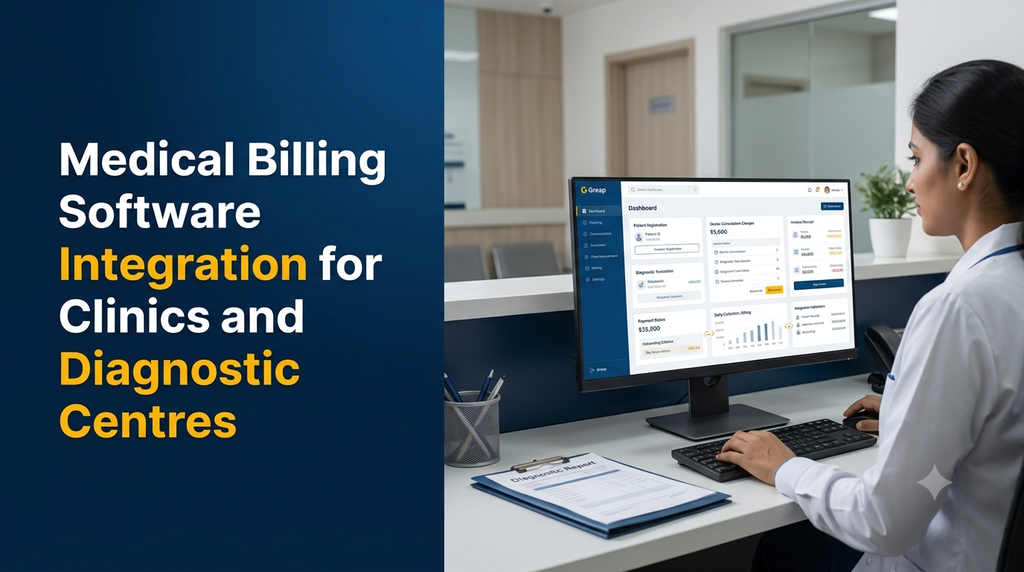
Medical billing software integration connects a clinic’s or diagnostic centre’s billing operations with other business and healthcare systems, such as patient registration, appointment management, doctor consultations, laboratory services, pharmacy billing and accounting. Instead of entering the same information into separate applications, staff can manage connected workflows through a centralised system.
For clinics and diagnostic centres in India, an integrated billing solution can help organise invoices, consultation fees, diagnostic charges, payment receipts, outstanding balances and financial reports. The right integration depends on the organisation’s services, existing software, payment methods and accounting requirements.
Why Do Clinics and Diagnostic Centres Need Integrated Billing Software?
Many healthcare businesses initially manage billing using spreadsheets, standalone applications or manual registers. These methods may work for a small operation, but become harder to manage when the number of patients, doctors, services and transactions increases.
A clinic may need to bill consultations, procedures, medicines and follow-up visits. A diagnostic centre may handle multiple laboratory tests, imaging services, sample collection charges and corporate customer invoices. When these activities operate independently, staff may need to enter the same patient or transaction details repeatedly.
An integrated billing system can help organisations:
- Generate invoices using existing patient and service information.
- Connect consultation and diagnostic service charges to billing.
- Record cash, card, UPI and other supported payment methods.
- Track partial payments and outstanding balances.
- Maintain a searchable history of invoices and receipts.
- Reduce duplicate data entry between departments.
- Prepare daily collection and service-wise financial reports.
- Connect billing records with supported accounting systems.
What Is Medical Billing Software Integration?
Medical billing software integration is the process of connecting a billing application with other software modules, databases, devices or external services used by a healthcare organisation.
For example, when a patient completes registration at a clinic, the billing application can retrieve the patient’s existing details. When a doctor adds a consultation or procedure charge, that service can be included in the patient’s bill. Once payment is recorded, the system can generate a receipt and update the transaction history.
In a diagnostic centre, a test order from the laboratory workflow can be connected to billing. The system can retrieve the configured test price, generate an invoice and record payment status without requiring staff to recreate the order manually.
Types of Healthcare Businesses That Can Benefit
1. General and Specialist Clinics
General clinics, dental clinics, eye clinics, paediatric centres and specialist practices can connect consultation scheduling, patient records, treatment charges and payment collection.
2. Diagnostic Centres and Pathology Laboratories
Diagnostic centres can connect test catalogues, patient registrations, laboratory orders, sample collection workflows and billing. This is especially useful when a centre offers individual tests as well as predefined test packages.
3. Multispeciality Hospitals
Hospitals may need billing across outpatient consultations, inpatient services, procedures, pharmacy, laboratory, radiology and other departments. Integration can help maintain a consistent financial record across these workflows.
4. Multi-Branch Healthcare Businesses
Healthcare organisations operating multiple branches may need centralised price management, branch-wise collections, consolidated reports and controlled access for different locations.
Important Features of Medical Billing Software
1. Patient Registration Integration
The billing module should retrieve relevant patient information from the registration system. This can include patient ID, name, contact details and visit reference, subject to the organisation’s access rules.
Existing patient records should be identifiable so that staff can avoid creating unnecessary duplicate profiles.
2. Doctor Consultation Billing
Clinics can configure consultation charges according to doctor, speciality, appointment type or service category. The billing workflow can retrieve the appropriate charge when a consultation is created or completed.
Possible billing categories include:
- New patient consultation
- Follow-up consultation
- Specialist consultation
- Teleconsultation, where offered
- Minor procedures and additional services
3. Diagnostic Test Billing Integration
Diagnostic centres can connect their billing application with a Laboratory Information System (LIS) or laboratory workflow module. Test orders can be associated with configured prices, invoices and payment records.
Useful capabilities include:
- Test catalogue and configurable service prices
- Individual test and package billing
- Patient-wise test order history
- Sample collection and home collection charges
- Corporate and referring-clinic billing, where applicable
- Invoice references linked to laboratory orders
- Payment status visibility for authorised staff
4. Invoice and Receipt Generation
The software should generate clear invoices and payment receipts containing the organisation’s configured details, invoice number, date, patient or customer reference, service descriptions, quantities, applicable charges, payment details and balance information.
Depending on business requirements, invoices can be printable or shareable through supported communication channels. Access to invoice documents should be restricted appropriately.
5. Multiple Payment Methods
A clinic or diagnostic centre may accept cash, UPI, card payments, bank transfers or payments through an integrated payment gateway.
The billing system can record:
- Payment method and transaction reference
- Amount received and date
- Full or partial payment status
- Remaining balance
- Refund or reversal records, where authorised
- Payment gateway references when applicable
Payment gateway integration should use the provider’s supported APIs and verification process. A payment should not be marked successful only because a browser displays a success message.
6. Discounts, Packages and Configurable Charges
Different healthcare services may have different pricing structures. The software can support configurable service rates, authorised discounts, package pricing and other approved adjustments.
Discount permissions should be assigned by role. The system should retain the original amount, adjustment, reason and approving user in the transaction history.
7. Outstanding Payment Management
When an organisation allows partial or deferred payments, the system should track the invoice amount, amount received, remaining balance and payment history.
Staff with appropriate permissions can view pending balances and follow up according to the organisation’s billing policy.
8. Financial Reports and Dashboards
A useful billing dashboard should provide operational visibility without exposing unnecessary patient information.
- Daily and monthly collection summaries
- Branch-wise revenue reports
- Doctor-wise consultation billing
- Test-wise and department-wise collections
- Payment method summaries
- Outstanding invoice reports
- Refund and adjustment reports
- Invoice and receipt history
Essential Software Integrations
The integration plan should be based on the actual applications used by the healthcare organisation. Not every clinic needs every integration.
| System | Integration purpose |
|---|---|
| Patient Management System | Retrieve patient profiles and visit information for billing. |
| Appointment Management | Connect scheduled consultations with applicable charges. |
| EMR Software | Associate authorised clinical service records with billing references. |
| Laboratory Information System | Connect test orders, test packages and laboratory billing. |
| Pharmacy Management | Connect medicine sales, stock and pharmacy invoices. |
| Payment Gateway | Process supported online payments and verify transaction status. |
| Accounting Software | Transfer appropriate financial entries and support reconciliation. |
| SMS and Email Services | Send configured invoice, receipt and payment notifications. |
| Business Intelligence Dashboard | Analyse authorised financial and operational summaries. |
How an Integrated Medical Billing Workflow Works
Consider a patient visiting a diagnostic centre for multiple laboratory tests. An integrated workflow can connect registration, test selection, billing and payment as follows:
- Patient registration: Staff create a new patient profile or retrieve an existing patient record.
- Service selection: The required tests are selected from the configured test catalogue.
- Price retrieval: The billing module retrieves the applicable service charges.
- Invoice generation: The system creates an invoice with a unique reference number.
- Payment collection: Staff record the payment method and transaction details.
- Order confirmation: The laboratory workflow receives the required billing or payment status according to configured business rules.
- Report processing: Laboratory staff manage the sample and test workflow independently of the financial transaction.
- Receipt and reporting: The system stores the receipt and updates the financial reports.
Example: Diagnostic Centre Billing Structure
A diagnostic centre can configure a service catalogue with individual test charges and predefined packages. The following is a fictional example to illustrate how the software can calculate an invoice.
| Service | Illustrative amount |
|---|---|
| Blood test A | ₹300 |
| Blood test B | ₹450 |
| Sample collection charge | ₹50 |
| Subtotal | ₹800 |
| Authorised discount | ₹50 |
| Illustrative total | ₹750 |
| Amount received | ₹500 |
| Balance due | ₹250 |
The actual tax treatment, applicable exemptions, invoice format and accounting entries must be configured according to the organisation’s services and advice from its qualified tax or accounting professional. The example above is not a tax calculation or a statement that a particular service is taxable.
GST and Accounting Considerations in India
Healthcare billing software used in India should support the organisation’s applicable invoicing and accounting requirements. The tax treatment of healthcare services can depend on the nature of the service, provider and applicable rules.
During development, consider the following:
- Configurable invoice and receipt formats
- Organisation and branch details
- Applicable tax configuration based on professional advice
- Separate treatment of services and other charge categories where required
- Invoice numbering and transaction history
- Credit notes, cancellations and refund records
- Accounting export and reconciliation
- Access-controlled financial reports
Avoid hardcoding a single tax rate for every medical service. The implementation should be reviewed by a qualified accounting or tax professional before production use.
Integration Methods: API, Database and Middleware
The best integration method depends on the existing software, its documentation, data structure and technical capabilities.
API-Based Integration
An API allows two applications to exchange approved information through defined endpoints. For example, a patient management application may provide an API to retrieve patient details, while the billing system sends back an invoice reference or payment status.
API integration is generally preferable when both applications offer supported interfaces and authentication mechanisms.
Database Integration
In some legacy environments, organisations may request direct database connectivity. This approach needs careful assessment because direct writes to another application’s database can bypass its business rules and cause data inconsistencies.
Where database access is necessary, use documented structures, restricted permissions, controlled transactions and a clear data ownership model.
Middleware Integration
Middleware acts as a connection layer between multiple applications. It can transform data formats, validate incoming records, manage retries and maintain integration logs.
This approach can be useful when a healthcare business operates several systems that need to exchange information in a consistent way.
Webhook-Based Updates
Where supported, webhooks can notify another application when an event occurs, such as an invoice being created or an online payment being confirmed. The receiving application should still verify the event and process it safely.
Security and Patient Data Protection
Medical billing applications may contain personal information, payment records and references to healthcare services. Security must therefore be included in the software architecture and integration process from the beginning.
Important Security Measures
- Role-based access: Give reception staff, doctors, accountants, administrators and branch managers only the access they need.
- Secure authentication: Use strong authentication and appropriate session controls.
- Encryption: Protect data in transit and apply suitable safeguards to stored sensitive information.
- Audit logs: Record important actions such as invoice changes, discounts, refunds and permission updates.
- Payment security: Use established payment providers and avoid storing sensitive card authentication data unnecessarily.
- Backup and recovery: Maintain tested backups and a documented recovery process.
- API protection: Use authentication, permission checks, input validation, rate limits and secure secrets management.
- Data minimisation: Share only the information needed by each connected application.
Healthcare businesses should assess applicable Indian data protection requirements, including the Digital Personal Data Protection Act and relevant rules, as their provisions and commencement dates apply. The organisation should obtain appropriate legal and compliance advice rather than assuming that installing billing software automatically makes it compliant.
Custom Medical Billing Software vs Ready-Made Software
| Consideration | Ready-made software | Custom-developed software |
|---|---|---|
| Initial setup | Often quicker when existing features meet requirements. | Requires requirement analysis and development. |
| Workflow flexibility | Limited to available configuration. | Can be designed around the organisation’s workflow. |
| Existing system integration | Depends on vendor-supported integrations. | Can be planned around accessible APIs and systems. |
| Interface and reports | Usually follow the vendor’s interface and reports. | Can be tailored to user roles and reporting needs. |
| Maintenance | Depends on the software provider. | Requires a defined development and support arrangement. |
| Ownership and control | Governed by the vendor’s licence and terms. | Depends on the development agreement and source-code terms. |
A small clinic with straightforward billing requirements may find a ready-made application sufficient. A diagnostic centre with multiple branches, specialised packages, existing laboratory software and custom reporting requirements may benefit from a tailored integration solution.
Medical Billing Software Development Cost in India
The cost of medical billing software integration depends on the number of modules, complexity of existing applications, availability of APIs, number of branches, payment gateway requirements, reports and security controls.
The following figures are illustrative planning estimates for custom development, not fixed Greap quotations or guaranteed market prices.
| Development scope | Illustrative estimate |
|---|---|
| Basic clinic billing with invoices and receipts | ₹25,000–₹45,000 |
| Patient registration and consultation billing integration | ₹40,000–₹70,000 |
| Diagnostic test catalogue and billing integration | ₹50,000–₹90,000 |
| Billing with payments, outstanding balances and reports | ₹65,000–₹1.2 lakh |
| Clinic or diagnostic centre billing with multiple modules | ₹90,000–₹1.8 lakh |
| Multi-branch billing with external software integrations | ₹1.5–₹3.5 lakh+ |
| Advanced healthcare billing platform with mobile applications | ₹2.5–₹5 lakh+ |
These estimates assume a defined project scope and should not be treated as a substitute for a technical assessment. Additional expenses may include:
- Domain, cloud hosting and server resources
- Database and document storage
- Existing software vendor API or integration fees
- Payment gateway charges
- SMS, email and WhatsApp service charges
- Data migration and data cleaning
- Hardware, printers and other device integrations
- Security assessment and third-party licences
- Taxes, ongoing maintenance and technical support
How to Choose a Medical Billing Software Development Company
Choosing a development partner requires more than comparing the initial project price. The company should understand healthcare workflows, billing rules, integration dependencies and the importance of protecting patient information.
Before selecting a software development company, review these points:
- Can the team understand your clinic or diagnostic centre’s existing billing process?
- Can it assess the APIs and integration options of your current applications?
- Will invoices, payments and refunds have traceable transaction histories?
- Can access permissions be configured for different staff roles?
- Will the application support branch-wise reporting if required?
- Are backups, testing and recovery procedures included in the project plan?
- Will you receive documentation and a clear maintenance arrangement?
- Are data ownership, source-code rights and third-party dependencies documented?
Medical Billing Software Integration for Clinics in Erode and Tamil Nadu
Clinics and diagnostic centres in Erode and other parts of Tamil Nadu may operate with different combinations of patient management applications, laboratory systems, accounting tools and payment services.
A practical software solution should reflect the actual workflow of the organisation. A standalone clinic may need consultation billing and receipt management, while a diagnostic centre may require test-wise billing, package pricing, sample collection charges and laboratory integration.
Healthcare businesses in Erode, Perundurai, Bhavani, Gobichettipalayam, Sathyamangalam and nearby locations can consider a custom web-based billing application or an integration layer that connects their existing systems.
The first step should be documenting the current patient journey, service catalogue, payment methods, invoice requirements and software connections. This helps define a realistic development scope before implementation begins.
Frequently Asked Questions
1. What is medical billing software integration?
Medical billing software integration connects billing with systems such as patient registration, appointment management, EMR, laboratory software, pharmacy applications, payment gateways and accounting tools. It allows approved information to move between connected workflows.
2. Can billing software be integrated with an existing clinic management system?
Yes, if the existing system provides suitable APIs, supported database access or another reliable integration method. A technical assessment is necessary to confirm compatibility and data access.
3. Can diagnostic centre billing be connected with laboratory software?
Yes. A billing application can connect with a Laboratory Information System to associate test orders, configured prices, invoices and payment status. The exact integration depends on the laboratory software’s technical capabilities.
4. Can the system generate invoices automatically?
It can generate invoices using configured patient, service and price information. Automatic invoice creation should follow defined business rules and include appropriate validation and staff permissions.
5. Can medical billing software support UPI and online payments?
Yes. The application can integrate with a compatible payment gateway that supports the required payment methods. Transaction verification, failure handling, refunds and reconciliation should be included in the integration design.
6. Can a clinic manage consultation fees and procedure charges?
Yes. The system can maintain configurable consultation, follow-up, procedure and other service charges. Authorised staff can manage price changes according to the clinic’s policies.
7. Can the software handle partial payments?
Yes. A billing application can record the invoice total, amount received, payment history and remaining balance. It can also provide reports for pending invoices.
8. Can multiple clinic branches use one billing system?
Yes. A centralised application can support multiple branches with separate user access, branch-wise invoices, configurable service prices and consolidated reports.
9. Can medical billing software integrate with accounting software?
Yes, where the accounting application provides a supported API, import format or other integration method. The connection can transfer relevant invoice, payment, refund and financial information.
10. Is medical billing software the same as hospital management software?
No. Medical billing software focuses on invoices, charges, payments and financial records. A hospital management system generally covers a wider range of activities, such as patient registration, appointments, departments, admissions, clinical workflows and billing.
11. How much does medical billing software development cost in India?
A basic custom billing application may have an illustrative development budget of ₹25,000–₹45,000. More advanced systems with diagnostic integration, payments, reporting and multiple branches can require a larger budget depending on the project scope.
12. How long does it take to develop a medical billing application?
A basic application may take a few weeks, while a system involving multiple integrations, branch management, advanced reporting and data migration may take several months. The timeline depends on requirements, access to existing software and testing needs.
13. Can a medical billing application work on mobile devices?
Yes. A responsive web application can be accessed through supported mobile browsers. A dedicated Android or iOS application can also be developed if the organisation needs mobile-specific features.
14. What security features should medical billing software have?
Important safeguards include role-based permissions, secure authentication, encryption, audit logs, protected APIs, backups, controlled document access and secure payment processing. Organisations should also assess their applicable data protection obligations.
15. Can Greap Technologies develop custom medical billing software?
Greap Technologies provides website and custom software development services. Clinics and diagnostic centres can discuss requirements for patient billing, invoice management, diagnostic integration, payment workflows, reporting and other business-specific modules.
Looking for Medical Billing Software Integration?
A well-planned billing application can connect your clinic or diagnostic centre’s patient records, consultations, laboratory services, invoices and payment workflows.
Greap Technologies helps businesses plan and develop custom website and software solutions based on their operational requirements.
Discuss your medical billing software requirements with Greap Technologies.