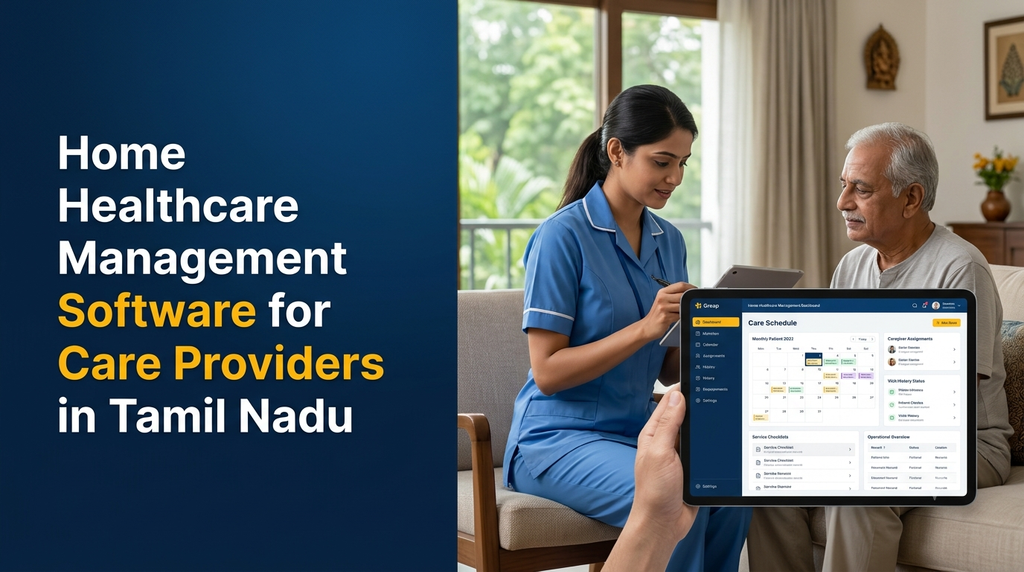
Home healthcare management software is a digital platform that helps care providers organise patient registrations, caregiver schedules, home visits, care plans, service records, billing and staff operations. It connects office administrators, nurses, caregivers, physiotherapists and other authorised team members through a centralised system.
For home healthcare agencies in Tamil Nadu, managing multiple patients across different locations can involve several daily activities. Staff need to coordinate visit timings, assign available caregivers, record completed services, manage follow-ups and communicate important updates. A well-designed software solution can bring these activities into one organised workflow.
What Is Home Healthcare Management Software?
Home healthcare management software is designed for organisations that deliver healthcare or care-related services at a patient’s residence rather than exclusively at a hospital or clinic.
The application helps administrators manage patients and staff, schedule home visits, allocate caregivers according to availability and service requirements, and maintain visit records.
Depending on the organisation, the platform may support nursing visits, physiotherapy appointments, post-hospital care coordination, elderly care services, wound-care visits and other approved home-based services.
A complete platform can include an administration dashboard, a caregiver mobile application, a patient or family portal and reporting tools.
Why Do Home Healthcare Providers Need Management Software?
Home healthcare operations are different from managing a single clinic. Employees may travel between multiple patient locations, work different shifts and provide services according to individual care plans.
When scheduling and visit records are managed through separate spreadsheets, messaging groups or paper registers, administrators may find it difficult to maintain a consistent view of operations.
A centralised software platform can help providers:
- Maintain organised patient and family contact records.
- Manage caregiver profiles, availability and assigned services.
- Schedule daily, weekly and recurring home visits.
- Reduce scheduling conflicts and missed assignments.
- Record visit completion and service notes.
- Track attendance and staff work schedules.
- Manage service packages, invoices and payment records.
- Coordinate follow-up visits and care plan updates.
- Review branch-wise and organisation-wide reports.
Types of Home Healthcare Services That Can Use the Software
1. Home Nursing Services
Home nursing agencies can use the platform to manage nurse profiles, patient assignments, visit schedules, nursing service records and follow-up requirements.
2. Elderly Care Services
Elderly care providers can organise recurring care visits, assigned caregivers, service checklists and family communication. Access to sensitive patient information should be limited to authorised users.
3. Home Physiotherapy Services
Physiotherapy providers can schedule sessions, allocate therapists, record visit attendance and maintain authorised treatment progress notes.
4. Post-Hospital Care Coordination
Agencies offering post-discharge support can organise home visits, follow-up schedules, assigned staff and service documentation based on the care instructions provided by the responsible healthcare professionals.
5. Home Medical Support Services
Organisations coordinating approved home-based medical support services can use scheduling, staff allocation, equipment records and service management modules according to their operating model.
Essential Features of Home Healthcare Management Software
1. Patient Registration and Management
The patient management module stores the information required to organise home healthcare services.
Depending on access permissions and business requirements, patient records may include:
- Patient name and unique identification number
- Contact details and address
- Emergency contact information
- Family or authorised representative details
- Service requirements and selected care package
- Visit history and follow-up schedule
- Relevant documents and authorised care instructions
The system should support controlled access to patient information and avoid collecting unnecessary personal details.
2. Caregiver and Nurse Management
Staff management helps administrators maintain caregiver and nurse profiles and organise available resources.
Useful fields and capabilities include:
- Staff profile and contact details
- Professional qualifications and verified credentials, where applicable
- Experience and service categories
- Availability and working shifts
- Assigned patients and visit schedules
- Leave and attendance records
- Service-area preferences
- Staff activity and assignment history
The organisation should verify professional qualifications and authorisations independently. A software profile alone does not establish a person’s clinical competence or eligibility to provide a regulated service.
3. Home Visit Scheduling
Scheduling is one of the most important features of home healthcare management software. Administrators need to assign the right staff member to the right visit while considering timing, availability, service type and location.
Scheduling features can include:
- Daily, weekly and monthly calendars
- One-time and recurring appointments
- Caregiver assignment and reassignment
- Shift and availability management
- Appointment confirmation
- Rescheduling and cancellation records
- Visit reminders
- Conflict detection and assignment alerts
4. Care Plan and Service Management
A care plan module helps authorised staff view the approved service instructions relevant to an assigned visit.
Depending on the provider’s services, it may support:
- Service category and care package
- Visit frequency and duration
- Assigned healthcare professional
- Approved service checklist
- Follow-up requirements
- Care plan review history
- Authorised visit notes
Clinical decisions and treatment changes must remain under the responsibility of appropriately qualified healthcare professionals. Administrative software should not independently prescribe treatment or replace clinical judgement.
5. Mobile Application for Caregivers
Caregivers and nurses often work away from the agency office. A mobile application can give them access to their assigned visits and relevant operational information.
Possible mobile app features include:
- Secure staff login
- Today’s assigned visit list
- Patient visit information based on permissions
- Appointment timing and location details
- Visit check-in and check-out
- Service checklist and visit notes
- Schedule change notifications
- Leave requests and availability updates
- Visit history and assigned tasks
Location access should be transparent, limited to a clearly defined operational purpose and governed by appropriate consent and organisational policies. Continuous location monitoring should not be assumed to be necessary.
6. Visit Tracking and Attendance Management
The system can maintain a structured record of scheduled and completed home visits.
Each visit record may include:
- Patient and assigned staff reference
- Scheduled visit date and time
- Actual check-in and check-out times
- Visit status
- Service checklist completion
- Authorised visit notes
- Rescheduling or cancellation reason
This makes it easier for administrators to identify pending visits, review attendance and maintain operational records.
7. Family and Patient Communication
A patient or family portal can provide access to approved information without requiring every enquiry to be handled manually by the office.
Depending on the service model, it may offer:
- Upcoming visit schedules
- Assigned caregiver details
- Appointment requests
- Service package information
- Invoice and payment history
- Approved visit summaries
- Contact and support requests
Sensitive clinical notes should not automatically be made visible to every family account. The organisation must define appropriate patient permissions and access arrangements.
8. Billing and Payment Management
Home healthcare providers may charge per visit, per hour, per day or through a predefined service package. Billing software can connect service records with invoices and payment transactions.
Useful billing features include:
- Service-wise pricing
- Hourly, daily and visit-based billing
- Recurring service packages
- Invoice and receipt generation
- Partial payments and outstanding balances
- Discount and adjustment records
- Payment method tracking
- Refund and cancellation records
- Monthly customer statements
9. Notifications and Reminders
Automated notifications can help keep patients, families and employees informed about important operational events.
- Upcoming home visit reminders
- Caregiver assignment notifications
- Schedule changes and cancellations
- Pending service confirmations
- Invoice and payment notifications
- Follow-up appointment reminders
SMS, email and WhatsApp notifications can be connected through suitable third-party providers. Messages should avoid exposing unnecessary medical or sensitive personal information.
10. Admin Dashboard and Reports
A central administration dashboard helps managers understand the agency’s daily operations.
Useful reports include:
- Total registered patients
- Today’s scheduled and completed visits
- Pending and cancelled visits
- Caregiver availability
- Staff attendance summary
- Service-wise booking reports
- Branch-wise operations
- Monthly billing and collections
- Outstanding payment summary
Important Modules in a Home Healthcare Platform
| Module | Main purpose |
|---|---|
| Super Admin | Manage the overall platform, branches, users and system settings. |
| Patient Management | Maintain patient profiles, contacts and service records. |
| Staff Management | Manage caregivers, nurses, therapists and availability. |
| Visit Scheduling | Create appointments, assign staff and manage recurring visits. |
| Care Plan Management | Maintain authorised care instructions and service checklists. |
| Caregiver Mobile App | Access assignments, visit information and operational tasks. |
| Patient and Family Portal | View approved schedules, service information and invoices. |
| Billing and Payments | Manage service charges, invoices, receipts and payment status. |
| Notifications | Send appointment and operational updates. |
| Reports and Analytics | Review visits, staff activity and financial performance. |
How Home Healthcare Management Software Works
A typical home healthcare service workflow can be organised into the following stages:
- Patient enquiry: The agency receives a request from a patient or authorised family representative.
- Registration: Staff create the patient profile and record the requested service.
- Service assessment: The provider follows its established process to determine the appropriate service and staffing requirements.
- Caregiver allocation: An authorised administrator assigns a suitable available staff member.
- Visit scheduling: The system records the appointment and sends configured notifications.
- Home visit: The assigned professional accesses the visit details and records completion according to the organisation’s process.
- Visit documentation: Relevant service records and authorised notes are saved.
- Billing: The system prepares the applicable invoice based on the configured pricing model.
- Follow-up: The administrator schedules future visits or other approved service activities.
Web Application, Mobile App and Patient Portal
Home healthcare software can be divided into separate interfaces for different users. This helps each person access only the functions required for their role.
Admin Web Application
- Patient and caregiver management
- Staff availability and scheduling
- Visit allocation and monitoring
- Care plan and service management
- Invoices, payments and reports
- Branch and permission management
Caregiver or Nurse Mobile Application
- Secure login and profile
- Daily schedule and visit list
- Assigned patient details
- Visit status and check-in/out
- Service checklist and authorised notes
- Notifications and schedule updates
Patient or Family Portal
- Service enquiry and appointment requests
- Upcoming visit schedule
- Approved service information
- Invoices and payment history
- Support and communication requests
Advanced Features for Growing Home Healthcare Agencies
1. Multi-Branch Management
Agencies operating in several towns or districts can manage branches through a central platform. Each branch can have its own staff, service areas, visit schedules and financial reports.
2. Intelligent Staff Scheduling
Scheduling assistance can consider caregiver availability, service category, working hours and visit location. Automated recommendations should be reviewed by an authorised administrator before assignments are confirmed.
3. Service Area and Route Planning
Map-based planning can help administrators view patient locations and organise visits across a service area. Route suggestions depend on mapping service availability, location accuracy and travel conditions.
4. Recurring Visit Management
Recurring scheduling can create a series of appointments based on approved service frequency. The application should support exceptions such as staff leave, rescheduling and patient-requested changes.
5. Equipment and Service Resource Management
Some home healthcare providers coordinate equipment or other service resources. An additional module can maintain equipment allocation, delivery status, maintenance records and returns where relevant.
6. Multi-Tenant Healthcare Platform
A software company serving multiple home healthcare agencies may build a multi-tenant SaaS platform. Each agency can have separate user accounts, operational records, settings and billing arrangements.
Security and Patient Data Protection
Home healthcare software can contain sensitive patient details, visit information, contact data and service records. Protecting this information should be a core part of the software design.
Important safeguards include:
- Role-based access control: Restrict access according to staff responsibilities.
- Secure authentication: Use strong login controls and appropriate session management.
- Encryption: Protect data transmitted between applications and appropriately secure stored information.
- Audit logs: Record important access and modification events.
- Data minimisation: Collect and share only the information necessary for each task.
- Secure mobile access: Protect patient details on staff devices and define procedures for lost devices.
- Backup and recovery: Maintain regular backups and test restoration procedures.
- Secure integrations: Protect APIs and external connections with authentication and permission checks.
Healthcare organisations should assess their obligations under applicable Indian data protection laws and rules, professional requirements and contractual arrangements. A software application does not automatically establish legal or clinical compliance.
Technology Stack for Home Healthcare Software Development
The technology stack should be selected based on the number of users, expected data volume, mobile requirements, integration needs and future expansion.
| Technology area | Possible options |
|---|---|
| Web frontend | React, Next.js or modern JavaScript frameworks |
| Backend | Laravel, Node.js or other suitable backend frameworks |
| Database | PostgreSQL or MySQL |
| Mobile application | Flutter or native Android and iOS development |
| Cloud hosting | Suitable managed cloud or VPS infrastructure |
| Notifications | SMS, email and approved messaging service integrations |
| Maps and location | Compatible mapping and location APIs |
| Reporting | Custom dashboards and reporting tools |
The final stack should be selected after assessing technical requirements rather than choosing technologies only because they are popular.
Home Healthcare Management Software Development Cost in India
Development cost depends on the number of modules, user roles, mobile applications, scheduling complexity, integrations, reporting requirements and security architecture.
The following figures are illustrative planning estimates for custom development. They are not fixed Greap quotations or guaranteed market prices.
| Development scope | Illustrative estimate |
|---|---|
| Basic patient and caregiver management | ₹30,000–₹50,000 |
| Patient management with visit scheduling | ₹45,000–₹80,000 |
| Scheduling, staff management and visit records | ₹60,000–₹1.1 lakh |
| Complete admin platform with billing and reports | ₹85,000–₹1.5 lakh |
| Admin platform with caregiver mobile application | ₹1.2–₹2.5 lakh+ |
| Patient portal, mobile apps and integrations | ₹2–₹4 lakh+ |
| Advanced multi-branch or multi-tenant platform | ₹3.5–₹7 lakh+ |
Additional costs may include:
- Domain registration and cloud hosting
- Database and document storage
- Android and iOS app publishing requirements
- SMS, email and messaging provider charges
- Maps and location API usage
- Payment gateway fees
- Third-party integrations and licences
- Data migration, testing and security assessment
- Taxes, maintenance and ongoing technical support
How to Choose a Home Healthcare Software Development Company
Selecting a development partner is an important decision because the application will support daily patient service coordination and staff operations.
Evaluate a software development company using the following considerations:
- Experience in developing workflow-based business applications
- Understanding of patient and caregiver management requirements
- Ability to develop responsive web and mobile applications
- Support for recurring visits and staff scheduling
- Role-based access and audit logging
- Secure handling of patient and service records
- Integration planning and documentation
- Testing, backup and maintenance arrangements
- Clear ownership and source-code terms
- Transparent project scope and development milestones
Home Healthcare Software for Providers in Erode and Tamil Nadu
Home healthcare providers in Tamil Nadu may coordinate services across different towns, residential areas and semi-urban locations. As an agency expands, managing caregivers, visit schedules and service records through disconnected tools can become difficult.
A custom platform can be planned around the provider’s actual service model. For example, a home nursing agency may prioritise nurse scheduling and visit records, while a physiotherapy provider may need recurring session management and therapist allocation.
Providers serving Erode, Perundurai, Bhavani, Gobichettipalayam, Sathyamangalam, Anthiyur and nearby locations can consider centralised scheduling with branch-wise or service-area management.
The software should also account for practical operating conditions, such as staff availability, travel time, internet connectivity and the need for mobile-friendly visit records.
Frequently Asked Questions
1. What is home healthcare management software?
It is a software platform that helps home healthcare agencies manage patient records, caregiver assignments, home visit schedules, care plans, service records, billing and operational reports.
2. Who can use home healthcare management software?
Home nursing agencies, elderly care providers, home physiotherapy services, post-hospital care coordinators and other organisations providing approved home-based care services can use it.
3. Can the software manage nurses and caregivers?
Yes. It can maintain staff profiles, qualifications, availability, shifts, assignments, attendance and visit history, with access controlled according to staff roles.
4. Can home healthcare software schedule recurring visits?
Yes. The system can create recurring appointments based on configured service schedules and support rescheduling, cancellations and staff reassignment.
5. Is a mobile app necessary for caregivers?
A mobile app is useful for caregivers who work at different patient locations. It can provide assigned visit details, schedule updates, check-in and check-out, service checklists and authorised visit notes.
6. Can families view patient visit schedules?
Yes. A patient or family portal can display approved appointment schedules, service information, invoices and other permitted details. Access to sensitive records should follow defined permissions.
7. Can the software track caregiver attendance?
Yes. It can record scheduled visits, check-in and check-out times, attendance status and visit completion. Any location-based feature should have a clearly defined purpose and suitable privacy controls.
8. Can home healthcare software manage billing?
Yes. It can support visit-based, hourly, daily or package-based charges, along with invoices, receipts, payment history and outstanding balances.
9. Can the platform support multiple branches?
Yes. A multi-branch platform can manage separate staff, patients, service areas, appointments and financial reports while providing centralised administration.
10. Can the software send appointment reminders?
Yes. It can connect with supported SMS, email or messaging services to send visit reminders, schedule changes, payment notifications and other approved updates.
11. Can the software work without an internet connection?
Offline support can be developed for selected mobile workflows. The application needs a secure local data strategy and reliable synchronisation rules when connectivity returns. Not every feature will necessarily be available offline.
12. How much does home healthcare software cost in India?
A basic custom platform may have an illustrative development budget of ₹30,000–₹50,000. Systems with mobile apps, billing, advanced scheduling, family portals and integrations may cost considerably more depending on scope.
13. How long does it take to develop the software?
A basic system may take several weeks. A complete platform with mobile applications, multi-branch management and external integrations may require several months. The timeline depends on requirements and testing.
14. Is home healthcare management software the same as hospital management software?
No. Hospital management software generally supports hospital-based operations such as admissions, departments and inpatient workflows. Home healthcare software focuses on care delivery coordination at patients’ residences, including caregiver scheduling and home visits.
15. Can Greap Technologies develop custom home healthcare software?
Greap Technologies provides custom website and software development services. Home healthcare providers can discuss requirements for patient management, caregiver scheduling, visit tracking, billing, mobile applications and administrative dashboards.
Planning Home Healthcare Management Software?
Build a connected platform to manage patients, caregivers, home visits, service schedules and billing through organised digital workflows.
Greap Technologies helps businesses plan and develop custom software solutions based on their operational requirements.
Discuss your home healthcare software requirements with Greap Technologies.