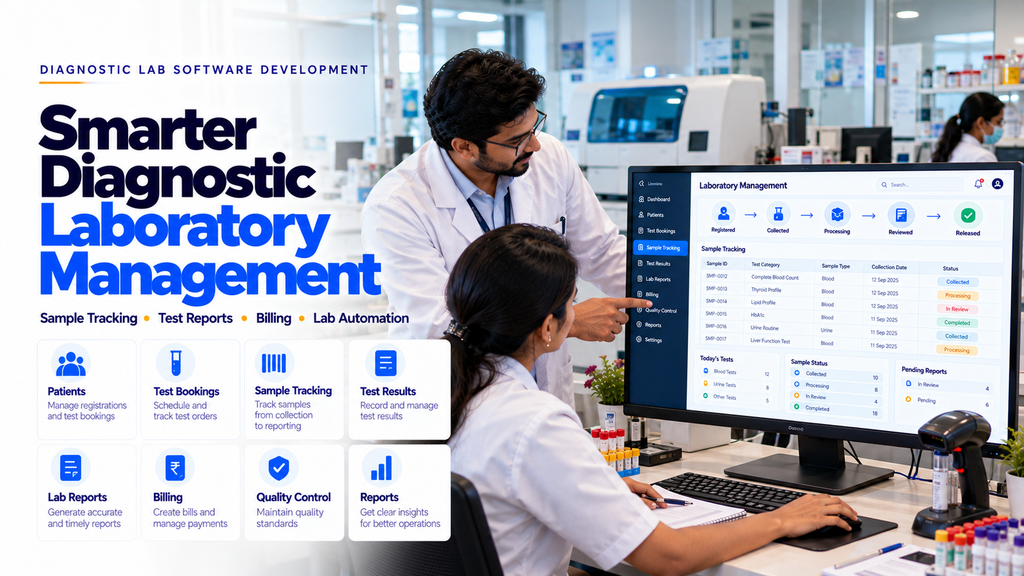
Diagnostic Laboratory Management Software Development in Erode
Running a diagnostic laboratory involves much more than collecting samples and preparing test reports. Laboratory owners, technicians and administrative employees need to coordinate patient registration, test bookings, sample collection, processing, result verification, report delivery, billing and daily operational records.
When these activities are managed through notebooks, spreadsheets or disconnected applications, employees may spend additional time locating sample records, checking test status and preparing reports.
For example, a patient visiting a diagnostic centre in Erode may book several laboratory tests. The centre needs to register the patient, assign sample identifiers, record collection details, track processing and release an authorized report after appropriate review.
A well-designed diagnostic laboratory management software system in Erode can help organize these activities into one structured digital platform.
Custom diagnostic software may include laboratory information management, patient registration, test catalogues, sample tracking, barcode labels, result entry, report generation, billing, quality control and management dashboards.
This guide explains the main features, development process, security considerations, implementation requirements and cost factors involved in building diagnostic laboratory management software.
What Is Diagnostic Laboratory Management Software?
Diagnostic laboratory management software is a digital application designed to support the administrative and laboratory information workflows of diagnostic testing centres.
Depending on the laboratory’s requirements, the system may manage:
- Patient registration
- Test bookings
- Test catalogues
- Sample collection records
- Sample identification
- Barcode tracking
- Laboratory processing status
- Test result entry
- Authorized result verification
- Report generation
- Billing and payments
- Quality control records
- Laboratory reports and analytics
Clinical interpretation, result validation and diagnostic decisions must remain under the responsibility of appropriately qualified laboratory and medical professionals.
What Is LIMS Software?
LIMS stands for Laboratory Information Management System.
A LIMS helps laboratories organize samples, testing workflows, associated records and laboratory information.
Depending on the system design, LIMS functionality may include:
- Sample identification
- Sample lifecycle tracking
- Test assignment
- Processing records
- Result management
- Quality control
- Audit trails
- Laboratory reporting
Clinical laboratories may also use Laboratory Information Systems (LIS), which commonly focus on patient-linked clinical laboratory testing and reporting workflows.
The terms LIMS and LIS are sometimes used differently across organizations and software providers. The required features matter more than the product label.
Why Diagnostic Laboratories in Erode Need Management Software
Diagnostic centres may handle different test categories, sample types, collection locations, laboratory instruments and reporting requirements.
Common operational challenges include:
- Manual patient registration
- Difficulty locating test bookings
- Sample identification errors
- Unclear sample processing status
- Manual result transcription
- Delays in report preparation
- Disconnected billing records
- Limited visibility into pending reports
- Difficulty coordinating collection centres
- Time-consuming operational reporting
Suitable laboratory software can help organize these activities when the system is designed around validated laboratory workflows.
1. Diagnostic Patient Registration
Patient registration is one of the foundation modules of laboratory management software.
Potential features include:
- Unique patient identification
- Patient name
- Contact information
- Relevant demographic information
- Referring practitioner details where applicable
- Test booking history
- Report history
- Communication preferences
Only information necessary for legitimate laboratory and administrative purposes should be collected.
2. Laboratory Test Catalogue Management
Diagnostic laboratories may offer different categories of tests.
A test catalogue module may include:
- Test name
- Test code
- Test category
- Specimen requirements
- Preparation instructions approved by the laboratory
- Expected processing time
- Price
- Reporting format
Test descriptions, specimen requirements and clinical reference information should be validated by qualified laboratory professionals.
3. Diagnostic Test Booking Management
Test booking software can help reception staff organize patient requests.
Possible features include:
- Patient selection
- Test selection
- Test package selection
- Booking date
- Collection location
- Booking confirmation
- Booking status
4. Online Diagnostic Test Booking
Diagnostic centres may allow patients to request appointments through their websites.
Potential features include:
- Available test listings
- Test package information
- Appointment requests
- Collection centre selection
- Booking confirmation
- Administrative notifications
Online booking forms should use secure data handling and avoid collecting unnecessary medical information.
5. Home Sample Collection Management
Some diagnostic laboratories provide home sample collection services.
Software may help organize:
- Collection requests
- Appointment scheduling
- Authorized collector assignment
- Collection status
- Specimen handover records
- Transport tracking
Sample collection and handling must follow applicable professional, safety and transport requirements.
6. Laboratory Sample Registration
Each laboratory sample should be linked to the correct authorized test request and patient record.
Sample registration may include:
- Unique sample identifier
- Associated test order
- Specimen type
- Collection date and time
- Collection location
- Collector identification
- Receipt status
Identification and acceptance procedures should be defined by qualified laboratory personnel.
7. Barcode-Based Sample Tracking
Barcode systems can help laboratories identify samples during different processing stages.
Potential features include:
- Unique barcode generation
- Barcode label printing
- Sample scanning
- Collection confirmation
- Sample receipt
- Processing status updates
- Audit records
Barcode workflows should be tested with actual laboratory equipment and sample handling procedures.
8. Sample Collection Workflow Management
Sample collection workflows may require several documented steps.
Possible features include:
- Collection request
- Patient identity verification status
- Sample identification
- Collection confirmation
- Specimen handover
- Laboratory receipt
The software should support laboratory procedures rather than replace professional specimen collection protocols.
9. Sample Processing Status Tracking
Laboratory staff may need to identify where a sample is within the testing workflow.
Possible statuses include:
- Registered
- Collection Pending
- Collected
- Received
- Processing
- Result Entry Pending
- Review Pending
- Verified
- Report Released
Status changes should reflect actual authorized workflow events.
10. Sample Rejection and Recollection Management
Some samples may not meet the laboratory’s acceptance criteria.
Software may support:
- Sample rejection records
- Documented rejection reasons
- Authorized review
- Recollection requests
- Updated sample identification
- Audit history
Sample rejection criteria must be defined and applied by qualified laboratory professionals.
11. Laboratory Test Result Entry
Laboratory software may provide structured result entry forms for authorized personnel.
Possible features include:
- Test parameter fields
- Result entry
- Measurement units
- Approved reference intervals
- Result comments
- Result status
- Entry history
Reference intervals and clinical result rules should be established and validated by qualified laboratory professionals.
12. Laboratory Result Verification
Result verification is an important stage before report release.
Potential software features include:
- Review queues
- Authorized reviewer assignment
- Result verification status
- Correction records
- Verification timestamps
- Audit logs
Software should not automatically substitute for required professional result review.
13. Diagnostic Lab Report Generation
Report generation software can help laboratories prepare consistent documents using verified results.
Possible features include:
- Approved report templates
- Patient and test identification
- Verified test results
- Units and validated reference intervals
- Authorized signatory information
- Report versioning
- PDF generation
- Report release records
Reports should be released only after required verification and authorization steps are completed.
14. Laboratory Report Templates
Different test categories may require different reporting formats.
A report template module may support:
- Test-specific layouts
- Parameter tables
- Units
- Approved reference information
- Authorized remarks
- Laboratory identification
- Report status
Templates should be reviewed by qualified laboratory professionals before use.
15. Diagnostic Report PDF Management
Laboratories may need to generate and securely store report documents.
Potential features include:
- PDF report generation
- Secure document storage
- Version tracking
- Authorized download
- Report access logs
- Corrected report handling
Reports should not be publicly accessible through predictable or unsecured URLs.
16. Laboratory Quality Control Management
Laboratories may need to document quality control activities according to their procedures.
Possible software features include:
- Quality control records
- Control material information
- Instrument association
- Review status
- Corrective action records
- Audit history
Quality control requirements should be defined and validated by qualified laboratory professionals.
17. Laboratory Equipment Management
Diagnostic laboratories may operate different testing instruments.
Equipment management features may include:
- Equipment profiles
- Asset identification
- Maintenance schedules
- Calibration records
- Service history
- Equipment availability
Software records should support, not replace, the laboratory’s approved equipment maintenance and quality procedures.
18. Laboratory Analyzer Integration
Some diagnostic instruments may support electronic data exchange with laboratory software.
Potential integration features include:
- Instrument connectivity
- Supported data format mapping
- Result import
- Sample identifier matching
- Validation checks
- Integration error logs
Integration feasibility depends on the instrument model, supported communication standards, vendor documentation and laboratory validation requirements.
19. Diagnostic Laboratory Billing Software
Diagnostic centres may need to prepare invoices for individual tests and test packages.
Potential features include:
- Test price lists
- Test package billing
- Applicable tax configuration
- Discount controls
- Invoice generation
- Payment records
- Receipts
- Outstanding balance tracking
Tax treatment and invoice formats should be configured according to applicable requirements.
20. Diagnostic Test Package Management
Some diagnostic centres offer predefined groups of laboratory tests.
Software may support:
- Package names
- Included tests
- Package pricing
- Booking records
- Sample requirements
- Report completion status
Test package descriptions should be accurate and should not make unsupported health claims.
21. Diagnostic Centre Payment Management
Billing systems may need to record different payment methods.
Potential features include:
- Cash payment records
- Digital payment records
- Receipts
- Payment status
- Authorized refunds
- Daily payment summaries
22. Referring Doctor Record Management
Diagnostic laboratories may need to record referring practitioner information when relevant to a legitimate test request.
Potential features include:
- Referring practitioner details
- Test request association
- Authorized report communication
- Referral history
Referral arrangements and communications should comply with applicable professional, privacy and ethical requirements.
23. Laboratory Reception Dashboard
Reception employees may need a clear overview of administrative activities.
Possible dashboard features include:
- Today’s bookings
- Patient registration
- Pending collections
- Billing status
- Report availability status
- Administrative notifications
Reception access to clinical details should be limited to information required for assigned duties.
24. Laboratory Technician Dashboard
Authorized laboratory personnel may need a workflow dashboard for assigned samples and tests.
Possible features include:
- Assigned samples
- Processing queues
- Sample status
- Result entry tasks
- Quality control records
- Equipment status
25. Laboratory Administrator Dashboard
An administrative dashboard may help laboratory management review operations.
Potential modules include:
- Patient registrations
- Test bookings
- Sample workflow status
- Pending reports
- Billing summaries
- Inventory status
- Staff accounts
- Operational reports
26. Laboratory Staff Roles and Permissions
Diagnostic software may require different access levels for employees.
Possible roles include:
- Laboratory Owner or Administrator
- Reception Employee
- Sample Collection Personnel
- Laboratory Technician
- Authorized Result Reviewer
- Billing Employee
- System Administrator
Permissions should reflect actual qualifications, responsibilities and laboratory policies.
27. Diagnostic Laboratory Inventory Management
Laboratories use reagents, collection supplies and other consumables.
An inventory module may include:
- Item catalogue
- Supplier information
- Stock quantities
- Batch or lot records
- Expiry dates where relevant
- Purchase records
- Low-stock alerts
- Stock adjustments
Inventory software should support appropriate storage, handling and safety procedures.
28. Laboratory Supplier and Purchase Management
Diagnostic centres may need to coordinate purchases from multiple suppliers.
Potential features include:
- Supplier profiles
- Purchase requests
- Purchase orders
- Goods receipt
- Purchase history
- Supplier payment records
29. Multi-Branch Diagnostic Laboratory Management
Diagnostic businesses operating several branches or collection centres may need centralized administration.
Potential features include:
- Branch-specific registrations
- Collection centre management
- Sample transfer records
- Central laboratory processing
- Branch billing
- Branch reports
- Controlled record access
Cross-branch patient information access should follow appropriate authorization and privacy policies.
30. Sample Transport and Chain-of-Custody Records
Samples collected outside the processing laboratory may require documented transfer records.
Possible features include:
- Sample dispatch records
- Collection centre identification
- Transport handover
- Receiving laboratory confirmation
- Transport timestamps
- Exception records
Transport conditions and specimen acceptance requirements should follow validated laboratory procedures.
31. Diagnostic Laboratory Website Integration
Diagnostic centres may connect selected software features with their websites.
Potential integrations include:
- Test catalogue display
- Appointment requests
- Collection centre information
- General enquiry forms
- Secure report access
Public websites should not expose private laboratory records or internal administration interfaces.
32. Secure Patient Report Portal
A patient portal may allow authorized individuals to access released laboratory reports.
Possible features include:
- Secure authentication
- Released report listing
- Authorized PDF downloads
- Report access history
- Account support
Patient identity verification and access controls are essential.
33. Diagnostic Laboratory Notifications
Laboratories may send administrative notifications related to appointments and report availability.
Potential notification channels include:
- SMS
- Authorized WhatsApp Business services
Messages should follow applicable consent, privacy and platform requirements.
Sensitive medical findings should not be unnecessarily disclosed in notifications.
34. Laboratory Reports and Business Analytics
Operational reporting can help laboratory managers review business activity.
Possible reports include:
- Daily test bookings
- Completed tests
- Pending samples
- Pending report reviews
- Report turnaround records
- Billing summaries
- Inventory reports
- Branch activity
Reports should be based on accurate operational records and protected by appropriate permissions.
35. LIMS vs General Hospital Management Software
| Laboratory Management Software | Hospital Management Software |
|---|---|
| Sample identification and tracking | Broader patient and hospital workflows |
| Laboratory test processing | Multi-department clinical operations |
| Result verification and reporting | Wider medical record management |
| Laboratory quality control | General hospital administration |
| Analyzer integration | Multiple hospital system integrations |
The appropriate system depends on the facility’s services, laboratory requirements and existing applications.
36. Ready-Made vs Custom Laboratory Software
| Ready-Made Laboratory Software | Custom Laboratory Software |
|---|---|
| Predefined features | Features based on laboratory requirements |
| May offer faster setup | Requires development and testing |
| Customization depends on vendor | Supports tailored workflows |
| Often subscription-based | May involve development and maintenance costs |
| Instrument support varies | Integrations depend on available interfaces |
Laboratories should compare workflow fit, total cost, security, data portability, instrument compatibility and ongoing support.
37. Diagnostic Laboratory Software Architecture
A custom laboratory management platform may include:
- Responsive web application
- Secure backend
- Patient database
- Test catalogue
- Booking module
- Sample tracking
- Result management
- Report generation
- Billing
- Quality control records
- Role-based permissions
- Audit logging
- Backup and recovery
38. Mobile-Friendly Laboratory Software
Laboratory administrators and authorized employees may need access to selected functions from mobile devices.
Responsive software may support:
- Appointment schedules
- Sample collection status
- Operational task lists
- Report availability status
- Administrative notifications
- Management summaries
Mobile access to patient and laboratory records requires appropriate security controls.
39. Diagnostic Laboratory Software Security
Laboratory software may process sensitive health and personal information.
Important security safeguards include:
- Strong authentication
- Role-based access controls
- Appropriate encryption
- Secure session management
- Input validation
- Audit logging
- Secure file storage
- Backup and recovery
- Access monitoring
- Incident response procedures
Security should be included throughout the software development lifecycle.
40. Patient Data Privacy and Compliance
Diagnostic laboratories should review applicable Indian privacy, clinical laboratory and healthcare recordkeeping requirements before deploying software.
Important considerations include:
- Appropriate notices and consent where required
- Purpose-based data collection
- Minimum necessary access
- Secure record storage
- Authorized report sharing
- Data retention policies
- Patient access procedures where applicable
- Vendor data handling agreements
Applicable obligations depend on the laboratory’s activities, data processing arrangements and current legal requirements.
41. Laboratory Accreditation and Quality Requirements
Laboratories seeking or maintaining relevant accreditation should ensure their software supports the records, traceability and quality processes required by their applicable standards.
Potential considerations include:
- Sample traceability
- Documented result review
- Audit trails
- Quality control records
- Equipment maintenance records
- Controlled report revisions
- Access management
Software does not automatically make a laboratory accredited or compliant. Requirements should be reviewed with qualified quality management and accreditation professionals.
42. Backup and Disaster Recovery
Diagnostic laboratories should plan how patient, sample and reporting records can be recovered after a technical failure.
Potential safeguards include:
- Scheduled backups
- Protected backup storage
- Recovery testing
- Documented restoration procedures
- Access-controlled recovery
Recovery requirements should reflect the laboratory’s operational and recordkeeping needs.
43. Diagnostic Laboratory Software Development Process
- Requirement Analysis: Understand laboratory operations.
- Professional Workflow Review: Validate laboratory processes with qualified professionals.
- Module Planning: Define patient, test, sample, result, billing and reporting modules.
- UI/UX Design: Design reception, technician, reviewer and admin interfaces.
- Database Design: Structure patient, test, sample and result records.
- Backend Development: Implement secure application logic.
- Frontend Development: Build responsive interfaces.
- Integration: Connect supported laboratory instruments and approved services.
- Security Testing: Verify access controls and data protection.
- Functional Testing: Test realistic laboratory workflows.
- Professional Validation: Validate clinical and reporting workflows.
- Deployment: Release the application.
- Training: Train authorized laboratory employees.
- Maintenance: Monitor and improve the system.
44. Recommended Diagnostic Laboratory Software Modules
| Module | Main Purpose |
|---|---|
| Patient Management | Registration and patient profiles |
| Test Catalogue | Laboratory test information |
| Test Booking | Appointments and test requests |
| Sample Tracking | Specimen identification and status |
| Barcode Management | Sample labels and scanning |
| Result Management | Result entry and verification |
| Report Generation | Authorized laboratory reports |
| Billing | Invoices and payment records |
| Quality Control | Quality-related records |
| Equipment Management | Maintenance and calibration records |
| Inventory | Reagents and consumables |
| Reports | Operational reporting |
| Admin Panel | Users, permissions and settings |
45. How Much Does Diagnostic Laboratory Software Development Cost in Erode?
Development cost depends on the laboratory’s requirements and project complexity.
Factors include:
- Number of laboratory branches
- Number of users
- Test catalogue complexity
- Sample tracking requirements
- Barcode integration
- Result entry and verification
- Report template requirements
- Instrument integration
- Quality control modules
- Billing and payments
- Data migration
- Security requirements
- Hosting and maintenance
Laboratories should request a detailed quotation separating development costs, instrument integration, infrastructure expenses and ongoing support.
46. How Long Does Laboratory Software Development Take?
Development timelines depend on the number of modules, laboratory workflows, instrument compatibility, data migration, testing and professional validation requirements.
A basic test booking and billing system generally requires less development effort than a complete laboratory information system with sample tracking, analyzer integration, quality control and multi-branch management.
Project milestones and acceptance criteria should be agreed upon before development begins.
47. How to Choose a Diagnostic Laboratory Software Development Company in Erode
Before selecting a software development provider, consider:
- Understanding of laboratory workflows
- Ability to develop custom modules
- Sample tracking capabilities
- Report management experience
- Security and privacy practices
- Instrument integration feasibility
- Responsive interface design
- Testing procedures
- Data migration planning
- Employee training
- Maintenance arrangements
Clinical and laboratory requirements should be reviewed with qualified professionals before implementation.
48. Diagnostic Laboratory Software Development Across Erode District
Diagnostic centres and laboratories across Erode district may need software based on their test services, sample volumes, collection centres and business operations.
Relevant locations include:
- Erode
- Perundurai
- Bhavani
- Anthiyur
- Gobichettipalayam
- Sathyamangalam
- Modakkurichi
- Kodumudi
- Nambiyur
- Chennimalai
- Kavindapadi
- Ammapettai
- Arachalur
- Sivagiri
- Punjai Puliampatti
- Thalavadi
- Solar
- Surampatti
- Veerappanchatram
- Nasiyanur
Software requirements should reflect the laboratory’s actual workflows and applicable professional obligations.
49. Common Diagnostic Laboratory Software Development Mistakes
- Ignoring laboratory sample workflows
- Using unclear sample identifiers
- Failing to validate barcode processes
- Allowing unverified results to be released
- Ignoring result correction history
- Using weak patient data access controls
- Failing to plan analyzer integration
- Ignoring quality control requirements
- Skipping realistic laboratory testing
- Ignoring backup and recovery
- Failing to train employees
- Launching without professional workflow validation
50. Diagnostic Laboratory Software Implementation Checklist
- Document current laboratory workflows.
- Define patient registration requirements.
- Prepare the test catalogue.
- Define sample identification rules.
- Plan barcode workflows.
- Map sample collection and transport.
- Define result entry permissions.
- Plan result verification.
- Validate report templates.
- Review quality control requirements.
- Assess instrument integration.
- Plan billing and payment modules.
- Define user roles and permissions.
- Implement secure record storage.
- Plan backup and recovery.
- Test realistic laboratory scenarios.
- Train laboratory employees.
- Maintain and update the system.
51. How Greap Technologies Can Help
Greap Technologies can help diagnostic centres and laboratories discuss custom software development requirements, including patient registration, test bookings, sample tracking, report generation and billing.
Depending on the agreed project scope, solutions may include:
- Laboratory software requirement analysis
- Patient registration systems
- Test catalogue management
- Diagnostic test booking
- Sample collection management
- Barcode-based sample tracking
- Result entry workflows
- Report generation
- Laboratory billing
- Quality control records
- Inventory management
- Multi-branch administration
- Responsive admin panels
- Security testing and maintenance
Explore Greap Technologies for custom software development, healthcare software and business automation solutions.
Conclusion
Diagnostic laboratory management software development in Erode can help diagnostic centres organize patient registration, test bookings, sample tracking, result verification, report generation, billing and operational reporting.
Unlike general business management applications, laboratory software requires carefully validated sample identification, clinical reporting, quality control and authorized result release workflows.
Successful implementation depends on accurate requirements, professional validation, secure data handling, realistic testing and ongoing maintenance.
For diagnostic laboratories across Erode and Tamil Nadu, beginning with clear operational requirements can help determine whether a ready-made laboratory system or a custom LIMS/LIS solution is the better fit.
Need Diagnostic Laboratory Management Software in Erode?
Greap Technologies can help you discuss diagnostic test booking, sample tracking, barcode management, laboratory reporting, billing and custom diagnostic software requirements.
Frequently Asked Questions
1. What is diagnostic laboratory management software?
It is a digital system that helps diagnostic centres manage patient registration, test bookings, samples, results, reports, billing and laboratory operations.
2. What is LIMS software?
LIMS stands for Laboratory Information Management System. It helps organize laboratory samples, testing workflows and associated records.
3. Can laboratory software track samples using barcodes?
Yes. Suitable software can generate unique sample identifiers and support barcode-based tracking.
4. Can diagnostic software generate laboratory reports?
Yes. Report modules can prepare documents using verified results and approved report templates.
5. Can laboratory software integrate with diagnostic equipment?
Some instruments support electronic integration. Compatibility depends on equipment models, interfaces and vendor documentation.
6. Can diagnostic software manage billing?
Yes. Billing modules can support test charges, packages, invoices, receipts and payment records.
7. Can patients download reports online?
Yes. A secure patient portal may allow authorized access to released reports.
8. Can laboratory software manage home sample collection?
Yes. Administrative modules can support collection requests, scheduling, assignment and tracking.
9. Can multiple diagnostic centres use one software system?
Yes. Multi-branch software can support centralized administration with branch-specific workflows and access permissions.
10. How much does diagnostic laboratory software cost in Erode?
Cost depends on test management, sample tracking, instrument integration, reporting, security and maintenance requirements.
11. Is diagnostic laboratory software secure?
Security depends on authentication, access controls, encryption, audit logging, backup procedures and ongoing maintenance.
12. Does Greap Technologies develop diagnostic laboratory software in Erode?
Greap Technologies can help assess diagnostic laboratory software requirements and develop suitable custom applications according to the agreed project scope.