Pharmacy Billing and Inventory Management Software in Erode
Running a pharmacy involves much more than generating bills. Medical shop owners and pharmacists need to manage medicine purchases, batch numbers, expiry dates, stock availability, supplier records, customer transactions and daily sales reports.
When these activities are handled through notebooks, spreadsheets or disconnected billing systems, staff may spend additional time checking stock, locating medicine batches and preparing purchase records.
For example, a customer visiting a medical shop in Erode may request several medicines. The pharmacy needs to confirm product availability, verify the correct batch, check expiry information and prepare an accurate invoice.
A well-designed pharmacy billing and inventory management software system in Erode can help connect these retail and inventory processes into one structured digital platform.
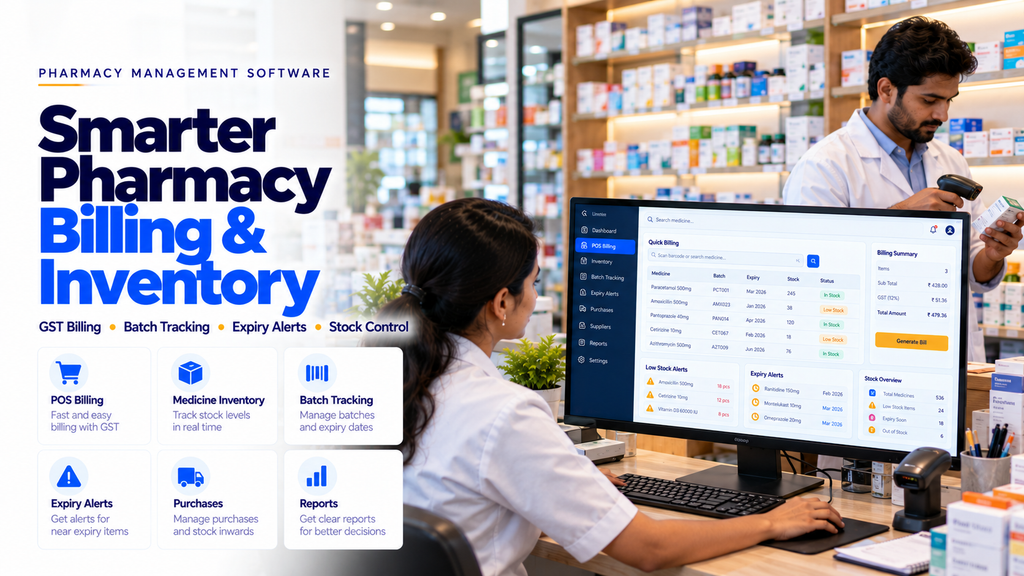
Custom pharmacy software may include point-of-sale billing, GST configuration, batch-wise stock management, expiry alerts, supplier purchases, barcode scanning, returns and business reporting.
This guide explains the main features, development process, security requirements, implementation considerations and cost factors involved in building pharmacy management software.
What Is Pharmacy Billing and Inventory Management Software?
Pharmacy billing and inventory management software is a digital application designed to support the operational needs of medical shops and pharmacies.
Depending on the business requirements, the system may manage:
- Medicine product records
- Point-of-sale billing
- GST invoice configuration
- Batch-wise stock
- Expiry dates
- Supplier purchases
- Purchase returns
- Sales returns
- Barcode scanning
- Stock alerts
- Payment records
- Business reports
The software supports inventory and administrative processes. It does not replace the responsibilities of licensed pharmacists or applicable medicine dispensing requirements.
Why Medical Shops in Erode Need Pharmacy Software
Pharmacies handle products with different batch numbers, expiry dates, storage requirements and regulatory conditions.
Common operational challenges include:
- Difficulty locating available medicine stock
- Manual batch number recording
- Unnoticed approaching expiry dates
- Incorrect stock quantities
- Time-consuming billing
- Supplier purchase discrepancies
- Difficulty managing purchase returns
- Limited visibility into low-stock medicines
- Manual daily sales reporting
Suitable pharmacy software can help organize these activities when configured around the store’s actual operations.
1. Pharmacy Point-of-Sale Billing
A pharmacy POS system helps authorized employees prepare invoices for permitted retail transactions.
Potential features include:
- Medicine search
- Product selection
- Barcode scanning
- Quantity entry
- Batch selection
- Price calculation
- Applicable tax calculation
- Discount controls
- Invoice generation
- Receipt printing
Medicine dispensing restrictions and pharmacist verification should remain part of the store’s workflow.
2. GST Billing Software for Medical Shops
Pharmacies may need billing software that supports applicable GST requirements.
Potential features include:
- GST configuration
- HSN code records
- Tax rate management
- Invoice generation
- Tax summaries
- Credit note workflows
- Sales reporting
Tax rates and invoice requirements can change. Businesses should validate configuration with qualified accounting professionals and current applicable rules.
3. Medicine Inventory Management
Inventory management helps pharmacy employees maintain records of available products.
A medicine inventory module may include:
- Product name
- Manufacturer
- Product category
- Pack size
- Purchase price
- Selling price
- Available quantity
- Supplier details
- Stock status
Stock records should be updated through validated purchase, sale, return and adjustment transactions.
4. Batch-Wise Medicine Stock Management
Different batches of the same medicine may have different expiry dates and purchase details.
Batch-wise inventory helps pharmacies track stock more accurately.
Possible fields include:
- Medicine identifier
- Batch number
- Manufacturing date, where available
- Expiry date
- Purchase quantity
- Remaining quantity
- Supplier information
- Purchase reference
Batch selection should be validated during billing and stock adjustments.
5. Medicine Expiry Date Management
Expiry tracking is an important inventory requirement for pharmacies.
Potential features include:
- Expiry date records
- Upcoming expiry reports
- Configurable alert periods
- Expired stock identification
- Quarantine or blocked-stock status
- Expiry-related supplier return records
Expired or otherwise unsuitable medicines must not be treated as saleable inventory.
6. Near-Expiry Stock Alerts
Pharmacy software may help employees identify stock approaching its expiry date.
Possible features include:
- Configurable alert thresholds
- Near-expiry inventory reports
- Batch-level notifications
- Supplier return review lists
- Stock disposition tracking
Stock handling decisions should follow applicable pharmacy regulations and supplier arrangements.
7. Low-Stock Medicine Alerts
Low-stock alerts can help pharmacy owners identify products that may need replenishment.
Potential features include:
- Minimum stock thresholds
- Reorder notifications
- Out-of-stock reports
- Purchase planning
- Supplier selection
Reordering decisions should consider demand, supplier lead times, storage requirements and available budgets.
8. Medicine Purchase Management
Pharmacies purchase products from authorized suppliers and distributors.
A purchase management module may include:
- Purchase order creation
- Supplier selection
- Product and batch entry
- Purchase invoice records
- Goods receipt
- Stock updates
- Purchase history
9. Pharmacy Supplier Management
Supplier management helps pharmacies organize purchase relationships and records.
Possible features include:
- Supplier profiles
- Contact details
- Relevant licence information
- Purchase history
- Outstanding balances
- Purchase returns
- Supplier performance records
Supplier eligibility and licensing should be verified according to applicable requirements.
10. Purchase Return Management
Pharmacies may need to return eligible products to suppliers for approved reasons.
Potential features include:
- Return request creation
- Supplier selection
- Product and batch identification
- Return reason
- Quantity verification
- Approval workflow
- Credit note records
Returns should follow applicable rules, supplier agreements and safe product handling procedures.
11. Pharmacy Sales Return Management
Sales returns require careful handling because medicines may be subject to additional safety and regulatory restrictions.
Software may support:
- Original invoice lookup
- Return request recording
- Product and batch verification
- Return reason
- Authorized approval
- Refund or credit documentation
Returned medicines should not automatically be added to saleable stock. Their disposition must follow applicable requirements and professional procedures.
12. Barcode-Based Pharmacy Billing
Barcode scanning can help employees identify products during billing and stock management.
Potential features include:
- Barcode product lookup
- Billing item selection
- Stock receiving
- Inventory verification
- Label printing where appropriate
Barcode formats and scanner compatibility should be assessed before implementation.
13. Medicine Product Catalogue Management
A pharmacy product catalogue can help organize product information.
Possible fields include:
- Product name
- Manufacturer
- Dosage form
- Strength
- Pack size
- Product identifier
- Applicable tax information
- Inventory status
Product records should be maintained accurately and updated when relevant details change.
14. Prescription Record Management
Some pharmacies may require a secure way to associate relevant prescription documentation with permitted dispensing transactions.
Possible features include:
- Prescription reference records
- Authorized document uploads
- Dispensing transaction association
- Access controls
- Record history
The system should not independently issue prescriptions or authorize restricted medicine sales. Dispensing decisions remain subject to qualified professional oversight and applicable law.
15. Prescription Verification Workflow
Pharmacy software may support documented verification steps for transactions that require a prescription.
Potential workflow elements include:
- Prescription requirement indicator
- Authorized pharmacist review
- Verification status
- Relevant transaction documentation
- Audit records
Verification requirements should be defined with qualified pharmacy professionals and applicable regulations.
16. Pharmacy Customer Management
Customer management features may help organize permitted business records and communication.
Possible features include:
- Customer profiles
- Contact details
- Invoice history
- Payment records
- Communication preferences
Personal and health-related information should be collected only when necessary and protected appropriately.
17. Pharmacy Payment Management
Billing systems may need to support different permitted payment methods.
Potential features include:
- Cash payment records
- Digital payment records
- Partial payment tracking where applicable
- Receipts
- Refund records
- Daily payment summaries
18. Pharmacy Cash Counter Management
Cash counter features can help store managers review daily transactions.
Possible features include:
- Opening cash balance
- Cash sales
- Authorized cash adjustments
- Closing balance
- Cash reconciliation
- Shift records
Adjustments should be logged and restricted to authorized employees.
19. Pharmacy Staff Management
Pharmacies may require different software permissions for owners, pharmacists and administrative employees.
Possible user roles include:
- Pharmacy Owner
- Licensed Pharmacist
- Store Manager
- Billing Employee
- Inventory Employee
- System Administrator
Software permissions should reflect actual responsibilities and applicable professional requirements.
20. Pharmacy Admin Dashboard
A pharmacy administration dashboard may help owners review business activity.
Potential modules include:
- Daily sales
- Inventory status
- Near-expiry products
- Low-stock alerts
- Purchase records
- Supplier balances
- Staff accounts
- Reports
21. Pharmacy Sales Reports
Sales reports can help pharmacy owners review transaction records.
Possible reports include:
- Daily sales
- Monthly sales
- Product category sales
- Payment method summaries
- Return records
- Invoice reports
Reports should use accurate business records and appropriate access controls.
22. Pharmacy Inventory Reports
Inventory reporting can help employees review stock conditions.
Potential reports include:
- Current stock
- Batch-wise stock
- Near-expiry stock
- Expired stock
- Low-stock products
- Stock adjustments
- Purchase history
23. Pharmacy Purchase and Supplier Reports
Purchase reporting can help owners review procurement activity.
Possible reports include:
- Supplier-wise purchases
- Purchase invoice history
- Pending purchase orders
- Purchase returns
- Supplier payment records
24. Multi-Branch Pharmacy Management
Pharmacy businesses operating multiple branches may need centralized management.
Potential features include:
- Branch-specific inventory
- Branch sales reports
- Centralized product catalogues
- Stock transfer requests
- Branch user permissions
- Centralized administration
Stock transfers should follow applicable medicine handling, documentation and licensing requirements.
25. Hospital Pharmacy Management Software
Hospital pharmacies may require additional workflows compared with ordinary retail medical shops.
Potential features include:
- Department-linked requests
- Authorized medication order processing
- Ward or department inventory
- Internal stock transfers
- Batch tracking
- Expiry management
- Billing integration
Hospital-specific clinical and dispensing workflows should be validated with qualified professionals.
26. Pharmacy Software Integration With Accounting
Some pharmacy businesses may want to connect billing and purchase information with accounting software.
Possible integrations include:
- Sales summaries
- Purchase records
- Tax information
- Supplier balances
- Payment reconciliation
Integration feasibility depends on supported APIs, data formats and accounting requirements.
27. Pharmacy Software vs General Retail POS
| General Retail POS | Pharmacy Management Software |
|---|---|
| Standard product billing | Billing with medicine-specific controls |
| Basic stock quantities | Batch-wise inventory |
| General product records | Medicine product details |
| Ordinary returns | Controlled medicine return workflows |
| Standard stock reports | Expiry and batch reports |
General POS software may be suitable for ordinary retail products but may not support the specialized inventory and dispensing-related requirements of a pharmacy.
28. Ready-Made vs Custom Pharmacy Software
| Ready-Made Pharmacy Software | Custom Pharmacy Software |
|---|---|
| Predefined modules | Features based on business requirements |
| May offer faster setup | Requires development and testing |
| Customization depends on vendor | Supports tailored workflows |
| Often subscription-based | May involve development and maintenance costs |
| Integrations depend on provider support | Can connect suitable supported systems |
Businesses should compare features, total cost, compliance needs, data portability and ongoing support.
29. Pharmacy Software Architecture
A custom pharmacy management platform may include:
- Responsive web application
- Secure backend
- Medicine product database
- Batch inventory module
- POS billing
- Purchase management
- Supplier records
- Expiry monitoring
- Reporting dashboard
- Role-based permissions
- Audit logs
- Backup and recovery
30. Mobile-Friendly Pharmacy Software
Pharmacy owners may want access to selected operational information through mobile devices.
Responsive software may support:
- Sales summaries
- Inventory lookup
- Low-stock alerts
- Near-expiry reports
- Purchase order status
- Management notifications
Sensitive customer and prescription records should be appropriately restricted.
31. Pharmacy Software Security
Pharmacy software may contain business financial records and personal information.
Important safeguards include:
- Strong authentication
- Role-based access controls
- Appropriate encryption
- Secure session handling
- Input validation
- Audit logging
- Protected backups
- Access monitoring
- Secure software updates
32. Pharmacy Data Privacy
Pharmacies should review applicable Indian privacy and medicine-related recordkeeping requirements.
Important considerations include:
- Purpose-based data collection
- Appropriate notices and consent where required
- Restricted access
- Secure storage
- Authorized information sharing
- Data retention policies
- Secure deletion procedures
Applicable requirements depend on the pharmacy’s activities and the type of information processed.
33. Pharmacy Software Regulatory Considerations
Pharmacy operations are subject to legal and professional requirements that software alone cannot satisfy.
Implementation planning should consider:
- Applicable pharmacy licensing requirements
- Authorized pharmacist responsibilities
- Prescription medicine restrictions
- Required sales and purchase records
- Medicine batch traceability
- Storage and expiry procedures
- Applicable tax requirements
Software workflows should be reviewed by qualified pharmacy and legal professionals before deployment.
34. Backup and Disaster Recovery
Pharmacy businesses should plan how important inventory, purchase and sales records can be restored after technical failures.
Potential safeguards include:
- Scheduled backups
- Protected backup storage
- Recovery testing
- Documented restoration procedures
- Access-controlled recovery
35. Pharmacy Software Development Process
- Requirement Analysis: Understand pharmacy operations.
- Professional Workflow Review: Validate medicine-specific requirements with qualified pharmacy professionals.
- Module Planning: Define billing, inventory, purchases and reporting.
- UI/UX Design: Design billing and admin interfaces.
- Database Design: Structure product, batch and transaction records.
- Backend Development: Implement secure business logic.
- Frontend Development: Build responsive interfaces.
- Integration: Connect approved barcode, accounting and payment services.
- Security Testing: Verify permissions and data protection.
- Functional Testing: Test realistic pharmacy workflows.
- Deployment: Release the application.
- Training: Train authorized employees.
- Maintenance: Monitor and improve the system.
36. Recommended Pharmacy Software Modules
| Module | Main Purpose |
|---|---|
| Medicine Catalogue | Product information |
| POS Billing | Sales invoices and receipts |
| Batch Inventory | Batch-wise stock records |
| Expiry Management | Expiry monitoring and alerts |
| Purchase Management | Supplier purchases |
| Returns | Controlled return records |
| Supplier Management | Vendor profiles and transactions |
| Customer Management | Permitted customer records |
| Reports | Sales and inventory reporting |
| Admin Panel | Users, permissions and settings |
37. How Much Does Pharmacy Billing Software Cost in Erode?
Development cost depends on the software requirements and implementation scope.
Factors include:
- Number of pharmacy branches
- Number of users
- POS billing features
- GST configuration
- Batch inventory complexity
- Expiry management
- Purchase and supplier modules
- Barcode hardware integration
- Accounting integration
- Data migration
- Security requirements
- Hosting and maintenance
Businesses should request a detailed quotation separating development costs, infrastructure expenses and recurring support charges.
38. How Long Does Pharmacy Software Development Take?
Development timelines depend on the number of modules, inventory complexity, integrations, regulatory requirements and testing.
A basic billing and stock management system generally requires less development effort than a multi-branch pharmacy platform with detailed batch tracking, purchase management and accounting integrations.
Project milestones and acceptance criteria should be agreed upon before development begins.
39. How to Choose a Pharmacy Software Development Company in Erode
Before selecting a development provider, consider:
- Understanding of pharmacy workflows
- Experience with billing and inventory systems
- Batch and expiry management capabilities
- Security practices
- Regulatory workflow review
- Responsive interface design
- Integration capabilities
- Testing procedures
- Employee training
- Maintenance arrangements
Medicine-related requirements should be reviewed with qualified pharmacy professionals.
40. Pharmacy Software Development Across Erode District
Medical shops and pharmacies across Erode district may need software based on their store size, inventory volume and business operations.
Relevant locations include:
- Erode
- Perundurai
- Bhavani
- Anthiyur
- Gobichettipalayam
- Sathyamangalam
- Modakkurichi
- Kodumudi
- Nambiyur
- Chennimalai
- Kavindapadi
- Ammapettai
- Arachalur
- Sivagiri
- Punjai Puliampatti
- Thalavadi
- Solar
- Surampatti
- Veerappanchatram
- Nasiyanur
Software features should be determined by operational requirements and applicable pharmacy rules rather than location alone.
41. Common Pharmacy Software Development Mistakes
- Using general POS software without batch tracking
- Failing to record expiry dates
- Allowing expired stock into saleable inventory
- Incorrect purchase quantity updates
- Weak user access controls
- Missing transaction audit logs
- Incorrect tax configuration
- Inadequate returns workflows
- Ignoring backup and recovery
- Skipping barcode compatibility checks
- Failing to train employees
- Launching without realistic transaction testing
42. Pharmacy Software Implementation Checklist
- Document existing pharmacy workflows.
- Define user roles and permissions.
- Review medicine product records.
- Plan batch-wise inventory.
- Configure expiry tracking.
- Define billing and tax requirements.
- Plan purchase management.
- Define supplier records.
- Review returns workflows.
- Check barcode hardware compatibility.
- Plan reporting requirements.
- Review regulatory obligations.
- Implement secure access.
- Plan backup and recovery.
- Test realistic transactions.
- Train employees.
- Maintain and update the software.
43. How Greap Technologies Can Help
Greap Technologies can help medical shop owners and pharmacy businesses discuss custom software requirements, including billing, inventory, batch tracking and purchase management.
Depending on the agreed project scope, solutions may include:
- Pharmacy software requirement analysis
- Medical shop POS billing
- GST invoice configuration
- Medicine inventory management
- Batch-wise stock tracking
- Expiry alerts
- Supplier and purchase management
- Barcode integration
- Returns management
- Sales and stock reports
- Multi-branch administration
- Responsive admin panels
- Security testing and maintenance
Explore Greap Technologies for custom software development, retail management applications and business automation solutions.
Conclusion
Pharmacy billing and inventory management software in Erode can help medical shops organize sales invoices, medicine stock, batch records, expiry monitoring, purchases and business reports.
Unlike ordinary retail POS systems, pharmacy software may require medicine-specific inventory controls, batch traceability, expiry management and professionally reviewed dispensing workflows.
Successful implementation depends on accurate requirements, secure data handling, realistic testing, professional oversight and ongoing maintenance.
For pharmacies across Erode district and Tamil Nadu, a requirements-based approach can help determine whether ready-made pharmacy software or a custom management system is the better fit.
Need Pharmacy Billing and Inventory Software in Erode?
Greap Technologies can help you discuss medical shop billing, batch-wise stock management, expiry tracking, supplier purchases and custom pharmacy software requirements.
Frequently Asked Questions
1. What is pharmacy billing and inventory software?
It is a digital system that helps pharmacies manage sales invoices, medicine stock, batches, expiry dates, purchases and operational reports.
2. Can pharmacy software generate GST invoices?
Yes. Suitable billing software can support GST configuration and invoice generation according to applicable requirements.
3. Can pharmacy software track medicine batches?
Yes. Batch-wise inventory modules can record batch numbers, quantities, expiry dates and purchase references.
4. Can pharmacy software identify expired medicines?
Yes. Expiry management modules can identify approaching and expired stock and help block unsuitable items from saleable inventory.
5. Can medical shop software support barcode scanners?
Yes. Barcode integration may be supported when the selected hardware and software are compatible.
6. Can pharmacy software manage suppliers?
Yes. Supplier modules can store purchase orders, invoices, purchase history and return records.
7. Can multiple pharmacies use one management system?
Yes. Multi-branch software can support centralized administration with branch-specific inventory and reporting.
8. Can pharmacy software manage prescription records?
Yes. Authorized prescription documentation may be recorded securely, subject to applicable professional and legal requirements.
9. Is pharmacy management software secure?
Security depends on authentication, permissions, encryption, audit logging, backups and ongoing maintenance.
10. How much does pharmacy software development cost in Erode?
Cost depends on billing, inventory, batch tracking, integrations, user roles, security and maintenance requirements.
11. Can pharmacy software integrate with accounting applications?
Yes. Suitable integrations may connect sales, purchases and tax records when supported interfaces are available.
12. Does Greap Technologies develop pharmacy software in Erode?
Greap Technologies can help assess pharmacy software requirements and develop suitable custom applications according to the agreed project scope.