Getting more visitors to an ecommerce website is useful only when the website also helps the right visitors understand products, make confident buying decisions and complete their orders.
An online store can receive traffic from Google, social media, advertisements, marketplaces, email campaigns and direct visits while still losing potential customers because of slow pages, unclear product information, confusing navigation, unexpected shipping costs, payment problems or a difficult checkout.
This is where ecommerce conversion rate optimization becomes important.
If you want to understand how to increase ecommerce conversion rate, the goal should not be to find one trick that forces more people to purchase.
A better approach is to examine the complete ecommerce customer journey, identify genuine friction and improve the experience systematically.
A useful model is:
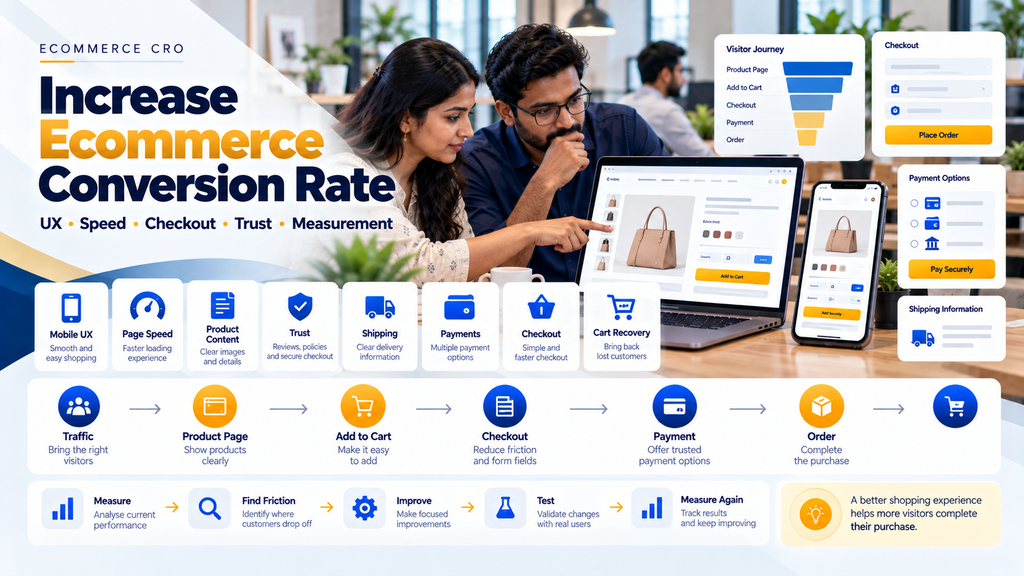
Traffic → Product Discovery → Product Evaluation → Cart → Checkout → Payment → Order → Post-Purchase Experience
Every stage can influence whether a customer continues or leaves.
What Is Ecommerce Conversion Rate?
Ecommerce conversion rate generally measures the percentage of relevant website visits or users that complete a defined ecommerce action, commonly a purchase.
A basic purchase conversion calculation can be represented as:
Conversion Rate = Completed Purchases ÷ Relevant Visits × 100
However, businesses should define the metric consistently because analytics systems may calculate sessions, users and transactions differently.
What Counts as an Ecommerce Conversion?
A completed purchase is usually the primary ecommerce conversion, but businesses can also measure important steps leading toward it.
- Product view
- Add to cart
- Begin checkout
- Payment initiation
- Completed purchase
- Quotation request for B2B ecommerce
- Account application for wholesale ecommerce
These supporting actions help identify where customers are leaving the buying journey.
Do Not Optimize Only the Final Conversion Rate
A single percentage does not explain what is wrong with an ecommerce website.
For example, a store may have:
Good Product Engagement → Strong Add-to-Cart Activity → Large Checkout Drop-Off
In this situation, improving product-page traffic alone may not address the main problem.
Start With the Ecommerce Conversion Funnel
A practical ecommerce funnel can be:
Landing Page → Product / Category → Add to Cart → Cart → Checkout → Payment → Purchase
1. Measure Product Views
Understand whether visitors are reaching relevant products after entering the website.
2. Measure Add-to-Cart Activity
This can help indicate whether visitors who view products are progressing toward purchase.
3. Measure Cart-to-Checkout Progression
If customers add products but rarely begin checkout, review the cart experience, pricing, shipping information and customer intent.
4. Measure Checkout Completion
If customers begin checkout but do not complete orders, investigate checkout usability, payment, shipping and technical errors.
5. Measure Payment Failures Separately
A customer who reaches payment but encounters a technical failure represents a different problem from a visitor who leaves a category page.
Strategy 1: Improve Ecommerce Website Speed
Online shopping involves repeated interaction with product images, variations, cart updates, checkout forms and payment workflows.
Performance problems throughout this journey can create unnecessary friction.
6. Optimize Product Images
Ecommerce stores frequently contain many high-resolution images.
Images should be appropriately sized, compressed and delivered in suitable modern formats where supported.
7. Avoid Uploading Oversized Images
A small product thumbnail should not require the browser to download an unnecessarily huge source image where responsive image handling can be used.
8. Lazy Load Appropriate Images
Images below the initial viewport can often be loaded when needed, while important above-the-fold content should be handled appropriately for performance.
9. Review Third-Party Scripts
Analytics, chat widgets, advertising tags, review tools, popups and other integrations can add frontend overhead.
10. Review Ecommerce Plugins and Apps
Every plugin or application should have a clear business purpose.
Removing unnecessary functionality can simplify both performance and maintenance.
11. Optimize Core Web Vitals
Businesses should monitor real user experience and relevant Core Web Vitals alongside broader website performance.
Read Core Web Vitals Optimization for Business Websites in Erode.
12. Test Mobile Performance
Do not evaluate ecommerce performance only on a fast office computer.
Read Website Speed Optimization Services in Erode.
Strategy 2: Improve Mobile Ecommerce UX
An ecommerce website should be designed for customers using smaller screens and touch interactions.
13. Responsive Product Pages
Product images, descriptions, pricing, variations and purchase actions should remain easy to understand on mobile.
14. Touch-Friendly Controls
Buttons, quantity selectors and variation controls should be practical to use without accidental taps.
15. Readable Text
Customers should not need to zoom simply to understand basic product information.
16. Avoid Horizontal Scrolling
Product tables, variation selectors and checkout forms should fit the available viewport appropriately.
17. Test Real Devices
Browser responsive previews are useful, but real-device testing can reveal additional usability problems.
Strategy 3: Make Navigation Easier
Customers cannot buy products they cannot find.
18. Clear Product Categories
Organize products according to how customers naturally browse the catalogue.
19. Avoid Excessive Category Depth
Customers should not need to navigate through many unnecessary levels to reach relevant products.
20. Use Breadcrumbs
Breadcrumb navigation can help customers understand where a product sits within the catalogue.
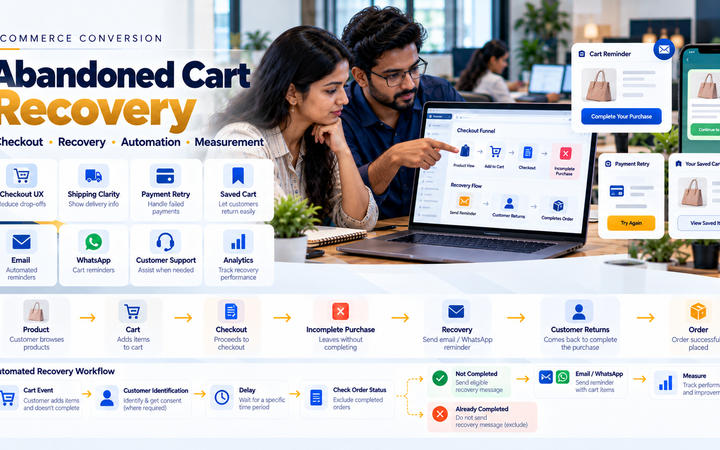
21. Keep Important Categories Accessible
Popular or strategically important product groups should not be hidden behind confusing navigation.
Strategy 4: Improve Ecommerce Search
Site search can be particularly important for stores with larger catalogues.
22. Search Product Names
Customers should be able to find products using expected names.
23. Search SKU or Product Codes Where Relevant
This can be especially useful for B2B, spare-parts, industrial and repeat-purchase ecommerce.
24. Handle Common Search Variations
Where technically appropriate, search can account for common wording variations without returning unrelated products.
25. Useful No-Results Page
If no exact product is found, provide useful navigation or assistance instead of a dead end.
Strategy 5: Improve Category Pages
Category pages help customers compare products before selecting an individual item.
26. Clear Category Heading
The customer should immediately understand what type of products are displayed.
27. Useful Product Cards
Cards can present the information needed to decide which product deserves further attention.
28. Appropriate Filters
Filters should reflect attributes that genuinely matter to purchasing decisions.
29. Useful Sorting
Provide relevant sorting options without overwhelming customers.
30. Avoid Filter Overload
Do not create dozens of filters simply because product data exists.
Strategy 6: Build Better Product Pages
A product page should answer the important questions a customer needs before deciding whether to purchase.
31. Clear Product Name
Use a product title customers can understand.
32. High-Quality Product Images
Show the product clearly and provide additional views where they genuinely help.
33. Accurate Price
Pricing should follow the store’s actual business rules.
34. Clear Variations
Size, colour, capacity, material or other options should be easy to select.
35. Product Description
Explain what the product is and the information relevant to the buyer.
36. Product Specifications
For technical products, structured specifications can help customers compare options.
37. Availability
Use inventory information appropriate to the store’s stock model.
38. Shipping Information
Provide relevant shipping information where it affects the buying decision.
39. Return Information
Make applicable return or exchange information accessible.
40. Product Questions
Provide a useful enquiry path when customers commonly need assistance before purchasing.
Strategy 7: Improve Product Photography
Online customers cannot physically inspect the product before purchasing.
41. Show the Actual Product Clearly
Avoid images that make it difficult to understand the product itself.
42. Multiple Views
Where useful, show the product from different angles.
43. Context Images
For some products, showing realistic use or scale can help customers understand what they are buying.
44. Keep Images Consistent
Consistent product presentation can make category and comparison pages easier to scan.
45. Do Not Misrepresent Products
Product imagery should not intentionally create a misleading impression of size, features, colour or included items.
Strategy 8: Improve Add-to-Cart Experience
Once a customer decides to purchase, the next action should be obvious.
46. Clear Add-to-Cart Action
The primary purchase action should be easy to identify.
47. Validate Required Variations
If a customer must choose a size or other variation, clearly explain what is missing rather than silently failing.
48. Confirm Cart Addition
Provide clear feedback after an item has been added successfully.
49. Do Not Interrupt With Excessive Popups
The cart action should not trigger unnecessary layers that make it difficult to continue shopping or checkout.
Strategy 9: Make the Cart Easy to Understand
The cart should provide a clear summary of the intended purchase.
50. Product Summary
Show the relevant product and selected variation.
51. Quantity
Allow quantity updates where appropriate.
52. Price
Show current applicable pricing.
53. Remove Product
Customers should be able to remove unwanted items without difficulty.
54. Order Summary
Present the relevant subtotal and other applicable charges clearly.
55. Checkout Action
The next step should be visually clear.
Strategy 10: Be Clear About Shipping
Shipping is part of the ecommerce purchase decision, not simply a warehouse task after checkout.
56. Shipping Charges
Communicate the store’s shipping rules as clearly as practical.
57. Free-Shipping Conditions
If free shipping requires a minimum eligible order, state the condition clearly.
58. Serviceability
Where supported, customers can be given relevant information about whether their destination can be served.
59. Delivery Information
Do not make delivery promises the business or courier cannot reliably support.
60. Shipping API Integration
Stores with more advanced logistics requirements can connect ecommerce orders with supported courier systems.
Read Shipping and Courier API Integration for Ecommerce Websites.
Strategy 11: Simplify Ecommerce Checkout
Checkout should help customers complete the transaction without unnecessary friction.
61. Remove Unnecessary Form Fields
Ask only for information genuinely needed for the order and business workflow.
62. Use Clear Field Labels
A customer should understand what each field requires.
63. Helpful Error Messages
If information is invalid, explain what needs to be corrected.
64. Preserve Correct Information
One validation error should not unnecessarily erase other correctly entered information.
65. Make Checkout Mobile Friendly
Forms, buttons and order summaries should remain practical on smaller screens.
66. Avoid Checkout Distractions
Reduce unrelated popups and promotional elements while the customer is trying to complete payment.
Strategy 12: Consider Guest Checkout
Where suitable for the business, allowing customers to order without creating an account first can simplify checkout.
67. Account Creation Can Follow Purchase
Some stores can offer account creation after the order instead.
68. B2B Stores May Require Accounts
Wholesale ecommerce may need authenticated customers for account pricing, dealer access, approvals or credit-related workflows.
There is no universal checkout model for every ecommerce business.
Strategy 13: Improve Payment Experience
A customer who wants to purchase still needs a reliable way to complete payment.
69. Appropriate Payment Methods
Select payment options relevant to the target market and supported by the chosen payment provider.
70. UPI for Indian Ecommerce
Where supported by the merchant’s payment setup, UPI may be an important option for Indian customers.
71. Cards
Supported debit and credit card options can be provided according to the payment provider’s capabilities.
72. Other Payment Methods
Availability depends on the selected gateway and merchant configuration.
73. Cash on Delivery
If the business offers COD, eligibility should follow actual shipping and business rules.
74. Secure Payment Flow
Payment credentials should be handled through appropriate payment-provider workflows rather than insecure custom collection.
Read Payment Gateway Integration for Ecommerce Websites in India.
Strategy 14: Build Payment Failure Recovery
Customers who encounter payment problems should not necessarily have to rebuild their order from the beginning.
75. Preserve Order Context
Where appropriate, maintain the relevant order information after an unsuccessful payment attempt.
76. Provide Secure Payment Retry
The customer can be given an appropriate path to retry payment.
77. Avoid Duplicate Orders
Payment retry logic should not unintentionally create multiple orders.
78. Verify Payment Server-Side
Do not treat a browser redirect alone as authoritative proof of payment.
Strategy 15: Reduce Avoidable Cart Abandonment
Customers abandon carts for many reasons, so recovery should begin with understanding the underlying friction.
79. Investigate the Funnel
Identify whether customers leave at the cart, checkout, payment or another stage.
80. Fix Preventable Problems First
Repeated reminder messages cannot repair a broken checkout.
81. Preserve Eligible Carts
Where appropriate, allow customers to return to their previous shopping context.
82. Build Recovery Workflows
Email, WhatsApp or other communication can be used where appropriate and properly configured.
Read Abandoned Cart Recovery Strategies for Ecommerce Businesses.
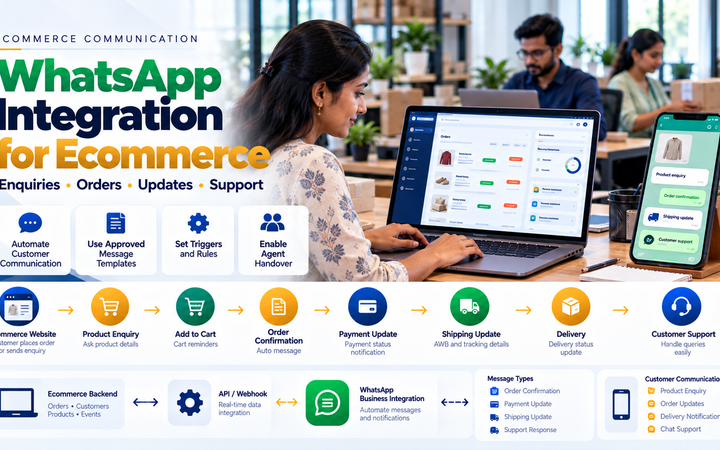
Strategy 16: Use WhatsApp as a Support Channel
For businesses whose customers use WhatsApp, messaging can help answer questions around the ecommerce journey.
83. Product Enquiries
Customers can ask questions about products before purchase.
84. Cart Assistance
Eligible customers can receive appropriate assistance when they need help completing an order.
85. Order Communication
Relevant verified ecommerce events can support appropriate transactional communication.
86. Shipping Updates
Verified fulfilment information can be used for relevant shipment communication.
87. Customer Support
Complex questions should have a route to human assistance.
Read WhatsApp Integration for Ecommerce Websites: Complete Business Guide.
Strategy 17: Build Customer Trust
Customers need enough confidence in the store to provide personal and payment information.
88. Clear Business Identity
Provide legitimate business and contact information appropriate to the store.
89. HTTPS
The production ecommerce website should use correctly configured secure connections.
90. Shipping Policy
Customers should be able to understand applicable shipping rules.
91. Return and Refund Information
Relevant policies should be accessible before purchase.
92. Privacy Information
Explain how customer information is handled as appropriate to the business and applicable requirements.
93. Avoid Fake Trust Badges
Do not display certifications, partnerships or security claims that are not genuine.
Strategy 18: Use Genuine Customer Reviews
Authentic customer feedback can help shoppers understand experiences with products and the business.
94. Verified or Genuine Feedback
Use legitimate reviews rather than fabricated testimonials.
95. Do Not Hide All Negative Feedback
Review moderation should focus on appropriate content standards rather than manufacturing a perfect-looking rating.
96. Respond Professionally
Customer concerns can provide useful information about product or service problems.
Strategy 19: Improve Product Recommendations
Relevant recommendations can help customers discover useful products.
97. Related Products
Recommend products that genuinely relate to the current item.
98. Complementary Products
Accessories or products commonly used together can be shown where relevant.
99. Avoid Random Recommendations
Showing unrelated products merely to fill space can create clutter.
100. Do Not Manipulate Recommendations
If a product is sponsored or promoted for a commercial reason, businesses should follow applicable transparency requirements.
Strategy 20: Improve Upselling Carefully
Upselling can help customers discover a more suitable option, but it should not obstruct the original purchase.
101. Compare Meaningful Differences
Explain why a higher-priced option may be relevant.
102. Do Not Hide the Original Choice
The customer should still be able to purchase the option they intentionally selected.
Strategy 21: Use Cross-Selling Appropriately
Cross-selling can suggest complementary products.
For example:
Primary Product → Relevant Accessory
The recommendation should help the purchase rather than simply increase the number of products displayed.
Strategy 22: Make Discounts Clear
Discounts can support genuine promotions, but confusing pricing can reduce trust.
103. Show Valid Promotional Conditions
Customers should understand eligibility and relevant limitations.
104. Avoid Fake Original Prices
Do not manufacture inflated reference prices simply to make a discount appear larger.
105. Avoid Fake Countdown Timers
Countdowns should represent genuine time-limited promotions if used.
106. Avoid False Scarcity
Do not claim that only a few products remain unless the information is genuinely supported.
Strategy 23: Improve Coupon UX
Coupon codes should not make customers feel that they are missing a secret better price.
107. Keep Coupon Entry Secondary
The field does not need to dominate checkout.
108. Explain Invalid Coupons
Provide appropriate feedback when a code cannot be used.
109. Automatically Apply Eligible Promotions Where Appropriate
Some promotions can be easier for customers when valid discounts are applied according to the store’s configured rules.
Strategy 24: Provide Useful Customer Support
Some customers leave because they cannot get an answer to a question.
110. Product Support
Provide an appropriate enquiry route for product questions.
111. Checkout Support
Customers experiencing genuine checkout issues should have a way to request help.
112. Post-Purchase Support
Support after the sale can also influence whether customers trust the business enough to return.
Strategy 25: Improve Internal Site Search Data
Search behaviour can reveal what customers expect to find.
113. Review Popular Searches
Frequently searched products can inform navigation and merchandising.
114. Review No-Result Searches
These may reveal missing products, alternative terminology or search-engine problems.
115. Do Not Automatically Create Products From Search Terms
Search data is evidence of interest, not proof that every query represents a product the business should sell.
Strategy 26: Improve Out-of-Stock Experience
An unavailable product does not always need to become a dead end.
116. Clearly Show Availability
Do not allow customers to proceed under a false impression that an unavailable item can be shipped immediately.
117. Suggest Relevant Alternatives
Where appropriate, show genuinely similar available products.
118. Back-in-Stock Notification
Customers can potentially request an update when inventory returns.
119. Do Not Create Fake Low-Stock Messages
Inventory urgency should come from genuine inventory information.
Strategy 27: Optimize the Ecommerce Homepage
The homepage should help relevant visitors understand the store and move toward useful categories or products.
120. Clear Value Proposition
Explain what the store sells and why it may be relevant to the intended customer.
121. Important Categories
Provide direct paths into major product groups.
122. Featured Products
Use merchandising intentionally rather than filling the page with every available product.
123. Avoid Homepage Clutter
Too many banners, popups, sliders and competing CTAs can make the next action unclear.
Strategy 28: Improve Landing-Page Relevance
Traffic quality and landing-page relevance affect ecommerce conversion.
124. Match Search Intent
If someone searches for a specific product category, send them to a relevant page rather than an unrelated homepage where possible.
125. Match Advertising Intent
Paid campaigns should lead customers to pages that match the advertised product or offer.
126. Avoid Misleading Ads
Advertising should not promise products, prices or offers that the landing page does not genuinely provide.
Strategy 29: Improve Ecommerce SEO
SEO can help attract people searching for relevant products and categories.
Conversion optimization and SEO are different disciplines, but they can support each other when the website provides useful content and a good customer experience.
127. Product Titles
Use descriptive titles that make sense to customers.
128. Category Content
Provide useful category context without keyword stuffing.
129. Product Descriptions
Avoid copying the same generic description across many products when useful unique information can be provided.
130. Internal Linking
Connect relevant categories, products, buying guides and supporting content.
131. Structured Data
Implement appropriate structured data where it accurately represents visible page content and the business’s website.
Strategy 30: Improve Ecommerce Accessibility
An online store should be usable by as many customers as reasonably possible.
132. Keyboard Navigation
Important ecommerce functionality should not unnecessarily depend only on a mouse.
133. Form Labels
Checkout fields should have meaningful labels.
134. Image Alternatives
Provide appropriate alternative text for meaningful images.
135. Colour Contrast
Important text and controls should remain readable.
136. Error Identification
Customers should be able to understand where a checkout error occurred.
Strategy 31: Measure Ecommerce Events Correctly
Conversion optimization requires reliable measurement.
137. Product View Events
Track meaningful product-page interactions according to the analytics implementation.
138. Add-to-Cart Events
Measure successful cart additions rather than button clicks that failed.
139. Begin Checkout
Track when the customer genuinely enters the checkout process.
140. Purchase Events
Purchase analytics should represent legitimate completed transactions according to the store’s measurement model.
141. Avoid Duplicate Purchase Events
Refreshing a confirmation page should not repeatedly count the same transaction as new revenue.
Strategy 32: Segment Conversion Data
An overall conversion rate can hide important differences.
142. Mobile vs Desktop
If mobile customers behave differently, investigate mobile UX and traffic quality.
143. New vs Returning Customers
These audiences can have different purchase behaviour.
144. Traffic Source
Search, social, advertising, email and direct visitors may arrive with different levels of purchase intent.
145. Product Category
Different product types can naturally have different purchase journeys.
146. Geographic Segment
Shipping availability, language, pricing or customer intent may differ across regions.
Do Not Compare Conversion Rates Blindly
There is no universal conversion-rate target that every ecommerce business should achieve.
Conversion behaviour can vary according to:
- Industry
- Product price
- Product complexity
- B2B vs B2C
- Traffic quality
- Customer geography
- Brand familiarity
- Purchase frequency
- Device
- Seasonality
The most useful benchmark is often the store’s own correctly measured historical performance, segmented by relevant customer and traffic characteristics.
Strategy 33: Use A/B Testing Carefully
Testing can help compare meaningful variations when a website has enough suitable traffic and reliable measurement.
147. Start With a Hypothesis
For example:
Customers may not understand shipping costs before checkout.
148. Change One Meaningful Experience
Create a variation that directly tests the hypothesis.
149. Define the Metric Before the Test
Decide what outcome will be evaluated before examining results.
150. Do Not Stop Because Early Results Look Exciting
Short-term fluctuations can be misleading.
151. Do Not Test Everything at Once
If many unrelated elements change simultaneously, it becomes harder to understand what influenced the result.
Strategy 34: Use Session Insights Carefully
Behavioural tools can sometimes help identify usability problems, but customer privacy should remain part of the implementation.
152. Identify Repeated UX Problems
Look for patterns such as customers struggling with a specific form or navigation element.
153. Protect Sensitive Fields
Passwords, payment information and other sensitive information should not be exposed through analytics or session-recording tools.
154. Do Not Use Behaviour Tools for Employee or Customer Surveillance
The purpose should be improving the website experience while respecting privacy.
Strategy 35: Improve Post-Purchase Experience
Conversion optimization does not necessarily end at the payment confirmation page.
155. Clear Order Confirmation
Customers should understand whether the order was successfully created.
156. Order Tracking
Provide useful shipment information when available.
157. Customer Support
Make it clear how customers can get help with legitimate order issues.
158. Returns
Provide the applicable return process clearly.
159. Repeat Purchase Experience
Where relevant, make it easy for returning customers to find or reorder appropriate products.
Ecommerce CRO for WooCommerce
WooCommerce conversion optimization can involve theme UX, product templates, checkout configuration, plugin performance, payment integration, shipping integration and analytics.
160. Audit Plugins
Remove unnecessary overlapping functionality where appropriate.
161. Review Theme Performance
A visually attractive theme should still provide a practical shopping experience.
162. Review Checkout Customization
Custom checkout code and plugins should be tested after platform updates.
Read WooCommerce Website Development for Businesses in Erode.
Ecommerce CRO for Shopify
Shopify stores can review theme UX, app usage, product merchandising, checkout capabilities, payment configuration, shipping and analytics within the capabilities of their current setup.
163. Audit Shopify Apps
Remove applications that no longer provide sufficient business value where appropriate.
164. Review Theme UX
Ensure product and collection templates support the actual catalogue.
165. Avoid App Overlap
Several apps trying to modify the same part of the shopping journey can create unnecessary complexity.
Ecommerce CRO for B2B Online Stores
B2B ecommerce conversions are not always immediate online payments.
166. Define the B2B Conversion
Depending on the business, the desired action may be:
- Request quotation
- Submit bulk order
- Create business account
- Contact sales
- Place purchase order
- Complete online order
167. Customer-Specific Pricing
Authenticated B2B customers may require account-specific pricing.
168. MOQ and Quantity Rules
Minimum quantities should be communicated clearly.
169. RFQ Workflow
Complex products may convert better through a quotation workflow than by forcing an immediate standard checkout.
Read Wholesale Ecommerce Website Development: B2B Features Businesses Need.
Ecommerce CRO for Multi-Vendor Marketplaces
Marketplaces have additional complexity because products, fulfilment and seller quality can vary.
170. Product Information Standards
Define minimum product-information requirements for sellers.
171. Duplicate Listings
Plan how similar or identical products are handled.
172. Seller Information
Provide appropriate seller context where it genuinely helps customers make decisions.
173. Multi-Seller Cart
Explain relevant shipping and fulfilment implications clearly.
Read Multi-Vendor Ecommerce Marketplace Development in Erode.
Ecommerce Conversion Optimization Process
A structured CRO process can be:
Measure → Identify Friction → Prioritize → Improve → Test → Measure Again
174. Measure
Establish reliable baseline data.
175. Identify Friction
Use analytics, technical testing, customer feedback and UX review to identify potential problems.
176. Prioritize
Focus first on issues likely to materially affect customers rather than changing elements simply because they are easy to edit.
177. Improve
Implement the selected UX, technical or operational change.
178. Test
Confirm that the change works across relevant devices, browsers and ecommerce workflows.
179. Measure Again
Compare performance using consistent measurement.
Conversion Optimization Priorities
| Area | What to Review |
|---|---|
| Traffic | Relevance and customer intent |
| Speed | Loading and interaction performance |
| Mobile | Responsive shopping experience |
| Navigation | Product discovery |
| Product Pages | Images, content, price and options |
| Cart | Clarity and purchase summary |
| Shipping | Cost and serviceability clarity |
| Checkout | Forms and usability |
| Payment | Methods, reliability and retry |
| Trust | Business information and policies |
| Recovery | Eligible abandoned-cart workflows |
| Analytics | Accurate funnel measurement |
Common Ecommerce Conversion Rate Mistakes
- Trying to increase traffic before fixing a broken checkout
- Copying competitors without understanding customer needs
- Using fake urgency
- Using fake reviews
- Hiding shipping costs
- Making checkout unnecessarily long
- Ignoring mobile users
- Installing too many plugins or apps
- Adding too many popups
- Offering discounts for every problem
- Ignoring payment failures
- Sending cart reminders after purchase
- Using poor product images
- Providing incomplete product information
- Ignoring internal site search
- Using stale inventory information
- Counting duplicate purchase events
- Comparing conversion rates without segmentation
- Changing many things without measuring them
- Assuming CRO guarantees more sales
Ecommerce Conversion Rate Optimization Checklist
- Verify ecommerce analytics
- Map the purchase funnel
- Measure product views
- Measure add-to-cart activity
- Measure checkout starts
- Measure completed orders
- Track payment failures
- Review mobile UX
- Review website speed
- Optimize product images
- Review category navigation
- Review internal search
- Improve product pages
- Clarify pricing
- Clarify shipping
- Review product availability
- Simplify checkout
- Review guest checkout where appropriate
- Test payment methods
- Build payment-retry workflow
- Review cart abandonment
- Implement appropriate recovery
- Review customer-support options
- Use genuine reviews
- Remove fake urgency
- Review trust information
- Test accessibility
- Segment analytics
- Prioritize high-impact friction
- Measure after implementation
Ecommerce Conversion Optimization for Businesses in Erode
Ecommerce businesses in Erode can improve their online stores by reviewing the complete purchase journey rather than focusing only on website traffic.
This is relevant for retailers, manufacturers, textile businesses, wholesalers, distributors, D2C brands and other businesses selling products online.
Greap Technologies works with businesses in Erode and nearby areas including Perundurai, Bhavani, Anthiyur, Chennimalai, Gobichettipalayam, Sathyamangalam, Modakkurichi, Kavindapadi, Kodumudi, Nambiyur and surrounding locations.
How Greap Technologies Can Help Improve Ecommerce Conversion
Greap Technologies can review ecommerce conversion as a combination of website UX, technical performance, checkout, payment, shipping and customer communication.
Depending on the existing platform and requirements, work can include:
- Ecommerce UX review
- Product-page improvements
- Category-page improvements
- Mobile ecommerce optimization
- Website speed optimization
- Core Web Vitals improvements
- Cart UX improvements
- Checkout optimization
- Payment gateway integration
- Payment failure recovery
- Shipping API integration
- WhatsApp integration
- Abandoned cart recovery
- WooCommerce customization
- Shopify store improvements
- Custom ecommerce development
- Analytics implementation
- Conversion funnel measurement
- Technical testing
Explore Greap Technologies Ecommerce Development Services or visit Greap Technologies.
Conclusion
Learning how to increase ecommerce conversion rate is not about finding a single button colour, popup, discount or marketing trick.
Conversion optimization requires understanding the complete customer journey:
Relevant Traffic → Easy Product Discovery → Useful Product Information → Clear Cart → Simple Checkout → Reliable Payment → Order Confirmation → Support
Businesses should begin with reliable measurement, identify where genuine friction occurs and prioritize improvements according to customer impact.
Website speed, mobile usability, product content, shipping transparency, checkout design, payment reliability, customer trust and abandoned-cart recovery can all contribute to the overall ecommerce experience.
Most importantly, conversion optimization should be treated as an ongoing process:
Measure → Find Friction → Improve → Test → Measure Again
No individual CRO tactic can guarantee higher sales. The objective is to build a clearer, faster and more reliable buying experience and use actual ecommerce data to understand whether the changes help.
Need Help Improving Your Online Store?
If your ecommerce website receives visitors but customers are dropping out before completing orders, Greap Technologies can review the product journey, mobile experience, speed, cart, checkout, payment and recovery workflow to identify practical improvement opportunities.
Discuss Your Ecommerce Conversion Optimization
Frequently Asked Questions
1. What is ecommerce conversion rate?
Ecommerce conversion rate generally represents the percentage of relevant website visits or users that complete a defined ecommerce action, commonly a completed purchase. Businesses should use a consistent measurement definition when comparing performance.
2. How can I increase my ecommerce conversion rate?
Start by measuring the purchase funnel and identifying where customers leave. Common areas to review include website speed, mobile UX, product information, navigation, shipping clarity, checkout usability, payment reliability, customer trust and cart recovery.
3. Does faster website speed improve ecommerce conversion?
Better performance can reduce unnecessary friction during product browsing and checkout, but speed alone does not guarantee more purchases. Product demand, pricing, traffic quality, UX and other factors also influence conversion.
4. How can product pages be improved for conversion?
Product pages should clearly communicate the product name, images, price, variations, important specifications, availability, shipping information and relevant policies while providing an obvious path to the next purchase step.
5. How can ecommerce checkout be improved?
Remove unnecessary fields, use clear labels, provide helpful validation, preserve correctly entered information, optimize for mobile and keep the checkout focused on completing the transaction.
6. Can payment gateway integration affect ecommerce conversion?
A reliable payment workflow with payment methods appropriate to the target customer can reduce payment-related friction. Payment status should be verified securely and failed payments should have an appropriate recovery path where supported.
7. Does WhatsApp help ecommerce conversion?
WhatsApp can support product enquiries, appropriate cart assistance, transactional communication and customer support when it matches customer behaviour and is implemented using appropriate consent and messaging practices. It does not guarantee additional sales.
8. How can abandoned carts be recovered?
First investigate why customers are leaving. After fixing preventable checkout problems, eligible customers can potentially be helped through saved carts, payment retry, email, WhatsApp or customer-support workflows depending on the available information and communication permissions.
9. Should every ecommerce store offer discounts to improve conversion?
No. Discounts are a commercial decision. Problems caused by slow pages, confusing checkout, payment failures or unclear shipping are generally better addressed by fixing those problems rather than automatically reducing prices.
10. What is ecommerce CRO?
Ecommerce CRO, or conversion rate optimization, is the process of measuring the online buying journey, identifying friction, implementing improvements and evaluating whether those changes improve meaningful customer outcomes.
11. Is conversion rate the same for every ecommerce industry?
No. Conversion behaviour varies according to product type, price, customer intent, B2B or B2C model, traffic source, geography, device, brand familiarity and other factors. Businesses should avoid treating a generic benchmark as a guaranteed target.
12. Does Greap Technologies provide ecommerce conversion optimization?
Greap Technologies can review ecommerce UX, performance, product pages, cart, checkout, payment integration, shipping, customer communication and analytics as part of ecommerce website development and improvement projects.