An ecommerce customer can discover a product, spend time comparing options, add items to the cart and even begin checkout without completing the purchase.
This creates one of the most important customer journeys for ecommerce businesses to understand: cart and checkout abandonment.
However, abandoned cart recovery should not be treated simply as sending repeated “complete your purchase” messages.
A cart may be abandoned because of unexpected shipping charges, payment problems, a complicated checkout, unclear delivery information, account-creation requirements, technical errors, product uncertainty, distraction or simply because the customer was not ready to purchase.
Effective abandoned cart recovery strategies for ecommerce businesses therefore start by improving the shopping and checkout experience before adding email, WhatsApp or other recovery automation.
This guide explains how ecommerce businesses can identify abandonment points, improve checkout, build appropriate recovery workflows and measure results without creating an intrusive customer experience.
What Is an Abandoned Cart?
An abandoned cart generally occurs when a shopper adds one or more products to an ecommerce cart but does not complete the expected purchase.
A simplified journey is:
Product → Add to Cart → Cart → Customer Leaves
But this definition alone does not explain why the customer left.
What Is an Abandoned Checkout?
An abandoned checkout usually refers to a customer who progresses further into the purchase journey but does not complete the order.
For example:
Product → Cart → Checkout → Customer Details → Payment Stage → No Completed Order
Cart abandonment and checkout abandonment can therefore represent different levels of purchase intent.
Cart Abandonment vs Checkout Abandonment
| Cart Abandonment | Checkout Abandonment |
|---|---|
| Customer added products to cart | Customer progressed into checkout |
| Customer may still be browsing | Usually indicates a later buying stage |
| Contact information may be unknown | Some customer information may have been legitimately provided |
| Recovery options may be limited | Recovery may be possible depending on identification and consent |
What Is Abandoned Cart Recovery?
Abandoned cart recovery is the process of helping eligible customers return to an incomplete ecommerce purchase.
A recovery strategy can include both:
- Preventing avoidable abandonment
- Recovering appropriate incomplete purchases
The first part is often overlooked.
Cart Recovery Should Start Before the Customer Leaves
If an ecommerce store has a confusing checkout, unclear shipping charges or frequent payment failures, sending more reminders does not solve the underlying problem.
A stronger model is:
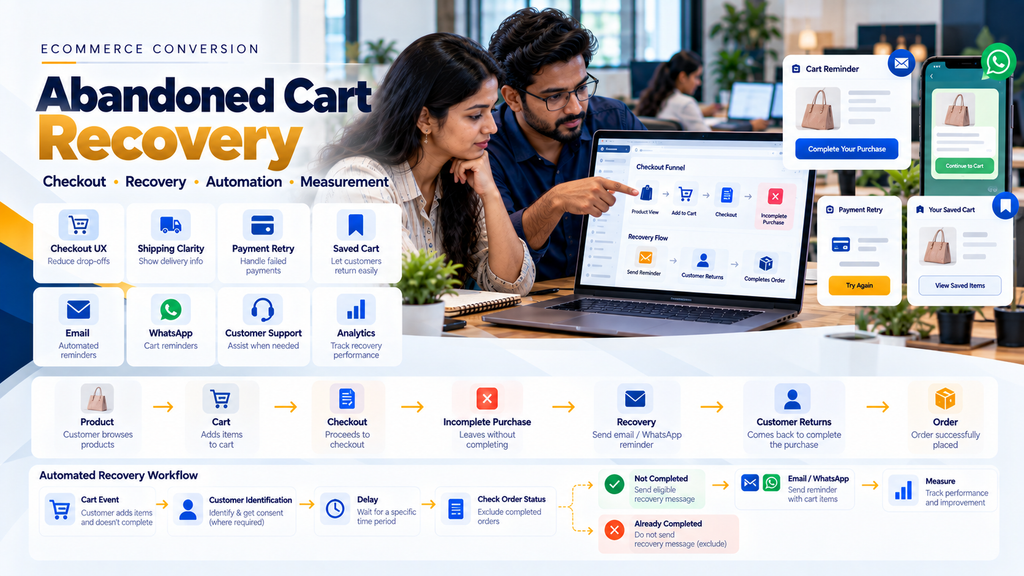
Understand Abandonment → Fix Preventable Problems → Preserve Cart → Build Recovery → Measure Results
Why Do Ecommerce Customers Abandon Carts?
There is no single reason that applies to every store.
Businesses should investigate their own customer journey and data rather than assuming every abandoned cart has the same cause.
1. Customer Was Only Browsing
Adding a product to a cart does not always mean the shopper was ready to purchase immediately.
Some customers use carts as temporary product lists while comparing options.
2. Unexpected Shipping Charges
If shipping costs appear only late in checkout, customers may reconsider the total purchase cost.
3. Unclear Delivery Information
Customers may hesitate when they cannot understand whether the product can be delivered to their location or what delivery expectations apply.
4. Complicated Checkout
Unnecessary form fields, confusing steps or unclear instructions can make checkout harder to complete.
5. Forced Account Creation
Some customers may prefer a simpler checkout instead of creating an account before ordering.
Whether guest checkout is suitable depends on the ecommerce business and its operational requirements.
6. Payment Failure
A genuine buyer can reach the payment stage but fail to complete the transaction because of a payment error, interruption or other issue.
7. Payment Method Not Available
A customer may leave if the payment options relevant to them are not supported.
8. Website Performance Problems
Slow product pages, cart pages or checkout interactions can create unnecessary friction.
9. Mobile Checkout Problems
A checkout that works well on desktop may still be difficult to use on a smaller screen.
10. Form Validation Problems
Unclear errors can prevent customers from understanding what they need to correct.
11. Coupon Confusion
A highly prominent coupon field can sometimes encourage customers to leave the website looking for a discount code.
12. Product Uncertainty
Customers may still have questions about size, specifications, compatibility, availability or other product details.
13. Return or Exchange Uncertainty
If relevant policies are difficult to understand, customers may hesitate before purchasing.
14. Technical Errors
JavaScript problems, checkout errors, broken integrations or API failures can prevent legitimate purchases.
15. Customer Was Interrupted
Not every abandonment is caused by the website. The customer may simply have been distracted or decided to continue later.
Start With Ecommerce Funnel Measurement
Before building recovery automation, businesses should understand where customers are leaving.
16. Product View
The customer views a product.
17. Add to Cart
The customer adds the product to the shopping cart.
18. View Cart
The customer reviews selected products.
19. Begin Checkout
The customer enters the checkout process.
20. Payment Stage
The customer reaches the relevant payment step.
21. Completed Purchase
The authoritative ecommerce system records the completed order according to the store’s business rules.
Example Ecommerce Funnel
A conceptual funnel can be:
Product View → Add to Cart → Begin Checkout → Payment → Purchase
Businesses should measure meaningful transitions rather than looking only at total website traffic.
Do Not Treat Every Funnel Drop-Off the Same
A visitor leaving a product page is different from a known customer experiencing a payment failure after beginning checkout.
Recovery strategies should reflect the stage and available customer context.
Strategy 1: Make Shipping Information Clear Earlier
Shipping surprises can create avoidable checkout friction.
22. Show Shipping Policy Clearly
Customers should be able to find relevant shipping information without searching through unrelated pages.
23. Explain Free-Shipping Rules
If free shipping applies only under certain conditions, communicate those conditions clearly.
24. Delivery Serviceability
Where suitable shipping APIs are available, ecommerce stores can potentially check whether delivery is available to the customer’s location.
25. Dynamic Shipping Calculation
Where the business requires provider-based shipping rates, supported shipping APIs can be integrated into the ecommerce workflow.
Read Shipping and Courier API Integration for Ecommerce Websites.
Strategy 2: Simplify Ecommerce Checkout
Checkout should collect the information required to process the order without creating unnecessary work for the customer.
26. Remove Unnecessary Fields
Review each field and determine whether it is genuinely required for the transaction or business workflow.
27. Use Clear Labels
Customers should understand what information a field requires.
28. Make Required Fields Obvious
Do not make customers discover requirements only after submitting the form.
29. Provide Helpful Validation
If information is invalid, explain the problem close to the relevant field.
30. Preserve Valid Information
A validation error in one field should not unnecessarily erase correctly entered information elsewhere.
31. Make Checkout Mobile Friendly
Forms, buttons, product summaries and payment actions should remain usable on smaller screens.
Strategy 3: Consider Guest Checkout
Where suitable for the business model, guest checkout can reduce the requirement to create an account before purchase.
32. Account Creation Can Be Optional
The store can potentially allow the customer to purchase first and create an account later.
33. B2B Ecommerce May Be Different
Wholesale stores may require authenticated accounts for customer-specific pricing, credit rules or dealer access.
Checkout architecture should therefore match the business model rather than blindly copying B2C ecommerce patterns.
Strategy 4: Improve Mobile Checkout
Mobile ecommerce requires more than simply shrinking a desktop page.
34. Appropriate Input Types
Use form controls suitable for the information being entered.
35. Large Enough Actions
Checkout buttons and important controls should be easy to use on touchscreens.
36. Avoid Horizontal Overflow
Customers should not need to scroll sideways to complete checkout.
37. Keep Order Summary Accessible
The customer should be able to understand what they are buying and the relevant total before completing the order.
Strategy 5: Improve Ecommerce Website Speed
A checkout should respond quickly enough for customers to understand that their actions have been registered.
38. Optimize Product Images
Large images should be appropriately compressed and delivered in suitable formats.
39. Reduce Unnecessary Scripts
Excessive third-party scripts can add performance overhead.
40. Review Checkout Plugins
Plugins or applications loaded during checkout should have a clear purpose.
41. Test Real Mobile Performance
Do not evaluate checkout only on a fast development computer and connection.
Strategy 6: Provide Appropriate Payment Options
The payment methods offered should match the store’s target customers and supported payment-provider capabilities.
42. UPI
For Indian ecommerce businesses, UPI may be an important payment option when supported by the selected provider and merchant setup.
43. Cards
Supported debit and credit card payments may be relevant to the customer base.
44. Net Banking and Other Methods
Availability depends on the payment provider and merchant configuration.
45. Do Not Add Payment Methods Only for Appearance
Each payment option should be properly integrated and tested.
Read Payment Gateway Integration for Ecommerce Websites in India.
Strategy 7: Build Payment Failure Recovery
Payment failure is different from an early-stage abandoned cart because the customer may already have demonstrated strong purchase intent.
46. Keep the Order Context
Where appropriate, a failed payment should not force the customer to rebuild the entire cart.
47. Allow Appropriate Payment Retry
The customer can potentially retry payment against the correct existing order.
48. Avoid Duplicate Orders
A payment retry should not automatically create a completely new order unless the architecture intentionally requires it.
49. Check Payment Status Before Recovery
Before sending a payment-recovery message, verify that the order has not subsequently been paid.
50. Never Ask for OTPs or Card Credentials
Recovery communication should direct customers to the legitimate secure checkout or payment flow rather than asking them to send sensitive payment information.
Strategy 8: Save the Customer’s Cart
Customers may want to continue shopping later.
51. Session-Based Cart
The store can maintain cart state for an appropriate period according to its architecture.
52. Logged-In Customer Cart
For authenticated customers, the cart can potentially be associated with their account.
53. Cross-Device Cart
Where supported by the ecommerce architecture, authenticated customers may be able to continue their cart on another device.
54. Do Not Reserve Inventory Forever
A saved cart should not necessarily remove products from available inventory indefinitely.
Cart Preservation vs Inventory Reservation
These are separate concepts.
Saved Cart = Remember What the Customer Wanted
Reserved Inventory = Temporarily Allocate Physical Stock
The business should define these rules independently.
Strategy 9: Use Email Cart Recovery Appropriately
Email can be used for eligible cart-recovery workflows when the business has legitimately collected the customer’s email address and the communication complies with the applicable requirements.
55. First Check Whether the Order Was Completed
Before sending a recovery email, the system should verify that the customer has not already completed the relevant purchase.
56. Restore the Correct Cart
The recovery link should return the customer to the appropriate cart or checkout context where technically possible.
57. Keep the Message Useful
The email can remind the customer what was left incomplete and provide a clear path back to the store.
58. Do Not Overload the Customer
Repeated reminders can become unwanted communication.
59. Stop Recovery After Purchase
Once the relevant order has been completed, the recovery sequence should stop.
Strategy 10: Use WhatsApp Cart Recovery Carefully
WhatsApp can be a useful ecommerce communication channel, but cart recovery requires appropriate customer identification, consent and messaging setup.
60. Do Not Message Anonymous Visitors
If a visitor has not legitimately provided a phone number, the business should not attempt to identify them improperly.
61. Checkout Phone Number Is Not Unlimited Marketing Permission
Businesses should distinguish information required for order fulfilment from consent for other communication.
62. Check Order Status Before Sending
The system should avoid sending an abandoned-cart reminder after the customer has already purchased.
63. Use Appropriate Messaging Mechanisms
Business-initiated WhatsApp communication should follow the current requirements applicable to the business messaging setup.
64. Limit Message Frequency
More reminders do not automatically produce a better customer experience.
Read WhatsApp Integration for Ecommerce Websites: Complete Business Guide.
Strategy 11: Provide Product-Enquiry Support
Sometimes the cart is not the problem. The customer may still have an unanswered product question.
65. Product-Level Enquiry
Provide an appropriate way to ask about the product from the product page.
66. Include Product Context
The enquiry can include the product name, URL or relevant selected variation.
67. Route Complex Questions to a Human
Automation should not invent product specifications when reliable information is unavailable.
Strategy 12: Make Pricing Clear
Customers should understand the price they are expected to pay.
68. Product Price
Display the appropriate product price according to the store’s pricing model.
69. Discounts
Discount conditions should be understandable.
70. Taxes
Tax display should follow the business’s applicable pricing and compliance requirements.
71. Shipping
Where possible, communicate shipping rules before the final purchase step.
72. Final Total
The customer should be able to review the relevant total before confirming payment.
Strategy 13: Improve Coupon Experience
Discount codes can help promotions, but the checkout experience should not make customers feel that they are paying the wrong price simply because they do not have a code.
73. Keep Coupon Entry Proportionate
The coupon field does not necessarily need to be the most visually prominent element of checkout.
74. Validate Coupons Clearly
If a code is invalid or ineligible, provide a useful explanation where appropriate.
75. Do Not Invent Urgency
Fake countdown timers and false scarcity can damage customer trust.
Strategy 14: Improve Product Pages Before Checkout
Better product information can reduce uncertainty before the customer reaches the cart.
76. Clear Product Images
Use images that help customers understand the product.
77. Product Specifications
Provide relevant technical or practical details.
78. Variations
Make size, colour or other selections understandable.
79. Availability
Use accurate availability information based on the store’s inventory model.
80. Shipping Information
Provide relevant shipping information where it helps purchase decisions.
81. Return Information
Make applicable return information easy to find.
Strategy 15: Use Customer Reviews Responsibly
Genuine customer feedback can help shoppers understand other customers’ experiences.
82. Do Not Create Fake Reviews
Fabricated testimonials or ratings can mislead customers and damage trust.
83. Keep Review Systems Transparent
Businesses should not manipulate review presentation simply to manufacture a false impression of customer satisfaction.
Strategy 16: Build Trust Through Website Quality
Customers may hesitate to enter payment and personal information into an ecommerce site that appears unreliable or broken.
84. HTTPS
The production ecommerce website should use correctly configured HTTPS.
85. Clear Business Information
Provide legitimate contact and business information appropriate to the store.
86. Accessible Policies
Shipping, returns, privacy and other relevant policies should be easy to locate.
87. Consistent Design
Checkout should visually belong to the same trusted ecommerce experience.
88. Avoid Fake Trust Badges
Do not display certifications, awards or security claims the business has not actually earned.
Strategy 17: Handle Out-of-Stock Situations Properly
Customers should not discover only at the end of checkout that an item cannot be fulfilled if the ecommerce system could have communicated availability earlier.
89. Validate Stock
Availability should be checked at appropriate points in the purchasing process.
90. Do Not Oversell Through Stale Inventory
If multiple systems manage inventory, the business should define which one is authoritative.
91. Back-in-Stock Option
Where appropriate, customers can be offered a way to request notification when an unavailable product becomes available again.
Strategy 18: Avoid Checkout Distractions
The checkout page has a specific purpose: helping the customer review and complete the transaction.
92. Reduce Unnecessary Navigation
A simplified checkout can reduce unrelated distractions while still preserving essential information and accessibility.
93. Avoid Intrusive Pop-Ups
A customer trying to pay should not have to repeatedly close marketing pop-ups.
94. Keep Important Support Available
Simplifying checkout should not remove necessary help, policies or accessibility features.
Strategy 19: Use Exit-Intent Carefully
Some ecommerce stores use exit-intent messages or offers when a user appears likely to leave.
This approach should be used carefully.
95. Do Not Interrupt Every Customer
An aggressive popup can itself become a reason to leave.
96. Do Not Automatically Offer Discounts
Training customers to abandon checkout to receive a discount can create an undesirable purchase pattern.
97. Consider Non-Discount Assistance
An exit message could instead offer help, preserve the cart or clarify relevant shipping information.
Strategy 20: Recover Without Discounts First
Not every abandoned cart needs a coupon.
98. Reminder
A simple reminder may be sufficient for a customer who was interrupted.
99. Customer Support
An unanswered product question may require assistance rather than a price reduction.
100. Payment Retry
A payment failure needs a working payment path rather than a discount.
101. Shipping Clarity
If shipping caused the problem, clearer shipping information may be more useful than a coupon.
When Should a Discount Be Considered?
Discounts are a commercial decision and should be used intentionally.
Businesses should consider margins, customer segment, promotion rules and long-term behaviour before automatically discounting every abandoned cart.
Do Not Create Fake Scarcity
Recovery messages should not falsely claim that a product is about to disappear, that a discount expires immediately, or that many people are competing for the same item unless the statement is genuinely supported.
Abandoned Cart Recovery Automation
A structured recovery system needs more than a timer.
102. Detect an Eligible Cart
The application identifies a cart or checkout that meets the business’s recovery criteria.
103. Determine Whether the Customer Is Known
Recovery communication requires legitimate customer contact information.
104. Check Communication Eligibility
The system determines whether the intended communication is appropriate for the customer and channel.
105. Wait for the Defined Recovery Period
The business can configure an appropriate delay based on its customer journey.
106. Recheck Purchase Status
This is critical.
Before sending a reminder:
Check Cart → Check Customer → Check Order → Check Payment → Then Decide Whether Recovery Is Still Needed
107. Send Eligible Recovery Communication
The system sends the appropriate email, WhatsApp message or other configured communication.
108. Stop After Purchase
If the customer completes the order, remaining recovery actions should be cancelled.
109. Respect Frequency Limits
The system should prevent excessive repeated communication.
Recommended Recovery Logic
A useful conceptual workflow is:
Cart Activity → Customer Identified → No Completed Order → Delay → Recheck Order → Check Communication Eligibility → Recovery → Measure
Abandoned Cart Data Model
For a custom ecommerce system, useful records can include:
- Cart identifier
- Customer identifier where legitimately known
- Cart items
- Cart value
- Last activity time
- Checkout stage
- Recovery eligibility
- Recovery attempts
- Associated order if created
- Recovery status
110. Do Not Store More Personal Data Than Required
Cart recovery should follow appropriate data-minimization and privacy practices.
111. Cart Data Can Change
Product price, inventory, promotions and shipping conditions may change between abandonment and recovery.
112. Revalidate the Cart
When the customer returns, the ecommerce system should validate current availability, pricing and applicable business rules rather than assuming the old cart remains fully valid.
Cart Recovery and Inventory
A major architectural question is whether abandoned carts reserve inventory.
113. Avoid Permanent Reservation
Leaving an item in a cart should not necessarily prevent other customers from purchasing it indefinitely.
114. Temporary Reservation
Some ecommerce models may use temporary reservation during later checkout stages.
115. Define Expiry
If inventory is reserved temporarily, the system should define when the reservation expires.
116. Release Inventory Correctly
Expired reservations should return stock to the appropriate available state.
117. Avoid Double Deduction
Cart reservation, payment confirmation and order fulfilment should not independently reduce the same inventory multiple times.
Abandoned Cart Recovery for WooCommerce
WooCommerce stores can implement cart recovery using suitable extensions or custom functionality depending on the required workflow.
118. Evaluate Plugins Carefully
Check maintenance, compatibility, data handling and supported communication channels.
119. Avoid Too Many Overlapping Plugins
Running separate plugins for popups, cart recovery, checkout customization, email automation and messaging can create conflicts or performance overhead.
120. Test WooCommerce Checkout After Changes
Cart-recovery functionality should not interfere with the core checkout and payment process.
Read WooCommerce Website Development for Businesses in Erode.
Abandoned Cart Recovery for Shopify
Shopify stores can use functionality available through the platform and compatible apps according to the merchant’s requirements.
121. Review Existing Platform Capabilities
Before installing additional apps, businesses should understand what their current Shopify setup already provides.
122. Evaluate App Permissions
Cart-recovery applications may need access to customer and order information. Businesses should review requested permissions carefully.
123. Avoid Duplicate Recovery Systems
If several apps respond to the same abandoned checkout, customers can receive overlapping messages.
Abandoned Cart Recovery for Custom Ecommerce Websites
A custom ecommerce platform can implement recovery directly around its own cart, checkout, customer and order architecture.
124. Cart Event
The system records relevant cart activity.
125. Checkout Event
The application records the customer’s progression through the checkout where appropriate.
126. Customer Identification
The system determines whether legitimate contact information is available.
127. Order Matching
Before recovery, the application checks whether the cart has resulted in a completed order.
128. Communication Rules
The backend determines whether the customer is eligible for the selected recovery channel.
129. Recovery Link
The system can generate an appropriate way for the customer to resume the shopping journey.
130. Cart Validation
When the customer returns, current price, inventory, promotions and shipping conditions should be revalidated.
Abandoned Cart Recovery for B2B Ecommerce
B2B cart abandonment can mean something different from consumer ecommerce.
131. Customer May Need a Quotation
A business buyer may add products to a cart only to prepare a requirement before requesting pricing.
132. Approval May Be Required
The buyer may need internal purchasing approval before completing the order.
133. Purchase Order Workflow
The transaction may continue outside an immediate online payment flow.
134. Sales Follow-Up May Be More Appropriate
For high-value B2B carts, an assigned account representative may provide more useful assistance than a generic automated discount message.
Read Wholesale Ecommerce Website Development: B2B Features Businesses Need.
Abandoned Cart Recovery for Multi-Vendor Marketplaces
Marketplace carts can contain products from several sellers, making recovery more complex.
135. Multi-Seller Cart
The cart may contain products with different stock, fulfilment or shipping conditions.
136. Revalidate Each Product
Availability and pricing may need to be checked across all relevant seller listings.
137. Avoid Seller-Level Duplicate Recovery
The marketplace should define whether cart recovery is controlled centrally or by sellers.
138. Protect Customer Information
Customer contact details should not automatically be exposed to every seller simply because a product was added to a cart.
Read Multi-Vendor Ecommerce Marketplace Development in Erode.
Abandoned Cart Recovery and Ecommerce Migration
Cart and checkout automation should also be reviewed when an ecommerce business migrates platforms.
139. Existing Recovery Workflows
Document the email, messaging and automation workflows currently connected to the old store.
140. Avoid Duplicate Automation After Migration
If the old system continues running while the new platform also sends recovery messages, customers may receive duplicates.
141. Update Recovery Links
Old cart and checkout URLs may not remain valid after migration.
Read Ecommerce Website Migration Services in Erode.
Measuring Abandoned Cart Recovery
Recovery should be measured using ecommerce transaction data rather than assumptions.
142. Cart-to-Checkout Progression
Understand how often carts progress into checkout.
143. Checkout Completion
Measure how many checkout journeys result in valid completed orders according to the store’s defined analytics model.
144. Payment Failure
Track legitimate payment failures separately from early cart abandonment where possible.
145. Recovery Messages Sent
Record the number of eligible recovery communications triggered.
146. Customers Returning After Recovery
Measure whether customers return through recovery links where appropriate tracking is available.
147. Recovered Orders
Define clearly what the business considers a recovered order.
148. Recovered Revenue
If reporting recovered revenue, use actual completed ecommerce orders and an agreed attribution model.
149. Unsubscribe or Opt-Out Signals
Communication performance should not be evaluated only through sales. Negative customer signals also matter.
150. Customer Support Responses
If customers frequently reply to recovery messages with the same concern, that may reveal a checkout, product or shipping problem worth fixing.
Do Not Overclaim Cart-Recovery Attribution
A customer who receives a reminder and later purchases may also have interacted with search, social media, paid advertising, email or another channel.
Businesses should use a consistent attribution model rather than automatically assigning every later purchase to the recovery message.
Abandoned Cart Recovery Testing
Recovery workflows should be tested before launch.
151. Anonymous Cart Test
Confirm that anonymous visitors are not improperly contacted.
152. Known Customer Test
Verify that eligible customer information is associated with the correct cart.
153. Completed Order Test
Ensure recovery stops when the relevant purchase is completed.
154. Payment Retry Test
Confirm that retrying payment does not create unintended duplicate orders.
155. Out-of-Stock Test
Verify what happens when a cart contains a product that becomes unavailable.
156. Price Change Test
Confirm that returning customers see the current valid price according to store rules.
157. Expired Promotion Test
An old cart should not automatically apply a promotion that is no longer valid.
158. Email Recovery Test
Check the recovery link, customer context and mobile experience.
159. WhatsApp Recovery Test
Verify eligibility, message context and stop conditions where WhatsApp recovery is implemented.
160. Duplicate Event Test
Repeated background events should not send the same recovery message multiple times.
161. Mobile Recovery Test
A customer returning from a mobile message should land on a mobile-friendly cart or checkout.
162. Cross-Device Test
If cross-device recovery is supported, test whether the cart is restored appropriately.
163. Checkout Error Test
Test how recovery behaves after genuine technical checkout failures.
Common Abandoned Cart Recovery Mistakes
- Assuming every abandoned cart represents a lost guaranteed sale
- Sending reminders without investigating checkout problems
- Hiding shipping charges until late checkout
- Using unnecessarily complicated checkout forms
- Ignoring mobile checkout usability
- Failing to preserve carts appropriately
- Creating new orders on every payment retry
- Sending recovery messages after purchase
- Contacting customers without an appropriate basis
- Sending too many reminders
- Using discounts as the first solution for every cart
- Creating fake urgency or scarcity
- Allowing several plugins to send duplicate reminders
- Restoring outdated product prices without validation
- Ignoring changed inventory
- Holding inventory indefinitely for abandoned carts
- Mixing cart status with payment status
- Using misleading recovery attribution
- Ignoring customer opt-out signals
- Failing to test automation before launch
Abandoned Cart Recovery Checklist
- Map the ecommerce purchase funnel
- Identify major abandonment points
- Review product-page clarity
- Review shipping information
- Review checkout fields
- Review mobile checkout
- Review checkout speed
- Test payment methods
- Build payment-failure recovery
- Preserve cart appropriately
- Define inventory-reservation rules
- Define customer identification rules
- Define communication eligibility
- Plan email recovery if required
- Plan WhatsApp recovery if appropriate
- Check order status before every recovery action
- Stop recovery after purchase
- Set frequency limits
- Revalidate product availability
- Revalidate pricing
- Revalidate promotions
- Test recovery links
- Test mobile recovery
- Test payment retry
- Test duplicate events
- Track completed orders
- Measure recovery carefully
- Monitor negative customer signals
- Review the workflow regularly
Abandoned Cart Recovery for Ecommerce Businesses in Erode
Ecommerce businesses in Erode can use cart-recovery strategies as part of a broader effort to improve the complete buying journey.
For local manufacturers, wholesalers, textile businesses, retailers and D2C brands, the right approach may involve a combination of ecommerce UX, payment integration, shipping integration, WhatsApp communication and order-management software.
Greap Technologies works with businesses in Erode and nearby areas including Perundurai, Chennimalai, Bhavani, Anthiyur, Gobichettipalayam, Sathyamangalam, Modakkurichi, Kavindapadi, Kodumudi, Nambiyur and surrounding locations.
How Greap Technologies Can Help With Ecommerce Cart Recovery
Greap Technologies can review abandoned-cart recovery as part of the complete ecommerce customer journey rather than treating it only as a reminder-message feature.
Depending on the ecommerce platform and business requirements, development can include:
- Ecommerce website development
- Checkout UX improvements
- Mobile checkout optimization
- Cart persistence
- Checkout-event tracking
- Payment gateway integration
- Payment retry workflows
- Email recovery integration
- WhatsApp ecommerce integration
- Shipping API integration
- Customer-support workflows
- WooCommerce customization
- Shopify-compatible integration
- Custom ecommerce development
- B2B ecommerce workflows
- Analytics implementation
- Automation testing
- Launch support
Explore Greap Technologies Ecommerce Development Services or visit Greap Technologies.
Conclusion
Abandoned cart recovery strategies for ecommerce businesses should begin with understanding why customers leave rather than immediately sending more marketing messages.
The strongest recovery strategy combines:
Better Product Information → Clear Pricing & Shipping → Simple Checkout → Reliable Payments → Saved Cart → Appropriate Recovery → Measurement
Email, WhatsApp and automation can help eligible customers continue an incomplete purchase, but these channels work best when the underlying ecommerce experience is already clear and reliable.
Businesses should also ensure recovery workflows stop after purchase, revalidate inventory and pricing, respect customer communication preferences and measure actual completed orders rather than assuming every abandoned cart could have become a sale.
For the wider ecommerce journey, read Payment Gateway Integration for Ecommerce Websites in India, Shipping and Courier API Integration for Ecommerce Websites and WhatsApp Integration for Ecommerce Websites: Complete Business Guide.
Need Help Improving Your Ecommerce Checkout and Cart Recovery?
If customers are adding products to your store but not completing checkout, Greap Technologies can review the ecommerce journey, checkout, payment flow and recovery requirements before recommending an implementation.
Discuss Your Ecommerce Cart Recovery Requirements
Frequently Asked Questions
1. What is an abandoned cart in ecommerce?
An abandoned cart generally occurs when a customer adds products to an online shopping cart but does not complete the expected purchase.
2. What is the difference between an abandoned cart and an abandoned checkout?
A cart can be abandoned before the customer begins checkout, while an abandoned checkout generally refers to a customer who has progressed further into the checkout process without completing the purchase.
3. Why do customers abandon ecommerce carts?
Possible reasons include browsing without immediate purchase intent, shipping costs, unclear delivery information, checkout friction, payment problems, unavailable payment methods, website performance, product questions or simple interruption. Businesses should use their own data to identify the most important causes.
4. How can an ecommerce business reduce cart abandonment?
Businesses can review product information, shipping clarity, checkout complexity, mobile usability, website performance, payment options, form validation and technical errors before relying on recovery messages.
5. Can email be used for abandoned cart recovery?
Email can be used for appropriate recovery workflows when the business has legitimately collected the required customer information and follows applicable communication requirements. The system should stop recovery once the relevant purchase is completed.
6. Can WhatsApp be used for abandoned cart recovery?
WhatsApp may be used for appropriate cart-recovery workflows when the customer has been legitimately identified and the business has the appropriate messaging setup and basis for the communication. Current business-messaging requirements should be followed.
7. Should every abandoned cart receive a discount?
No. A customer may have left because of interruption, payment failure, shipping uncertainty or an unanswered question. A reminder, better support or a working payment-retry flow may be more appropriate than automatically offering a discount.
8. How can failed payments be recovered?
The ecommerce system can preserve the relevant order context and provide an appropriate secure payment-retry path where supported. Before sending recovery communication, it should verify that the payment has not subsequently succeeded.
9. Should products in abandoned carts remain reserved?
Not necessarily. Cart persistence and physical inventory reservation are different concepts. If temporary inventory reservation is used, the business should define clear expiry and stock-release rules.
10. Can WooCommerce support abandoned cart recovery?
Yes. WooCommerce stores can use suitable maintained extensions or custom functionality depending on the required cart, email, WhatsApp, payment and analytics workflows.
11. Can Shopify support abandoned checkout recovery?
Shopify stores can use capabilities available through the platform and compatible applications. Businesses should review their current Shopify setup before adding overlapping recovery tools.
12. Does abandoned cart recovery guarantee more sales?
No. Recovery can help eligible customers return to an incomplete purchase, but results depend on factors such as purchase intent, product demand, checkout experience, pricing, shipping, payment reliability and the relevance of the recovery communication.