Progressive Web App Development Services in Erode: PWA Benefits
Customers increasingly use smartphones to browse products, book services, place orders and communicate with businesses. For many businesses, providing a convenient mobile experience is just as important as having a professional desktop website.
However, building and maintaining separate native mobile applications may not be necessary for every business model.
Progressive Web App development in Erode offers another approach: creating a website that can provide selected app-like features through modern web technologies.
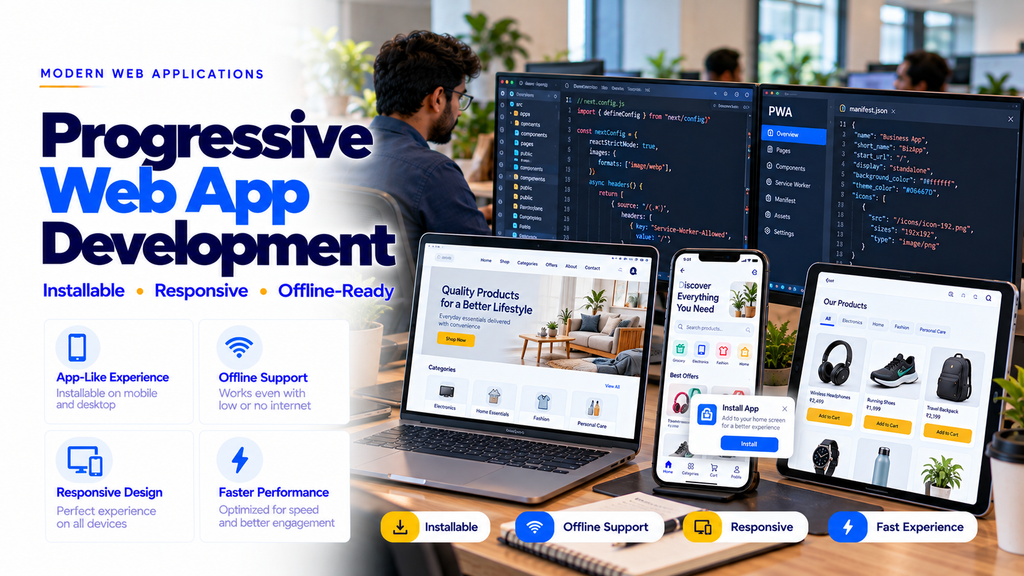
A Progressive Web App, commonly called a PWA, can support features such as installation to a device, offline access to selected content, responsive layouts and notifications on supported platforms.
For businesses exploring a PWA development company in Erode, understanding what PWAs can and cannot do is essential before choosing a technology.
This guide explains Progressive Web Apps, their benefits, suitable business applications, technical requirements, development costs and important considerations for businesses across Erode and Tamil Nadu.
What Is a Progressive Web App?
A Progressive Web App is a web application developed using web technologies and enhanced with features that can provide an app-like experience on supported browsers and devices.
A PWA is accessed through a website URL. Depending on its implementation and browser support, users may also be able to install it on their device.
Common PWA capabilities include:
- Responsive mobile layouts
- Installable app experience
- Home screen access
- Offline access to selected content
- Service worker caching
- Push notifications on supported platforms
- Secure HTTPS delivery
- App-like navigation
Not every PWA includes every capability. Features must be implemented, tested and supported by the user’s browser and operating system.
How Does a Progressive Web App Work?
PWAs use standard web technologies such as HTML, CSS and JavaScript, along with optional browser capabilities.
Three important building blocks are:
- Web Application: Provides the website interface and business functionality.
- Web App Manifest: Describes app information such as its name, icons and display preferences.
- Service Worker: Can manage selected network requests, caching and background browser capabilities.
The service worker does not automatically make an entire website work offline. Developers must plan which resources and actions can be supported without connectivity.
Why Businesses in Erode Consider PWA Development
Businesses may consider a PWA when customers frequently access their services through mobile browsers.
Potential reasons include:
- One web-based experience across multiple devices
- Convenient access through a URL
- Installation options on supported devices
- Reduced need for separate platform-specific interfaces in some projects
- Offline access to selected resources
- Flexible website updates
- Integration with existing backend systems
PWAs are not a universal replacement for Android and iOS applications. The appropriate approach depends on required device features, user expectations and business workflows.
1. Installable Website Experience
One of the most recognizable PWA features is the ability to install a website as an application on supported devices.
Depending on the browser and operating system, users may be able to:
- Add the application to their home screen
- Launch it through an app icon
- Use an app-style display
- Return without manually typing the website URL
Installation prompts and installation procedures vary across platforms.
2. Mobile-App-Like User Interface
PWAs can be designed with familiar mobile interface patterns.
Potential features include:
- Bottom navigation
- Mobile-friendly menus
- Touch-friendly buttons
- Product cards
- Account dashboards
- Booking interfaces
- Order tracking screens
These features can make repeated tasks more convenient when the interface is designed carefully.
3. Offline Access to Selected Content
Some PWA resources can be cached so users can access them without an active network connection.
Potential offline capabilities include:
- Previously cached pages
- Selected product information
- Saved reference content
- Application interface resources
- Offline status messages
Transactions, live inventory, payments and other server-dependent actions generally require connectivity unless a carefully designed offline synchronization workflow is implemented.
4. PWA Push Notifications
Web push notifications can help businesses communicate relevant updates to users who have granted permission.
Potential use cases include:
- Order updates
- Booking reminders
- Service status changes
- Delivery notifications
- Important account alerts
Notification availability and permission requirements vary by browser and operating system. Marketing messages should respect user preferences and applicable rules.
5. Responsive Design Across Devices
PWAs should work comfortably on different screen sizes.
Responsive development may include:
- Mobile-first layouts
- Tablet-friendly interfaces
- Desktop navigation
- Flexible content sections
- Responsive images
- Readable typography
- Accessible forms
6. PWA Website Speed Optimization
PWAs can be optimized for efficient loading and smooth interactions.
Potential optimization techniques include:
- Reducing unnecessary JavaScript
- Image compression
- Lazy loading
- Appropriate caching
- Optimized API requests
- Efficient frontend components
- Performance testing
A PWA is not automatically faster than a conventional website. Performance depends on implementation quality.
7. PWA and Core Web Vitals
Core Web Vitals help evaluate loading performance, responsiveness and visual stability.
Important metrics include:
- Largest Contentful Paint (LCP): Loading performance.
- Interaction to Next Paint (INP): Interaction responsiveness.
- Cumulative Layout Shift (CLS): Visual stability.
Developers should test PWA performance on realistic devices and network conditions.
8. PWA SEO Benefits and Limitations
A PWA remains a web application, so public pages can be optimized for search engines.
Important SEO considerations include:
- Search-accessible content
- Clean URL structures
- Relevant page titles
- Meta descriptions
- Canonical URLs
- XML sitemaps
- Semantic HTML
- Internal linking
- Mobile usability
- Appropriate rendering strategies
Installing a service worker or adding a web app manifest does not directly guarantee better Google rankings.
9. Ecommerce Progressive Web App Development
Ecommerce businesses may use PWAs to provide mobile-friendly shopping experiences.
Potential features include:
- Product categories
- Product search
- Product filters
- Product detail pages
- Shopping cart
- Customer accounts
- Order history
- Order tracking
- Selected notifications
Payments, stock validation and order processing should be handled through secure backend services.
10. Grocery Delivery PWA Development
Grocery stores may use PWAs for customer ordering interfaces.
Potential features include:
- Product categories
- Search
- Shopping cart
- Delivery address
- Delivery slot selection
- Checkout
- Order history
- Order status
11. Food Ordering PWA Development
Restaurants and food businesses may use PWAs for direct customer ordering.
Potential features include:
- Digital menus
- Food categories
- Item customization
- Shopping cart
- Pickup or delivery selection
- Order confirmation
- Order tracking
12. Retail Store PWA Development
Retail businesses may use PWAs to present products and accept online enquiries or orders.
Potential features include:
- Product catalogues
- Product search
- Wishlist
- Customer accounts
- Order history
- Offers
- Store information
13. B2B Ecommerce PWA Development
Manufacturers and wholesalers may need mobile-friendly ordering portals for business customers.
Potential features include:
- Business customer login
- Product catalogues
- Bulk enquiries
- Quotation requests
- Customer-specific pricing
- Order placement
- Order history
14. Dealer and Distributor PWA Development
Businesses operating dealer networks may use PWAs to provide convenient mobile access to partner portals.
Potential features include:
- Dealer login
- Product availability
- Order placement
- Invoice records
- Dispatch status
- Payment information
- Dealer reports
15. Appointment Booking PWA Development
Service businesses may use PWAs for appointment booking.
Potential features include:
- Service categories
- Staff availability
- Appointment slots
- Booking confirmation
- Rescheduling requests
- Booking history
- Reminder notifications
16. Healthcare Appointment PWA Development
Clinics and healthcare businesses may use PWAs for selected patient-facing services.
Potential features include:
- Doctor profiles
- Service information
- Appointment requests
- Booking history
- Contact information
- Authorized account access
Healthcare applications require appropriate security, privacy and regulatory planning.
17. Educational Institution PWA Development
Schools, colleges and training centers may use PWAs for student and parent access.
Potential features include:
- Announcements
- Timetables
- Course information
- Student dashboards
- Attendance information
- Fee records
- Notifications
18. Real Estate PWA Development
Real estate businesses may use PWAs for property search and enquiry experiences.
Potential features include:
- Property listings
- Search filters
- Property images
- Saved properties
- Agent contact options
- Enquiry forms
19. Logistics and Delivery PWA Development
Logistics companies may use PWAs for customer tracking portals and selected staff workflows.
Potential features include:
- Shipment tracking
- Pickup requests
- Delivery status
- Customer accounts
- Booking history
- Notifications
Advanced background location tracking may require platform-specific capabilities and may be better suited to native applications.
20. Field Sales PWA Development
Field sales teams may need mobile access to customer information and business forms.
Potential features include:
- Customer lists
- Visit schedules
- Order entry
- Product catalogues
- Task lists
- Selected offline forms
- Data synchronization
Offline data entry requires careful handling of synchronization conflicts and data security.
21. Employee Portal PWA Development
Businesses may use PWAs for employee self-service portals.
Potential features include:
- Employee login
- Profile information
- Leave requests
- Attendance information
- Announcements
- Document access
- Task lists
22. Customer Service PWA Development
Customer service PWAs may help businesses organize support requests.
Potential features include:
- Customer login
- Support tickets
- Request history
- Service status
- Knowledge base
- Notifications
23. PWA Development Using React.js
React can be used to build component-based Progressive Web App interfaces.
Potential advantages include:
- Reusable UI components
- Interactive interfaces
- Structured frontend development
- API integration
- Responsive layouts
PWA features such as manifests, service workers and offline caching must still be configured appropriately.
24. PWA Development Using Next.js
Next.js can be used to develop PWAs with React-based interfaces and flexible page rendering.
Potential capabilities include:
- Structured routing
- Server rendering
- Static generation
- Metadata management
- API integration
- Custom PWA configuration
Developers should ensure that service worker behavior is compatible with the selected rendering and caching architecture.
25. PWA Backend Development Using Laravel
Laravel can provide backend services for a Progressive Web App.
Potential responsibilities include:
- User authentication
- Database operations
- Business logic
- Order management
- Booking management
- Admin dashboards
- API endpoints
26. PWA and MySQL Database Integration
Business PWAs often require a backend database for persistent information.
Potential records include:
- Customers
- Products
- Orders
- Bookings
- Employees
- Inventory
- Reports
Database access should be controlled through secure backend services rather than exposing database credentials in frontend code.
27. PWA Service Worker Development
A service worker is a browser-managed script that can support caching and selected background functionality.
Potential responsibilities include:
- Resource caching
- Offline fallback pages
- Cache updates
- Push notification handling
- Selected background operations
Service workers require careful versioning and cache invalidation to avoid displaying outdated content.
28. PWA Web App Manifest
A web app manifest describes information used by browsers for the installable application experience.
Common manifest properties include:
- Application name
- Short name
- Application icons
- Start URL
- Display mode
- Theme color
- Background color
Manifest support and installation behavior vary by platform.
29. PWA Caching Strategies
Caching strategies determine how the application retrieves selected resources.
Common approaches include:
- Cache-first for suitable static resources
- Network-first for selected frequently updated information
- Stale-while-revalidate for suitable content
- Offline fallback pages
Customer-specific information, prices, inventory and sensitive data require careful caching policies.
30. PWA Offline Data Synchronization
Some business applications may need users to complete selected tasks while temporarily offline.
Potential examples include:
- Drafting forms
- Recording field visits
- Preparing order requests
- Saving task notes
When connectivity returns, the application may synchronize stored changes with backend services.
Synchronization must account for duplicate requests, conflicts, permissions and data integrity.
31. PWA Authentication and User Accounts
Business PWAs may require secure customer or employee accounts.
Potential features include:
- Registration
- Login
- Password reset
- Session management
- Profile settings
- Role-based interfaces
Authentication and authorization should be enforced by backend services.
32. PWA Security Requirements
PWAs may handle customer information, transactions and business records.
Important safeguards include:
- HTTPS
- Secure authentication
- Server-side authorization
- Input validation
- Secure API communication
- Careful offline data storage
- Dependency updates
- Security testing
Developers should avoid storing sensitive information in insecure browser storage.
33. PWA Accessibility
Accessible interfaces help more people use digital services.
Important considerations include:
- Semantic HTML
- Keyboard navigation
- Accessible forms
- Readable text
- Visible focus states
- Appropriate contrast
- Screen reader support
34. PWA Browser Compatibility
PWA capabilities vary across browsers and operating systems.
Differences may affect:
- Installation methods
- Push notifications
- Background processing
- Storage limits
- Device API access
- Offline behavior
Projects should be tested on the browsers and devices used by the intended customers.
35. PWA vs Native Mobile App
| Factor | Progressive Web App | Native Mobile App |
|---|---|---|
| Access | Through website URL; installation may be available | Typically installed as an application |
| Technology | Web technologies | Platform-specific or cross-platform app technologies |
| Offline Features | Selected functionality with suitable caching | Can support offline features through app design |
| Device APIs | Browser and platform dependent | Generally broader platform integration |
| Updates | Web deployment and cache update mechanisms | App distribution and update processes |
| Typical Fit | Web-first customer and business experiences | Applications needing deeper device integration |
36. PWA vs Responsive Website
A responsive website adapts its layout to different screen sizes.
A PWA may include responsive design plus additional capabilities such as:
- Web app manifest
- Installable experience
- Service worker caching
- Selected offline features
- Supported push notifications
A responsive website does not automatically become a PWA simply because it works well on mobile devices.
37. PWA vs Flutter App
Flutter is a development framework commonly used to build mobile applications and other interfaces.
PWAs use browser-based web technologies.
A PWA may be appropriate for web-first business workflows, while a Flutter mobile application may be suitable when the project requires specific native platform capabilities or mobile application distribution.
The decision should be based on actual features and platform requirements.
38. Can a PWA Be Published on App Stores?
Some PWA-based experiences can be distributed through selected app stores using supported packaging or platform-specific approaches.
However, acceptance is not automatic. Store policies, packaging requirements and supported capabilities vary.
Businesses should review the intended store’s current requirements before choosing an app distribution strategy.
39. PWA Payment Gateway Integration
Ecommerce and booking PWAs may connect to supported payment services.
Potential features include:
- Checkout interfaces
- Payment initiation
- Transaction status
- Payment history
- Order confirmation
Sensitive payment operations should use secure provider integrations and appropriate backend verification.
40. PWA WhatsApp and Customer Support Integration
Businesses may provide customer support through WhatsApp links or supported messaging integrations.
Potential use cases include:
- Product enquiries
- Booking assistance
- Order support
- Service enquiries
- Customer communication
Automated messaging capabilities depend on the selected service and its policies.
41. PWA Analytics and User Experience Monitoring
Businesses may monitor how customers interact with their applications.
Potential measurements include:
- Page visits
- Important user journeys
- Form submissions
- Checkout completion
- Loading performance
- Application errors
Analytics implementation should respect privacy requirements and user consent where applicable.
42. PWA Hosting Requirements
Hosting requirements depend on the PWA frontend and backend architecture.
Common considerations include:
- HTTPS support
- Static asset hosting
- API hosting
- Database hosting
- Caching configuration
- Service worker scope
- Backup procedures
- Monitoring
A static PWA frontend may run on compatible shared hosting, while dynamic backend services may require additional infrastructure.
43. PWA Maintenance Services
PWAs require maintenance after deployment.
Potential activities include:
- Bug fixes
- Dependency updates
- Security updates
- Service worker updates
- Cache management
- Browser compatibility testing
- Performance improvements
- Feature enhancements
44. Converting an Existing Website into a PWA
Some existing websites can be enhanced with PWA features.
Potential activities include:
- Existing website assessment
- HTTPS verification
- Responsive interface review
- Web app manifest creation
- Application icon preparation
- Service worker implementation
- Offline strategy planning
- Installation testing
- Cross-browser testing
Conversion feasibility depends on the existing technology, website structure and required features.
45. PWA Development Cost in Erode
Progressive Web App development cost depends on the application type, features, backend requirements and supported platforms.
Important cost factors include:
- UI/UX design
- Number of screens
- Responsive development
- Installable app configuration
- Offline functionality
- Push notifications
- Customer accounts
- Admin dashboard
- Database integration
- Payment integration
- Third-party APIs
- Testing
- Hosting
- Maintenance
A basic informational PWA may require less development work than an ecommerce application, booking platform or multi-role business system.
Businesses should request a feature-based quotation rather than relying on a universal PWA development price.
46. PWA Development Budget Planning
| Component | Typical Scope | Cost Consideration |
|---|---|---|
| UI/UX Design | Responsive app interfaces | Design complexity |
| PWA Frontend | Pages and interactive components | Number of features |
| Offline Support | Caching and synchronization | Offline workflow complexity |
| Backend | Business logic and APIs | Application requirements |
| Admin Panel | Content and business management | Administrative modules |
| Notifications | Push notification workflows | Platform and provider requirements |
| Hosting | Frontend and backend infrastructure | Runtime and traffic requirements |
| Maintenance | Updates and support | Agreed service scope |
47. PWA Development Timeline
Development time depends on design requirements, number of screens, backend features, offline workflows, testing and deployment.
Adding basic PWA capabilities to an existing compatible website may require less work than developing a complete custom business application.
Project milestones should be agreed upon before development begins.
48. Progressive Web App Development Process
- Requirement Analysis: Understand business goals and users.
- Feature Planning: Define screens and workflows.
- Platform Review: Identify browser and device requirements.
- UI/UX Design: Prepare responsive interfaces.
- Architecture Planning: Select frontend and backend technologies.
- Frontend Development: Build the web application.
- PWA Configuration: Configure manifest and service worker.
- Backend Integration: Connect APIs and databases.
- Offline Planning: Implement selected offline features.
- Testing: Verify installation and functionality.
- Security Review: Test access and data handling.
- Deployment: Configure production hosting.
- Maintenance: Monitor and update the application.
49. PWA Development for Startups
Startups may consider PWAs for web-first minimum viable products.
Potential features include:
- Customer registration
- Core business workflows
- Mobile-friendly interfaces
- Installable experience
- Basic administration
- API integration
- Feedback collection
50. PWA Development for Small Businesses
Small businesses may use PWAs when customers need convenient access to online services.
Potential examples include:
- Online ordering
- Appointment booking
- Product catalogues
- Customer portals
- Service request applications
- Order tracking
51. PWA Development for Enterprises
Larger organizations may use PWAs for selected customer-facing and employee-facing applications.
Potential integrations include:
- ERP systems
- CRM systems
- Inventory platforms
- Employee management systems
- Order management systems
- Reporting platforms
Enterprise projects require detailed security, offline data and device compatibility planning.
52. PWA Development Across Erode District
Businesses across Erode district may explore Progressive Web App development for online ordering, bookings, customer services and internal business workflows.
Relevant locations include:
- Erode
- Perundurai
- Bhavani
- Anthiyur
- Gobichettipalayam
- Sathyamangalam
- Modakkurichi
- Kodumudi
- Nambiyur
- Chennimalai
- Kavindapadi
- Ammapettai
- Arachalur
- Sivagiri
- Punjai Puliampatti
- Thalavadi
- Solar
- Surampatti
- Veerappanchatram
- Nasiyanur
Businesses in Coimbatore, Tiruppur, Salem, Karur, Namakkal, Chennai, Madurai and Tiruchirappalli may also require Progressive Web App development.
53. How to Choose a PWA Development Company in Erode
Before selecting a development provider, consider:
- Understanding of business requirements
- Responsive UI/UX experience
- PWA installation knowledge
- Service worker development experience
- Offline workflow planning
- Browser compatibility testing
- Backend API integration
- Security practices
- Performance testing
- Hosting support
- Maintenance arrangements
Ask for relevant project examples, a written feature scope and clear delivery milestones.
54. Common PWA Development Mistakes
- Assuming every PWA feature works on every device
- Ignoring browser compatibility
- Using incorrect caching strategies
- Caching sensitive information unnecessarily
- Failing to update service worker caches
- Assuming all transactions can work offline
- Ignoring synchronization conflicts
- Overloading the frontend with JavaScript
- Skipping mobile usability testing
- Ignoring accessibility
- Failing to plan backend security
- Choosing incompatible hosting
- Ignoring maintenance requirements
55. PWA Launch Checklist
- Define business objectives.
- Identify target devices and browsers.
- Finalize required features.
- Prepare responsive designs.
- Configure HTTPS.
- Create the web app manifest.
- Prepare application icons.
- Configure service worker functionality.
- Define caching strategies.
- Implement offline fallbacks where needed.
- Test installation behavior.
- Test push notifications where applicable.
- Review offline data security.
- Test API integrations.
- Test mobile usability.
- Review accessibility.
- Test performance.
- Check browser compatibility.
- Configure production hosting.
- Plan maintenance.
56. How Greap Technologies Can Help
Greap Technologies can help businesses in Erode and Tamil Nadu discuss Progressive Web App and custom web application requirements.
Depending on the agreed project scope, solutions may include:
- PWA requirement analysis
- Custom Progressive Web App development
- Mobile-first website development
- Installable business web applications
- Ecommerce PWA development
- Booking PWA development
- Customer portal development
- Dealer and distributor portals
- React PWA development
- Next.js PWA development
- Laravel backend integration
- Service worker configuration
- Offline caching implementation
- Push notification integration
- Website performance optimization
- Testing and deployment
- PWA maintenance
Explore Greap Technologies for website development, mobile application development, custom software and digital business solutions.
Conclusion
Progressive Web App development services in Erode can help businesses create mobile-friendly, installable web applications with selected offline and app-like capabilities.
PWAs may be suitable for ecommerce stores, booking systems, customer portals, dealer platforms, service applications and selected employee workflows.
However, PWA capabilities depend on browser support, application architecture, backend requirements and the features being implemented.
Before investing in a PWA, businesses should identify their target users, required device features, offline needs, notification requirements and long-term maintenance expectations.
Planning a Progressive Web App in Erode?
Greap Technologies can help you discuss installable business websites, ecommerce PWAs, booking applications, customer portals and custom web application requirements.
Frequently Asked Questions
1. What is a Progressive Web App?
A Progressive Web App is a web application that can provide selected app-like capabilities, including installation and offline access, on supported browsers and devices.
2. How much does PWA development cost in Erode?
Cost depends on design, application features, offline functionality, backend services, integrations, testing and maintenance.
3. Can a PWA work offline?
Yes. Selected resources and workflows can work offline when caching and synchronization are implemented appropriately.
4. Can users install a PWA on their phones?
Many supported browsers and devices allow PWAs to be installed or added to the home screen. Installation behavior varies by platform.
5. Can PWAs send push notifications?
Yes, on supported browsers and operating systems, with the necessary permissions and implementation.
6. Is a PWA better than a native mobile app?
Neither is universally better. PWAs suit many web-first experiences, while native applications may be preferable for deeper device integration.
7. Can React be used to build a PWA?
Yes. React can provide the application interface, while PWA features require additional configuration.
8. Can Next.js be used for PWA development?
Yes. Next.js can support PWA projects with suitable manifest, service worker and caching configuration.
9. Can Laravel be used as a PWA backend?
Yes. Laravel can provide APIs, database access, authentication, business logic and admin panels.
10. Is a PWA good for SEO?
Public PWA pages can be optimized for SEO. A PWA implementation alone does not guarantee better rankings.
11. Can an existing website be converted into a PWA?
Some websites can be enhanced with PWA capabilities, depending on their existing technology and requirements.
12. Does Greap Technologies offer PWA development in Erode?
Greap Technologies can assess Progressive Web App requirements and propose development according to the agreed project scope.