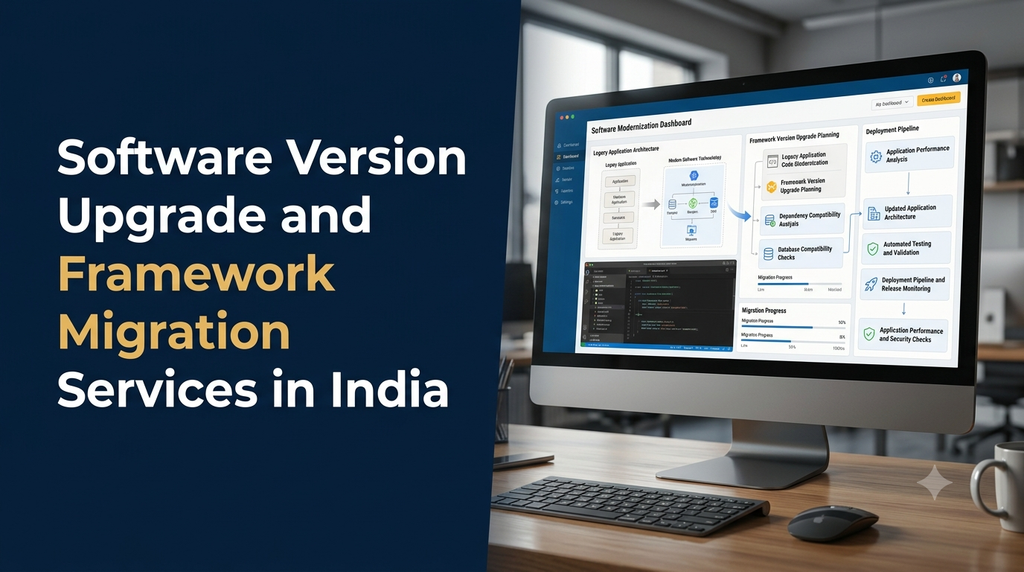
Software applications need regular technology updates to remain secure, compatible and maintainable. Programming languages, frameworks, libraries and development tools evolve continuously. When a business continues using outdated software versions, it may eventually face security vulnerabilities, compatibility issues, slower development and increasing maintenance costs.
Software version upgrade and framework migration services help businesses modernize existing applications without unnecessarily rebuilding every feature from scratch. Depending on the application, this may involve upgrading a programming language, moving to a newer framework version, replacing unsupported dependencies or migrating to a different technology stack.
For businesses running custom websites, enterprise applications, SaaS platforms, ecommerce systems and internal software, a carefully planned upgrade can improve long-term maintainability and support future development.
This guide explains software upgrades, framework migration, common challenges, migration strategies, testing requirements, implementation processes and project cost considerations in India.
What Are Software Version Upgrade and Framework Migration Services?
Software version upgrade services involve moving an existing application from an older software version to a newer supported version. This can include programming languages, runtime environments, frameworks, databases, packages and development tools.
Framework migration involves moving an application from one framework version or framework technology to another. It may require code changes, architecture adjustments, dependency replacement, configuration updates and application testing.
These activities are related but not always identical. An application may need a simple framework version upgrade without changing its overall technology stack. A more extensive migration may involve replacing the framework or moving to a different architecture.
Why Businesses Need Software Version Upgrades
Applications that are not regularly maintained can become difficult and expensive to operate. Older versions may stop receiving security fixes, lose compatibility with hosting environments or prevent developers from using newer libraries and tools.
1. Security and vulnerability management
Unsupported software versions may no longer receive important security patches. Upgrading to supported versions helps reduce exposure to known vulnerabilities, although security also depends on application code, server configuration, access controls and dependency management.
2. Framework and library compatibility
Newer libraries and services may require specific runtime or framework versions. An outdated application may not be able to integrate with these components without additional changes.
3. Improved application maintainability
Modern development environments often provide better tooling, documentation and support. Upgrading can make it easier for developers to understand, test and maintain an existing application.
4. Performance and resource improvements
New software versions may include performance improvements and more efficient internal operations. Actual gains depend on the application code, hosting environment and workload, so performance should be measured rather than assumed.
5. Support for future development
Businesses may need new modules, integrations, APIs or mobile application connections. A modernized technology stack can make these improvements easier to implement.
6. Reduced long-term technical debt
Old dependencies, unsupported packages and outdated architecture can create ongoing maintenance challenges. A planned modernization project can address these issues gradually.
Common Types of Software Upgrade and Migration Services
Popular Technology Upgrade and Migration Requirements
PHP version upgrade
PHP applications may need runtime upgrades to remain compatible with supported hosting environments and modern libraries. A PHP upgrade should include code compatibility checks, extension verification, Composer dependency reviews and testing of existing application features.
Laravel framework upgrade
Laravel applications may require changes to configuration, service providers, middleware, authentication, routing, packages and application code when moving between major versions. The upgrade path should follow the relevant official version guides.
Node.js version upgrade
Node.js upgrades can affect package compatibility, runtime behavior, build tools and server-side application dependencies. Teams should check supported package versions, deployment environments and automated test results.
React application modernization
React application upgrades may involve updating React packages, reviewing deprecated APIs, changing build tooling and improving component architecture. Related libraries for routing, forms and state management should also be checked.
Angular framework upgrade
Angular upgrades may involve TypeScript compatibility, RxJS dependencies, Angular CLI updates, application configuration and changes to framework APIs. Major upgrades should follow the recommended migration path.
Python and Django upgrades
Python and Django applications may need changes to dependencies, middleware, database drivers, asynchronous operations and configuration. Teams should review supported Python versions and the compatibility of installed packages.
Framework Upgrade vs Framework Migration
Choosing between upgrading the existing framework and migrating to a different framework is an important project decision. A complete migration is not automatically better than a version upgrade.
| Comparison | Framework upgrade | Framework migration |
|---|---|---|
| Meaning | Moving to a newer version of the same framework | Moving to a different framework or technology stack |
| Code changes | Usually focused on compatibility and deprecated features | May require broader application restructuring |
| Architecture | Often retains the existing architecture | May involve architectural redesign |
| Testing needs | Regression and compatibility testing | More extensive functional and integration testing |
| Typical complexity | Depends on version distance and dependencies | Often higher because of technology changes |
| Suitable when | The current framework remains appropriate | Business or technical needs justify a different stack |
Signs That Your Business Application Needs an Upgrade
Businesses should review their software stack regularly rather than waiting until an application stops working.
- The programming language or framework version has reached end of support.
- Important security updates are no longer available.
- Application packages have unresolved compatibility problems.
- The hosting provider no longer supports the application’s runtime.
- Developers struggle to maintain older code and dependencies.
- New integrations cannot be implemented without workarounds.
- Build and deployment processes depend on obsolete tools.
- Application errors appear after infrastructure or database changes.
- The business plans major new features that require a more maintainable architecture.
Software Version Upgrade and Framework Migration Process
A successful upgrade requires more than changing a version number in a configuration file. It should follow a structured process that protects existing data and business functionality.
Step 1: Existing application assessment
The first stage reviews the current application architecture, programming language, framework, packages, database, hosting environment and integrations.
The assessment should identify unsupported dependencies, deprecated features, custom modifications and components that may require additional work.
Step 2: Compatibility analysis
Check whether the target runtime, framework, libraries, database drivers and server environment are compatible. Review official upgrade documentation and dependency requirements before implementation.
Step 3: Upgrade planning
Prepare an upgrade roadmap with milestones, estimated effort, testing requirements, backup arrangements and deployment strategy. For major upgrades, a staged approach may reduce risk.
Step 4: Development environment preparation
Create a separate development or staging environment that reflects the target production configuration. This allows developers to test compatibility without changing the live application.
Step 5: Code and dependency updates
Update application code, package versions, configuration files, runtime requirements and related libraries. Resolve deprecated API usage and incompatible dependencies.
Step 6: Database and integration review
Review database drivers, query behavior, schema changes and external service integrations. Where database migrations are needed, test them using representative data and a documented recovery plan.
Step 7: Application testing
Conduct functional, regression, integration, security and performance testing. Verify important business workflows such as login, payments, reports, order processing and administrative operations.
Step 8: Staging and user acceptance testing
Deploy the upgraded application to staging and allow relevant stakeholders to validate important workflows. Resolve issues before production release.
Step 9: Production deployment
Schedule deployment with appropriate backups, release checks, monitoring and rollback procedures. For critical applications, use a deployment approach that minimizes service interruption.
Step 10: Post-upgrade monitoring
Monitor application errors, response times, background jobs, database activity and integrations after release. Document the new software versions and maintenance requirements.
Testing Requirements Before and After Migration
Testing is one of the most important parts of a software modernization project. An application may start successfully after an upgrade while individual features continue to behave incorrectly.
| Testing type | Purpose | Example |
|---|---|---|
| Functional testing | Confirm existing features work correctly | Login, forms and reports |
| Regression testing | Check that existing functionality has not broken | Order processing and user permissions |
| Integration testing | Verify connected systems still communicate correctly | Payment gateways and external APIs |
| Database testing | Validate data integrity and query behavior | Migration scripts and reporting queries |
| Security testing | Identify vulnerabilities and configuration problems | Authentication and access control |
| Performance testing | Evaluate application behavior under expected workloads | Concurrent users and API requests |
| Compatibility testing | Check supported browsers and environments | Production runtime and browser support |
Strategies for Migrating Legacy Applications
Not every legacy application should be upgraded in the same way. The right approach depends on the application’s size, dependencies, business importance and available development resources.
1. Direct upgrade
A direct upgrade moves the existing application to a supported software version while retaining most of its architecture. This may be suitable when the framework provides a clear upgrade path and the codebase is reasonably maintainable.
2. Incremental migration
Incremental migration updates the application in stages. Individual modules or components can be modernized while the rest of the system continues operating.
3. Strangler-style modernization
In this approach, selected functionality is gradually moved from the legacy system to newer services. Routing and integration layers allow old and new components to operate together during the transition.
4. Full framework replacement
A complete replacement may be appropriate when the current framework is unsuitable, unsupported or difficult to maintain. It generally requires broader redevelopment, integration planning and functional validation.
Common Challenges in Software Upgrade Projects
Outdated dependencies
Older packages may no longer be maintained or may not support the target runtime. Developers may need to replace them or implement alternative functionality.
Custom application code
Applications with extensive customizations can require additional work because standard upgrade instructions may not account for project-specific code.
Database compatibility
Changes in database drivers, SQL behavior, data types or query handling can affect existing application features.
Third-party integrations
Payment services, email providers, authentication systems and external APIs may have their own version and compatibility requirements.
Limited documentation
Older projects may have incomplete technical documentation. Teams may need to inspect source code, database structures and deployment configurations before planning the migration.
Production downtime risks
An upgrade may introduce unexpected issues after deployment. Backups, staging validation, release planning and rollback procedures help manage this risk.
How to Reduce Risk During Framework Migration
- Maintain a verified backup of application files and databases.
- Record current framework, runtime and dependency versions.
- Use version control and review changes before merging.
- Test the upgrade in a staging environment.
- Keep development, testing and production configurations separate.
- Automate repeatable tests wherever practical.
- Review database changes and migration scripts carefully.
- Document deployment and rollback procedures.
- Monitor application behavior after production release.
- Update technical documentation after completing the upgrade.
Software Version Upgrade Services for Different Business Applications
Ecommerce websites
Ecommerce platforms need careful upgrade planning because product catalogs, shopping carts, checkout processes, payment integrations and inventory synchronization are business-critical. Testing should cover the complete purchasing workflow.
ERP and business management software
ERP systems may include finance, inventory, purchasing, production and reporting modules. An upgrade should preserve data integrity, user permissions, reports and integrations between business departments.
SaaS applications
SaaS products may serve multiple customers through shared infrastructure. Upgrade planning should consider tenant isolation, subscription features, background jobs, APIs and backward compatibility.
Customer and employee portals
Portals often depend on authentication, document management, notifications and workflow approvals. Regression testing should cover user roles and important portal operations.
Custom business applications
Custom applications may contain unique business rules and integrations. A technical assessment helps identify which parts can be upgraded directly and which require restructuring.
Software Upgrade and Framework Migration Cost in India
Software modernization costs vary according to application size, framework, version distance, dependency complexity, database changes, testing coverage and deployment requirements.
| Service scope | Illustrative planning estimate |
|---|---|
| Basic software version assessment | ₹5,000–₹12,000 |
| Small application framework upgrade | ₹12,000–₹25,000 |
| PHP and Laravel version modernization | ₹15,000–₹40,000 |
| Frontend framework upgrade | ₹15,000–₹35,000 |
| Runtime and dependency modernization | ₹12,000–₹30,000 |
| Database compatibility and migration work | ₹15,000–₹40,000 |
| Complex enterprise framework migration | ₹40,000–₹1,50,000+ |
| Large legacy application modernization | Based on detailed technical assessment |
Pricing note: These are illustrative planning estimates, not fixed Greap Technologies quotations or guaranteed market prices. Actual project pricing depends on source code quality, application modules, dependency compatibility, framework versions, testing requirements and deployment complexity. Hosting, third-party licenses, paid migration tools, external services, taxes and ongoing maintenance may be additional.
How to Choose a Software Migration Company in India
Selecting a development partner is important because software upgrades can affect existing business operations. A suitable team should understand both the current application and the target technology.
- Technology experience: Look for experience with the programming language and framework used by your application.
- Legacy code assessment: The team should be able to inspect existing code and identify migration risks.
- Testing approach: Ask how functional, regression, integration and security testing will be handled.
- Data protection: Confirm backup, database migration and recovery arrangements.
- Deployment planning: Review staging, production release and rollback procedures.
- Documentation: Request updated technical documentation and dependency information.
- Post-upgrade support: Discuss monitoring, bug fixes and maintenance after deployment.
How Greap Technologies Can Help
Greap Technologies provides website development, custom software development and digital growth solutions for businesses. Existing business applications may need technology upgrades as their operational requirements and software dependencies change.
Depending on the project requirements, a software modernization engagement may include:
- Existing application and source code assessment
- Programming language and runtime version upgrades
- Framework and library compatibility review
- Frontend and backend modernization
- Database compatibility and migration support
- Application testing and deployment preparation
- Technical documentation and maintenance planning
The recommended migration approach depends on the current application, target technology, business priorities and acceptable operational risk. A structured assessment helps determine whether a direct upgrade, incremental modernization or framework replacement is appropriate.
Planning to Upgrade or Modernize Your Business Software?
Discuss your existing application, framework version, compatibility issues and modernization requirements with Greap Technologies.
Visit Greap Technologies | Discuss Your Requirements on WhatsApp | Call 7092330168
Frequently Asked Questions
1. What are software version upgrade services?
Software version upgrade services involve updating an existing application, programming language, framework, runtime or dependency to a newer supported version while checking compatibility and preserving required functionality.
2. What is framework migration?
Framework migration involves moving an application from an older framework version or one framework technology to another. It may require code changes, dependency updates, configuration changes and extensive testing.
3. Is framework migration the same as application redevelopment?
No. Framework migration can retain much of the existing application functionality and business logic. Full redevelopment may be necessary in some cases, but it should not be assumed to be required for every migration.
4. Why should businesses upgrade outdated software versions?
Upgrades can help maintain security support, improve compatibility, simplify maintenance and prepare applications for future development. The benefits depend on the target version and application requirements.
5. Can an existing Laravel application be upgraded?
Yes. Laravel applications can often be upgraded through supported version paths. The effort depends on the current Laravel and PHP versions, dependencies, custom code and database integrations.
6. How long does a framework migration take?
A small framework upgrade may take a few days, while a complex enterprise migration may require several weeks or longer. The timeline depends on application size, compatibility issues, testing requirements and deployment planning.
7. Will framework migration affect existing application data?
It can if database changes are involved. Proper backups, tested migration scripts, data validation and recovery procedures help protect existing business data.
8. Is testing required after a software upgrade?
Yes. Functional, regression, integration, security and performance testing help verify that the upgraded application works correctly and that important business operations remain available.
9. Can an outdated application be migrated without downtime?
Some applications can use staged or low-downtime deployment strategies. However, the approach depends on database changes, architecture, infrastructure and application dependencies. Zero downtime should not be guaranteed without a detailed assessment.
10. How much does software framework migration cost in India?
Costs vary according to application complexity, technology stack, dependency compatibility, database changes and testing requirements. A technical assessment is needed to prepare a reliable project estimate.
Conclusion
Software version upgrades and framework migration help businesses maintain their applications as technology evolves. Updating unsupported runtimes, modernizing dependencies and improving framework compatibility can make software easier to maintain and prepare it for future requirements.
Successful modernization requires careful assessment, upgrade planning, code changes, database validation, comprehensive testing and controlled deployment. The right strategy should protect existing business functionality while addressing the technical limitations of the current application.
Whether your business operates an ecommerce website, SaaS platform, ERP system, customer portal or custom web application, a structured software upgrade can support long-term application stability and maintainability.