Custom software is more than the application users see on their screens. Behind every reliable business application are architecture decisions, database structures, integrations, security rules, deployment procedures and maintenance processes. When these details are not documented properly, even a well-built application can become difficult to operate, update or transfer to another development team.
Technical documentation provides a structured record of how software is designed, developed, configured, tested and maintained. It helps developers understand the system, supports troubleshooting and reduces dependency on individual team members. For businesses investing in custom software, documentation is an important part of protecting the long-term value of that investment.
This guide explains what to include in technical documentation for custom software projects, which documents are useful at different stages and how businesses can keep documentation accurate as their applications evolve.
What Is Technical Documentation in a Custom Software Project?
Technical documentation is a collection of written records, diagrams, specifications and instructions that explain how a software application works and how it should be managed. It describes the application’s structure, technologies, components, data flow, integrations and operational requirements.
Depending on the project, documentation may be prepared for developers, system administrators, testers, technical support teams, project owners and future maintenance partners.
Why Is Technical Documentation Important?
1. Easier software maintenance
Developers can understand the existing implementation before changing features or correcting problems. This reduces unnecessary investigation and helps maintenance work follow the original system design.
2. Reduced dependency on individual developers
Without documentation, important technical knowledge may remain with the people who originally developed the application. Clear records help new team members understand the project when responsibilities change.
3. Better troubleshooting
Architecture diagrams, error-handling rules, logs and deployment procedures give technical teams useful information when investigating application issues.
4. Safer upgrades and integrations
Documented dependencies, APIs and data structures make it easier to evaluate the effect of a proposed upgrade or integration before implementation.
5. More predictable project handover
When a business moves to another development or support team, documentation helps transfer technical knowledge without relying entirely on meetings or informal explanations.
6. Improved operational continuity
Deployment, backup, restoration and monitoring instructions help authorised teams manage the application consistently.
Essential Documents to Include in a Custom Software Project
Not every application requires a large documentation library. The right documentation set depends on the project’s complexity, technology, integrations, security requirements and operational needs. The following sections cover the main documents businesses should consider.
1. Project Overview and Scope Document
Start with a document that explains the purpose of the software and the business problem it is designed to solve. It should give technical and non-technical stakeholders a shared understanding of the project.
- Project name and application purpose
- Business objectives and expected outcomes
- Major modules and features
- Intended user groups
- Supported platforms and devices
- Project scope and exclusions
- Known assumptions and constraints
- Important third-party dependencies
2. Software Requirements Specification (SRS)
The Software Requirements Specification describes what the application must do and the conditions under which it must operate. It connects business expectations with development and testing activities.
Functional requirements describe application behaviour, such as creating an order, approving a purchase, generating an invoice or managing user accounts.
Non-functional requirements describe quality expectations, such as performance, availability, accessibility, scalability, security and compatibility.
An SRS may include:
- Feature descriptions and business rules
- User roles and permission requirements
- Input validation and expected outputs
- Workflow and approval requirements
- Performance and availability expectations
- Supported browsers, operating systems and devices
- Acceptance criteria for important features
3. System Architecture Documentation
Architecture documentation explains how the major parts of the application fit together. It provides a high-level technical view before a developer needs to examine individual code files.
Include the following where relevant:
- Architecture style, such as monolithic, modular or microservices
- Frontend, backend and database components
- External services and integration points
- Communication between application modules
- Authentication and authorisation approach
- Hosting and infrastructure overview
- Important architectural decisions and their reasons
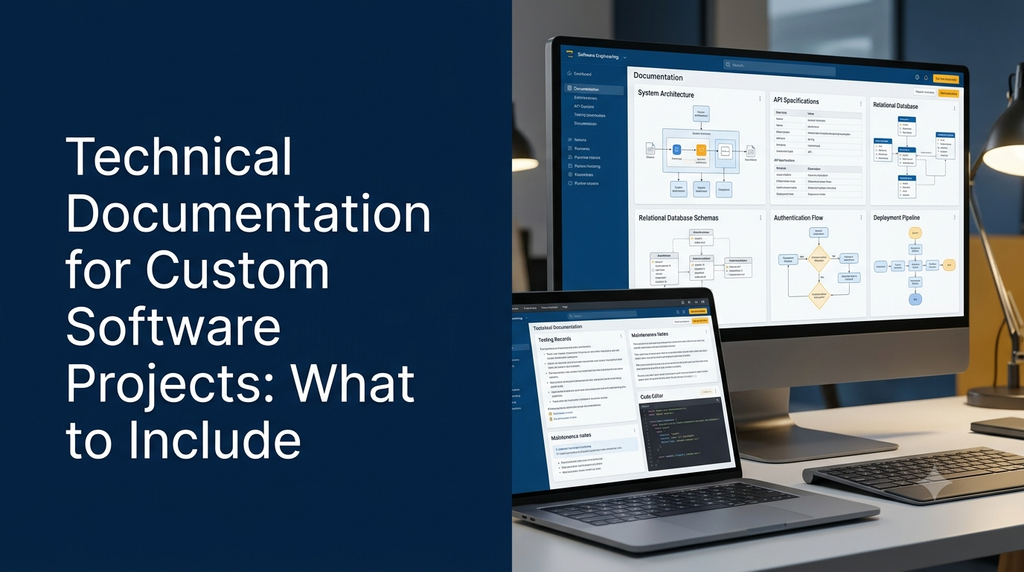
Use diagrams to show system boundaries, major components, request flows and external connections. A diagram should be accompanied by a short explanation rather than being the only source of information.
4. Technology Stack and Dependencies
Record the technologies used to build and operate the application. This information helps future developers understand the environment and assess compatibility before making changes.
| Area | Information to document |
|---|---|
| Frontend | Framework, language, build tools and important packages |
| Backend | Programming language, framework, runtime and server requirements |
| Database | Database engine, version and required extensions |
| Infrastructure | Hosting environment, operating system and server components |
| Integrations | Payment, messaging, email, analytics and other external services |
| Development tools | Version control, package manager, testing and build tools |
Record supported versions and upgrade considerations where they matter. Do not include private access tokens, passwords or production secrets in documentation.
5. Database Design Documentation
Database documentation explains how application data is organised and how different records relate to one another. It is particularly important for ERP, CRM, ecommerce, inventory, finance and reporting applications.
Include:
- Database engine and version
- Entity Relationship Diagram (ERD)
- Table names and descriptions
- Important columns and data types
- Primary keys and foreign keys
- Indexes and important constraints
- Relationships between business entities
- Data retention and archival rules
- Migration history and backup expectations
Sensitive fields should be identified so that teams can apply appropriate access controls, encryption and data-handling practices.
6. API Documentation
API documentation explains how the application communicates with mobile apps, websites, partner systems and external services. It is essential when multiple applications depend on the same backend.
For each API endpoint, document:
- Endpoint path and HTTP method
- Purpose and expected behaviour
- Required headers and authentication
- Request parameters and body format
- Example request and response
- Validation rules and error responses
- Pagination, filtering and sorting behaviour
- Rate limits and versioning rules, where applicable
OpenAPI specifications can be useful for documenting REST APIs. Keep examples accurate and avoid including real customer data or live credentials.
7. User Roles, Permissions and Authentication
Business software often has multiple user types, such as administrators, managers, employees, agents, customers and suppliers. Documentation should explain what each role can access and which actions it can perform.
- Role definitions and responsibilities
- Permission matrix for modules and actions
- Login and authentication approach
- Password and account recovery policies
- Session management rules
- Multi-factor authentication requirements, if implemented
- Audit logging and access review procedures
A permission matrix is especially useful for applications where users have different levels of access to financial, employee or customer information.
8. UI/UX and Workflow Documentation
Technical documentation should explain important user journeys and business workflows, not just the underlying code.
Useful material includes:
- Screen inventory and module descriptions
- Navigation structure
- User journey diagrams
- Form validation rules
- Approval and rejection workflows
- Notification behaviour
- Responsive design expectations
- Accessibility considerations
9. Integration Documentation
Many custom applications depend on third-party services. Document how each integration works and what happens when an external service is unavailable.
- External service name and purpose
- Data exchanged between systems
- Authentication method, without exposing secrets
- Webhook events and callback behaviour
- Timeout and retry expectations
- Error handling and fallback behaviour
- Relevant vendor documentation links
- Subscription or account ownership information
10. Security and Compliance Documentation
Security documentation records the controls used to protect the application, its users and its data. The exact requirements depend on the business, the information handled and applicable regulations.
Consider documenting:
- Authentication and authorisation design
- Data classification and handling rules
- Encryption approach for data in transit and at rest
- Input validation and secure file upload controls
- Dependency and patch management process
- Audit logs and security monitoring
- Backup protection and recovery responsibilities
- Security review and incident response procedures
11. Testing and Quality Assurance Documentation
Testing documentation explains how the team verifies that the software behaves as expected. It also gives future developers a reference when changing existing features.
- Test strategy and scope
- Test cases and expected results
- Unit, integration and system testing coverage
- User acceptance testing scenarios
- Performance and compatibility test records
- Known defects and their status
- Release approval and sign-off records
12. Deployment and Environment Setup Guide
A deployment guide explains how authorised technical staff can prepare the environment and release the application. It should be detailed enough for a qualified team member to follow without relying on undocumented steps.
Include:
- Required server and runtime versions
- Environment preparation requirements
- Build and deployment process
- Environment variable names and descriptions, not secret values
- Database migration procedure
- Domain, DNS and SSL configuration responsibilities
- Background jobs and scheduled task requirements
- Post-deployment verification steps
- Rollback and recovery considerations
13. Backup, Recovery and Monitoring Documentation
Production applications need clear operational procedures. Documentation should explain what is backed up, how recovery is coordinated and how system health is monitored.
- Backup scope and schedule
- Backup storage and access responsibilities
- Retention expectations
- Restoration procedure and validation
- Application logs and monitoring locations
- Alert ownership and escalation process
- Recovery objectives, where agreed
14. Maintenance and Troubleshooting Guide
Maintenance documentation helps support teams handle routine tasks and investigate common problems.
It can include:
- Common application errors and their causes
- Log locations and diagnostic guidance
- Routine maintenance tasks
- Dependency update procedures
- Known limitations and workarounds
- Support contacts and escalation responsibilities
- Change history and release notes
Documentation Checklist by Project Stage
Documentation should be created throughout the software development lifecycle rather than postponed until the final handover.
| Project stage | Documents to prepare or update |
|---|---|
| Planning | Project overview, scope, requirements and assumptions |
| Design | Architecture diagrams, database design, workflows and UI specifications |
| Development | Code structure, dependencies, API specifications and technical decisions |
| Testing | Test strategy, test cases, defect records and acceptance results |
| Deployment | Environment setup, release steps, configuration and rollback guide |
| Handover | Admin guide, maintenance guide, access ownership and known limitations |
| Ongoing support | Release notes, change history, updated diagrams and troubleshooting records |
Example: Documentation Structure for a Business Management Application
Consider a custom business management platform containing customer management, inventory, sales, invoicing and reporting modules. A practical documentation folder could be organised as follows:
business-management-project/
|
|-- 01-project-overview/
|   |-- project-scope.md
|   |-- business-requirements.md
|
|-- 02-architecture/
|   |-- system-architecture.md
|   |-- component-diagram.png
|   |-- data-flow-diagram.png
|
|-- 03-database/
|   |-- database-design.md
|   |-- er-diagram.png
|   |-- migration-history.md
|
|-- 04-api/
|   |-- api-overview.md
|   |-- openapi-specification.yaml
|
|-- 05-security/
|   |-- roles-and-permissions.md
|   |-- security-controls.md
|
|-- 06-testing/
|   |-- test-strategy.md
|   |-- test-cases.xlsx
|   |-- known-issues.md
|
|-- 07-deployment/
|   |-- environment-setup.md
|   |-- deployment-guide.md
|   |-- rollback-guide.md
|
|-- 08-maintenance/
|   |-- troubleshooting.md
|   |-- backup-and-recovery.md
|   |-- release-notes.md
|
|-- README.md
This is an example structure, not a mandatory standard. Smaller applications may combine related documents, while complex enterprise systems may need separate documentation for each service, module or deployment environment.
Which Tools Can Be Used to Create Technical Documentation?
| Tool | Common use |
|---|---|
| Markdown | Lightweight project notes, README files and developer guides |
| Confluence | Team knowledge bases and collaborative documentation |
| Git-based repositories | Version-controlled documentation maintained alongside code |
| OpenAPI / Swagger | REST API specifications and interactive API references |
| Mermaid | Architecture, sequence and workflow diagrams using text definitions |
| Draw.io | Visual architecture, network and process diagrams |
| PlantUML | UML and software design diagrams |
Tool selection should be based on team size, project complexity, collaboration needs and version-control practices. A simple project can often be documented effectively with a well-organised README, Markdown files and a few diagrams.
Best Practices for Maintaining Accurate Documentation
Keep documentation close to the code
Store developer-facing documentation in the project repository where practical. This makes it easier to review documentation changes alongside code changes.
Assign clear ownership
Decide who is responsible for updating architecture diagrams, API specifications, deployment instructions and operational procedures.
Update documents during development
Treat documentation updates as part of completing a feature or technical change. Waiting until the end of a project increases the chance of missing important details.
Use diagrams where they improve understanding
A clear sequence diagram or data-flow diagram can explain a complex interaction more effectively than several paragraphs. Keep diagrams labelled and update them when the system changes.
Write for the intended audience
Developer setup instructions, administrator guides and business user manuals serve different purposes. Avoid placing every type of information into one large document.
Protect confidential information
Use secure secret-management systems for credentials and private configuration. Documentation should explain where authorised staff obtain secrets, not reproduce the secrets themselves.
Review documentation periodically
Review important documents during releases, technology upgrades, security reviews and support handovers. Remove obsolete instructions and identify information that still needs confirmation.
Common Technical Documentation Mistakes
- Creating documentation only at project completion: Important design decisions may already be forgotten.
- Writing overly generic descriptions: Documents should describe the actual application, not just common software concepts.
- Ignoring deployment instructions: A system may be difficult to operate if environment setup is undocumented.
- Leaving API references outdated: Incorrect request and response examples can cause integration problems.
- Exposing credentials: Secrets should never be copied into ordinary documentation.
- Failing to record custom business rules: Unwritten approval, pricing or calculation rules can be difficult to reconstruct.
- Not documenting known limitations: Future teams need to know about unresolved issues and intentional design constraints.
- Using unclear file names: Consistent folder structures and naming conventions make documents easier to locate.
How Much Technical Documentation Does a Project Need?
The required level of documentation depends on the software’s complexity and business importance. A small internal tool does not need the same documentation depth as a multi-branch ERP platform or a SaaS product used by many customers.
| Project type | Suggested documentation focus |
|---|---|
| Small business website | Technology overview, deployment, integrations, backups and maintenance |
| Custom business application | Requirements, architecture, database, APIs, roles, testing and deployment |
| ERP or CRM system | Module workflows, business rules, permissions, data relationships, reports and integrations |
| SaaS platform | Tenant architecture, subscription workflows, APIs, security, monitoring and release management |
| Enterprise application | Detailed architecture, security, integrations, operational procedures, recovery and governance |
Documentation effort should be agreed during project planning. It can be treated as a deliverable with defined contents, review responsibilities and handover expectations.
What Should a Software Development Company Deliver at Handover?
Businesses commissioning custom software should clarify documentation deliverables before development begins. Depending on the agreed project scope, a handover package may include:
- Final project scope and approved requirements
- System architecture overview and relevant diagrams
- Technology stack and dependency information
- Database structure and migration notes
- API documentation and integration details
- User roles and permission documentation
- Testing summary and known issues
- Deployment and environment setup instructions
- Backup, restoration and maintenance procedures
- Administrator or user guidance, where included
- Source-code repository and agreed ownership information
- Third-party service and subscription ownership details
Access credentials should be transferred through an appropriate secure method, not embedded in the documentation files. The contract or project agreement should define source-code ownership, third-party licences, hosting responsibilities and post-launch support.
How Greap Technologies Approaches Custom Software Projects
Greap Technologies works on website development, custom software development and digital growth solutions for businesses. For a custom application, documentation should support more than the initial development process: it should help the business understand its system, manage future changes and coordinate ongoing technical support.
Whether the requirement involves a business management platform, customer portal, inventory system, ERP, CRM or a web-based application, the documentation scope should be aligned with the features, integrations and operational needs of the project.
Planning a Custom Software Project?
Discuss your application requirements, technical architecture, development scope and documentation needs with Greap Technologies.
Frequently Asked Questions
1. What is included in technical documentation for custom software?
It commonly includes project scope, requirements, architecture, technology stack, database design, API specifications, security controls, testing records, deployment instructions and maintenance procedures. The exact contents depend on the project.
2. Is technical documentation necessary for small software projects?
Yes. Small projects still benefit from basic setup instructions, technology details, integration notes, database information and backup procedures. Documentation can be concise without being omitted.
3. What is the difference between technical documentation and user documentation?
Technical documentation explains how the software is structured, configured, integrated and maintained. User documentation explains how people use its features to complete their tasks.
4. Who is responsible for preparing software documentation?
Responsibility may be shared between software architects, developers, testers, project managers, technical writers and operations teams. A project should assign clear ownership for each document.
5. Should API documentation be included in a custom software project?
API documentation is important when the application communicates with mobile apps, external services, partner systems or other software. It should describe endpoints, authentication requirements, request formats and response behaviour.
6. Should database diagrams be part of technical documentation?
Yes, when the application uses a structured database. Entity Relationship Diagrams and table descriptions help developers understand data relationships, constraints and important business records.
7. How often should technical documentation be updated?
It should be updated whenever a relevant system change is made. Important review points include feature releases, database changes, API modifications, framework upgrades and deployment changes.
8. Which tools are suitable for software technical documentation?
Markdown, Git repositories, Confluence, OpenAPI, Mermaid, Draw.io and PlantUML are common options. The best choice depends on the team’s workflow and documentation requirements.
9. Should source code be included in technical documentation?
The source code is normally maintained in a separate version-controlled repository. Documentation should explain the repository structure, setup process, important modules and development conventions, with access and ownership handled separately.
10. What should businesses check before accepting a software handover?
Check that the agreed documentation is complete, deployment instructions are understandable, integrations are described, known issues are recorded, source-code access is transferred as agreed and hosting and third-party account ownership are clear.
Conclusion
Technical documentation is a practical foundation for maintaining, upgrading and managing custom software. Requirements, architecture diagrams, database structures, API specifications, security information, testing records and deployment procedures all help preserve important project knowledge.
Businesses should define documentation expectations before development starts and make updates part of the software delivery process. A well-documented application is easier to understand, maintain and hand over as business requirements change.