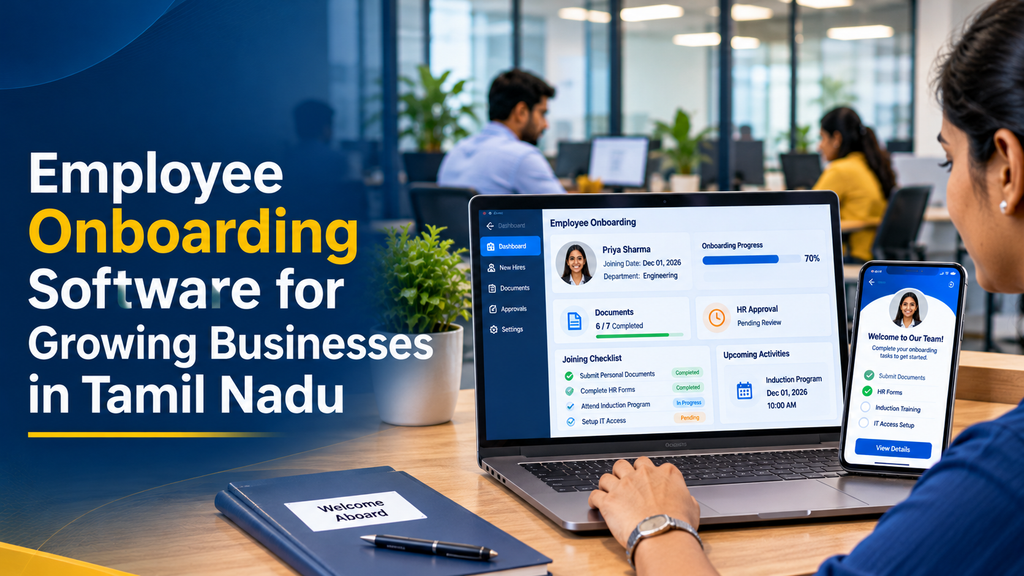
Employee onboarding software helps growing businesses manage the process of welcoming, registering and preparing new employees through a structured digital workflow. It brings together joining forms, document collection, HR approvals, induction schedules, department tasks and employee record creation in one system.
When a company starts hiring more employees, onboarding can become difficult to coordinate through spreadsheets, paper forms and separate email conversations. HR teams may need to follow up on missing documents, managers may not know which tasks are pending, and IT teams may receive equipment requests too late.
A dedicated employee onboarding management system makes these responsibilities visible. Employees can complete their joining information online, HR can review submissions, and departments can track their assigned activities.
What Is Employee Onboarding Software?
Employee onboarding software is a digital application that helps organisations manage the administrative and operational activities involved in bringing a new employee into the company.
It provides a common workspace for the new employee, HR team, reporting manager, administration department and IT team. Each participant can see the tasks assigned to them and update the progress of the onboarding process.
For example, a new employee may receive a secure onboarding link to complete a profile, submit requested documents and review company policies. HR can verify the information, while IT and administration complete their respective joining tasks.
The system can then create or update the employee’s central HR record using approved information, reducing repeated manual entry.
Why Do Growing Businesses Need Digital Employee Onboarding?
A small organisation may initially manage joining formalities with a few documents and a spreadsheet. As hiring increases, that approach becomes harder to maintain consistently.
1. Reduces repeated administrative work
HR teams often collect similar information from every new employee. Digital forms allow employees to submit information directly, while validation rules can identify missing fields before HR begins its review.
2. Keeps joining tasks organised
Onboarding involves several people. A task management workflow assigns each activity to an owner, sets a due date and shows whether it is pending, completed or awaiting approval.
3. Improves document management
Employee records may include personal information, education records, previous employment details and other documents required for a specific role. Centralised document management helps authorised HR staff review and maintain the records.
4. Creates a consistent employee experience
A structured onboarding journey helps new employees understand what they need to complete before joining and what to expect during their first few days.
5. Supports business expansion
Businesses opening new branches or hiring across multiple departments can use standardised onboarding templates while allowing appropriate variations for different roles and locations.
Essential Features of Employee Onboarding Software
1. New employee profile management
The employee profile is the central record created during onboarding. It stores the information needed by the organisation and authorised HR users.
- Employee name and contact information
- Joining date and employment type
- Department and job designation
- Reporting manager
- Work location and branch
- Employment status
- Relevant payroll and HR reference fields
The profile should use clearly defined fields and validation rules. Businesses should collect only information necessary for their employment, operational or legal requirements.
2. Digital joining forms
Digital forms allow new employees to submit their joining information through a web or mobile-friendly interface.
- Personal information form
- Contact and address details
- Education and experience information
- Emergency contact details where appropriate
- Bank and payroll information where required
- Role-specific declarations and forms
- Custom fields configured by HR
Form fields should be configurable so that businesses can adjust the information requested for different employee categories.
3. Employee document collection
The software can provide a secure document submission area where employees upload the records requested by the organisation.
Depending on the role and applicable requirements, document categories may include:
- Identity and address records
- Education certificates
- Previous employment records
- Signed offer or appointment documents
- Bank account information for payroll
- Role-specific forms and declarations
- Other records justified by company policy or applicable requirements
HR users should be able to mark documents as pending, submitted, approved or requiring correction. The employee should be informed when a replacement or additional document is needed.
Sensitive records must be protected through appropriate access restrictions, secure storage and retention rules. Not every employee or manager needs access to every document.
4. Offer and appointment document management
An onboarding platform can store offer and appointment documents and track their status.
- Offer document preparation
- Approval before issue
- Document sharing with the candidate
- Acceptance status tracking
- Appointment document records
- Template management
- Digital signature integration where required
Document templates should be reviewed by the employer’s authorised HR or legal personnel before they are used.
5. Automated onboarding checklists
A checklist helps HR and other departments understand which activities must be completed for each new employee.
Typical tasks include:
- Complete employee joining form
- Submit required documents
- Complete HR verification
- Confirm reporting manager
- Prepare employee ID card
- Arrange workstation or equipment
- Create authorised email and system accounts
- Share company policies
- Schedule induction sessions
- Complete first-week manager check-in
Different templates can be created for office employees, field staff, factory workers, managers and other job categories.
6. HR and department approval workflows
Some onboarding activities require approval from more than one person. A workflow engine can route requests to the correct department based on the employee’s role, location or employment category.
- HR document review
- Department head approval
- Manager confirmation
- Administration task approval
- IT access request approval
- Final joining confirmation
The system should record who approved an action and when it was completed. Important decisions, exceptions and changes should remain under authorised human control.
7. Employee self-service portal
An employee self-service portal gives new hires a place to complete their own onboarding activities.
- View joining instructions
- Complete personal information
- Upload requested documents
- Review company policies
- Track pending onboarding activities
- View induction schedules
- Receive HR notifications
- Update permitted profile information
A responsive portal is particularly useful for employees who complete joining formalities using a smartphone.
8. Employee induction and training management
Onboarding should cover more than paperwork. Employees also need to understand their responsibilities, company processes and workplace expectations.
The software can help HR coordinate:
- Company introduction sessions
- Department orientation
- Role-specific training
- Workplace policy acknowledgement
- Safety and process training where relevant
- Training completion records
- Manager or mentor assignment
9. IT asset and access management
Employees may need laptops, mobile devices, email accounts, software access or other workplace resources. The onboarding system can coordinate these requests with the IT team.
- Equipment request and assignment
- Asset identification and issue records
- Email and application access requests
- Department-specific access checklist
- Employee acknowledgement of assigned assets
- Asset return tracking when applicable
The software should coordinate access requests rather than automatically granting sensitive permissions without the required authorisation.
10. HR dashboard and onboarding reports
An HR dashboard provides visibility into joining progress across employees, departments and locations.
- Total employees undergoing onboarding
- Joining dates and upcoming joiners
- Pending document submissions
- Documents awaiting HR verification
- Incomplete department tasks
- Overdue approvals
- Induction completion status
- Onboarding completion by department
How Does Employee Onboarding Software Work?
A typical onboarding workflow begins when a candidate accepts an offer and continues through the joining process and initial induction.
- Candidate handover: Recruitment or HR creates the onboarding record after the relevant hiring approval.
- Onboarding invitation: The new employee receives access to a secure onboarding portal.
- Information submission: The employee completes the required forms and submits requested documents.
- HR review: Authorised HR staff review information and request corrections where necessary.
- Department task assignment: IT, administration and the reporting manager receive their assigned activities.
- Joining preparation: The company coordinates access, equipment, induction and other joining arrangements.
- Employee record creation: Approved information is transferred to the central employee database or HRMS.
- Induction follow-up: HR and the manager monitor the initial onboarding checklist and training activities.
Example: Employee Onboarding Task Assignment
A practical system should assign each task to a responsible person instead of keeping all activities under a single HR checklist.
| Onboarding activity | Responsible team | Example status |
|---|---|---|
| Joining form submission | New employee | Pending |
| Document verification | HR team | In review |
| Workstation preparation | Administration | Assigned |
| Email and software access | IT team | Not started |
| Role introduction | Reporting manager | Scheduled |
| Final joining review | HR manager | Awaiting completion |
These statuses are illustrative. A real application should allow administrators to configure task owners, deadlines, dependencies and status options.
Employee Onboarding Software for Different Types of Businesses
Startups and small businesses
Startups often need a simple onboarding process covering employee information, joining documents, policy acknowledgement and basic task management. The system should be easy to maintain as the team grows.
Manufacturing companies
Manufacturing businesses may need department-specific workflows for production staff, supervisors, maintenance teams and office employees. Site orientation, safety training and equipment allocation may be part of the onboarding checklist.
IT and software companies
Technology companies may require developer account requests, access permissions, device allocation, project introductions and role-specific technical induction.
Retail and multi-branch businesses
Retail organisations can use location-based onboarding templates for store staff, supervisors, warehouse employees and regional managers. Central HR teams can monitor completion across branches.
Service and professional businesses
Service businesses may need client confidentiality acknowledgements, department training, internal tool access and reporting-manager introductions.
Integration with HRMS, Payroll and Attendance Software
Onboarding becomes more useful when approved employee information can flow into the organisation’s other HR systems.
- HRMS integration: Creates or updates the central employee record.
- Payroll integration: Transfers approved employee and salary setup information to payroll.
- Attendance integration: Prepares the employee record for attendance and shift management.
- Leave management: Connects the employee with the applicable leave policy.
- Recruitment integration: Transfers relevant approved candidate information after hiring.
- Communication tools: Sends authorised notifications and reminders.
- IT systems: Coordinates account and equipment requests.
Integration should be planned carefully so that employee information is not repeatedly entered into separate systems. The receiving system should use approved data and provide a clear record of successful or failed transfers.
Privacy and Security in Employee Onboarding Software
Employee onboarding systems may store personal, financial and employment-related information. Security must therefore be part of the application design rather than an optional feature.
- Role-based access for HR, managers, IT and employees
- Secure authentication and session controls
- Encryption for data transmission and suitable protection for stored records
- Restricted access to sensitive documents
- Audit logs for document access and important changes
- Secure backup and tested recovery procedures
- Defined retention and deletion policies
- Appropriate consent and notice processes where required
- Secure file upload and document access controls
Businesses should collect only information needed for a defined purpose and establish appropriate access and retention rules. Requirements may depend on the organisation, the nature of the information and applicable laws. A software implementation should be reviewed by appropriate legal and HR professionals rather than treated as an automatic compliance guarantee.
Cloud-Based vs Custom Employee Onboarding Software
Growing businesses can choose a ready-made HR platform or commission a custom onboarding application. The right option depends on the company’s workflows and integration requirements.
| Factor | Ready-made platform | Custom software |
|---|---|---|
| Initial setup | Often quicker for standard workflows | Requires requirements analysis and development |
| Workflow flexibility | Depends on available configuration | Can be designed around specific processes |
| Integrations | Uses supported integrations | Can be planned for selected internal systems |
| Pricing model | Often subscription-based | Development and ongoing operating costs |
| Feature control | Limited to vendor capabilities | More control over agreed functionality |
| Maintenance | Usually managed by the provider | Requires an agreed maintenance arrangement |
A standard HRMS may be sufficient for businesses with straightforward joining processes. Custom development is worth evaluating when an organisation needs specialised approval workflows, multiple entities, branch-specific processes or integration with existing business applications.
How Much Does Employee Onboarding Software Development Cost in India?
Custom employee onboarding software development cost depends on the number of modules, workflow complexity, document storage requirements, integrations, user roles and mobile application requirements.
The following are illustrative planning estimates for custom development in India. They are not fixed market prices or a quotation from Greap Technologies.
| Development scope | Illustrative cost range |
|---|---|
| Basic employee records and joining checklist | ₹25,000–₹45,000 |
| Digital forms and document management | ₹40,000–₹70,000 |
| Onboarding workflows and HR approvals | ₹55,000–₹95,000 |
| Employee portal, notifications and reports | ₹70,000–₹1.2 lakh |
| Advanced onboarding and HRMS integration | ₹1.2–₹2.5 lakh+ |
| Multi-branch platform with mobile applications and advanced integrations | ₹2.5–₹5 lakh+ |
These figures are indicative planning ranges only. Hosting, domain registration, cloud document storage, SMS or email services, e-signature providers, third-party HR integrations, data migration, taxes and ongoing maintenance may involve additional costs.
A detailed project estimate should be prepared after reviewing the employee journey, approval rules, document requirements, user roles and integration needs.
How to Choose the Right Employee Onboarding Software
Before selecting a platform or starting custom development, businesses should evaluate the following points:
- Ease of use: Can new employees complete forms without extensive assistance?
- Mobile experience: Does the portal work well on smartphones?
- Workflow flexibility: Can different departments and employee categories use different checklists?
- Document security: Can access to sensitive records be restricted?
- Approval tracking: Can HR see who is responsible for each pending task?
- HRMS integration: Can approved data flow into employee records and payroll?
- Reporting: Can HR identify incomplete onboarding activities?
- Data ownership: Can the organisation export its employee records?
- Scalability: Can the system support additional branches, departments and users?
- Support and maintenance: Is there a clear process for updates, backups and issue resolution?
Employee Onboarding Software Development in Tamil Nadu
Growing companies across Tamil Nadu may have different employee onboarding requirements depending on their industry, workforce size and number of business locations.
A manufacturing company may need factory induction and safety checklists, while an IT business may focus on system access and technical orientation. Retail and service businesses may require branch-wise joining workflows and manager approvals.
Businesses in Erode, Coimbatore, Chennai, Tiruppur, Salem, Madurai and other Tamil Nadu locations can benefit from onboarding workflows configured around their own operating processes.
Greap Technologies provides website development, software development and digital growth services. We can help businesses plan custom employee onboarding applications with employee profiles, digital forms, document management, task automation, approval workflows and reporting.
Planning Custom Employee Onboarding Software?
Organise employee joining activities with a digital system designed around your HR process, department workflows and business growth plans.
Discuss your software requirements with Greap Technologies.
Visit Greap Technologies | Discuss on WhatsApp | Call 70923 30168
Frequently Asked Questions
1. What is employee onboarding software?
Employee onboarding software is a digital system that manages new-hire forms, document collection, HR approvals, joining tasks, induction activities and employee record creation.
2. Can small businesses use employee onboarding software?
Yes. Small businesses can start with employee profiles, joining forms, document uploads and checklists. Additional modules can be introduced as hiring and operational requirements grow.
3. Can employees upload joining documents online?
Yes. A secure employee portal can allow new hires to upload requested documents and view whether HR has approved them or requested corrections.
4. Can onboarding software automate HR approvals?
Yes. Configurable workflows can route tasks to HR, reporting managers, IT and administration, while recording approval status and task history.
5. Can the software generate offer and appointment documents?
A custom system can use approved templates to prepare offer and appointment documents, track their status and connect with suitable digital-signature services where required.
6. Can onboarding software integrate with payroll?
Yes. Approved employee information can be transferred to compatible payroll or HRMS software, subject to the integration capabilities of both systems.
7. Can different departments have separate onboarding checklists?
Yes. Businesses can create different task templates for departments, job roles, branches and employee categories.
8. Is employee onboarding software available on mobile?
A responsive web portal can support mobile browsers. Businesses can also commission a dedicated mobile application if their workflow requires it.
9. How is employee information protected?
Appropriate security measures include role-based permissions, secure authentication, encryption, audit logs, controlled document access, backups and defined retention policies.
10. How much does custom employee onboarding software cost?
The development cost depends on the required modules, workflow complexity, integrations and mobile features. A basic application generally has a smaller scope than a multi-branch HR platform with advanced automation.
Conclusion
Employee onboarding software helps growing businesses organise new-hire documentation, approvals, joining checklists, department tasks and employee records through a structured digital process.
The most suitable solution should match the organisation’s hiring workflow, protect employee information and connect smoothly with its existing HR systems. Businesses can begin with essential onboarding features and expand the platform as their workforce and operational needs grow.
Greap Technologies can help plan and develop custom software solutions for businesses looking to improve their employee onboarding and internal operations.