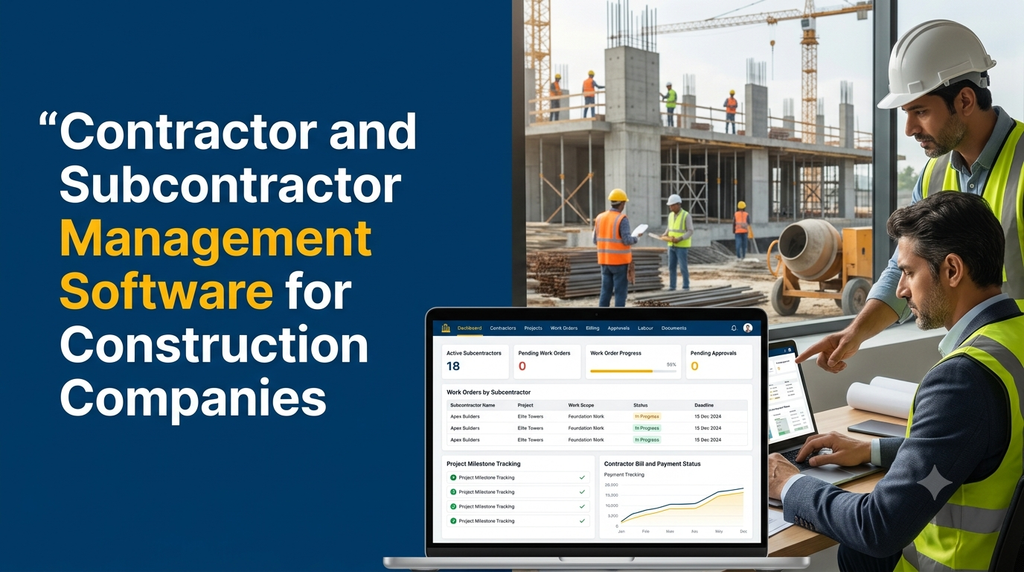
Contractor and Subcontractor Management Software for Construction Companies
Construction projects involve multiple contractors, subcontractors, suppliers, site engineers and project teams. Coordinating their responsibilities, work orders, progress reports, agreements and payments can become difficult when information is spread across spreadsheets, paper documents and messaging applications.
Contractor and subcontractor management software is a digital system that helps construction companies register contractors, allocate project work, monitor site activities, manage agreements, review completed work and track bills and payments. It brings contractor-related information into one centralized platform, helping project managers and administrators coordinate construction operations more effectively.
Why Do Construction Companies Need Contractor Management Software?
A construction project may involve civil contractors, electrical subcontractors, plumbing teams, painting contractors, flooring specialists and several other service providers. Each team may have different responsibilities, payment terms, schedules and completion requirements.
Without a centralized process, project managers may find it difficult to identify who is responsible for a particular activity, whether the assigned work has been completed, which bills are awaiting approval and how much has already been paid.
A dedicated software system can help businesses:
- Maintain centralized contractor and subcontractor records.
- Allocate work based on project, location and trade.
- Track work orders, deadlines and completion status.
- Maintain agreements, licences and supporting documents.
- Record site progress and completed quantities.
- Review contractor bills before payment approval.
- Monitor advances, deductions, retention and outstanding balances.
- Compare planned project costs with recorded expenses.
- Maintain a history of contractor activities and approvals.
Who Can Use Contractor and Subcontractor Management Software?
The system is useful for businesses that execute construction projects through external contractors or specialist subcontracting teams.
1. Building Construction Companies
Residential and commercial construction companies can manage civil, electrical, plumbing, painting, flooring and finishing contractors across different projects.
2. Infrastructure Contractors
Road construction, drainage, water supply and infrastructure businesses can organize subcontractor assignments, site progress, measurement records and work completion approvals.
3. Real Estate Developers
Developers managing several buildings, apartments or commercial developments can maintain contractor records and monitor work packages across multiple sites.
4. Industrial Construction Companies
Industrial construction and engineering businesses can coordinate fabrication, civil work, electrical installations, equipment erection and maintenance contractors.
5. Interior Design and Fit-Out Companies
Interior contractors can manage carpenters, electricians, painters, false-ceiling specialists and furniture installation teams.
Essential Features of Contractor Management Software
1. Contractor and Subcontractor Registration
A centralized contractor directory helps administrators maintain complete information about every service provider.
Typical contractor profile fields include:
- Contractor or business name.
- Contact person and communication details.
- Business address and operating locations.
- Contractor category and specialization.
- GST and other applicable business information.
- Bank and payment details with restricted access.
- Agreement and supporting document records.
- Assigned projects and previous work history.
- Current status and internal remarks.
Administrators can categorize contractors by trade, specialization, service area and project eligibility. This makes it easier to identify suitable service providers when new work is assigned.
2. Project-Wise Contractor Allocation
Construction companies often manage several projects simultaneously. The software should support assigning contractors to individual projects, buildings, floors, blocks, locations or work packages.
For example:
| Project | Work Category | Assigned Contractor | Status |
|---|---|---|---|
| Residential Project A | Electrical Work | Electrical Contractor | In Progress |
| Commercial Project B | Plumbing | Plumbing Contractor | Assigned |
| Residential Project C | Painting | Painting Contractor | Completed |
Project managers can view contractor assignments, identify overlapping responsibilities and review the current status of each work package.
3. Work Order and Job Allocation Management
Work orders define what a contractor is expected to complete, where the work must be performed and the commercial terms associated with the assignment.
A work order can contain:
- Project and site details.
- Contractor information.
- Work description and scope.
- BOQ items and agreed quantities, where applicable.
- Unit rates and contract value.
- Planned start and completion dates.
- Milestones and delivery expectations.
- Supporting drawings and attachments.
- Approval status and revision history.
The system can support work order creation, review, approval, revision and closure. This helps maintain a consistent record of the work assigned to each contractor.
4. Contractor Agreement and Document Management
Construction agreements often contain important information about work scope, rates, payment conditions, timelines, responsibilities and other contractual requirements.
A document management module can organize:
- Contractor agreements and work contracts.
- Purchase and work orders.
- Quotation and rate approval documents.
- Applicable business registrations and certificates.
- Insurance and safety-related documents, where applicable.
- Site instructions and approved drawings.
- Variation and change order records.
- Completion and handover documents.
Document expiry reminders can be configured for records that require periodic renewal. Access permissions should restrict sensitive contractual and financial documents to authorized users.
5. Site Progress and Work Completion Tracking
Contractor management should not stop at work allocation. Construction managers also need a practical way to record actual site progress.
The application can capture:
- Daily and weekly progress entries.
- Completed work quantities.
- Work pending and reasons for delay.
- Site inspection remarks.
- Progress photographs and attachments.
- Engineer verification and approval.
- Milestone completion dates.
A mobile interface allows authorized site engineers to submit progress information from the construction location instead of waiting until they return to the office.
6. Measurement Book and Quantity Verification
For projects where contractor payments depend on measured work, a measurement management module can record the quantities completed at the site.
Depending on the business workflow, records may include:
- Work item and BOQ reference.
- Location, floor or construction section.
- Measurement description.
- Recorded length, width, height or quantity.
- Calculated completed quantity.
- Previous and current measured quantities.
- Engineer verification and approval.
The software can maintain a measurement history and connect verified quantities with contractor billing. Calculation rules should be configured according to the company’s approved measurement practices and contract terms.
7. Contractor Billing and Payment Management
Contractor billing is one of the most important modules in a construction management application. The system should help businesses record bills, verify completed work, apply approved deductions and track payments.
Useful billing capabilities include:
- Contractor invoice submission.
- Work order and BOQ reference linking.
- Quantity and rate verification.
- Running account (RA) bill records.
- Advance payment tracking.
- Approved deductions and adjustments.
- Retention amount records.
- Tax fields based on applicable requirements.
- Bill approval and rejection workflow.
- Payment entries and outstanding balances.
- Payment history and downloadable statements.
8. Labour and Workforce Records
Some construction businesses also need to monitor workers deployed by contractors. A workforce module can maintain labour information without necessarily replacing the contractor’s own payroll system.
Possible capabilities include:
- Contractor-wise workforce records.
- Daily worker attendance.
- Site-wise labour deployment.
- Trade and skill classification.
- Shift and workday records.
- Overtime and additional work entries.
- Worker movement between sites.
- Labour strength reports.
Where attendance devices or biometric systems are required, integration depends on the hardware, software interface and vendor compatibility.
9. Material and Equipment Coordination
Certain construction contracts include materials, tools or equipment supplied by the main contractor. Recording these movements can help businesses understand project consumption and contractor accountability.
Depending on the project, the system can record:
- Material issued to a contractor.
- Material return entries.
- Equipment allocation and return.
- Tool handover records.
- Material consumption against work orders.
- Damaged or missing material reports.
- Site-wise issue and consumption summaries.
10. Contractor Performance Monitoring
Construction companies may need to evaluate contractors based on documented project performance. A performance module can help managers review measurable project information.
Possible evaluation criteria include:
- Work completion against agreed milestones.
- Verified quality inspection outcomes.
- Recorded rework and defect reports.
- Safety documentation and incident records.
- Response to site instructions.
- Billing accuracy and documentation completeness.
- Project handover status.
Performance scores, if used, should be based on transparent criteria and verified records. They should not be presented as objective assessments without a documented evaluation method.
How Does Contractor Management Software Work?
A typical workflow starts when a construction company registers a contractor and assigns work under a specific project.
- Contractor registration: The administrator creates a contractor profile and records the required business details.
- Project assignment: The project manager selects the project, site and work category.
- Work order creation: The company defines the scope, quantities, rates and planned completion dates.
- Contractor acceptance: The contractor receives the work details and follows the agreed process for confirmation.
- Site execution: The contractor completes the assigned activities and submits progress information.
- Quantity verification: The authorized engineer checks the completed work and records approved quantities.
- Bill submission: The contractor submits the bill with supporting records.
- Bill approval: Authorized personnel review the measurements, rates and applicable adjustments.
- Payment recording: The finance team records payment details and updates the outstanding balance.
- Work closure: The project team completes the handover and closes the work order.
Example of Contractor Billing Management
Consider a construction company that assigns flooring work to a subcontractor. The contract specifies an agreed unit rate, and the project engineer verifies completed quantities before the bill is approved.
| Billing Detail | Illustrative Value |
|---|---|
| Verified completed quantity | 1,000 sq. ft. |
| Agreed rate | ₹50 per sq. ft. |
| Gross work value | ₹50,000 |
| Approved advance adjustment | ₹5,000 |
| Illustrative retention | ₹2,500 |
| Illustrative balance before other applicable adjustments | ₹42,500 |
This example demonstrates how the system can display a billing calculation. Actual payable amounts depend on the signed agreement, tax treatment, approved deductions and company accounting rules.
Important Modules in a Construction Contractor Management System
| Module | Purpose |
|---|---|
| Admin Dashboard | Centralized view of projects, contractors, work orders and approvals. |
| Contractor Management | Registration, classification and contractor records. |
| Project Management | Project-wise contractor and work allocation. |
| Work Order Management | Scope, rates, quantities and assignment tracking. |
| Agreement Management | Contracts, supporting documents and revisions. |
| Site Progress | Daily progress, photographs and completion reports. |
| Measurement Management | Recorded quantities and verification. |
| Billing and Payments | RA bills, advances, deductions and payment records. |
| Labour Management | Contractor-wise workforce and attendance records. |
| Reports and Analytics | Project costs, work progress and contractor summaries. |
Web Application and Mobile App for Construction Teams
A contractor management platform can include a web-based administration system and mobile applications for people working at construction sites. The required interfaces depend on the company’s approval structure and contractor communication process.
Admin and Management Web Dashboard
- Manage company users and permissions.
- Create and monitor construction projects.
- Register contractors and subcontractors.
- Prepare and approve work orders.
- Review agreements and project documents.
- Monitor work progress and verified quantities.
- Review contractor bills and payment records.
- Generate project-wise financial and operational reports.
Site Engineer Mobile App
- View assigned construction projects.
- Access contractor work orders.
- Submit daily progress updates.
- Upload site photographs and supporting documents.
- Record measurements and completed quantities.
- Submit inspection observations.
- Track pending approvals.
Contractor and Subcontractor Portal
- View assigned projects and work orders.
- Access approved contract documents.
- Submit work progress updates.
- Upload bills and supporting documents.
- Review bill approval status.
- View payment history and outstanding balances.
- Receive work instructions and notifications.
Advanced Features for Large Construction Companies
Companies managing multiple construction sites may require additional capabilities beyond contractor registration and billing.
1. Multi-Project and Multi-Site Management
Maintain a unified view of contractors, work orders, documents and financial records across different project locations.
2. BOQ and Rate Management
Maintain bill of quantities, approved unit rates, item descriptions and project-specific commercial terms.
3. Change Order Management
Record variations to the original work scope, including revised quantities, rates, approvals and supporting documents.
4. Approval Hierarchy
Configure separate approval stages for work orders, measurements, bills, deductions and payments.
5. Contractor Self-Service
Allow authorized contractors to access relevant assignments, documents, submissions and payment information through a secure portal.
6. Notifications and Reminders
Send configurable notifications for new assignments, document expiry, approaching deadlines, bill submissions and pending approvals. Email, SMS and WhatsApp notifications depend on the selected third-party providers and integration arrangements.
7. Dashboard and Business Intelligence
Display project-level contractor expenses, completed work, pending bills, outstanding payments, work order status and contractor allocation summaries.
Benefits of Contractor and Subcontractor Management Software
- Centralized information: Contractor, project and work order records are available in one system.
- Better coordination: Project teams can review assignments and work status through a shared platform.
- Improved billing visibility: Submitted, verified, approved and paid bills can be tracked separately.
- Document organization: Agreements, drawings and supporting records can be linked to projects and work orders.
- Progress monitoring: Managers can review submitted site updates and verified completion quantities.
- Financial tracking: Contractor expenses and outstanding commitments can be reviewed by project.
- Accountability: User permissions and approval histories provide a record of important actions.
- Management reporting: Project and contractor summaries help managers review operational information.
Excel vs Contractor Management Software
Spreadsheets can be suitable for maintaining a small number of contractor records. However, when a company manages multiple projects, approval stages, work orders and recurring bills, a dedicated system may provide better structure.
| Business Requirement | Spreadsheet-Based Process | Dedicated Software |
|---|---|---|
| Contractor records | Separate sheets or files | Centralized profiles |
| Work allocation | Manual updates | Project-wise assignments |
| Work order tracking | Manual status changes | Structured workflow |
| Site progress | Separate reports | Linked progress records |
| Bill approvals | Email or manual coordination | Configurable approval stages |
| Payment history | Manual reconciliation | Contractor-wise records |
| Management reports | Manual consolidation | Centralized dashboards |
The right choice depends on project volume, team size, process complexity and reporting requirements. A spreadsheet may remain useful for simple activities, while a dedicated platform can support more connected operational workflows.
Integrations for Construction Management Software
A contractor management system may need to exchange information with other business applications. Integration requirements should be identified during the planning stage.
- Accounting software: Connect approved bills, expenses and payment records where supported.
- ERP systems: Share project, purchase and financial information.
- Document storage: Store agreements, drawings and project files securely.
- Attendance systems: Import workforce attendance where device integration is supported.
- Messaging platforms: Send notifications through approved email, SMS or WhatsApp services.
- Payment systems: Support payment status updates through suitable banking or payment integrations.
- Reporting tools: Export or connect operational data for advanced analysis.
Security and Data Management Considerations
Contractor management software can store business agreements, financial details, project documents and personal contact information. Security should be considered from the beginning of development.
Important safeguards include:
- Role-based access control for administrators, engineers, accounts teams and contractors.
- Secure authentication and appropriate session management.
- Restricted access to bank and financial information.
- Protected document uploads and controlled download permissions.
- Audit logs for important approvals and changes.
- Encrypted data transmission using HTTPS.
- Regular backups and a tested recovery process.
- Data retention and deletion policies.
- Secure API access for external integrations.
Businesses should also establish clear procedures for managing user accounts when employees or contractors leave a project.
Custom Contractor Management Software Development in India
Every construction company follows a different contractor management process. A small building contractor may need basic work orders and payment tracking, while a large construction business may require multi-project management, BOQ, measurement books, RA bills, document approvals and contractor mobile access.
Custom software development makes it possible to design the system around the company’s actual operational requirements.
Technology Considerations
- Frontend: React or another suitable modern web framework.
- Backend: Laravel, Node.js or another suitable backend technology.
- Database: MySQL or PostgreSQL, selected according to data and reporting requirements.
- Mobile applications: Flutter or native Android development based on device and deployment requirements.
- Hosting: Cloud or VPS infrastructure selected according to expected usage and availability needs.
- APIs: Secure interfaces for accounting, notifications, document storage and other integrations.
The final technology stack should be selected based on the required functionality, existing infrastructure, integration needs and long-term maintenance plans.
How Much Does Contractor Management Software Development Cost in India?
Development cost depends on the number of modules, user roles, mobile applications, approval workflows, financial calculations, integrations and reporting requirements.
The following figures are illustrative planning estimates for custom development in India. They are not fixed market prices or a quotation from Greap Technologies.
| Software Scope | Illustrative Development Budget |
|---|---|
| Basic contractor registration and project records | ₹30,000–₹50,000 |
| Contractor directory with work order management | ₹45,000–₹80,000 |
| Work orders, site progress and document management | ₹60,000–₹1.1 lakh |
| Contractor billing and payment tracking | ₹70,000–₹1.3 lakh |
| Complete contractor and subcontractor management platform | ₹1.2–₹2.5 lakh+ |
| Advanced platform with mobile apps and integrations | ₹2.5–₹5 lakh+ |
These estimates can change significantly depending on the actual scope. Hosting, domain registration, SMS or WhatsApp services, third-party licences, payment integrations, mobile app publishing, data migration, taxes and ongoing maintenance may be additional.
Factors That Affect Development Cost
- Number of projects, sites and contractor categories.
- Number of user roles and approval levels.
- Complexity of BOQ, measurements and billing calculations.
- Contractor and engineer mobile application requirements.
- Document storage and reporting requirements.
- Integration with accounting, ERP and attendance systems.
- Security, backup and infrastructure requirements.
How to Choose the Right Contractor Management Software?
Before selecting or developing a system, construction companies should understand their operational requirements.
- Can it manage multiple projects and construction sites?
- Can contractors be classified by work category?
- Does it support work orders and contract documents?
- Can site engineers submit progress and measurement records?
- Does it support the company’s contractor billing process?
- Can advance payments, retention and approved deductions be tracked?
- Are user roles and approval permissions configurable?
- Can contractors access their own assignments and bills securely?
- Are reports available for project and financial management?
- Can the system be maintained and extended as the business grows?
Request a demonstration using realistic project workflows rather than evaluating the system only by its dashboard appearance. Confirm how exceptions, revised work orders, rejected bills and payment adjustments are handled.
Why Consider Custom Construction Software from Greap Technologies?
Greap Technologies provides website development, software development and digital growth solutions for businesses. Construction companies looking to organize contractor and subcontractor operations can discuss a custom application based on their project structure and internal workflows.
Depending on the requirements, a custom construction management platform can include:
- Contractor and subcontractor registration.
- Project and site management.
- Work order and agreement management.
- Site engineer and contractor portals.
- Progress and measurement tracking.
- Bill approval and payment management.
- Labour and material records.
- Project dashboards and reports.
- Mobile applications and business integrations.
Companies in Erode, Perundurai, Bhavani, Gobichettipalayam and other parts of Tamil Nadu can discuss their construction software requirements with Greap. The proposed scope should be based on the company’s actual project operations, user roles and budget.
Frequently Asked Questions
1. What is contractor and subcontractor management software?
It is a software application used by construction companies to manage contractor details, project assignments, work orders, agreements, site progress, bills and payments in one centralized platform.
2. What is the difference between contractor management and project management software?
Project management software focuses on overall project planning, tasks, schedules, resources and milestones. Contractor management software focuses specifically on external service providers, subcontractor assignments, agreements, work verification and contractor-related payments. Both functions can be included in one application.
3. Can the software manage multiple subcontractors for one project?
Yes. A system can assign different subcontractors to separate work categories, locations, buildings or work packages under the same construction project.
4. Can contractor bills and payments be managed through the software?
Yes. Depending on the configured workflow, the system can record submitted bills, verified quantities, approved amounts, advances, retention, deductions, payment entries and outstanding balances.
5. Can the software support RA bills and measurement books?
Yes. Custom construction software can include running account bill records and measurement book workflows. The calculations and approval process should follow the company’s contract terms and established measurement practices.
6. Can contractors submit progress reports from mobile phones?
Yes. A mobile application or responsive contractor portal can allow authorized users to submit work updates, photographs, documents and bill information from the site.
7. Can contractor management software include labour attendance?
Yes. A workforce module can maintain contractor-wise labour records, site attendance, deployment and related reports. Biometric integration depends on device and vendor compatibility.
8. How much does custom contractor management software cost in India?
A basic custom system may start around ₹30,000–₹50,000 as an illustrative planning estimate. A larger platform with billing, site reporting, contractor portals, mobile applications and integrations can cost considerably more. Final pricing depends on the approved project scope.
9. Can contractor management software integrate with accounting software?
Yes. Suitable integrations can share approved bills, expenses and payment information with accounting applications. Available integration methods depend on the accounting product and its API or data exchange capabilities.
10. Can a construction company build software based on its own workflow?
Yes. Custom software can be designed around the company’s contractor registration, project allocation, work order, measurement, billing, approval and reporting requirements.
Looking for Custom Contractor Management Software?
Organize contractor records, subcontractor assignments, work orders, site progress, bills and payment workflows with a construction management application designed around your business requirements.
Contact Greap Technologies to discuss a custom contractor and subcontractor management solution for your construction company.
Website: www.greap.in
WhatsApp: Chat with Greap Technologies
Call: 70923 30168
Conclusion
Contractor and subcontractor management software helps construction companies organize the external teams responsible for completing different project activities. By connecting contractor registration, work allocation, agreements, site progress, measurements, billing and payments, businesses can maintain a more structured view of contractor-related operations.
The most suitable solution depends on the company’s project size, commercial arrangements, site processes and reporting requirements. Whether the requirement is a basic contractor database or a complete construction management platform, careful workflow planning is essential before development.