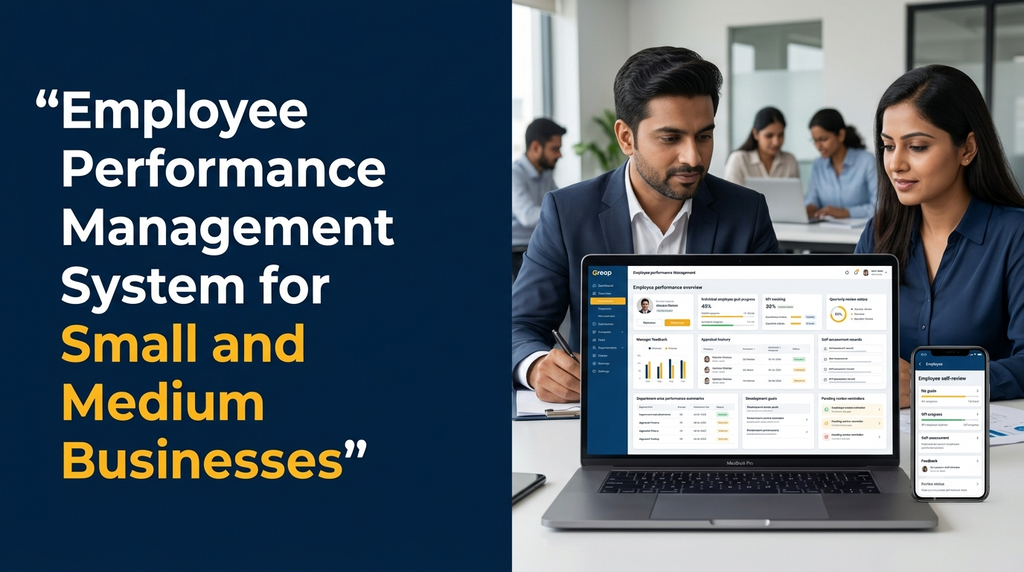
Employee Performance Management System for Small and Medium Businesses
Managing employee performance is important for small and medium businesses that want to build capable teams, improve work quality and connect individual responsibilities with business objectives. However, many growing companies still depend on spreadsheets, paper appraisal forms and informal conversations to review employee performance.
An employee performance management system provides a structured way to set employee goals, track key performance indicators (KPIs), collect feedback, conduct reviews and maintain appraisal records. Instead of treating performance evaluation as a once-a-year activity, businesses can use software to support regular communication between employees and managers.
For SMEs, the system does not need to be complicated. A practical solution can begin with employee profiles, department-wise goals, review forms and manager feedback, then expand into dashboards, development plans and HR integrations as the business grows.
What Is an Employee Performance Management System?
An employee performance management system is a digital platform used by an organisation to plan, monitor, review and improve employee performance. It connects individual responsibilities with department targets and broader business objectives.
The system can include goal setting, KPI tracking, employee self-assessments, manager reviews, feedback records, appraisal workflows and development plans. HR teams can use it to coordinate review cycles and maintain consistent records across departments.
Unlike a simple employee database, performance management software focuses on work expectations, progress and development. It should help managers have better conversations with employees rather than simply assign numerical ratings.
Why Do Small and Medium Businesses Need Performance Management Software?
As a business grows, managers may no longer be able to review every employee’s work through informal conversations. Teams may operate across departments, branches or locations, making consistent review processes more difficult.
- Unclear expectations: Employees may not have documented goals or a clear understanding of how their work will be evaluated.
- Inconsistent reviews: Different managers may use different evaluation methods and review schedules.
- Scattered records: Feedback, appraisal forms and performance discussions may be stored in separate documents.
- Limited progress visibility: Managers may struggle to understand whether agreed goals are progressing.
- Delayed feedback: Employees may receive feedback only during annual appraisal discussions.
- Manual HR administration: HR teams may spend time collecting forms, sending reminders and preparing review summaries.
A structured application helps standardise these processes. It does not automatically improve performance; meaningful results still depend on clear goals, fair evaluation, useful feedback and consistent management practices.
Who Can Use an Employee Performance Management System?
Small businesses
Maintain employee goals, manager feedback and periodic reviews without depending on multiple spreadsheets.
Medium-sized companies
Coordinate review cycles across departments, teams, managers and multiple business locations.
Manufacturing businesses
Define role-based expectations for production, quality, maintenance, warehouse and administration teams.
Sales organisations
Review sales objectives, customer follow-ups, account responsibilities and agreed business targets.
Service companies
Review project responsibilities, service quality, task completion and customer-related work outcomes.
Professional service firms
Manage employee objectives, project contributions, skills development and manager feedback.
Essential Features of Employee Performance Management Software
1. Employee Profile and Department Management
Maintain employee records containing name, employee ID, designation, department, reporting manager, joining date and employment status. These details help the system organise review responsibilities and provide appropriate access.
For businesses with multiple branches, the application can also include branch, location, team and department information. Employee records should be accessible only to authorised users.
2. Employee Goal Setting
Goal setting allows managers and employees to document the outcomes expected during a particular review period. Goals can be assigned individually or connected to department-level objectives.
For example, a sales employee may have a goal related to customer follow-ups, while a software developer may have goals connected to assigned project responsibilities, code quality and delivery commitments.
Each goal can include:
- Goal title and description
- Responsible employee
- Expected outcome
- Measurement method
- Target or completion criteria
- Start date and due date
- Review frequency
- Current progress and manager comments
3. KPI Management and Tracking
Key performance indicators help organisations evaluate specific aspects of an employee’s responsibilities. KPIs should be relevant to the role and based on information the business can reasonably measure.
Examples include:
- Sales: agreed sales targets, customer follow-ups and account development.
- Customer support: response quality, issue resolution and customer feedback.
- Software development: task delivery, code review quality and collaboration.
- Manufacturing: quality checks, assigned production responsibilities and process adherence.
- Administration: record accuracy, assigned task completion and process coordination.
A good system allows KPIs to vary by job role. Applying the same measurement criteria to every employee can produce misleading comparisons.
4. Employee Self-Assessment
Self-assessment gives employees an opportunity to review their own progress before a formal appraisal. They can describe completed work, challenges, achievements, skills developed and areas where they need support.
Self-assessments should be treated as one source of information, not as a replacement for manager review or objective work records.
5. Manager Performance Reviews
Managers can evaluate employee progress using structured review forms. Review sections may cover goal completion, role responsibilities, work quality, communication, collaboration and development needs.
Review forms should include space for written feedback and supporting examples. A numerical rating alone may not explain why an employee received a particular evaluation.
6. Continuous Feedback and Review History
Performance management should not be limited to annual appraisals. Managers can record regular feedback, recognise achievements, document improvement areas and agree on next steps throughout the year.
A review history allows authorised users to refer to previous goals and feedback when preparing later discussions. It also reduces the need to search through old emails and documents.
7. 360-Degree Feedback
Some organisations may benefit from collecting feedback from multiple working relationships, such as managers, peers and project collaborators. This is commonly called 360-degree feedback.
It should be introduced carefully, with clear questions, appropriate confidentiality settings and a defined purpose. Anonymous feedback should only be offered when the system can genuinely protect the identity of respondents.
8. Performance Appraisal Workflow
A digital appraisal workflow can guide each review through defined stages:
- HR opens the review cycle.
- Employees complete their self-assessments.
- Managers review goals and add feedback.
- Department heads or HR review submissions where required.
- The final review is shared with the employee.
- Agreed development actions are recorded for follow-up.
The application can show pending reviews, overdue submissions and completed appraisal records to authorised users.
9. Performance Improvement and Development Plans
When an employee needs additional support, managers can create a development plan with specific objectives, training activities, review dates and support responsibilities.
A performance improvement plan should communicate expectations clearly and provide a fair opportunity for the employee to understand and address identified gaps. It should not be used as an unexplained automatic disciplinary decision.
10. Employee Training and Skill Development
Performance reviews can identify areas where employees may benefit from training, mentoring or additional experience. The system can record development goals, suggested courses, training completion and follow-up discussions.
For example, a customer support employee may need product training, while a team leader may benefit from communication or people-management development.
11. HR Dashboard and Performance Reports
A central dashboard can help HR teams and managers understand the status of performance reviews and employee goals.
- Total employees included in a review cycle
- Pending and completed self-assessments
- Manager reviews awaiting submission
- Department-wise goal progress
- Upcoming appraisal deadlines
- Development plans requiring follow-up
- Review history and feedback records
Reports should explain their measurement periods and data sources. Missing information should not be presented as poor employee performance.
How Does a Performance Management System Work?
A typical employee performance management cycle can be organised into the following stages:
- Define business objectives: Identify the priorities that departments and teams need to support.
- Create employee goals: Convert department expectations into role-specific employee objectives.
- Choose relevant KPIs: Define how progress and outcomes will be evaluated.
- Monitor progress: Record updates and discuss obstacles during the review period.
- Collect employee feedback: Allow employees to share their achievements, challenges and development needs.
- Conduct manager reviews: Evaluate progress using documented expectations and supporting examples.
- Discuss the results: Communicate feedback and agree on future actions.
- Start the next cycle: Update goals and development plans based on business priorities.
Example of an Employee KPI and Goal Review
The following table illustrates how a business might organise role-specific goals. These are examples for explaining the software workflow, not universal employee standards.
| Employee role | Example goal | Possible measurement | Review period |
|---|---|---|---|
| Sales executive | Improve customer follow-up | Completed follow-ups against assigned schedule | Monthly |
| Customer support executive | Improve support resolution quality | Resolution records and quality review | Monthly |
| Software developer | Complete assigned project work | Task outcomes, review feedback and code quality | Per project or quarter |
| Production supervisor | Improve process coordination | Assigned responsibilities and quality records | Monthly |
| HR executive | Maintain employee records | Record completeness and process accuracy | Quarterly |
Performance Management vs Employee Attendance Software
Employee performance management and attendance management are related HR functions, but they solve different problems. Attendance software records working time and attendance events, while performance management software evaluates agreed work objectives and development progress.
| Comparison | Performance management | Attendance management |
|---|---|---|
| Primary purpose | Review goals, work outcomes and development | Record attendance and working time |
| Main records | KPIs, reviews, feedback and goals | Check-in, check-out, leave and shifts |
| Typical users | Employees, managers and HR | Employees, supervisors and HR |
| Reports | Goal progress and review completion | Attendance and leave summaries |
| Review frequency | Monthly, quarterly or annually | Daily and monthly |
Both modules can be connected through a broader HR management platform, but attendance data should not be treated as a complete measure of employee performance.
Web Dashboard and Employee Self-Service Portal
Admin and HR Web Dashboard
- Employee and department management
- Review-cycle configuration
- Goal and KPI templates
- Manager assignment and reporting hierarchy
- Appraisal forms and approval workflows
- Feedback and development records
- Performance reports and dashboard filters
- Access permissions and audit history
Employee Self-Service Portal
- View personal goals and assigned KPIs
- Update progress against goals
- Complete self-assessment forms
- Read manager feedback
- Review appraisal history
- View development plans and training actions
- Receive review reminders and notifications
A mobile-friendly portal can make it easier for employees and managers to complete reviews from different devices. A dedicated Android or iOS application can be considered if the business requires additional mobile features.
How to Design a Fair Employee Performance Review Process
Software can organise the review process, but fairness depends on how the organisation defines and applies its evaluation criteria.
- Use role-specific goals: Evaluate employees against responsibilities relevant to their jobs.
- Set clear expectations: Explain the measurement method and review period before evaluating results.
- Use supporting examples: Encourage managers to explain feedback with relevant work evidence.
- Allow employee comments: Give employees an opportunity to add context and respond to feedback.
- Review external factors: Consider resource limitations, changing priorities and dependencies that affected work.
- Protect confidentiality: Restrict sensitive appraisal information to authorised users.
- Keep a correction process: Allow inaccurate records to be reviewed and corrected through a documented process.
- Train managers: Help reviewers understand the evaluation framework and avoid inconsistent judgements.
Benefits of Employee Performance Management Software for SMEs
Clearer employee expectations
Documented goals help employees understand what their roles require and how progress will be reviewed.
Organised appraisal records
Keep review forms, feedback and previous goals in a central system instead of separate files.
Regular manager feedback
Support more frequent discussions instead of depending entirely on annual appraisal meetings.
Department-level visibility
Give authorised managers a clearer view of review completion and goal progress across teams.
Employee development planning
Connect review discussions with training, mentoring and future development actions.
Reduced manual administration
Use automated reminders, structured forms and central records to simplify HR coordination.
Can Performance Management Software Integrate with Payroll and HRMS?
Yes. A performance management system can be part of a larger HRMS or connect with existing business applications through suitable APIs or integration methods.
- HRMS integration: Reuse employee profiles, departments and reporting structures.
- Attendance integration: Connect attendance records where relevant, without treating attendance as a substitute for performance evaluation.
- Payroll integration: Share approved appraisal outcomes with authorised payroll processes if the business has a defined workflow.
- Learning management: Connect development plans with training courses and completion records.
- Project management: Reference project assignments and task records when reviewing relevant work outcomes.
- Business intelligence: Combine permitted HR information with management reporting systems.
Payroll changes, compensation decisions and other sensitive actions should remain subject to the organisation’s approval procedures. An appraisal score should not automatically trigger a salary or employment decision without an appropriate review process.
Security and Employee Data Privacy
Performance management systems store personal employee information, feedback and appraisal records. Businesses should plan access controls and data protection carefully.
- Use secure authentication and role-based access.
- Allow employees to access only their own permitted information.
- Restrict manager access to employees within their reporting responsibilities.
- Protect sensitive data during transmission and storage.
- Maintain audit logs for important record changes and approvals.
- Define appropriate retention and deletion policies.
- Back up important records and test recovery procedures.
- Provide a process for correcting inaccurate employee information.
Businesses should review applicable Indian data protection requirements and employment policies with qualified advisers. Implementing software by itself does not guarantee legal compliance.
How Much Does Employee Performance Management Software Cost in India?
The development cost depends on the number of employee roles, review workflows, reporting requirements, integrations and mobile access. A basic appraisal application requires less work than a full HR platform with performance management, attendance, payroll and training modules.
The following figures are illustrative planning estimates for discussing custom software scope. They are not fixed Greap quotations or guaranteed market prices.
| Application scope | Illustrative development estimate |
|---|---|
| Basic employee profiles and appraisal forms | ₹25,000–₹45,000 |
| Goal setting and KPI management | ₹40,000–₹70,000 |
| Manager reviews and employee self-assessment | ₹50,000–₹90,000 |
| Performance dashboard and department reports | ₹65,000–₹1.1 lakh |
| Multi-department performance management platform | ₹90,000–₹1.8 lakh+ |
| Advanced HRMS integration with mobile access | ₹1.5–₹3.5 lakh+ |
These estimates depend on the final feature list and implementation approach. Hosting, domain renewals, third-party services, SMS or messaging charges, external integrations, mobile app publishing, data migration, taxes and ongoing maintenance may cost extra.
How to Choose the Right Software Development Company
Before selecting a development partner, prepare a simple description of your current appraisal process and identify what should change. A clear workflow helps avoid paying for unnecessary features.
- HR workflow understanding: Can the developer understand your review periods, approval levels and reporting hierarchy?
- Flexible KPI configuration: Can different departments use different goals and evaluation criteria?
- Employee usability: Can employees easily view goals, submit self-assessments and read feedback?
- Manager experience: Can managers review their teams without navigating complicated forms?
- Reporting: Can HR filter review records by employee, department, manager and review period?
- Data security: Are permissions, backups, audit logs and retention requirements included?
- Integration readiness: Can the application connect to existing HRMS, payroll or project systems where required?
- Future maintenance: Is there a defined plan for updates, support and future improvements?
Why Consider Custom Employee Performance Management Software?
Small and medium businesses may have different appraisal methods depending on their industry, team size and management structure. A sales organisation may evaluate sales objectives and customer development, while a manufacturing business may use role-specific production and quality responsibilities.
Custom software can reflect these differences through configurable review forms, KPI templates, approval workflows and department dashboards. It can also be connected to an existing employee database or HR system when the integration is technically supported.
For businesses in Erode and across Tamil Nadu, a web-based performance management system can provide a central review process for employees working in offices, factories, branches and service teams. The most suitable starting point is usually a focused set of modules that addresses the organisation’s current appraisal challenges.
Frequently Asked Questions
1. What is an employee performance management system?
It is software used to set employee goals, track relevant KPIs, collect feedback, conduct performance reviews and maintain development records.
2. Is performance management software useful for small businesses?
Yes. Small businesses can use a basic system to organise employee goals, appraisal forms, manager feedback and review schedules without maintaining multiple spreadsheets.
3. What is the difference between performance management and performance appraisal?
Performance appraisal is a formal evaluation at a particular point in time. Performance management is a broader ongoing process that includes goal setting, progress discussions, feedback, reviews and development planning.
4. Can employees update their own performance goals?
A system can allow employees to view goals, submit progress updates and complete self-assessments. Changes to approved goals can be controlled through manager or HR approval.
5. Can different departments have different KPIs?
Yes. A configurable system can provide department-specific and role-specific KPIs so employees are reviewed against relevant responsibilities.
6. How often should employee performance reviews be conducted?
Review frequency depends on the organisation. Businesses may use monthly check-ins, quarterly reviews or annual appraisals, with regular feedback between formal review periods.
7. Can performance management software connect with payroll?
It can integrate with payroll systems when suitable APIs or supported integration methods are available. Any compensation-related action should follow the organisation’s approval process.
8. Can the system include employee self-assessment?
Yes. Employees can submit achievements, progress updates, challenges and development requirements before their manager completes the review.
9. Can performance management software work on mobile devices?
Yes. A responsive web application or dedicated mobile app can allow employees and managers to access goals, review forms and feedback from supported devices.
10. How much does a custom employee performance management system cost?
The cost depends on appraisal workflows, KPI modules, employee portals, reporting, integrations and mobile requirements. A detailed estimate should be prepared after defining the required features.
Planning an Employee Performance Management System for Your Business?
Greap Technologies develops custom business software, web applications and mobile apps. If your business needs employee goal management, KPI tracking, appraisal workflows, manager feedback or HR dashboards, discuss your requirements with our team.
Visit Greap Technologies Discuss Your Project on WhatsApp Call 7092330168
Conclusion
An employee performance management system helps small and medium businesses organise employee goals, KPIs, feedback, appraisals and development plans. By creating a consistent review process, businesses can make expectations clearer and give managers and employees a shared view of progress.
The best solution is one that matches the organisation’s actual working process. Start with essential performance reviews and goal tracking, then introduce additional features such as 360-degree feedback, training management, HRMS integration and advanced reporting as the business grows.