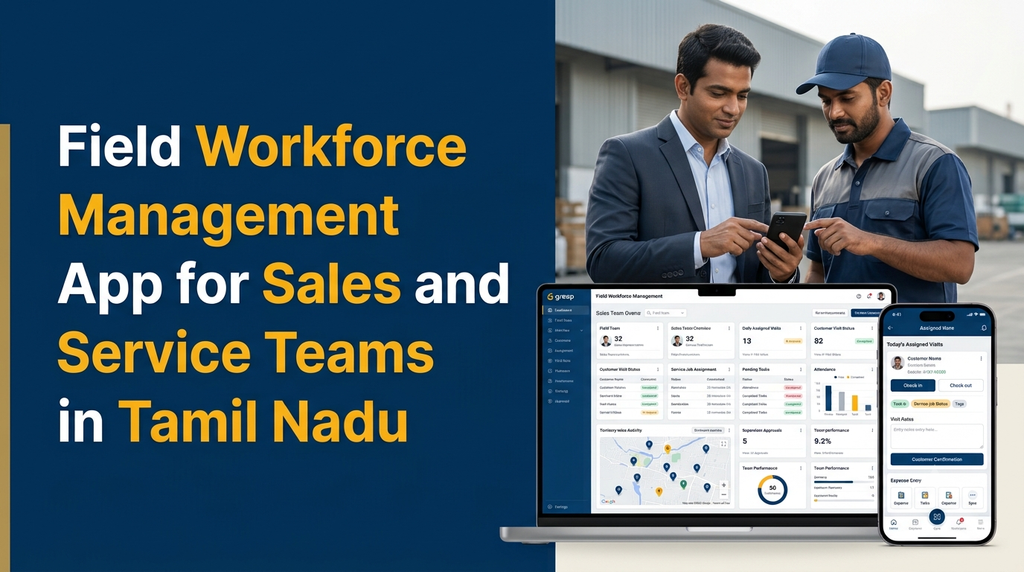
Field Workforce Management App for Sales and Service Teams in Tamil Nadu
Businesses with employees working outside the office need more than a basic attendance register. Sales representatives visit customers, service technicians handle jobs at different locations, and supervisors coordinate assignments across territories. A field workforce management app brings these activities into one system, helping businesses plan visits, assign work, record field activity and monitor job progress.
In Tamil Nadu, businesses in distribution, industrial sales, equipment servicing, electrical maintenance, healthcare services, consumer products and other sectors may manage employees across towns and districts. When field operations are handled through phone calls, spreadsheets and separate messaging groups, important information can become difficult to coordinate.
A custom field workforce application can connect the office team with sales representatives and service staff through a shared web dashboard and mobile app. The exact modules can be selected according to the company’s working process.
What Is a Field Workforce Management App?
A field workforce management app is a business application that helps organisations plan, assign, coordinate and review work performed by employees outside the office. It normally includes a mobile application for field staff and a central web dashboard for administrators and supervisors.
For a sales team, the application may record customer visits, follow-ups, orders and sales activities. For a service team, it may manage service requests, technician assignments, job cards, work updates, spare parts and customer confirmation.
Instead of maintaining separate records for each activity, the business can use a common platform with role-based access and centralised reporting.
Why Do Businesses Need Field Workforce Management Software?
Field operations involve several moving parts. Managers need to know which employee is assigned to a customer, whether a visit has been completed, what work remains pending and whether a service request needs further attention.
- Scattered information: Customer details, visit notes and service updates may be spread across calls, messages and spreadsheets.
- Unclear task ownership: Employees and supervisors may not have one shared view of who is responsible for each assignment.
- Delayed reporting: Managers may receive visit and service reports only after employees return to the office.
- Missed follow-ups: Customer requests and pending tasks can be overlooked when reminders are managed manually.
- Limited operational visibility: Management may find it difficult to compare assigned work with completed work across territories.
- Separate sales and service records: Teams may maintain different systems even when they serve the same customers.
A properly designed application gives authorised users a common view of assignments and updates. It supports better coordination, although the actual results depend on employee adoption, process quality and the accuracy of the information entered.
Who Can Use a Field Workforce Management App?
Sales and distribution companies
Manage sales representatives, dealer visits, retailer coverage, product enquiries, order collection and follow-up schedules.
Equipment service providers
Assign technicians for installation, inspection, maintenance, repair and customer support visits.
Industrial suppliers
Coordinate field sales teams, customer meetings, quotation follow-ups and technical support assignments.
Maintenance companies
Schedule site visits, allocate technicians, record completed work and monitor recurring maintenance tasks.
Healthcare and diagnostic services
Coordinate eligible home-service appointments, staff assignments and visit completion records, subject to appropriate privacy controls.
Installation and facility teams
Track installation requests, site inspections, work progress, material requirements and customer sign-offs.
Essential Features of a Field Workforce Management App
1. Employee and Field Staff Management
Maintain employee profiles with contact information, department, designation, reporting manager, assigned territory and employment status. Administrators can organise staff into sales, service, installation and maintenance teams.
Access should be role-based so that employees see their own assignments while supervisors and administrators access the information required for their responsibilities.
2. GPS-Enabled Field Attendance
Field employees may record attendance through a mobile app. Depending on the business policy, attendance can include check-in time, check-out time and a location record at the moment of the action.
Location access should be transparent, limited to a clear business purpose and configured with appropriate employee notice and privacy safeguards. Continuous location monitoring should not be assumed to be necessary for every business.
3. Customer Visit Management
Sales representatives and service employees can view their assigned customer visits in one place. Each visit can include the customer name, address, contact person, purpose, scheduled date, priority and assigned employee.
After a visit, the employee can enter notes, select an outcome, record the next follow-up date and attach permitted supporting documents or photographs.
4. Territory and Area Allocation
Businesses can divide their operating areas into territories, districts, zones or sales routes. Managers can assign employees to specific areas and review activity by territory.
For example, a company operating around Erode may organise its field coverage by Erode, Perundurai, Bhavani, Gobichettipalayam and other service areas. The actual territory structure should match the company’s customer base and travel requirements.
5. Sales Activity and Follow-Up Tracking
Sales teams may need more than a simple visit register. A sales-focused module can record:
- New customer enquiries and prospect details
- Retailer, dealer or distributor visits
- Product demonstrations and discussions
- Quotation requests and follow-up dates
- Orders collected or referred to the office
- Customer feedback and next actions
These records help supervisors understand field activity without treating the number of visits as the only measure of performance.
6. Service Request and Job Assignment Management
Service businesses can create a job from a customer request and assign it to a technician. A job record may include equipment details, reported issue, service priority, appointment time, required skills, assigned technician and current status.
Common statuses include New, Assigned, Accepted, In Progress, Waiting for Parts, Completed and Revisit Required. Businesses can customise these statuses to match their service workflow.
7. Job Cards and Work Completion Records
Technicians can use digital job cards to record inspection findings, work performed, parts used, time spent and customer comments. The application can also capture a customer acknowledgement or signature where appropriate.
A completed job card creates a useful service history for future maintenance and customer support.
8. Task Scheduling and Employee Assignment
Supervisors can create daily or weekly tasks, select an employee, set a due date and assign a priority. The system can display pending, accepted, in-progress, delayed and completed work.
Assignment rules may consider employee availability, territory, skills, workload and appointment commitments. More advanced scheduling can be added when the business has enough operational data to support it.
9. Route Planning and Map Integration
Map integration can help employees view customer locations and plan their visits. Some applications may support route suggestions or navigation through a third-party mapping service.
Route optimisation, live location sharing and map services may require separate APIs, usage-based charges and additional development. A basic location display is not the same as a fully optimised route-planning system.
10. Expense and Travel Claim Management
Field employees may submit business expenses such as approved travel, parking or other work-related costs. The app can capture the expense category, amount, date, notes and supporting receipt image.
Supervisors can review, approve or reject claims according to company policy. Reimbursement rules should be defined by the business rather than assumed by the software.
11. Notifications and Reminders
Push notifications or other configured alerts can inform employees about new assignments, appointment changes, overdue tasks and supervisor comments. Managers may receive alerts for jobs that need attention.
Notification delivery depends on device permissions, internet connectivity and the selected messaging service.
12. Supervisor and Management Dashboard
A web dashboard gives managers a consolidated view of daily field operations. Useful indicators may include:
- Total employees assigned to field work
- Planned and completed customer visits
- Open and completed service jobs
- Pending follow-ups
- Territory-wise activity
- Employee-wise task status
- Expense claims awaiting approval
- Delayed jobs and unresolved customer requests
Dashboards should present operational information clearly and avoid creating misleading performance scores from incomplete data.
Sales Team App vs Service Team App: What Is Different?
Both teams work outside the office, but their daily workflows are different. A custom application can provide shared employee, attendance and reporting features while giving each team its own operational modules.
| Area | Sales team | Service team |
|---|---|---|
| Main activity | Customer visits and sales follow-ups | Installation, inspection and repair jobs |
| Assignments | Prospects, dealers and customer meetings | Service requests and work orders |
| Visit records | Meeting notes and sales outcomes | Inspection notes and work performed |
| Completion evidence | Visit outcome or order reference | Job card and customer confirmation |
| Follow-up | Next meeting or quotation follow-up | Revisit, parts or maintenance follow-up |
| Reports | Territory and sales activity reports | Job status and service completion reports |
How Does a Field Workforce App Work?
- Employee registration: The administrator creates employee profiles and assigns teams, roles and reporting managers.
- Customer and territory setup: The business adds customer records, service locations and operating territories.
- Work assignment: A manager schedules customer visits, sales tasks or service jobs.
- Mobile notification: The assigned employee receives the task in the mobile application.
- Field execution: The employee checks the assignment, travels to the customer and records the relevant work updates.
- Visit or job completion: The employee submits notes, status, permitted attachments and customer confirmation when required.
- Supervisor review: The manager reviews the record and requests additional information if necessary.
- Reporting: The system updates dashboards and operational reports based on recorded activity.
Example: Daily Field Operations Workflow
Consider a company with sales representatives and service technicians operating in several towns. A supervisor can prepare the day’s assignments before field employees begin their visits.
| Team member | Assignment | App update |
|---|---|---|
| Sales representative | Visit an assigned dealer | Visit completed, meeting notes and follow-up date saved |
| Sales representative | Meet a prospective customer | Enquiry details and next action recorded |
| Service technician | Inspect customer equipment | Inspection notes and job status updated |
| Service technician | Complete a maintenance request | Work details and customer acknowledgement submitted |
| Supervisor | Review daily field activity | Pending jobs and follow-ups checked on the dashboard |
This example illustrates a possible workflow, not a fixed schedule. Real assignments should reflect travel time, employee availability, customer appointments and the urgency of each task.
Mobile App and Web Admin Panel: Recommended Structure
Field Employee Mobile Application
- Secure employee login
- Personal profile and assigned territory
- Daily task and visit list
- Attendance check-in and check-out
- Customer details and location
- Visit notes and follow-up reminders
- Service job cards and status updates
- Expense submission
- Notifications and assignment history
- Offline draft entry and later synchronisation, if included in the project scope
Admin and Supervisor Web Dashboard
- Employee, team and role management
- Customer and territory management
- Daily and weekly assignment planning
- Sales visit and service job management
- Attendance and activity reports
- Expense approval workflow
- Customer visit and job history
- Dashboard filters and downloadable reports
- System settings, permissions and audit records
Can a Field Workforce App Work Without Internet?
Field employees may visit locations with unreliable mobile connectivity. An application can be designed to support selected offline activities, such as viewing previously downloaded assignments, drafting visit notes and saving job updates locally.
When connectivity returns, the app can synchronise saved records with the server. The design should handle duplicate submissions, conflicting edits, failed uploads and the time at which each record was created.
Not every feature can operate offline. Live dashboards, remote notifications, current map data and server-side approvals generally need connectivity. Offline capability should therefore be specified feature by feature.
Important Integrations for Field Workforce Software
- Maps and navigation: Display customer locations and support navigation using a compatible mapping service.
- CRM: Share customer profiles, enquiries, sales opportunities and follow-up information.
- Inventory: Check spare parts or products required for service visits and sales orders.
- Billing and accounting: Connect approved orders, invoices or expense records to the relevant business system.
- WhatsApp or SMS: Send configured customer or employee notifications through supported providers and approved templates.
- Biometric attendance: Integrate with compatible attendance systems when the organisation requires a combined office and field attendance process.
- ERP: Connect customer, product, employee or transaction information with an existing enterprise system.
Integration feasibility depends on the external provider’s API, licensing, data format and access permissions. Third-party charges may apply.
Security and Employee Privacy Considerations
A field workforce application can contain employee information, customer contact details, business records and location-related data. Security and privacy should be considered during planning rather than added only after development.
- Use secure authentication and role-based permissions.
- Encrypt data in transit and protect sensitive stored information.
- Collect only the employee and customer data needed for defined business purposes.
- Explain when location information is collected and why it is required.
- Set appropriate access and retention rules for location and attendance records.
- Maintain audit logs for important administrative actions.
- Provide a process for reporting lost devices and managing account access.
- Plan regular backups, security updates and application maintenance.
Businesses should review applicable Indian data protection requirements, employment policies and sector-specific obligations with qualified advisers. Software features alone do not guarantee legal compliance.
How Much Does Field Workforce Management App Development Cost in India?
The development cost depends on the number of user roles, mobile platforms, web dashboard requirements, workflow complexity, integrations, offline functionality and reporting needs. A basic field visit application is considerably different from a platform that combines sales CRM, service management, route planning, inventory and ERP integration.
The following figures are illustrative planning estimates for discussing project scope. They are not fixed Greap quotations or guaranteed market prices.
| Application scope | Illustrative development estimate |
|---|---|
| Basic employee app with attendance and task updates | ₹30,000–₹55,000 |
| Field visit management with customer records | ₹45,000–₹80,000 |
| Admin dashboard with sales team management | ₹60,000–₹1.1 lakh |
| Service job assignment and technician management | ₹70,000–₹1.3 lakh |
| Combined sales and service workforce platform | ₹1.2–₹2.5 lakh+ |
| Advanced platform with offline sync, integrations and multiple apps | ₹2.5–₹5 lakh+ |
Additional expenses may include cloud hosting, domain and server renewals, mapping API usage, SMS or WhatsApp provider charges, third-party licences, biometric devices, app-store publishing accounts, data migration, taxes and ongoing maintenance. The final quotation should be prepared after reviewing the required screens, workflows and integrations.
How to Choose the Right Field Workforce Software Development Company
Before selecting a development partner, prepare a clear list of the activities your sales and service employees perform every day. Evaluate the proposed system against actual business workflows rather than choosing features only because they appear in a long product checklist.
- Workflow understanding: Can the developer understand your sales visits, service requests and approval process?
- Mobile usability: Can employees complete common tasks quickly on different Android devices?
- Admin reporting: Can supervisors filter records by date, employee, team, territory and status?
- Flexible configuration: Can the business add teams, task types and territories without redesigning the entire application?
- Data ownership: Are database access, export options and backup responsibilities clearly documented?
- Security: Are access controls, authentication, backups and update plans included?
- Integration scope: Are external APIs, subscriptions and usage charges identified before development?
- Support: Is there a defined process for bug fixes, maintenance and future improvements?
Why Consider Custom Field Workforce App Development in Tamil Nadu?
Businesses often have workflows that are specific to their products, customers, territories and service commitments. A distributor may need retailer visits and order collection, while an industrial equipment company may require technician scheduling, maintenance history and spare-parts records.
A custom application can combine these processes while keeping the mobile experience focused on each employee’s role. It can also be designed around the organisation’s existing customer database, billing system or ERP, subject to integration feasibility.
For companies operating in Erode and other parts of Tamil Nadu, a field workforce platform can be planned around local sales territories, customer locations, service coverage and reporting structures. The software should reflect the actual operating model rather than forcing every business into the same workflow.
Frequently Asked Questions
1. What is a field workforce management app?
It is a mobile and web application that helps businesses manage employees working outside the office. Common features include field attendance, customer visits, task assignments, service jobs, expense claims and management reports.
2. Can one app manage both sales and service teams?
Yes. A custom platform can share employee profiles, attendance, assignments and reporting while providing separate sales visit and service job modules for each team.
3. Can managers assign customer visits to employees?
Yes. Managers can create visits, select employees, set appointment details and monitor updates such as scheduled, in progress, completed or rescheduled.
4. Does a field staff app support GPS attendance?
It can support location-enabled check-in and check-out when the feature is included and the employee has granted the required device permissions. Location collection should follow a clear and transparent company policy.
5. Can a field workforce app manage service technicians?
Yes. It can manage service requests, technician assignments, job cards, work status, parts records, customer confirmation and service history.
6. Can the application work without an internet connection?
Selected features can support offline entry and later synchronisation. The required offline screens and conflict-handling rules should be defined during project planning.
7. Can a field workforce app integrate with existing CRM or ERP software?
Yes, when the existing system provides a suitable API or another supported integration method. Integration scope, data mapping, permissions and third-party costs should be assessed first.
8. How much does a custom field workforce app cost?
A basic application may require a smaller budget than a combined sales and service platform. Costs depend on modules, mobile platforms, dashboard requirements, integrations, offline support and maintenance. A detailed estimate requires a defined feature scope.
9. Can the app manage multiple branches and territories?
Yes. The system can support multiple branches, teams, territories and reporting managers, with access permissions configured for each role.
10. Can the business add more features later?
Yes, if the application is planned with a maintainable architecture. Features such as route planning, customer portals, inventory integration and advanced reporting can be considered in later phases.
Planning a Field Workforce Management App for Your Business?
Greap Technologies develops websites, custom business software and mobile applications. If your company needs a system for sales visits, field attendance, technician assignments, customer service jobs or workforce reporting, discuss your workflow and required features with our team.
Visit Greap Technologies Discuss Your Project on WhatsApp Call 7092330168
Conclusion
A field workforce management app can help sales and service businesses bring employee assignments, customer visits, attendance, job updates and operational reports into one platform. The most useful solution is not necessarily the one with the most features; it is the one that supports the team’s real working process and is simple enough for employees to use consistently.
Businesses in Tamil Nadu can start with essential field operations and expand into sales automation, service management, route planning and business-system integrations as their requirements grow. A clearly defined scope, secure data handling and a practical mobile experience are important foundations for a successful project.