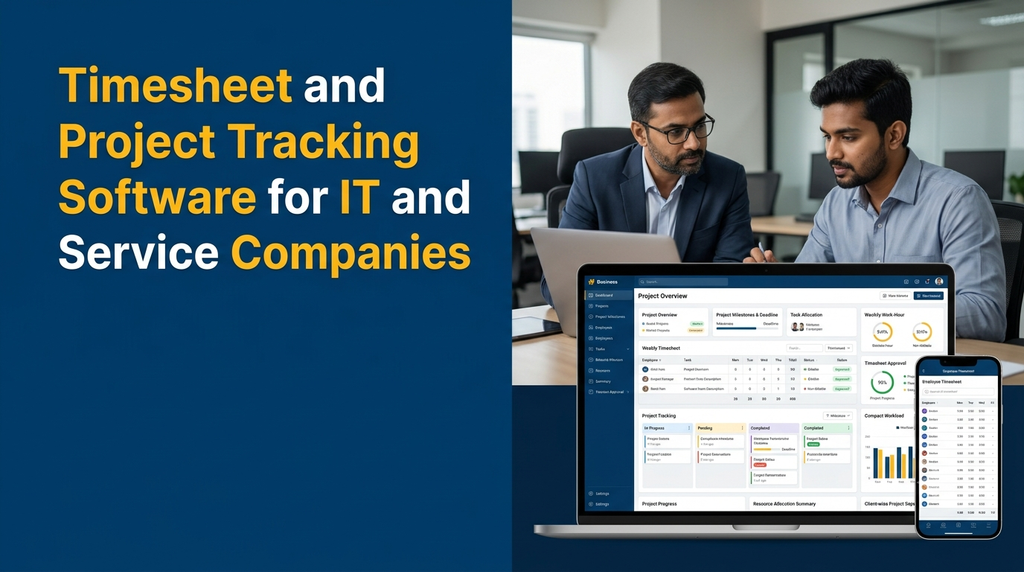
Timesheet and Project Tracking Software for IT and Service Companies
IT companies and professional service businesses often manage several projects, employees, clients and deadlines at the same time. Managers need to understand how much time teams spend on each project, which tasks are progressing, what work is awaiting approval and whether delivery is aligned with the original plan.
When employees record their work hours in spreadsheets or send updates through separate messages, project information can become difficult to consolidate. A dedicated timesheet and project tracking software brings employee time records, task assignments, project milestones and reporting into one application.
For software development companies, digital agencies, consultants and service providers, this type of system can support project planning, billable-hour tracking, timesheet approvals, workload monitoring and client reporting.
What Is Timesheet and Project Tracking Software?
Timesheet and project tracking software combines two related business functions.
Timesheet management records how much time employees spend on specific projects, tasks or activities. Entries can include working dates, descriptions, hours, billable status and approval information.
Project tracking monitors the work required to complete a project. It includes task allocation, deadlines, milestones, progress updates, dependencies and project status reports.
When these functions are connected, managers can understand not only what work is completed but also how much time was recorded against that work. This supports project planning, cost estimation and client billing processes.
Why Do IT and Service Companies Need Timesheet Software?
Project-based businesses need reliable information about employee effort and delivery progress. Manual tracking can become difficult when multiple employees work on several projects during the same week.
- Scattered work records: Employees may record time in spreadsheets, emails or separate project documents.
- Unclear project effort: Managers may not know how many hours have been spent on each task or client.
- Delayed timesheet submission: Employees may submit work-hour records after the reporting period.
- Approval delays: Managers may find it difficult to review and approve entries consistently.
- Deadline visibility: Project owners may lack a central view of pending tasks and upcoming milestones.
- Billing difficulties: Service companies may need to reconcile recorded billable hours with client agreements.
- Resource planning: Managers may struggle to understand employee workloads across active projects.
A central system helps organise these records. Its effectiveness depends on accurate employee entries, clear project definitions and a consistent approval process.
Who Can Use Timesheet and Project Tracking Software?
Software development companies
Track development tasks, testing, bug fixes, sprint work, client projects and engineering effort.
Digital marketing agencies
Record time spent on SEO, advertising, content, design, reporting and client campaigns.
IT consulting firms
Manage consulting assignments, client meetings, technical work and billable project hours.
Professional service companies
Track consulting, implementation, support and other client-specific service activities.
Engineering and design teams
Monitor design tasks, project revisions, technical documentation and delivery milestones.
Maintenance and support providers
Record service activities, support requests, maintenance hours and recurring work.
Essential Features of Timesheet and Project Tracking Software
1. Project and Client Management
Maintain a central list of clients and their projects. Each project can include a project name, client, description, start date, expected completion date, project owner, status and agreed billing method.
Projects can be organised by client, department, business unit or project category. This makes it easier to filter reports and review the work associated with each customer.
2. Task Creation and Assignment
Project managers can divide projects into smaller tasks and assign them to employees or teams. Each task can include:
- Task title and description
- Assigned employee or team
- Start date and due date
- Priority and task status
- Estimated effort
- Dependencies and related milestones
- Comments and supporting files
Task assignments help employees understand their responsibilities and give managers a clearer view of the work that remains.
3. Employee Timesheet Entry
Employees can record the time spent on projects and tasks through a daily or weekly timesheet. Entries can include the work date, project, task, start and end times where required, total duration and a short work description.
Businesses can configure timesheet formats based on their working practices. Some teams may enter total hours manually, while others may use start-and-stop timers.
4. Billable and Non-Billable Hour Tracking
Service companies often need to distinguish between time that can be charged to a client and internal business activities.
- Billable time: Approved work hours that fall within the client’s agreed billing arrangement.
- Non-billable time: Internal meetings, administration, training or other work not charged directly to a client.
Each timesheet entry can include a billable status. Managers can review billable and non-billable totals by employee, project and client.
Not every recorded billable hour automatically becomes an invoice item. Contract terms, approval rules, rate cards and billing adjustments must also be considered.
5. Weekly and Monthly Timesheets
Employees can view their time entries in daily, weekly or monthly formats. A weekly view is useful for submitting several work records together, while monthly summaries help managers review effort over a longer period.
The system can display total hours, project-wise breakdowns, incomplete entries and submission status. Businesses can define their own submission deadlines and reporting periods.
6. Timesheet Submission and Approval Workflow
A structured approval process helps managers verify work-hour records before using them for billing or internal reporting.
- Employee records time against a project and task.
- Employee reviews and submits the timesheet.
- Manager checks the entries and supporting descriptions.
- Manager approves or returns the timesheet for correction.
- Approved hours become available in project reports.
- Authorised users can use approved records for billing or cost analysis.
The system should maintain a history of submissions, approvals, corrections and important changes.
7. Project Milestones and Deadline Tracking
Projects can be divided into milestones representing important delivery stages. A milestone may include a target date, responsible person, completion criteria and linked tasks.
Managers can view upcoming deadlines, delayed tasks and completed milestones through a project timeline or dashboard. This helps teams identify work that needs attention.
8. Kanban Boards and Task Status
A Kanban board displays tasks in columns representing their current status. A simple workflow might include:
- Backlog
- To Do
- In Progress
- Under Review
- Completed
- On Hold
Employees and project managers can update task status as work progresses. The workflow should be configurable because software development, consulting and support projects may require different stages.
9. Estimated Hours vs Actual Hours
One useful project tracking feature is comparing estimated effort with recorded work hours.
For example, a project manager may estimate that a development task requires 12 hours. The timesheet records can show how much time has been entered so far and whether the task is approaching or exceeding its estimate.
This comparison can help teams improve future project estimates. It should be interpreted alongside task complexity, scope changes and unexpected dependencies rather than treated as an automatic measure of employee efficiency.
10. Employee Workload and Resource Allocation
Managers can review assigned projects and tasks to understand how work is distributed across employees. A resource view may show active assignments, estimated effort, due dates and available capacity.
This can help managers identify overloaded teams, unassigned tasks and scheduling conflicts. Workload reports should use realistic capacity assumptions and account for leave, meetings and non-project responsibilities.
11. Project Cost and Budget Tracking
Businesses can compare project budgets with the cost of recorded employee time. Depending on the configuration, the system may use internal cost rates, client billing rates or project-specific financial assumptions.
Possible reports include:
- Estimated project hours
- Actual recorded hours
- Approved billable hours
- Non-billable effort
- Estimated labour cost
- Budget utilisation
- Outstanding project work
Accurate cost calculations require suitable rate definitions and approved time records. The software should clearly distinguish internal labour cost from client revenue.
12. Client-Wise Reports
Service businesses can prepare reports showing the work performed for each client. Reports may include project names, task descriptions, approved hours, billing categories and delivery milestones.
Depending on the client agreement, these reports can support invoice preparation, project review meetings and service documentation.
13. Notifications and Reminders
Automated notifications can remind employees to submit timesheets and alert managers when approvals are pending. Project teams can also receive reminders for approaching deadlines, new assignments and task updates.
Notifications may use in-app alerts, email or configured messaging services. Delivery depends on the selected provider, user preferences and device permissions.
14. Management Dashboard and Analytics
A central dashboard helps managers review project activity and timesheet information without combining multiple spreadsheets.
- Active and completed projects
- Pending project tasks
- Upcoming and overdue milestones
- Submitted and pending timesheets
- Approved billable and non-billable hours
- Employee-wise workload
- Estimated versus actual project effort
- Client-wise time summaries
- Project budget and cost reports
Reports should show the date range and approval status of the underlying records. Incomplete or unapproved entries should not be mixed silently with approved totals.
Example of a Weekly Employee Timesheet
The following is a simplified example of how an IT employee could record time against different project activities.
| Project | Task | Monday | Tuesday | Wednesday | Thursday | Friday | Total |
|---|---|---|---|---|---|---|---|
| Client Website | Frontend development | 3h | 4h | 2h | 3h | 2h | 14h |
| Mobile App | Feature development | 2h | 2h | 3h | 2h | 3h | 12h |
| Internal | Meetings and documentation | 1h | 1h | 1h | 1h | 1h | 5h |
| Support | Customer issue resolution | 2h | 1h | 2h | 2h | 1h | 8h |
This example illustrates a possible weekly record, not a recommended working-hour schedule. A real system can calculate totals automatically and classify entries according to the company’s billing and reporting rules.
Timesheet Software vs Project Management Software
Timesheet management and project management are closely related, but they focus on different information. Timesheet software records time spent, while project management software organises the work that needs to be completed.
| Area | Timesheet software | Project tracking software |
|---|---|---|
| Main purpose | Record employee work hours | Monitor project tasks and delivery |
| Primary records | Time entries and work descriptions | Tasks, milestones and deadlines |
| Common users | Employees, managers and finance teams | Project managers and delivery teams |
| Reports | Hours, billing categories and approvals | Progress, workload and project status |
| Key question | How much time was recorded? | What work is completed or pending? |
A combined application connects both functions, allowing project managers to review delivery progress alongside recorded effort.
How Does a Combined Timesheet and Project Tracking System Work?
- Create clients and projects: Add client information, project details, expected dates and project owners.
- Break projects into tasks: Define work items, milestones, estimated hours and dependencies.
- Assign employees: Allocate tasks to the appropriate employees or teams.
- Record work hours: Employees enter time against the relevant project and task.
- Submit timesheets: Employees review their entries and submit them for approval.
- Review project progress: Managers monitor task status, milestones and recorded effort.
- Approve time records: Authorised managers verify entries and approve or return them for correction.
- Generate reports: The system prepares project, employee, client and billing summaries.
Web Dashboard and Employee Portal: Recommended Modules
Admin and Project Manager Dashboard
- Client and project management
- Project task and milestone planning
- Employee and team allocation
- Estimated hours and project budgets
- Timesheet review and approval
- Project status and deadline monitoring
- Client-wise and employee-wise reports
- Billing rate and cost configuration
- Role permissions and audit records
Employee Portal or Mobile Application
- Assigned projects and tasks
- Daily and weekly timesheets
- Manual time entry or configured timer
- Billable and non-billable classification
- Task status updates
- Work descriptions and comments
- Timesheet submission history
- Approval status and correction requests
- Project notifications and reminders
A responsive web portal may be sufficient for many teams. Dedicated Android or iOS applications can be considered when employees need mobile-first entry, offline drafts or device-specific capabilities.
Useful Integrations for IT and Service Companies
- Accounting software: Share approved billable-hour summaries or project financial records with accounting workflows.
- CRM: Connect client records, sales opportunities and project handovers.
- Payroll or HRMS: Share permitted employee and approved work information where a defined business process requires it.
- Issue tracking: Connect development tasks, bugs and support tickets with project time entries.
- Invoicing: Use approved hours and configured billing rates as inputs for invoice preparation.
- Email and messaging: Send task notifications, timesheet reminders and approval alerts.
- Business intelligence: Export or connect project information to management reporting tools.
Integration feasibility depends on the external product’s API, permissions, subscription plan and data format. Third-party licensing or usage charges may apply.
Security and Data Management
Timesheet and project systems can contain employee information, client records, commercial rates and confidential project details. Access should be designed around each user’s responsibilities.
- Use secure authentication and role-based access controls.
- Restrict employees to their permitted projects and records.
- Allow managers to review only their authorised teams or projects.
- Protect client information and commercial rate details.
- Maintain audit logs for timesheet edits and approvals.
- Use secure data transmission and suitable storage protections.
- Configure backups and test data recovery procedures.
- Define retention policies for employee and client project records.
If time records are used for payroll, contractual billing or other formal decisions, businesses should establish clear correction, approval and dispute-handling processes.
How Much Does Timesheet and Project Tracking Software Cost in India?
Development cost depends on the number of modules, user roles, approval workflows, reporting requirements, mobile access and integrations. A basic timesheet application is different from a complete project management platform with resource planning, billing and financial reports.
The following figures are illustrative planning estimates for custom development discussions. They are not fixed Greap quotations or guaranteed market prices.
| Application scope | Illustrative development estimate |
|---|---|
| Basic employee timesheet entry and reports | ₹25,000–₹45,000 |
| Timesheet submission and approval workflow | ₹40,000–₹70,000 |
| Project and task tracking dashboard | ₹50,000–₹90,000 |
| Timesheet with billable-hour and client reports | ₹65,000–₹1.1 lakh |
| Combined project and timesheet management platform | ₹90,000–₹1.8 lakh+ |
| Advanced system with resource planning and integrations | ₹1.5–₹3.5 lakh+ |
Actual pricing depends on the agreed requirements and development scope. Hosting, domain renewals, third-party APIs, messaging charges, accounting integrations, mobile app publishing, data migration, taxes and ongoing maintenance may be additional expenses.
How to Choose the Right Software Development Company
Before selecting a software development partner, map your current project workflow and identify how employees record time, how managers approve entries and how client reports are prepared.
- Project workflow experience: Can the developer understand your project stages, tasks and approval requirements?
- Timesheet flexibility: Can the system support daily, weekly and project-wise time entries?
- Billing requirements: Can billable and non-billable hours be managed with appropriate approval rules?
- Project reporting: Can managers compare estimated effort with approved actual hours?
- Employee usability: Can employees record work quickly without complicated screens?
- Access control: Can client rates, project records and employee data be restricted appropriately?
- Integration planning: Are API requirements, external subscriptions and additional costs documented?
- Maintenance: Is there a defined plan for backups, security updates, bug fixes and future changes?
Why Consider Custom Timesheet and Project Tracking Software?
IT and service companies do not all follow the same delivery model. A software development company may organise work around projects, sprints, bugs and testing. A digital agency may track SEO, content, design and campaign activities. A consulting business may need client-wise time entries and billable-hour approvals.
Custom software can be configured around these differences. It can combine project tracking, employee timesheets, manager approvals and client reporting in one platform, with optional integrations for accounting, CRM and HR systems.
For businesses in Erode and across Tamil Nadu, a web-based system can support teams working from offices, client sites or different locations. The most practical approach is to begin with essential project and timesheet workflows, then add advanced reporting and integrations as operational needs develop.
Frequently Asked Questions
1. What is timesheet and project tracking software?
It is software that records employee work hours against projects and tasks while monitoring project progress, deadlines, milestones and resource allocation.
2. Can timesheet software track billable and non-billable hours?
Yes. Entries can be classified as billable or non-billable, and approved totals can be summarised by employee, client or project.
3. Can employees record time against multiple projects?
Yes. Employees can record separate entries against different projects and tasks, subject to their assigned access permissions.
4. Does project tracking software include task management?
It can include task creation, assignment, deadlines, priorities, status updates, dependencies and milestone tracking.
5. Can managers approve employee timesheets?
Yes. A configurable workflow can allow managers to review, approve or return submitted timesheets for correction.
6. Can the system generate client-wise work-hour reports?
Yes. Approved timesheet entries can be grouped by client and project to prepare work-hour summaries and supporting billing reports.
7. Can timesheet software integrate with accounting systems?
It can integrate with supported accounting applications through suitable APIs or other integration methods. The available features depend on the external system.
8. Is a timer necessary for employee time tracking?
No. Employees can enter hours manually or use a timer. The appropriate method depends on the company’s workflow and record-keeping requirements.
9. Can the software be accessed on mobile devices?
Yes. A responsive web application or dedicated mobile app can support timesheet entry, task updates and approval notifications on compatible devices.
10. How much does custom timesheet and project tracking software cost?
The cost depends on timesheet workflows, project modules, reporting, billing features, mobile access and integrations. A detailed estimate requires a defined feature scope.
Planning Timesheet and Project Tracking Software for Your Company?
Greap Technologies develops custom business software, web applications and mobile apps. If your IT or service company needs employee timesheets, project task tracking, billable-hour management, approval workflows or client reports, discuss your requirements with our team.
Visit Greap Technologies Discuss Your Project on WhatsApp Call 7092330168
Conclusion
Timesheet and project tracking software helps IT and service companies connect employee work-hour records with project tasks, deadlines and delivery progress. A shared system can make it easier to review approved hours, monitor workloads, prepare client reports and understand project effort.
The best solution is one that fits the organisation’s actual delivery and billing process. Starting with project management, employee timesheets and approval workflows provides a practical foundation for adding resource planning, financial reporting and external integrations later.