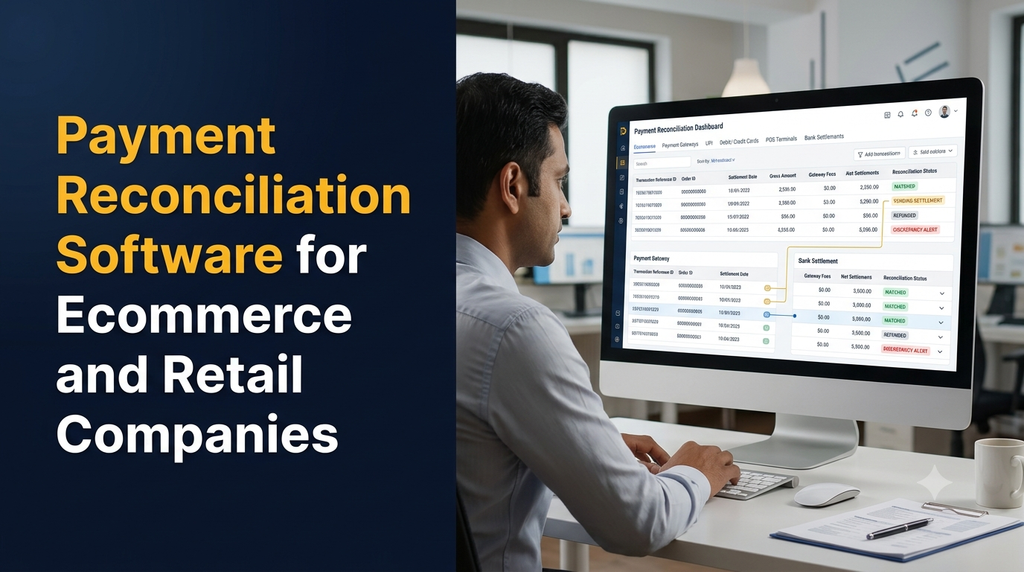
Payment reconciliation software helps ecommerce and retail companies compare payment records from orders, payment gateways, UPI, card terminals, marketplaces and bank statements. It identifies which transactions have been settled, which amounts are still pending and where fees, refunds or payment differences need attention.
Businesses often receive payments through several channels. An online store may use multiple payment gateways, a retail outlet may accept UPI and card payments through POS terminals, and a marketplace may transfer settlements after deducting commissions and other charges. Each source can produce a separate report.
Comparing these records manually can become difficult as transaction volumes increase. A payment reconciliation system brings the information together, matches related records and gives finance teams a structured way to investigate exceptions.
Why Do Ecommerce and Retail Businesses Need Payment Reconciliation?
A customer payment, an order record, a gateway transaction and a bank settlement are connected, but they are not always recorded at the same time or in the same format. A successful payment notification does not necessarily mean the corresponding amount has already reached the business bank account.
Common operational challenges include:
- Comparing large numbers of orders with gateway transaction reports.
- Tracking settlements that are pending, delayed or partially paid.
- Identifying gateway fees and deductions before recording net receipts.
- Matching UPI and card transactions with POS or bank records.
- Reconciling marketplace payouts against individual orders and returns.
- Finding refunds that have been initiated but not yet reflected in records.
- Investigating duplicate, missing or unmatched transaction entries.
- Preparing reliable daily, weekly and monthly finance reports.
A central reconciliation workflow gives the finance team a consistent view of collections and settlements instead of requiring staff to switch between multiple spreadsheets and provider dashboards.
What Is Payment Reconciliation Software?
Payment reconciliation software is a business application that imports or receives transaction data from supported systems, compares related records using identifiers and transaction attributes, and highlights matches and exceptions for review.
Depending on the business requirements, it can connect ecommerce orders, payment gateway records, marketplace settlement reports, POS transactions, refund records and bank statements. The system can then calculate expected settlements and compare them with reported or received amounts.
Payment Sources the Software Can Reconcile
1. Ecommerce Website Payments
An ecommerce website may accept payments through one or more gateways. Reconciliation can connect order IDs with payment IDs, transaction references, payment status, refunds and settlement entries. This is useful for businesses operating their own online stores.
2. UPI Transactions
UPI collections may come through payment gateways, QR-based collection systems or supported business payment applications. Reconciliation should use the identifiers and reports available from the relevant provider, such as transaction references or UTR details where supplied.
3. Debit and Credit Card Payments
Card transactions from online checkouts and physical POS terminals may have separate transaction and settlement reports. The system can compare transaction totals, settlement batches, fees, refunds and bank credits.
4. Payment Gateway Settlements
Gateway settlement files can contain gross collections, fees, taxes on charges where applicable, refunds, adjustments and net payout values. The reconciliation system should retain the original report and show how each net settlement amount was calculated.
5. Marketplace Settlements
Marketplace payouts may combine multiple orders and include commissions, shipping-related adjustments, returns, penalties or other deductions. A useful system links payout entries back to the relevant orders and marketplace reports rather than treating every payout as one unexplained bank credit.
6. Cash on Delivery and Store Collections
Retailers and omnichannel businesses may also need to reconcile cash collections, delivery partner remittances, store deposits and daily closing records. These workflows should be configured separately from electronic payment settlements.
Essential Features of Payment Reconciliation Software
1. Centralised Transaction Management
Import transaction information from supported gateways, ecommerce platforms, marketplaces, POS systems and bank statements. Store the source, import date, reference identifiers and original transaction details so finance teams can trace each record.
2. Automated Transaction Matching
Matching rules compare records using available identifiers and business rules. Exact matches can be identified automatically, while records with missing or conflicting information can be sent for manual review.
- Order ID and payment ID matching.
- Gateway transaction reference matching.
- UTR or bank reference matching where available.
- Amount and currency comparison.
- Transaction date and settlement date comparison.
- Configurable matching rules for different payment providers.
3. Settlement Tracking
Track settlement batches, expected payout dates, reported payout amounts, actual bank credits and settlement status. The dashboard should distinguish a successful customer payment from a completed bank settlement.
4. Fee and Deduction Management
Record gateway fees, marketplace commissions, applicable taxes on service charges, refunds and other supported adjustments. Show gross collections and net settlement amounts separately to make financial review easier.
5. Refund and Reversal Tracking
Link refunds to their original transactions. Track the refund request, provider status, amount, reference and corresponding bank or settlement entry. Partial refunds should be supported when the underlying provider and business workflow allow them.
6. Exception and Discrepancy Management
Not every record will match automatically. An exception queue helps staff investigate missing references, amount differences, duplicate entries, unexpected fees, delayed settlements and other discrepancies.
7. Bank Statement Reconciliation
Import supported bank statement formats and compare bank credits and debits with expected settlements, refunds and business ledger entries. The application should preserve statement references and avoid treating an imported bank row as proof of a customer order unless a valid match exists.
8. Finance Dashboard and Reports
Provide summaries for collections, matched transactions, pending settlements, refunds, deductions and unresolved exceptions. Users should be able to filter results by date, channel, branch, payment provider, marketplace and settlement status.
9. User Roles and Approval Workflow
Configure separate permissions for finance executives, store managers, accountants, finance heads and administrators. Sensitive adjustments, write-offs and manual match approvals can require an authorised reviewer.
10. Audit Trail and Export
Record imports, rule changes, manual matches, edits, approvals and resolution notes. Provide CSV, spreadsheet or PDF exports where required, with access controls for financial data.
Important Modules in a Payment Reconciliation System
| Module | Purpose | Typical users |
|---|---|---|
| Transaction Import | Collect gateway, POS, marketplace and bank records | Finance team |
| Order Matching | Connect customer orders with payment transactions | Finance and ecommerce teams |
| Settlement Management | Track expected and reported payouts | Accountants |
| Fee Management | Record charges, commissions and adjustments | Finance team |
| Refund Management | Track refund requests and settlement effects | Support and finance |
| Bank Reconciliation | Compare expected amounts with bank entries | Accountants |
| Exception Management | Investigate unmatched or disputed records | Finance managers |
| Reports and Audit | Review results, approvals and change history | Management and auditors |
How Automated Payment Reconciliation Works
A typical implementation follows a controlled sequence. The exact process depends on the payment providers, ecommerce platform, bank formats and accounting system being used.
- Collect transaction data: Receive records through supported APIs, scheduled imports or approved report uploads.
- Standardise the records: Convert source fields into a common format while retaining original identifiers and source information.
- Match orders and payments: Compare order IDs, payment references, amounts, currencies and other available attributes.
- Process settlement reports: Link transactions to settlement batches and calculate expected net payout amounts.
- Compare bank entries: Match reported settlements against imported bank statement credits.
- Identify exceptions: Highlight unmatched entries, duplicate records, differences and delayed payouts.
- Review and approve: Allow authorised staff to investigate, add notes and approve permitted corrections.
- Generate reports: Produce reconciliation summaries and export approved records for accounting workflows.
Example: Reconciling an Ecommerce Payment
Consider a fictional ecommerce order with a customer payment of ₹2,000. The following example demonstrates the basic calculation. Actual gateway fees, taxes, settlement schedules and adjustments depend on the provider agreement and transaction.
| Record | Example amount | What it represents |
|---|---|---|
| Customer order | ₹2,000 | Order value recorded by the store |
| Successful payment | ₹2,000 | Payment provider confirms the transaction |
| Illustrative provider fee | ₹40 | Example processing charge |
| Illustrative net settlement | ₹1,960 | Amount expected before other adjustments |
| Bank credit | ₹1,960 | Amount observed in the bank statement |
The software links the order, payment, provider fee, settlement and bank credit. If the bank credit is different from the expected amount, the transaction can be placed in an exception queue for investigation. The system should not silently change the original records to force a match.
Common Payment Reconciliation Exceptions
| Exception | Possible reason | Recommended system response |
|---|---|---|
| Payment without an order match | Missing or inconsistent order reference | Show source details and allow controlled investigation |
| Order without a payment match | Payment failed, pending or data not imported | Check provider status before classifying the order |
| Settlement amount difference | Fees, refunds or adjustments | Show a settlement breakdown |
| Bank credit not found | Payout pending, delayed or bank reference unavailable | Keep the payout pending and flag it for review |
| Duplicate transaction | Repeated report import or duplicate source record | Use source identifiers and duplicate checks |
| Refund mismatch | Partial refund or different processing date | Link the refund to the original payment and track status |
| Marketplace payout difference | Commission, returns or other adjustments | Compare the payout statement with order-level records |
Payment Reconciliation for Different Business Types
Online Stores and D2C Brands
Online retailers need order-to-payment matching, gateway settlement tracking, refund handling and bank reconciliation. Businesses using multiple checkout providers can benefit from a unified reporting view.
Retail Shops and Supermarkets
Physical stores may need reconciliation across POS terminals, UPI QR collections, card machines, cash deposits and branch-level closing reports. Store-wise and terminal-wise filters help finance teams identify differences.
Marketplace Sellers
Sellers operating on multiple marketplaces need to compare payout statements with orders, commissions, returns and adjustments. The software should retain marketplace-specific references and fee descriptions.
Omnichannel Retail Businesses
Businesses selling through stores, websites, mobile applications and marketplaces may need a consolidated reconciliation process. Each channel should remain identifiable so that combined reporting does not hide the original transaction source.
Wholesale and Distribution Companies
Wholesalers and distributors may reconcile customer transfers, UPI collections, payment links, bank deposits and invoice references. Customer-wise outstanding and receipt allocation can be included where required.
Integrations Required for Payment Reconciliation Software
Integrations determine how reliably the system receives and compares records. Before development, businesses should confirm that each provider supports the required API, report export or approved integration method.
- Ecommerce platforms: Connect orders, cancellations, returns and payment statuses.
- Payment gateways: Receive transaction, refund, fee and settlement information through supported interfaces.
- UPI and POS providers: Import available collection and settlement records.
- Marketplaces: Process payout statements, order references, commissions and adjustments.
- Banking data: Import supported statements or use an authorised bank-data connection where available.
- Accounting software: Export or synchronise approved entries with the selected accounting application.
- ERP and inventory systems: Link payment records with invoices, orders, branches and business units.
API access, provider permissions, rate limits, report availability and integration charges vary. A development team should verify the documentation and access conditions before promising a particular integration.
Security and Financial Data Management
Payment reconciliation software handles commercially sensitive financial records. Its design should minimise unnecessary data collection and restrict access according to business responsibilities.
- Use role-based access control for finance, operations and administrators.
- Protect data in transit and at rest using appropriate security controls.
- Store API credentials securely and restrict access to integration secrets.
- Maintain audit logs for imports, approvals, edits and reconciliation actions.
- Use backups, recovery procedures and controlled data-retention policies.
- Validate imported files and protect upload workflows against malicious content.
- Mask sensitive information in screens and exports where practical.
- Separate test and production environments.
Avoid storing card security codes or unnecessary sensitive payment credentials. If the application handles cardholder data or connects to systems that do, the business must assess the applicable PCI DSS responsibilities with its payment providers and qualified security professionals. Compliance should never be assumed merely because a reconciliation dashboard has been developed.
Ready-Made Software vs Custom Payment Reconciliation Development
| Consideration | Ready-made product | Custom development |
|---|---|---|
| Initial setup | Often faster when workflows are supported | Requires requirements and implementation work |
| Business-specific rules | Limited to available configuration | Can be designed around approved workflows |
| Integrations | Depends on vendor-supported connectors | Can target selected provider APIs and formats |
| Reporting | Uses built-in reports and exports | Can provide custom dashboards and reports |
| Maintenance | Managed according to vendor plan | Requires an ongoing maintenance arrangement |
| Cost model | Subscription, usage or licence fees | Development plus hosting and maintenance |
A ready-made product may be suitable when the business uses standard payment channels and supported workflows. Custom software may be worth evaluating when a company has multiple branches, marketplace-specific rules, unusual settlement formats, internal approval requirements or existing ERP workflows that need integration.
Payment Reconciliation Software Development Process
- Requirement analysis: List payment channels, transaction volumes, business entities, settlement rules and reporting needs.
- Provider assessment: Verify API documentation, sample reports, access permissions and integration limitations.
- Data model design: Define orders, transactions, settlement batches, fees, refunds, bank entries and exceptions.
- Interface design: Plan dashboards, filters, reconciliation screens and approval workflows.
- Integration development: Build and test supported API connections and file-import processes.
- Matching engine: Configure exact matching, conditional rules, duplicate detection and exception handling.
- Testing: Test partial settlements, refunds, duplicate imports, delayed payouts, missing references and large data files.
- Deployment and training: Set up production access, backups, user roles, documentation and staff training.
- Ongoing maintenance: Monitor integration changes, provider updates, security and reconciliation accuracy.
How Much Does Payment Reconciliation Software Development Cost in India?
Development cost depends on the number of payment sources, transaction volume, matching complexity, accounting integrations, reporting requirements and security expectations. The following figures are illustrative planning ranges for discussing project scope, not fixed market prices or a quotation from Greap.
| Project scope | Illustrative development estimate |
|---|---|
| Basic transaction import and reconciliation dashboard | ₹35,000–₹60,000 |
| Order and payment matching with exception tracking | ₹50,000–₹90,000 |
| Gateway settlement and fee reconciliation | ₹70,000–₹1.2 lakh |
| Bank statement matching and finance reports | ₹85,000–₹1.5 lakh |
| Multi-channel ecommerce and retail reconciliation | ₹1.2–₹2.5 lakh+ |
| Advanced platform with marketplace and accounting integrations | ₹2.5–₹5 lakh+ |
These estimates require validation against a detailed scope. Cloud hosting, database and file storage, third-party API charges, payment provider fees, accounting licences, messaging services, data migration, security testing, taxes and ongoing maintenance may be additional. Hardware or POS-related integration work may also affect the budget.
How to Choose a Payment Reconciliation Software Development Company
Before selecting a development partner, evaluate the following:
- Experience with ecommerce, retail and financial workflow applications.
- Ability to understand settlement reports and payment-provider documentation.
- Clear handling of partial settlements, refunds and duplicate imports.
- Transparent integration scope and third-party access requirements.
- Configurable matching rules and a reviewable exception process.
- Secure user permissions, audit history and backup planning.
- Testing with realistic sample data and documented acceptance criteria.
- Post-launch maintenance and support arrangements.
Ask the development team to demonstrate how one order moves through payment confirmation, gateway settlement and bank reconciliation. This practical walkthrough can reveal gaps that a feature checklist may miss.
Payment Reconciliation Software for Businesses in Erode and Tamil Nadu
Retail stores, textile businesses, distributors, ecommerce sellers and multi-branch companies in Erode and across Tamil Nadu may receive money through different payment channels. As a business adds online sales, additional branches or marketplace accounts, finance teams may need a more consistent way to compare collections and settlements.
A custom application can be planned around the company’s actual payment providers, accounting process, branch structure and reporting needs. Businesses should begin by identifying their transaction sources and obtaining sample settlement and bank statement files before finalising the development scope.
Frequently Asked Questions
1. What is payment reconciliation software?
It is software that compares payment records from orders, gateways, marketplaces, POS systems and bank statements to identify matched transactions, settlements and discrepancies.
2. How does automated payment reconciliation work?
It imports records from supported sources, standardises their fields, applies matching rules, compares settlement amounts and sends unmatched or inconsistent records for review.
3. Can the software reconcile multiple payment gateways?
Yes, it can be designed to combine data from multiple gateways when suitable API access or report formats are available. Each provider’s integration requirements must be checked separately.
4. Can UPI and card payments be reconciled together?
Yes. The application can provide a common dashboard for supported UPI and card records while retaining their original provider references and settlement details.
5. What is the difference between payment reconciliation and bank reconciliation?
Payment reconciliation connects business orders and payment-provider transactions with settlements. Bank reconciliation compares expected financial entries with transactions recorded in the bank statement. A business system can support both workflows.
6. Can it track payment gateway fees?
Yes. If the provider supplies the required fee and adjustment data, the software can record charges, applicable taxes on those charges and net settlement values.
7. Can marketplace settlements be reconciled order by order?
This is possible when marketplace reports contain suitable order-level references and payout details. The system can link supported commissions, refunds and adjustments to the relevant records.
8. Does payment reconciliation software manage refunds?
It can track refund requests, provider status, original transaction references, partial refund amounts and related settlement entries. Initiating a refund requires a separate authorised integration or provider workflow.
9. Can it identify duplicate transactions?
Yes. Duplicate detection can use provider references, source file identifiers and other transaction attributes. The system should distinguish a genuine duplicate from a legitimate repeated payment.
10. Can the software integrate with accounting applications?
It can be integrated with selected accounting applications through supported APIs, connectors or controlled exports. The required integration and accounting workflow should be confirmed before development.
11. Is a bank API required for reconciliation?
Not necessarily. A system may use supported bank statement uploads. Direct bank-data integration depends on authorised access and the services available to the business.
12. Can multiple retail branches use one reconciliation system?
Yes. Branch-wise records, user permissions, payment channels and consolidated reports can be included in a multi-branch application.
13. How long does payment reconciliation software development take?
A basic system may take less time than a multi-channel platform with several provider integrations. A realistic schedule should be prepared after reviewing the data sources, API access, matching rules, reports and testing requirements.
14. How much does custom payment reconciliation software cost?
Cost depends on modules, payment providers, transaction volume, integrations, reports and security requirements. An initial planning estimate should be confirmed after a detailed requirements review.
15. Is payment reconciliation software suitable for small businesses?
It can be useful for small businesses that manage several payment channels or spend significant time comparing settlement records. The project scope should match transaction volume and operational complexity.
Need Custom Payment Reconciliation Software?
Greap Technologies develops business websites, custom software and digital solutions for companies. If your ecommerce or retail business needs a centralised payment reconciliation workflow, discuss your payment sources, settlement reports, accounting process and reporting requirements with our team.