Businesses handle large volumes of documents every day. Invoices, purchase orders, receipts, customer forms, contracts, delivery notes and employee records are important for daily operations. However, collecting information from these documents and entering it into business software can consume considerable staff time.
Manual document handling can also introduce data-entry errors, approval delays, misplaced files and difficulties in retrieving information.
AI-powered document processing software development helps businesses automate document reading, data extraction, classification, validation and workflow management using technologies such as Optical Character Recognition (OCR), machine learning and natural language processing.
For Indian businesses looking to improve operational efficiency, a properly designed document processing system can connect incoming documents with existing accounting, ERP, CRM and management applications.
What Is AI-Powered Document Processing Software?
AI-powered document processing software is an application that reads documents, identifies relevant information and converts unstructured content into usable digital data.
Traditional document management systems mainly help users store, organize and retrieve files. Intelligent document processing systems go further by understanding document content and automating selected tasks.
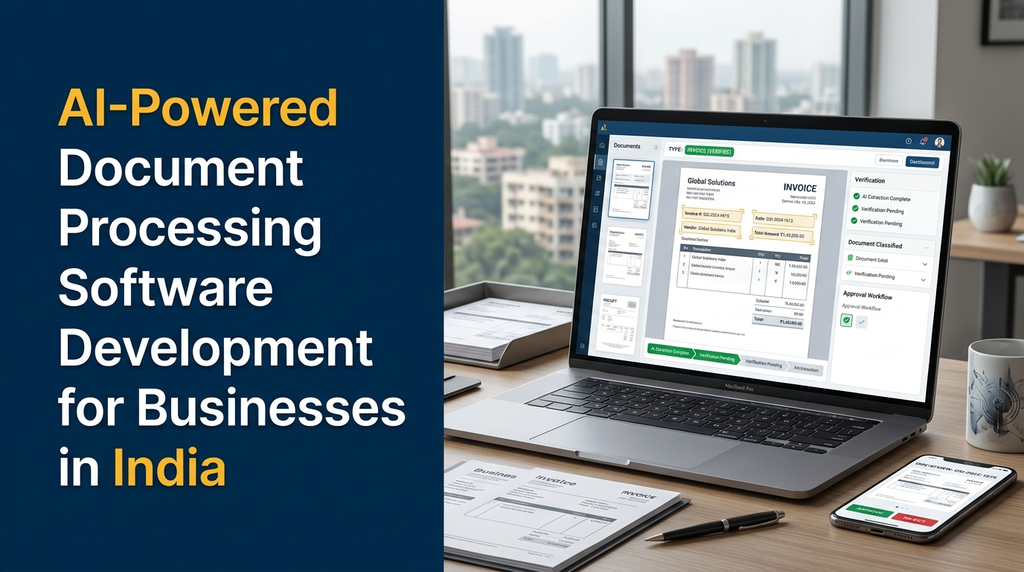
For example, when an employee uploads a supplier invoice, the software can identify the document type, recognize printed text, extract invoice details and prepare the information for review or entry into an accounting system.
A company receives 200 supplier invoices in PDF format. Instead of manually opening every file and entering the invoice number, date, vendor and amount, an AI document processing application can extract the fields and organize them for verification.
Employees can review uncertain or incomplete fields before the information is approved and transferred to another business application.
How AI Document Processing Works
An intelligent document processing workflow usually combines several technologies. Each component performs a different task, from receiving a file to preparing verified data for a business system.
1. Document collection
The application receives documents through file uploads, email attachments, scanning systems, mobile applications, shared folders or supported third-party integrations.
2. Document preprocessing
The system prepares scanned documents for recognition. This may include image correction, page rotation, noise reduction, page separation and file conversion.
3. OCR and text recognition
Optical Character Recognition converts text in scanned images or document pages into machine-readable content. It can recognize printed text and, depending on the selected engine and document quality, some handwritten content.
4. Document classification
AI models or configured classification rules identify whether a file is an invoice, purchase order, receipt, application form, contract or another supported document.
5. Information extraction
The system identifies relevant fields such as names, dates, reference numbers, addresses, quantities, tax values and totals. The extraction process depends on document structure, language and model capabilities.
6. Data validation
Extracted values are checked against configured business rules. For example, invoice totals can be compared with line-item calculations, and vendor details can be checked against existing supplier records.
7. Human review and approval
Low-confidence or unusual results can be sent to an employee for verification. Authorized users can correct information and approve the document before further action.
8. Business system integration
After verification, approved data can be transferred to accounting software, ERP systems, CRM applications or other connected business tools.
Essential Features of AI Document Processing Software
1. Multiple document upload formats
Businesses work with different document formats. The application should support the required file types, such as PDF, JPEG, PNG and other agreed formats.
Depending on the project, it may also support email-based document collection and batch uploads.
2. Intelligent document classification
Automatically organize incoming files into categories such as invoices, purchase orders, receipts, contracts and customer forms.
3. AI-based data extraction
Extract important information from different document layouts without requiring employees to enter every field manually.
4. Template-based and flexible extraction
Some documents follow fixed layouts, while others come from different suppliers and have different structures. A flexible system can combine templates, field mapping and AI-based extraction to support both situations.
5. Confidence scoring and verification
Display extraction confidence or validation indicators where the selected technology provides meaningful confidence information. Low-confidence fields should be reviewed rather than automatically accepted.
6. Duplicate document detection
Identify possible duplicate invoices or repeated uploads using document identifiers, supplier information, dates, amounts and file-level checks.
7. Approval workflow management
Configure approval stages based on document type, department, transaction value or user role. For example, a purchase invoice may require accounts-team verification before manager approval.
8. Document search and retrieval
Search for documents using extracted information such as invoice number, vendor name, date, customer name or reference ID. This is more useful than searching only by file name.
9. Audit trail and activity history
Maintain a record of uploads, extracted values, corrections, approvals, downloads and other important actions. This helps businesses investigate processing issues.
10. Dashboard and reports
Provide an overview of documents received, processing status, pending reviews, approved records and failed processing tasks.
11. Notifications and reminders
Notify relevant employees when a document requires review, an approval is pending or a processing task has failed.
12. API and third-party integrations
Connect the application with ERP, accounting, CRM, inventory, email and other business software through supported APIs or integration methods.
Common Business Use Cases in India
AI-powered document processing can support many industries. The document types and validation rules should be designed according to each organization’s actual workflow.
1. Invoice processing for accounting departments
Finance teams receive invoices from suppliers, service providers and other vendors. Document AI can extract invoice numbers, dates, tax details, line items and totals.
The system can prepare the extracted information for verification and transfer approved data to accounting software.
2. Purchase order processing for manufacturers
Manufacturing businesses handle purchase orders, supplier quotations and delivery documents. AI extraction can help identify product descriptions, quantities, rates and delivery information.
3. GST invoice and supporting document management
Businesses can organize relevant tax invoices and extract selected fields for review. Any GST-related calculations, classifications or compliance decisions should be checked against applicable rules and verified by qualified accounting professionals.
4. Textile and garment industry documentation
Textile manufacturers and garment businesses may process purchase orders, job-work records, material receipts, delivery challans, supplier invoices and quality reports.
A document processing system can extract relevant information and connect it with production, inventory or ERP workflows.
5. Logistics and transportation documents
Logistics companies work with delivery receipts, transport documents, shipment records and invoices. Automated extraction can help organize shipment references, dates, quantities and delivery information.
6. Healthcare administration documents
Healthcare organizations may process administrative forms, billing documents, insurance paperwork and patient-related records. These applications require particularly careful access controls and privacy safeguards.
7. Human resources document management
HR departments can use document automation for employee application forms, joining documents, experience certificates and other administrative records.
8. Banking and financial service operations
Financial organizations may use document processing to extract information from application forms and supporting records. Sensitive decisions must retain appropriate verification and human oversight.
Documents That Can Be Processed Using AI
| Document type | Possible extracted information | Business application |
|---|---|---|
| Supplier invoice | Invoice number, date, vendor, tax and total | Accounts payable |
| Purchase order | PO number, item, quantity and rate | Procurement |
| Receipt | Merchant, date, amount and reference | Expense management |
| Delivery challan | Delivery reference, item and quantity | Inventory and logistics |
| Application form | Applicant details and selected fields | Administration |
| Contract | Parties, dates and selected clauses | Contract management |
| Quality report | Batch number, measurements and results | Quality management |
OCR vs AI-Powered Intelligent Document Processing
OCR and intelligent document processing are related, but they are not the same. OCR primarily converts text from images into machine-readable text. Intelligent document processing combines OCR with other technologies to understand and organize document information.
| Capability | Basic OCR | Intelligent document processing |
|---|---|---|
| Text recognition | Yes | Yes, through OCR or document models |
| Document classification | Usually requires additional logic | Can be automated |
| Field extraction | May need templates or custom rules | Can use AI and structured extraction |
| Validation | Requires additional business logic | Can combine AI extraction with rules |
| Workflow automation | Not normally included by itself | Can include review and approval workflows |
| Business integration | Requires additional development | Can connect with business applications |
The right solution depends on document complexity. A business processing consistent, clean forms may only need OCR and rule-based extraction. A business receiving varied supplier invoices and scanned documents may benefit from a broader intelligent document processing platform.
AI Technologies Used in Document Processing Software
Optical Character Recognition (OCR)
OCR identifies printed text in scanned images and documents. It provides the text foundation for many document automation workflows.
Machine learning
Machine learning models can classify documents, identify patterns and support extraction from different document layouts.
Natural Language Processing (NLP)
NLP helps software analyze text, identify relevant entities and interpret selected information in documents.
Large language models (LLMs)
LLMs can help interpret complex text, summarize documents and extract structured information when configured with suitable prompts, schemas and validation rules.
Their outputs should be treated as data requiring verification, particularly when documents affect financial, legal or compliance decisions.
Document layout analysis
Layout analysis identifies text blocks, tables, headings, columns, checkboxes and other page structures. It is useful when the position and relationship of information matter.
Human-in-the-loop review
A human review process allows employees to verify uncertain fields, correct mistakes and approve records. This is important when the cost of an incorrect extraction is high.
Technology Stack for Custom Document Processing Software
The technology stack should be selected based on document volume, required languages, deployment preferences, security requirements and integration needs.
| Layer | Possible technologies |
|---|---|
| Frontend | React, Next.js, Vue.js |
| Backend | Laravel, Node.js, Python, Django |
| Database | PostgreSQL, MySQL |
| OCR | Tesseract or suitable commercial OCR services |
| Document AI | Cloud document AI services or custom ML models |
| AI integration | Suitable LLM APIs or self-hosted models |
| File storage | Secure object storage or managed file storage |
| Background jobs | Redis queues, workers and scheduled jobs |
| Deployment | Cloud infrastructure or private hosting |
These are examples, not a mandatory combination. A project can use different technologies depending on the selected architecture and service providers.
Cloud-Based vs On-Premises Document Processing
Cloud-based deployment
A cloud-based system runs on managed infrastructure and can use hosted OCR or AI services. It may simplify scaling and maintenance, but businesses should review data location, vendor terms, access controls and ongoing usage costs.
On-premises deployment
An on-premises system runs within the organization’s infrastructure. It can provide more direct control over the environment, but requires internal infrastructure, security, updates, monitoring and technical support.
Hybrid deployment
A hybrid architecture combines private business systems with selected cloud services. The design should clearly define which documents and data can be sent to external services and which must remain within controlled infrastructure.
Integration with ERP, Accounting and Business Software
Document processing becomes more valuable when extracted information can be used by other business applications. Instead of leaving data in a separate document dashboard, businesses can connect approved records to existing workflows.
- ERP software: Transfer approved purchase orders, supplier invoices and inventory-related records.
- Accounting software: Prepare verified invoice and expense information for accounting workflows.
- CRM software: Organize customer forms, correspondence and selected customer documents.
- Inventory systems: Extract item, quantity and delivery information from relevant documents.
- HR software: Organize employee administration records and application forms.
- Email systems: Collect documents received through approved business email workflows.
Supporting Indian Languages and Different Document Formats
Indian businesses may receive documents in English, Tamil, Hindi and other regional languages. Some documents may contain a combination of languages, local formats, stamps, tables and handwritten entries.
Language support should be tested using actual sample documents before choosing an OCR or AI provider. Recognition quality can vary based on:
- Language and script support.
- Print quality and scanning resolution.
- Handwriting and font variations.
- Document layout and table complexity.
- Mixed-language text and regional terminology.
- Image quality, shadows and page distortion.
For example, a Tamil-language supplier document should be included in testing if the application is expected to process Tamil text. Do not assume that support for English OCR automatically means reliable support for every Indian language.
Data Security and Privacy Considerations
Business documents may contain personal information, financial details, contracts and confidential company data. Security should therefore be included in the system architecture from the beginning.
- Apply role-based access control to documents and records.
- Encrypt data during transfer and protect stored files.
- Use secure authentication and session management.
- Keep AI and OCR service credentials out of frontend code.
- Define document retention and deletion policies.
- Maintain access logs and document activity history.
- Use secure backups and tested recovery procedures.
- Review third-party AI provider data handling and retention terms.
- Restrict access to sensitive documents based on business roles.
Indian businesses should assess applicable privacy and information-security obligations, including the Digital Personal Data Protection framework where relevant, along with sector-specific requirements. Legal and compliance teams should review the applicable obligations for the organization’s use case.
Common Challenges in AI Document Processing Projects
Low-quality scanned documents
Blurry scans, faded text, shadows and rotated pages can affect recognition. Preprocessing and clear scanning guidelines can help improve input quality.
Different supplier formats
Suppliers may use different invoice layouts. A solution should support configurable extraction rules and testing across representative document samples.
Incorrect extracted information
OCR and AI systems can misread numbers, dates or names. Validation rules and human verification are important for sensitive records.
Complex tables
Documents containing multiple line items, merged cells and multi-page tables may require specialized layout extraction and additional validation.
Unclear business rules
Extraction alone cannot decide every business action. The organization must define approval limits, duplicate handling, vendor matching and exception procedures.
Third-party AI dependency
External AI services can have usage charges, processing limits, service availability constraints and changing terms. The system should include monitoring and a plan for service failures or provider changes.
How to Measure Document Processing Performance
Businesses should measure the quality and operational impact of document automation instead of relying only on a vendor’s general AI accuracy claim.
| Metric | What it measures |
|---|---|
| Field extraction accuracy | How correctly selected document fields are extracted. |
| Document classification quality | How correctly documents are assigned to categories. |
| Human review rate | How many records require employee verification. |
| Processing time | Time taken from upload to the required processing stage. |
| Exception rate | Share of documents requiring special handling. |
| Duplicate detection rate | Effectiveness of identifying repeated documents. |
| Integration success rate | Whether approved data reaches connected systems correctly. |
Test these metrics using a representative sample of real business documents. Measure critical fields separately, because an error in an invoice total may have a different business impact from an error in a non-critical description.
AI-Powered Document Processing Software Development Cost in India
The cost depends on document types, processing volume, OCR requirements, AI model selection, approval workflows, security needs and integration complexity.
| Software scope | Illustrative planning estimate |
|---|---|
| Basic OCR and document upload application | ₹40,000 – ₹80,000 |
| AI extraction with document classification | ₹80,000 – ₹1,50,000 |
| Document automation with review and approval workflows | ₹1,50,000 – ₹3,00,000 |
| Advanced enterprise document processing with ERP integrations | ₹3,00,000 onwards |
Important: These are illustrative planning estimates, not fixed Greap Technologies quotations or guaranteed market prices. Final costs depend on the approved technical scope, document samples and integrations.
Additional costs to consider
- Cloud hosting and file storage.
- OCR and document AI API usage charges.
- LLM API or model hosting expenses.
- Third-party software and integration fees.
- Security reviews and infrastructure requirements.
- Ongoing maintenance and model evaluation.
- Additional language support and custom document templates.
How to Choose an AI Document Processing Software Development Company
A document automation project involves more than adding an AI API to a website. The development team should understand the business documents, data structures, approval rules and existing software environment.
Before choosing a development partner, evaluate whether it can:
- Understand your document processing workflow.
- Evaluate actual sample documents before selecting technology.
- Build OCR and AI-based extraction workflows.
- Implement validation and human review features.
- Connect the system with ERP and accounting applications.
- Protect sensitive files and API credentials.
- Test extraction quality across different document formats.
- Provide deployment, documentation and maintenance support.
AI Document Processing Software Development by Greap Technologies
Greap Technologies provides website development, software development and digital growth solutions for businesses. We can help plan custom document processing applications that fit your existing operations.
Depending on project requirements, development can include:
- AI-powered invoice and receipt processing.
- OCR-based document reading and data extraction.
- Purchase order and supplier document automation.
- Document classification and digital filing.
- Custom document review and approval dashboards.
- ERP, CRM and accounting software integration.
- Role-based document access and audit history.
- Business reports and document processing analytics.
We begin by understanding your document formats, business rules, expected processing volume and integration requirements. The final solution is planned around practical automation needs, data verification and maintainability.
Looking to Automate Your Business Documents with AI?
Discuss your invoice processing, document extraction, approval workflow or business automation requirements with Greap Technologies.
Visit Greap Technologies Discuss on WhatsApp Call UsFrequently Asked Questions
1. What is AI-powered document processing software?
It is software that uses OCR, AI and business rules to read, classify, extract and validate information from documents. It can also automate selected approval and data-transfer workflows.
2. How does AI extract data from PDF documents?
The system reads digital PDF text directly where possible. For scanned PDFs, OCR converts page images into text. AI or configured extraction rules then identify the required fields and prepare structured information.
3. Can AI automatically process supplier invoices?
Yes. An appropriately configured application can extract invoice details, identify vendors, validate selected fields and send records for approval. Important financial information should be verified before posting or payment.
4. What is the difference between OCR and document AI?
OCR converts text in images into machine-readable content. Document AI combines OCR or other document recognition methods with classification, extraction, interpretation and workflow capabilities.
5. Can document processing software recognize Tamil documents?
It can be designed to process Tamil documents when the selected OCR and AI technologies support the required script and document format. Testing with actual Tamil-language samples is essential.
6. Can AI document processing integrate with ERP software?
Yes. Approved extracted information can be transferred to ERP systems through APIs, database interfaces or other supported integration methods.
7. Is human verification necessary in AI document processing?
It depends on the document and business risk. Human verification is recommended for uncertain fields and sensitive financial, legal or compliance-related information.
8. Can AI process handwritten documents?
Some OCR and document AI technologies support handwriting recognition. Results depend on handwriting quality, language, document condition and the selected technology. A sample-based feasibility test is recommended.
9. How much does AI document processing software cost in India?
A basic OCR application may start around ₹40,000 as an illustrative planning estimate. Advanced AI extraction, approval workflows and ERP integration can require a larger development budget.
10. Can a business build custom document processing software?
Yes. A custom application can be designed around the company’s document formats, approval rules, security requirements and existing business systems.
Conclusion
AI-powered document processing can help Indian businesses reduce repetitive data-entry work, organize information and improve document-based workflows. From invoice extraction and purchase order processing to HR administration and logistics documentation, the technology has applications across many industries.
A successful implementation requires more than text recognition. It should combine suitable OCR and AI technologies with business validation rules, human verification, secure document storage and reliable software integrations.
Businesses planning document automation should begin with a clear workflow assessment and a representative sample of their documents. This makes it easier to select the right technology and build a solution that supports real operational requirements.