Startups and software development teams need to release features quickly while maintaining application stability, security and performance. As projects grow, manual deployments, disconnected development workflows and inconsistent server configurations can create unnecessary operational challenges. DevOps implementation helps businesses connect software development and IT operations through automation, collaboration and repeatable delivery processes.
What Is DevOps Implementation?
DevOps is a combination of development practices, tools and cultural approaches designed to improve collaboration between software developers and IT operations teams.
DevOps implementation involves setting up the processes and technical infrastructure required to build, test, deploy and monitor applications efficiently.
Instead of treating development and deployment as completely separate activities, DevOps encourages teams to establish a connected software delivery lifecycle.
A typical DevOps environment includes:
- Source code management and version control.
- Continuous integration and continuous delivery pipelines.
- Automated application testing.
- Cloud infrastructure and server management.
- Containerization and orchestration where appropriate.
- Infrastructure automation.
- Application monitoring and centralized logging.
- Security checks throughout the delivery lifecycle.
Why Do Startups Need DevOps Services?
Startups often begin with a small development team and a limited infrastructure budget. Early deployments may be handled manually, with developers directly managing application servers and database updates.
This approach can work for an initial prototype, but it may become difficult as the number of users, features, developers and environments increases.
1. Faster and More Consistent Software Releases
Automated build, test and deployment workflows reduce repetitive manual work. Teams can follow a defined release process instead of relying on individual developers to remember every deployment step.
2. Reduced Deployment Errors
Manual deployments can introduce configuration differences, missing files and inconsistent application versions. Repeatable deployment pipelines help reduce these risks.
3. Better Collaboration Between Developers
Version control, code reviews, automated checks and shared deployment workflows provide a common process for developers and operations teams.
4. More Reliable Testing
Automated testing can run whenever developers submit changes. This helps identify certain problems before new code reaches production.
5. Improved Infrastructure Visibility
Monitoring and centralized logging help teams understand application health, server behavior and operational issues.
6. Support for Business Growth
As application traffic and operational requirements change, a properly designed infrastructure can be adjusted to support new workloads. Scaling still requires capacity planning and appropriate architecture.
Core DevOps Implementation Services
1. DevOps Assessment and Consulting
The implementation begins by understanding the existing development process, application architecture, team structure, hosting environment and release requirements.
An assessment identifies workflow bottlenecks and helps establish a practical implementation roadmap.
2. CI/CD Pipeline Implementation
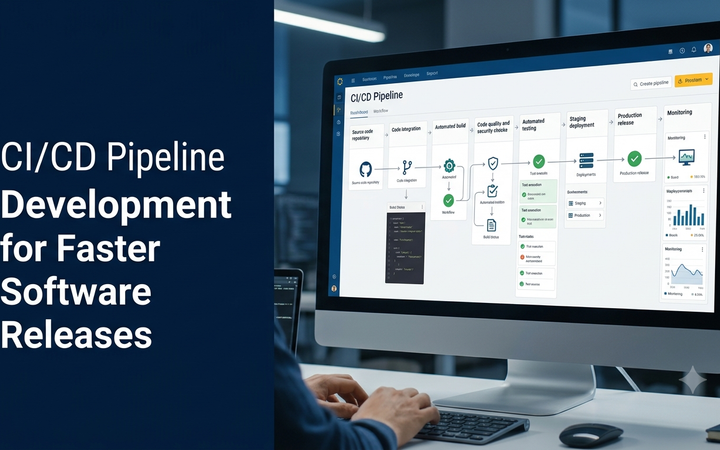
Continuous Integration (CI) automates the process of integrating and validating code changes. Continuous Delivery or Deployment (CD) extends this workflow by preparing or releasing validated application versions.
A CI/CD pipeline may include:
- Code repository integration.
- Automated build processes.
- Code quality and security checks.
- Automated test execution.
- Application packaging.
- Deployment to staging environments.
- Approval-based production releases.
- Release verification and rollback planning.
3. Cloud Infrastructure Setup
Cloud infrastructure services help configure the computing resources needed to run business applications. Depending on the project, this may include virtual machines, managed databases, networking, storage, load balancing and access management.
Infrastructure should be selected based on workload requirements, operational skills, availability objectives and budget.
4. Docker Containerization
Docker allows applications and their required dependencies to be packaged into containers. This can make development, testing and deployment environments more consistent.
Containerization can be especially useful when applications contain multiple services or need to run across different environments.
5. Kubernetes and Container Orchestration
Kubernetes helps manage containerized workloads across a cluster of computing resources. It provides capabilities such as workload scheduling, service discovery, scaling and deployment management.
Not every startup needs Kubernetes. A simpler container platform or managed application service may be more cost-effective for a small application.
6. Infrastructure as Code (IaC)
Infrastructure as Code uses configuration files and automation to provision and manage infrastructure in a repeatable way.
Tools such as Terraform and Ansible can help teams manage infrastructure configurations, reduce manual setup work and track infrastructure changes.
7. DevOps Monitoring and Logging
Monitoring provides visibility into application availability, infrastructure health and performance. Logging helps teams investigate errors and understand application behavior.
Depending on the system, monitoring may cover CPU and memory usage, application response times, error rates, database health and service availability.
8. DevSecOps Implementation
DevSecOps incorporates security checks into development and deployment workflows rather than treating security as a final release activity.
Typical activities include:
- Static application security testing.
- Third-party dependency scanning.
- Secret detection.
- Container image security checks.
- Access-control reviews.
- Secure deployment configuration.
Popular DevOps Tools and Technologies
DevOps does not require one fixed technology stack. The right combination depends on the programming language, cloud provider, team skills and deployment architecture.
| Category | Popular tools | Purpose |
|---|---|---|
| Version control | Git, GitHub, GitLab, Bitbucket | Source code management and collaboration. |
| CI/CD | GitHub Actions, GitLab CI/CD, Jenkins | Automated build, testing and deployment. |
| Containers | Docker, Podman | Application packaging and consistent environments. |
| Orchestration | Kubernetes | Managing containerized workloads. |
| Infrastructure as Code | Terraform, OpenTofu | Infrastructure provisioning and management. |
| Configuration management | Ansible | Automating system and application configuration. |
| Monitoring | Prometheus, Grafana | Metrics collection and visualization. |
| Centralized logging | OpenSearch, ELK Stack | Collecting and analyzing application logs. |
| Cloud platforms | AWS, Microsoft Azure, Google Cloud | Cloud infrastructure and managed services. |
How Does a CI/CD Pipeline Work?
A CI/CD pipeline connects code changes with automated validation and deployment activities. It provides a repeatable process for moving application updates from development towards production.
- Code development: A developer creates or updates application code.
- Repository submission: Changes are pushed to a shared version-control repository.
- Automated build: The pipeline builds the application and checks whether the build completes successfully.
- Code analysis: Quality and security checks run against the submitted changes.
- Automated testing: Relevant unit, integration and application tests are executed.
- Package creation: A deployable application artifact or container image is prepared.
- Staging deployment: The new version is deployed to a testing environment.
- Production release: The release is approved or automatically deployed according to the team’s policy.
- Post-deployment monitoring: The team checks application health and release behavior.
DevOps Architecture for a Startup
A startup does not necessarily need a large enterprise infrastructure. A simple, well-managed architecture can support many early-stage applications.
A practical starting architecture may contain:
- Git-based source code repository.
- CI/CD automation for application builds and tests.
- One or more staging and production environments.
- Cloud-hosted application server or managed application platform.
- Managed database with appropriate backup arrangements.
- Secure environment-variable and secret management.
- Application logs, uptime monitoring and error alerts.
- Documented deployment and recovery procedures.
As the product grows, the architecture can evolve to include container orchestration, multiple services, advanced observability and more sophisticated infrastructure automation.
DevOps Implementation Process
Step 1: Understand Business and Technical Requirements
The team identifies the application type, technology stack, expected workload, release frequency, security requirements and infrastructure budget.
Step 2: Audit the Existing Development Workflow
Existing repositories, deployment procedures, server configurations, testing practices and monitoring tools are reviewed.
Step 3: Select the Appropriate DevOps Tools
The toolset is selected according to the application’s needs rather than adopting every available technology. This helps avoid unnecessary infrastructure complexity.
Step 4: Configure Version Control
Repository access, branch policies, pull-request reviews and code protection rules are established.
Step 5: Implement CI/CD Automation
Build, testing, code analysis and deployment workflows are configured for the relevant application environments.
Step 6: Configure Cloud Infrastructure
Application servers, databases, networks, storage and access permissions are configured according to the agreed architecture.
Step 7: Implement Security Controls
Secret management, access permissions, dependency checks and appropriate deployment security controls are introduced.
Step 8: Set Up Monitoring and Alerts
The team configures useful operational metrics, application logs, availability checks and alerting rules.
Step 9: Test the Complete Release Workflow
The pipeline is tested using controlled releases. The team verifies build results, deployment behavior, permissions and recovery procedures.
Step 10: Documentation and Team Handover
The final implementation includes setup instructions, deployment documentation, operational procedures and guidance for maintaining the DevOps environment.
DevOps for Different Types of Software Teams
Startup Development Teams
Startups usually benefit from a lightweight setup focused on source control, automated testing, repeatable deployment and essential monitoring. The goal is to establish good delivery practices without creating unnecessary operational overhead.
SaaS Development Teams
SaaS products may require structured release management, database migration controls, tenant-aware testing, centralized logging and infrastructure scaling.
Mobile App Development Teams
Mobile teams can automate application builds, test execution, development signing workflows and release preparation. Publishing to app stores may still require platform-specific checks and approvals.
Enterprise Software Teams
Enterprise environments may need stricter approval processes, infrastructure governance, access management, audit trails, disaster recovery planning and multiple deployment environments.
Common DevOps Implementation Challenges
- Choosing too many tools: A large toolset can increase complexity and maintenance effort.
- Legacy application limitations: Older systems may need code and architecture improvements before full automation.
- Insufficient automated testing: Deployment automation is less reliable when application testing is incomplete.
- Weak access management: Poorly controlled permissions can create security and operational risks.
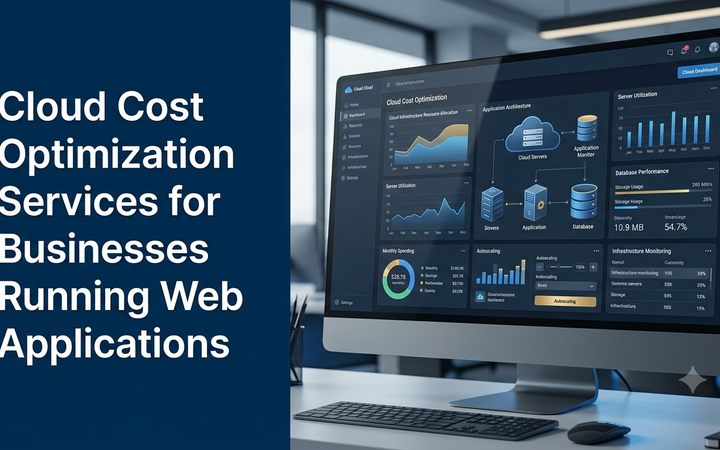
- Infrastructure cost growth: Unmonitored resources and unnecessary services can increase cloud bills.
- Missing documentation: Teams may become dependent on individuals who understand undocumented deployment procedures.
- Resistance to workflow changes: Developers and operations staff need time and guidance to adopt shared practices.
DevOps vs. Traditional Software Deployment
| Aspect | Traditional approach | DevOps approach |
|---|---|---|
| Deployment | Often manual and dependent on individual procedures. | Repeatable, pipeline-driven processes. |
| Testing | May be performed separately or near release time. | Can be integrated throughout development. |
| Collaboration | Development and operations may work in separate stages. | Encourages shared responsibility. |
| Infrastructure | May rely heavily on manual configuration. | Can use automation and Infrastructure as Code. |
| Monitoring | May focus mainly on server availability. | Can include application, infrastructure and release monitoring. |
| Feedback | Issues may be identified later in the release cycle. | Automated checks and monitoring can provide earlier feedback. |
How Much Does DevOps Implementation Cost in India?
DevOps implementation costs vary based on application complexity, cloud provider, number of environments, automation requirements, security controls and ongoing maintenance expectations.
The following are illustrative planning estimates, not fixed Greap quotations or guaranteed market prices.
| Service scope | Illustrative estimate |
|---|---|
| Basic CI/CD pipeline setup | ₹10,000–₹20,000 |
| Startup DevOps foundation | ₹20,000–₹40,000 |
| Cloud infrastructure and deployment automation | ₹25,000–₹50,000 |
| Docker-based deployment setup | ₹20,000–₹45,000 |
| Monitoring and logging implementation | ₹15,000–₹35,000 |
| Advanced DevOps and DevSecOps implementation | ₹40,000–₹90,000+ |
| Complex enterprise infrastructure | Custom assessment required |
These estimates describe implementation work, not a guaranteed total cost of operating the infrastructure. Cloud hosting, storage, databases, monitoring subscriptions, domain names, licenses, third-party services, ongoing support and applicable taxes may be additional.
A detailed proposal should define the infrastructure architecture, included environments, automation scope, security requirements, documentation and post-implementation support.
How to Choose a DevOps Implementation Partner
The right implementation partner should understand both software development and the operational requirements of running applications.
- Experience with your programming language and application framework.
- Knowledge of CI/CD pipeline design and release management.
- Practical cloud infrastructure experience.
- Understanding of containers and infrastructure automation.
- Security-focused access and secret management practices.
- Monitoring, logging and backup planning experience.
- Clear documentation and team knowledge transfer.
- Transparent pricing and clearly defined service scope.
DevOps Implementation for Businesses in India
India’s startup ecosystem and software development industry include companies working across SaaS, ecommerce, manufacturing, finance, education, logistics and business automation.
These organizations may have different infrastructure needs. A small SaaS startup may need an automated deployment pipeline and managed database, while a growing enterprise application may require multiple environments, infrastructure automation and advanced monitoring.
Businesses in Tamil Nadu, including Erode, Coimbatore, Chennai, Tiruppur and Salem, can benefit from DevOps practices when their development and deployment processes become increasingly complex.
The best implementation is not necessarily the one with the most tools. It is the one that supports the software team’s actual workflow, operational needs and available budget.
Planning DevOps Implementation for Your Software Project?
Greap Technologies provides website development, custom software development and digital technology solutions for businesses. Discuss your application architecture, deployment workflow and automation requirements with our team.
Visit Greap Technologies Discuss on WhatsApp Call 7092330168Frequently Asked Questions
1. What are DevOps implementation services?
DevOps implementation services help businesses configure development workflows, CI/CD pipelines, cloud infrastructure, deployment automation, monitoring and operational processes.
2. Is DevOps suitable for startups?
Yes. Startups can begin with basic version control, automated testing, deployment pipelines and monitoring. The setup can expand as the product and team grow.
3. What is CI/CD in DevOps?
CI/CD refers to Continuous Integration and Continuous Delivery or Deployment. It connects code changes with automated building, validation and release workflows.
4. Which cloud platforms support DevOps?
AWS, Microsoft Azure and Google Cloud provide services and integrations that support DevOps workflows. The appropriate platform depends on project requirements, existing skills and budget.
5. Does every startup need Kubernetes?
No. Kubernetes is useful for managing complex containerized workloads, but smaller applications may be better served by simpler hosting or managed container platforms.
6. What is Infrastructure as Code?
Infrastructure as Code uses machine-readable configuration to provision and manage infrastructure in a repeatable, trackable manner.
7. What is DevSecOps?
DevSecOps integrates security activities into development and operations workflows. It can include code analysis, dependency checks, secret detection and secure deployment practices.
8. How long does DevOps implementation take?
A basic pipeline can take a few days, while a complete implementation involving multiple environments, cloud infrastructure, monitoring and security controls may take several weeks or longer.
9. Can DevOps reduce software development costs?
Automation can reduce repetitive manual work and help identify release problems earlier. Actual savings depend on implementation quality, infrastructure costs and the team’s working practices.
10. What is the difference between DevOps and cloud computing?
Cloud computing provides computing resources and services over a network. DevOps describes practices and workflows for developing, delivering and operating software. They are complementary, not interchangeable.
Conclusion
DevOps implementation helps startups and software teams establish repeatable development, testing, deployment and monitoring workflows. By connecting development and operations through appropriate automation, businesses can improve release consistency and gain better visibility into their applications.
A successful implementation should begin with the team’s real requirements. Start with useful foundations such as version control, automated testing, CI/CD and monitoring. Introduce containers, Infrastructure as Code, orchestration and advanced security automation when the application’s complexity justifies them.
For startups and growing businesses in India, a practical and scalable DevOps strategy can provide a stronger foundation for software delivery and long-term product development.