Accepting online payments is one of the most important parts of an ecommerce website. A customer can discover a product, compare options, add it to the cart and complete the checkout form, but the transaction still depends on a properly implemented payment process.
Payment gateway integration for ecommerce websites in India connects an online store with the systems required to initiate and process supported digital payment methods.
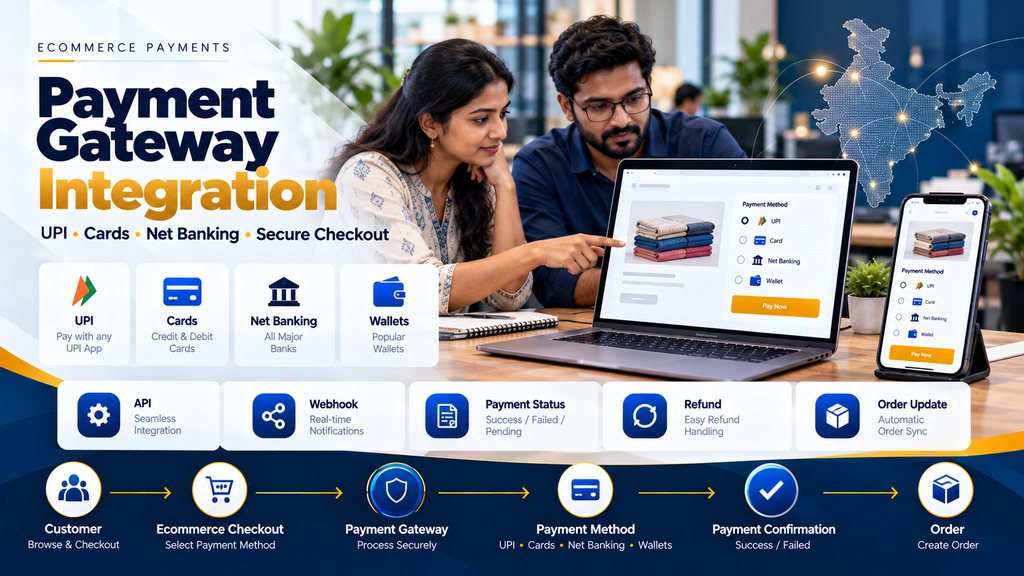
Depending on the payment provider and merchant setup, customers may be able to use payment methods such as UPI, cards, net banking and other supported options.
However, payment integration is not simply about displaying a “Pay Now” button. The ecommerce application also needs to manage order creation, payment initiation, payment verification, status updates, failed transactions, refunds and other relevant scenarios.
Greap Technologies develops ecommerce websites and integrates supported payment gateways based on the ecommerce platform, payment provider and business requirements.
What Is a Payment Gateway?
A payment gateway is part of the technology that enables an ecommerce website or application to accept supported electronic payments.
The exact payment flow varies by provider, payment method and integration model.
From the ecommerce application’s perspective, a simplified flow can look like:
Customer → Ecommerce Checkout → Payment Provider → Payment Processing → Payment Result → Ecommerce Order Update
What Is Payment Gateway Integration?
Payment gateway integration is the technical process of connecting an ecommerce website with a payment provider using the methods supported by that provider.
Depending on the provider and ecommerce platform, integration can use:
- Official plugins
- Platform apps
- Hosted checkout
- Redirect-based checkout
- Provider SDKs
- APIs
- Webhooks
- Other supported integration methods
Why Ecommerce Websites Need Payment Gateway Integration
A payment gateway can allow customers to complete eligible online purchases without the merchant manually coordinating each payment.
For ecommerce operations, a well-designed integration can also help the website associate payment activity with the correct order.
Typical Ecommerce Payment Flow
A simplified ecommerce payment journey can be:
Product → Cart → Checkout → Order Created → Payment Initiated → Payment Provider → Payment Result → Verification → Order Status Updated
The exact sequence depends on the selected provider and application architecture.
1. Customer Selects Products
The customer adds one or more products to the ecommerce cart.
2. Cart Calculates the Order
The application calculates relevant product quantities, prices, discounts, shipping and applicable taxes according to the store’s business rules.
3. Customer Proceeds to Checkout
The checkout collects the information required to process the order.
4. Ecommerce System Creates an Order
A robust architecture commonly creates or identifies an internal order before relying on the payment result.
This gives the application a record that can be connected with payment attempts.
5. Payment Is Initiated
The ecommerce application communicates with the payment provider according to the provider’s supported integration method.
6. Customer Completes the Payment Flow
The exact customer experience depends on the selected payment method and provider.
7. Payment Provider Returns a Result
The ecommerce application receives or retrieves information about the transaction.
8. Payment Must Be Verified
A customer-facing success screen alone should not be treated as authoritative proof that money was successfully received.
The application should use the verification mechanisms supported by the payment provider.
9. Order Status Is Updated
After appropriate verification, the ecommerce system can update the related order according to the confirmed payment state.
Payment Methods for Ecommerce Websites in India
The exact methods available depend on the payment gateway, merchant eligibility, account configuration and current provider support.
10. UPI Payments
UPI is an important payment option for Indian ecommerce customers.
The exact UPI experience should follow the integration methods currently supported by the selected payment provider.
11. Debit and Credit Cards
Card payments may be available through payment providers according to the merchant account and supported card networks.
12. Net Banking
Some payment providers support net-banking options for eligible banks and merchant accounts.
13. Wallets and Other Payment Methods
Additional payment options can depend on the selected provider and its current merchant offering.
Do Not Assume Every Gateway Supports Every Payment Method
Payment-method availability can vary by provider, merchant category, account status and other requirements.
The payment provider’s current documentation and merchant terms should therefore be checked before development.
Payment Gateway Integration Architecture
A simplified architecture can look like:
Ecommerce Website → Backend / Server → Payment Gateway API → Payment Processing
with payment updates returning through supported mechanisms such as:
Payment Provider → Webhook / Verification API → Ecommerce Backend → Order Status
14. Frontend Payment Integration
The customer-facing interface can display the appropriate checkout or payment experience provided by the selected integration.
15. Backend Payment Integration
Security-sensitive payment operations and verification logic should be implemented in an appropriate server-side environment according to the provider’s documentation.
16. Do Not Expose Secret Credentials
Secret API credentials should not be embedded in publicly accessible frontend JavaScript, HTML or mobile application code.
17. Test and Production Credentials
Where a provider offers separate test and production environments, the correct credentials and endpoints should be used for each environment.
18. Never Publish Production Credentials
API secrets, signing secrets and other sensitive credentials should be protected using appropriate application configuration and secret-management practices.
Payment Gateway API Integration
Custom ecommerce systems may integrate directly with a provider’s supported APIs.
The exact implementation depends on the provider’s current API documentation.
19. Create Payment or Provider Order
Many integrations require the ecommerce backend to create a payment-related object with the provider before checkout continues.
20. Store Provider References
Relevant provider identifiers can be associated with the ecommerce order to support reconciliation and troubleshooting.
21. Use Unique Internal Order References
Each ecommerce order should have an appropriate unique identifier so payment attempts can be associated with the correct transaction.
22. Never Trust the Amount From the Browser Alone
Critical transaction values should be validated against authoritative server-side order information rather than accepting client-side values as trusted input.
23. Server-Side Order Amount
The amount sent for payment should correspond to the order amount calculated by the trusted ecommerce backend.
24. Currency Validation
The currency used during payment should match the intended order and the payment provider’s supported configuration.
Payment Verification
Payment verification is one of the most important parts of ecommerce integration.
25. Do Not Trust Only the Browser Redirect
A user reaching a success page does not necessarily prove that the payment is final.
26. Use Provider-Supported Verification
Verification can involve signatures, server-side API queries, webhooks or other mechanisms defined by the provider.
27. Verify Transaction References
Relevant payment identifiers should correspond to the expected ecommerce order.
28. Verify Amount Where Applicable
The application should ensure that the confirmed transaction corresponds to the intended order amount according to the provider’s supported verification flow.
29. Verify Payment State
Payment systems can have more than simple success and failure states.
The application should understand the provider’s actual status model.
Webhooks for Ecommerce Payments
A webhook allows the payment provider to send a server-to-server notification when a relevant payment event occurs.
30. Why Webhooks Matter
The customer may close the browser, lose connectivity or fail to return to the ecommerce website after completing the provider-side payment process.
Server-to-server notifications can help the ecommerce application receive relevant payment updates independently of the customer’s browser.
31. Verify Webhook Authenticity
Webhook requests should be authenticated or verified according to the provider’s documented security mechanism.
32. Do Not Process Unverified Webhooks
A public webhook endpoint should not trust arbitrary incoming requests.
33. Webhook Idempotency
Payment providers can retry webhook delivery.
The ecommerce system should be designed so repeated delivery of the same event does not incorrectly create duplicate orders, refunds or inventory changes.
34. Store Relevant Webhook Processing Information
Appropriate event references and processing states can help identify whether an event has already been handled.
Payment Status Management
An ecommerce application should distinguish between order status and payment status where the business workflow requires it.
35. Order Status Is Not Always Payment Status
For example, an order may exist while its payment is still awaiting confirmation.
36. Pending Payment
A payment attempt may remain pending depending on the provider and payment method.
37. Successful Payment
Once success is appropriately verified, the ecommerce order can proceed according to the business workflow.
38. Failed Payment
A failed payment should not automatically be treated as a completed order.
39. Cancelled Payment
If a customer cancels the payment flow, the application should retain or update the order according to the store’s defined policy.
40. Payment Timeout
Payment sessions can expire. The website should provide a clear recovery path where supported.
41. Payment Retry
Where the business and provider support it, customers may be allowed to retry payment against the appropriate order rather than creating unnecessary duplicate orders.
Avoid Duplicate Ecommerce Orders
A common integration problem occurs when every payment attempt creates a completely new business order.
The application should define clearly how retries and multiple payment attempts relate to an existing order.
42. One Order Can Have Multiple Payment Attempts
Depending on the architecture, it can be useful to model:
Order → Payment Attempt 1 → Failed
Order → Payment Attempt 2 → Successful
rather than treating both attempts as separate customer purchases.
43. Use Idempotency Where Supported
Provider-supported idempotency and application-level duplicate protection can help prevent accidental repeated operations.
Payment Gateway and Inventory Management
Payment integration should also be coordinated with inventory logic.
44. When Should Stock Be Reserved?
The correct point depends on the business model.
Possible approaches include reservation during checkout, order creation or another defined stage.
45. Do Not Reduce Stock Twice
If both checkout logic and payment webhook logic update inventory independently, duplicate stock deductions can occur.
46. Define the Inventory Event Clearly
The application should specify exactly which event changes physical, reserved or available stock.
47. Payment Failure and Stock Release
If inventory is temporarily reserved before payment, the system should define when and how the reservation is released after unsuccessful or expired payments.
Payment Gateway and Order Management
A payment gateway should fit into the complete order workflow.
A simplified flow can be:
Order Created → Payment Pending → Payment Verified → Order Confirmed → Fulfilment → Dispatch → Completed
48. Do Not Mark an Order Dispatched Because Payment Succeeded
Payment confirmation and physical fulfilment are different operational events.
49. Ecommerce Order Management Integration
For larger businesses, verified online orders can flow into order-management, ERP or warehouse systems.
Payment Gateway Integration for WooCommerce
WooCommerce stores can integrate payment gateways through supported payment extensions or custom integration where appropriate.
50. Prefer Maintained Integrations
Where an appropriate official or actively maintained provider integration exists, it should generally be evaluated before building unnecessary custom payment code.
51. Check WooCommerce Compatibility
Payment extensions should be compatible with the store’s current WordPress and WooCommerce environment.
52. Test After WooCommerce Updates
Critical checkout and payment functionality should be included in testing after significant ecommerce updates.
Read WooCommerce Website Development for Businesses in Erode.
Payment Gateway Integration for Shopify
Shopify payment options depend on the platform’s currently supported payment-provider architecture, the merchant’s location and account eligibility.
53. Follow Shopify’s Supported Integration Model
A Shopify store should use payment methods and provider integrations supported by the platform for the relevant merchant setup.
54. Do Not Assume a WooCommerce Integration Works on Shopify
Payment integrations are platform-specific.
A provider’s WordPress plugin cannot simply be installed on Shopify.
Payment Integration for Custom Ecommerce Websites
A custom ecommerce application may use provider APIs and SDKs directly where the provider supports that architecture.
55. Custom Backend Integration
The backend can manage order creation, provider requests, verification, webhook processing and payment-state updates.
56. Custom Frontend Checkout
The frontend should use the customer-facing payment components and methods permitted by the provider.
57. Keep Sensitive Operations Server-Side
Secret credentials and security-sensitive verification should remain in an appropriate protected backend environment.
58. Payment Integration for Mobile Apps
Ecommerce mobile apps may also use provider-supported mobile SDKs or payment flows.
The backend should still maintain authoritative order and payment records where appropriate.
Payment Gateway Security for Ecommerce Websites
Payment integration involves financial transactions and requires careful security engineering.
59. Use HTTPS
Production ecommerce websites should use correctly configured HTTPS.
60. Protect API Credentials
Secret credentials should not be committed to public repositories or exposed in browser code.
61. Restrict Administrative Access
Only authorized personnel should have access to payment configuration and relevant ecommerce administration.
62. Keep Ecommerce Software Updated
WordPress, WooCommerce, plugins, themes, frameworks and other relevant components should receive appropriate maintenance.
63. Validate Input
Server-side applications should validate incoming data rather than assuming frontend values are trustworthy.
64. Protect Webhook Endpoints
Webhook authenticity should be verified according to provider documentation.
65. Avoid Storing Sensitive Payment Credentials
An ecommerce business should avoid collecting or storing sensitive payment information unless its architecture and compliance responsibilities explicitly require it.
Using provider-hosted or provider-supported secure payment components can reduce the amount of sensitive payment data handled directly by the merchant website, depending on the integration.
PCI DSS and Card Payments
Businesses accepting card payments should understand the payment-security responsibilities applicable to their architecture.
The exact PCI DSS scope can depend on how cardholder data flows through the website and payment provider.
Businesses should rely on current guidance from their payment provider and qualified compliance professionals where necessary rather than assuming that installing a gateway plugin automatically removes all compliance responsibilities.
66. Never Display Full Card Information in Admin Panels
Ecommerce administrators generally should not need access to complete card credentials to process normal online orders.
Refund Integration
Refunds are another important part of ecommerce payment architecture.
67. Full Refund
A business may need to refund the complete eligible payment according to its policy and the provider’s supported process.
68. Partial Refund
Some business scenarios may require a partial refund where supported.
69. Refund Is Different From Order Cancellation
Changing an ecommerce order status to “cancelled” does not necessarily initiate a financial refund.
70. Keep Payment and Order Records Consistent
If a refund is processed, the ecommerce system should reflect the appropriate payment and order state.
71. Refund Webhooks
Where supported, provider notifications can help synchronize refund status with the ecommerce application.
72. Do Not Promise Instant Refunds
The time required for a refund to reach a customer’s payment account can depend on the provider, payment method and financial institutions involved.
Failed Payment Handling
Failed payments should provide a recoverable customer experience.
73. Show a Clear Payment Result
The customer should understand whether the payment is confirmed, pending or unsuccessful based on verified application information.
74. Allow Appropriate Retry
Where supported, provide a way for the customer to attempt payment again.
75. Do Not Create Confusing Duplicate Orders
Retries should be associated with the correct ecommerce order according to the application’s payment model.
76. Preserve the Cart Where Appropriate
A failed payment should not unnecessarily force customers to rebuild a complex cart where the platform can safely preserve the order context.
Pending Payment Handling
Some payment outcomes may not be immediately final.
77. Do Not Treat Pending as Successful
Fulfilment should follow the business’s verified payment policy.
78. Reconciliation
Payment reconciliation helps the business compare ecommerce orders with payment-provider transaction records.
79. Store Useful Payment References
Provider transaction references can help customer support and finance teams investigate payment issues.
80. Payment Reconciliation Report
A business may need reports showing relationships between:
- Internal order reference
- Payment reference
- Order amount
- Payment status
- Refund status
- Relevant timestamps
Payment Gateway and Accounting Integration
Businesses should define how ecommerce payments interact with accounting records.
81. Payment Success Is Not the Entire Accounting Workflow
An online payment may still need to be associated with invoices, fees, refunds and settlements according to the company’s accounting process.
82. Define the Financial Source of Truth
If accounting software is authoritative for financial records, the ecommerce website should not become a conflicting independent accounting system.
Payment Gateway and ERP Integration
Larger ecommerce operations may connect verified orders and payment references with ERP systems.
83. Avoid Duplicate Financial Records
Integration should define which system creates invoices and other financial records.
84. ERP Integration Depends on Available APIs
Integration feasibility depends on the supported interfaces of the ecommerce, payment and ERP systems involved.
Payment Gateway for B2B Ecommerce
Not every B2B ecommerce order needs immediate online payment.
85. Online Payment
Some B2B customers may pay during checkout.
86. Quotation-Based Orders
Other B2B transactions may follow:
RFQ → Quotation → Approval → Sales Order → Payment
87. Payment Against an Existing Order
A B2B portal can potentially allow an eligible customer to make payment against an existing order or invoice where the business workflow and integration support it.
88. Multiple Payment Models
B2B ecommerce may combine online payment with offline or account-based payment workflows.
Read B2B Ecommerce Website Development for Wholesalers and Manufacturers in Erode.
Payment Gateway for Multi-Vendor Marketplaces
Marketplace payments can be significantly more complex than payments for a single-merchant ecommerce store.
89. Customer Payment and Seller Settlement Are Different Problems
Receiving a customer payment does not automatically solve how funds should be allocated or settled among marketplace participants.
90. Marketplace Payment Architecture
The marketplace should be designed around the capabilities, onboarding requirements and settlement model supported by the selected payment provider.
91. Do Not Build an Informal Money-Splitting System
Marketplace payment and seller-settlement workflows should use legally and technically appropriate provider-supported mechanisms.
Read Multi-Vendor Ecommerce Marketplace Development in Erode.
Payment Gateway Testing Before Launch
Payment integration should be tested extensively before accepting production transactions.
92. Successful Payment Test
Confirm that a valid successful transaction updates the correct order.
93. Failed Payment Test
Verify that failure does not incorrectly confirm the order.
94. Cancelled Payment Test
Test the customer’s recovery path after cancellation.
95. Pending Payment Test
Where the provider supports pending states, confirm that the website does not incorrectly fulfil the order.
96. Duplicate Webhook Test
Ensure repeated event delivery does not duplicate business operations.
97. Invalid Webhook Test
Requests that fail the provider’s verification process should not be treated as legitimate payment events.
98. Amount Validation Test
Verify that the backend uses the authoritative order amount.
99. Payment Retry Test
Confirm that repeated attempts do not create unintended duplicate purchases.
100. Refund Test
Where a provider offers an appropriate test environment, verify the intended refund workflow.
101. Mobile Payment Testing
Test the payment journey on relevant mobile devices and browsers.
102. Slow Network Testing
The application should handle delayed responses without encouraging customers to create repeated transactions unnecessarily.
103. Browser Closure Scenario
Test whether the backend can still receive the appropriate payment update when the customer does not return to the ecommerce website.
104. Production Verification After Launch
After going live, controlled verification of the production payment flow can help identify configuration differences between test and production environments.
How to Choose a Payment Gateway for an Ecommerce Website in India
The right provider depends on the business rather than simply choosing the most recognizable company.
105. Supported Payment Methods
Check whether the provider supports the payment methods important to the target customers.
106. Ecommerce Platform Compatibility
Confirm support for WooCommerce, Shopify, custom applications or the platform being used.
107. API and Documentation Quality
Custom integrations benefit from clear, maintained technical documentation.
108. Webhook Support
Reliable server-side payment-event notifications can be important for robust ecommerce architecture.
109. Refund Support
Understand how full and partial refunds work for the business’s required payment methods.
110. Settlement Process
Businesses should understand the provider’s current settlement terms, eligibility requirements and applicable charges directly from the provider.
111. Merchant Onboarding
Review the documentation and verification requirements needed to activate the merchant account.
112. Business Category Support
Payment providers may have different eligibility requirements depending on the merchant’s business category.
113. International Payment Requirements
Businesses selling internationally should verify the provider’s current support for relevant currencies, payment methods and merchant requirements.
114. Recurring Payment Requirements
Subscription businesses should confirm whether their required recurring-payment model is supported.
115. Marketplace Requirements
A marketplace should evaluate seller onboarding, settlements and other platform-specific payment capabilities before choosing a provider.
116. Technical Support
Businesses should consider the support channels and documentation available for integration and production issues.
117. Pricing and Transaction Charges
Provider pricing can change and can vary by payment method, merchant category and commercial agreement.
Businesses should check current pricing directly with shortlisted payment providers rather than relying on an old comparison table.
Payment Gateway Comparison: What Should Businesses Compare?
| Factor | Questions to Ask |
|---|---|
| Payment methods | Does it support the methods our customers need? |
| Platform | Does it support our ecommerce technology? |
| Integration | Plugin, app, hosted checkout, API or SDK? |
| Webhooks | Can server-side payment updates be handled reliably? |
| Refunds | Does it support our required refund workflows? |
| Settlements | How does settlement work for our merchant account? |
| International | Does it meet our cross-border requirements? |
| Recurring payments | Does it support our subscription model? |
| Marketplace | Does it support our seller-payment architecture? |
| Documentation | Is current technical documentation available? |
| Support | What production support options are available? |
| Pricing | What current fees apply to our use case? |
Payment Gateway Integration Cost
The development cost of integrating a payment gateway depends on the ecommerce architecture and integration complexity.
Factors can include:
- Ecommerce platform
- Payment provider
- Official plugin or app availability
- Custom API development
- Checkout customization
- Webhook integration
- Order management integration
- Refund functionality
- ERP integration
- Accounting integration
- Marketplace requirements
- Subscription requirements
- Testing
- Existing code quality
Payment-provider transaction charges are separate from website-development charges and should be verified directly with the selected provider.
Payment Gateway Integration Timeline
The development timeline depends on whether the website uses a standard supported integration or requires custom payment architecture.
A standard maintained ecommerce extension can require a very different implementation effort from a custom marketplace payment system.
Common Payment Gateway Integration Mistakes
- Trusting payment success only from the browser
- Exposing secret API credentials
- Using production secrets in public code
- Trusting the amount supplied by the frontend
- Not verifying payment status
- Not verifying webhooks
- Processing duplicate webhook events multiple times
- Creating duplicate orders on payment retry
- Reducing inventory multiple times
- Treating pending payments as successful
- Confusing order cancellation with payment refund
- Ignoring refund synchronization
- Not keeping useful payment references
- Failing to test mobile payment flows
- Assuming test and production configurations are identical
- Failing to monitor payment failures after launch
Payment Gateway Integration Checklist
- Select payment provider based on requirements
- Complete merchant onboarding
- Confirm supported payment methods
- Choose supported integration method
- Define ecommerce order lifecycle
- Define payment lifecycle
- Define inventory reservation rules
- Protect API credentials
- Use server-side authoritative order amounts
- Implement provider-supported payment verification
- Implement webhook verification
- Handle duplicate webhook events safely
- Handle failed payments
- Handle pending payments
- Handle payment retries
- Plan refund workflow
- Test successful payments
- Test failed payments
- Test cancellations
- Test retries
- Test mobile checkout
- Test relevant refunds
- Test order updates
- Test inventory updates
- Verify production configuration
- Monitor payments after launch
Payment Gateway Integration for Ecommerce Businesses in Erode and India
Greap Technologies develops ecommerce websites for businesses that need online payment functionality across India.
For businesses in Erode and nearby areas, payment integration can also be planned alongside ecommerce development, B2B ecommerce, inventory software, ERP integration and other business requirements.
Local service areas include Erode, Perundurai, Chennimalai, Bhavani, Anthiyur, Gobichettipalayam, Sathyamangalam, Modakkurichi, Kavindapadi, Kodumudi, Nambiyur and surrounding locations.
Why Consider Greap Technologies for Ecommerce Payment Integration?
Greap Technologies can integrate payment functionality as part of a broader ecommerce architecture rather than treating payment as an isolated button.
Depending on the project, development can include:
- Ecommerce website development
- WooCommerce payment integration
- Shopify-compatible payment setup
- Custom ecommerce payment API integration
- UPI-supported payment integration
- Card payment integration
- Payment verification
- Webhook integration
- Order-status synchronization
- Payment retry handling
- Refund workflow integration
- Inventory integration
- ERP integration
- Accounting integration
- B2B ecommerce integration
- Marketplace payment architecture
- Testing
- Launch support
Explore Greap Technologies Ecommerce Development Services or visit Greap Technologies.
Conclusion
Payment gateway integration for ecommerce websites in India is not simply about connecting a checkout button to a payment service.
A robust payment architecture needs to connect the customer transaction with the correct ecommerce order while safely handling success, failure, pending payments, retries, webhooks, refunds and operational updates.
A useful architecture can be summarized as:
Customer → Checkout → Order → Payment → Verification → Order Update → Inventory / Fulfilment
Businesses should select a payment provider based on their actual requirements, including supported payment methods, ecommerce-platform compatibility, APIs, webhooks, refunds, settlement requirements, merchant eligibility and ongoing costs.
For businesses building a new online store, read Ecommerce Development Company in Erode: Complete Guide for Business Owners. Businesses changing ecommerce platforms should also review Ecommerce Website Migration Services in Erode.
Need Payment Gateway Integration for Your Ecommerce Website?
If you are developing an ecommerce website or need to integrate online payments into an existing store, Greap Technologies can review your ecommerce platform, order workflow and payment requirements before implementing a suitable supported integration.
Discuss Your Payment Gateway Integration
Frequently Asked Questions
1. What is payment gateway integration in ecommerce?
Payment gateway integration connects an ecommerce website with a payment provider so customers can use supported online payment methods and the ecommerce application can receive and verify relevant payment results.
2. Which payment methods can an ecommerce website offer in India?
Depending on the selected payment provider, merchant account and eligibility, options may include UPI, cards, net banking and other supported payment methods.
3. Can UPI be integrated into an ecommerce website?
UPI payment options can be provided when supported by the selected payment gateway and merchant setup. The implementation should follow the provider’s current supported integration methods.
4. Can a payment gateway be integrated with WooCommerce?
Yes. WooCommerce can use supported payment extensions or custom integrations where appropriate. Compatibility and maintenance should be checked before implementation.
5. Can payment gateways be integrated with Shopify?
Shopify supports payment providers according to its platform architecture, merchant location and eligibility. Businesses should verify currently supported options for their specific Shopify setup.
6. Can a payment gateway be integrated into a custom ecommerce website?
Yes, when the payment provider supplies suitable APIs, SDKs or other supported integration methods. Sensitive credentials and verification logic should be handled securely.
7. Is the payment success page enough to confirm a payment?
No. A customer reaching a success page should not by itself be treated as authoritative payment confirmation. The application should use the verification mechanisms supported by the payment provider.
8. What is a payment webhook?
A webhook is a server-to-server notification that a payment provider can send to an ecommerce backend when relevant payment events occur. Webhook authenticity should be verified before processing the event.
9. What happens when an ecommerce payment fails?
The order should remain in an appropriate unpaid or unsuccessful state according to the store’s workflow. Where supported, the customer can be given a clear way to retry payment without creating unnecessary duplicate orders.
10. Can ecommerce websites process refunds through payment gateways?
Many payment providers support refund workflows, but available functionality and processing depend on the provider, payment method and merchant configuration.
11. How much does payment gateway integration cost?
Development cost depends on the ecommerce platform, payment provider, integration method, custom checkout requirements, webhooks, refunds and connections with other business systems. Payment-provider transaction charges are separate and should be checked directly with the provider.
12. Does Greap Technologies provide payment gateway integration for ecommerce websites?
Yes. Greap Technologies provides ecommerce development and supported payment-gateway integration based on the website platform, selected payment provider and business requirements.