For an ecommerce business, receiving an online order is only the beginning of the fulfilment process. The product still needs to be prepared, packed, assigned to an appropriate shipping service, handed over for delivery and tracked until the shipment reaches its destination or another final status.
When these activities are managed manually across an ecommerce admin panel and separate courier portals, the operations team may spend significant time copying order information, creating shipments, downloading labels and checking tracking updates.
Shipping and courier API integration for ecommerce websites can connect the online store with supported courier, logistics or shipping-management systems so relevant fulfilment information can move between systems electronically.
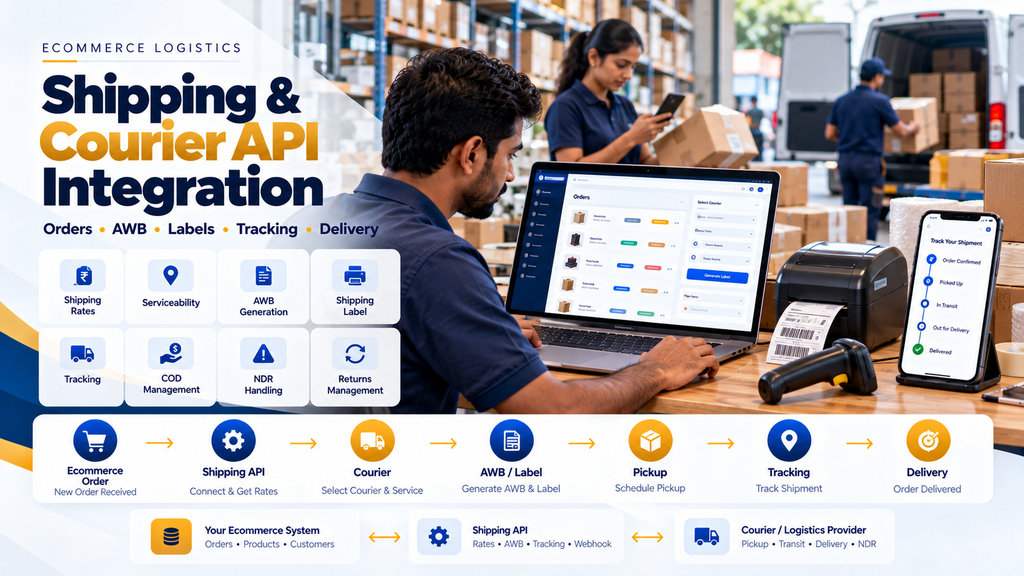
Depending on the shipping provider and available APIs, integration can support functions such as serviceability checks, shipping-rate requests, shipment creation, AWB generation, shipping labels, pickup requests, tracking updates, COD information and return workflows.
The exact capabilities depend on the selected courier or shipping platform. A business should therefore design its integration around current provider documentation rather than assuming every courier exposes the same API features.
What Is a Shipping API?
A shipping API is an application programming interface that allows an ecommerce website or another business system to communicate programmatically with a shipping, courier or logistics platform.
Instead of an employee manually entering every order into a courier portal, the ecommerce application can potentially send the required shipment information through a supported API.
What Is Courier API Integration?
Courier API integration connects an ecommerce or order-management system with a courier provider’s supported technology.
A simplified workflow can look like:
Ecommerce Order → Shipping API → Shipment Creation → Courier → Tracking Updates → Delivery Status
Why Ecommerce Businesses Use Shipping API Integration
An ecommerce website and a courier system solve different parts of the customer order journey.
The ecommerce website handles activities such as:
- Products
- Cart
- Checkout
- Customer details
- Orders
- Payments
The courier or logistics system can handle supported shipping activities such as:
- Serviceability
- Shipment creation
- AWB assignment
- Shipping labels
- Pickup
- Tracking
- Delivery events
- Returns
API integration connects these two parts of the ecommerce operation.
Typical Ecommerce Shipping Workflow
A structured shipping workflow may look like:
Customer Order → Payment / Order Confirmation → Fulfilment → Package Ready → Courier Selection → Shipment Creation → AWB → Label → Pickup → In Transit → Delivery
The actual sequence should match the business’s fulfilment process.
1. Ecommerce Order Is Created
The shipping process starts with a valid ecommerce order.
The system may contain information such as:
- Order reference
- Customer name
- Shipping address
- Contact details
- Products
- Quantities
- Payment method
- Order amount
- Package information
2. Determine Whether the Order Is Ready for Shipping
An order should not necessarily be sent to the courier immediately after it is created.
The business may first require:
- Payment verification
- Inventory confirmation
- Fraud or order review where applicable
- Picking
- Packing
- Quality checking
3. Package Information Is Prepared
Courier services may require package details such as weight and dimensions.
The required fields depend on the shipping provider.
4. Serviceability Is Checked
Where supported, the shipping system can check whether a destination is serviceable for a particular courier or service.
5. Shipping Options Are Evaluated
If multiple shipping services are available, the system may compare eligible options according to the provider’s available data and the business’s configured rules.
6. Shipment Is Created
After the appropriate service is selected, the ecommerce or fulfilment system can send the required shipment information to the provider.
7. AWB Is Generated or Assigned
An Air Waybill or shipment reference can be associated with the ecommerce order according to the courier’s process.
8. Shipping Label Is Generated
Where supported, the integration can retrieve a shipping label for printing and attaching to the package.
9. Pickup Is Requested
Some providers expose pickup-related capabilities through their APIs or operational systems.
10. Tracking Begins
Once the shipment enters the courier network, tracking events can become available.
11. Ecommerce Order Receives Shipping Updates
Relevant courier events can be synchronized back into the ecommerce or order-management system where supported.
12. Customer Receives Relevant Updates
The ecommerce business can use verified shipment information to provide appropriate customer notifications.
Shipping API Integration Architecture
A simplified architecture can look like:
Ecommerce Website → Backend / Order System → Shipping API → Courier / Logistics Provider
with updates returning through:
Courier / Logistics Provider → Webhook / Tracking API → Ecommerce Backend → Order / Shipment Status
13. Ecommerce Frontend
The customer-facing website can display appropriate shipping options, estimated information or tracking status where the required data is available.
14. Ecommerce Backend
The backend can manage shipment creation, provider references, AWB information, tracking events and integration logic.
15. Courier API
The provider API acts as the supported interface between the ecommerce application and the shipping service.
16. Webhooks
Where supported, webhooks can notify the ecommerce backend when shipment events occur.
17. Tracking API
Where webhooks are unavailable or where additional verification is required, the system may retrieve shipment status using the provider’s supported tracking API.
Shipping Serviceability API
Serviceability is an important part of ecommerce shipping.
18. Destination Check
A serviceability request can help determine whether a shipping service is available for the required destination.
19. Origin and Destination
Eligibility can depend on both pickup and delivery locations rather than only the customer’s destination.
20. COD Serviceability
Cash-on-delivery availability may differ from prepaid serviceability.
21. Do Not Assume Every PIN Code Supports Every Service
Shipping availability can change according to courier coverage and operational conditions.
Current provider responses should therefore be used where real-time serviceability matters.
Shipping Rate API Integration
Some shipping systems can return rate information for eligible shipment options.
22. Shipping Rate Inputs
Rate calculations may depend on:
- Origin
- Destination
- Package weight
- Package dimensions
- Payment type
- Shipment value
- Service type
23. Do Not Hardcode Courier Rates When Dynamic Rates Are Required
If the business needs current provider-calculated rates, hardcoded values can become inaccurate as shipping arrangements change.
24. Business Shipping Rules
The rate returned by a courier does not necessarily have to equal the shipping charge shown to the customer.
The ecommerce business may have its own shipping policy, such as free shipping above an eligible order value or a configured flat rate.
25. Keep Customer Shipping Charges Separate From Courier Cost
Separating these concepts can make the architecture clearer.
Customer Shipping Charge ≠ Necessarily Courier Invoice Cost
Multi-Courier API Integration
Some ecommerce businesses use more than one courier service.
26. Why Use Multiple Couriers?
Different providers can have different:
- Serviceable locations
- Service types
- Operational capabilities
- Commercial arrangements
- Delivery networks
27. Courier Selection
A multi-courier architecture can evaluate eligible shipping options based on configured business rules and available provider information.
28. Do Not Choose Only by Lowest Rate
The cheapest eligible option may not always match the business’s required service level.
Selection rules can consider the factors that are genuinely relevant to the business.
29. Manual Courier Selection
Some businesses may prefer operations staff to choose a courier after reviewing available options.
30. Rule-Based Courier Selection
Other businesses may use defined rules to select eligible services automatically.
31. Keep Automatic Rules Explainable
The operations team should be able to understand why a shipping service was selected rather than relying on an unexplained decision.
AWB Generation API
An AWB or courier shipment reference is an important link between the ecommerce order and the physical shipment.
32. Store the AWB Against the Correct Shipment
The ecommerce system should maintain the relationship:
Order → Shipment → Courier → AWB / Tracking Reference
33. One Order May Have More Than One Shipment
Some orders can be fulfilled in multiple packages or at different times.
The data model should not assume that every order always has exactly one shipment.
34. One Shipment Should Not Be Accidentally Created Multiple Times
Retries and API failures should be handled carefully to prevent unintended duplicate shipment creation.
Shipping Label API Integration
Where supported, the shipping provider can return a label associated with the shipment.
35. Shipping Label Printing
The fulfilment team can print the label and attach it to the correct package.
36. Avoid Label-to-Order Mismatches
Warehouse workflows should make it clear which label belongs to which packed order.
37. Barcode Scanning
Larger operations can potentially use barcode scanning to reduce manual matching between orders, packages and labels.
Manifest Generation
Some courier workflows use manifests or similar handover documentation.
38. Manifest API
If supported by the provider, manifest-related operations may be available through the integration.
39. Provider-Specific Requirements
Manifest and handover processes vary, so implementation should follow the courier’s current operational requirements.
Pickup API Integration
Some courier providers allow pickup-related operations through supported APIs.
40. Pickup Location
Businesses with multiple warehouses should associate shipments with the correct pickup location.
41. Pickup Request
The system can potentially create a pickup request according to provider capabilities.
42. Pickup Status
Where available, pickup-related information can be stored or displayed to operations staff.
Shipment Tracking API Integration
Tracking integration connects courier shipment events with the ecommerce application.
43. Tracking Number
The courier reference should be associated with the correct shipment.
44. Tracking Timeline
Where provider data supports it, the website can show a customer-friendly shipment timeline.
45. Do Not Invent Tracking Statuses
The customer-facing status should be derived from actual provider information or a documented mapping of provider events.
46. Normalize Courier Statuses
Different couriers may use different terminology for similar shipment events.
A multi-courier system can map provider-specific events into a consistent internal status model.
Example Internal Shipment Statuses
A business might use internal stages such as:
Ready to Ship → Shipment Created → Picked Up → In Transit → Out for Delivery → Delivered
Additional exception or return states can be included according to the actual provider workflows.
47. Keep Raw Provider Status Where Useful
Alongside normalized statuses, retaining relevant original provider event information can help troubleshooting.
Shipping Webhook Integration
Webhooks can provide shipment updates without the ecommerce application repeatedly requesting every shipment status.
48. Verify Webhook Authenticity
Where the courier provides a verification mechanism, incoming webhook requests should be validated according to its documentation.
49. Do Not Trust Arbitrary Public Requests
A public webhook URL should not allow anyone on the internet to mark an order as delivered.
50. Handle Duplicate Webhooks
Providers may retry event delivery.
The application should avoid duplicating notifications or business operations when the same event arrives more than once.
51. Out-of-Order Events
Integrations should also consider the possibility that shipment events may not always arrive in the expected sequence.
52. Store Event Timestamps
Relevant provider event timestamps can help the application understand the shipment history.
COD Ecommerce Shipping
Cash on delivery adds additional considerations to the shipping workflow.
53. COD Eligibility
COD availability should be based on the business’s rules and supported courier capabilities.
54. COD Order Value
Any COD limits should come from actual business and provider rules rather than arbitrary assumptions in the website code.
55. COD Amount
The amount communicated to the shipping provider should match the intended collectible amount for that shipment.
56. COD and Prepaid Must Be Distinguished
The courier should not be instructed to collect payment for an order that has already been paid online.
57. Payment and Shipping Integration
The ecommerce architecture should clearly connect payment status with the correct fulfilment rules.
Read Payment Gateway Integration for Ecommerce Websites in India.
Shipment Tracking for Customers
Customers generally want a simple answer to:
“Where is my order?”
58. Order Tracking Page
An ecommerce website can provide an appropriate order or shipment tracking page using verified shipment information.
59. Do Not Expose Internal Courier Data Unnecessarily
Customer-facing tracking should display useful information without exposing internal operational or integration details.
60. Customer Notifications
Relevant shipment events can potentially trigger email, SMS, WhatsApp or other supported notifications according to the business’s communication setup and applicable requirements.
61. Avoid Excessive Notifications
Not every low-level courier scan needs to become a customer message.
62. Use Meaningful Customer Events
Examples may include:
- Order shipped
- Shipment picked up
- Out for delivery
- Delivered
- Delivery issue requiring customer action
Delivery Exceptions
Not every shipment reaches the customer on the first attempt.
63. Failed Delivery Attempt
The integration can record an appropriate provider event when delivery is unsuccessful.
64. NDR Workflows
Some ecommerce logistics systems use Non-Delivery Report workflows to manage delivery exceptions.
The exact capabilities and terminology depend on the shipping provider.
65. Do Not Automatically Blame the Customer
A failed delivery can occur for many operational reasons. Internal systems should preserve the provider’s actual information rather than creating unsupported assumptions.
66. Customer Action
Where the provider and business process support it, the customer may be contacted to resolve appropriate delivery issues.
Return to Origin (RTO)
Some undelivered shipments may eventually be returned to the origin.
67. RTO Is Different From Customer Return
Return to Origin generally relates to an outbound shipment that could not be successfully delivered, while a customer return normally begins after or around a completed customer-delivery process.
68. RTO Tracking
Where supported, the system can track relevant return-to-origin shipment events.
69. Inventory Should Not Be Restored Too Early
A shipment being marked for return does not necessarily mean the product has physically arrived back at the warehouse in saleable condition.
70. Warehouse Receipt Should Confirm Returned Stock
Inventory restoration can follow the business’s physical return and inspection process.
Ecommerce Returns Integration
Customer returns may require a separate reverse-logistics workflow.
71. Return Request
The customer or support team can initiate an eligible return according to store policy.
72. Return Approval
The business may validate whether the order or product is eligible for return.
73. Reverse Shipment
Where supported, a reverse shipment can be created through the logistics provider.
74. Return Tracking
The returned package can have its own tracking information.
75. Warehouse Inspection
Physical receipt and inspection should determine the appropriate inventory and refund workflow.
76. Refund Is a Separate Financial Operation
A courier marking a return as delivered to the warehouse should not by itself be treated as proof that a payment refund has been completed.
Shipping API Integration With Inventory
Shipping should be coordinated with the inventory system.
77. Picking
Inventory is identified for the customer order.
78. Packing
Picked products are packed into one or more shipments.
79. Shipment Creation
The shipping system creates the appropriate courier shipment.
80. Inventory Deduction
The exact inventory event should be defined according to the business’s stock model.
81. Avoid Multiple Stock Deductions
Ecommerce, warehouse and courier events should not independently reduce the same physical inventory multiple times.
Shipping API Integration With Warehouse Management
For higher-volume ecommerce operations, shipping can be connected with warehouse workflows.
A broader process can be:
Order → Stock Allocation → Picking → Packing → Weight / Dimensions → Courier Selection → AWB → Label → Dispatch
Read Warehouse Management Software Development in Erode.
82. Packing Station Integration
A warehouse packing station can potentially display the order, package information, courier and label in one workflow.
83. Weight Capture
Where required, actual package weight can be recorded before shipment creation.
84. Multiple Packages
Large orders may require multiple packages and therefore multiple shipment references.
85. Partial Fulfilment
An order may be shipped in stages where the business workflow permits it.
Shipping Integration With ERP
Manufacturers, wholesalers and larger ecommerce businesses may manage sales orders and inventory through ERP software.
86. Define the Source of Truth
The project should define which system owns:
| Information | Possible Authoritative System |
|---|---|
| Online checkout | Ecommerce Platform |
| Sales order | ERP / Order Management |
| Inventory | ERP / Warehouse |
| Picking and packing | Warehouse System |
| Courier shipment | Shipping / Logistics System |
| Tracking events | Courier / Shipping Provider |
87. Avoid Duplicate Shipment Creation
If both ERP and the ecommerce website can create courier shipments, clear ownership rules are required.
88. Sync Shipment References
The required systems can receive relevant AWB and tracking information after successful shipment creation.
Shipping API Integration for WooCommerce
WooCommerce businesses can integrate courier and shipping functionality through supported plugins or custom API development where appropriate.
89. Evaluate Existing Supported Plugins First
If a courier provides a maintained WooCommerce integration that satisfies the business requirements, it should generally be evaluated before creating unnecessary custom code.
90. Custom WooCommerce Shipping API
Custom integration may be considered when the business requires specialized courier selection, warehouse workflows, ERP integration or other functionality not covered by an existing supported extension.
91. WooCommerce Order Status Mapping
Courier shipment statuses should not be blindly mapped to WooCommerce order statuses.
Order, payment, fulfilment and shipment states represent different concepts.
Read WooCommerce Website Development for Businesses in Erode.
Shipping API Integration for Shopify
Shopify shipping integration should follow the capabilities supported by Shopify and the selected logistics provider.
92. App-Based Integration
Where an appropriate supported app exists, it may provide shipment creation, labels and tracking functionality.
93. Custom Shopify Integration
Custom integration possibilities depend on the Shopify architecture, available APIs, permissions and merchant requirements.
94. Do Not Assume WooCommerce Shipping Plugins Work on Shopify
Integrations are platform-specific and should be selected accordingly.
Shipping API for Custom Ecommerce Websites
A custom ecommerce application can integrate directly with shipping-provider APIs where suitable APIs are available.
95. Custom Shipping Backend
The backend can manage:
- Serviceability
- Rates
- Courier selection
- Shipment creation
- AWB
- Labels
- Pickup
- Tracking
- Returns
96. Provider Abstraction Layer
Businesses integrating several couriers may benefit from an internal shipping layer that prevents the rest of the ecommerce application from depending directly on every provider’s unique terminology.
97. Standard Internal Shipment Model
The ecommerce system can use a consistent internal structure while provider-specific adapters handle individual courier APIs.
98. Do Not Hide Important Provider Differences
Normalization should simplify the application without pretending all courier services have identical capabilities.
Shipping API Authentication and Security
Courier API credentials can allow access to shipment and customer information and should be protected appropriately.
99. Keep API Secrets Server-Side
Secret courier credentials should not be exposed in frontend JavaScript or public application code.
100. Use Secure Credential Storage
Credentials should be managed using appropriate server configuration or secret-management practices.
101. HTTPS
API communication should use secure provider-supported connections.
102. Limit Administrative Access
Only authorized staff should have access to courier configuration and shipment-management functionality.
103. Protect Customer Addresses
Shipping integration necessarily handles personal information such as names, addresses and contact details.
Only the information required for legitimate fulfilment should be transmitted to the relevant provider.
104. Avoid Logging Sensitive Data Unnecessarily
Application logs should contain enough technical information for troubleshooting without unnecessarily duplicating complete customer data.
Shipping API Error Handling
External APIs can fail, time out or return unexpected responses.
105. Network Failure
A temporary network problem should not automatically cause the ecommerce order to disappear or become corrupted.
106. Courier API Timeout
The system should distinguish an unknown response from a confirmed shipment failure.
107. Do Not Blindly Retry Shipment Creation
If the first request actually succeeded but the response was lost, an uncontrolled retry could create duplicate shipments.
108. Check Existing Provider Reference
Where supported, the application can use provider references or idempotency mechanisms to determine whether the operation already succeeded.
109. Log Integration Errors
Useful technical logs can help developers investigate failed requests.
110. Operations Error Queue
Higher-volume systems can provide an internal list of shipments requiring manual attention.
111. Do Not Silently Ignore Failed Shipments
If an order is ready for dispatch but courier shipment creation fails, the operations team should be able to identify the problem.
Shipping API Rate Limits
Courier APIs may impose request limits or other usage restrictions.
112. Avoid Excessive Tracking Requests
Requesting the same shipment status continuously can waste API capacity.
113. Prefer Webhooks Where Appropriate
When reliable provider webhooks are available, event-driven updates can reduce unnecessary polling.
114. Controlled Polling
If polling is required, the frequency should match operational needs and provider limitations.
115. Stop Polling Completed Shipments
Once a shipment reaches an appropriate final state, continuous status requests are generally unnecessary.
Shipping API Testing
Integration should be tested before it becomes part of live fulfilment.
116. Serviceability Test
Test representative serviceable and unsupported destinations where the provider’s test environment permits it.
117. Rate Calculation Test
Check representative package weights, dimensions and destinations.
118. Shipment Creation Test
Confirm that the correct order and customer information is sent.
119. Duplicate Shipment Test
Verify that retries do not create unintended duplicate shipments.
120. AWB Test
Confirm that the returned tracking reference is stored against the correct shipment.
121. Shipping Label Test
Check that labels are associated with the correct packages.
122. Pickup Test
Test pickup-related functionality where supported.
123. Tracking Test
Confirm that provider events map correctly into the ecommerce shipment model.
124. Webhook Test
Verify legitimate events and reject events that fail the provider’s verification requirements.
125. Duplicate Webhook Test
Repeated delivery of the same event should not create repeated business operations.
126. COD Test
Verify that the correct collectible amount and payment type are communicated for COD shipments.
127. Prepaid Order Test
Confirm that prepaid orders are not incorrectly treated as COD.
128. Return Test
Test reverse-logistics functionality where supported and required.
129. Multi-Package Test
Test orders that require more than one shipment if the business supports them.
130. Mobile Customer Tracking Test
Customer-facing shipment information should remain usable on mobile devices.
How to Choose a Shipping or Courier Integration
The appropriate integration depends on the business’s actual fulfilment requirements.
131. Coverage
Check whether the provider serves the destinations important to the business.
132. Ecommerce Platform Compatibility
Confirm compatibility with WooCommerce, Shopify, a custom ecommerce system or the relevant platform.
133. API Availability
Review the provider’s current API capabilities and documentation.
134. Serviceability API
Check whether real-time serviceability information is available if the business requires it.
135. Shipping Rate API
Determine whether rate information can be retrieved programmatically.
136. Shipment Creation API
Confirm that the required shipment workflow is supported.
137. Label Generation
Check the label formats and printing requirements needed by the fulfilment operation.
138. Tracking API and Webhooks
Understand how shipment status information becomes available.
139. COD Support
Businesses offering COD should evaluate the provider’s relevant capabilities and commercial terms.
140. Reverse Logistics
Check whether the required return-shipment workflow is supported.
141. Multiple Warehouse Support
Businesses shipping from several locations should confirm how origins and pickup locations are represented.
142. Documentation Quality
Clear and maintained documentation can make integration and future maintenance easier.
143. Support
Consider what support is available when production shipping issues occur.
144. Current Commercial Terms
Shipping charges and commercial arrangements can change. Businesses should verify current pricing and contractual terms directly with shortlisted providers.
Direct Courier Integration vs Multi-Courier Shipping Platform
| Direct Courier Integration | Multi-Courier Platform |
|---|---|
| Connect directly with a courier provider | Connect through a platform supporting multiple shipping services |
| Provider-specific API | Potentially more normalized API |
| Direct provider relationship | Relationship may include an intermediary platform |
| Suitable for defined courier requirements | Can simplify multi-courier operations |
| Each additional courier may require another integration | Additional supported couriers may be accessible through the same platform |
The right architecture depends on shipping volume, business relationships, coverage requirements, internal technology and operational preferences.
Shipping API Integration Cost
There is no single development cost for every courier integration.
Cost can depend on:
- Ecommerce platform
- Courier provider
- Number of courier integrations
- Existing plugin or app availability
- Custom API development
- Serviceability requirements
- Rate calculation
- AWB generation
- Label generation
- Pickup integration
- Tracking
- Webhooks
- COD workflow
- Return workflow
- Multi-warehouse support
- Warehouse integration
- ERP integration
- Testing
- Existing code quality
Courier charges, shipping-platform subscriptions and provider commercial fees are separate from development costs.
Shipping API Integration Timeline
The implementation timeline depends on the provider, available documentation, ecommerce architecture and required workflow.
Installing and configuring an existing supported shipping extension is different from developing a custom multi-courier integration connected to ERP and warehouse software.
Common Shipping API Integration Mistakes
- Creating courier shipments before orders are ready
- Sending incorrect customer addresses
- Using inaccurate package weight or dimensions
- Hardcoding dynamic courier rates
- Assuming every PIN code supports every service
- Confusing customer shipping charge with courier cost
- Creating duplicate shipments after API timeouts
- Attaching the wrong label to a package
- Assuming one order always has one package
- Trusting unverified webhook requests
- Processing duplicate events repeatedly
- Mapping courier status directly to order status without planning
- Marking prepaid orders as COD
- Restoring RTO inventory before physical receipt
- Confusing return shipment with payment refund
- Exposing courier API credentials in frontend code
- Logging unnecessary customer data
- Ignoring API rate limits
- Failing to test error scenarios
- Failing to monitor integration failures after launch
Shipping and Courier API Integration Checklist
- Document ecommerce fulfilment workflow
- Select courier or shipping platform
- Review current API documentation
- Confirm platform compatibility
- Define serviceability workflow
- Define shipping-rate workflow
- Define courier-selection rules
- Define package data requirements
- Implement shipment creation
- Store courier shipment reference
- Implement AWB handling
- Implement shipping labels
- Implement pickup workflow where required
- Implement tracking
- Verify webhooks
- Protect against duplicate events
- Define COD workflow
- Define RTO workflow
- Define customer return workflow
- Define inventory events
- Define warehouse integration
- Define ERP integration
- Protect API credentials
- Protect customer information
- Implement error logging
- Handle API timeouts
- Prevent duplicate shipments
- Test representative shipments
- Test tracking events
- Test COD and prepaid orders
- Test returns where applicable
- Monitor integration after launch
Shipping and Courier API Integration for Ecommerce Businesses
Shipping integration can be useful for retail ecommerce stores, D2C businesses, manufacturers, wholesalers, distributors, marketplaces and other businesses that fulfil physical product orders.
Greap Technologies can develop ecommerce and business-software integrations that connect online orders with supported shipping and logistics systems according to the available provider APIs and the company’s operational workflow.
Shipping API Integration for Businesses in Erode
For businesses in Erode and nearby areas, ecommerce shipping integration can be planned together with online-store development, warehouse software, order management, ERP and transport-management requirements.
Service areas include Erode, Perundurai, Chennimalai, Bhavani, Anthiyur, Gobichettipalayam, Sathyamangalam, Modakkurichi, Kavindapadi, Kodumudi, Nambiyur and surrounding areas.
Why Consider Greap Technologies for Ecommerce Shipping Integration?
Greap Technologies approaches courier integration as part of the complete ecommerce fulfilment workflow.
Depending on the project and provider capabilities, development can include:
- Ecommerce website development
- WooCommerce shipping integration
- Shopify-compatible shipping integration
- Custom ecommerce shipping APIs
- Courier API integration
- Multi-courier integration
- Serviceability checks
- Shipping-rate integration
- Shipment creation
- AWB handling
- Shipping labels
- Pickup workflow
- Shipment tracking
- Webhook integration
- COD workflows
- RTO workflows
- Return shipping
- Warehouse integration
- ERP integration
- Order-management integration
- Testing
- Launch support
Explore Greap Technologies Ecommerce Development Services, Warehouse Management Software Development in Erode and Transport and Logistics Management Software Development in Erode.
Conclusion
Shipping and courier API integration for ecommerce websites connects the digital customer order with the physical fulfilment and delivery process.
A well-planned architecture can connect:
Ecommerce Order → Inventory → Picking → Packing → Shipping API → Courier → AWB → Tracking → Delivery / Return
But reliable integration requires more than calling a shipment-creation API. Businesses need to consider serviceability, package data, shipping rates, duplicate prevention, labels, tracking, COD, delivery exceptions, returns, inventory and integration failures.
The selected courier or shipping platform should also be evaluated using its current documentation, API capabilities, service coverage and commercial requirements.
Businesses building the wider ecommerce technology stack can also read Payment Gateway Integration for Ecommerce Websites in India and Ecommerce Website Migration Services in Erode.
Need Shipping or Courier API Integration?
If your ecommerce team is manually copying orders into courier portals or you need shipping automation for a new online store, Greap Technologies can review your order, warehouse and fulfilment workflow before planning the integration.
Discuss Your Shipping API Integration
Frequently Asked Questions
1. What is a shipping API for an ecommerce website?
A shipping API allows an ecommerce or order-management system to communicate programmatically with a supported courier or logistics platform for functions such as serviceability, shipment creation, labels and tracking.
2. What is courier API integration?
Courier API integration connects ecommerce orders with a courier provider’s supported systems so shipment information can move electronically between the applications.
3. Can an ecommerce website automatically generate AWB numbers?
Where the selected shipping provider supports shipment or AWB creation through its API, the ecommerce system can request a shipment and store the returned courier reference against the appropriate order or package.
4. Can shipping labels be generated automatically?
Where supported by the provider, shipping labels can be retrieved through the integration and presented to the fulfilment team for printing.
5. Can customers track courier shipments on an ecommerce website?
Yes, when suitable tracking information is available through the courier or shipping platform. The website can present relevant shipment information through an order or tracking interface.
6. Can multiple courier companies be integrated into one ecommerce website?
Yes, when suitable APIs or a multi-courier platform are available. The system can maintain a consistent internal shipping workflow while accounting for differences between providers.
7. Can courier APIs check PIN-code serviceability?
Some providers offer serviceability APIs that can check supported routes or destinations. Exact functionality depends on the selected provider.
8. Can shipping API integration support COD orders?
Yes, when COD is supported by the courier, merchant arrangement and destination. The ecommerce system must distinguish COD orders from prepaid orders and communicate the correct collectible amount.
9. Can courier APIs integrate with WooCommerce?
Yes. WooCommerce can use supported shipping extensions or custom API integrations depending on the courier provider and business requirements.
10. Can shipping APIs integrate with Shopify?
Shipping integration can be implemented according to Shopify’s supported architecture and the capabilities offered by the selected shipping provider or app.
11. Can shipping integration connect with warehouse or ERP software?
Potentially. Orders, packing information, shipment references and tracking data can be synchronized between systems when suitable APIs or other supported integration methods are available.
12. How much does shipping and courier API integration cost?
Development cost depends on the ecommerce platform, number of couriers, available plugins or apps, custom API requirements, serviceability, rates, AWB, labels, tracking, COD, returns, warehouse integration and ERP integration. Courier charges and third-party platform fees are separate.