ERP Software for Small Manufacturing Businesses in Erode
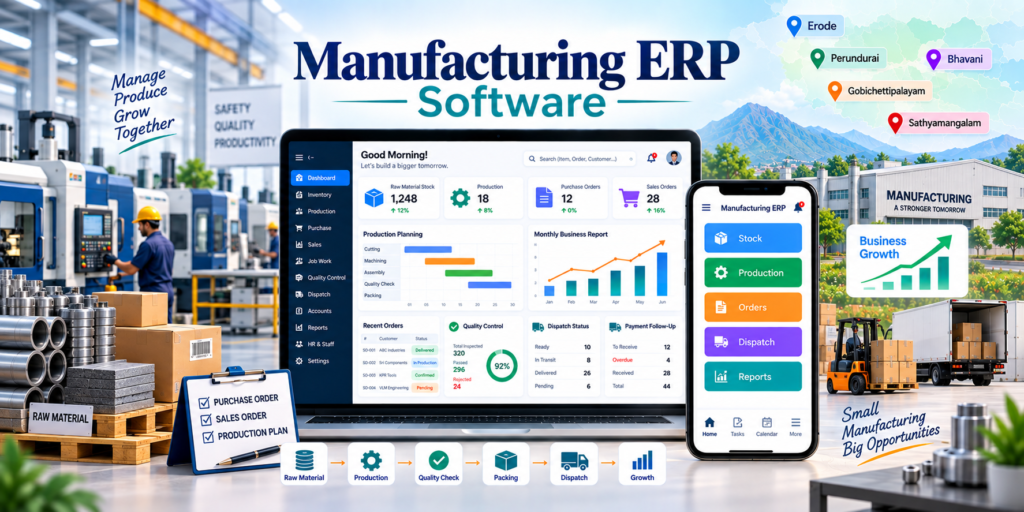
ERP software for small manufacturing businesses in Erode helps small factories, production units, textile businesses, food manufacturers, packaging companies, engineering workshops, non-woven bag manufacturers, furniture units, printing businesses and industrial suppliers manage inventory, purchase, production, sales orders, job work, quality, dispatch and reports in one system.
Small manufacturing companies often begin with notebooks, Excel sheets, WhatsApp messages and separate billing software. These methods may work when operations are simple, but they can become difficult to manage as stock movement, customer orders, production volume and staff responsibilities increase.
A practical ERP system helps connect these activities so owners can understand what material is available, which orders are pending, what is currently in production, what needs to be purchased and what is ready for dispatch.
At Greap Technologies, we provide ERP software for small manufacturing businesses in Erode, helping manufacturers build simple, scalable and workflow-focused ERP systems based on their actual operations.
Quick Answer: What Is ERP Software for Small Manufacturing Businesses?
Small manufacturing ERP software is a business-management system that connects inventory, purchase, customer orders, production, job work, quality control, dispatch and reporting.
Depending on the business, ERP software can include:
- Admin dashboard
- Raw-material inventory
- Finished-goods inventory
- Purchase management
- Supplier management
- Customer management
- Quotation and sales orders
- Bill of Materials
- Material Requirement Planning
- Production planning
- Production entries
- Work-in-progress tracking
- Job-work management
- Quality control
- Packing and dispatch
- Payment follow-up
- Staff accounts
- Role-based permissions
- Reports and analytics
Small businesses do not necessarily need every ERP module from day one. A phased implementation can start with the most important processes and expand as the company grows.
ERP Software for Small Manufacturing Businesses in Erode: Service Overview
| Detail | Information |
|---|---|
| Service | ERP Software for Small Manufacturing Businesses |
| Company | Greap Technologies |
| Location | Erode, Tamil Nadu |
| Main Audience | Small factories, workshops, manufacturers, suppliers and production units |
| Main Goal | Connect stock, purchase, production, orders and dispatch |
| Core Modules | Inventory, purchase, sales, production, job work, quality and reports |
| Best For | Textile, packaging, food, engineering, furniture, printing, bags and industrial products |
| Service Area | Erode District and nearby areas |
Why Small Manufacturing Businesses in Erode Need ERP Software
As a manufacturing business grows, owners may find it increasingly difficult to answer basic operational questions quickly.
For example:
- How much raw material is currently available?
- What needs to be purchased?
- Which customer orders are pending?
- Which orders are currently in production?
- How much material has been issued?
- What work is with outside job workers?
- How much production is completed?
- What quantity was rejected?
- Which orders are ready for dispatch?
- Which customers have pending payments?
- Which staff member updated each activity?
ERP software brings these records into one structured system and gives management better operational visibility.
When Should a Small Manufacturer Move to ERP Software?
A small manufacturing business may benefit from ERP when:
- Stock is difficult to reconcile
- Orders are being tracked in multiple Excel sheets
- Production status is unclear
- Multiple employees update separate records
- Job-work material is difficult to track
- Purchase requirements are often identified late
- Delivery dates are being missed
- Owners depend on verbal updates
- Reports take too much manual effort
- The business is planning to scale
ERP should solve real operational problems. Small businesses should avoid implementing complex modules that their team does not actually need.
What Types of Small Manufacturing Businesses Can Use ERP Software?
1. Textile Manufacturing Units
Small textile manufacturers can manage yarn, fabric, orders, production, job work, quality and dispatch.
2. Food Product Manufacturers
Food manufacturers can track raw materials, batch production, packing, finished stock, expiry-related information where required and dispatch.
3. Packaging Manufacturers
Packaging businesses can manage raw materials, custom sizes, printing requirements, production, job work and bulk orders.
4. Engineering and Fabrication Workshops
Engineering workshops can track material usage, customer jobs, production stages, labour activities and delivery status.
5. Furniture Manufacturers
Furniture units can manage wood, hardware, custom orders, manufacturing stages, finishing and delivery.
6. Printing Businesses
Printing units can track orders, materials, design approval, printing status, finishing and dispatch.
7. Non-Woven Bag Manufacturers
Non-woven bag manufacturers can track:
- Fabric rolls
- GSM
- Bag dimensions
- Printing
- Cutting
- Stitching
- Packing
- Bulk orders
8. Garment Manufacturing Units
Garment businesses can track fabric stock, cutting, stitching, finishing, size-wise quantities and buyer orders.
9. Industrial Product Manufacturers
Small industrial units can track material requirements, work orders, production, quality and dispatch.
10. Product-Based Factories
Any small business producing physical products can consider ERP when inventory, production and order tracking have become difficult to manage manually.
Benefits of ERP Software for Small Manufacturing Businesses
1. Better Inventory Visibility
ERP software can track:
- Raw materials
- Semi-finished goods
- Finished goods
- Packing materials
- Stock inward
- Stock issue
- Stock transfer
- Stock adjustments
- Low-stock levels
Stock accuracy depends on employees recording material movement correctly and consistently.
2. Better Production Tracking
Production records can include:
- Production order
- Planned quantity
- Material issued
- Work started
- Work-in-progress
- Completed quantity
- Rejected quantity
- Rework
- Completion date
3. Better Order Management
Customer orders can be connected with:
- Customer
- Product
- Quantity
- Specification
- Delivery date
- Production status
- Packing status
- Dispatch status
- Payment follow-up
4. Better Purchase Control
The purchase module can help track:
- Suppliers
- Purchase requests
- Purchase orders
- Material receipts
- Purchase returns
- Pending POs
- Supplier rates
5. Better Job-Work Tracking
Businesses using outside processors can record:
- Job worker
- Material issued
- Quantity
- Expected return date
- Received quantity
- Pending quantity
- Wastage
- Job-work charges
- Quality status
6. Better Quality Records
Quality control can capture:
- Accepted quantity
- Rejected quantity
- Defect reason
- Rework quantity
- Inspection remarks
- Approval status
7. Better Dispatch Coordination
Dispatch records can include:
- Packing status
- Dispatch date
- Invoice reference
- Transporter
- LR/reference number
- Delivery location
- Delivery status
8. Better Management Reports
Owners can review:
- Stock report
- Purchase report
- Production report
- Pending order report
- Job-work report
- Quality report
- Dispatch report
- Customer-wise report
- Supplier-wise report
- Payment follow-up report
Important Modules in Small Manufacturing ERP Software
1. Dashboard Module
A management dashboard can show:
- Total active orders
- Today’s production
- Pending production
- Low-stock items
- Pending purchases
- Pending job work
- Orders ready for dispatch
- Pending payments
2. Inventory Management
Inventory can include:
- Item master
- Raw materials
- Semi-finished products
- Finished goods
- Packing materials
- Warehouse/location
- Stock inward
- Stock issue
- Stock adjustment
3. Purchase Management
The purchase module can include:
- Supplier master
- Purchase request
- Purchase order
- Approval workflow
- Material receipt
- Purchase return
- Pending purchase report
4. Customer and Sales Order Management
The sales module can include:
- Customer master
- Sales enquiry
- Quotation
- Sales order
- Product specification
- Order quantity
- Delivery date
- Order status
5. Bill of Materials
A Bill of Materials, or BOM, defines the standard materials required to manufacture a product.
BOM can be useful for repeatable products such as:
- Furniture
- Garments
- Non-woven bags
- Packaging products
- Fabricated products
- Assembled products
6. Material Requirement Planning
MRP can help estimate material requirements based on:
- Confirmed orders
- BOM quantities
- Available stock
- Existing purchase orders
- Work-in-progress
- Expected wastage
MRP is most useful when item masters, BOMs and inventory entries are maintained accurately.
7. Production Management
Production management can include:
- Production planning
- Production order
- Material issue
- WIP
- Output entry
- Rejection entry
- Rework
- Completion status
8. Job Work Management
Job-work modules can track material issued outside and reconcile quantities returned.
9. Quality Control
Quality checks can be linked with incoming material, production stages or finished goods depending on the workflow.
10. Packing and Dispatch
This module can manage packing lists, dispatch details and transporter information.
11. Payment Follow-Up
Basic commercial tracking can include:
- Invoice reference
- Invoice amount
- Advance received
- Pending amount
- Due date
- Payment status
For complete accounting, taxation and statutory reporting, integration with suitable accounting software may be preferable.
Small Manufacturing ERP Workflow Example
A typical workflow can be:
Customer Order → Stock Check → Purchase Requirement → Material Receipt → Production Planning → Material Issue → Production → Quality Check → Finished Stock → Packing → Dispatch → Payment Follow-Up
Job Work Workflow
Production Requirement → Material Issue to Job Worker → Processing → Material Return → Quantity Check → Quality Check → Next Stage
Simple Make-to-Stock Workflow
Purchase → Stock Inward → Production → Finished Goods → Customer Order → Dispatch
The actual ERP workflow should match how the company currently manufactures its products.
ERP Software vs CRM Software for Small Manufacturing Businesses
| Feature | CRM Software | ERP Software |
|---|---|---|
| Main Purpose | Leads, enquiries and customer follow-ups | Business operations and manufacturing |
| Lead Management | Core focus | May be included or integrated |
| Customer Follow-Up | Strong focus | Basic or integrated |
| Inventory | Limited | Core focus |
| Purchase | Limited | Core focus |
| Production | Not main purpose | Core focus |
| Job Work | Limited | Can be included |
| Quality Control | Limited | Can be included |
| Dispatch | Limited | Can be fully tracked |
| Best For | Sales and marketing teams | Owners, production, stores, purchase and operations |
Growing manufacturers can use CRM for enquiry-to-order sales activities and ERP for order-to-production and dispatch activities.
ERP Software vs Billing Software
| Feature | Billing Software | ERP Software |
|---|---|---|
| Main Purpose | Create invoices and manage basic sales records | Manage broader business operations |
| Inventory | Basic to moderate | Detailed and process-connected |
| Purchase | Basic | Structured workflow |
| Production | Usually unavailable | Core manufacturing functionality |
| BOM / MRP | Usually unavailable | Can be included |
| Job Work | Usually limited | Can be managed |
| Quality | Usually unavailable | Can be included |
| Best For | Simple billing requirements | Manufacturing businesses requiring operational control |
ERP Software vs Excel for Small Manufacturers
| Area | Excel / Manual Files | ERP Software |
|---|---|---|
| Multiple Users | Can become difficult to coordinate | Role-based centralized access |
| Stock Movement | Depends on manual sheets | Transaction-based tracking |
| Production Status | Often maintained separately | Can be connected with orders |
| History | Can be difficult to audit | User and transaction history can be maintained |
| Reports | Often require manual preparation | Can be generated from recorded data |
| Scalability | Becomes harder as data grows | Designed for structured expansion |
Excel remains useful for many calculations and ad-hoc analysis. ERP is more useful when the business needs one controlled operational system used by multiple people.
ERP Software Design for Small Manufacturing Businesses
| User Type | Primary ERP Need |
|---|---|
| Business Owner | Dashboard, stock, production and reports |
| Production Manager | Production planning and work status |
| Stores Staff | Stock inward, issue and balance |
| Purchase Team | Purchase orders and suppliers |
| Sales Team | Customer orders and delivery status |
| Quality Team | Inspection and rejection records |
| Admin / Accounts | Documents and payment follow-up |
Small manufacturing ERP interfaces should prioritize:
- Simple forms
- Fast search
- Clear order statuses
- Minimal unnecessary fields
- Role-based screens
- Mobile-responsive access where appropriate
- Easy reports
Production Costing and Wastage Tracking
Small manufacturers that need better cost visibility can include production costing.
Depending on the business, costing can consider:
- Raw-material cost
- Job-work cost
- Labour cost
- Process cost
- Packing cost
- Transport-related cost
- Wastage
- Rejections
Accurate costing depends on reliable master data and consistent transaction entries.
Barcode and QR Code Tracking
Barcode or QR functionality can be added where manual item identification has become difficult.
Possible use cases include:
- Raw materials
- Batches
- Finished products
- Boxes
- Production jobs
- Warehouse locations
This should be planned according to how products physically move through the factory.
ERP Software for Small Manufacturing Businesses in Erode: Integrations
ERP software for small manufacturing businesses in Erode can be integrated with other business systems depending on requirements and available integration methods.
Possible integrations include:
- CRM software
- Company website
- Catalogue website
- Accounting software
- Barcode / QR devices
- WhatsApp workflows
- Email notifications
- Google Sheet import/export
- Customer portal
- Dealer portal
- Mobile applications
- Third-party APIs
Greap Technologies also provides API integration services for suitable custom integration requirements.
How Small Manufacturers Can Implement ERP in Phases
Small businesses do not have to implement every module at once.
Phase 1: Core Operations
- Item master
- Inventory
- Purchase
- Customers
- Sales orders
- Basic reports
Phase 2: Manufacturing
- BOM
- Production planning
- Material issue
- WIP
- Finished goods
- Quality control
Phase 3: Advanced Operations
- Job work
- MRP
- Barcode / QR
- Production costing
- Approval workflows
- Advanced dashboards
Phase 4: Integration and Automation
- CRM integration
- Accounting integration
- Website integration
- Customer portal
- Mobile app
- API integrations
A phased approach can make training and adoption easier for smaller teams.
Admin Panel Features for Small Manufacturing ERP
| Module | Purpose |
|---|---|
| Dashboard | Overall operational view |
| Items | Manage materials and products |
| Inventory | Manage stock movement |
| Purchase | Manage procurement |
| Suppliers | Manage vendor information |
| Customers | Manage customer records |
| Sales Orders | Manage customer orders |
| BOM | Define product materials |
| Production | Manage manufacturing work |
| Job Work | Track outside processing |
| Quality | Manage inspections |
| Dispatch | Manage delivery activities |
| Payments | Track payment follow-ups |
| Users & Roles | Control staff access |
| Reports | Analyze operations |
Advanced Features for Small Manufacturing ERP Software
- BOM management
- Material Requirement Planning
- Barcode stock tracking
- QR code tracking
- Batch tracking
- Serial-number tracking
- Machine-wise production
- Worker-wise production
- Wastage tracking
- Production costing
- Low-stock alerts
- Purchase approvals
- Quotation PDF generation
- Job-worker ledger
- Multi-store inventory
- Customer portal
- Dealer portal
- Document upload
- Audit logs
- Analytics dashboard
- Mobile app
Advanced features should only be added when they solve a real business requirement.
ERP Software Development Process
Step 1: Requirement and Workflow Study
Important questions include:
- What products are manufactured?
- What raw materials are used?
- How is inventory currently tracked?
- What production stages exist?
- Do you use job workers?
- Do you need BOM?
- Do you need MRP?
- Do you need quality control?
- Do you need costing?
- How many employees will use ERP?
- What reports does management need?
Step 2: Workflow Mapping
The existing manufacturing flow should be documented before software development.
Step 3: Module Planning
Separate requirements into:
- Essential modules
- Recommended modules
- Future modules
Step 4: UI/UX Design
Frequent tasks should require minimal steps and clear user permissions.
Step 5: ERP Development
Core modules can be developed first before adding advanced workflows.
Step 6: Existing Data Migration
Existing data can include:
- Products
- Raw materials
- Opening stock
- Customers
- Suppliers
- Open orders
- Job workers
- Staff users
Data should be reviewed and cleaned before migration.
Step 7: Testing
Test complete workflows such as:
- Purchase to stock
- Sales order to production
- Material issue to finished goods
- Job work issue and receipt
- Quality inspection
- Packing and dispatch
- Reports
- User permissions
Step 8: Staff Training
Training should be given according to each employee’s role.
Step 9: Go-Live and Improvement
After implementation, workflows and reports can be improved based on real usage.
Small Manufacturing ERP Software Features Checklist
| Feature | Recommendation |
|---|---|
| Admin Dashboard | Required |
| Inventory Management | Required |
| Raw Material Tracking | Required |
| Finished Goods | Required |
| Purchase Management | Required |
| Supplier Management | Required |
| Customer Management | Required |
| Sales Orders | Required |
| BOM | Based on product type |
| MRP | Based on manufacturing complexity |
| Production Planning | Required |
| Work-In-Progress | Recommended |
| Job Work | Based on workflow |
| Quality Control | Recommended |
| Dispatch Management | Required |
| Payment Follow-Up | Recommended |
| Staff Accounts | Required |
| Role-Based Permissions | Recommended |
| Reports | Required |
| Barcode / QR | Based on requirement |
| CRM Integration | Based on requirement |
| Accounting Integration | Based on requirement |
Common ERP Mistakes Small Manufacturers Should Avoid
1. Trying to Implement Everything at Once
Start with the processes creating the biggest operational problems and expand gradually.
2. Poor Item Master Data
Duplicate product names and inconsistent units can make stock reports unreliable.
3. No Stock Entry Discipline
Inventory reports will not be accurate if inward and outward movements are not recorded.
4. No Order-Wise Production Tracking
Customer orders should be connected with production and target delivery dates.
5. No Job-Work Reconciliation
Material issued outside should be reconciled against quantities returned.
6. No Wastage or Rejection Tracking
These values can affect production cost and material planning.
7. No Role-Based Access
Employees should only access the modules needed for their work.
8. Using ERP as Only Billing Software
The main value of manufacturing ERP comes from connecting inventory, production, purchase and orders.
9. Complicated User Interface
Small teams need a practical system that can be used consistently.
10. No Training or Management Review
ERP success depends on accurate use, staff adoption and regular review of reports.
Erode District Small Manufacturing ERP Strategy
Greap Technologies supports manufacturers across:
Erode, Perundurai, Bhavani, Anthiyur, Gobichettipalayam, Sathyamangalam, Modakkurichi, Kodumudi, Nambiyur, Chennimalai, Kavindapadi, Ammapettai, Arachalur, Sivagiri, Punjai Puliampatti, Solar, Surampatti, Veerappanchatram, Nasiyanur and nearby areas.
Location-specific SEO pages should only be created for genuine service areas and should provide unique, locally relevant information instead of repeating identical content.
How Greap Technologies Helps Small Manufacturing Businesses
Greap Technologies can develop custom ERP software around the actual workflow and size of the manufacturing business.
Our ERP development services can include:
- ERP requirement analysis
- Workflow mapping
- Inventory management
- Purchase management
- Supplier management
- Customer management
- Sales-order management
- BOM and MRP
- Production planning
- Work-in-progress tracking
- Job-work management
- Quality control
- Finished-goods tracking
- Packing and dispatch
- Payment follow-up
- Barcode / QR workflows
- Staff accounts
- Role-based permissions
- Dashboards and reports
- CRM integration
- Accounting/API integration
- Data migration
- Testing and training
- ERP maintenance support
Explore related Greap services:
- Custom Software Development
- API Integration Services
- Website Development Services
- Ecommerce Development
- Mobile App Development
Why Choose Greap Technologies?
Small Manufacturing Workflow Planning
We can structure ERP around actual processes such as purchase, stock, production, job work, quality and dispatch.
Custom ERP Development
The software can be designed around your company’s real workflow instead of using an unnecessarily complicated fixed system.
Phased Implementation
Small manufacturers can start with essential modules and expand the ERP as operational requirements grow.
Simple User Experience
The system can be designed for practical daily use by owners, stores staff, production teams and administrators.
Integration Support
ERP can connect with suitable CRM, accounting, website and third-party systems where supported.
Complete Digital Support
Greap Technologies also provides CRM software, websites, ecommerce development, mobile apps, SEO and digital marketing services.
Conclusion
ERP software for small manufacturing businesses in Erode can help local factories and production units organize inventory, purchase, customer orders, production, job work, quality and dispatch in one structured system.
The best ERP for a small manufacturer is not necessarily the system with the most features. It should solve the company’s main operational problems, remain simple for employees to use and be able to expand as the business grows.
A phased ERP implementation can help smaller companies digitize important processes without introducing unnecessary complexity from the beginning.
Greap Technologies helps small manufacturing businesses in Erode build custom ERP software around their products, workflow, team structure and operational requirements.
Need ERP Software for Your Small Manufacturing Business in Erode?
Greap Technologies can help you build a custom ERP with inventory, purchase, production, job work, quality control, dispatch, staff access and management reports.
Frequently Asked Questions
1. What is ERP software for small manufacturing businesses?
Small manufacturing ERP software is a business-management system that connects inventory, purchase, customer orders, production, job work, quality control, dispatch and reporting.
2. Why do small manufacturing businesses in Erode need ERP software?
ERP software can help small manufacturers reduce fragmented manual tracking, improve stock visibility, monitor production and organize customer orders and dispatch.
3. What modules should small manufacturing ERP software include?
A small manufacturing ERP can include inventory, purchase, suppliers, customers, sales orders, production, job work, quality control, dispatch and reports.
4. Can ERP software track raw materials and finished goods?
Yes. ERP software can track raw-material inward, issues, production receipts, finished-goods stock and adjustments depending on the configured workflow.
5. Can ERP software manage production?
Yes. ERP can manage production planning, material issue, work-in-progress, completed quantities, rejections and production status.
6. Can ERP software manage job work?
Yes. ERP can track material issued to job workers, quantities returned, pending quantities, charges and quality status.
7. Can Greap Technologies build custom ERP software for small manufacturers?
Yes. Greap Technologies can develop custom ERP software based on the company’s inventory, production, order, job-work and reporting requirements.
8. Is ERP software affordable for small manufacturing businesses?
ERP scope and cost depend on the required modules, number of users, workflows and integrations. Small manufacturers can reduce initial complexity by starting with essential modules and adding advanced features later.
9. Is ERP software the same as billing software?
No. Billing software mainly focuses on invoices and basic transactions, while manufacturing ERP can connect inventory, purchase, production, orders and dispatch.
10. Can ERP software improve small manufacturing operations?
ERP software can improve operational visibility and coordination when the system matches the business workflow and employees maintain accurate data consistently.