Vendor Management Software for Businesses in Erode
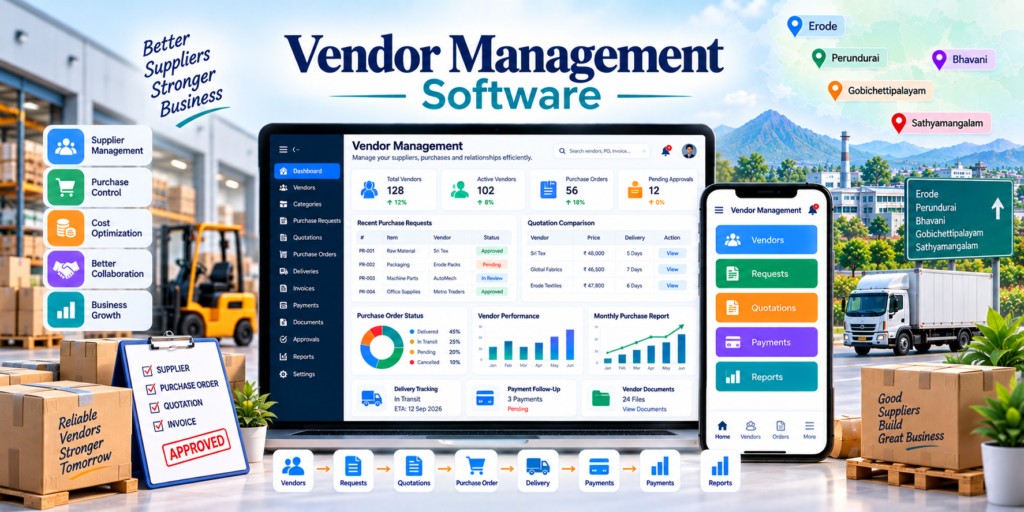
Vendor management software for businesses in Erode helps manufacturers, textile businesses, wholesalers, retailers, ecommerce companies, construction companies, hospitals, educational institutions, hotels, restaurants and service businesses manage suppliers, quotations, purchase orders, deliveries, invoices, payments and vendor documents in one structured system.
Businesses may work with dozens or hundreds of suppliers for raw materials, products, packaging, transport, machinery, maintenance, printing, software, professional services and other operational requirements.
When vendor information is maintained through separate Excel sheets, WhatsApp conversations, emails and physical files, purchase teams can find it difficult to track quotation history, approvals, delivery commitments, invoices and payments.
At Greap Technologies, we provide vendor management software for businesses in Erode, helping companies build custom vendor and procurement systems around their actual purchasing workflow.
Quick Answer: What Is Vendor Management Software?
Vendor management software is a centralized system used to manage suppliers and vendor-related processes from onboarding through quotation, purchase, delivery, invoice and payment.
A custom vendor management system can include:
- Vendor database
- Vendor categories
- Supplier onboarding
- Vendor document management
- Purchase requests
- RFQ management
- Quotation comparison
- Approval workflow
- Purchase orders
- Delivery tracking
- Goods Receipt Note tracking
- Invoice management
- Payment follow-up
- Vendor performance scorecards
- Contract expiry reminders
- Staff accounts
- Role-based permissions
- Dashboards and reports
- ERP or inventory integration
The exact software structure should match the company’s vendor types, purchasing process, approval levels and accounting workflow.
Vendor Management Software in Erode: Service Overview
| Detail | Information |
|---|---|
| Service | Vendor Management Software Development |
| Company | Greap Technologies |
| Location | Erode, Tamil Nadu |
| Main Audience | Manufacturers, retailers, wholesalers, institutions, ecommerce and service businesses |
| Main Goal | Manage suppliers, procurement, quotations, orders, invoices and payments |
| Core Modules | Vendors, RFQs, quotations, approvals, purchase orders, GRN, invoices and reports |
| Best For | Textile, manufacturing, retail, construction, healthcare, education, hospitality and B2B businesses |
| Service Area | Erode District and nearby areas |
Why Businesses in Erode Need Vendor Management Software
A growing business may work with different vendors for different departments and requirements.
Without a centralized system, it can become difficult to track:
- Vendor contact details
- Products or services supplied
- Vendor GST and business information
- Contracts and documents
- Purchase requests
- RFQs
- Quotation responses
- Quotation comparisons
- Purchase approvals
- Purchase orders
- Pending deliveries
- Goods received
- Vendor invoices
- Payment due dates
- Outstanding amounts
- Vendor performance
- Staff activity
Vendor management software gives purchase, stores, accounts and management teams a common system for handling these activities.
What Types of Businesses Need Vendor Management Software?
1. Manufacturing Companies
Manufacturers can manage raw-material suppliers, machinery vendors, job workers, packaging vendors and maintenance providers.
2. Textile Businesses
Textile companies can track:
- Yarn suppliers
- Fabric suppliers
- Dyeing vendors
- Printing units
- Garment accessory vendors
- Packing-material suppliers
- Job workers
3. Retail Businesses
Retailers can maintain product suppliers, purchase histories, invoice records and payment status.
4. Ecommerce Businesses
Ecommerce companies can manage product vendors, packaging suppliers, logistics providers and other fulfilment partners.
5. Construction Companies
Construction businesses can manage material suppliers, subcontractors, machinery vendors, quotations, site deliveries and payment milestones.
6. Hospitals and Clinics
Healthcare organizations can manage medical suppliers, equipment vendors, maintenance providers and other approved service vendors.
7. Schools and Colleges
Educational institutions can manage stationery, uniforms, books, transport, catering, maintenance and technology vendors.
8. Hotels and Restaurants
Hospitality businesses can manage grocery, vegetable, housekeeping, packaging, maintenance and equipment suppliers.
9. Wholesale Businesses
Wholesalers can manage product suppliers, bulk purchasing, transport vendors and supplier payments.
10. Service Businesses
Service companies can manage consultants, freelancers, agencies, software providers, contractors and maintenance vendors.
Benefits of Vendor Management Software
1. Centralized Vendor Database
Vendor profiles can contain:
- Vendor name
- Company name
- Contact person
- Phone number
- Address
- Vendor category
- GST details where required
- Payment terms
- Products or services supplied
- Documents
- Vendor status
- Notes
Sensitive details such as bank information should have restricted access based on staff roles.
2. Better Vendor Onboarding
A structured onboarding workflow can help collect required information before a vendor becomes active.
Example:
Vendor Application → Document Review → Internal Approval → Vendor Code Creation → Active Vendor
3. Better Purchase Request Management
Internal departments can raise purchase requests with:
- Item or service
- Quantity
- Required date
- Department
- Priority
- Requested by
- Reason
- Approval status
4. Better Quotation Comparison
Businesses can compare vendors by:
- Quoted price
- Delivery time
- Payment terms
- Taxes
- Minimum quantity
- Warranty or service terms
- Past vendor performance
The cheapest quotation is not always the best choice. Quality, reliability, delivery capability and commercial terms should also be considered.
5. Better Purchase Order Control
Purchase orders can provide clear records of:
- Vendor
- Items
- Quantity
- Rate
- Tax
- Delivery address
- Expected date
- Payment terms
- Approval status
6. Better Delivery Tracking
The system can show:
- Ordered quantity
- Delivered quantity
- Pending quantity
- Rejected quantity
- Delivery date
- Delivery challan
- Goods receipt status
7. Better Invoice and Payment Tracking
Vendor invoices can be connected with purchase orders and deliveries to reduce manual confusion.
8. Better Vendor Performance Monitoring
Scorecards can help management review supplier performance using consistent criteria.
Important Modules in Vendor Management Software
1. Vendor Database Module
The vendor master can include:
- Vendor ID
- Company details
- Contact person
- Vendor category
- Products/services
- Tax information
- Payment terms
- Documents
- Status
2. Vendor Category Management
Example categories:
- Raw Material Supplier
- Product Supplier
- Packaging Supplier
- Transport Vendor
- Maintenance Vendor
- Machinery Supplier
- Job Worker
- Contractor
- Software Vendor
- Professional Service Provider
3. Purchase Request Module
A purchase request can contain:
- PR number
- Department
- Item/service
- Quantity
- Required date
- Priority
- Requester
- Approval status
4. RFQ Management
Request for Quotation functionality can include:
- RFQ number
- Selected vendors
- Requested items
- Specifications
- Quantity
- Submission deadline
- Terms
- RFQ status
5. Quotation Management
Vendor quotations can be uploaded and compared inside the system.
6. Quotation Comparison
| Comparison | Vendor A | Vendor B | Vendor C |
|---|---|---|---|
| Price | ₹ | ₹ | ₹ |
| Delivery Time | Value | Value | Value |
| Payment Terms | Terms | Terms | Terms |
| Vendor Rating | Score | Score | Score |
The actual comparison fields should be based on the company’s procurement criteria.
7. Approval Workflow
Approval can be configured based on:
- Department
- Purchase value
- Vendor category
- Project
- Branch
Example:
Purchase Request → Department Head → Purchase Manager → Finance / Management Approval → PO
8. Purchase Order Management
The PO module can include:
- PO number
- Vendor
- Items/services
- Quantity
- Rate
- Taxes
- Total value
- Delivery terms
- Payment terms
- Approval history
- PO PDF
9. Goods Receipt / GRN Tracking
For physical purchases, a Goods Receipt Note can record what was actually received.
GRN can include:
- PO reference
- Vendor
- Received date
- Ordered quantity
- Received quantity
- Rejected quantity
- Pending quantity
- Quality remarks
10. Invoice Management
Vendor invoice records can include:
- Invoice number
- Invoice date
- Vendor
- PO reference
- GRN reference
- Invoice amount
- Tax details
- Due date
- Approval status
- Payment status
11. PO–GRN–Invoice Matching
For businesses requiring stronger purchase controls, vendor management software can support matching between:
Purchase Order → Goods Received → Vendor Invoice
This can help teams identify differences between ordered quantity, received quantity and invoiced quantity before payment approval.
12. Payment Follow-Up
Payment tracking can include:
- Invoice amount
- Paid amount
- Balance
- Due date
- Payment status
- Payment reference
- Remarks
13. Vendor Document Management
Documents can include:
- GST documents
- Contracts
- Quotations
- Purchase orders
- Invoices
- Delivery challans
- Compliance documents
- Product catalogues
- Certificates where applicable
14. Vendor Performance Module
Vendor performance can be assessed using criteria such as:
- On-time delivery
- Quality acceptance
- Quotation response time
- Price competitiveness
- Complaint history
- Service responsiveness
15. Reports and Dashboard
The dashboard can show:
- Total active vendors
- Pending purchase requests
- Open RFQs
- Pending approvals
- Open purchase orders
- Delayed deliveries
- Invoices pending approval
- Payments due
- Vendor-wise purchases
Vendor Management Workflow Example
A typical procurement workflow can be:
Purchase Requirement → Internal Approval → RFQ → Vendor Quotations → Comparison → Vendor Selection → Purchase Order → Delivery → GRN → Invoice → Payment Approval → Payment → Closed
Service Vendor Workflow
Service Requirement → Vendor Selection → Work Order / PO → Service Completion → Verification → Invoice → Payment
The exact workflow should be configured according to the company’s internal controls.
Vendor Management Software vs Purchase Management Software
| Feature | Vendor Management Software | Purchase Management Software |
|---|---|---|
| Main Purpose | Vendor relationship and supplier lifecycle | Purchase transaction workflow |
| Vendor Master | Strong focus | Included |
| Vendor Onboarding | Important | Usually limited |
| RFQ / Quotations | Included | Strong focus |
| Purchase Orders | Included | Core feature |
| Vendor Performance | Strong focus | Usually limited |
| Vendor Documents | Strong focus | Basic to moderate |
| Payments | Can be tracked | Can be tracked |
For many businesses, vendor management and purchase management are best implemented as connected modules.
Vendor Management Software vs ERP Software
| Feature | Vendor Management Software | ERP Software |
|---|---|---|
| Main Purpose | Supplier and procurement control | Broader business operations |
| Vendor Management | Core focus | Usually included |
| Purchases | Strong focus | Core module |
| Inventory | Can integrate | Strong focus |
| Production | Not core | Can be core |
| Sales | Not core | Included |
| Vendor Scorecards | Can be detailed | Depends on ERP |
A company can use vendor management as a standalone procurement system or as part of a larger ERP architecture.
Vendor Portal Development
A vendor portal can give approved suppliers secure login access.
Vendor-side features can include:
- Vendor profile
- RFQ notifications
- Quotation submission
- Purchase-order access
- Delivery updates
- Invoice upload
- Document upload
- Payment-status view
The portal should only expose information relevant to the authenticated vendor.
Vendor Document Security
Vendor management software may store sensitive commercial and financial records.
Security controls can include:
- Secure login
- Role-based permissions
- Restricted bank-detail access
- Secure document storage
- File-type validation
- Audit logs
- User activity history
- Session controls
- Data backups
Users should only have access to the vendor and payment information required for their responsibilities.
Vendor Management Software Design Style
| User Type | Primary Requirement |
|---|---|
| Business Owner | Dashboard, approvals and reports |
| Purchase Team | Vendors, RFQs and purchase orders |
| Department User | Purchase requests |
| Stores Team | Goods receipt and quantity verification |
| Accounts Team | Invoices, due dates and payments |
| Vendor | RFQs, POs, invoices and documents |
Useful design principles include:
- Clean dashboard
- Fast vendor search
- Simple purchase requests
- Clear approval status
- Easy quotation comparison
- Visible due dates
- Mobile-responsive access
- Role-based screens
Vendor Management Software Integrations
Vendor management software for businesses in Erode can be connected with other business systems where suitable APIs or integration methods are available.
Possible integrations include:
- ERP software
- Inventory software
- Accounting software
- Purchase management systems
- Warehouse management systems
- Email notifications
- WhatsApp notifications
- Document storage
- Google Sheet import/export
- Mobile applications
A typical integrated flow can be:
Purchase Request → Vendor System → PO → Inventory / GRN → Accounts → Payment
Explore API integration services for suitable custom integrations.
Advanced Features for Vendor Management Software
- Vendor self-registration
- Vendor portal
- Vendor approval workflow
- RFQ portal
- Quotation comparison
- Multi-level approvals
- Purchase budgets
- Automatic PO generation
- GRN tracking
- PO-GRN-invoice matching
- Vendor rating
- Vendor scorecards
- Contract-expiry reminders
- Compliance-document expiry alerts
- Product-wise vendor mapping
- Department-wise budgets
- Invoice approval workflow
- Payment approval workflow
- Email notifications
- WhatsApp notifications
- Analytics dashboard
- Mobile app
Advanced features should be introduced based on actual procurement complexity and team requirements.
Vendor Management Software Development Process
Step 1: Requirement Analysis
Important questions include:
- How many vendors do you currently manage?
- What types of vendors do you work with?
- How are purchase requests created?
- Do you collect multiple quotations?
- Who approves purchases?
- Do you need purchase orders?
- Do you need GRN?
- Do you need invoice matching?
- How are vendor payments approved?
- Do you need a vendor portal?
- Do you use ERP or inventory software?
Step 2: Workflow Mapping
Document the current purchase and vendor process before development.
Step 3: Role and Approval Planning
Define:
- Requester roles
- Purchase team permissions
- Management approvals
- Stores access
- Accounts access
- Vendor access
Step 4: UI/UX Design
Frequently used workflows should remain simple for staff.
Step 5: Software Development
Core modules can include vendors, PR, RFQ, quotations, PO, GRN, invoices, payments and reports.
Step 6: Existing Data Migration
Data can include:
- Existing vendor list
- Vendor categories
- Contact details
- Products/services supplied
- Open purchase orders
- Invoices
- Payment status
Existing records should be reviewed and cleaned before import.
Step 7: Testing
Test workflows such as:
- Vendor creation
- Purchase request
- Approval
- RFQ
- Quotation comparison
- PO generation
- GRN
- Invoice
- Payment status
- User permissions
Step 8: Staff Training
Training can be provided separately for purchase, stores, accounts and management users.
Step 9: Launch and Improvement
Reports, approval levels and vendor workflows can be refined based on actual system usage.
Vendor Management Software Features Checklist
| Feature | Recommendation |
|---|---|
| Vendor Database | Required |
| Vendor Categories | Required |
| Vendor Documents | Recommended |
| Vendor Onboarding | Recommended |
| Purchase Requests | Recommended |
| RFQ Management | Based on procurement process |
| Quotation Management | Recommended |
| Quotation Comparison | Recommended |
| Approval Workflow | Based on requirement |
| Purchase Orders | Recommended |
| Delivery Tracking | Recommended |
| GRN | Recommended for physical goods |
| Invoice Management | Recommended |
| Payment Tracking | Recommended |
| Vendor Performance | Recommended |
| Staff Accounts | Required |
| Role-Based Access | Recommended |
| Audit Logs | Recommended |
| Vendor Portal | Based on requirement |
| ERP / Inventory Integration | Based on requirement |
| Reports | Required |
| Mobile Responsive Design | Required |
Common Vendor Management Mistakes Businesses Should Avoid
1. Managing All Vendors in Separate Excel Files
Multiple files make vendor history and purchasing activity harder to control as the business grows.
2. No Vendor Onboarding Process
Required vendor information and documents should be collected consistently.
3. No Quotation Comparison
Price, delivery terms, quality and vendor history should be compared before important purchases.
4. No Purchase Approval Workflow
Larger purchases should follow defined approval rules.
5. No Goods Receipt Tracking
Ordered quantity and actually received quantity should be clearly recorded.
6. Paying Invoices Without Matching Records
Where appropriate, PO, receipt and invoice information should be checked before payment.
7. No Vendor Document Expiry Tracking
Important contracts or compliance documents may need renewal reminders.
8. No Vendor Performance Review
Supplier quality, reliability and delivery performance should be reviewed periodically.
9. Weak Role Permissions
Sensitive commercial and bank information should not be visible to every system user.
10. No ERP or Inventory Integration Plan
Purchase, inventory and payment systems should have clearly defined data ownership when integrations are required.
Erode District Vendor Management Software Strategy
Greap Technologies supports businesses across:
Erode, Perundurai, Bhavani, Anthiyur, Gobichettipalayam, Sathyamangalam, Modakkurichi, Kodumudi, Nambiyur, Thalavadi, Chennimalai, Kavindapadi, Ammapettai, Arachalur, Sivagiri, Punjai Puliampatti, Solar, Surampatti, Veerappanchatram, Nasiyanur and nearby areas.
Location-specific SEO pages should only be created for genuine service areas and should contain unique, locally relevant information instead of simply changing location names.
How Greap Technologies Helps with Vendor Management Software Development
Greap Technologies can develop custom vendor management software around the actual procurement and supplier workflow of the business.
Our vendor management software development services can include:
- Vendor workflow analysis
- Vendor database development
- Supplier-category management
- Vendor onboarding
- Purchase requests
- RFQ management
- Quotation comparison
- Purchase-order management
- Approval workflows
- Delivery tracking
- GRN management
- Invoice management
- Payment tracking
- Vendor document management
- Vendor scorecards
- Contract reminders
- Staff accounts
- Role-based permissions
- Audit logs
- Vendor portal development
- ERP integration
- Inventory integration
- Accounting/API integration
- Dashboards and reports
- Testing and staff training
- Maintenance support
Explore related Greap services:
- Custom Software Development
- Web Application Development
- API Integration Services
- Mobile App Development
- Website Development Services
Why Choose Greap Technologies?
Workflow-Based Vendor Management Development
We can structure the software around your real purchasing, approval and payment process.
Custom Software Development
The system can match your business workflow instead of forcing staff into a fixed generic procurement process.
Vendor and Purchase Control
Vendor records, quotations, approvals, POs, deliveries and invoices can be connected in one workflow.
Secure Role-Based Access
Sensitive commercial and financial information can be restricted according to staff responsibilities.
Integration Support
Vendor management software can connect with supported ERP, inventory, accounting and other business systems.
Complete Digital Support
Greap Technologies also provides CRM, ERP, inventory software, portals, ecommerce development, mobile apps, SEO and digital marketing services.
Conclusion
Vendor management software for businesses in Erode can help companies organize suppliers, purchase requests, RFQs, quotations, purchase orders, deliveries, invoices, payments and vendor documents in one structured system.
A practical vendor-management solution should provide a centralized vendor database, clear purchase approvals, quotation comparison, purchase-order tracking, goods-receipt records, invoice status, payment visibility and useful supplier-performance reports.
For businesses with larger procurement operations, vendor management software can also integrate with inventory, ERP and accounting systems to create a more connected purchasing workflow.
Greap Technologies helps businesses in Erode develop custom vendor-management systems based on their vendor process, approval structure and operational requirements.
Need Vendor Management Software for Your Business in Erode?
Greap Technologies can help you build a custom vendor-management system with supplier records, RFQs, quotation comparison, purchase orders, delivery tracking, invoices, payments and reports.
Frequently Asked Questions
1. What is vendor management software?
Vendor management software is a system used to manage supplier information, purchase requests, RFQs, quotations, purchase orders, deliveries, invoices, payments and vendor performance.
2. Why do businesses in Erode need vendor management software?
Vendor management software can help businesses centralize supplier information, organize purchasing workflows, track deliveries and improve visibility into vendor invoices and payments.
3. What features should vendor management software include?
A vendor management system can include vendor profiles, vendor categories, purchase requests, RFQs, quotation comparison, approvals, purchase orders, GRN, invoices, payments, documents and reports.
4. Can vendor management software compare quotations?
Yes. Quotations can be compared by price, delivery terms, payment terms and other procurement criteria defined by the business.
5. Can vendor management software track purchase orders?
Yes. Purchase orders can be tracked from creation and approval through delivery, goods receipt and invoice processing.
6. Can vendor management software track vendor payments?
Yes. The system can track invoice amount, paid amount, outstanding balance, due date and payment status.
7. What is PO-GRN-invoice matching?
It is a control process that compares the purchase order, goods actually received and vendor invoice before payment approval.
8. Can Greap Technologies build custom vendor management software?
Yes. Greap Technologies can develop custom vendor management software based on the business’s vendor, purchasing, approval and reporting workflows.
9. Can vendor management software connect with ERP or inventory software?
Yes. Integration may be possible with supported ERP, inventory, accounting and other systems depending on API availability and business requirements.
10. Can vendors have their own login portal?
Yes. A vendor portal can allow approved suppliers to view RFQs, submit quotations, access purchase orders, upload invoices and manage permitted documents.