Businesses that sell products or services to other businesses often manage customer orders, quotations, negotiated prices, invoices and delivery updates across multiple channels. When these processes depend on phone calls, spreadsheets and manual follow-ups, keeping customers informed can become difficult as the business grows.
B2B customer portal development in Erode helps businesses create a secure online platform where approved customers can access relevant business information, request quotations, place orders, view invoices and track order progress. Instead of depending entirely on sales representatives for routine updates, customers can access the information they need through a centralised portal.
At Greap Technologies, businesses can explore custom website and software development approaches based on their existing workflows, customer requirements and future plans. The right solution may be a simple customer self-service portal, a B2B ecommerce platform or a more advanced system integrated with existing business software.
What Is B2B Customer Portal Development?
B2B customer portal development involves designing and building a web-based application that allows a company to serve its business customers digitally. B2B stands for business-to-business, meaning the company sells to other businesses rather than operating only as a direct-to-consumer retailer.
For example, a textile supplier in Erode may sell fabric to garment manufacturers, exporters and wholesale buyers. Each customer may have a different price agreement, credit arrangement, minimum order quantity or delivery schedule. A properly designed portal can display the relevant information to each authorised customer after login.
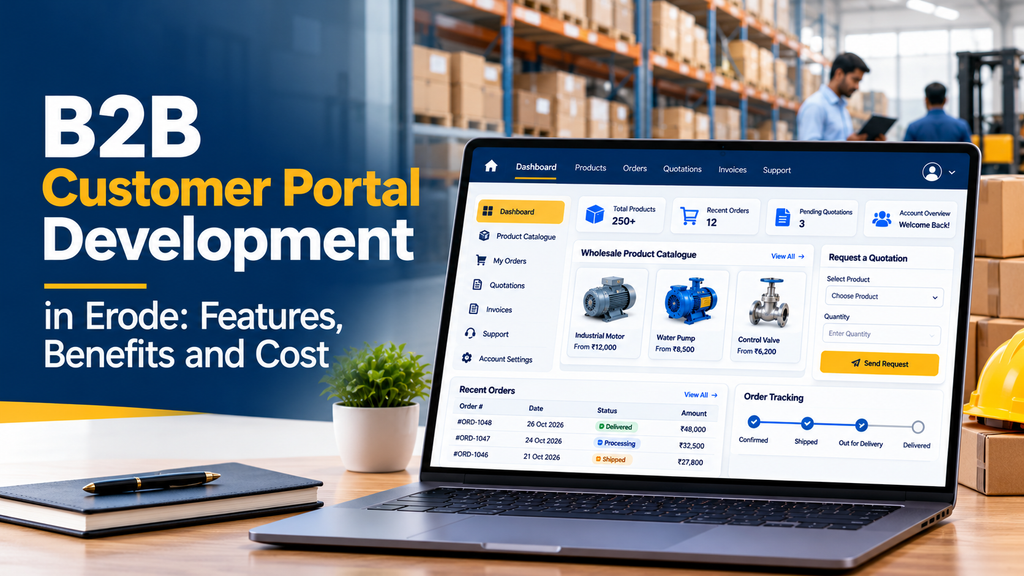
Depending on the business model, a portal may provide:
- Secure customer registration and login.
- Customer-specific product catalogues and pricing.
- Quotation requests and quotation history.
- Online purchase orders and reorder options.
- Order status and dispatch updates.
- Invoice and account statement access.
- Payment options and payment status.
- Document downloads and customer support.
- Integration with inventory, accounting, ERP or CRM systems.
Not every business needs all these features. A successful project begins by identifying the tasks customers perform most frequently and selecting the features that make those tasks easier.
Who Needs a B2B Customer Portal in Erode?
B2B portals can support businesses across manufacturing, distribution, wholesale trade and professional services. Erode’s business environment includes textile-related companies, manufacturers, traders, suppliers and distributors that may benefit from more organised digital customer interactions.
1. Textile and Garment Businesses
Fabric suppliers, garment manufacturers, processing units and textile wholesalers can share product specifications, available stock information, quotation requests and order progress with approved buyers.
2. Manufacturers and Industrial Suppliers
Manufacturers can provide technical product details, downloadable catalogues, purchase order submission, spare-parts enquiries and service request tracking.
3. Wholesale and Distribution Companies
Distributors can offer repeat ordering, customer-specific pricing, bulk quantity selection, order histories and delivery updates.
4. Exporters and Trading Companies
Export-oriented businesses can share approved product documents, quotation details, order milestones and shipment-related information with authorised customers.
5. Agricultural and Machinery Suppliers
Equipment suppliers can manage dealer enquiries, product specifications, spare-parts requests, quotation approvals and customer service requests.
6. B2B Service Providers
Companies providing recurring services can offer customer dashboards, project updates, service tickets, reports, invoices and downloadable documents.
The portal should reflect the actual sales process of the business. A wholesale distributor may prioritise quick reordering, while an industrial manufacturer may need technical documents and quotation approvals.
Important Features of B2B Customer Portal Development
1. Secure Customer Registration and Login
A B2B portal usually serves approved business customers rather than anonymous visitors. Customer accounts allow the system to identify each company and display its permitted products, prices, documents and orders.
Useful capabilities include:
- Customer registration and approval workflows.
- Email or mobile verification where appropriate.
- Password reset and secure session management.
- Company profile and authorised contact management.
- Role-based access for different customer users.
- Account activation, suspension and access control.
For businesses with multiple buyers or branches under one customer account, permissions can be configured so that users see only the information they are authorised to access.
2. Customer-Specific Pricing
Many B2B companies negotiate prices based on order quantity, customer agreements, product category or contractual terms. A standard retail price list may not represent these arrangements.
A customer portal can display pricing based on defined business rules, such as:
- Different price lists for approved customer groups.
- Contract prices for selected customers.
- Quantity-based discounts.
- Minimum order quantities.
- Product-specific or category-specific pricing.
- Prices requiring sales approval before confirmation.
The business should define how prices are calculated and which users can change them. Where negotiated pricing is confidential, the portal must prevent unauthorised customers from accessing another company’s rates.
3. Product Catalogue and Technical Information
A well-organised product catalogue helps buyers find the right products without repeatedly requesting basic information from sales staff.
Depending on the industry, product pages can include:
- Product name, code and category.
- Images, specifications and downloadable documents.
- Available sizes, colours, grades or variants.
- Minimum order quantity and packaging information.
- Stock or availability information, where reliable data is available.
- Product search, filtering and sorting.
- Related products and compatible accessories.
For industrial products, technical specifications and documentation may be more important than decorative product imagery. The catalogue should prioritise the information customers need to make purchasing decisions.
4. Quotation Request and Approval Management
Many B2B orders require a quotation before a purchase can be confirmed. This is especially common for bulk orders, custom manufacturing, industrial machinery and products with changing prices.
A quotation workflow may allow customers to:
- Select products and enter requested quantities.
- Describe customisation or delivery requirements.
- Upload relevant specifications or supporting documents.
- Submit a quotation request.
- View quotation status and expiry date.
- Download the approved quotation.
- Accept a quotation and convert it into an order, if configured.
On the administration side, authorised employees can review requests, enter prices, add terms, approve quotations and send them to customers. Approval rules should reflect the company’s pricing authority and sales process.
5. Online Ordering and Repeat Purchases
Regular customers should not have to rebuild the same order from the beginning every time they buy. An online ordering module can make recurring purchases more convenient.
Potential features include:
- Shopping cart or order basket for B2B products.
- Bulk quantity entry.
- Purchase order number fields.
- Minimum order quantity validation.
- Saved order lists or frequently ordered products.
- Reordering from previous purchases.
- Order notes and requested delivery dates.
- Approval workflows for customers who require internal purchasing authorisation.
Businesses that do not want to accept automatic online orders can instead use the portal to collect purchase requests for internal review before confirmation.
6. Order Tracking and Delivery Updates
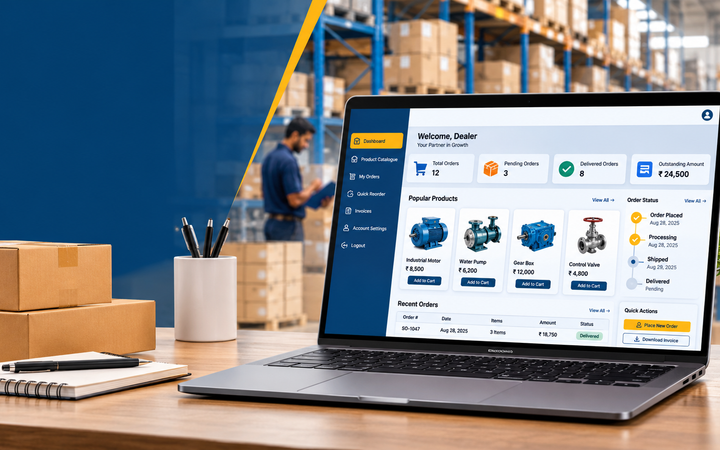
After placing an order, customers often want to know whether it has been accepted, processed, dispatched or delivered. A portal can display order milestones and reduce routine status enquiries.
Typical order statuses include:
- Request submitted.
- Awaiting review or approval.
- Order confirmed.
- Processing or production.
- Ready for dispatch.
- Dispatched.
- Delivered or completed.
These statuses should reflect the actual operational workflow. If dispatch or logistics data comes from another system, the portal may need an integration to keep the information current.
7. Invoice, Payment and Account Information
Business customers often need access to invoices, payment records and outstanding balances. A customer portal can provide a central place to review these details without repeatedly requesting copies from the accounts team.
Depending on the accounting workflow, it may include:
- Invoice list and invoice downloads.
- Payment status and transaction references.
- Credit notes and relevant account documents.
- Outstanding balance information, when supported by reliable data.
- Payment links through an appropriate payment gateway.
- Downloadable account statements.
- Notifications for due dates or payment confirmations.
Payment collection is optional. Some businesses may prefer to use the portal only for invoices and account visibility while continuing to collect payments through existing channels.
If the portal displays credit limits or outstanding balances, those figures should come from the authoritative accounting or ERP system. Incorrect financial information can create avoidable disputes.
8. Customer Documents and File Downloads
Business transactions may involve technical specifications, purchase orders, invoices, product catalogues, quality documents, service reports or other files.
A document centre can organise these files by customer, order, product or document type. Access controls should ensure that customers can download only the documents intended for their organisation.
Some industries require specific document formats or approval procedures. These should be identified during discovery rather than assumed to be included in every portal.
9. Customer Support and Service Requests
A portal can also provide a structured way for customers to request support. Instead of relying entirely on scattered messages and phone calls, the business can record each request and track its status.
Support features may include:
- Service ticket creation.
- Issue categories and priority levels.
- Attachment uploads.
- Assigned support staff.
- Progress updates and resolution notes.
- Customer-visible ticket history.
Manufacturers may use this module for maintenance requests, replacement parts or warranty-related enquiries. Service businesses may use it for project support or recurring service requests.
10. Notifications and Communication
Notifications help customers stay informed when an important event occurs. The right communication method depends on the customer’s preferences, the importance of the event and the cost of sending messages.
Possible notification events include:
- Account approval or activation.
- Quotation received or approved.
- Order confirmation.
- Dispatch or delivery status changes.
- Invoice availability.
- Payment confirmation.
- Support ticket updates.
Email, in-portal notifications and WhatsApp integration may be considered where suitable. Automated WhatsApp messaging can require an approved business messaging setup and may involve additional charges. SMS services may also have separate costs.
11. Admin Dashboard and Employee Permissions
The business needs its own administrative interface to manage the portal. The exact dashboard depends on the number of customers, employees, products and transactions.
Common administrative functions include:
- Customer account management.
- Product catalogue and price list management.
- Quotation review and approval.
- Order processing and status updates.
- Invoice and document management.
- Support ticket assignment.
- Notification configuration.
- Activity logs and operational reports.
- Role-based permissions for sales, accounts and support staff.
Administrative access should follow the principle of least privilege: employees should receive only the permissions needed to perform their work.
12. ERP, CRM and Accounting Integrations
Integration is often one of the most important decisions in a B2B portal project. If product information, stock levels, customer prices and invoices already exist in business software, duplicating all that information manually can create inconsistent records.
Depending on the existing systems, integrations may support:
- Product and customer data synchronisation.
- Inventory or stock availability.
- Customer-specific price lists.
- Sales order creation.
- Invoice and payment status.
- CRM customer and sales activity.
- Accounting records and reports.
Integration feasibility depends on the software’s API availability, data quality, permissions, licensing and technical constraints. Legacy software without a suitable API may require a separate integration approach, which can increase cost and development time.
Benefits of B2B Customer Portal Development
1. Reduced Manual Follow-Ups
When customers can check order status, retrieve documents and review quotations themselves, staff may spend less time answering repetitive enquiries. The actual time savings depend on how frequently customers use the portal and how well the information is maintained.
2. Better Customer Experience
A centralised portal makes it easier for customers to access business information. They can check relevant details without depending entirely on office hours or waiting for a sales representative to respond.
3. More Organised Order Management
Structured digital order submissions can reduce errors caused by incomplete messages, missing quantities or unclear product descriptions. Validation rules can require essential fields before an order request is submitted.
4. Improved Visibility for Sales Teams
A shared dashboard can help authorised employees see pending quotations, new orders, customer requests and tasks awaiting approval. This makes it easier to identify work that needs attention.
5. Support for Repeat Business
Order history, saved lists and repeat-order options make recurring purchases more convenient. A portal can support customer retention by improving the buying process, although repeat business still depends on product quality, pricing, service and other commercial factors.
6. Centralised Business Information
Customer records, order documents and support requests can be organised in one system rather than scattered across multiple files and communication channels. Where several systems remain in use, clear integration and data ownership rules are still necessary.
7. A Platform That Can Grow With the Business
A portal can begin with core features and expand as requirements evolve. For example, a company might launch with customer login, quotations and order tracking, then add ERP integration, automated notifications or advanced reporting later.
B2B Customer Portal vs B2B Ecommerce Website
These terms overlap, but they do not always describe the same solution.
| Area | B2B Customer Portal | B2B Ecommerce Website |
|---|---|---|
| Main purpose | Customer self-service and account-specific business interactions. | Online product discovery and purchasing. |
| Product catalogue | Optional or central, depending on the business. | Usually a core feature. |
| Customer login | Commonly required for protected information. | May support guest browsing and registered buyers. |
| Negotiated pricing | Can be a key requirement. | Can be supported, depending on the platform. |
| Quotations | Often an important workflow. | May be included or require custom functionality. |
| Invoices and account records | Common in customer self-service systems. | May be available through extensions or integrations. |
| Ordering | May collect requests or support complete ordering. | Usually supports online purchasing as a core function. |
| Integrations | Often important for customer-specific data and operations. | May require integrations based on the business model. |
A company may need both. For example, a wholesale business could use a public website to introduce its products and attract enquiries while providing approved buyers with a login-protected portal for negotiated prices, repeat orders and invoices.
Custom B2B Portal vs Ready-Made Software
Before commissioning development, compare custom software with an existing platform. The best option depends on how closely your workflow matches available software and whether the system can support your future requirements.
When Ready-Made Software May Be Suitable
- Your requirements are relatively standard.
- You want to launch using an existing feature set.
- The software supports your preferred payment and accounting tools.
- Its pricing model and recurring fees suit your budget.
- You can adapt your workflow without creating major operational problems.
When Custom Development May Be Suitable
- You have unique customer-specific pricing rules.
- Your quotation and order approval processes are specialised.
- You need integration with existing business software.
- You require detailed permissions for multiple customer roles.
- You need a tailored interface or specialised reporting.
- You want greater control over the development roadmap.
Custom development is not automatically better in every case. It can offer greater flexibility but requires careful planning, testing, maintenance and ongoing technical support. A ready-made platform may be more economical when it already covers the essential requirements.
B2B Customer Portal Development Cost in Erode
The cost of B2B customer portal development depends on the number of modules, interface complexity, security requirements, integration work and the quality of the existing business data.
The following figures are illustrative budgeting ranges, not a verified Erode market average or an official Greap Technologies quotation. The actual project cost should be determined after discussing the required workflows and technical scope.
| Portal Type | Illustrative Development Budget | Possible Scope |
|---|---|---|
| Basic Customer Portal | ₹25,000–₹50,000 | Login, customer profiles, basic document access and simple dashboard. |
| Standard B2B Portal | ₹50,000–₹1,20,000 | Customer accounts, catalogue, quotation requests, order history and administrative management. |
| Advanced B2B Ordering Portal | ₹1,20,000–₹3,00,000 | Customer-specific pricing, bulk ordering, approval workflows, invoices and more advanced reporting. |
| Integrated Enterprise Portal | ₹3,00,000 and above | Complex ERP or CRM integration, advanced permissions, multi-branch workflows and custom business logic. |
These ranges are provided for early planning only. They are not guaranteed prices and should not be treated as fixed quotations. A small portal with a complex integration can cost more than a larger portal that uses standard features.
What Affects the Development Cost?
- Number of features: Each additional module adds design, development and testing work.
- User roles: Multiple customer types and employee permissions increase complexity.
- Pricing logic: Negotiated prices, tiered discounts and contractual pricing need clear rules.
- Integration: ERP, CRM, inventory and accounting integrations depend on the existing software and available interfaces.
- Data migration: Importing and cleaning customer, product or order records can add work.
- Security requirements: Sensitive business data may require stronger access controls, audit trails and security testing.
- Notifications: Email, SMS and WhatsApp services can introduce provider charges and configuration requirements.
- Hosting and maintenance: Infrastructure, backups, monitoring, updates and ongoing support should be budgeted separately.
Other Costs to Consider
The initial development quote may not include every recurring or third-party expense. Confirm whether the proposal covers:
- Domain and hosting.
- SSL and infrastructure configuration.
- Email delivery services.
- SMS or WhatsApp messaging fees.
- Payment gateway transaction charges.
- Third-party software licences.
- ERP or accounting software API access.
- Backups, monitoring and maintenance.
- Additional features requested after the agreed scope.
Ask the developer to separate one-time development costs from recurring expenses so the business can estimate the total cost of ownership.
How Long Does It Take to Develop a B2B Portal?
The development timeline depends on the scope, the availability of requirements and the complexity of any integrations. The following are illustrative planning estimates rather than guaranteed delivery times.
| Project Scope | Indicative Timeline |
|---|---|
| Basic customer portal | Approximately 2–4 weeks. |
| Standard B2B portal | Approximately 4–8 weeks. |
| Advanced ordering portal | Approximately 8–14 weeks. |
| Complex integrated platform | Approximately 3–6 months or longer. |
These estimates assume that the business can provide timely feedback and the necessary content, product data and access to existing systems. Complex integrations, data migration, changing requirements or delayed approvals can extend the schedule.
Steps in the B2B Customer Portal Development Process
Step 1: Understand the Business Workflow
Start by documenting how customers currently register, request quotations, place orders, receive invoices and contact support. Identify repetitive tasks, common mistakes and delays that the portal should address.
Step 2: Define Customer and Employee Roles
List the different types of users, such as customer buyers, customer administrators, sales representatives, accounts staff and portal administrators. Define what each role can view, create, approve or modify.
Step 3: Prioritise the Required Features
Separate essential launch features from optional improvements. A first version might include customer login, quotation requests, order history and document downloads. Additional modules can be introduced after the initial system is validated.
Step 4: Design the User Interface
Plan the navigation, dashboard, catalogue, forms, tables and mobile experience. Customers should be able to find common tasks quickly, without navigating through unnecessary screens.
Step 5: Develop the Portal and Backend
Build the customer-facing interface, administrative dashboard, database structure and business rules. Establish how customer accounts, products, prices, quotations and orders relate to one another.
Step 6: Integrate Existing Systems
Where required, connect the portal to inventory, accounting, CRM or ERP software. Define which system is authoritative for each type of data and how errors or failed synchronisations will be handled.
Step 7: Test Security and Business Workflows
Test customer access restrictions, pricing rules, quotation approvals, order submission, document access, error handling and mobile usability. Ensure that one customer’s information cannot be accessed by another unauthorised customer.
Step 8: Launch and Train Users
Deploy the application, configure backups and monitoring, and train employees who will administer the portal. Provide customers with clear login instructions and guidance for completing common tasks.
Step 9: Monitor and Improve
After launch, review support requests, customer feedback, system errors and portal usage. Use these findings to prioritise improvements rather than adding features without a clear business purpose.
Security Requirements for a B2B Customer Portal
A B2B portal may contain commercially sensitive information, including negotiated prices, customer records, orders, invoices and business documents. Security should therefore be part of the design from the beginning.
Important measures include:
- HTTPS for data transmitted between browsers and the application.
- Secure password storage and appropriate account protection.
- Role-based permissions and server-side access checks.
- Protection against common web application vulnerabilities.
- Input validation and safe file upload handling.
- Session management and account recovery controls.
- Audit logs for important administrative actions.
- Regular backups and tested recovery procedures.
- Dependency updates, monitoring and security testing.
- Restricted access to confidential customer and financial records.
Security requirements should be proportionate to the sensitivity of the data and the business’s operational needs. Where applicable, the company should also review relevant contractual, privacy and regulatory obligations with qualified professionals.
Mobile-Friendly B2B Portal Development
Many business buyers and sales representatives use mobile phones to check order status, retrieve documents or submit requests while travelling. A portal should therefore work well across desktop, tablet and mobile screens.
Mobile usability considerations include:
- Simple navigation and clearly labelled actions.
- Responsive tables or mobile-friendly order cards.
- Forms with appropriate field types and validation.
- Readable product specifications and downloadable documents.
- Convenient access to order history and quotation status.
- Efficient loading on slower connections.
- Accessible controls and clear error messages.
A responsive web application may be sufficient for many B2B businesses. A separate mobile app should be considered when there is a specific need for native capabilities, offline workflows or other features that justify the additional development and maintenance effort.
How B2B Customer Portals Support Local Business Growth
A customer portal is primarily an operational and customer-service tool, rather than a direct replacement for marketing. It can work alongside a business website that introduces the company, explains its products and services, and generates enquiries.
For example, a manufacturer can use its public website to attract potential buyers through useful product pages and industry information. After a customer relationship is established, approved buyers can use the portal to access account-specific prices, submit orders and download documents.
For companies serving customers in Erode, Perundurai, Bhavani, Gobichettipalayam and other areas, a web-based portal can provide a consistent digital process without requiring every customer interaction to happen in person.
Businesses should represent their actual service coverage accurately. A portal can support customer relationships across locations, but it does not by itself establish local offices or guarantee search engine visibility.
How to Choose a B2B Portal Development Company in Erode
Choosing a development partner involves more than comparing the initial quotation. The team should understand your business process and explain how the proposed system will work in practice.
Before selecting a provider, consider these questions:
- Does the team understand B2B ordering, quotations and customer-specific pricing?
- Can the developer explain the proposed architecture and user roles?
- Are the deliverables and exclusions clearly documented?
- Will the portal support mobile and desktop users?
- Can it integrate with your existing software where technically feasible?
- How will confidential customer data be protected?
- Who owns the source code and project-specific assets under the contract?
- What hosting, maintenance and support arrangements are included?
- How will additional requirements be estimated and approved?
- Will the business receive administrator training and technical documentation?
Request a written scope covering the features, milestones, testing process, payment terms, third-party costs and post-launch responsibilities. This helps both sides understand what is being delivered.
Why Consider Greap Technologies for B2B Portal Development?
Greap Technologies provides website development, software development and digital growth services for businesses. For companies considering a B2B customer portal, the first step is to identify the operational problems the system should solve and determine which features are genuinely required.
A suitable project discussion can cover:
- Customer login and account management.
- Product catalogues and customer-specific pricing.
- Quotation and purchase order workflows.
- Order history and status tracking.
- Invoice and document access.
- Administrative dashboards and employee permissions.
- Integration requirements and ongoing maintenance.
The final scope, technology and budget should be based on your business requirements, the capabilities of your existing systems and the integrations needed.
Planning a B2B Customer Portal for Your Business?
Discuss your customer ordering process, quotation workflow, account requirements and software integration needs with Greap Technologies.
Share your requirements to explore a suitable development scope and estimated budget.
Discuss Your B2B PortalFrequently Asked Questions
1. What is a B2B customer portal?
A B2B customer portal is a secure online platform where business customers can access authorised account information, request quotations, place orders, track transactions and download relevant documents.
2. How much does B2B customer portal development cost in Erode?
The cost depends on the features and integrations required. For early budgeting, a basic portal might be estimated at ₹25,000–₹50,000, while more advanced or integrated systems may cost several lakhs. These are illustrative ranges, not fixed quotations or verified local market averages.
3. How long does it take to build a B2B customer portal?
A basic portal may take approximately two to four weeks, while a standard portal may require four to eight weeks. Complex workflows and third-party integrations can take several months. The final schedule depends on the approved scope and project readiness.
4. Can each customer have different product prices?
Yes. A portal can be configured to display customer-specific price lists, negotiated prices, quantity discounts or contract rates. The pricing rules and permissions must be defined carefully to prevent unauthorised access to confidential prices.
5. Can a B2B portal support wholesale ordering?
Yes. Depending on the design, it can support bulk quantities, minimum order quantities, purchase order references, saved order lists, repeat purchases and internal approval workflows.
6. Can the portal integrate with existing ERP or accounting software?
Integration may be possible if the existing system provides suitable APIs or other supported integration methods. The exact feasibility, cost and timeline depend on the software, data structure, permissions and integration requirements.
7. Can customers download invoices and account statements?
Yes. The portal can provide authorised customers with access to invoices, statements and other account documents. Where financial data comes from an accounting system, the integration should be designed to keep the displayed information accurate.
8. Is a B2B portal different from a normal business website?
Yes. A normal business website mainly introduces the company and generates enquiries, while a B2B portal provides protected customer functions such as account access, order management, quotations and documents. A business can use both together.
9. Can a B2B customer portal work on mobile phones?
Yes. A responsive portal can adapt to mobile phones, tablets and desktops. A separate mobile app is optional and should be considered when the business has requirements that justify native app development.
10. Is online payment mandatory for a B2B portal?
No. A portal can support order requests and invoice access without collecting payments online. Payment gateway integration can be added if it suits the company’s payment process and commercial requirements.
11. Can a B2B portal manage dealers and distributors?
Yes. It can support approved dealer accounts, product catalogues, dealer-specific pricing, order submission, document access and order status tracking. More advanced dealer management functions may require additional modules.
12. What information should I prepare before requesting a development quote?
Prepare a list of user roles, required features, product and customer data sources, quotation and ordering workflows, existing software integrations, security requirements and your preferred launch timeline. Sample forms or spreadsheets can also help clarify the requirements.
Conclusion
B2B customer portal development in Erode can help manufacturers, wholesalers, distributors and service providers organise customer interactions through a centralised digital platform. Features such as customer-specific pricing, quotation management, online ordering, invoice access and order tracking can make everyday business processes easier to manage.
The best portal is not necessarily the one with the most features. It is the one that fits the business’s actual workflow, protects confidential information, integrates appropriately with existing systems and remains manageable after launch.
Before starting development, document the essential requirements, establish a realistic budget and agree on the project scope. With the right planning, a B2B portal can become a practical part of a company’s wider digital operations.