Customers increasingly expect to access services, submit requests and receive updates online without needing to call a business for every small requirement. For service companies, a well-designed customer self-service portal can make these interactions easier while helping internal teams manage requests more systematically.
Looking for customer self-service portal development in Erode? Greap Technologies helps businesses explore custom website and software solutions that bring customer accounts, service requests, appointments, support tickets and important documents into one accessible online platform.
Whether you operate a maintenance company, IT service business, equipment servicing centre, consultancy, facility management company or another service-based organisation, a customer portal can provide a more organised way to deliver support. The right features depend on how your company works, what customers need and which processes you want to simplify.
What Is a Customer Self-Service Portal?
A customer self-service portal is a secure website or web application that allows customers to complete selected tasks independently. After signing in, a customer might submit a service request, check its status, book an appointment, download an invoice, view service history or read answers to common questions.
Instead of relying entirely on phone calls, emails or messaging apps, customers can use a central online account to find information and manage routine interactions. Your staff can use an administrative dashboard to review requests, assign work, update statuses and respond when assistance is needed.
A self-service portal is not necessarily a replacement for human support. A useful portal combines convenient self-service options with a clear way to contact the appropriate team when a customer needs personal assistance.
Why Service Companies in Erode May Need a Customer Portal
Service businesses often manage enquiries, appointments, complaints, documents and follow-up activities across several communication channels. As the number of customers grows, it can become difficult to maintain a consistent view of every request.
A customer portal can help bring these activities into a more structured workflow. For example, a customer could submit a maintenance request online, receive a reference number and check progress later. The service team could review the request in an admin dashboard, assign it to a staff member and record updates in the same system.
For businesses serving customers across Erode and nearby locations, an online portal may also make it easier to provide access to service information outside normal office hours. Actual improvements depend on adoption, process design and how reliably the system is maintained.
Which Businesses Can Benefit from a Self-Service Portal?
IT and Software Service Companies
Allow clients to raise technical support tickets, report software issues, view progress and access relevant service documents.
Equipment and Machinery Service Providers
Manage maintenance requests, equipment details, service history, visit schedules and warranty-related information.
Facility Management Companies
Give customers a structured way to report maintenance issues, request assistance and monitor work status.
Consultancies and Professional Services
Provide client dashboards, appointment scheduling, document sharing and progress updates for ongoing engagements.
Repair and Maintenance Businesses
Help customers book visits, submit repair requests, review service history and receive updates about their requests.
Subscription-Based Service Providers
Offer account details, plan information, renewal reminders, support requests and access to invoices where applicable.
Essential Features of Customer Self-Service Portal Development
Every portal should be planned around the actual customer journey. A small service business may need only account access, service requests and status updates. A larger organisation may require multiple customer roles, integrations and more advanced workflows.
1. Secure Customer Registration and Login
Customers should be able to access their accounts through an appropriate authentication method. Depending on the use case, this may include email and password login, email verification, password reset and optional multi-factor authentication.
Access controls should ensure that each customer can view only their own account information and authorised records. If your business has corporate clients with multiple users, the portal may also need company-level accounts and role-based permissions.
2. Personalised Customer Dashboard
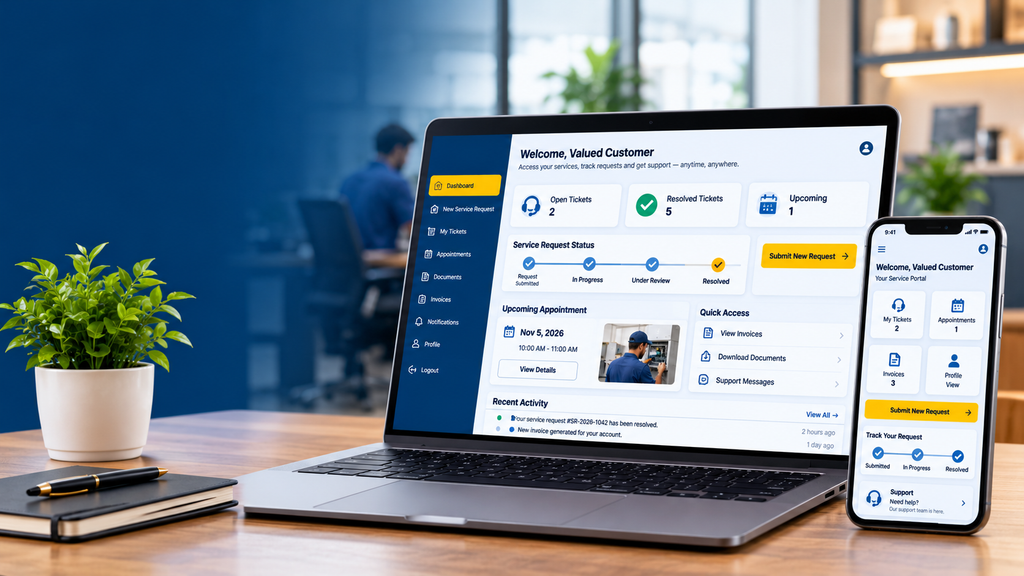
A dashboard provides an overview of the customer’s relationship with your business. It can display recent requests, pending actions, upcoming appointments, notifications and frequently used services.
The layout should prioritise the actions customers need most often. A simple, clearly organised dashboard is generally more useful than a crowded screen filled with features customers rarely use.
3. Online Service Request Submission
Customers should be able to describe a problem or request without having to explain everything repeatedly through different channels.
A request form may include:
- Request category and service type
- Problem description and relevant reference number
- Preferred service date or time, where applicable
- Location or equipment details, if required
- Attachments such as photographs or documents
- Confirmation after successful submission
Use conditional form fields when different service types require different information. Collect only information needed to process the request.
4. Support Ticket and Request Tracking
Customers should be able to see whether a request has been received, assigned, reviewed, resolved or closed. Your business can define statuses that match its real workflow.
A useful ticket record may contain a reference number, submission date, assigned team, status history, customer messages and resolution notes. Staff should be able to update the ticket without losing its history.
5. Appointment Booking and Scheduling
For businesses that provide consultations, maintenance visits or scheduled services, the portal can let customers request available time slots. Depending on the requirements, the system may support appointment confirmation, rescheduling, cancellation and reminder notifications.
If multiple staff members or service locations are involved, availability rules should be designed carefully to avoid double bookings.
6. Document, Invoice and Service History Access
A customer account can provide access to relevant documents such as invoices, quotations, service reports, receipts, contracts and previous service records.
Documents should be accessible only to authorised users. Sensitive files should not be exposed through guessable public links or unrestricted folders.
7. Notifications and Updates
Notifications can inform customers when a request is received, an appointment is confirmed or a ticket status changes. Depending on the project, these notifications may be delivered through email, SMS or an approved messaging integration.
Notification rules should be configurable so that customers receive useful updates rather than repeated messages for every minor change. Third-party messaging and SMS charges may apply separately.
8. Knowledge Base and Frequently Asked Questions
A searchable help centre can answer common questions about services, booking procedures, troubleshooting, payments or maintenance. Articles can include written instructions, diagrams or short videos where appropriate.
Organise help content by topic and make it easy for customers to search. Include a clear support contact option when an article does not solve their problem.
9. Customer Feedback and Complaint Management
Where appropriate, customers can submit feedback after a service is completed or raise a complaint through a defined workflow. Administrators can categorise feedback, assign follow-up tasks and record the resolution.
Any feedback collection should be transparent and linked to genuine customer interactions. The portal should not display fabricated reviews or misleading ratings.
10. Administrative Dashboard
The administrative dashboard is where authorised employees manage portal activity. Depending on the project, it may include:
- Customer accounts and permissions
- Service requests and support tickets
- Staff assignment and status updates
- Appointment and calendar management
- Document and service record management
- Notification templates and delivery settings
- Search, filters and operational reports
- Audit records for important actions
Different staff roles should receive only the permissions required for their responsibilities. For example, a support agent may need to manage tickets without having access to system-wide settings.
Advanced Features to Consider
After the core workflow is established, your business may benefit from additional capabilities. These should be selected according to a genuine operational need rather than added simply to make the software appear more complex.
- CRM integration: Synchronise authorised customer and enquiry information with an existing customer relationship management system.
- Accounting integration: Connect invoice or payment status with supported accounting software where practical.
- Payment gateway integration: Allow customers to pay eligible invoices online through a supported payment provider.
- WhatsApp notifications: Send permitted service updates through an approved WhatsApp Business integration, subject to provider requirements and applicable consent rules.
- Multi-branch support: Route requests to the appropriate office, service centre or regional team.
- Customer organisation accounts: Allow authorised users from one business client to access shared company records with defined permissions.
- Reports and analytics: Review request volumes, resolution stages, recurring issues and service workload.
- API integration: Connect the portal with other business systems where supported APIs are available.
Benefits of a Customer Self-Service Portal
More Accessible Service
Customers can submit requests and review available information online without depending entirely on office-hour calls.
Better Request Visibility
Customers and authorised staff can refer to a shared status record instead of relying on scattered updates.
Organised Workflows
Structured forms, assignments and status changes can help reduce avoidable manual coordination.
Centralised Records
Service history, documents and customer interactions can be easier to locate when managed in one system.
Consistent Communication
Automated notifications can provide standard updates at important stages of the service process.
Room to Scale
A well-planned portal can be expanded as the business adds services, staff, locations or customer account types.
These benefits are potential outcomes, not automatic guarantees. Results depend on portal usability, internal adoption, accurate data, staff training and the quality of the underlying service process.
Customer Portal vs. Customer Support Software
These solutions overlap, but they are not always the same. A customer portal is the interface customers use to access services and information. Customer support software typically helps internal teams manage tickets, conversations and service workflows. A custom solution can combine both, or a portal can connect to an existing support platform.
| Capability | Customer Self-Service Portal | Support Management System |
|---|---|---|
| Main users | Customers and authorised client users | Support staff and administrators |
| Typical tasks | Submit requests, track status, access documents | Assign tickets, manage queues, resolve issues |
| Customer account view | Usually a core feature | May be limited or staff-facing |
| Workflow management | Customer-facing request stages | Internal routing, assignment and escalation |
| How they work together | Can display updates from the support system | Can process requests submitted through the portal |
Custom Customer Portal vs. Ready-Made Software
Before development begins, compare a custom portal with existing customer support or service management software. The most suitable option depends on your workflows, integration requirements, budget and available technical resources.
| Factor | Custom Portal | Ready-Made Software |
|---|---|---|
| Workflow flexibility | Can be designed around specific business processes | Usually follows the provider’s available configuration options |
| Initial investment | May be higher for a bespoke implementation | May have a lower initial setup cost or subscription entry point |
| Integration | Can be built around supported systems and APIs | Depends on available integrations and plan restrictions |
| Maintenance | Requires an agreed maintenance and security plan | Core platform maintenance is generally handled by the provider |
| Best suited for | Businesses with specialised workflows or integration needs | Businesses whose requirements fit existing features |
A discovery and requirements review can help determine whether a custom build is justified. Avoid developing features from scratch when a reliable existing product already meets your requirements.
Customer Self-Service Portal Development Cost in Erode
The cost of customer self-service portal development depends on the number of user roles, the complexity of service workflows, the design, security requirements, integrations and the scope of the administrative dashboard.
The following figures are illustrative planning ranges, not verified market averages or a formal Greap Technologies quotation. Actual pricing requires a review of the project requirements.
| Portal Type | Indicative Budget | Typical Scope |
|---|---|---|
| Basic Customer Portal | ₹25,000–₹50,000 | Customer login, basic dashboard, request forms and simple admin management |
| Standard Self-Service Portal | ₹50,000–₹1,20,000 | Request tracking, ticket statuses, notifications, customer history and document access |
| Advanced Service Portal | ₹1,20,000–₹3,00,000 | Appointment scheduling, multiple roles, more advanced workflows and selected integrations |
| Integrated Enterprise Portal | ₹3,00,000+ | Complex permissions, multi-branch workflows, APIs and integrations with business systems |
Hosting, domain registration, paid software licences, messaging charges, payment provider fees, third-party subscriptions and ongoing maintenance may be billed separately. Confirm what is included in the development proposal before approving a budget.
How Long Does Portal Development Take?
The timeline depends on whether the project requires only a few customer-facing functions or a complete service workflow with integrations.
- Basic portal: approximately 2–4 weeks
- Standard portal: approximately 4–8 weeks
- Advanced portal: approximately 8–14 weeks
- Complex integrated portal: 3–6 months or longer
These are indicative planning estimates. Requirements finalisation, design approval, third-party access, data migration, testing and feedback can affect the delivery schedule.
Security and Privacy Considerations
A customer portal may store contact details, service records, invoices, contracts or other business information. Security should therefore be considered from the beginning rather than added only before launch.
- Use secure authentication and appropriate password handling.
- Enforce server-side authorisation for every protected record.
- Separate customer data so one account cannot access another customer’s records.
- Use HTTPS and secure session management.
- Validate uploaded files and restrict permitted file types and sizes.
- Apply role-based permissions to customer, staff and administrator accounts.
- Maintain suitable backups and test restoration procedures.
- Record important administrative actions where auditability is required.
- Define retention and deletion procedures for customer information.
- Keep dependencies, server software and the application updated.
Security measures should match the sensitivity of the information being handled. Businesses should also review applicable privacy and legal obligations for their specific services.
How to Choose a Customer Portal Development Company in Erode
Choosing a development partner involves more than comparing the initial price. The team should understand how your service business operates and be able to translate that process into a usable, maintainable application.
- Define your customer journey: Document how a customer submits a request, how your team processes it and how the customer receives the outcome.
- Prioritise essential features: Separate launch requirements from optional future enhancements.
- Review relevant experience: Ask about similar portal workflows, dashboards, integrations and mobile-responsive interfaces.
- Check ownership and access: Clarify source-code ownership, hosting access, administrator credentials and handover arrangements.
- Discuss maintenance: Confirm how bug fixes, security updates, backups and future improvements will be handled.
- Plan testing: Ensure that customer permissions, request workflows, notifications and mobile layouts are tested before launch.
- Request a written scope: The proposal should list deliverables, exclusions, timeline, payment milestones and recurring costs.
Why Consider Greap Technologies?
Greap Technologies provides website development, software development and digital growth solutions for businesses. If your company is considering a customer self-service portal in Erode, the first step is to identify which customer interactions should move online and which tasks your team needs to manage internally.
Depending on the requirements, a project may include a responsive customer dashboard, service request management, appointment booking, document access, notifications and an administrative interface. Integrations can be assessed separately based on the systems your business already uses.
We recommend starting with a clearly defined scope, then planning the portal so additional features can be introduced as your operational needs grow.
Planning a Customer Self-Service Portal?
Discuss your service workflow, required portal features, integrations and estimated development budget with Greap Technologies.
Share what your customers need to do online and how your team currently manages service requests.
Discuss Your Portal ProjectFrequently Asked Questions
1. What is customer self-service portal development?
It is the process of designing and building an online platform where customers can manage selected services independently, such as submitting requests, tracking support tickets, booking appointments and accessing authorised documents.
2. How much does a customer self-service portal cost in Erode?
The budget depends on the required features, design, user roles, security and integrations. A basic custom portal may be planned from around ₹25,000, while advanced or integrated systems can cost considerably more. A formal estimate requires a defined project scope.
3. Can a customer portal include support ticket tracking?
Yes. A portal can allow customers to create support tickets, view current statuses, read authorised updates and review previous requests. The exact workflow depends on how the service team handles issues.
4. Can customers book appointments through the portal?
Yes. Appointment booking can be added where the business needs customers to request or select available time slots. Calendar rules, staff availability, confirmation and rescheduling options should be planned for the specific workflow.
5. Is a customer portal suitable for small service businesses?
It can be, particularly when a business repeatedly handles service requests, customer documents or appointments. A smaller business can begin with essential features and expand the portal later if demand justifies it.
6. Can the portal work on mobile phones?
Yes. A responsive web portal can adapt its layout to mobile phones, tablets and desktop computers. The interface should be tested on common screen sizes and browsers before launch.
7. Can a customer portal integrate with existing CRM or accounting software?
Potentially. Integration depends on the other software’s available APIs, permissions, licensing and data structure. These requirements should be checked before the integration cost and timeline are finalised.
8. Can the portal send email or WhatsApp notifications?
Email notifications are a common option. WhatsApp notifications may also be possible through an approved integration, subject to provider rules, consent requirements and applicable charges.
9. How long does it take to develop a customer portal?
A basic portal may take a few weeks, while a more advanced platform can require several months. The timeline depends on the features, approvals, integrations, testing and availability of required information.
10. Does a customer self-service portal replace customer support staff?
Not necessarily. It can make routine tasks easier and help organise requests, while staff continue to handle complex questions, exceptions and situations that need personal attention.
11. Does a customer portal require ongoing maintenance?
Yes. Like other business applications, it may need security updates, backups, bug fixes, compatibility updates, monitoring and feature improvements. The maintenance scope and cost should be agreed before launch.
12. How do I start a customer portal development project with Greap Technologies?
Start by describing your business, the services you provide, how customers contact you today and which tasks you want to move online. Greap Technologies can then discuss the possible scope, features, integrations and budget.