Manufacturing companies depend on reliable suppliers to obtain raw materials, components, packaging, spare parts and other essential resources. When procurement activities are managed through disconnected emails, phone calls and spreadsheets, tracking purchase orders, delivery schedules, invoices and supplier documents can become increasingly difficult.
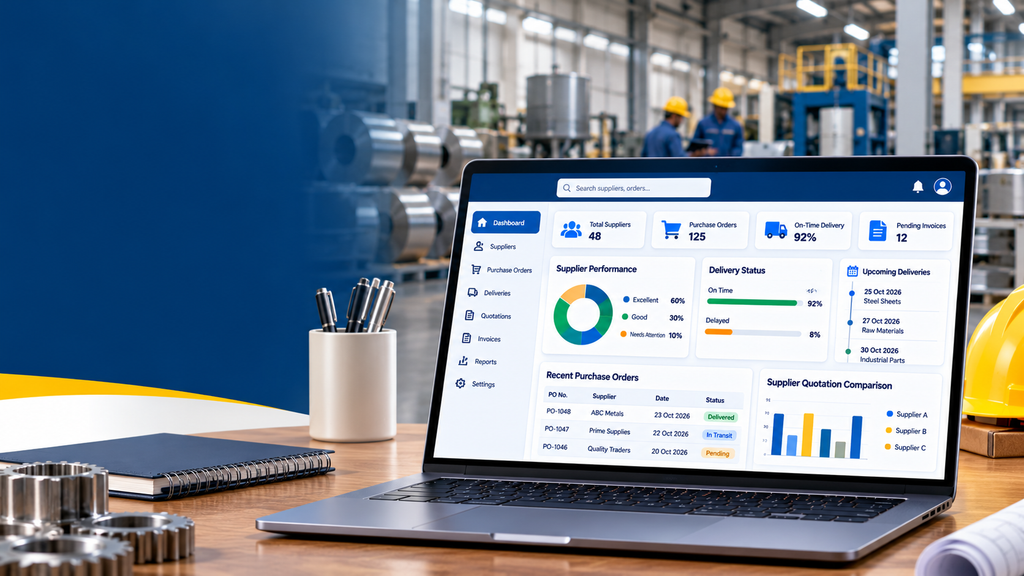
Supplier portal development for manufacturing companies in Tamil Nadu helps businesses create a centralised digital platform for communicating with suppliers and managing procurement-related activities. Depending on the requirements, suppliers can receive purchase orders, confirm delivery schedules, upload invoices, submit quotations and check the status of their transactions through a secure online portal.
For manufacturers, a supplier portal can support better coordination between purchasing teams, suppliers, warehouse staff, accounts departments and production planners. It can also connect with existing ERP, inventory or accounting software where suitable integration options are available.
What Is Supplier Portal Development?
Supplier portal development involves designing and building a web application that allows an organisation and its suppliers to exchange information through a controlled digital environment.
Consider a manufacturing company that purchases steel, textile materials, industrial chemicals, packaging supplies or machine components from multiple vendors. Procurement employees may need to contact different suppliers to confirm prices, check delivery dates and request invoices.
A supplier portal can bring many of these activities into one system. Authorised suppliers can access their assigned purchase orders, respond to requests and submit relevant documents. Internal employees can review supplier responses, approve transactions and monitor procurement activities.
Depending on the business process, a portal may include:
- Supplier registration and approval.
- Supplier profiles and compliance documents.
- Purchase order access and acknowledgement.
- Quotation and tender submissions.
- Delivery schedules and shipment updates.
- Goods receipt and delivery discrepancy reporting.
- Invoice submission and payment status.
- Supplier communication and document exchange.
- Performance tracking and procurement reports.
- ERP, inventory and accounting integrations.
Not every manufacturer needs every feature. The right solution should reflect the company’s procurement workflow, supplier relationships, transaction volume and existing software.
Why Manufacturing Companies in Tamil Nadu May Need a Supplier Portal
Manufacturers across Tamil Nadu operate in industries with different procurement requirements. Textile and garment companies may purchase yarn, fabric, dyes, chemicals and packaging. Engineering and industrial manufacturers may source metals, electronic components, tooling and machine parts. Food processors may manage packaging materials and production inputs.
As supplier networks grow, maintaining accurate and timely communication becomes increasingly important.
Textile and Garment Manufacturing
Coordinate material orders, supplier quotations, delivery schedules, purchase documents and invoice submissions for textile-related procurement.
Engineering and Machinery
Manage component procurement, technical specifications, vendor quotations, spare parts and purchase order acknowledgements.
Automotive and Component Manufacturing
Organise supplier documentation, delivery commitments, component specifications and procurement communication.
Food and Packaging Manufacturing
Track packaging material orders, supplier documents, delivery updates and records required by the company’s quality processes.
Electronics Manufacturing
Coordinate electronic components, technical documentation, order confirmations and expected delivery dates.
Industrial Products and Chemicals
Manage supplier details, product specifications, relevant safety documents and purchasing records according to business requirements.
A portal can be particularly useful when multiple departments need access to the same procurement information. However, its value depends on the quality of the underlying data and whether suppliers and employees consistently use the system.
Essential Features of Supplier Portal Development
1. Supplier Registration and Onboarding
Manufacturers often need to collect and review supplier information before allowing a vendor to participate in purchasing activities. A digital onboarding workflow can organise this process.
Potential features include:
- Supplier registration forms.
- Company name and contact information.
- Product and service categories supplied.
- Business and tax identification details, where applicable.
- Banking information submission through an appropriately secured process.
- Document uploads and expiry dates.
- Internal review and approval workflows.
- Supplier activation, suspension and profile updates.
Sensitive information should only be collected when necessary and should be visible only to authorised employees. The portal should also define how supplier information is reviewed, updated and retained.
2. Supplier Profile and Vendor Database
A supplier directory gives procurement teams a consistent view of their approved vendors and the products or services they provide.
Supplier profiles may include:
- Supplier contact information.
- Product categories and capabilities.
- Approved material or component lists.
- Agreed commercial terms.
- Relevant documents and certificates.
- Purchase history.
- Internal notes and approval status.
- Performance records, where available.
Access to commercial information should be role-based. For example, a supplier should not be able to view another vendor’s confidential pricing or purchase history.
3. Purchase Order Management
Purchase orders are a central part of manufacturing procurement. A supplier portal can provide an organised way to share approved orders and record supplier responses.
Useful capabilities include:
- Viewing assigned purchase orders.
- Downloading purchase order documents.
- Acknowledging or confirming an order.
- Reviewing quantities and agreed prices.
- Confirming expected delivery dates.
- Requesting changes through a controlled workflow.
- Viewing order revisions and status history.
Where purchase orders are created in an existing ERP system, the portal can potentially retrieve them through an integration. The implementation should define which system controls order numbers, prices, quantities and approval status.
4. Supplier Quotation and RFQ Management
Before placing an order, manufacturers may request quotations from multiple suppliers. RFQ stands for Request for Quotation.
A quotation module can allow procurement employees to send requests to selected vendors and collect their responses in a consistent format.
Depending on the process, suppliers may be able to:
- View assigned quotation requests.
- Submit unit prices and total prices.
- Specify minimum order quantities.
- Provide lead times and expected delivery dates.
- Attach technical documents.
- Specify quotation validity periods.
- Revise submissions before the deadline, if permitted.
Internal employees can compare responses and record approval decisions. Access to competing supplier quotations should be restricted to authorised staff because pricing and commercial terms may be confidential.
5. Raw Material and Component Delivery Tracking
Manufacturing schedules can depend on the timely arrival of raw materials and components. A portal can help purchasing teams monitor expected delivery dates and identify orders that require follow-up.
Potential functions include:
- Expected delivery dates.
- Supplier delivery confirmations.
- Partial delivery information.
- Dispatch references and supporting documents.
- Delivery delay notifications.
- Quantity discrepancy reporting.
- Delivery status history.
For accurate visibility, the portal must distinguish supplier-reported information from verified warehouse receipts. A supplier marking an order as dispatched should not automatically mean the material has been received and accepted by the factory.
6. Goods Receipt and Quality Documentation
When materials arrive, warehouse and quality teams may need to verify quantities, inspect goods and record discrepancies. A supplier portal can support parts of this workflow when the company wants suppliers to receive updates or respond to issues.
Depending on the manufacturing process, the system may support:
- Goods receipt references.
- Accepted, rejected or pending inspection status.
- Shortage or damage reports.
- Quality-related documents.
- Supplier responses to discrepancies.
- Corrective action records.
Actual inspection and acceptance decisions should remain with authorised employees. If these records are maintained in an ERP or quality management system, integration may be preferable to maintaining conflicting copies.
7. Invoice Submission and Payment Status
Suppliers need a clear process for submitting invoices and checking whether payments have been processed. A portal can help organise invoice documents and provide status visibility.
Possible features include:
- Invoice uploads.
- Purchase order references.
- Invoice number and date fields.
- Supporting document attachments.
- Duplicate submission checks.
- Pending review or approval status.
- Payment status, where supported by accounting data.
- Records of queries or discrepancies.
Invoice submission should not automatically mean that an invoice has been approved for payment. The portal should distinguish received, under review, approved, disputed and paid states according to the company’s accounting workflow.
8. Supplier Document Management
Manufacturers may need to collect and maintain supplier agreements, product specifications, quality documents, tax information and other business records.
A document management module can organise files by supplier, product category, purchase order or document type.
Useful functions include:
- Secure document uploads and downloads.
- Document categories and metadata.
- Expiry dates and renewal reminders.
- Version history where needed.
- Approval and review status.
- Restricted access to sensitive records.
- Audit history for important changes.
Document requirements vary by industry. The portal should be configured around the manufacturer’s actual quality, procurement and compliance procedures rather than using a generic list of documents for every supplier.
9. Supplier Communication and Notifications
A portal can centralise selected procurement communications and notify suppliers when action is required.
Notifications may be triggered when:
- A supplier account is approved.
- A purchase order is assigned.
- An order requires acknowledgement.
- A quotation request is available.
- A delivery date changes.
- A document requires an update.
- An invoice needs correction.
- A payment status changes.
Email notifications and in-portal alerts are common options. SMS or WhatsApp notifications may also be considered where appropriate, but they can require additional service configuration and usage fees.
Important business decisions should remain recorded in the portal or the designated system of record, even when notifications are sent through external messaging channels.
10. Supplier Performance Tracking
Manufacturers may want to evaluate supplier performance using consistent operational information. A portal can collect relevant data and present it through reports or dashboards.
Depending on the available records, performance measures may include:
- On-time delivery rate.
- Quantity discrepancies.
- Quality rejection records.
- Quotation response time.
- Purchase order acknowledgement time.
- Invoice correction frequency.
- Open delivery issues.
Metrics should use clearly defined calculations and reliable data. A delayed delivery, for example, should be evaluated against the agreed delivery date and any formally approved changes.
Performance dashboards can support internal reviews, but they should not be treated as objective rankings unless the underlying methodology and data quality justify that interpretation.
11. Admin Dashboard and Employee Permissions
The manufacturing company needs an administrative interface to manage the portal and supervise procurement-related activities.
Common functions include:
- Supplier approval and account management.
- Purchase order visibility and status monitoring.
- Quotation review and comparison.
- Document verification.
- Invoice review and exception handling.
- Delivery and discrepancy reporting.
- Supplier performance reports.
- Employee role and permission management.
- Audit logs for sensitive actions.
Different employees should receive appropriate access. Procurement staff, warehouse staff, quality inspectors, accounts personnel and administrators may need different permissions.
12. ERP, Inventory and Accounting Integration
Integration is an important consideration when a manufacturer already uses software for purchase orders, inventory, accounts or production planning.
A supplier portal may integrate with existing systems to exchange:
- Supplier master records.
- Purchase orders and approved revisions.
- Product and material information.
- Expected and received quantities.
- Goods receipt status.
- Invoice and payment status.
- Supplier performance records.
Integration feasibility depends on the existing software, available APIs, licensing, data quality and access permissions. Older systems may require additional integration work, and not every field can necessarily be synchronised in real time.
Before development begins, define which application is the authoritative source for each type of information. This reduces duplicate records and disagreements between the portal and internal business software.
Benefits of Supplier Portal Development for Manufacturers
1. More Organised Supplier Communication
A shared portal gives suppliers and internal employees a common place to access assigned information. It can reduce the need to search through multiple email threads and disconnected files.
2. Better Purchase Order Visibility
Procurement teams can review supplier acknowledgements, delivery commitments and outstanding orders in one interface, provided the underlying information is maintained accurately.
3. Reduced Manual Data Entry
Structured forms can collect supplier responses in a consistent format. Where integrations are available, selected information may be transferred into existing business systems rather than re-entered manually.
4. Improved Document Organisation
Supplier records, quotations, invoices and related documents can be stored with consistent references, making it easier for authorised staff to locate the information they need.
5. Better Coordination Between Departments
Procurement, warehouse, quality and accounts teams can work from shared transaction records while retaining appropriate role-based permissions.
6. Earlier Visibility of Delivery Issues
Supplier confirmations and delivery updates can help purchasing teams identify potential delays earlier. A portal does not prevent every delay, but it can improve the visibility of issues that suppliers report.
7. More Consistent Supplier Onboarding
A structured registration and approval process can help manufacturers collect required information consistently and identify incomplete supplier records before activation.
8. A Scalable Procurement Workflow
As the supplier network grows, the portal can provide a more structured way to handle procurement interactions. Additional features can be introduced as the company’s processes and requirements evolve.
Supplier Portal vs Vendor Management Software
The terms are related, but they describe different aspects of supplier operations.
| Area | Supplier Portal | Vendor Management Software |
|---|---|---|
| Main purpose | Provides a digital interface for supplier interactions. | Manages vendor records, workflows and related business processes. |
| Supplier login | Usually central to the system. | May be available, depending on the platform. |
| Purchase orders | Suppliers may view and acknowledge assigned orders. | Internal teams may create, approve and monitor orders. |
| Supplier onboarding | Suppliers may submit information and documents. | Internal teams may review and approve supplier records. |
| Invoice handling | May support supplier invoice submission and status visibility. | May support internal invoice review and processing workflows. |
| Performance reporting | Can display selected supplier performance information. | May provide broader vendor evaluation and reporting functions. |
| Integration | Often connects suppliers with internal systems. | May form part of a wider procurement or ERP platform. |
A supplier portal can be one component of a larger vendor management system. The right structure depends on whether the company primarily needs a supplier-facing interface, internal procurement software or both.
Custom Supplier Portal vs Ready-Made Software
Manufacturers should compare custom development with existing procurement or ERP modules before choosing a solution.
When Ready-Made Software May Be Suitable
- Your procurement workflow is relatively standard.
- Your existing ERP already offers a supplier portal module.
- The available software supports your required supplier roles.
- Its integration capabilities meet your needs.
- Its licensing and recurring costs are acceptable.
When Custom Development May Be Suitable
- Your purchase approval process is specific to your business.
- You have unusual supplier onboarding requirements.
- You need custom quotation or delivery workflows.
- Your portal must integrate with specialised legacy software.
- You need a tailored supplier interface and reporting system.
- Existing products do not adequately support your operational requirements.
Custom software offers flexibility but requires planning, testing, maintenance and ongoing technical support. A ready-made solution may be a more economical option if it already covers the required features.
Supplier Portal Development Cost in Tamil Nadu
The cost depends on the number of modules, supplier roles, workflow complexity, security requirements, user interface and integration requirements.
The figures below are illustrative planning estimates, not verified Tamil Nadu market averages or an official Greap Technologies quotation. A project-specific estimate should be prepared after defining the scope.
| Portal Type | Illustrative Development Budget | Possible Features |
|---|---|---|
| Basic Supplier Portal | ₹30,000–₹60,000 | Supplier login, profiles, basic document access and administrative dashboard. |
| Standard Supplier Management Portal | ₹60,000–₹1,50,000 | Supplier onboarding, purchase order visibility, document uploads and basic reporting. |
| Advanced Procurement Portal | ₹1,50,000–₹3,50,000 | Quotation workflows, delivery tracking, invoice handling, approvals and supplier performance reports. |
| Integrated Manufacturing Supplier Platform | ₹3,50,000 and above | Complex ERP integration, multi-department workflows, advanced permissions and custom business rules. |
These figures are intended for early budget planning only. A small portal with complex ERP integration may cost more than a larger portal built primarily with standard features.
Factors That Affect the Development Cost
- Feature scope: Supplier onboarding, RFQs, order management, invoice handling and reporting each require implementation and testing.
- User roles: Different suppliers and internal departments may require separate permissions.
- Workflow complexity: Multi-level approvals and exception handling add development effort.
- Integration requirements: ERP, accounting and inventory connections depend on the existing software and its interfaces.
- Data migration: Importing supplier records, documents and historical transactions can require additional work.
- Security: Sensitive supplier information requires appropriate access control, logging and security testing.
- Notifications: Email, SMS and WhatsApp services may have separate setup or usage costs.
- Hosting and support: Infrastructure, backups, monitoring and ongoing maintenance should be budgeted separately.
Additional Expenses to Consider
Confirm whether the project quotation includes:
- Domain and hosting.
- SSL and infrastructure configuration.
- Email delivery services.
- SMS or WhatsApp messaging fees.
- Third-party software licences.
- ERP integration or API access costs.
- Data migration and document storage.
- Maintenance, monitoring and backups.
- Training and technical documentation.
Request a clear breakdown of one-time development charges and recurring expenses before approving the project.
How Long Does Supplier Portal Development Take?
The development timeline depends on the agreed scope and availability of supplier data, business requirements and integration access. The following are indicative estimates, not guaranteed delivery dates.
| Project Scope | Indicative Timeline |
|---|---|
| Basic supplier portal | Approximately 2–4 weeks. |
| Standard supplier management portal | Approximately 4–8 weeks. |
| Advanced procurement portal | Approximately 8–14 weeks. |
| Complex integrated supplier platform | Approximately 3–6 months or longer. |
Complex approvals, legacy integrations, data migration, changing requirements and delayed testing can extend the timeline. The final schedule should be agreed after requirements and dependencies have been reviewed.
Supplier Portal Development Process
Step 1: Analyse the Procurement Workflow
Document how the company registers suppliers, requests quotations, approves purchase orders, receives materials, handles invoices and resolves discrepancies. Identify which steps should be managed through the portal.
Step 2: Define Supplier and Employee Roles
Identify supplier users and internal departments, including procurement, warehouse, quality, accounts and administrators. Specify which information each role can view or modify.
Step 3: Prioritise Features
Separate essential launch features from optional improvements. A first version may focus on supplier login, purchase order access and document exchange before introducing advanced analytics or complex integrations.
Step 4: Design the Interface
Plan supplier dashboards, purchase order views, document forms, quotation submissions and internal administrative screens. Make frequent tasks easy to complete on desktop and mobile devices.
Step 5: Develop the Application
Build the portal interface, backend logic, database structure, permissions and administrative tools. Define validation rules for supplier data and purchasing transactions.
Step 6: Integrate Existing Business Systems
Connect the portal to ERP, inventory or accounting systems where required and technically feasible. Define data ownership, synchronisation frequency and how failed transactions will be handled.
Step 7: Test Security and Business Rules
Test supplier access restrictions, purchase order visibility, quotation submissions, document uploads, invoice status and administrative approvals. Ensure that one supplier cannot access another supplier’s confidential information.
Step 8: Launch and Train Users
Deploy the application, configure backups and monitoring, and train internal employees. Provide suppliers with instructions for logging in and completing common tasks.
Step 9: Monitor and Improve
Review supplier adoption, unresolved issues, failed integrations and user feedback. Prioritise improvements based on operational needs and actual system usage.
Security Considerations for Manufacturing Supplier Portals
A supplier portal can contain commercially sensitive information, including supplier records, negotiated prices, purchase orders, invoices, technical drawings and quality documents. Security should be considered from the start of development.
Important measures include:
- HTTPS for data transmission.
- Secure authentication and account recovery.
- Role-based access controls and server-side permission checks.
- Protection against common web application vulnerabilities.
- Safe file upload and document download controls.
- Session management and appropriate account protection.
- Audit logs for sensitive actions and approval changes.
- Regular backups and tested recovery procedures.
- Monitoring, software updates and security testing.
- Restricted access to confidential supplier and commercial information.
Security controls should be proportionate to the data and business risks. Manufacturers should also review applicable contractual, privacy and regulatory obligations with qualified professionals where necessary.
Mobile-Friendly Supplier Portal Development
Suppliers and procurement employees may need to check order details, confirm deliveries or upload documents while away from their desks. A responsive portal can support these tasks on smartphones, tablets and desktop computers.
Mobile-friendly features may include:
- Simple navigation and readable order information.
- Responsive purchase order tables.
- Convenient document upload controls.
- Clear delivery confirmation forms.
- Easy access to quotation requests.
- Useful status notifications.
- Efficient performance on slower connections.
A responsive web portal may be sufficient for many manufacturers. A separate mobile app should be considered only when specific requirements justify the additional development and maintenance work.
How Supplier Portals Support Manufacturing Operations
A supplier portal is most effective when it forms part of a broader operational system rather than functioning as an isolated website.
For example, a manufacturing company can use an ERP system to create approved purchase orders. The supplier portal can display the relevant orders to authorised suppliers and collect acknowledgements or delivery confirmations. Warehouse staff can then record actual goods receipt in the designated inventory system.
This workflow helps distinguish the information supplied by vendors from the information verified by the manufacturer.
Similarly, a supplier may submit an invoice through the portal while the accounts team reviews it against the purchase order and goods receipt records. The portal can display the resulting status if the relevant data is available through an integration.
The specific workflow should be designed around the company’s procurement, quality and accounting procedures. A portal should complement existing controls rather than bypass them.
How to Choose a Supplier Portal Development Company in Tamil Nadu
Selecting a development partner involves more than comparing the initial price. The team should understand manufacturing procurement workflows and explain how the proposed software will support them.
Before selecting a provider, consider the following:
- Does the team understand supplier onboarding and purchase order workflows?
- Can the proposed system support different supplier and employee roles?
- Are the features, exclusions and deliverables documented clearly?
- Can the portal integrate with existing ERP or accounting software where feasible?
- How will supplier documents and confidential prices be protected?
- Will the portal work well on mobile devices?
- Who will own the source code and project-specific assets under the contract?
- What hosting, maintenance and support arrangements are included?
- How will additional features be estimated and approved?
- Will employees receive training and technical documentation?
Request a written scope covering the features, development milestones, testing process, payment terms, third-party expenses and post-launch responsibilities. This helps avoid confusion about what the project includes.
Why Consider Greap Technologies?
Greap Technologies provides website development, software development and digital growth services for businesses. Manufacturers considering a supplier portal can begin by identifying their procurement challenges and deciding which workflows would benefit from a dedicated digital system.
A project discussion can cover:
- Supplier registration and onboarding.
- Purchase order management.
- Quotation requests and supplier responses.
- Delivery coordination and document exchange.
- Invoice status and approval workflows.
- Supplier performance reporting.
- ERP, inventory and accounting integration requirements.
- Hosting, maintenance and ongoing support.
The final scope, technology and budget should be based on the manufacturer’s actual processes, supplier network, existing systems and security requirements.
Planning a Supplier Portal for Your Manufacturing Business?
Discuss your supplier onboarding, purchase order, quotation, delivery tracking and integration requirements with Greap Technologies.
Share your business workflow to explore a suitable development scope and estimated budget.
Discuss Your Supplier PortalFrequently Asked Questions
1. What is a supplier portal for manufacturing companies?
A supplier portal is a secure online platform that connects a manufacturer with its suppliers. It can support purchase orders, quotations, delivery updates, invoice submissions, document exchange and supplier communication.
2. How much does supplier portal development cost in Tamil Nadu?
The cost depends on the required features and integrations. For early planning, a basic portal might be estimated at ₹30,000–₹60,000, while advanced integrated platforms can cost several lakhs. These are illustrative figures, not verified market averages or fixed quotations.
3. How long does it take to develop a supplier portal?
A basic portal may take approximately two to four weeks, while a standard system may require four to eight weeks. Complex workflows and ERP integrations can take several months. The actual timeline depends on the approved scope and project dependencies.
4. Can suppliers view and acknowledge purchase orders online?
Yes. A portal can allow authorised suppliers to view assigned purchase orders, download documents, acknowledge orders and provide expected delivery dates, subject to the configured workflow.
5. Can a supplier portal integrate with ERP software?
Integration may be possible when the existing ERP provides suitable APIs or other supported integration methods. Feasibility, cost and timeline depend on the software and required data exchange.
6. Can suppliers submit quotations through the portal?
Yes. A quotation module can allow suppliers to submit prices, quantities, lead times, validity periods and supporting documents in response to assigned requests for quotation.
7. Can a supplier portal track material delivery status?
Yes. It can record expected delivery dates, supplier confirmations, dispatch details and delivery exceptions. Actual receipt and inspection should be recorded according to the manufacturer’s internal procedures.
8. Can suppliers upload invoices and check payment status?
Yes. The portal can support invoice uploads and display approval or payment status when the relevant data is available. Invoice submission should remain separate from invoice approval and payment authorisation.
9. Is supplier portal software suitable for small manufacturing companies?
It can be suitable when a company has recurring supplier interactions that are difficult to manage manually. A smaller business can begin with supplier profiles, purchase order access and document exchange, then add features as needed.
10. Can the portal manage multiple suppliers with different permissions?
Yes. Role-based access can ensure that each supplier sees only its assigned purchase orders, documents and relevant transaction information. Internal employees can receive separate permissions according to their responsibilities.
11. Does supplier portal development include hosting and maintenance?
Not necessarily. Hosting, backups, monitoring, maintenance and third-party services may be separate charges. Confirm the inclusions, renewal costs and support terms in the development quotation.
12. What information is needed before requesting a supplier portal quotation?
Prepare details about supplier numbers, user roles, purchase order workflows, quotation processes, delivery tracking, invoice handling, existing ERP software, security requirements and the desired launch timeline. Sample purchase orders or spreadsheets can help clarify the scope.
Conclusion
Supplier portal development for manufacturing companies in Tamil Nadu can provide a structured way to manage supplier onboarding, purchase orders, quotations, deliveries, invoices and procurement communication.
The right solution depends on the manufacturer’s size, supplier network, purchasing workflow and existing software. A basic portal may be enough for supplier documents and purchase order visibility, while a larger manufacturer may need advanced approval workflows and ERP integration.
Before beginning development, document the essential features, identify the authoritative source for each type of data and agree on a realistic budget. A carefully planned supplier portal can become a practical component of a manufacturer’s wider procurement and digital operations strategy.