As a business grows, managing employee information through spreadsheets, paper forms and separate communication channels can become increasingly difficult. Employees may need to contact HR for leave balances, attendance corrections, payslips, company policies and routine administrative requests. When every request requires manual follow-up, HR teams can spend valuable time on repetitive tasks instead of more strategic responsibilities.
Looking for employee self-service portal development in Erode? Greap Technologies helps businesses explore custom software solutions that bring employee information, leave applications, attendance records, HR requests and important documents into one secure online platform.
An employee self-service portal gives authorised employees a convenient place to access their own information and complete selected HR activities. Managers and HR administrators can manage approvals, maintain records and communicate updates through a central system.
For growing businesses in Erode and across Tamil Nadu, the right portal can help create more consistent HR processes as teams expand. The features should match the company’s actual policies, workforce structure and existing software.
What Is an Employee Self-Service Portal?
An employee self-service portal, commonly called an ESS portal, is a website or web application that allows employees to access and manage permitted employment-related information without relying on HR for every routine task.
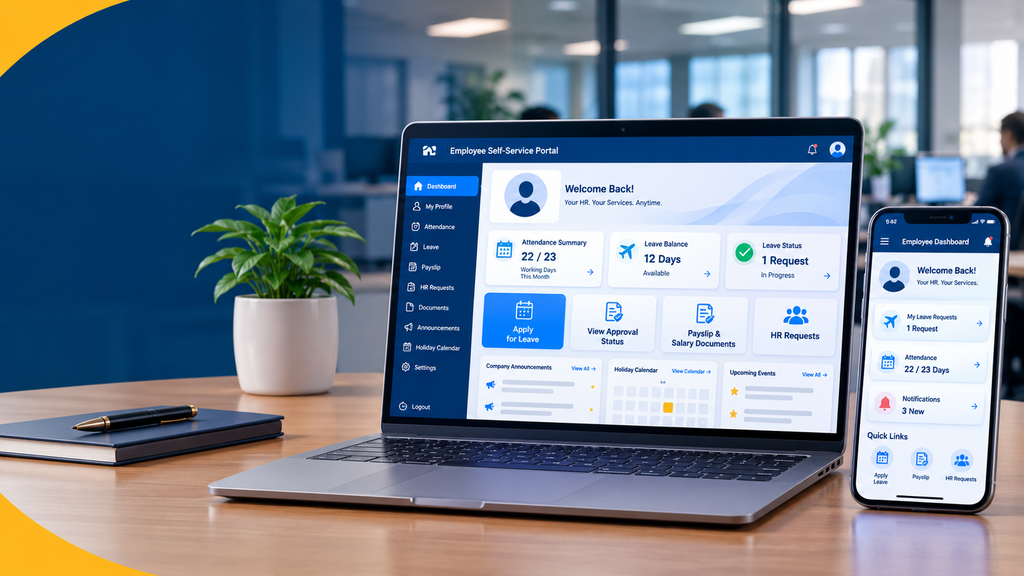
Depending on the system, employees may be able to view attendance records, apply for leave, download payslips, update selected personal details, access company policies, submit HR requests and check approval statuses.
HR administrators and authorised managers use separate dashboards to manage employee records, review requests, approve applications and maintain relevant information. Each user should see only the information and functions permitted by their role.
An ESS portal can operate as a standalone application or as part of a broader human resource management system (HRMS). It may also integrate with existing attendance, payroll or accounting software when suitable integration options are available.
Why Growing Businesses in Erode May Need an ESS Portal
When a company has only a few employees, informal processes may appear manageable. As the workforce grows, HR teams may receive more requests for leave information, attendance corrections, salary documents and employment records.
If these activities are handled across email, paper forms, messaging apps and spreadsheets, it can become harder to maintain a reliable record of each request. A self-service portal offers a more structured way to submit, review and track routine activities.
For example, an employee could apply for leave through the portal, view the request status and receive a notification when a manager makes a decision. HR can review the application history without searching through separate message threads.
Businesses in manufacturing, textiles, retail, distribution, professional services and other sectors may have different workforce requirements. The portal should be designed around those differences rather than forcing every organisation into the same workflow.
Which Businesses Can Benefit from Employee Self-Service Software?
Manufacturing and Textile Companies
Provide employee access to permitted HR records, leave requests, attendance information and company announcements across departments or locations.
Retail and Distribution Businesses
Support employee requests and HR communication across branches, offices, warehouses and retail locations.
IT and Professional Service Companies
Offer employee profiles, leave applications, policy documents, payslip access and onboarding information.
Educational Institutions
Manage selected employee information, staff leave requests, circulars and internal administrative workflows.
Healthcare Organisations
Provide authorised staff with access to HR information, leave workflows, internal announcements and employee documents.
Growing Small and Medium Businesses
Standardise recurring HR activities as employee numbers increase and responsibilities become more distributed.
Essential Features of Employee Self-Service Portal Development
The most useful portal is not necessarily the one with the most features. Start with the tasks employees perform frequently, then add capabilities based on operational needs and the availability of reliable data.
1. Secure Employee Login
Each employee should have an individual account with secure authentication. Depending on the organisation’s requirements, this may include password reset, email verification, multi-factor authentication or integration with an existing identity provider.
Permissions should be enforced by the application server, not only by hiding buttons on the screen. Employees must not be able to access another person’s records by changing a URL or manipulating a request.
2. Employee Profile Management
The employee dashboard can display approved personal and employment information, such as employee ID, department, job title, joining date and reporting manager.
If employees are allowed to update certain details, the portal should define which fields can be edited directly and which require HR verification. Changes to important employment records should be traceable.
3. Attendance Information
Employees can view available attendance records, working days, recorded hours and relevant attendance exceptions. Where appropriate, the portal may provide a process for requesting corrections to missing or inaccurate entries.
If the company already uses biometric devices, access-control systems or attendance software, integration may be possible depending on the system’s capabilities. The portal should not be treated as the source of truth until the attendance data flow and approval process have been defined.
4. Leave Application and Approval
Leave management is one of the most common reasons businesses consider an ESS portal. Employees can submit leave applications, choose dates, select a leave category and add supporting information where required.
The system can then route the request to the appropriate manager or HR team. Employees should be able to view whether the application is pending, approved, rejected or cancelled.
Leave balances and eligibility rules should reflect the company’s approved policies. If leave is calculated automatically, the calculation rules need to be documented and tested.
5. Payslip and Salary Document Access
An ESS portal can provide employees with access to their authorised payslips and relevant salary documents. This reduces the need to request the same document repeatedly from HR.
Payroll information is sensitive. Access should be restricted to the relevant employee and authorised payroll personnel, with secure document storage and appropriate download controls.
Payroll calculation, statutory deductions and salary processing are separate capabilities. If the business needs these functions, they should be scoped explicitly rather than assumed to be included in a basic self-service portal.
6. HR Request Management
Employees may need employment letters, address updates, identity document corrections, experience certificates or other administrative services. A central request form can help HR receive the necessary details in a consistent format.
Each request can have a reference number, submission date, assigned HR staff member, status and relevant comments. Employees can check progress without repeatedly contacting the department.
7. Employee Document Management
The portal may provide authorised access to appointment letters, policy documents, employee handbooks, payslips and other relevant files.
Some documents should be visible only to HR, payroll staff or selected managers. The system should support appropriate permissions and document retention practices rather than placing every file in a shared directory.
8. Company Announcements and Notifications
HR teams can publish internal announcements about holidays, policy changes, training sessions and company events. Notifications can help employees discover new information or track the status of requests.
Email or other notification channels may be added depending on the requirements. Messaging integrations and SMS services can involve separate provider charges and configuration.
9. Holiday Calendar and Work Schedules
A shared calendar can show company holidays, planned events and other relevant dates. Businesses with multiple branches or shifts may need separate calendars or schedules based on employee location, department or role.
Shift scheduling and workforce rostering are more advanced capabilities. They should be included only if the business needs the portal to manage those processes.
10. Employee Onboarding
An onboarding module can help new employees access joining instructions, submit permitted information, review company policies and complete assigned onboarding tasks.
HR administrators can monitor which tasks have been completed and identify outstanding items. Sensitive documents should be collected and stored through a secure process.
11. Manager and HR Dashboards
Employees are not the only users of an ESS portal. Managers and HR teams need interfaces that support their responsibilities.
- Review and approve leave applications.
- View permitted team attendance summaries.
- Manage HR requests and application statuses.
- Maintain employee records according to assigned permissions.
- Publish announcements and update policy documents.
- Generate authorised operational reports.
- Review relevant activity history for accountability.
Manager access should be limited to the employees and information relevant to their responsibilities. HR administrators may need broader permissions, while system administrators may require separate technical controls.
Advanced Features for Growing Organisations
Once the core employee workflows are working reliably, additional capabilities can be considered.
- Biometric attendance integration: Import attendance information from compatible devices or software.
- Payroll integration: Connect to an existing payroll system to display approved employee documents or payroll-related information.
- Multi-branch support: Apply appropriate policies, calendars and access permissions across locations.
- Shift management: Display assigned shifts or connect to a dedicated scheduling system.
- Performance management: Integrate selected appraisal or performance workflows when required.
- Training management: Publish training materials and track assigned learning tasks.
- Single sign-on: Connect the portal with an existing identity platform when supported.
- HRMS or ERP integration: Exchange approved data with existing business systems through supported integration methods.
- Reports and analytics: Review request volumes, leave patterns and workflow status using authorised and appropriately aggregated data.
Advanced integrations require technical validation. The availability of APIs, licensing, data quality and vendor restrictions can affect the cost and feasibility of connecting external systems.
Benefits of an Employee Self-Service Portal
Convenient Employee Access
Employees can access permitted information and submit routine requests through a central platform.
More Organised HR Workflows
Structured forms and approval stages can make requests easier to track and manage.
Centralised Records
Employee documents, requests and relevant activity histories can be managed in one system.
Clearer Request Status
Employees can check whether an application is pending or completed instead of relying on repeated follow-ups.
Consistent Communication
Announcements and notifications can help HR communicate important information more systematically.
Support for Business Growth
A well-designed system can accommodate additional employees, departments and workflows as requirements change.
These are potential benefits, not guaranteed outcomes. Results depend on usability, employee adoption, accurate data, clear company policies and how consistently the system is maintained.
Employee Self-Service Portal vs. Complete HRMS
An employee self-service portal focuses on giving employees access to selected information and HR services. A human resource management system (HRMS) may cover a much wider set of processes, including employee records, recruitment, payroll, performance management and workforce planning.
| Area | Employee Self-Service Portal | Complete HRMS |
|---|---|---|
| Main purpose | Employee access to information and routine requests | Broader management of HR processes |
| Leave applications | Common feature | Usually available in systems that support leave management |
| Payslip access | Can be included | Depends on payroll capabilities and configuration |
| Payroll calculation | Not automatically included | May be included or provided through integration |
| Recruitment and onboarding | May include selected onboarding tasks | May cover the wider employee lifecycle |
| Best suited for | Businesses prioritising employee-facing HR services | Businesses needing a broader HR management platform |
A business does not always need a complete HRMS to introduce employee self-service. A smaller portal or an ESS module connected to existing software may be a more practical starting point.
Custom Employee Portal vs. Ready-Made HR Software
Before commissioning development, compare the cost and suitability of custom software with established HR products. The best choice depends on company policies, integration requirements, employee numbers and the capabilities available in existing solutions.
| Factor | Custom Employee Portal | Ready-Made HR Software |
|---|---|---|
| Workflow flexibility | Can be designed around defined company processes | Depends on available settings and supported workflows |
| Initial cost | May require a larger upfront development investment | May offer a lower initial setup cost or subscription pricing |
| Integration | Can be planned around supported systems and APIs | Depends on the provider’s available integrations |
| Maintenance | Requires an agreed maintenance and security plan | Core platform maintenance is generally managed by the vendor |
| Best suited for | Specific workflows or integration needs not met by standard products | Businesses whose needs fit the product’s existing capabilities |
Do not choose custom development solely because it offers more flexibility. First identify the essential requirements and check whether a reliable existing product already meets them.
Employee Self-Service Portal Development Cost in Erode
The development cost depends on the number of modules, user roles, workflow complexity, design requirements, integrations, security controls and the extent of administrative functionality.
Important: The following figures are illustrative planning estimates, not verified market averages or a formal Greap Technologies quotation. A final price requires a review of the project requirements.
| Portal Type | Indicative Budget | Possible Scope |
|---|---|---|
| Basic Employee Portal | ₹25,000–₹50,000 | Employee login, profile, announcements and basic HR requests |
| Standard ESS Portal | ₹50,000–₹1,20,000 | Leave applications, approval workflows, attendance views and document access |
| Advanced Employee Portal | ₹1,20,000–₹3,00,000 | Multiple roles, expanded HR workflows, reporting and selected integrations |
| Integrated HR Platform | ₹3,00,000+ | Complex multi-branch workflows, payroll or attendance integrations and broader system connectivity |
These ranges should not be treated as fixed package prices. A basic portal that displays payslips is different from a system that calculates payroll, handles statutory requirements and integrates with attendance devices.
Hosting, domain registration, paid licences, third-party services, messaging charges, data migration, ongoing support and future enhancements may cost extra. Ask for a written proposal that clearly identifies included features and exclusions.
How Long Does Development Take?
The timeline depends on the agreed scope, the number of user roles, the availability of existing employee data and the complexity of the approval process.
- Basic employee portal: approximately 2–4 weeks
- Standard ESS portal: approximately 4–8 weeks
- Advanced portal: approximately 8–14 weeks
- Complex integrated platform: 3–6 months or longer
These are indicative planning estimates rather than delivery guarantees. Requirements approval, testing, feedback, integration access and data migration can affect the actual schedule.
Security and Privacy for Employee Information
Employee portals may handle sensitive personal information, attendance records, salary documents and employment-related files. Security and access control should therefore be part of the original design.
- Use secure authentication and appropriate password handling.
- Enforce server-side access permissions for every protected record.
- Ensure employees can access only their own permitted information.
- Restrict payroll and sensitive HR information to authorised users.
- Use HTTPS and secure session management.
- Protect file uploads and use access-controlled document storage.
- Maintain appropriate backups and test recovery procedures.
- Keep application dependencies and server software updated.
- Record important administrative actions where audit trails are required.
- Define suitable data retention, correction and deletion procedures.
Businesses should review their applicable privacy, employment and record-keeping obligations. The appropriate controls depend on the type of information stored and how the organisation uses it.
How to Choose an Employee Portal Development Company in Erode
The development partner should understand both software requirements and the practical realities of HR workflows. Before selecting a provider, consider the following steps.
- Map your HR processes: Document how employees currently apply for leave, request documents and access attendance or salary information.
- Identify user roles: Define what employees, managers, HR staff and system administrators should be allowed to do.
- Prioritise the first release: Begin with the most valuable functions and leave optional modules for later phases.
- Review integration requirements: Check whether existing attendance, payroll or HR systems provide suitable integration options.
- Check data security: Ask how access controls, sensitive documents, backups and audit records will be handled.
- Clarify ownership: Confirm source-code ownership, hosting access, administrative credentials and handover documentation.
- Plan ongoing maintenance: Agree on how bugs, updates, backups and future improvements will be managed.
- Request a written scope: Ensure the proposal includes features, exclusions, milestones, estimated delivery and recurring charges.
Why Consider Greap Technologies?
Greap Technologies provides website development, software development and digital growth solutions for businesses. For organisations exploring employee self-service portal development in Erode, the starting point is understanding the company’s HR processes and identifying which employee tasks should move online.
Depending on the requirements, a project may include employee profiles, leave management, attendance views, document access, HR requests, notifications and separate dashboards for employees, managers and administrators.
Existing payroll, attendance or HR software can be assessed for integration where suitable technical options are available. The final scope should clearly distinguish employee self-service functions from more extensive payroll or HRMS capabilities.
Planning an Employee Self-Service Portal?
Discuss your employee workflows, required HR features, integrations and estimated development budget with Greap Technologies.
Share your current HR process and the tasks you want employees to manage online.
Discuss Your ESS PortalFrequently Asked Questions
1. What is an employee self-service portal?
It is a secure online platform that allows employees to access permitted HR information and complete routine tasks such as leave applications, document requests and payslip downloads.
2. How much does employee self-service portal development cost in Erode?
The cost depends on the features, user roles, integrations and security requirements. A basic custom portal may be planned from around ₹25,000, while advanced integrated systems can cost considerably more. A final estimate requires a defined scope.
3. Can employees apply for leave through the portal?
Yes. The portal can support leave applications, approval workflows, application status and leave balances when the relevant company policies and calculation rules are configured.
4. Can employees download their payslips online?
Yes. Payslips can be made available to authorised employees through secure account access. The payslip feature does not automatically include payroll calculation or salary processing.
5. Can an ESS portal integrate with biometric attendance devices?
Potentially. Integration depends on the device or attendance software, its data access options and the available API or export mechanism. These details should be checked before development.
6. Is an employee self-service portal suitable for small businesses?
Yes, if the business has recurring HR tasks that would benefit from a central system. A small business can start with essential features and expand the portal as its workforce and needs grow.
7. Can employees use the portal on mobile phones?
Yes. A responsive web portal can adapt to mobile phones, tablets and desktop computers. The interface should be tested on relevant devices and browsers before launch.
8. Does an ESS portal include payroll processing?
Not necessarily. Employee access to payslips and payroll calculation are different functions. Payroll processing should be included in the project scope explicitly or connected through a supported integration.
9. How long does it take to develop an employee portal?
A basic portal may take a few weeks, while a more advanced platform with integrations can take several months. The timeline depends on requirements, approvals, testing and integration complexity.
10. Can a portal support multiple branches?
Yes. Multi-branch support can be designed with suitable employee assignments, role-based access, branch-specific calendars and relevant HR workflows.
11. Does an employee self-service portal need maintenance?
Yes. Ongoing maintenance may include security updates, bug fixes, backups, compatibility updates, monitoring and feature improvements. The maintenance scope should be agreed before launch.
12. How can I start an employee portal project with Greap Technologies?
Describe your workforce, current HR processes, required features and existing software. Greap Technologies can discuss the possible project scope, integrations, timeline and budget based on those requirements.