Professional communication is essential for every growing business. A branded email address such as sales@yourcompany.in creates a consistent business identity and helps customers communicate with the right team. Business email setup and migration involve more than creating mailboxes: domain configuration, security, data transfer and reliable email delivery all need attention.
Businesses in Erode use email for quotations, purchase orders, invoices, customer enquiries, supplier communication, recruitment and internal coordination. Whether you are starting a new company or moving from an older hosting email service, a properly configured business email system can make everyday communication easier to manage.
This guide explains business email platforms, custom-domain configuration, mailbox migration, email security, implementation steps and indicative planning costs for businesses in Erode and across Tamil Nadu.
What Is Business Email Setup?
Business email setup is the process of creating and configuring email accounts that use your organisation’s domain name instead of a generic personal email address.
For example, a business using greap-example.in could create:
- info@greap-example.in – general enquiries
- sales@greap-example.in – sales communication
- accounts@greap-example.in – billing and accounts
- support@greap-example.in – customer support
- hr@greap-example.in – recruitment and HR communication
- name@greap-example.in – individual employee accounts
These are illustrative addresses. The actual domain and mailbox names depend on the organisation. A business email provider hosts the mailboxes, while DNS records connect the domain to that provider.
Why Do Businesses in Erode Need Professional Email?
Businesses often communicate with customers, distributors, suppliers, employees and service partners. A domain-based email system gives the organisation a consistent address structure and centralised account administration.
- Professional identity: Use an email address that matches your business domain.
- Team organisation: Create separate accounts for sales, accounts, support and management.
- Better administration: Manage employee accounts and access from a central console.
- Collaboration: Use calendars, shared files and productivity tools where supported by the selected plan.
- Business continuity: Plan account recovery, mailbox retention and employee offboarding.
- Security management: Apply authentication, access controls and anti-phishing settings.
Business Email Platforms: Which One Should You Choose?
The right platform depends on your budget, number of employees, storage requirements, preferred applications and security needs. There is no single option that suits every organisation.
1. Google Workspace
Google Workspace provides custom-domain email with Gmail and can include collaboration tools such as Google Drive, Calendar, Meet and Docs, depending on the subscription.
It may suit businesses that:
- Prefer the Gmail interface.
- Work with shared documents and cloud storage.
- Need team calendars and online meetings.
- Want centralised user and security administration.
2. Microsoft 365
Microsoft 365 offers business email through Exchange Online and may include Outlook, Word, Excel, Teams, OneDrive and other services, depending on the chosen plan.
It may suit organisations that:
- Use Outlook as their primary email application.
- Depend on Microsoft Office applications.
- Need calendar and team collaboration features.
- Require centralised identity and administration controls.
3. Zoho Mail
Zoho Mail offers custom-domain business email and administration features. It can be a practical option for small and medium-sized organisations comparing email-focused plans and wider Zoho services.
It may suit businesses that:
- Need domain-based email accounts.
- Want to compare different mailbox plans.
- Already use other Zoho business applications.
- Prefer a centralised business email administration panel.
4. Hosting-Based Business Email
Some website hosting packages include email accounts through a hosting control panel. This may be sufficient for a small organisation with limited email requirements.
Before choosing it, check mailbox storage, sending limits, spam filtering, backup arrangements, support quality and the provider’s account recovery options. Website hosting and email hosting do not necessarily need to be purchased from the same provider.
Business Email Platform Comparison
| Platform | Main strength | Suitable for | Things to evaluate |
|---|---|---|---|
| Google Workspace | Gmail and Google collaboration tools | Teams using Google applications | Plan storage, licensing and administration |
| Microsoft 365 | Outlook and Microsoft productivity tools | Office-focused organisations | Exchange features, licences and security settings |
| Zoho Mail | Domain-based email and administration | Small and medium businesses | Mailbox limits, plan features and integrations |
| Hosting email | Convenience with website hosting | Basic email requirements | Storage, deliverability, support and backup |
Compare current plan details directly with the provider before purchasing. Features, storage allowances, regional availability and subscription prices can change.
What Is Included in Business Email Setup Services?
A complete setup project should cover the domain, provider configuration, user accounts, DNS records, device access and testing.
1. Domain and DNS Verification
The domain owner must verify control of the domain with the selected email provider. This commonly involves adding a verification TXT record or another record specified by the provider.
2. Mailbox Creation
Create the required user mailboxes and role-based addresses. Decide whether an address needs its own mailbox, an alias, a group or a shared mailbox. These options can have different licensing and access rules.
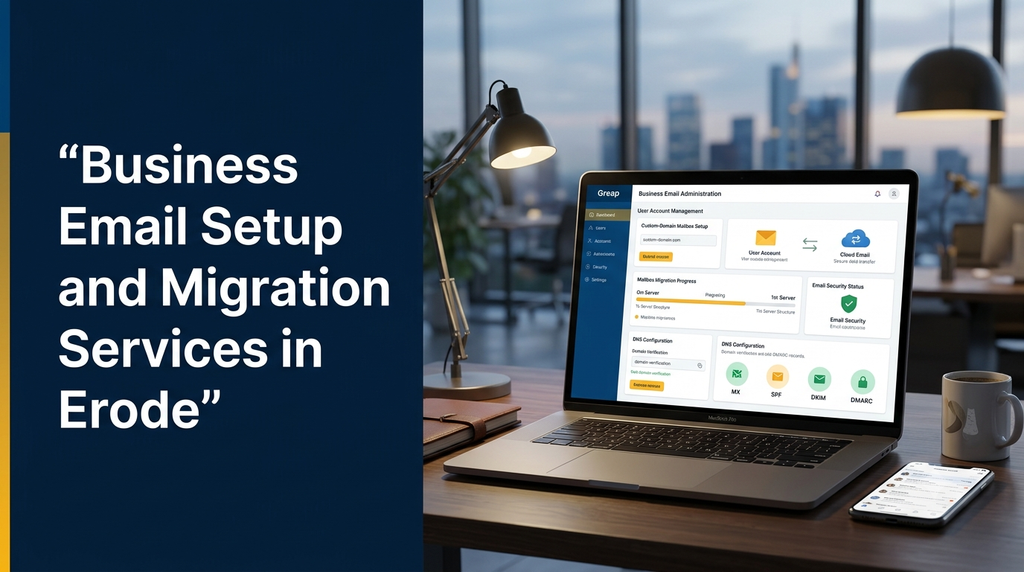
3. MX Record Configuration
Mail Exchange (MX) records tell other mail systems where to deliver incoming messages for your domain. The destination provider supplies the correct values and priorities.
4. SPF Configuration
Sender Policy Framework (SPF) identifies the services authorised to send email for your domain. If your website, email platform and other applications send messages, their legitimate sending sources must be considered together.
5. DKIM Configuration
DomainKeys Identified Mail (DKIM) uses a digital signature so receiving systems can verify that a message was authorised by a configured sending service and was not altered in transit.
6. DMARC Configuration
Domain-based Message Authentication, Reporting and Conformance (DMARC) publishes a policy for handling messages that fail domain authentication checks. It can also provide reports that help domain owners understand email authentication activity.
What Is Business Email Migration?
Business email migration means moving existing email accounts and supported mailbox data from one email service to another.
Common migration scenarios include:
- Hosting email to Google Workspace.
- Hosting email to Microsoft 365.
- Hosting email to Zoho Mail.
- Google Workspace to Microsoft 365.
- Microsoft 365 to Google Workspace.
- Moving email accounts after a hosting provider change.
- Consolidating multiple email providers into one platform.
Depending on the source and destination platforms, migration tools may support email messages, folders, contacts and calendars. Not every migration method transfers every data type, so the scope must be checked before work begins.
What Data Can Be Migrated?
| Data type | Migration considerations |
|---|---|
| Existing emails | Messages, dates, folders and supported attachments |
| Contacts | Address books and contact details, where supported |
| Calendars | Events, schedules and invitations, depending on the migration tool |
| Mailbox folders | Folder structure and supported labels |
| Aliases and groups | Usually need to be recreated or mapped separately |
| Shared mailboxes | Require separate planning and permission checks |
Migration feasibility depends on mailbox size, source access, account permissions, supported protocols and destination platform capabilities. A pre-migration assessment helps identify limitations before the switch.
Business Email Migration Process
Step 1: Review the Existing Email System
Identify the current provider, number of mailboxes, mailbox sizes, domain registrar, DNS host, aliases, shared addresses and any applications that send email using the domain.
Step 2: Select the Destination Platform
Compare the required features, licences, storage, security controls, support and recurring costs. Choose the platform based on actual business requirements rather than features that may never be used.
Step 3: Prepare the New Accounts
Create the destination user accounts, groups, aliases and shared mailboxes. Confirm that each user has the appropriate licence and access permissions.
Step 4: Plan and Transfer Existing Mail
Use a supported migration method to copy existing mailbox data. Where possible, test with a small mailbox before moving the remaining accounts. Keep the original mail system available until migration validation is complete.
Step 5: Configure DNS and Switch Mail Routing
Schedule the mail-routing change during a suitable business window. Update the MX records using the destination provider’s exact instructions. Review SPF, DKIM and DMARC without accidentally removing records required by other legitimate sending services.
Step 6: Configure Devices and Applications
Set up the new accounts on supported desktop applications, mobile devices and webmail. Update website contact forms, invoicing systems, CRM platforms and other applications that send or receive business messages.
Step 7: Test and Validate
Test incoming and outgoing messages, replies, attachments, aliases, shared mailboxes and authentication results. Confirm that important business workflows continue to work.
How to Reduce Email Migration Disruption
A migration should be planned so that employees know when to use the new system and where to report problems.
- Prepare a list of all existing mailboxes and aliases.
- Confirm access to the domain registrar and active DNS host.
- Keep a record of existing DNS settings before changing them.
- Create destination mailboxes before switching incoming mail routing.
- Test the migration with a representative account.
- Choose a low-activity period for the final mail-routing change.
- Communicate login instructions to employees securely.
- Keep the old service available until the new service is validated.
- Check website forms and automated business notifications.
No provider or migration method can guarantee zero interruption in every situation. The goal is to reduce disruption through preparation, staged transfer and post-migration checks.
Business Email Security Best Practices
Business mailboxes can contain quotations, invoices, customer information and internal discussions. Protecting these accounts should be part of the original setup.
- Multi-factor authentication: Enable MFA for user and administrator accounts.
- Strong account recovery: Configure secure recovery methods and protect administrator access.
- SPF, DKIM and DMARC: Configure domain email authentication correctly.
- Access permissions: Give employees only the access they require.
- Phishing awareness: Train employees to recognise suspicious links and unexpected attachments.
- Employee offboarding: Disable access promptly when an employee leaves and transfer business-owned information according to company policy.
- Backup and retention: Review the provider’s retention features and decide whether an additional backup solution is needed.
- Security reviews: Periodically review administrator roles, forwarding rules and connected applications.
Email authentication improves domain protection and message verification, but it does not guarantee that every message reaches the inbox. Sender reputation, recipient policies, content and other factors also influence delivery.
Business Email for Different Industries in Erode
Textile and Garment Businesses
Textile manufacturers, garment units and exporters can organise communication through purchase@, orders@, exports@ and accounts@ addresses. This helps separate supplier enquiries, buyer communication and internal operations.
Manufacturing and Engineering Companies
Manufacturing businesses can use dedicated addresses for sales, procurement, production coordination, quality management and service enquiries.
Retail and Ecommerce Businesses
Online sellers may need separate addresses for orders, returns, customer support, payments and website notifications. Automated messages should be configured through suitable authorised sending services.
Professional Services
Consultants, agencies, accountants and other service providers can use branded individual email accounts alongside shared enquiry and support addresses.
Healthcare and Educational Organisations
Clinics, training centres and educational institutions may require separate communication channels for administration, appointments, admissions and general enquiries. Access to sensitive information should be restricted according to the organisation’s policies.
Business Email Setup and Migration Cost in India
The overall budget usually has two parts: the email provider’s recurring subscription and the one-time professional setup or migration service. These should be evaluated separately.
| Service | Illustrative planning estimate |
|---|---|
| Basic domain email configuration | ₹1,500–₹3,000 |
| Business email setup with DNS configuration | ₹2,500–₹5,000 |
| Small-team mailbox migration | ₹3,000–₹8,000 |
| Multi-user migration and configuration | ₹8,000–₹20,000+ |
| Complex migration with multiple systems | Based on assessment |
| Ongoing email administration support | Based on users and support scope |
These figures are illustrative project-planning estimates, not fixed Greap quotations, guaranteed market rates or live provider prices. Actual costs depend on mailbox count, storage, migration volume, source and destination platforms, DNS complexity, security requirements and support scope.
Provider subscriptions, domain renewals, taxes, premium security features, third-party backup tools and additional storage may be charged separately. Obtain the current subscription price directly from the selected provider before purchasing.
Common Business Email Setup Mistakes
- Using a personal email address for all business communication.
- Creating accounts without planning role-based addresses.
- Changing MX records before preparing destination mailboxes.
- Publishing multiple conflicting SPF records.
- Forgetting to configure or enable DKIM.
- Applying a strict DMARC policy without checking legitimate senders.
- Ignoring website forms and automated application emails.
- Failing to test mobile and desktop access.
- Deleting the old email service before confirming migration success.
- Sharing administrator passwords among multiple employees.
How to Choose a Business Email Setup and Migration Provider in Erode
Before appointing a service provider, check whether the team can handle the complete process rather than only creating email accounts.
- Experience with the selected email platform.
- Understanding of domain registration and DNS configuration.
- Ability to assess existing mailboxes before migration.
- Clear data-transfer and validation procedures.
- Correct SPF, DKIM and DMARC configuration.
- Support for mobile, desktop and webmail setup.
- Secure handling of account access and business information.
- Clear project scope, pricing and post-migration support.
Business Email Setup and Migration Support from Greap Technologies
Greap Technologies provides website development, software development and digital growth solutions for businesses. Business email configuration can be planned alongside a company’s domain, website and wider digital requirements.
Depending on the project scope, business email assistance can include:
- Professional email planning using your business domain.
- Google Workspace, Microsoft 365 or Zoho Mail setup assistance.
- Mailbox and role-based address configuration.
- Domain verification and DNS record configuration.
- SPF, DKIM and DMARC setup checks.
- Existing mailbox migration planning and validation.
- Desktop and mobile email configuration.
- Website contact-form email configuration.
- Post-setup troubleshooting and support based on the agreed scope.
Businesses in Erode, Perundurai, Bhavani, Gobichettipalayam, Sathyamangalam, Chennimalai, Anthiyur, Modakkurichi and nearby areas can enquire about their email requirements.
Need Professional Business Email for Your Company?
Set up domain-based business email or plan a migration from your existing email provider. Contact Greap Technologies to discuss your mailbox requirements, platform and migration scope.
Visit Greap Technologies WhatsApp Enquiry Call 70923 30168Frequently Asked Questions
1. What is a professional business email address?
A professional business email address uses your company’s domain, such as name@company.in, instead of a generic personal email domain.
2. Which business email platform is suitable for a small company?
Google Workspace, Microsoft 365, Zoho Mail and hosting-based email are options to compare. The best choice depends on your budget, storage, collaboration requirements and preferred applications.
3. Can I use my existing domain for business email?
Yes. If you control the domain and can access its active DNS settings, you can generally connect it to a supported email provider after completing the provider’s verification process.
4. Can old emails be transferred to a new provider?
In many cases, yes. The available migration method depends on the source and destination platforms, mailbox size, account access and supported data types. Assess the mailboxes before starting.
5. Will I lose my existing email address after migration?
Usually, you can continue using the same domain-based email address. The email hosting provider changes, but the address itself can remain the same when the domain and account configuration are maintained.
6. What are MX, SPF, DKIM and DMARC records?
MX records route incoming email. SPF identifies authorised sending services. DKIM provides a cryptographic message signature. DMARC publishes a policy for handling messages that fail domain authentication checks.
7. Can business email be configured on mobile phones?
Yes. Most business email platforms support mobile access through their official applications or compatible mail clients. The exact setup depends on the provider and device.
8. Can my website contact form send messages to my business email?
Yes. A website can send form notifications to configured business addresses. The website’s sending service must also be authorised and tested so that it works correctly with the domain’s email authentication settings.
9. How long does business email migration take?
The duration depends on the number of users, mailbox sizes, source provider, destination platform and DNS changes. A small setup may be completed relatively quickly, while a larger migration requires more planning, transfer time and validation.
10. Do businesses in Erode need a separate email hosting provider?
Not necessarily. A business can choose a dedicated email platform or an email service included with its hosting package. Compare reliability, storage, security, support and long-term cost before deciding.
Conclusion
Business email setup is an important part of building a reliable digital communication system. A suitable email platform, correctly configured DNS records, secure user accounts and a carefully planned migration can help businesses manage communication more effectively.
Whether you are launching a new company email system or moving existing mailboxes to another provider, assess the requirements before making changes. For businesses in Erode and across Tamil Nadu, Greap Technologies can help discuss domain, website and business email configuration requirements.
Explore: Greap Technologies – Website, Software and Digital Growth Solutions