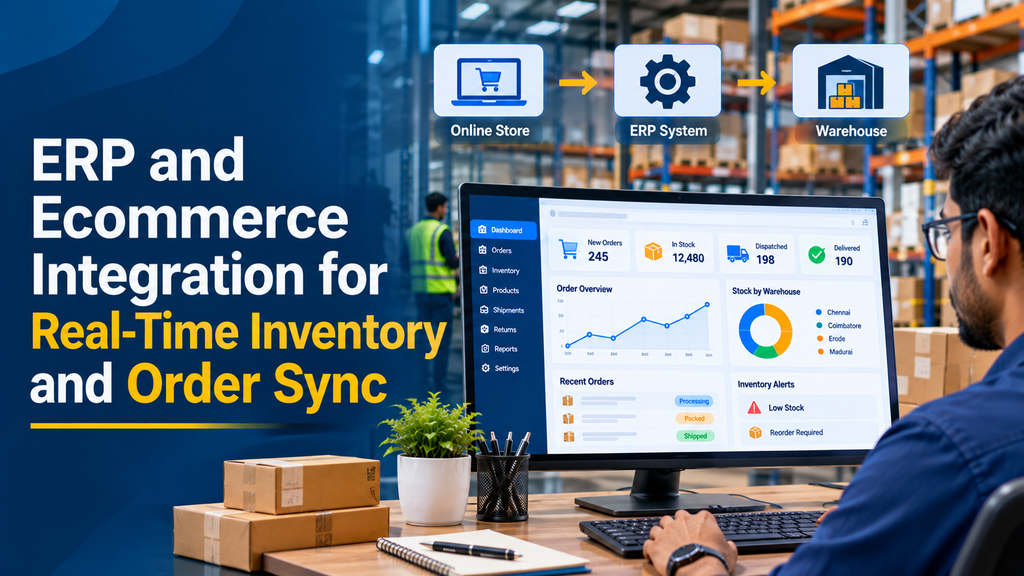
Managing an ecommerce business becomes more complicated when product information, stock quantities and customer orders are maintained in separate systems. A sale made through an online store may not immediately appear in the warehouse or accounting system. At the same time, stock changes recorded by warehouse staff may not reach the website quickly.
ERP and ecommerce integration connects an online store with an enterprise resource planning system so that important business information can move between platforms. It can synchronise orders, inventory, product details, customer records, pricing and fulfilment updates, reducing manual work across ecommerce and business operations.
What Is ERP and Ecommerce Integration?
ERP and ecommerce integration is the process of connecting an online shopping platform with an ERP system that manages business operations. Instead of maintaining separate product, order and stock records, the connected systems exchange information according to defined business rules.
For example, a retailer may sell the same product through a website, marketplace and physical store. When a customer purchases an item online, the ecommerce platform records the order. The integration can transfer the order to the ERP system, where it becomes part of the sales and fulfilment workflow.
Similarly, when warehouse stock is updated in the ERP, the available quantity can be sent to the ecommerce store so customers see a more accurate stock position.
Common integration areas include:
- Product catalogue and SKU information
- Inventory quantity and warehouse availability
- Online sales orders and order status
- Customer and billing information
- Product pricing and applicable tax data
- Invoices and payment records
- Shipping, dispatch and fulfilment details
- Returns, cancellations and refunds
Why Do Ecommerce Businesses Need ERP Integration?
A standalone ecommerce platform can manage the online shopping experience, but it may not cover every internal business process. ERP software usually handles broader operations such as purchasing, warehouse management, accounts, manufacturing and sales.
When these systems operate independently, employees may need to enter the same information more than once. This can create delays, inconsistent records and additional administrative work.
Reduce Manual Data Entry
Orders, product information and stock updates can move between connected platforms automatically. Staff spend less time copying records from one application to another.
Improve Stock Visibility
An integration can distribute updated inventory quantities across the online store and other sales channels. This helps businesses make better decisions about product availability.
Organise Order Processing
Ecommerce orders can be transferred to the ERP system for verification, picking, packing, invoicing and dispatch.
Support Multiple Sales Channels
Businesses selling through their own websites, marketplaces and physical stores can manage inventory through a more coordinated process.
Improve Business Reporting
Connected order, inventory and financial records can provide a clearer view of sales performance, stock movement and operational activity.
How Does Real-Time Inventory and Order Synchronisation Work?
A typical integration uses events, APIs and background processing to exchange data between an ecommerce platform and an ERP application. The exact workflow depends on the platforms, available APIs and business requirements.
Step 1: Customer Places an Online Order
A customer selects products, enters delivery information and completes checkout. The ecommerce platform creates an order record with product quantities, prices, taxes and customer details.
Step 2: Order Information Is Sent to the ERP
An event notification or scheduled integration process identifies the new order. The integration validates the information and maps it to the ERP’s sales order structure.
Step 3: ERP Processes the Sales Order
The ERP system checks the relevant product, customer, pricing, warehouse and payment information. Depending on the configured workflow, the order can proceed to approval, picking or fulfilment.
Step 4: Inventory Availability Is Updated
The integration applies the appropriate stock movement or reservation rules. Updated available quantities can then be sent to the ecommerce platform and other connected sales channels.
Step 5: Fulfilment Information Is Synchronised
When the warehouse processes the order, shipment and fulfilment details can be sent back to the ecommerce platform. Customers and support teams can then view the latest available order status.
Important Data to Synchronise Between ERP and Ecommerce
| Data type | Typical information | Business purpose |
|---|---|---|
| Products | SKU, name, description, variants and categories | Maintain consistent product records |
| Inventory | On-hand, reserved and available quantities | Show appropriate stock availability |
| Orders | Order number, items, quantities and totals | Process online sales through the ERP |
| Customers | Name, contact and billing information | Maintain customer records |
| Pricing | Product prices and approved price lists | Maintain consistent pricing rules |
| Payments | Payment status, transaction references and amounts | Support reconciliation |
| Fulfilment | Picking, packing, dispatch and tracking references | Keep order progress updated |
| Returns | Return requests, received quantities and refund status | Update stock and financial records |
Two-Way ERP and Ecommerce Integration
Two-way integration allows both platforms to exchange relevant information. However, two-way synchronisation does not mean both systems should freely overwrite every field. Each data type needs a clearly defined owner.
ERP to Ecommerce
- Product master information
- SKU and variant details
- Available inventory quantities
- Approved product pricing
- Product availability status
- Order fulfilment and shipment updates
Ecommerce to ERP
- New online orders
- Customer and delivery information
- Purchased product quantities
- Payment and transaction references
- Order cancellations and return requests
- Online discount and promotion details
For many businesses, the ERP is the primary owner of inventory and accounting information, while the ecommerce platform owns the checkout experience and initial online order record. The integration should document ownership for each field before development begins.
Real-Time Sync vs Scheduled Sync
Not every type of business information needs to be transferred at exactly the same frequency. The integration should select a synchronisation method based on operational importance, API limits and the acceptable delay for each data type.
| Method | How it works | Suitable use cases |
|---|---|---|
| Event-driven sync | Transfers data after configured events occur | New orders, stock changes and order status updates |
| Scheduled sync | Transfers data at defined intervals | Reports, catalogue refreshes and reconciliation |
| Manual sync | Authorised users initiate a transfer | Initial migration and controlled corrections |
| Hybrid sync | Combines events with scheduled verification | Businesses with multiple systems and warehouses |
Event-driven integration can provide near-real-time updates, but actual delivery depends on the source platform, network, processing queues, API availability and destination system response. Scheduled reconciliation is still valuable for identifying missed or delayed updates.
Inventory Management for Multiple Warehouses
Businesses operating more than one warehouse need more than a single overall stock quantity. Inventory should be managed according to the location where the products are stored and the orders that can be fulfilled from each location.
A multi-warehouse integration may include:
- Warehouse-specific stock quantities
- Reserved and available inventory
- Stock transfers between locations
- Goods received and goods dispatched
- Warehouse selection rules
- Location-based fulfilment
- Low-stock alerts and replenishment information
- Inventory adjustment records
For example, a business may maintain stock in Erode and Coimbatore. The ecommerce system can use configured fulfilment rules to select an eligible warehouse based on availability, delivery region and business priorities.
Preventing Overselling with Inventory Reservation
Overselling can occur when multiple customers attempt to purchase the same limited stock before all systems receive the latest update. Synchronising stock quantities is important, but it should be supported by a proper inventory reservation strategy.
A reliable process should consider:
- Available stock rather than only physical on-hand quantity.
- Stock already reserved for confirmed orders.
- Orders awaiting payment confirmation.
- Order cancellation and reservation release rules.
- Concurrent purchase attempts across sales channels.
- Backorder and preorder policies, where supported.
- Safety stock for products that require a buffer.
Product and SKU Mapping Between Systems
Correct product mapping is one of the most important parts of ERP ecommerce integration. A product may have different internal IDs in the ERP and ecommerce platform. The integration needs a consistent way to identify the same product in both systems.
Product mapping should consider:
- Unique SKU and product identifiers
- Product names and descriptions
- Size, colour and other variants
- Barcode or GTIN information, when used
- Unit of measurement
- Product categories and attributes
- Bundle and kit component relationships
- Product activation and discontinuation status
A mapping table can maintain the relationship between ERP product IDs, ecommerce product IDs and variant IDs. This prevents the integration from accidentally updating the wrong product when records are created or modified.
Order Management and Fulfilment Automation
ERP integration can connect online orders with internal sales and warehouse workflows. The exact stages depend on how the business handles payment, approvals and dispatch.
Order Creation
A new ecommerce order can be transferred to the ERP with its items, quantities, customer details, discounts, tax information and delivery address.
Order Validation
The ERP can apply configured checks for product availability, customer details, pricing and other business requirements before the order moves to the next stage.
Picking and Packing
Warehouse staff can use ERP or warehouse management workflows to pick the ordered products, verify quantities and prepare parcels for dispatch.
Shipment and Tracking Updates
Shipment references and fulfilment status can be transferred back to the ecommerce platform so the online order record reflects the latest available information.
Cancellation and Refund Handling
The integration should define how cancellations and refunds affect order status, reserved inventory, returned goods and accounting records. A refund does not always mean that the returned product is immediately available for resale.
Integrating ERP with WooCommerce and Shopify
WooCommerce ERP Integration
WooCommerce provides REST API endpoints that allow supported external applications to work with store data such as products, orders and customers. Its webhook functionality can notify an external system when configured events occur.
A custom WooCommerce ERP integration can be developed to:
- Transfer new orders to the ERP.
- Update product information and stock quantities.
- Synchronise order status and fulfilment details.
- Map product variations and SKUs.
- Handle cancellations and return workflows.
Official documentation: WooCommerce REST API and WooCommerce Webhooks.
Shopify ERP Integration
Shopify supports API-based integrations and event notifications through webhooks. These can help connected applications respond to order and inventory events without repeatedly checking for changes.
A Shopify ERP connection may support:
- Order transfer to ERP sales records.
- Inventory updates across configured locations.
- Product and variant information exchange.
- Fulfilment and shipment status updates.
- Customer and transaction data synchronisation.
Official developer reference: Shopify Webhooks.
Connecting Custom ERP Software with Ecommerce Platforms
Some businesses use custom ERP software developed around their own manufacturing, purchasing, inventory or accounting workflows. In these situations, a standard connector may not support every required field or business rule.
A custom integration layer can connect the ecommerce platform to the existing ERP database or application services through supported, controlled interfaces.
Common development components include:
- REST API endpoints for data exchange
- Webhook receivers for event notifications
- Middleware for data transformation and routing
- Product and customer mapping tables
- Order processing queues
- Retry and error-handling mechanisms
- Integration logs and monitoring dashboards
- Scheduled reconciliation processes
Direct database access should be carefully controlled. Where possible, integrations should use supported application interfaces rather than allowing external systems to modify ERP database tables directly.
Integration Architecture: APIs, Webhooks and Middleware
API Integration
APIs allow one application to request or update information in another. They can be used to create sales orders, retrieve product information, update inventory and exchange customer records.
Webhook Integration
Webhooks send event notifications to a configured endpoint when an event occurs. For example, an ecommerce platform may notify the integration service when a new order is created or a product is updated.
Middleware Integration
Middleware acts as a connecting layer between the ecommerce platform and ERP. It can transform data formats, apply business rules, manage queues and coordinate communication between multiple applications.
iPaaS and Ready-Made Connectors
Integration platforms and existing connectors can reduce development effort when the required systems and workflows are supported. Custom development may still be necessary for specialised processes.
Common ERP Ecommerce Integration Challenges
1. Different Product Identifiers
ERP and ecommerce systems may use different product IDs. A reliable mapping table should connect the records using stable identifiers such as SKU and platform-specific IDs.
2. Duplicate Orders
Webhook delivery or retry processing can result in the same event being received more than once. The integration should use unique order references and idempotent processing so a repeated event does not create duplicate ERP sales orders.
3. API Rate Limits
Ecommerce platforms and ERP APIs may limit request frequency. Integration design should respect those limits through queues, batching, backoff and suitable request scheduling.
4. Network or System Downtime
If one platform becomes unavailable, the integration should retain pending events where possible and retry them safely after service recovery.
5. Incorrect Stock Calculations
Different systems may calculate available inventory differently. Businesses should define how reservations, returns, damaged goods, warehouse transfers and safety stock affect sellable quantities.
6. Order and Payment Status Mismatches
Payment confirmation, order approval and dispatch are separate events. They should have clear mapping rules rather than being treated as interchangeable statuses.
7. Failed or Partial Synchronisation
A transfer may succeed for some records but fail for others. The integration should record processing results and support safe retries and manual review.
Best Practices for Reliable ERP and Ecommerce Integration
- Define system ownership: Decide which application owns each data type.
- Use stable identifiers: Maintain consistent SKU and order references.
- Build idempotent processing: Prevent repeated events from creating duplicate records.
- Use secure authentication: Protect API credentials and restrict access.
- Validate incoming data: Check mandatory fields, quantities and supported values.
- Use background queues: Process larger workloads without blocking customer-facing operations.
- Implement retries: Handle temporary failures with controlled retry policies.
- Monitor integration health: Record failed events, delays and processing results.
- Schedule reconciliation: Compare key records between systems to detect missed updates.
- Test business exceptions: Include partial shipments, cancellations, returns and payment failures.
Security Considerations
ERP and ecommerce systems may exchange customer details, financial information, order records and internal inventory data. Security must be considered throughout the integration lifecycle.
- Use HTTPS for communication between systems.
- Use secure authentication such as OAuth or supported API credentials.
- Keep secrets and tokens outside public frontend code.
- Apply least-privilege access to API accounts.
- Verify webhook signatures where the platform supports them.
- Validate incoming event payloads.
- Restrict access to integration logs and dashboards.
- Maintain backups and recovery procedures.
- Review permissions and rotate credentials when appropriate.
How Much Does ERP and Ecommerce Integration Cost in India?
Integration cost depends on the ecommerce platform, ERP architecture, number of modules, data volume, warehouse structure and custom workflows. A simple order connection is different from a complete two-way integration covering inventory, purchasing, fulfilment, accounting and returns.
The following ranges are illustrative development-planning estimates, not fixed market prices or a Greap Technologies quotation.
| Integration scope | Illustrative development estimate |
|---|---|
| Basic ecommerce order transfer to ERP | ₹15,000 – ₹30,000 |
| Product and inventory synchronisation | ₹25,000 – ₹50,000 |
| Two-way order and inventory integration | ₹40,000 – ₹80,000 |
| Multi-warehouse and fulfilment integration | ₹60,000 – ₹1.2 lakh |
| Advanced ERP, ecommerce and accounting integration | ₹1 lakh – ₹2.5 lakh+ |
| Enterprise multi-channel integration | ₹2.5 lakh+ depending on scope |
Additional costs may apply for ERP licences, ecommerce platform plans, middleware subscriptions, hosting, API usage, payment gateway services, shipping integrations, data migration, security reviews, ongoing support and taxes. A detailed requirement analysis is recommended before preparing a project quotation.
Which Businesses Benefit from ERP Ecommerce Integration?
Retail and Wholesale Businesses
Manage online orders, shop inventory, wholesale pricing and customer records through connected business systems.
Textile and Garment Manufacturers
Synchronise fabric or garment variants, sizes, colours, warehouse stock and online sales orders.
Electronics and Appliance Sellers
Manage product SKUs, serial numbers where required, stock availability, dispatch records and returns.
Food and FMCG Businesses
Coordinate product batches, expiry information, stock availability, order processing and warehouse dispatch.
Manufacturing Companies
Connect online sales with production, purchasing, inventory and fulfilment workflows, subject to the capabilities of the ERP system.
ERP and Ecommerce Integration for Businesses in Erode and Tamil Nadu
Businesses in Erode and other industrial areas of Tamil Nadu may sell through a combination of direct websites, distributors, marketplaces and physical outlets. Maintaining separate stock and order records across these channels can become difficult as operations grow.
ERP and ecommerce integration can support textile businesses, garment manufacturers, engineering suppliers, wholesalers, retail stores and other companies that need coordinated product and order management.
For example, an Erode-based textile business may maintain product variations for fabric type, colour, width and quantity. A connected system can help transfer online orders to the ERP and publish suitable stock availability from the relevant warehouse.
The integration should be designed around actual product structures, sales channels, warehouse operations and accounting workflows rather than using the same configuration for every business.
Our ERP and Ecommerce Integration Development Process
1. Requirement Analysis
Understand the existing ERP, ecommerce platform, business workflows, product catalogue, order volume and warehouse structure.
2. Data Mapping
Define how products, SKUs, customers, orders, inventory and fulfilment records correspond between the connected applications.
3. Integration Architecture
Select suitable APIs, webhooks, middleware, queues and synchronisation schedules based on system capabilities and business requirements.
4. Development and Configuration
Develop the integration services, mapping rules, inventory workflows, order transfer and status update processes.
5. Testing and Reconciliation
Test order creation, stock adjustments, duplicate events, API failures, cancellations, returns and multi-warehouse scenarios. Compare records between systems before deployment.
6. Deployment and Monitoring
Deploy the integration, monitor synchronisation activity and provide maintenance for changes to the ERP, ecommerce platform and business workflows.
Frequently Asked Questions
1. What is ERP and ecommerce integration?
It is the process of connecting an online store with ERP software to exchange information such as products, inventory, orders, customers, pricing and fulfilment records.
2. Can ERP and ecommerce inventory update automatically?
Yes. APIs and event notifications can transfer inventory changes between connected systems. The update frequency depends on the platform, integration design and system availability.
3. Can online orders automatically enter an ERP system?
Yes. A configured integration can transfer new ecommerce orders into the ERP as sales orders, subject to validation and business processing rules.
4. Is real-time inventory synchronisation possible?
Near-real-time inventory synchronisation is possible using event-driven integrations. Queues, network delays, API limits and processing time can affect how quickly updates appear.
5. Can WooCommerce be integrated with ERP software?
Yes. WooCommerce REST APIs and webhooks can be used to connect supported ecommerce data with ERP applications. Custom development may be required for specialised business workflows.
6. Can Shopify be connected to a custom ERP?
Yes. Shopify APIs and webhooks can support integrations with custom ERP software. The required API permissions, data mapping and synchronisation rules depend on the project.
7. Can one ERP connect to multiple ecommerce websites?
Yes. A suitable integration architecture can connect an ERP to multiple online stores or sales channels. Each channel needs appropriate product mapping, stock allocation and order rules.
8. Can the integration support multiple warehouses?
Yes. It can synchronise stock by warehouse, manage location-based availability and support fulfilment rules where the ERP and ecommerce platforms provide the necessary capabilities.
9. How can ERP ecommerce integration reduce overselling?
It can help by synchronising stock changes, maintaining reservations, accounting for pending orders and applying available-to-sell rules. The business must also handle simultaneous purchases correctly.
10. Can product prices be synchronised from ERP to ecommerce?
Yes. Product pricing can be transferred from the designated source system. The integration should define how discounts, taxes, customer-specific pricing and promotional prices are handled.
11. Can order status updates move back to the online store?
Yes. Configured integration workflows can transfer ERP fulfilment and shipment updates to the ecommerce platform.
12. What happens if the ERP or ecommerce API is unavailable?
A well-designed integration can retain pending events, retry temporary failures and record unsuccessful transfers for review. Reconciliation can help identify missing updates.
13. Can ERP integration handle product returns?
Yes. Return requests, received quantities, stock inspection, restocking decisions and refund information can be synchronised when the required workflows are supported.
14. How much does ERP ecommerce integration cost in India?
The cost depends on the ERP, ecommerce platform, number of modules, warehouses, data volume and custom requirements. A basic integration may cost less than a complete multi-channel system with advanced inventory and fulfilment workflows.
15. Can a custom-built ERP be connected to an ecommerce website?
Yes. A custom ERP can be connected through supported APIs or a controlled integration layer. The development process includes analysing the existing ERP structure and defining secure data exchange methods.
Conclusion
ERP and ecommerce integration helps businesses connect online sales with inventory, order processing, warehouse operations and accounting. With clear data ownership, reliable APIs, event handling and reconciliation, businesses can reduce manual work and maintain more consistent operational records.
Whether a business uses WooCommerce, Shopify or a custom ecommerce application, the integration should be planned around its ERP capabilities, product structure, sales channels and fulfilment process.
Need ERP and Ecommerce Integration for Your Business?
Greap Technologies develops custom business software, ecommerce websites and system integrations. We can help plan and build integrations for product data, inventory synchronisation, order management and business workflows.
Discuss your integration requirements:
Website: www.greap.in
WhatsApp: +91 70923 30168
Phone: +91 70923 30168