Businesses regularly send important updates to customers, employees, suppliers and business partners. These updates may include OTPs, order confirmations, payment alerts, invoices, appointment reminders and service notifications.
Sending every notification manually becomes difficult as business operations grow. SMS and email API integration connects business software with messaging and email delivery services to send automated notifications when specific events occur.
By connecting SMS and email APIs with a website, CRM, ERP, ecommerce platform or custom application, businesses can create a centralised notification system that reduces repetitive work and improves communication.
For businesses in Erode, Tamil Nadu and across India, this integration can support customer communication, order processing, billing, appointment management and internal business workflows.
What Is SMS and Email API Integration?
SMS and email API integration is the process of connecting a business application with external messaging and email services through application programming interfaces.
An API allows one software application to request another service to perform a task.
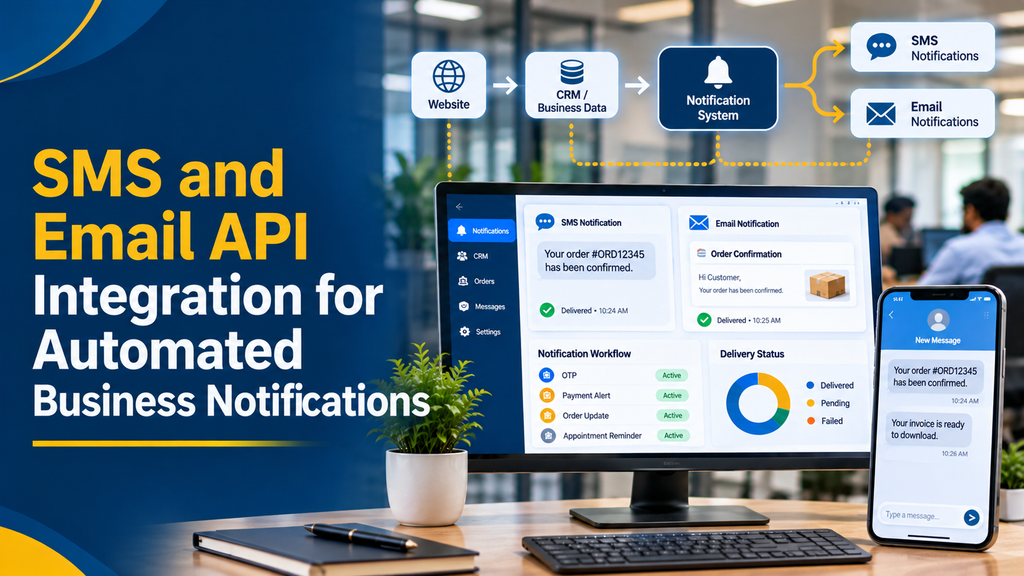
For example, when a customer places an order:
- The ecommerce website records the order.
- The backend application verifies the relevant order details.
- The notification system prepares an SMS and email.
- The SMS provider receives the SMS request.
- The email service receives the email request.
- The customer receives the relevant notifications.
- Delivery events are recorded in the business application when supported.
The same approach can be used for appointment reminders, payment notifications, account alerts and other business events.
Why Businesses Need Automated SMS and Email Notifications
SMS and email serve different communication purposes.
SMS is useful for short, time-sensitive notifications that customers may need to see quickly. Email is suitable for longer messages, invoices, detailed order summaries, documents and formal business communication.
Using both channels can help businesses provide important information through the communication method appropriate for each event.
- Faster automated customer communication.
- Reduced manual notification work.
- Consistent message formats.
- Improved visibility into delivery events.
- Automated order and payment updates.
- Better communication records.
- Easier integration with CRM and ERP systems.
- Support for growing customer volumes.
The actual delivery experience depends on the recipient’s network, device, email provider, message configuration and third-party service availability.
Important Features of SMS API Integration
1. OTP SMS Integration
One-time passwords can be sent during account verification and authentication workflows.
Common applications include:
- Customer registration.
- Login verification.
- Password reset.
- Phone number verification.
- Transaction confirmation, where appropriate.
OTP generation and validation should happen securely on the backend. Applications should apply expiry limits, attempt restrictions and suitable rate controls.
2. Transactional SMS Notifications
Businesses can configure SMS messages for important transaction-related events.
- Order confirmation.
- Payment status.
- Booking confirmation.
- Appointment reminders.
- Dispatch updates.
- Service request acknowledgement.
- Account-related notifications.
The message category and registration requirements must follow applicable Indian telecom rules and the service provider’s requirements.
3. Delivery Status Tracking
An SMS integration can receive status callbacks or delivery reports from supported providers.
Depending on the provider and carrier, these events may indicate:
- Message accepted.
- Message queued.
- Message submitted.
- Message delivered.
- Message failed.
- Message expired.
A successful API request does not necessarily mean the SMS has reached the recipient’s phone. The application should distinguish request acceptance from final delivery status.
4. Scheduled SMS Notifications
A business application can schedule reminders based on dates, events or workflow rules.
- Appointment reminders.
- Service renewal reminders.
- Payment due notifications.
- Booking reminders.
- Delivery updates.
Scheduled messages should be checked against the customer’s current communication preferences and the latest status of the relevant transaction before dispatch.
5. SMS Integration with CRM
CRM integration can connect SMS activity with customer and lead records.
- Lead acknowledgement.
- Follow-up reminders.
- Customer account notifications.
- Support ticket updates.
- Sales activity records.
- Communication history.
Employees can view relevant communication records from a central dashboard instead of managing separate manual message logs.
Important Features of Email API Integration
1. Automated Transactional Emails
Transactional emails are triggered by a customer’s interaction or a business transaction.
- Account registration confirmation.
- Password reset instructions.
- Order confirmation.
- Payment receipt.
- Invoice delivery.
- Booking confirmation.
- Shipping notification.
- Service request acknowledgement.
These messages should contain only the information relevant to the event.
2. Dynamic Email Templates
A business application can use reusable email templates with dynamic fields.
Subject: Your Order {{order_id}} Has Been Confirmed
Hello {{customer_name}},
Thank you for your order.
Order reference: {{order_id}}
Order date: {{order_date}}
Current status: {{order_status}}
You can view your order details through your customer account.
The application should populate dynamic values from trusted backend records and escape user-provided content appropriately before inserting it into HTML.
3. Invoice and Document Delivery
Email API integration can automatically send business documents.
- PDF invoices.
- Order summaries.
- Payment receipts.
- Booking confirmations.
- Statements.
- Service reports.
- Approved business documents.
Businesses should apply suitable file-size limits, access controls and document validation.
For sensitive documents, a secure authenticated download link may be more appropriate than attaching the file directly.
4. HTML Email Design
Custom HTML templates help businesses maintain consistent branding.
An email design may include:
- Business logo.
- Header and footer.
- Customer information.
- Order or invoice summary.
- Action buttons.
- Contact information.
- Terms and support details.
Email templates should be responsive and tested across common email clients. Not every email client supports every CSS feature, so simpler layouts are generally more reliable.
5. Email Delivery Tracking
Supported email platforms can provide event information such as:
- Accepted.
- Delivered.
- Bounced.
- Deferred.
- Opened, where tracking is enabled.
- Clicked, where tracking is enabled.
- Unsubscribed.
- Reported as spam.
An email being accepted by the sending service does not guarantee that it will reach the inbox. Delivery, spam filtering and recipient-server behaviour must be considered separately.
6. Email Automation with CRM
CRM integration can automatically send relevant emails based on customer activity.
- New lead acknowledgement.
- Sales enquiry response.
- Appointment confirmation.
- Proposal or quotation delivery.
- Invoice notification.
- Support ticket update.
- Service renewal reminder.
The CRM can also record message events and associate them with the relevant customer or business record.
SMS vs Email: Which Channel Should Businesses Use?
Both channels are useful, but they serve different communication needs.
| Requirement | SMS | |
|---|---|---|
| Short OTP | Suitable | Possible, but different user experience |
| Short order update | Suitable | Suitable |
| Detailed invoice | Limited | Suitable |
| PDF document delivery | Not suitable for ordinary SMS | Suitable, subject to attachment limits |
| Appointment reminder | Suitable | Suitable |
| Long business communication | Limited | Suitable |
| Delivery status tracking | Provider-dependent | Provider-dependent |
| Customer support history | Requires integration | Requires integration |
| Promotional communication | Subject to telecom and consent rules | Subject to email marketing and privacy rules |
A business can use SMS for short alerts and email for detailed information. The notification engine can select the appropriate channel based on the event, customer preference and available contact information.
How Automated Business Notifications Work
A notification system generally follows a structured workflow.
Step 1: Business Event Occurs
An event is created in the website, CRM, ERP or other application.
Examples:
- New customer registration.
- New order.
- Payment confirmation.
- Appointment booking.
- Invoice generation.
- Shipment update.
Step 2: Backend Processes the Event
The backend validates the event and retrieves the necessary information from the relevant database.
It should confirm that the event is genuine and that the associated record is in the correct state.
Step 3: Notification Rules Are Evaluated
The system checks:
- Which notification should be sent?
- Which channel should be used?
- Is the customer’s contact information available?
- Is the message permitted?
- Has the same notification already been processed?
- Does the customer have an applicable communication preference?
Step 4: Message Template Is Prepared
The application selects the correct SMS or email template. Dynamic fields are populated using trusted business records.
Step 5: API Request Is Submitted
The backend sends the request to the configured SMS provider or email service.
API credentials must remain on the backend rather than being exposed in frontend code or mobile applications.
Step 6: Delivery Events Are Received
The provider may send webhook events or delivery reports. The application records the available status information and handles errors appropriately.
Step 7: Notification History Is Updated
The CRM or admin dashboard can show:
- Recipient.
- Notification type.
- Channel.
- Related order or customer.
- Submission time.
- Delivery status.
- Error details, where relevant.
Automated Notification Examples for Different Businesses
Ecommerce and Retail Businesses
Ecommerce businesses can automate:
- Registration messages.
- Order confirmations.
- Payment notifications.
- Invoice emails.
- Dispatch alerts.
- Delivery updates.
- Return and refund status messages.
For example, when an ecommerce order is confirmed, the backend can send an SMS with a short reference and an email containing the complete order summary.
Hospitals and Clinics
Clinics and healthcare organisations can use notification systems for:
- Appointment confirmation.
- Appointment reminders.
- Booking changes.
- General service updates.
- Payment receipts.
Healthcare communication requires additional care. Sensitive patient information should not be included in ordinary SMS or email notifications unless the channel, access controls and applicable requirements have been properly assessed.
Educational Institutions
Schools, colleges and training centres can automate:
- Admission acknowledgement.
- Application status updates.
- Fee payment notifications.
- Examination schedule announcements.
- Event reminders.
- Administrative communication.
Manufacturing and Distribution Companies
Manufacturers and distributors can connect ERP and order management software with notification services.
- Purchase order acknowledgement.
- Production status updates.
- Dispatch notifications.
- Invoice delivery.
- Dealer order confirmation.
- Service request updates.
Travel and Hospitality Businesses
Travel agencies, hotels and tour operators can send:
- Booking confirmations.
- Reservation updates.
- Payment receipts.
- Travel reminders.
- Check-in information.
- Cancellation updates.
SMS API Integration in India: DLT and TRAI Requirements
Businesses sending bulk SMS in India should understand the telecom regulatory framework.
TRAI’s TCCCPR framework requires relevant business senders to complete applicable registration and message configuration processes through telecom access providers.
Depending on the communication category and use case, this can include:
- Principal Entity registration.
- SMS header registration.
- Content template registration.
- Consent template registration, where applicable.
- Passing the required registration identifiers through the delivery chain.
- Acquiring and managing customer consent where required.
Businesses should not assume that connecting an SMS API alone makes every type of SMS eligible for delivery.
The sender, SMS provider and telecom delivery route must be configured for the applicable requirements. Check current TRAI guidance and the chosen telecom provider’s registration process before implementation.
Official reference: TRAI Advice to Senders.
Email API Integration: Authentication and Deliverability
Sending emails through an API is only one part of reliable email communication. Businesses also need to configure their sending domain correctly.
SPF
Sender Policy Framework identifies which mail servers are authorised to send email for a domain.
DKIM
DomainKeys Identified Mail adds a cryptographic signature that receiving systems can use to verify that an email was authorised by the sending domain and was not modified in transit.
DMARC
Domain-based Message Authentication, Reporting and Conformance uses SPF and DKIM alignment to help domain owners define how receiving systems should handle unauthenticated messages.
Domain and Sender Verification
Email service providers commonly require businesses to verify their sending identity before production sending.
Proper configuration can improve authentication and help protect against email spoofing. However, authentication alone does not guarantee inbox placement.
SMS and Email API Integration Architecture
A scalable notification system should use a backend service between the business application and the external providers.
Website / CRM / ERP / Ecommerce Application
↓
Backend Notification Service
↓
Event Validation and Notification Rules
↓
Template Management
↓
SMS API and Email API
↓
Customer Mobile Phone and Email Inbox
↓
Delivery Webhooks and Reports
↓
Notification History and Admin Dashboard
Recommended Software Components
| Component | Purpose |
|---|---|
| CRM or ERP | Stores customer and business records. |
| Backend API | Processes notification events. |
| Notification Engine | Selects channel and message rules. |
| Template Manager | Maintains SMS and email templates. |
| Queue System | Handles message workloads. |
| SMS Provider | Sends SMS messages. |
| Email Provider | Sends email messages. |
| Webhook Endpoint | Receives delivery events. |
| Database | Stores notification history. |
| Admin Dashboard | Monitors status and failures. |
A queue-based design is useful when businesses generate many notifications at the same time. It allows the application to process requests without making the main order or booking workflow wait for every external messaging response.
Popular SMS and Email Integration Options
Businesses can select a service based on delivery coverage, technical requirements, pricing, support and available features.
SMS Service Considerations
When evaluating an SMS provider, check:
- Indian mobile network coverage.
- Applicable DLT support.
- API documentation.
- Sender and template configuration.
- Delivery report availability.
- Webhook support.
- Authentication options.
- Usage reporting.
- Support and pricing.
The right provider depends on the target countries, message categories and business requirements.
Email Service Considerations
When evaluating an email API provider, check:
- Transactional email API support.
- Domain authentication.
- Template management.
- Attachment support.
- Delivery and bounce events.
- Webhook availability.
- Suppression and unsubscribe management.
- Usage limits.
- Data handling and support.
Amazon SES and Twilio SendGrid are examples of email delivery services with documented API and authentication capabilities.
The best option depends on the application’s volume, operational requirements, region and budget.
Security and Reliability Best Practices
A reliable notification system should include the following safeguards.
1. Protect API Keys
Keep SMS and email API credentials in secure backend configuration or a secrets-management system.
Never expose them in public JavaScript, mobile app source code or client-side network requests.
2. Use Event Validation
Send notifications only after verifying the underlying business event.
For example, send a payment confirmation only after the payment provider’s trusted backend response or webhook has been validated.
3. Prevent Duplicate Messages
A payment webhook or order event may be delivered more than once. Use idempotency keys, event identifiers or notification records to avoid sending the same notification repeatedly.
4. Implement Retry Handling
Temporary provider failures may require retrying a notification. Use controlled retry intervals and distinguish temporary failures from permanent errors such as invalid addresses, invalid phone numbers or rejected templates.
5. Validate Webhook Requests
Verify provider webhook signatures or authentication mechanisms where supported. Reject untrusted requests and avoid allowing an unauthenticated callback to change payment, order or account status.
6. Manage Customer Communication Preferences
Maintain customer consent and communication preferences where required. Support opt-out handling for applicable communication types and keep promotional communication separate from essential transaction-related updates.
7. Monitor Delivery Performance
The admin dashboard should distinguish between submitted, delivered, bounced, failed and other available provider statuses.
Avoid treating API acceptance as proof that a recipient received the notification.
8. Maintain Logs Responsibly
Store necessary notification metadata, such as message identifiers, timestamps, event references and status information. Avoid retaining unnecessary personal information or sensitive message content.
SMS and Email API Integration Development Cost
The development cost depends on the number of workflows, existing software, provider selection, notification volume and dashboard requirements.
The following are illustrative planning estimates, not fixed Greap quotations or guaranteed market prices.
| Development Scope | Indicative Cost |
|---|---|
| Basic SMS API integration | ₹5,000–₹10,000 |
| Basic transactional email API integration | ₹5,000–₹10,000 |
| SMS and email integration for a website | ₹10,000–₹18,000 |
| OTP and account notification integration | ₹10,000–₹20,000 |
| Ecommerce order and payment notifications | ₹15,000–₹30,000 |
| CRM notification integration | ₹20,000–₹40,000 |
| Admin dashboard with delivery history | ₹25,000–₹45,000 |
| Advanced ERP and multi-channel notification system | ₹45,000–₹90,000+ |
Actual quotations depend on the existing application architecture, number of templates, webhook requirements, user roles, testing and deployment scope.
Additional Expenses
Businesses should separately consider:
- SMS provider charges.
- Email provider charges.
- DLT registration or associated provider services, where applicable.
- Hosting and server costs.
- Database storage and backups.
- Domain and DNS configuration.
- Maintenance and support.
- Applicable taxes.
SMS and email API usage costs are separate from custom software development costs.
How Greap Technologies Can Develop Automated Notification Software
Greap Technologies develops websites, custom business applications, CRM platforms and business automation solutions.
A notification system can be designed around the organisation’s existing software instead of requiring employees to manage separate messaging processes.
Depending on project requirements, the solution may include:
- SMS API integration.
- Email API integration.
- OTP and verification workflows.
- Automated order notifications.
- Payment and invoice alerts.
- Appointment reminders.
- CRM and ERP integration.
- Custom SMS and email templates.
- Webhook and delivery status tracking.
- Notification history dashboard.
- Admin settings and user permissions.
- Retry and failure management.
For businesses in Erode, Perundurai, Bhavani, Gobichettipalayam and other parts of Tamil Nadu, the system can be developed around existing business processes and future expansion requirements.
Need Automated SMS and Email Notifications for Your Business?
Connect your website, CRM, ERP or ecommerce application with a custom notification system. Greap Technologies can help plan and develop an integration that fits your business workflow.
Frequently Asked Questions
1. What is SMS API integration?
SMS API integration connects a software application with an SMS delivery service. It allows the application to send automated text messages for OTPs, order updates, payment alerts and other notifications.
2. What is email API integration?
Email API integration connects business software with an email delivery platform to send automated messages such as invoices, receipts, confirmations, account alerts and customer updates.
3. Can SMS and email notifications be integrated into one system?
Yes. A backend notification engine can connect both services and select the appropriate channel based on business events, customer preferences and communication rules.
4. Can a CRM send automatic SMS and emails?
Yes. CRM software can trigger SMS and email notifications when a lead is created, an appointment is booked, a payment is recorded or a customer status changes.
5. Can an ecommerce website send order notifications automatically?
Yes. An ecommerce application can connect order creation, payment verification, shipping and delivery events with SMS and email services.
6. Can SMS API be used for OTP verification?
Yes. An SMS API can deliver OTP messages for registration, login verification and password reset workflows. OTP generation, expiry and validation should be handled securely by the backend.
7. Is DLT registration required for SMS in India?
Businesses sending regulated bulk or commercial SMS in India must follow applicable TRAI requirements, which can include Principal Entity registration, header and content template registration and consent-related processes. The exact requirements depend on the message category and current telecom rules.
8. Can email APIs send PDF invoices?
Yes. Supported email services can send PDF invoices and other attachments, subject to their file-size and account limits. Secure download links can be used where appropriate.
9. Can businesses track SMS delivery?
Many SMS providers offer delivery reports or status callbacks. The available statuses depend on the provider and carrier network.
10. Can businesses track email delivery?
Yes. Email delivery platforms can report events such as accepted, delivered, bounced, deferred and, where enabled, opened or clicked. These events do not guarantee that the recipient has read the email.
11. Which is better for business notifications: SMS or email?
SMS is useful for short, time-sensitive alerts. Email is more suitable for detailed information, invoices and documents. Many businesses use both channels for different notification types.
12. Can SMS and email integrate with ERP software?
Yes. ERP systems can trigger notifications for purchase orders, invoices, dispatches, payments, inventory events and other business workflows.
13. Does API integration guarantee that every message is delivered?
No. API acceptance and final delivery are different events. Mobile network issues, invalid phone numbers, email bounces, spam filtering, provider restrictions and recipient settings can affect delivery.
14. How much does SMS and email API integration cost?
A basic integration may cost less than a complete notification platform with CRM, ERP, templates, webhooks and an admin dashboard. SMS and email usage charges are separate from development costs.
15. Can notification software support multiple branches?
Yes. A custom system can support multiple branches, departments, sender configurations, user permissions and notification workflows, depending on the required architecture.
Conclusion
SMS and email API integration helps businesses automate important communication without depending on manual messaging.
By connecting messaging services with CRM, ERP, ecommerce and custom business applications, organisations can automate OTPs, order updates, payment alerts, invoices, appointments and customer notifications.
A reliable solution should combine secure backend processing, correct message configuration, customer communication preferences, delivery tracking and error handling.
Greap Technologies can help businesses plan and develop custom SMS and email notification integrations that support their day-to-day operations.