Accepting online payments is an important part of modern business websites and mobile applications. Whether a company sells products, provides professional services or offers online bookings, customers need a convenient way to complete payments digitally.
Razorpay payment gateway integration allows businesses to connect their websites and mobile applications with Razorpay’s payment infrastructure. With a properly configured integration, customers can complete supported online payments while the business manages transaction records, payment verification, refunds and order updates through its application.
What Is Razorpay Payment Gateway Integration?
Payment gateway integration is the process of connecting a website or application with a payment service so customers can make online payments through supported payment methods.
Razorpay provides payment APIs, checkout interfaces, platform SDKs and ecommerce integrations that developers can use to build payment workflows.
Once integrated, a business application can create payment orders, initiate checkout, receive payment responses, verify transactions and update the corresponding order or booking record.
Common applications include:
- Business and corporate websites
- Ecommerce websites and online stores
- Android applications
- iOS applications
- Appointment and booking platforms
- Online education and course platforms
- Subscription-based applications
- Custom business management software
- Customer portals and service applications
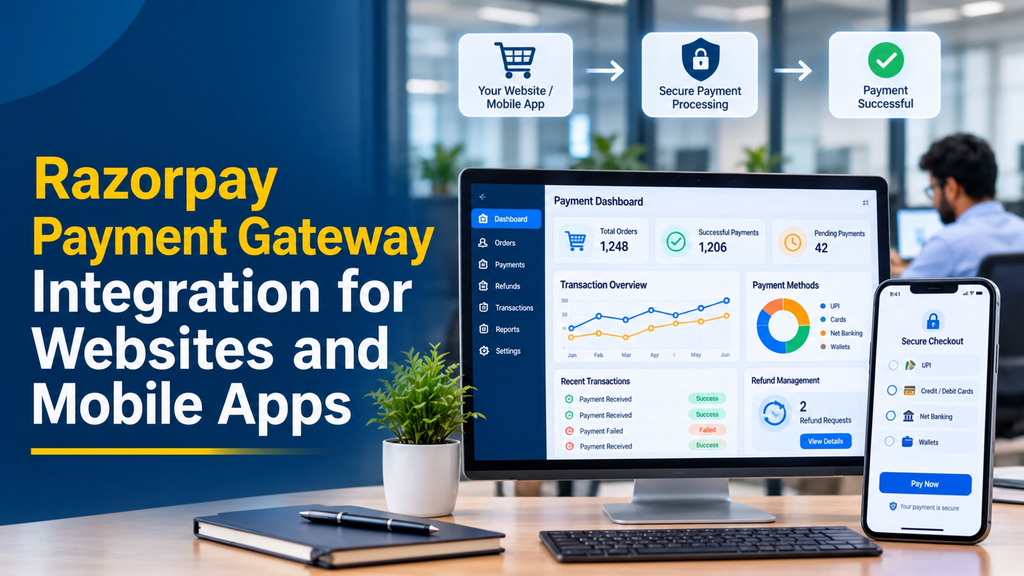
Payment Methods Supported Through Razorpay
Razorpay’s checkout can offer different payment methods depending on merchant activation, account configuration, transaction eligibility and the available checkout settings.
UPI Payments
UPI is widely used for digital payments in India. Depending on the configured checkout experience, customers may be able to complete eligible payments using supported UPI options.
Debit and Credit Cards
Customers can use eligible debit and credit cards through the supported checkout flow. Card availability and authentication requirements depend on the payment method and issuing bank.
Net Banking
Net banking allows customers to select an available bank and complete the payment through the bank’s authentication process.
Wallets and Other Supported Methods
Additional methods may be available depending on Razorpay’s current payment configuration and the merchant’s eligibility.
How Razorpay Payment Gateway Integration Works
A secure payment integration normally involves the website or app, the business backend and Razorpay’s payment services.
- Customer starts checkout: The customer selects a product, service, booking or other item and proceeds to payment.
- Application creates an order: The backend calculates the payable amount and creates an order through the Razorpay Orders API.
- Checkout is opened: The website or mobile application opens the supported Razorpay checkout experience using the order information.
- Customer completes payment: The customer selects an available payment method and completes the required authentication.
- Payment response is returned: The checkout returns payment information to the application.
- Server verifies the payment: The backend validates the payment signature and checks the transaction status.
- Order status is updated: The business application updates its order or booking record based on the verified payment state.
Webhooks can also notify the backend about payment events. They are useful for background processing, reconciliation and handling updates when the customer has already left the checkout screen.
Razorpay Integration for Business Websites
A website can integrate Razorpay using its supported web checkout and server-side APIs. The right implementation depends on the website technology and the type of payment workflow.
Custom HTML, PHP and Laravel Websites
A custom website can use Razorpay’s web checkout with a backend developed in PHP, Laravel, Node.js, Python or another supported server technology.
A typical implementation includes:
- Creating an order from the backend
- Opening the checkout interface on the website
- Passing the server-created order ID to checkout
- Receiving the payment response
- Verifying the signature on the server
- Updating the order and transaction records
WordPress and WooCommerce
Businesses using WordPress and WooCommerce can consider a supported Razorpay plugin. The plugin should be checked for compatibility, maintenance status and the required checkout features.
A custom WooCommerce integration may be appropriate when the business needs specialised payment rules, custom order workflows or additional application connections.
Custom Ecommerce Websites
Custom ecommerce applications can connect Razorpay with cart, checkout, order management, invoice generation and customer notification workflows.
Razorpay Integration for Android Applications
Android applications can use Razorpay’s supported Android Standard Checkout SDK. The application communicates with the backend to create the payment order before launching checkout.
The general integration process includes:
- Configure the supported Android SDK in the application.
- Request a payment order from the business backend.
- Receive the server-created order ID.
- Open the Razorpay checkout interface.
- Handle the success or failure callback.
- Send payment response details to the backend.
- Verify the signature and final payment status on the server.
- Update the application order screen after verification.
The API secret must never be embedded in the Android application. A mobile application is distributed to user devices, so sensitive payment credentials belong in a secure server environment.
Razorpay Integration for iOS Applications
iOS applications can use Razorpay’s supported iOS Standard Checkout SDK. The payment flow follows the same general server-driven approach: create the order, open checkout, receive the response and verify the payment on the backend.
Important implementation areas include:
- SDK setup and supported platform configuration
- Backend order creation
- Checkout presentation and callback handling
- Payment signature verification
- Transaction status updates
- Error handling and payment retry experience
- Testing on supported iOS devices
The backend should remain responsible for determining whether an order is paid. A mobile success screen alone should not be treated as proof of payment.
Razorpay Integration with Flutter and React Native
Businesses building cross-platform mobile applications can consider Razorpay’s supported Flutter and React Native integrations. These options help developers connect payment checkout with a shared mobile application codebase.
Flutter Integration
Flutter applications can use the supported Razorpay Flutter integration to initiate checkout and handle payment callbacks. The server should create orders and verify payment responses.
React Native Integration
React Native applications can use the supported Razorpay React Native integration for Android and iOS. Platform-specific setup and compatibility should be checked before deployment.
Important Backend Components for Razorpay Integration
1. Order Creation API
The backend should calculate the payable amount using trusted application records and create the corresponding Razorpay order. Do not rely on an amount supplied only by the browser or mobile app.
2. Payment Signature Verification
After checkout returns the payment information, the backend should verify the signature using the server-held key secret and the original order information.
3. Payment Status Verification
The application should confirm the transaction’s actual state using trusted server-side information. An authorised payment and a captured payment are not the same status.
4. Webhook Endpoint
A webhook endpoint receives payment-related events from Razorpay. The application can use these notifications to update order records, send notifications and perform reconciliation.
5. Refund Processing
A suitable refund workflow can allow authorised business users to initiate refunds through the backend and track their status. The application should retain the original payment and refund references.
Payment Signature Verification: Why It Matters
Payment verification protects a business from treating an unverified browser or mobile callback as a completed transaction. A customer may return to the website after checkout, but the application must still verify the payment using trusted server-side information.
The verification process should include:
- Store the original order ID in the business database.
- Receive the payment ID and signature from checkout.
- Retrieve the original order reference from the server.
- Generate the expected signature using the documented method.
- Compare the generated signature with the received signature.
- Check the payment’s status and amount.
- Update the order only after the required verification succeeds.
What Are Razorpay Webhooks?
Webhooks are server-to-server event notifications. Razorpay can send configured payment-related events to a business endpoint so the application can process changes without depending entirely on the customer returning to the website or app.
Webhook-based workflows may be used for:
- Payment captured notifications
- Payment failure handling
- Order payment updates
- Refund status changes
- Subscription-related events where applicable
- Transaction reconciliation
Webhook requests must be authenticated using the documented signature-verification process. The integration should also handle repeated event delivery safely and avoid processing the same business action more than once.
Payment Capture, Failure and Refund Management
Payment Authorisation and Capture
A payment may move through different states. Businesses should understand the difference between an authorised payment and a captured payment. The capture configuration should match the business’s order fulfilment process.
Failed Payments
If a payment fails, the application should retain the order reference and show an appropriate status. Customers can be provided with a suitable retry option where supported.
Refunds
Refunds can be initiated through the appropriate Razorpay workflow. The application should record the refund reference, amount, reason and current status.
Partial Refunds
Where supported by the payment and business workflow, partial refunds can be used when only part of an order needs to be refunded.
Payment Reconciliation
Reconciliation compares business order records with gateway payment information and settlement records. It helps identify missing updates, failed transactions, refunds and differences that require review.
Razorpay Integration for Different Business Applications
- Ecommerce websites: Collect online payments for product orders and connect payment status with order fulfilment.
- Education platforms: Manage eligible course or service payments and update enrolment records after verification.
- Appointment booking systems: Connect booking requests with payment confirmation and appointment status.
- Service business websites: Collect payments for approved service orders, quotations or bookings.
- Mobile applications: Integrate payment checkout into Android, iOS, Flutter and React Native applications using supported SDKs.
- Membership platforms: Connect payment records with membership access and renewal workflows where the relevant payment products are enabled.
- Business portals: Support eligible customer payments, invoices and transaction history through a secure application workflow.
Razorpay Payment Gateway Security Best Practices
Payment integration requires careful handling of credentials, transaction information and customer data. Security should be included in the design and testing process.
- Use HTTPS across the website and backend APIs.
- Keep the Razorpay key secret on the server.
- Never include secret credentials in Android or iOS builds.
- Use the official signature-verification process.
- Verify webhook signatures before processing events.
- Use trusted server-side amounts and order references.
- Restrict payment administration access to authorised users.
- Maintain transaction logs and appropriate audit records.
- Handle duplicate callbacks and webhook events safely.
- Keep payment SDKs and plugins updated.
- Do not store sensitive card information unnecessarily.
A business should use the gateway’s supported checkout flow and avoid collecting or storing raw card details in its own application unless it has the necessary compliance arrangements and an approved technical design.
Razorpay Test Mode and Live Mode
Razorpay provides a test environment that developers can use to validate payment integration before enabling live transactions.
Test Mode
Developers can test order creation, checkout responses, payment verification, error handling and configured webhook events using the test environment.
Live Mode
Live integration uses the merchant’s live credentials and enabled payment configuration. Before switching to live transactions, the business should complete the required account activation and verification steps.
How Much Does Razorpay Payment Gateway Integration Cost in India?
Development cost depends on the application type, checkout requirements, backend technology, order workflow, refund handling and testing requirements.
The following are illustrative custom-development planning estimates. They are not fixed market prices or a quotation from Greap Technologies.
| Integration scope | Illustrative development estimate |
|---|---|
| Basic payment button or hosted checkout setup | ₹3,000 – ₹8,000 |
| Custom website checkout integration | ₹8,000 – ₹18,000 |
| Ecommerce checkout with order management | ₹12,000 – ₹25,000 |
| Custom Android application integration | ₹10,000 – ₹20,000 |
| Custom iOS application integration | ₹12,000 – ₹25,000 |
| Flutter or React Native integration | ₹12,000 – ₹25,000 |
| Advanced integration with webhooks, refunds and reconciliation | ₹20,000 – ₹45,000+ |
| Website and Android/iOS multi-platform integration | ₹30,000 – ₹70,000+ |
These estimates cover illustrative development scope only. Razorpay’s transaction charges, taxes, hosting, maintenance, third-party services, application development and other project expenses may be additional. Confirm the current commercial terms directly with Razorpay before budgeting for transaction costs.
Our Razorpay Payment Gateway Integration Process
1. Requirement Analysis
Understand the website or application, payment requirements, order workflow, technology stack and business model.
2. Integration Planning
Select the appropriate checkout method, SDK, backend APIs and webhook workflow.
3. Backend Development
Develop order creation, payment verification, transaction storage, status updates and refund-related functionality.
4. Frontend or Mobile Integration
Connect the website or mobile application with the checkout flow and implement appropriate payment result screens.
5. Testing and Verification
Test successful payments, failed transactions, cancellations, repeated callbacks, refunds, webhook events and payment status handling.
6. Live Deployment
Configure the live environment after the merchant account and required payment settings are ready. Monitor the initial transactions and verify the reconciliation workflow.
Frequently Asked Questions
1. What is Razorpay payment gateway integration?
It is the process of connecting a website or mobile application with Razorpay so customers can make supported online payments. The integration also connects payment results with the business application’s order and transaction records.
2. Can Razorpay be integrated into any website?
Razorpay provides web integration options and server SDKs for various technologies. Compatibility depends on the website platform, backend and required payment workflow.
3. Can Razorpay be integrated into Android applications?
Yes. Razorpay provides an Android Standard Checkout SDK. The application should use a secure backend for order creation and payment verification.
4. Can Razorpay be integrated into iOS applications?
Yes. Razorpay provides an iOS integration option that allows supported applications to initiate checkout and handle payment results.
5. Does Razorpay support Flutter and React Native?
Razorpay lists supported Flutter and React Native integration options. Developers should check the current SDK documentation and platform compatibility before implementation.
6. Can Razorpay accept UPI payments?
UPI is among the payment methods supported through eligible Razorpay checkout configurations. Actual availability depends on merchant activation and the enabled payment methods.
7. Is a backend required for Razorpay integration?
A secure backend is strongly recommended for creating payment orders, protecting secret credentials, verifying signatures and updating trusted transaction records.
8. What is the purpose of Razorpay order creation?
Creating an order on the server links the payment attempt to a trusted order reference and amount. The resulting order ID is passed to checkout.
9. Why is payment signature verification necessary?
Signature verification helps confirm that the payment response corresponds to the original order and has not been altered. It should be performed on the backend.
10. What is a Razorpay webhook?
A webhook is a server-to-server notification sent when a configured payment event occurs. It helps applications process payment updates asynchronously.
11. Can Razorpay handle refunds through an application?
Yes. A backend can use the supported refund APIs and workflows to initiate refunds and maintain refund records, subject to the payment and account configuration.
12. Can Razorpay be connected to WooCommerce?
Yes. Businesses can use a supported WooCommerce integration or develop a custom connection for specific order and payment requirements.
13. Can payment status update automatically after checkout?
Yes. Verified checkout responses and webhook notifications can update the application’s payment and order records. The final status should be confirmed through trusted server-side processing.
14. How long does Razorpay integration take?
A basic checkout setup may take less time than a custom application integration. Backend development, testing, refunds, webhook processing and multiple platforms affect the total project duration.
15. How much does Razorpay integration cost in India?
Development cost depends on the platform, payment workflow, backend features and testing scope. A basic website integration generally requires less development work than a complete website and mobile application payment system.
Conclusion
Razorpay payment gateway integration helps businesses accept supported digital payments through websites and mobile applications. A reliable implementation should include server-side order creation, signature verification, payment status checks, webhook processing and appropriate refund management.
Whether the requirement is a business website, ecommerce platform, Android app, iOS app or cross-platform application, selecting the correct integration method and securing the payment workflow are essential for dependable operation.
Need Razorpay Integration for Your Website or Mobile App?
Greap Technologies develops business websites, ecommerce platforms, Android and iOS applications, and custom software integrations. We can help plan payment checkout, backend verification, transaction records and payment-related business workflows.
Discuss your project requirements:
Website: www.greap.in
WhatsApp: +91 70923 30168
Phone: +91 70923 30168