Businesses often use multiple applications to manage employees, customers, accounts, projects and daily operations. When every application requires a separate username and password, users may struggle to manage their login credentials, while IT teams face additional account administration work.
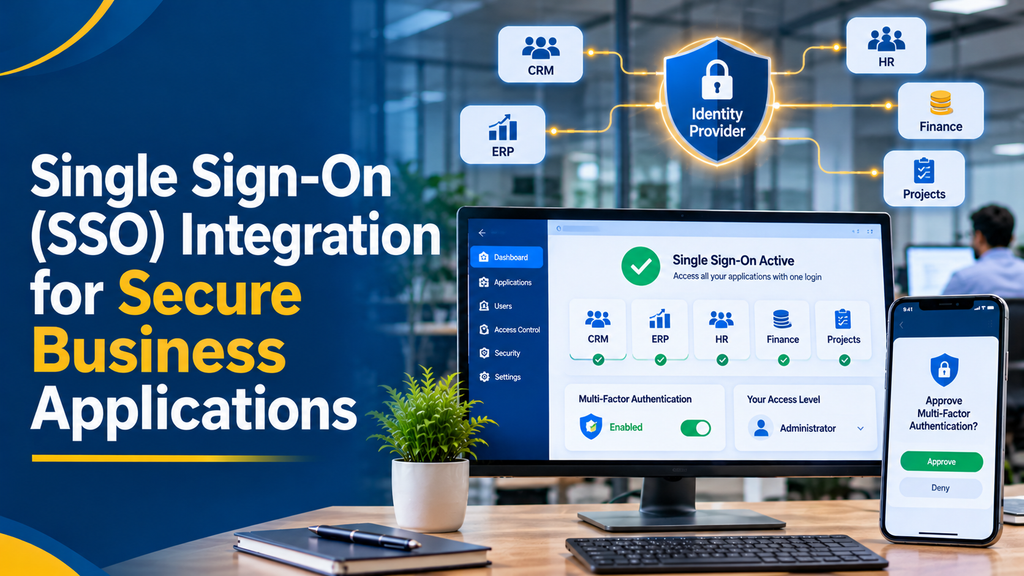
Single Sign-On (SSO) integration allows users to authenticate through a central identity provider and access multiple connected applications without independently signing in to each application.
By integrating SSO with CRM, ERP, HR, finance, project management and other business applications, organisations can simplify authentication while applying centralised identity and access management policies.
For businesses in Erode, Tamil Nadu and across India, SSO can support secure employee access, improve application administration and provide a consistent login experience across business software.
What Is Single Sign-On (SSO)?
Single Sign-On is an authentication approach that allows a user to sign in through a trusted identity provider and access multiple applications that accept that identity provider’s authentication.
Instead of maintaining a separate login experience for every connected application, the organisation can manage authentication through a central identity system.
An employee signs in to the organisation’s identity platform. After successful authentication, the employee can access authorised CRM, HR, ERP and project management applications without repeatedly entering credentials during the relevant authenticated sessions.
SSO does not automatically give a user access to every connected application or every feature. Each application must still apply its own access permissions, roles and security rules.
How SSO Integration Works
An SSO system typically includes an identity provider and one or more applications that trust its authentication results.
1. User Opens a Business Application
An employee visits a connected CRM, ERP or other business application.
2. Application Checks Authentication
If the user does not have a valid application session, the application redirects the user to the configured identity provider.
3. Identity Provider Authenticates the User
The identity provider checks the user’s credentials and applies configured security policies. These may include password checks, multi-factor authentication and device or access policies.
4. Identity Provider Returns an Authentication Response
After successful authentication, the identity provider returns a protocol-specific response to the application.
Depending on the implementation, this may be a SAML assertion or an OpenID Connect authentication response containing an ID Token.
5. Application Validates the Response
The application validates the response using the relevant protocol requirements. It checks information such as the issuer, audience, signature, expiry and other security parameters.
6. Application Creates Its Own Session
After successful validation, the application creates its own authenticated session and applies the user’s assigned permissions.
7. User Opens Other Connected Applications
When the user opens another connected application, that application can use the existing identity provider session where valid, subject to its own session and security policies.
User Opens Business Application
↓
Application Redirects to Identity Provider
↓
User Authentication and Security Checks
↓
Identity Provider Returns Authentication Response
↓
Application Validates the Response
↓
Application Creates an Authenticated Session
↓
User Accesses Authorised Business Features
Benefits of SSO Integration for Businesses
1. Simplified Employee Login
Employees can use a central authentication experience to access multiple connected business applications. This reduces the need to repeatedly manage different application login credentials.
2. Centralised Identity Management
IT administrators can manage user identities through a central identity provider, depending on the selected platform and integration.
3. Improved Access Administration
When an employee joins, changes roles or leaves an organisation, administrators can coordinate identity and application access changes through defined processes.
4. Multi-Factor Authentication Support
An identity provider can enforce multi-factor authentication policies before allowing access to connected applications.
5. Consistent Authentication Policies
Businesses can apply supported authentication requirements centrally, including password policies, MFA requirements and conditional access rules.
6. Better User Experience
A consistent sign-in experience can make it easier for employees to work across multiple business systems.
7. Support for Growing Organisations
As organisations add new departments, branches and applications, a central identity architecture can make authentication management easier to expand.
SSO Protocols and Technologies
Different applications and identity providers support different authentication protocols. Selecting the appropriate protocol is an important part of SSO integration.
1. SAML 2.0
Security Assertion Markup Language (SAML) 2.0 is an XML-based standard commonly used for enterprise Single Sign-On.
SAML allows an identity provider to send a signed authentication assertion to a connected application, known as a service provider.
Common SAML integration features include:
- Identity provider and service provider configuration.
- Signed authentication assertions.
- User attribute mapping.
- Certificate configuration.
- Single Sign-On request and response handling.
- Optional single logout support, where properly implemented.
SAML is often considered when integrating enterprise applications or working with organisations that already use SAML-compatible identity platforms.
2. OpenID Connect (OIDC)
OpenID Connect is an authentication protocol built on top of the OAuth 2.0 framework. It allows an application to verify a user’s identity through an identity provider.
OIDC is commonly used for modern web applications, mobile applications and cloud-based software.
Important OIDC components include:
- ID Tokens.
- Authentication endpoints.
- Authorization Code Flow.
- Client registration.
- Identity claims.
- Token signature and expiry validation.
- Discovery metadata and signing keys.
For modern application development, OIDC is often a practical choice when supported by the identity provider and the application architecture.
3. OAuth 2.0
OAuth 2.0 is an authorization framework that allows applications to obtain limited access to protected resources.
It is important to understand that OAuth 2.0 alone is not an authentication protocol. OpenID Connect adds a standard identity layer that allows applications to authenticate users.
OAuth access tokens are intended for accessing protected resources and should not automatically be treated as proof of user identity.
SSO Protocol Comparison
| Technology | Main Purpose | Common Use Cases |
|---|---|---|
| SAML 2.0 | Federated authentication | Enterprise application SSO |
| OpenID Connect | Authentication and identity information | Modern web and mobile applications |
| OAuth 2.0 | Delegated authorization | Secure API access |
| SCIM | User provisioning and lifecycle management | Automated account creation and updates |
These technologies serve different purposes. SCIM, for example, can complement SSO by synchronising user accounts, but it is not itself an authentication protocol.
Identity Providers for Business Applications
An identity provider manages user authentication and provides identity information to connected applications.
The right provider depends on the organisation’s existing technology, security requirements, licensing, application compatibility and administrative needs.
Microsoft Entra ID
Microsoft Entra ID supports enterprise identity management and SSO integration with compatible applications. It is commonly considered by organisations using Microsoft business services.
Google Workspace Identity Services
Google Workspace provides identity and application access capabilities for organisations using Google’s business productivity ecosystem. Supported SSO options depend on the relevant application and configuration.
Keycloak
Keycloak is an open-source identity and access management solution that supports standards such as OpenID Connect and SAML. It can be considered for organisations that need a self-managed identity platform.
Other Enterprise Identity Platforms
Businesses may also evaluate other identity providers based on their application ecosystem, user count, security requirements and available integration capabilities.
Business Applications That Can Use SSO
CRM Software
Sales teams can access customer records, lead management, sales pipelines and reporting through a central authentication system.
ERP Software
Employees can use SSO to authenticate into connected finance, inventory, purchase, production and reporting applications.
HR Management Software
HR teams and employees can access attendance, payroll, leave management and employee self-service applications through supported SSO connections.
Project Management Applications
Project teams can use central authentication to access task management, collaboration, project reports and resource planning tools.
Customer and Supplier Portals
Businesses can integrate identity services with customer portals, supplier portals and partner applications. External user access should have separate onboarding, access and account lifecycle policies.
Custom Web and Mobile Applications
Custom applications can integrate with an identity provider using supported authentication standards. Mobile applications need suitable platform-specific authentication flows and secure token handling.
SSO Integration Architecture
A typical SSO architecture contains an identity provider, one or more connected applications and the required authentication configuration.
Central Identity Provider
↓
Authentication and Identity Verification
↓
Secure SAML or OIDC Response
↓
Connected Business Applications
↓
Application-Level Roles and Permissions
Recommended Integration Components
| Component | Purpose |
|---|---|
| Identity Provider | Authenticates users and issues identity responses. |
| Application Client | Connects a business application to the identity provider. |
| Authentication Middleware | Processes the protocol response and application login. |
| User Attribute Mapping | Maps identity attributes to application user records. |
| Session Management | Manages application login sessions and expiry. |
| Role and Permission System | Controls which business features users can access. |
| Audit Logging | Records relevant authentication and access events. |
| User Provisioning | Creates, updates or deactivates accounts when supported. |
Security Features and Best Practices for SSO
SSO centralises authentication, so the identity provider and its connected applications must be configured carefully.
1. Multi-Factor Authentication
Multi-factor authentication adds another verification step beyond a password. Businesses can enforce suitable MFA policies based on user roles, risk and application sensitivity.
2. Validate Authentication Responses
Applications must validate authentication responses according to the selected protocol. This includes checking signatures, issuer, audience, expiry, response destination and other required security parameters.
3. Use Secure Redirect Configuration
Configure exact approved redirect and callback URLs. Avoid accepting arbitrary redirect destinations because they can create security risks.
4. Use Modern Authentication Flows
For OIDC implementations, use supported secure flows such as Authorization Code Flow with PKCE where appropriate. Follow current OAuth security guidance and avoid deprecated or insecure flow patterns.
5. Protect Client Credentials
Keep confidential application credentials and signing secrets on trusted backend systems. Do not expose confidential secrets in browser code or publicly distributed mobile applications.
6. Apply Role-Based Access Control
Successful authentication should not automatically grant unrestricted application access.
Use application-level roles and permissions to determine whether users can access specific modules, records and administrative functions.
7. Manage Sessions Carefully
Set suitable session expiry, inactivity limits and re-authentication requirements. Define how application sessions behave when a user signs out of the identity provider.
Single Logout is not automatic across all SSO implementations. It requires compatible protocol support and correct configuration across connected applications.
8. Maintain Authentication Audit Logs
Record relevant events such as successful login, failed login, account changes, MFA events and administrative access changes.
Protect logs from unauthorised access and avoid storing passwords, full authentication tokens or unnecessary sensitive information.
9. Plan for Account Deactivation
When an employee leaves an organisation, administrators should disable the identity and review active application sessions, refresh tokens and any separately provisioned accounts.
10. Monitor Identity Provider Availability
A central identity provider can become a critical dependency. Businesses should plan for service availability, recovery procedures and administrative access if the identity service is temporarily unavailable.
SSO Integration Implementation Process
A structured implementation process helps businesses integrate SSO without disrupting existing applications.
Step 1: Analyse Existing Applications
Identify the applications that need SSO and check whether they support SAML, OpenID Connect or another compatible authentication method.
Step 2: Select an Identity Provider
Choose an identity platform based on the organisation’s existing infrastructure, security requirements, user volume and application compatibility.
Step 3: Select the Authentication Protocol
Choose SAML 2.0 or OpenID Connect based on the connected applications and identity provider capabilities. OAuth 2.0 may also be required for delegated API access.
Step 4: Configure Application Registration
Register the application with the identity provider. Configure the required identifiers, callback URLs, certificates, scopes and protocol settings.
Step 5: Implement Authentication Handling
Integrate the required authentication middleware or protocol library into the application. Implement secure response validation and application session creation.
Step 6: Map User Attributes and Roles
Map identity attributes such as email address, unique identifier, display name and group membership to the application’s user records and permissions.
Step 7: Configure MFA and Access Policies
Apply appropriate authentication policies and review access permissions for different employee categories.
Step 8: Test the Integration
Test important scenarios such as:
- Successful login.
- Invalid or expired authentication response.
- Unauthorised application access.
- Incorrect user attribute mapping.
- Expired application session.
- Identity provider logout.
- Deactivated user account.
- MFA verification.
- Mobile and browser login compatibility.
Step 9: Deploy and Monitor
Deploy the integration after testing. Monitor authentication events, application errors, identity provider availability and user access issues.
Common SSO Integration Challenges
Different Applications Support Different Protocols
Some applications support SAML while others support OpenID Connect. Integration planning must account for protocol compatibility and any required middleware.
User Attribute Mapping Problems
An identity provider may use different attribute names or formats from the connected application. Incorrect mapping can create login failures or incorrect user profiles.
Session and Logout Differences
Applications may manage their own sessions independently. A central identity provider logout does not necessarily terminate every application session unless the relevant logout mechanisms are configured.
Legacy Application Compatibility
Older business applications may not support modern authentication standards. They may require an identity-aware proxy, application updates or another controlled integration approach.
Multiple User Directories
Organisations may maintain employee records in HR software, directories and business applications. User identity mapping and account lifecycle processes must be planned carefully.
External User Access
Customer and supplier portals may require a different identity strategy from employee SSO. External users should have appropriate registration, verification and account recovery processes.
Single Sign-On Integration Development Cost
The development cost depends on the number of applications, selected identity provider, authentication protocol, user provisioning requirements and security testing scope.
The following are illustrative planning estimates, not fixed Greap quotations or guaranteed market prices.
| Development Scope | Indicative Cost |
|---|---|
| Basic OIDC login integration for one application | ₹8,000–₹15,000 |
| SAML 2.0 integration for one application | ₹12,000–₹22,000 |
| SSO integration with an existing CRM | ₹15,000–₹30,000 |
| SSO integration across two or three applications | ₹25,000–₹45,000 |
| SSO with MFA and role mapping | ₹25,000–₹50,000 |
| Custom identity integration for multiple business applications | ₹40,000–₹80,000+ |
| Enterprise SSO with user provisioning and advanced access workflows | ₹80,000–₹1.5 lakh+ |
These estimates cover illustrative development scopes only. Actual quotations depend on application compatibility, identity provider licensing, protocol requirements, number of user groups, testing, deployment and ongoing support.
Additional Expenses
- Identity provider subscription or licensing.
- Server and hosting resources.
- Domain and SSL configuration.
- Directory or user provisioning services.
- Security assessment and penetration testing.
- Application upgrades or legacy system modifications.
- Maintenance and technical support.
- Applicable taxes.
How Greap Technologies Can Develop SSO Integration
Greap Technologies develops websites, custom business software, CRM systems, ERP applications and digital solutions.
A custom SSO integration can connect an organisation’s existing business applications with a central identity provider while maintaining application-specific roles and permissions.
Depending on project requirements, the solution may include:
- Single Sign-On implementation.
- SAML 2.0 integration.
- OpenID Connect integration.
- OAuth 2.0 authorization integration.
- Identity provider configuration.
- CRM and ERP authentication integration.
- Employee portal login integration.
- Multi-factor authentication support.
- User attribute and role mapping.
- Session management.
- Authentication audit logging.
- User provisioning integration where supported.
For businesses in Erode, Perundurai, Bhavani, Gobichettipalayam and other parts of Tamil Nadu, the integration can be planned around existing software, employee access requirements and future application expansion.
Need Secure SSO Integration for Your Business Applications?
Connect your CRM, ERP, HR portal and custom business software through a central authentication system. Greap Technologies can help plan an SSO integration suited to your application architecture and security requirements.
Frequently Asked Questions
1. What is Single Sign-On (SSO)?
Single Sign-On is an authentication approach that allows users to authenticate through a central identity provider and access multiple connected applications without repeatedly entering credentials during valid sessions.
2. How does SSO integration work?
A connected application redirects the user to an identity provider. After authentication, the identity provider returns a protocol-specific response. The application validates it and creates its own authenticated session.
3. What is the difference between SSO and OAuth 2.0?
SSO describes a user authentication experience across connected applications. OAuth 2.0 is an authorization framework for delegated access to protected resources. OpenID Connect adds an identity layer for authentication.
4. What is the difference between SAML and OpenID Connect?
SAML 2.0 is an XML-based federation protocol commonly used in enterprise SSO. OpenID Connect is an identity protocol built on OAuth 2.0 and is widely used for modern web and mobile applications.
5. Can SSO be integrated with custom software?
Yes. Custom web and mobile applications can integrate with compatible identity providers using supported protocols such as SAML 2.0 or OpenID Connect.
6. Can SSO connect CRM and ERP software?
Yes. CRM and ERP applications can use a common identity provider when both applications support compatible SSO integration methods.
7. Does SSO improve business application security?
SSO can support centralised authentication policies, MFA and identity administration. However, it must be implemented with secure protocol validation, suitable session management and application-level access controls.
8. Does SSO automatically provide multi-factor authentication?
No. MFA is a separate security control that can be configured through the identity provider or authentication platform. Its availability depends on the selected provider and account configuration.
9. What is an identity provider?
An identity provider is a system that authenticates users and supplies identity information to connected applications. It manages authentication processes and may enforce MFA and access policies.
10. What is SCIM in identity management?
System for Cross-domain Identity Management (SCIM) is a standard used to automate user provisioning and account updates between identity systems and connected applications. It complements SSO but does not perform authentication itself.
11. Does SSO support mobile applications?
Yes. Mobile applications can integrate with supported identity providers using appropriate authentication flows, secure system-browser handling and platform-specific token storage.
12. What happens when an employee leaves a company?
The organisation should disable the employee’s identity account, review application access, revoke relevant tokens where supported and terminate active sessions according to its account lifecycle policy.
13. Does signing out of one application sign out of every application?
Not necessarily. Application sessions are managed separately in many implementations. Cross-application logout requires compatible logout support and correct configuration.
14. How much does SSO integration cost?
The cost depends on the number of applications, identity provider, protocol, MFA requirements, user provisioning and security testing. Provider licensing and infrastructure expenses may be additional.
15. Can SSO be implemented for multiple branches?
Yes. SSO can support employees across multiple branches when the identity architecture, user groups, application permissions and access policies are configured appropriately.
Conclusion
Single Sign-On integration helps businesses simplify authentication across multiple applications while managing user identities through a central identity provider.
By combining suitable protocols such as SAML 2.0 and OpenID Connect with MFA, role-based access control, session management and account lifecycle processes, organisations can create a more consistent approach to application authentication.
Greap Technologies can help businesses plan and develop SSO integrations for CRM, ERP, HR portals, customer portals and custom business applications.