
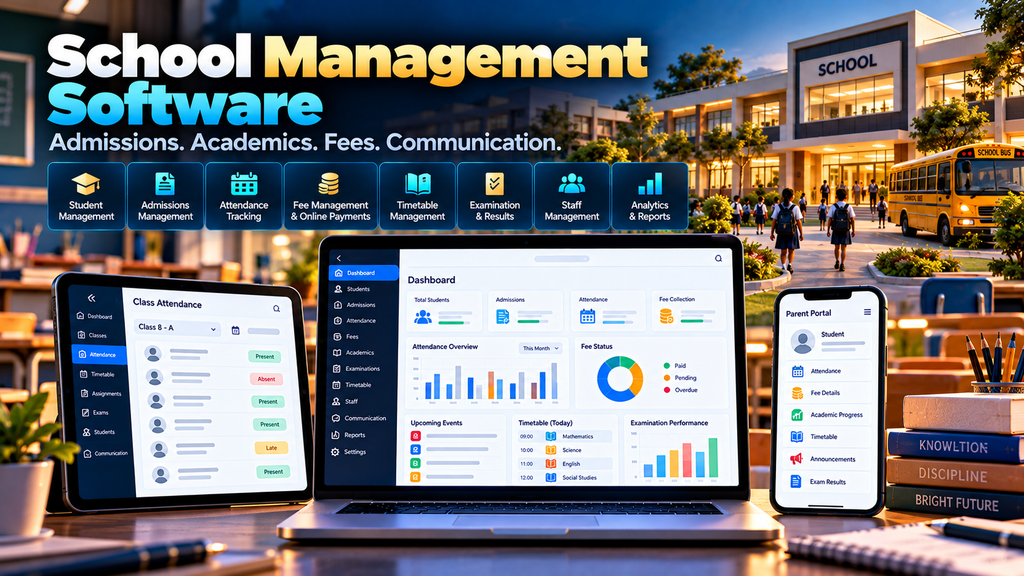
School Management Software Development in Erode can help schools organize admissions, student information, attendance, fees, academics, examinations, staff, timetables, parent communication and administrative reporting through a centralized digital platform.
Running a school involves much more than maintaining student records.
The admission team handles enquiries and applications.
Teachers manage classes, attendance and academics.
The office manages student records and certificates.
The accounts team manages fees and payments.
Parents need relevant updates about their children.
Management needs reliable information about overall school operations.
When these processes depend heavily on paper registers, spreadsheets, separate applications and manual communication, maintaining consistent information can become difficult.
A properly planned School Management System or School ERP can bring relevant administrative and academic workflows into one connected platform.
At Greap Technologies, we develop custom business software, web applications, portals and digital systems for organizations in Erode and nearby areas.
What Is School Management Software?
School management software is a digital platform designed to help educational institutions manage administrative, academic and communication workflows.
Depending on the school’s requirements, the software can include:
- Admission management
- Student information management
- Class and section management
- Attendance
- Fee management
- Timetable management
- Academic records
- Examinations
- Marks and grades
- Report cards
- Homework or assignment information
- Staff management
- Teacher portals
- Parent portals
- Student portals
- Announcements
- Transport management
- Library management
- Certificates and documents
- School reports
The right system should reflect how the institution actually operates rather than forcing every school into the same workflow.
Who Can Use School Management Software?
School management systems can be designed for different types and sizes of educational institutions.
Depending on requirements, these may include:
- Primary schools
- Middle schools
- Higher secondary schools
- Matriculation schools
- CBSE schools
- Private educational institutions
- Multi-campus school groups
- Other institutions with similar student-management requirements
Modules and workflows should be configured according to the institution’s structure and administrative requirements.
School Management Software vs School ERP
The terms school management software and school ERP are often used for overlapping types of systems.
A smaller school management system may focus on core workflows such as:
- Students
- Attendance
- Fees
- Examinations
- Communication
A broader school ERP may connect additional administrative modules, departments, campuses and integrations.
The important question is not the label used for the software. It is whether the system supports the institution’s actual requirements.
1. Requirement Analysis Before Development
School software development should begin by understanding the institution’s current workflow.
Important questions include:
- How are admission enquiries handled?
- How are students registered?
- How are classes and sections structured?
- How is attendance recorded?
- How are fees configured and collected?
- How are examinations managed?
- How are marks entered?
- How are report cards prepared?
- How do teachers communicate with parents?
- Which reports does management need?
These requirements should shape the software architecture.
2. Academic Year Management
School data is commonly organized by academic year.
The system should clearly distinguish information belonging to different academic periods.
This can affect:
- Student classes
- Attendance
- Fees
- Timetables
- Examinations
- Academic records
Historical records should remain available according to the institution’s data-retention requirements.
3. Admission Enquiry Management
A school may receive admission enquiries through:
- Website forms
- Phone calls
- Direct visits
- Other approved channels
An enquiry module can help the admission team record and follow up on prospective student enquiries.
A simple workflow could be:
Enquiry → Follow-Up → Application → Review → Admission Decision
4. Online Admission Application
Where appropriate, schools can provide an online application form for parents or guardians.
The form can collect information required by the institution.
The exact fields and documents should be determined by the school and applicable requirements.
Only information genuinely required for the admission process should be collected.
5. Admission Workflow
A structured admission workflow can help authorized employees understand the status of each application.
Statuses might include:
- Application received
- Under review
- Additional information required
- Approved
- Not approved
- Admission completed
The workflow should reflect the institution’s admission policy.
6. Student Information Management
A centralized student profile can maintain relevant school records.
Depending on requirements, the system can organize:
- Student identification information
- Admission information
- Class and section
- Parent or guardian contact information
- Academic information
- Attendance records
- Fee records
- School-issued documents
Student information should be protected through appropriate access controls and data-security practices.
7. Student ID Management
Each student can be assigned a unique identifier within the school system.
This identifier can help connect records across relevant modules without relying only on student names.
8. Class and Section Management
The software can organize the school’s academic structure using:
- Grades or standards
- Classes
- Sections
- Subjects
- Teachers
- Academic year
The structure should reflect how the institution organizes its students.
9. Student Promotion
At the end of an academic year, eligible students may move to another class or grade according to school policy.
A promotion workflow can help update the next academic year’s class information while preserving historical records.
10. Student Attendance Management
Attendance is one of the most common school-management requirements.
Teachers can record attendance according to the school’s chosen workflow.
The system can then provide relevant:
- Daily attendance
- Class-wise attendance
- Student-wise attendance
- Date-range reports
Attendance rules should follow the institution’s policies.
11. Teacher Attendance Interface
Teachers should have a simple interface for their assigned classes.
A practical workflow can be:
Select Class → Select Date/Period → Mark Attendance → Review → Submit
The interface should minimize unnecessary administrative work.
12. Attendance Reports
Authorized users can access attendance reports using filters such as:
- Academic year
- Class
- Section
- Student
- Date range
Reports should clearly state the period and criteria used.
13. Fee Structure Management
Schools may have different fee structures depending on:
- Class
- Academic year
- Transport requirements
- Optional services
- Other institution-defined categories
The system can maintain configured fee structures so the accounts team does not need to calculate every student’s fees manually.
14. Student Fee Assignment
Relevant fees can be assigned according to the student’s applicable structure.
The system should also support approved exceptions or adjustments where required by the institution.
15. Fee Collection Management
Authorized staff can record fee transactions and maintain relevant payment status.
The system can help organize:
- Fee category
- Amount due
- Amount received
- Balance
- Payment date
- Payment reference
- Receipt information
Financial permissions should be restricted appropriately.
16. Online Fee Payment Integration
Where the school wants to accept online payments, the platform can potentially integrate with a suitable payment provider.
A typical workflow can be:
Parent Portal → Select Fee → Payment Provider → Payment Result → School System Update
Payment implementation should use the provider’s supported and secure integration methods.
17. Fee Receipts
The system can generate appropriate receipt information after a payment has been successfully recorded or confirmed.
Receipt formats should follow the institution’s accounting requirements.
18. Outstanding Fee Reports
Authorized accounts users can review pending fee information by:
- Student
- Class
- Fee category
- Due period
Access to financial information should be limited to appropriate users.
19. Fee Reminder Workflow
The school can configure communication for relevant fee reminders.
Messages should be accurate, respectful and sent through approved communication channels.
Automated reminders should not replace appropriate human handling of exceptional cases.
20. Timetable Management
A timetable module can organize:
- Classes
- Sections
- Subjects
- Teachers
- Periods
- Rooms where relevant
The system can also help identify obvious scheduling conflicts according to configured information.
21. Teacher Timetable
Teachers can access a view of their assigned classes and periods.
A clear timetable interface can reduce dependence on printed schedules when digital access is practical.
22. Student Timetable
Students or parents can be given access to relevant class timetable information through an authorized portal.
23. Subject Management
The academic structure can associate subjects with relevant:
- Classes
- Sections
- Teachers
- Academic years
This information can then support timetable, examination and academic-report modules.
24. Examination Management
A school ERP can organize examination information.
Depending on requirements, the system can manage:
- Examination name
- Applicable classes
- Subjects
- Dates
- Maximum marks
- Configured grading rules
The software should follow the school’s academic framework.
25. Examination Timetable
Exam schedules can be prepared and made available to authorized students, parents and teachers.
The system should clearly show:
- Exam
- Date
- Subject
- Relevant timing
26. Marks Entry
Authorized teachers can enter marks for assigned students and subjects.
The software can restrict teachers to relevant classes and subjects based on configured permissions.
Validation rules can help reduce simple data-entry mistakes.
27. Grade Calculation
If the institution uses defined grade rules, the system can calculate grades according to the configured framework.
Grading rules should be approved by the institution before being automated.
28. Report Card Generation
Once academic information has been verified, the software can generate report-card data using the school’s approved format.
Report cards may include:
- Student information
- Subjects
- Marks
- Grades
- Attendance information where required
- Approved remarks
Academic results should have appropriate review controls before publication.
29. Academic Performance Reports
Authorized school users can review academic information using reports organized by:
- Student
- Class
- Subject
- Examination
- Academic period
Reports should present recorded educational data without making unsupported judgments about individual students.
30. Homework and Assignment Information
Teachers can use the platform to share relevant homework or assignment information.
This can include:
- Class
- Subject
- Task description
- Assigned date
- Due date
- Relevant attachment where supported
The system can act as an organized communication channel rather than relying entirely on separate messages.
31. Teacher Management
A teacher or staff profile can maintain relevant employment and academic assignment information.
Access to staff records should be controlled according to administrative responsibilities.
32. Staff Management
Schools may also need to manage non-teaching staff.
Depending on scope, a staff module can maintain:
- Staff identification
- Department
- Role
- Contact information
- Employment status
- Relevant administrative records
33. Staff Attendance
If required, employee attendance can be managed separately from student attendance.
The workflow can depend on the school’s existing attendance process and any hardware integrations involved.
34. Role-Based Access Control
School software can contain sensitive student, family, academic and financial information.
Access should therefore be separated carefully.
| User | Example Access |
|---|---|
| Administrator | Configured system administration |
| School Management | Authorized reports and operational information |
| Teacher | Assigned classes, attendance and academic functions |
| Accounts User | Authorized fee and payment information |
| Parent/Guardian | Relevant information for linked student accounts |
| Student | Authorized academic and school information |
Users should only be able to access the information required for their role.
35. Parent Portal
A parent or guardian portal can provide authorized access to relevant school information for linked students.
Depending on the school’s requirements, this may include:
- Attendance
- Fee information
- Timetable
- Examination schedule
- Published academic results
- Homework information
- Announcements
Account linking and permissions should be implemented carefully to protect student information.
36. Student Portal
Schools can provide students with access to age-appropriate and authorized academic information.
This can include:
- Timetable
- Homework
- Exam schedule
- Published results
- School announcements
The design should be simple and appropriate for the intended student group.
37. Teacher Portal
A teacher portal can bring frequently used functions into one interface.
These may include:
- Today’s timetable
- Assigned classes
- Attendance
- Homework
- Marks entry
- Announcements
The objective should be to reduce repetitive administrative steps for teachers.
38. School Announcements
Authorized administrators can publish relevant school announcements.
Announcements can be targeted where appropriate to:
- Whole school
- Specific class
- Specific section
- Staff
- Parents or guardians
Important communication should use appropriate channels according to the school’s policies.
39. Notification Management
The software can support notifications for meaningful events.
Examples can include:
- School announcements
- Attendance updates where appropriate
- Fee reminders
- Exam schedules
- Published results
- Timetable updates
Schools should avoid excessive notifications that make important messages easier to miss.
40. School Transport Management
Schools operating transport services may require a separate transport module.
Depending on requirements, this can maintain:
- Vehicles
- Routes
- Stops
- Drivers
- Assigned students
- Transport fee information
More advanced vehicle tracking requires appropriate GPS or transport integrations.
41. Route and Stop Management
School transport routes can be organized using defined stops.
A route may contain:
Starting Point → Stop A → Stop B → Stop C → School
Students can then be associated with appropriate routes and stops according to school records.
42. Library Management
A school management platform can include a library module when required.
Potential functionality can include:
- Book catalogue
- Book identification
- Issue records
- Return records
- Availability status
- Member information
Library workflows should match the school’s existing process.
43. Certificate Management
Schools may generate different documents or certificates based on approved templates.
Where appropriate, the system can help populate verified student information into configured document formats.
Authorized employees should review important official documents before issuance.
44. Document Management
Relevant documents can be associated with student or administrative records where necessary.
Because school documents can contain personal information, the system should apply appropriate:
- Access controls
- Storage security
- Retention rules
- Backup procedures
45. Multi-Campus School Management
School groups operating multiple campuses may require centralized management with campus-level separation.
The software can potentially support:
- Campus-specific students
- Campus-specific staff
- Campus-specific classes
- Campus-specific fees
- Campus reports
- Authorized group-level reporting
The exact data-sharing model should be established during requirement analysis.
46. School Dashboard
Administrative dashboards can summarize relevant school information.
Depending on user permissions, dashboards might display:
- Student counts
- Admission activity
- Attendance information
- Fee information
- Academic schedules
- Operational alerts
Dashboards should prioritize information that helps users take action rather than displaying unnecessary charts.
47. School Management Reports
A school ERP can provide reports for authorized users.
Examples can include:
- Student reports
- Admission reports
- Attendance reports
- Fee reports
- Academic reports
- Examination reports
- Staff reports
- Transport reports
Reports should clearly indicate their filters and reporting period.
48. Search and Filtering
Authorized users should be able to find relevant records without manually searching through large lists.
Search and filtering can be provided for:
- Students
- Admissions
- Classes
- Fees
- Staff
- Examinations
- Documents
49. Audit Trail
Important changes can be recorded in an audit history.
Depending on the module, the audit trail can identify:
- What changed
- Who performed the action
- When the action occurred
This can be useful for sensitive areas such as fees, academic records and user permissions.
50. Data Import and Migration
A school moving from spreadsheets or another system may need to migrate existing records.
This can include relevant:
- Student information
- Parent or guardian information
- Classes
- Fee structures
- Staff
- Historical records where required
Existing data should be reviewed before migration so inaccurate or duplicate records are not simply copied into the new system.
51. School Software Security
Security is especially important because school systems can contain information relating to children, families, staff, academics and payments.
Security planning should include appropriate:
- User authentication
- Role-based authorization
- Secure communications
- Input validation
- Access logging
- Software updates
- Backup procedures
- Integration security
Access to sensitive records should be limited to authorized users with a legitimate operational requirement.
52. Privacy and Student Data
A school management platform should be designed to collect and expose only information required for legitimate school operations.
Important considerations include:
- What student information is collected
- Why the information is required
- Who can access it
- How long records are retained
- How information is protected
- How parent, student and staff accounts are authenticated
Schools should determine the legal, regulatory and institutional requirements that apply to their handling of student information.
53. Backup and Recovery
School data changes throughout the academic year.
A backup and recovery strategy should therefore consider relevant:
- Databases
- Uploaded files
- Configuration
- Academic records
- Financial records
- Recovery procedures
Backup frequency and retention should reflect the system architecture and institution’s requirements.
54. Responsive School Management System
Teachers, parents and administrators may access the platform using different devices.
A responsive interface should therefore work appropriately across:
- Desktop computers
- Laptops
- Tablets
- Smartphones
Different roles may benefit from different interface priorities rather than showing the same dashboard to everyone.
55. School Mobile App vs Responsive Web Portal
Not every school requires separate Android or iOS applications.
A responsive web platform may be sufficient for requirements such as:
- Attendance
- Fees
- Timetables
- Results
- Announcements
- Parent access
A dedicated mobile application can be considered when the school’s requirements justify app-specific functionality.
The decision should be based on actual user needs, budget and maintenance requirements.
School Management Software Modules
| Module | Purpose |
|---|---|
| Admissions | Manage enquiries and admission workflows |
| Students | Maintain authorized student records |
| Classes | Manage academic structure |
| Attendance | Record and report student attendance |
| Fees | Manage configured fee structures and collections |
| Timetable | Organize classes, subjects and teachers |
| Examinations | Manage exam schedules and academic records |
| Staff | Maintain relevant employee information |
| Parent Portal | Provide authorized parent or guardian access |
| Student Portal | Provide authorized student information |
| Transport | Manage school transport information |
| Library | Manage books and issue/return workflows |
| Communication | Publish relevant announcements and notifications |
| Reports | Provide authorized school-management reporting |
School Management Software vs General ERP Software
A general ERP can support broad organizational processes such as finance, HR, purchasing and administration.
A school management system focuses more specifically on educational workflows such as:
- Admissions
- Students
- Classes
- Attendance
- Fees
- Timetables
- Examinations
- Parent communication
Depending on the institution, school-specific software may also integrate with other administrative or accounting systems.
Custom School Software vs Ready-Made School ERP
Ready-made school software can be suitable when its workflows already match the institution’s requirements.
Custom development can be considered when a school requires:
- Unique admission workflows
- Specific fee structures
- Custom academic processes
- Special user permissions
- Existing system integrations
- Multi-campus workflows
- Custom reports
- Institution-specific portals
Neither approach is automatically better for every school.
The choice should consider requirements, implementation effort, ongoing support, security, maintenance and total cost.
How Much Does School Management Software Development Cost in Erode?
There is no single development price suitable for every school management system.
Cost can depend on:
- Number of modules
- Number of users
- Student volume
- Admission workflow
- Fee-management complexity
- Academic requirements
- Parent and student portals
- Transport functionality
- Payment integrations
- Existing software integrations
- Data migration
- Security requirements
- Mobile application requirements
A basic student, attendance and fee-management platform has a different development scope from a multi-campus school ERP with admissions, academics, portals, payments, transport and integrations.
How Long Does School Management Software Development Take?
The timeline depends on the scope and complexity of the project.
Factors can include:
- Requirement analysis
- Workflow documentation
- UI/UX design
- Number of modules
- User roles
- Integrations
- Data migration
- Testing
- Training
- User acceptance
A realistic timeline should be prepared after the institution’s requirements are documented.
Should School ERP Development Be Done in Phases?
For larger school-management projects, phased implementation can be practical.
For example:
- School setup and user roles
- Admissions and students
- Classes and attendance
- Fee management
- Timetable
- Examinations and report cards
- Parent and teacher portals
- Transport and library modules
- Integrations
- Additional reports and workflows
The actual implementation order should follow the school’s priorities and technical dependencies.
School Management Software Development in Erode and Nearby Areas
Greap Technologies can develop custom school management systems for educational institutions in Erode, Perundurai, Bhavani, Gobichettipalayam, Sathyamangalam, Anthiyur, Chennimalai, Modakkurichi, Kavindapadi, Nambiyur, Kodumudi and nearby areas.
The software should be designed around each institution’s actual requirements rather than creating near-identical systems simply for different nearby locations.
Why Choose Greap Technologies for School Management Software Development in Erode?
Greap Technologies provides custom software development, website development and digital solutions for organizations in Erode and nearby areas.
Depending on project requirements, a custom school management system can include:
- Requirement analysis
- Admission management
- Student management
- Class and section management
- Attendance
- Fee management
- Online payment integration
- Timetable management
- Examinations
- Marks and report cards
- Staff management
- Teacher portal
- Parent or guardian portal
- Student portal
- Announcements
- Transport management
- Library management
- School reports
- Role-based access
- Data migration
- Responsive interfaces
- Ongoing technical support
The objective is to understand how the institution currently manages academic and administrative workflows and then design software around processes that genuinely benefit from digitization.
Explore Greap Technologies, Website Development Services, SEO Services in Erode and Digital Marketing Services.
Conclusion
School management software can help educational institutions organize administrative, academic and communication workflows through one structured digital platform.
A useful system should not simply contain a large collection of modules.
It should support the workflows the school actually uses:
Admission → Student Record → Class → Attendance → Fees → Academics → Examination → Parent Communication → Reporting
Depending on requirements, the system can then expand into:
- Teacher portals
- Student portals
- Transport management
- Library management
- Online payments
- Multi-campus management
- Custom reports
- External integrations
For schools, privacy and access control should be treated as core requirements because the platform may handle information relating to children and families.
Need School Management Software in Erode?
If your institution currently manages admissions, student records, attendance, fees, examinations and parent communication through paper registers, spreadsheets and disconnected systems, a custom school management platform may help centralize relevant workflows.
Greap Technologies develops custom school management software, web applications, portals and business systems for organizations in Erode and nearby areas.
Discuss Your School Management Software Project on WhatsApp
Frequently Asked Questions
1. What is school management software?
School management software is a digital system for managing educational and administrative workflows such as admissions, students, attendance, fees, timetables, examinations, staff and communication.
2. What is a school ERP?
A school ERP is a broader school-management platform that can connect multiple academic, administrative and communication modules within one system.
3. Can school software manage student attendance?
Yes. Teachers can be provided with authorized attendance interfaces, while administrators can access relevant attendance reports according to their permissions.
4. Can the system manage school fees?
Yes. A custom system can manage configured fee structures, student fee assignments, payment records, balances and receipts according to the institution’s requirements.
5. Can parents pay school fees online?
Potentially. The school platform can integrate with a suitable online payment provider when the institution requires digital fee payments.
6. Can parents access student information?
Yes. An authenticated parent or guardian portal can provide access to approved information associated with the relevant student account.
7. Can teachers enter marks online?
Yes. Authorized teachers can be provided with marks-entry interfaces for their assigned classes and subjects.
8. Can school management software generate report cards?
Yes. The system can generate report-card information using verified academic data and the institution’s configured grading and report format.
9. Can the software manage school transport?
Yes. A transport module can manage relevant vehicles, routes, stops, drivers and student assignments. Live vehicle tracking requires suitable tracking technology and integration.
10. Does every school need custom software?
No. Ready-made school software may be suitable when it already supports the institution’s workflows. Custom development can be considered when specific processes, integrations, portals or reporting requirements justify it.
11. How much does school management software development cost in Erode?
Development cost depends on modules, user roles, student volume, fee and academic workflows, portals, integrations, data migration, security and overall project complexity.
12. Does Greap Technologies develop school management software in Erode?
Yes. Greap Technologies develops custom school management systems, web applications and digital platforms for organizations in Erode and nearby areas.


