
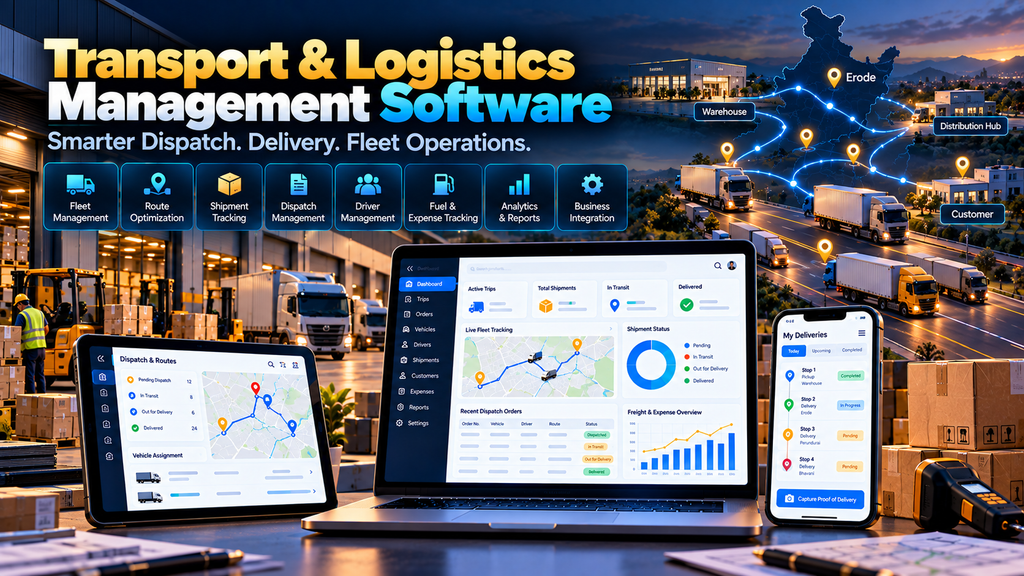
Transport and Logistics Management Software Development in Erode can help manufacturers, distributors, transport operators, wholesalers and logistics businesses organize vehicles, drivers, trips, dispatches, shipments, deliveries, freight, expenses and operational reporting through a centralized digital system.
Transport operations can become difficult to manage when important information is spread across phone calls, WhatsApp messages, paper documents, spreadsheets and separate accounting or tracking systems.
The warehouse team may know when goods are ready.
The transport team may need to arrange a vehicle.
The driver needs delivery information.
The customer may want to know the shipment status.
The accounts team needs freight and expense information.
Management needs to understand overall transport operations.
A properly planned Transport Management System (TMS) can connect relevant parts of this workflow into one structured software platform.
At Greap Technologies, we develop custom business software, warehouse systems, B2B platforms, ecommerce solutions and digital systems for businesses in Erode and nearby areas.
What Is Transport and Logistics Management Software?
Transport and logistics management software is a business system designed to help companies plan, record and manage transportation and delivery operations.
Depending on the business model, the software can support:
- Vehicle management
- Driver management
- Trip planning
- Vehicle assignment
- Shipment management
- Dispatch management
- Delivery management
- Route information
- Freight management
- Transporter management
- Delivery status
- Proof of delivery
- Trip expenses
- Fuel records
- Vehicle documents
- Maintenance records
- GPS integrations
- Customer notifications
- Transport reports
- ERP integrations
- Warehouse integrations
The required modules should be based on how the company actually moves goods from one location to another.
Who Can Use Transport Management Software?
A custom transport or logistics platform can be relevant for:
- Transport companies
- Logistics service providers
- Manufacturers
- Wholesalers
- Distributors
- Ecommerce businesses
- Industrial suppliers
- Textile businesses
- Building material suppliers
- Retail distribution businesses
- Businesses operating their own delivery fleet
A company does not necessarily need to be a dedicated logistics provider to benefit from transport management software.
Businesses operating their own vehicles or coordinating regular third-party transport may also need structured logistics workflows.
Transport Management Software vs Fleet Management Software
| Transport Management Software | Fleet Management Software |
|---|---|
| Focuses on transportation workflows | Focuses primarily on vehicles and fleet operations |
| Can manage shipments and trips | Can manage vehicles and maintenance |
| Can support dispatch and delivery | Can support vehicle utilization and records |
| Can manage freight workflows | Can manage vehicle-related expenses |
| Can integrate with warehouse and order systems | Can integrate with GPS and vehicle-related systems |
The two areas can overlap significantly.
A custom logistics platform may include both transport and fleet management functionality.
1. Map the Existing Logistics Workflow
Transport software development should begin by understanding how shipments currently move through the business.
Document the workflow from:
Order → Goods Ready → Transport Planning → Vehicle Assignment → Loading → Dispatch → Transit → Delivery → Proof of Delivery
Also identify:
- Who creates trips?
- Who assigns vehicles?
- Who assigns drivers?
- How are freight charges determined?
- How are third-party transporters selected?
- How are delivery updates communicated?
- How are expenses recorded?
- How is proof of delivery collected?
This process becomes the foundation for the software architecture.
2. Vehicle Master Management
A centralized vehicle master can maintain relevant fleet information.
Depending on requirements, this can include:
- Vehicle number
- Vehicle type
- Capacity
- Ownership type
- Assigned branch
- Current status
- Relevant documents
The software should store only information that supports actual operational or compliance workflows.
3. Vehicle Type Management
Different shipments may require different types of vehicles.
Vehicle categories can be configured according to the company’s operations.
Examples may include different:
- Capacity classes
- Body types
- Commercial vehicle categories
- Special-purpose vehicle types
Vehicle classification can later support trip planning and reporting.
4. Driver Management
A driver master can maintain relevant information about authorized drivers.
Depending on business requirements, this may include:
- Driver name
- Phone number
- Employee or driver ID
- Assigned vehicle
- License-related information
- Current availability
Access to personal and document information should be restricted appropriately.
5. Transporter Management
Businesses that use third-party transport providers can maintain transporter records separately from their own fleet.
A transporter master can include relevant:
- Company information
- Contact details
- Service locations
- Vehicle types
- Commercial information
- Account status
This can create a centralized directory for transport planning.
6. Shipment Management
The system can create shipment records for goods that need transportation.
A shipment may contain:
- Shipment number
- Customer
- Delivery location
- Related orders
- Products or packages
- Quantity
- Weight
- Volume where relevant
- Required delivery information
Shipment data can come from an ERP, warehouse system, ecommerce platform or manual entry depending on the architecture.
7. Trip Creation
A trip can represent the actual transport movement associated with one or more shipments.
Trip creation can include:
- Trip number
- Vehicle
- Driver
- Origin
- Destination
- Shipments
- Planned date
- Transporter
- Trip status
The system should clearly distinguish shipments from trips where the business requires that distinction.
8. Vehicle Assignment
Dispatch employees can assign an appropriate vehicle to a trip.
The decision may consider:
- Vehicle availability
- Vehicle capacity
- Shipment size
- Destination
- Product requirements
- Business rules
Software can support the decision, but assignment rules should reflect real operational requirements.
9. Driver Assignment
A driver can be assigned to a vehicle or trip based on availability and business rules.
The system can help avoid accidental duplicate assignments by showing relevant current trip information.
10. Trip Approval Workflow
Some businesses may require approval before a transport movement begins.
A workflow can follow:
Trip Created → Vehicle Assigned → Cost Reviewed → Approved → Dispatch
Approval rules can depend on trip cost, transporter, route or internal policy.
11. Dispatch Management
Dispatch functionality can record when goods officially leave the warehouse or dispatch location.
Relevant information can include:
- Trip
- Vehicle
- Driver
- Shipment
- Dispatch time
- Packages
- Documents
- Status
This can connect warehouse fulfilment with transport operations.
12. Loading Management
Where required, the software can record which shipments are loaded onto a vehicle.
This is particularly useful when a single vehicle carries:
- Multiple orders
- Multiple customers
- Multiple delivery stops
Loading confirmation can help prevent a trip from being dispatched with missing shipments.
13. Multi-Stop Delivery Management
A single vehicle may deliver to multiple customers or locations.
A transport system can organize a trip into stops.
For example:
Warehouse → Customer A → Customer B → Customer C → Return
Each stop can maintain its own delivery status and relevant shipment information.
14. Route Information
The system can store planned origin, destination and delivery-stop information for each trip.
When route services or mapping providers are integrated, additional capabilities may be available depending on the provider.
Route functionality should be implemented according to actual business requirements rather than assuming every logistics operation needs advanced optimization.
15. Route Planning
Transport teams may need to plan deliveries based on:
- Delivery locations
- Vehicle capacity
- Delivery priority
- Available vehicles
- Customer requirements
- Operational constraints
Simple operations may only need manual planning tools, while more complex operations may justify additional route-planning functionality.
16. GPS Tracking Integration
If the company already uses a GPS or telematics provider, the transport platform may be able to integrate relevant tracking information.
Potential information can include:
- Vehicle location
- Trip movement
- Relevant timestamps
- Configured vehicle events
Integration depends on the GPS provider’s supported APIs and permissions.
17. Live Trip Status
Operational users can update or receive relevant trip statuses.
For example:
- Planned
- Assigned
- Loading
- Dispatched
- In transit
- Partially delivered
- Delivered
- Completed
- Exception
Status definitions should be consistent across departments.
18. Delivery Management
Each delivery can have its own workflow.
A simple process may be:
Assigned → Out for Delivery → Arrived → Delivered / Failed Delivery
The exact statuses should reflect the company’s logistics process.
19. Proof of Delivery
Proof of Delivery, commonly called POD, can record confirmation that a shipment reached its intended recipient.
Depending on business requirements and applicable processes, POD may include:
- Delivery status
- Recipient information
- Delivery date and time
- Uploaded document or image
- Delivery notes
- Other approved confirmation methods
The business should define what constitutes acceptable proof of delivery.
20. Digital POD Workflow
A driver-facing interface can allow delivery information to be submitted digitally.
A possible workflow is:
Open Delivery → Verify Shipment → Update Status → Capture Required POD Information → Submit
This can make POD information available to authorized office users without waiting for physical documents to return.
21. Failed Delivery Management
Not every delivery is successful on the first attempt.
The software can record a failed-delivery status along with a configured reason.
Examples may include:
- Customer unavailable
- Location issue
- Delivery rescheduled
- Shipment refused
- Other approved reason
The next action can then follow the company’s delivery policy.
22. Delivery Rescheduling
When a shipment needs another delivery attempt, authorized employees can reschedule it rather than creating an unrelated duplicate shipment.
This helps preserve the history of the original delivery process.
23. Freight Management
Transport businesses may need to record freight information for trips or shipments.
Freight rules can vary according to:
- Distance
- Vehicle type
- Weight
- Volume
- Route
- Transporter
- Contract
The software should follow the company’s actual commercial model rather than assuming one universal freight calculation.
24. Transport Rate Management
Where businesses use contracted rates, the system can maintain relevant rate information.
Rates might depend on:
- Transporter
- Origin
- Destination
- Vehicle type
- Load
- Commercial agreement
Rate changes should be controlled and historical requirements considered.
25. Trip Expense Management
A trip can generate operational expenses.
Depending on the business, employees may need to record relevant expenses such as:
- Fuel
- Toll
- Parking
- Loading or unloading
- Driver-related approved expenses
- Other trip expenses
Expense categories should reflect the company’s accounting and approval policies.
26. Fuel Management
Businesses operating their own fleet may need to maintain fuel records.
Relevant information can include:
- Vehicle
- Date
- Quantity
- Amount
- Odometer reading where used
- Trip reference
Fuel reports can then be reviewed alongside vehicle and trip data.
27. Vehicle Expense Tracking
Vehicle-related costs can also be recorded separately from individual trip expenses.
Depending on requirements, categories can include:
- Maintenance
- Repairs
- Tyres
- Service
- Other approved vehicle expenses
The system should avoid duplicating financial records already managed by accounting software unless integration is planned.
28. Vehicle Maintenance Management
Fleet operators can maintain service-related information for their vehicles.
The system can record:
- Vehicle
- Service type
- Service date
- Odometer information where relevant
- Maintenance notes
- Next planned service
Maintenance scheduling should follow the organization’s actual fleet policies.
29. Vehicle Document Management
Transport operations may need to maintain relevant vehicle documents and expiry information.
The exact documents vary according to vehicle type, jurisdiction and business operations.
Where appropriate, the software can store document references and configured expiry reminders.
30. Driver Document Management
Relevant driver documentation can also be maintained with appropriate access controls.
The system can provide configured reminders when important recorded dates approach.
Businesses remain responsible for determining which documentation and compliance requirements apply to their operations.
31. Transport Document Management
Trips and shipments can involve several documents.
The platform can associate relevant documents with:
- Shipment
- Trip
- Vehicle
- Driver
- Delivery
This can make operational documentation easier for authorized employees to locate.
32. Customer Delivery Portal
Depending on the business model, customers can be provided with limited access to relevant shipment information.
This may include:
- Shipment reference
- Dispatch status
- Delivery status
- POD availability
Only appropriate customer-specific information should be exposed.
33. Customer Notifications
Notifications can be triggered for meaningful delivery events.
Examples can include:
- Shipment dispatched
- Out for delivery
- Delivery completed
- Delivery exception
Notification channels and consent requirements should be configured according to the business’s communication process.
34. Driver Mobile Interface
Drivers and delivery employees may need a simple mobile interface rather than a complex desktop dashboard.
Relevant functionality can include:
- Assigned trips
- Delivery stops
- Shipment information
- Contact information where appropriate
- Status updates
- POD submission
- Approved expense entry
The interface should minimize unnecessary steps for users working on the road.
35. Dispatcher Dashboard
A dispatcher may need a different view from a driver.
A dispatch dashboard can show:
- Trips awaiting assignment
- Available vehicles
- Driver availability
- Loading trips
- Dispatched trips
- Delivery exceptions
- Completed trips
The dashboard should prioritize information requiring action.
36. Logistics Management Dashboard
Management users can have access to broader operational information.
Depending on requirements, this may include:
- Trips
- Shipments
- Delivery status
- Vehicle utilization
- Transport expenses
- Transporter activity
- Exceptions
Dashboard metrics should be clearly defined so users understand what each number represents.
37. Transport Reports
Useful reports can include:
- Trip report
- Shipment report
- Vehicle-wise trip report
- Driver-wise trip report
- Transporter report
- Delivery status report
- Freight report
- Expense report
- Fuel report
- POD report
- Exception report
Reports should be designed around real management and operational questions.
38. Delivery Performance Reporting
Where reliable timestamps are available, businesses can analyze delivery activity over defined periods.
Reports should clearly specify:
- Date range
- Status definitions
- Included shipments
- Relevant filters
Software should present operational data rather than making unsupported claims about logistics performance.
39. Transporter Performance Reports
Businesses working with multiple transport providers can compare relevant operational data.
This can include recorded:
- Trip volume
- Shipment volume
- Delivery statuses
- Exceptions
- Freight information
Any evaluation should use clearly defined business criteria and reliable data.
40. Multi-Branch Logistics Management
Businesses operating several branches or dispatch locations may need branch-specific access and reporting.
The system can potentially support:
- Branch-specific shipments
- Branch vehicles
- Branch dispatch teams
- Branch reports
- Central management visibility
41. Role-Based Access Control
Different users require different permissions.
| User | Example Access |
|---|---|
| Driver | Assigned trips and delivery actions |
| Dispatcher | Trips, vehicles and dispatch operations |
| Warehouse User | Relevant loading and shipment information |
| Transport Manager | Operations and reports |
| Accounts User | Relevant freight and expense information |
| Administrator | Configured system administration |
Users should only have access to the information necessary for their responsibilities.
42. ERP Integration
A transport management platform may need to exchange information with an ERP.
A possible workflow could be:
ERP Sales Order → Shipment → TMS → Dispatch → Delivery → Relevant Status/Cost Information → ERP
Data ownership and synchronization rules should be clearly defined before integration development.
43. Warehouse Management Software Integration
Transport operations often begin after warehouse fulfilment.
A connected workflow can be:
Sales Order → WMS → Pick → Pack → Ready for Dispatch → TMS → Vehicle Assignment → Delivery
Read our Warehouse Management Software Development in Erode guide.
44. Dealer and Distributor Management Integration
Manufacturers operating through dealers and distributors can connect dealer orders with logistics workflows.
For example:
Dealer Order → Approval → Warehouse Fulfilment → Transport Planning → Dispatch → Dealer Delivery
Read our Dealer and Distributor Management Software Development in Erode guide.
45. B2B Ecommerce Integration
A B2B ecommerce order can also become the starting point for warehouse and logistics workflows.
For example:
B2B Order → Inventory Allocation → Warehouse → Transport → Customer Delivery
Read our B2B Ecommerce Website Development for Wholesalers and Manufacturers in Erode guide.
46. Ecommerce Integration
Ecommerce businesses may need transport or delivery systems to receive relevant order information from their online store.
The architecture depends on:
- Ecommerce platform
- Order volume
- Fulfilment model
- Transport model
- Courier or logistics providers
- Available APIs
Explore our Ecommerce Development Services.
47. Accounting Integration
Relevant freight and transport cost information may need to reach accounting software.
The integration should clearly define which system owns:
- Invoices
- Transporter bills
- Expenses
- Payments
- Financial records
A transport platform should not unnecessarily duplicate accounting functionality.
48. API Integration
Modern logistics systems may need to connect with external platforms through APIs.
Possible integrations can include:
- ERP systems
- Warehouse software
- Ecommerce platforms
- GPS providers
- Mapping services
- Courier or logistics providers
- Accounting systems
Integration capability depends on what each external provider supports.
49. Audit Trail
Important transport actions can be recorded for operational review.
An audit history may record:
- User
- Action
- Previous information
- Updated information
- Date and time
This can be useful for changes to trip assignments, statuses, freight information and approvals.
50. Software Security
Transport software can contain commercially important customer, shipment, vehicle and operational information.
Security planning can include:
- User authentication
- Role-based authorization
- Secure communications
- Input validation
- Audit logging
- Backup processes
- Integration security
- Software updates
Security should be considered throughout development and ongoing maintenance.
51. Backup and Recovery
Transport information can change continuously as trips and deliveries progress.
A backup and recovery strategy should therefore consider:
- Database information
- Uploaded POD documents
- Configuration
- Relevant application files
- Recovery procedures
The strategy should match the architecture and importance of the data.
52. Performance and Scalability
Transport software should be designed around realistic operational volumes.
Planning can consider:
- Number of vehicles
- Number of drivers
- Daily trips
- Daily shipments
- Delivery stops
- Concurrent users
- GPS or API activity
- Document uploads
- Reporting volume
Scalability should be planned around measurable requirements rather than claims of unlimited capacity.
Transport and Logistics Management Software Modules
| Module | Purpose |
|---|---|
| Vehicle Management | Maintain fleet information |
| Driver Management | Manage driver records and assignments |
| Transporter Management | Manage third-party transport providers |
| Shipment Management | Manage goods requiring transportation |
| Trip Management | Plan and manage transport movements |
| Dispatch | Manage shipment dispatch |
| Delivery | Track delivery workflows |
| POD | Record proof-of-delivery information |
| Freight | Manage relevant transport rates and charges |
| Expenses | Record trip and vehicle expenses |
| Fleet Maintenance | Maintain vehicle service information |
| Reports | Provide logistics operational reporting |
| Integrations | Connect ERP, WMS and other business systems |
Transport Management Software vs ERP
An ERP may manage broad company processes such as finance, procurement, inventory, sales and production.
A Transport Management System can focus more deeply on:
- Shipments
- Trips
- Vehicle assignments
- Dispatch
- Deliveries
- POD
- Freight
- Transport operations
For many businesses, TMS and ERP can work together rather than competing as replacement systems.
Transport Management Software vs Warehouse Management Software
A WMS primarily manages what happens inside the warehouse.
A TMS primarily manages how goods are transported between locations.
A connected workflow can look like:
Warehouse Receiving → Storage → Picking → Packing → TMS Dispatch → Transportation → Delivery
For manufacturers and distributors, integrating these systems can create a more connected order-to-delivery workflow.
Custom TMS vs Ready-Made Logistics Software
Ready-made logistics software can be suitable when its workflows closely match the business.
Custom software development can be considered when the company requires:
- Unique dispatch workflows
- Special freight calculations
- Existing ERP integration
- Warehouse integration
- Dealer portal integration
- Custom driver workflows
- Specific reports
- Industry-specific processes
- Special approval workflows
Custom development should solve genuine operational requirements rather than recreating standard functionality without a clear business reason.
How Much Does Transport and Logistics Software Development Cost in Erode?
There is no universal price for transport management software.
Development cost can depend on:
- Number of modules
- Number of user roles
- Fleet size
- Shipment workflows
- Dispatch complexity
- Delivery workflows
- POD requirements
- Freight calculations
- GPS integration
- ERP integration
- Warehouse integration
- Driver mobile interface
- Reports
- Data migration
- Security requirements
A basic trip and delivery management portal has a very different scope from a multi-branch logistics platform integrated with WMS, ERP and GPS systems.
How Long Does Transport Management Software Development Take?
The development timeline depends on project complexity.
Factors can include:
- Requirement analysis
- Transport process mapping
- UI/UX design
- Number of modules
- Mobile workflows
- Integrations
- Data migration
- Testing
- User acceptance
A realistic timeline should be established after the transport workflows and integration requirements are documented.
Should Logistics Software Be Developed in Phases?
For larger systems, phased development can make implementation easier to manage.
A possible sequence is:
- Vehicle and driver management
- Shipment management
- Trip planning
- Dispatch
- Delivery and POD
- Freight and expenses
- Warehouse integration
- ERP integration
- GPS integration
- Advanced reports and additional modules
The actual order should follow business priorities and technical dependencies.
Transport Management Software for Manufacturers in Erode
Manufacturers can use transport software to connect finished-goods dispatch with customer, dealer or distributor deliveries.
Potential functionality can include:
- Shipment creation
- Vehicle planning
- Dispatch
- Dealer deliveries
- POD
- Freight records
- Warehouse integration
- ERP integration
The software should complement existing manufacturing and warehouse processes rather than creating another disconnected system.
Logistics Software for Wholesalers and Distributors
Wholesalers and distributors may need to coordinate frequent deliveries across multiple customers and locations.
A logistics platform can support:
- Dealer orders
- Shipment consolidation
- Vehicle assignments
- Multi-stop deliveries
- Dispatch
- Delivery status
- POD
- Transport reporting
Transport Software for Logistics Companies
Transport operators may require deeper functionality around:
- Customer shipments
- Fleet
- Drivers
- Trips
- Transport rates
- Freight
- Expenses
- POD
- Operational reporting
The system should reflect the company’s service and billing model.
Transport and Logistics Management Software Development in Erode and Nearby Areas
Greap Technologies can develop custom transport and logistics management systems for businesses in Erode, Perundurai, Bhavani, Gobichettipalayam, Sathyamangalam, Anthiyur, Chennimalai, Modakkurichi, Kavindapadi, Nambiyur, Kodumudi and nearby areas.
The software should be built around actual transport operations rather than creating near-identical software pages for individual nearby locations.
Why Choose Greap Technologies for Transport Management Software Development in Erode?
Greap Technologies provides custom software development, ecommerce development, website development and business technology solutions for companies in Erode and nearby areas.
Depending on project requirements, transport and logistics software can include:
- Transport process analysis
- Vehicle management
- Driver management
- Transporter management
- Shipment management
- Trip planning
- Vehicle and driver assignment
- Dispatch management
- Multi-stop deliveries
- Delivery status
- Proof of delivery
- Freight management
- Trip expenses
- Fuel records
- Fleet maintenance
- Driver mobile interfaces
- Management dashboards
- Transport reports
- ERP integration
- Warehouse integration
- Dealer management integration
- GPS integration where supported
- Ongoing software support
The objective is to understand how goods currently move from order fulfilment to final delivery and then develop software around the workflows that need better visibility, coordination and control.
Explore our Greap Technologies, Website Development Services, Ecommerce Development Services and SEO Services in Erode.
Conclusion
Transport and logistics management software can help businesses create a structured digital workflow around shipment, dispatch and delivery operations.
A useful TMS should begin with understanding the real movement of goods:
Order → Warehouse → Shipment → Vehicle → Dispatch → Transit → Delivery → POD
Depending on the operation, the platform can then support:
- Vehicle management
- Driver management
- Trip planning
- Multi-stop deliveries
- Freight management
- Trip expenses
- GPS integration
- Fleet maintenance
- Warehouse integration
- ERP integration
- Dealer portal integration
- Transport reports
The objective is not simply to put vehicle information into software.
It is to create a connected system around how shipments are planned, dispatched, transported and delivered.
Need Transport and Logistics Management Software in Erode?
If your business currently manages vehicles, drivers, trips, dispatches and deliveries through spreadsheets, calls, WhatsApp and disconnected systems, a custom transport management platform may help centralize important workflows.
Greap Technologies develops custom transport software, warehouse systems, dealer portals, B2B ecommerce platforms and business integrations for companies in Erode and nearby areas.
Discuss Your Transport & Logistics Software Project on WhatsApp
Frequently Asked Questions
1. What is transport management software?
Transport management software is a business system used to organize transportation workflows such as shipments, trips, vehicle assignments, dispatches, deliveries, freight and related operational information.
2. What is TMS software?
TMS commonly refers to a Transport Management System. It can help businesses plan and manage the movement of goods between locations.
3. Can transport software manage vehicles and drivers?
Yes. A custom system can include vehicle and driver records, assignments, availability and related operational information when required.
4. Can logistics software track deliveries?
Yes. Delivery workflows can maintain shipment and trip statuses. Live location tracking requires suitable GPS, telematics or other tracking integrations.
5. Can drivers upload proof of delivery?
Yes. A driver-facing mobile interface can be designed to submit configured proof-of-delivery information after completing a delivery.
6. Can transport software integrate with GPS tracking?
Potentially. Integration depends on the GPS or telematics provider’s available APIs, permissions and technical capabilities.
7. Can TMS integrate with warehouse management software?
Yes. A connected workflow can move packed and dispatch-ready shipments from a WMS into transport planning, vehicle assignment and delivery processes.
8. Can the software integrate with our ERP?
Potentially. ERP integration depends on the ERP’s supported APIs or integration methods and the information that needs to move between the systems.
9. Can the system manage third-party transporters?
Yes. A transport platform can maintain transporter records, trips, relevant rates and shipment assignments according to business requirements.
10. Do we need custom logistics software?
Not necessarily. Ready-made software can work when its workflows fit the business. Custom development can be considered when unique operations, integrations, reports or commercial processes require a tailored platform.
11. How much does transport management software development cost in Erode?
Cost depends on modules, fleet size, user roles, shipment and delivery workflows, GPS requirements, integrations, mobile functionality, reports, data migration and overall system complexity.
12. Does Greap Technologies develop transport and logistics software in Erode?
Yes. Greap Technologies develops custom transport, logistics, warehouse and other business management software for companies in Erode and nearby areas.