When a business sells products that require after-sales support, managing warranty registrations, service requests and repair histories can become complicated as sales grow. Product details may be stored in spreadsheets, warranty documents may be scattered across emails, and service teams may have difficulty finding the complete history of a customer’s product.
Looking for warranty registration and product service tracking software development in Erode? Greap Technologies helps businesses explore custom software solutions for product registration, warranty validation, service request management, repair tracking and after-sales support.
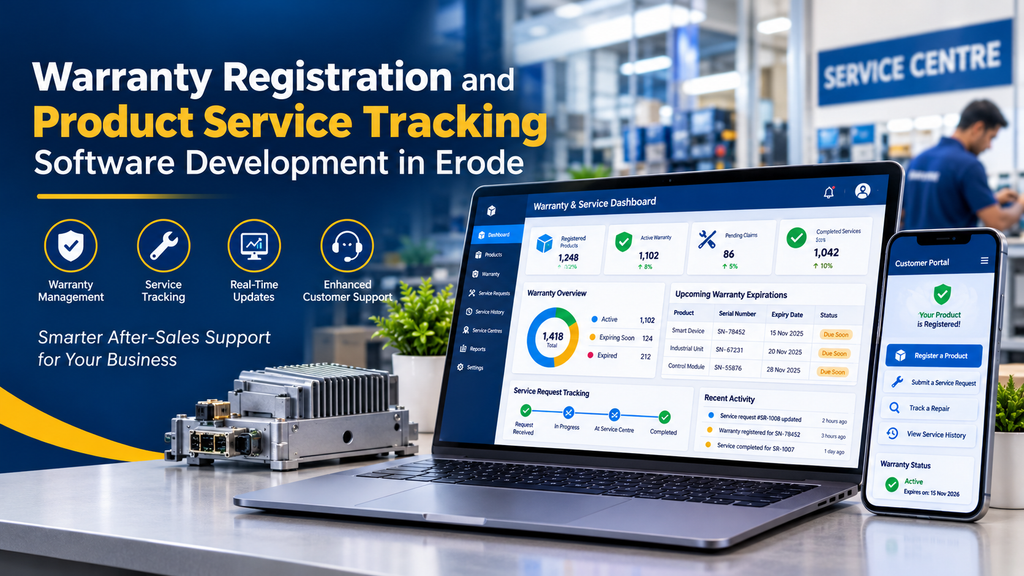
A warranty and service tracking system creates a central record for each product and its service lifecycle. Depending on the business requirements, customers can register products online, check warranty details and submit service requests. Authorised staff can validate claims, assign technicians, record repairs and monitor service progress.
For manufacturers, distributors, equipment suppliers and service companies in Erode and across Tamil Nadu, this type of software can help organise after-sales workflows and make product service information easier to manage.
What Is Warranty Registration and Product Service Tracking Software?
Warranty registration and product service tracking software is a business application used to manage product warranty information and after-sales service activities in one system.
The warranty component records information such as the product model, serial number, purchase date, registration date, warranty period and applicable coverage conditions. The service tracking component records customer complaints, service requests, repair assignments, parts used and resolution status.
When these functions are connected, authorised staff can review a product’s registration and service history before deciding how to handle a new request. Customers may also be given access to a portal where they can register eligible products and check the status of service cases.
The software does not automatically determine every warranty decision. Eligibility rules, exclusions, proof-of-purchase requirements and approval procedures should be defined by the business and implemented in accordance with its actual warranty policy.
Why Businesses in Erode May Need Warranty Management Software
Manufacturers and product sellers often manage warranty-related information across invoices, product serial-number lists, service forms, spreadsheets and customer communications. These separate records can make it harder to verify a product’s coverage or understand what happened during an earlier repair.
A central system can help employees find product information, review claim details and maintain a consistent service history. It can also make it easier to identify pending cases and follow up on requests that have not yet been resolved.
For example, an equipment supplier in Erode could register products against their serial numbers, record the date of sale and define the applicable warranty period. If a customer later submits a repair request, the service team can review the product record and follow the company’s warranty verification process.
The value of the system depends on the accuracy of the product records, the consistency of service workflows and how well staff use the application.
Which Businesses Can Benefit from Warranty and Service Tracking Software?
Manufacturing Companies
Maintain product registration records, warranty coverage, serial numbers and service histories for manufactured goods.
Industrial Machinery Suppliers
Track equipment installations, service requests, repair visits, spare parts and warranty-related maintenance.
Electronics and Appliance Businesses
Manage customer registrations, proof-of-purchase details, warranty enquiries and authorised repair cases.
Dealers and Distributors
Record product sales and customer information, subject to the business’s access permissions and registration process.
Equipment Service Centres
Organise incoming service requests, technician assignments, repair updates and completion records.
Businesses Offering AMC Services
Manage annual maintenance contracts, covered service visits, renewal dates and related service histories.
Essential Features of Warranty Registration Software
1. Online Product Warranty Registration
A product registration form allows customers, dealers or authorised staff to create a product record. The registration process may collect:
- Product name, model and serial number
- Purchase date and invoice reference
- Customer contact information
- Dealer or distributor details, where applicable
- Installation date, if relevant to the warranty
- Proof-of-purchase documents when required
The application can validate required fields and flag duplicate serial numbers for review. Registration should not automatically be treated as proof that a warranty claim is valid unless the business’s policy explicitly defines that behaviour.
2. Product Serial Number Management
Serial numbers provide a way to identify individual products. The system can associate each serial number with its product model, sale details, registration record, warranty information and service history.
For businesses with large product catalogues, importing product records or integrating with an existing inventory system may reduce duplicate data entry. The import process should validate records and report errors before the data is accepted.
3. Warranty Period and Coverage Rules
The system can store warranty start dates, expiry dates, coverage duration and policy-specific conditions. Different product models may have different warranty periods, and coverage may depend on purchase or installation dates.
Administrators should be able to configure the rules relevant to their products. The application should also account for approved exceptions or extensions where the business permits them.
Any automated eligibility result should be based on clearly defined rules and should allow authorised staff to review cases that require manual assessment.
4. Warranty Claim Management
Customers or service agents can submit a warranty-related service request through a form or staff dashboard. The request may include the product serial number, issue description, supporting photographs, invoice details and relevant contact information.
The workflow can assign a unique claim reference and record each status change. Depending on the business process, statuses may include submitted, under review, information required, approved, rejected, repair in progress and resolved.
Claim approval should remain subject to the company’s documented warranty policy and the appropriate authorised review.
5. Customer Registration and Service Portal
A customer-facing portal can let users access their registered products and service cases through a secure account.
Possible customer features include:
- Register a newly purchased product
- View registered products and available warranty details
- Submit a warranty or repair request
- Upload required supporting documents
- Check service request status
- Review previous service records made available to the customer
- Receive important service notifications
Customers should only be able to access products and records associated with their authorised account. A serial number alone should not grant access to private customer or service information.
6. Service Request and Repair Tracking
Once a request has been accepted for processing, the service team needs a structured way to track the work. Each case can contain the reported issue, assigned service centre or technician, priority, planned visit, diagnosis, repair notes and current status.
The system may support statuses such as:
- New request
- Awaiting verification
- Assigned to service team
- Inspection scheduled
- Awaiting parts or customer information
- Repair in progress
- Ready for collection or delivery
- Completed or closed
These statuses should reflect the actual service workflow. Not every business needs every stage, and the status list should remain understandable to both staff and customers.
7. Technician and Service Centre Assignment
Businesses that operate multiple service centres or employ field technicians may need assignment and scheduling features. An administrator can route cases based on product type, location, technician availability or service responsibility.
More advanced implementations may include technician calendars, visit schedules, work notes and completion reports. Route planning or live location tracking should be considered separate features with their own requirements and privacy implications.
8. Spare Parts and Repair Records
A repair record can document the work performed, parts used, diagnosis, labour details and final resolution. If the business has a compatible inventory system, the application may also record or synchronise spare-part usage.
Integration is useful when stock availability needs to be considered during repair planning. However, inventory deduction, procurement and spare-parts forecasting are separate functions that should be explicitly included in the project scope.
9. Warranty Expiry Notifications
The system can generate reminders for upcoming warranty expirations, subject to the business’s notification rules. Staff may use these reminders for service planning or to provide customers with relevant information about available maintenance options.
Notifications can be delivered through email or other supported channels. SMS and WhatsApp messaging may require separate provider setup, consent management and additional charges.
10. Admin Dashboard and Reports
An administrative dashboard gives authorised staff a central place to manage warranty and service operations.
- Product and serial-number records
- Warranty registrations and coverage details
- Claims awaiting verification or approval
- Open, pending and completed service cases
- Service centre and technician assignments
- Repair history and parts records
- Warranty expiry reports
- Search, filters and export options
- Role permissions and important activity records
Reports should reflect reliable source data and give employees only the information needed for their roles.
Advanced Features for Manufacturers and Distributors
Businesses with more complex operations may need additional modules beyond registration and service tracking.
- QR code registration: Let customers scan a product label to open a registration page, with appropriate verification to prevent unauthorised access.
- Dealer portal: Allow authorised dealers to register products sold to customers or submit service requests according to defined permissions.
- ERP integration: Connect relevant product, invoice or customer data with an existing ERP system where supported.
- CRM integration: Synchronise appropriate customer and communication records with a compatible CRM.
- AMC management: Track annual maintenance contracts, service entitlements, renewals and scheduled visits.
- Multi-branch support: Assign cases to the appropriate service centre and restrict records by business location.
- Customer notifications: Provide permitted updates about claim receipt, inspection, repair progress and completion.
- Service analytics: Review request volumes, turnaround times, repeat repairs and product-related service trends.
- API connectivity: Connect the platform with compatible e-commerce, inventory, dealer or business applications.
Each advanced feature should be assessed according to its business value, technical feasibility and maintenance requirements.
Benefits of Warranty and Product Service Tracking Software
Centralised Product Records
Keep product registration, warranty details and service history connected to a consistent product record.
More Organised Claim Handling
Use structured workflows to receive, review, assign and resolve warranty-related requests.
Better Service Visibility
Help authorised staff and customers check the progress of service cases through appropriate dashboards.
Improved Service History
Maintain repair notes, service dates and relevant parts information for future reference.
Timely Follow-Up
Use reminders and reports to identify pending requests and upcoming warranty or maintenance milestones.
More Consistent Processes
Standardise how service requests are recorded and processed across staff members or service locations.
These are potential operational benefits, not guaranteed outcomes. Results depend on data quality, staff adoption, the design of the service process and the reliability of the software.
Warranty Management Software vs. Service Management Software
Warranty management and service management overlap, but they address different parts of the after-sales process. Warranty software focuses on product registration, coverage periods and claim eligibility. Service management software focuses more broadly on handling service requests, scheduling work, assigning technicians and recording repairs.
| Capability | Warranty Management | Service Management |
|---|---|---|
| Product registration | Usually a core feature | May be available through integration or configuration |
| Warranty start and expiry dates | Core function | May be recorded as part of the product or service record |
| Claim verification | Usually a core workflow | May be supported if warranty checks are included |
| Technician scheduling | May be an additional module | Common in field service systems |
| Repair and service history | Can be linked to warranty records | Usually a major function |
| Best suited for | Businesses needing structured warranty records and claim workflows | Businesses managing broader service delivery and technician operations |
A combined platform can connect both processes, allowing staff to review warranty information while handling a service request. The required modules should be defined before development begins.
Custom Warranty Software vs. Ready-Made Solutions
Before investing in a custom application, compare the requirements with available warranty, CRM and field service products. A ready-made solution may be suitable when its workflows and integrations already meet the business’s needs.
| Factor | Custom Software | Ready-Made Software |
|---|---|---|
| Workflow flexibility | Can be designed around specific product and service processes | Depends on available configuration options |
| Initial investment | May require a higher upfront development cost | May offer subscription or lower initial setup options |
| Integration | Can be planned around supported APIs and systems | Depends on the vendor’s integrations and plan limits |
| Maintenance | Requires an agreed support and update plan | Core platform maintenance is generally handled by the vendor |
| Best suited for | Specific workflows or integrations not covered by existing tools | Businesses whose requirements fit the product’s existing features |
Warranty Registration Software Development Cost in Erode
The cost depends on the features, number of user roles, registration volume, service workflows, security requirements and integrations. A registration-only application is different from a complete platform with customer accounts, claim approvals, technician scheduling and ERP connectivity.
Pricing note: The following figures are illustrative planning ranges, not verified market averages or a formal Greap Technologies quotation. Actual pricing requires a review of the project requirements.
| Software Type | Indicative Budget | Possible Scope |
|---|---|---|
| Basic Warranty Registration System | ₹25,000–₹50,000 | Product registration, serial-number records and basic admin management |
| Standard Warranty Management Portal | ₹50,000–₹1,20,000 | Customer accounts, warranty status, claim submission and service tracking |
| Advanced Warranty and Service System | ₹1,20,000–₹3,00,000 | Approval workflows, technician assignments, repair records and reports |
| Integrated After-Sales Service Platform | ₹3,00,000+ | Complex roles, multi-branch operations and selected ERP, CRM or inventory integrations |
Hosting, domain registration, paid software licences, SMS or messaging charges, third-party integrations, data migration and ongoing maintenance may be billed separately. A written proposal should clearly identify the included modules and any exclusions.
How Long Does Development Take?
The project timeline depends on the number of features, approval complexity, data import requirements and external integrations.
- Basic registration system: approximately 2–4 weeks
- Standard warranty portal: approximately 4–8 weeks
- Advanced warranty and service platform: approximately 8–14 weeks
- Complex integrated system: 3–6 months or longer
These are indicative estimates, not delivery guarantees. Requirements approval, testing, feedback, data quality and third-party access can affect the final schedule.
Security and Data Management Considerations
A warranty system may store customer contact information, invoices, product details and repair records. These records should be protected through suitable application and operational controls.
- Use secure authentication and appropriate session management.
- Apply role-based access to customer, dealer, technician and administrator accounts.
- Verify access to each product and service record on the server.
- Protect uploaded invoices, photographs and other documents.
- Validate file types and file sizes for customer uploads.
- Maintain backups and test data restoration.
- Record important claim approvals and administrative changes where auditability is required.
- Define suitable data retention and deletion practices.
- Keep the application, dependencies and server software updated.
Warranty decisions should also remain traceable. If a claim is approved, rejected or manually adjusted, the system should record the relevant status and authorised action where appropriate.
How to Choose a Warranty Software Development Company in Erode
Choosing a development partner requires evaluating the business workflow as well as the technical implementation. Before approving a project, consider the following steps.
- Map the product lifecycle: Document how products are sold, registered, covered under warranty and submitted for service.
- Define warranty rules: Identify coverage periods, exclusions, proof requirements, approval roles and permitted exceptions.
- Plan user roles: Specify what customers, dealers, service agents, technicians and administrators can access.
- Prioritise essential features: Start with registration, claim handling and tracking before adding advanced modules.
- Review integrations: Check whether existing inventory, ERP, CRM or accounting systems provide suitable integration options.
- Test the customer journey: Verify product registration, claim submission, status tracking and service closure on mobile and desktop devices.
- Clarify ownership: Confirm source-code ownership, hosting access, administrator credentials and handover documentation.
- Plan maintenance: Agree on updates, backups, bug fixes, monitoring and future enhancements.
Why Consider Greap Technologies?
Greap Technologies provides website development, software development and digital growth solutions for businesses. For companies exploring warranty registration and product service tracking software in Erode, the first step is to define how products, warranty records and service requests should move through the business.
Depending on the requirements, a custom application may include product registration, warranty validation, customer service requests, claim workflows, repair history, notifications and an administrative dashboard. Integration with existing business systems can be assessed where suitable technical options are available.
A clearly defined scope helps establish which functions belong in the initial release, what data needs to be imported and which features can be added later.
Planning a Warranty Management System?
Discuss your product registration process, warranty rules, service tracking requirements and estimated software development budget with Greap Technologies.
Share your product type, service workflow and the features your team needs.
Discuss Your Software ProjectFrequently Asked Questions
1. What is warranty registration software?
Warranty registration software records product details, serial numbers, purchase information and applicable warranty periods. It can also provide a customer-facing registration form and an administrative dashboard.
2. How much does warranty registration software cost in Erode?
The cost depends on the required modules and integrations. A basic custom registration system may be planned from around ₹25,000, while a broader warranty and service management platform may cost considerably more. A formal estimate requires a defined scope.
3. Can customers register products online?
Yes. Customers can submit product details, serial numbers and purchase information through a web form or customer portal. The business can configure verification rules and review registrations where necessary.
4. Can the system track warranty claims?
Yes. The system can record claim details, assign reference numbers, track statuses, store supporting documents and maintain a history of relevant actions.
5. Can customers track product repair status?
Yes. An authorised customer portal can display relevant service updates, such as request received, inspection scheduled, repair in progress and service completed.
6. Can warranty software manage serial numbers?
Yes. Serial numbers can be linked to product models, registration records, warranty details and service history. Duplicate detection and data validation can help maintain consistent records.
7. Can warranty software integrate with ERP or inventory systems?
Potentially. Integration depends on the existing system’s API or data access options, licensing, data structure and security requirements. These should be assessed before confirming the scope.
8. Can the software send warranty expiry reminders?
Yes. The system can identify upcoming warranty expirations and send permitted notifications through configured channels. SMS or messaging services may involve additional charges.
9. Is warranty software suitable for industrial machinery suppliers?
It can be suitable for machinery suppliers that need to manage equipment registration, warranty coverage, service requests, repairs and parts records. The features should reflect the equipment and service workflow.
10. Can the system manage annual maintenance contracts?
Yes, if AMC management is included in the scope. The module can track contract periods, renewal dates, covered service visits and relevant service history.
11. How long does warranty software development take?
A basic registration system may take a few weeks, while a system with customer portals, claim workflows, technician scheduling and integrations can require several months.
12. How can I start a warranty software project with Greap Technologies?
Describe your products, warranty policies, registration process and after-sales service workflow. Greap Technologies can discuss the required features, possible integrations, estimated timeline and development budget.