WooCommerce can be a suitable ecommerce platform for many businesses, particularly when a company wants the flexibility of WordPress and greater control over its website environment. However, as an ecommerce business changes, its platform requirements can also change.
Some businesses may eventually decide that Shopify better matches the way they want to manage their online store. Moving between the two platforms requires more than creating a new Shopify website and uploading products again.
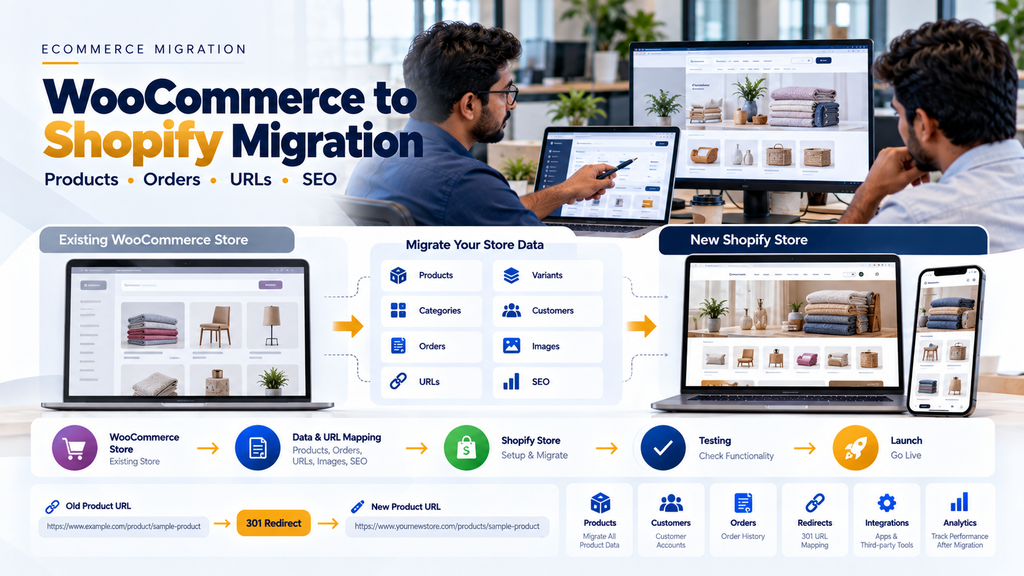
WooCommerce to Shopify migration services in Erode can involve transferring products, variants, categories, customers, historical orders, images and important content while also planning URLs, redirects, SEO elements, integrations, analytics and the final store launch.
The objective should not be to reproduce every WordPress or WooCommerce configuration inside Shopify. Instead, the migration should identify what the business needs to preserve, what should be improved and how existing workflows can be adapted appropriately to the destination platform.
Greap Technologies provides ecommerce development and migration services for businesses in Erode and nearby areas based on their existing store, catalogue, integrations and operational requirements.
What Is WooCommerce to Shopify Migration?
WooCommerce to Shopify migration is the process of moving an existing ecommerce store built with WooCommerce to a Shopify-based ecommerce environment.
Depending on the existing store, migration can include:
- Products
- Product variants
- Product categories
- Images
- Customers
- Customer addresses
- Historical orders
- Pages
- Blog content
- SEO metadata
- URLs
- Redirects
- Payment configuration
- Shipping configuration
- Analytics
- Third-party integrations
The exact migration scope should be determined after reviewing the existing WooCommerce store.
Why Do Businesses Move From WooCommerce to Shopify?
There is no universal reason why every WooCommerce business should migrate to Shopify.
WooCommerce and Shopify use different approaches to ecommerce, and either platform can be suitable depending on business requirements.
A business may consider Shopify when it wants a different approach to areas such as:
- Store administration
- Hosting responsibility
- Platform maintenance
- Ecommerce-focused management
- Theme and storefront management
- Supported app ecosystem
- Operational simplicity
- Specific integrations
The decision should be based on requirements rather than assuming Shopify is automatically better than WooCommerce.
Businesses still deciding between the platforms can read Shopify vs WooCommerce: Which Is Better for Erode Businesses?.
WooCommerce and Shopify Are Different Platforms
A migration is not a one-to-one copy because the two platforms have different architectures.
| WooCommerce | Shopify |
|---|---|
| Built around WordPress | Hosted ecommerce platform |
| WordPress themes and plugins | Shopify themes and apps |
| Hosting environment managed separately | Core platform hosting is managed as part of Shopify |
| High WordPress-level customization flexibility | Customization follows Shopify’s platform architecture |
| Plugin-dependent functionality is common | Apps and platform capabilities provide extensions |
Because the architecture differs, WooCommerce plugins cannot simply be copied into Shopify.
Typical WooCommerce to Shopify Migration Workflow
A structured project can follow:
WooCommerce Audit → Requirements → Data Mapping → Shopify Store Setup → Design / Theme Development → Data Migration → URL Mapping → Integrations → Testing → Redirects → Launch → Monitoring
1. Audit the Existing WooCommerce Store
The first step should be understanding what the existing website contains and how the business currently uses it.
The audit can review:
- WordPress configuration
- WooCommerce configuration
- Products
- Variants
- Categories
- Customers
- Orders
- Pages
- Blog posts
- Plugins
- Theme functionality
- Custom code
- Payment methods
- Shipping methods
- Tax configuration
- Analytics
- SEO configuration
- External integrations
2. Identify Why Shopify Is Being Considered
The migration should have a clear business or technical objective.
Without that objective, the project can become an expensive exercise in rebuilding the same workflows on another platform.
3. Identify Critical WooCommerce Features
Not every feature is equally important.
Before migration, identify which functions are essential for customers, administrators and business operations.
4. Review Existing WordPress Plugins
WooCommerce stores can accumulate many plugins over time.
Each important plugin should be classified according to the business function it provides.
5. Do Not Search for Plugin Names Alone
When moving to Shopify, the important question is not necessarily, “What Shopify app has the same plugin name?”
The better question is:
What business requirement does this WooCommerce plugin currently solve?
The Shopify implementation can then be selected based on that requirement.
6. Review Custom WooCommerce Functionality
Custom checkout logic, pricing rules, product configurations, integrations and administrative workflows should be documented before selecting their Shopify replacements.
7. Define the Migration Scope
Create a clear list of:
- Data to migrate
- Features to rebuild
- Features to replace
- Features to remove
- URLs to preserve
- URLs that will change
- Integrations to rebuild
- Content to retain
8. Product Migration
Product information is usually one of the largest parts of a WooCommerce to Shopify migration.
9. Product Fields
Depending on the store, product migration can include:
- Product title
- SKU
- Description
- Images
- Price
- Variants
- Product type
- Relevant attributes
- Inventory references
- SEO information
10. Clean Product Data Before Import
Migration is an opportunity to identify duplicate, outdated or incomplete products rather than automatically carrying every old record into Shopify.
11. Preserve Important SKUs
If product SKUs are already connected with warehouse, accounting, ERP or internal business processes, changing them unnecessarily can create problems.
12. Product Variant Migration
WooCommerce and Shopify can represent product options differently.
Existing variants should therefore be mapped according to the destination store’s supported product structure.
13. Complex Product Configuration
Products using specialized WooCommerce extensions may require redesign rather than direct migration.
14. Product Category Migration
WooCommerce product categories should be mapped to the catalogue structure planned for Shopify.
15. Do Not Blindly Copy a Poor Category Structure
If the old store contains confusing, duplicated or outdated categories, migration can be an opportunity to improve the architecture.
Any resulting URL changes should be included in the SEO migration plan.
16. Product Image Migration
Product images should be transferred and associated with the correct products and variants.
17. Image Quality Review
Low-quality, duplicate or unnecessarily large images can be reviewed before the new store launches.
18. Customer Migration
Relevant WooCommerce customer information can potentially be transferred to the Shopify environment according to the supported data structure.
19. Customer Privacy During Migration
Customer data should be handled carefully during exports, transformation, testing and imports.
20. Customer Passwords Need Special Attention
Password data should not be converted into insecure plaintext simply to make migration easier.
21. Customer Account Activation
If existing authentication credentials cannot be transferred securely in a compatible way, an appropriate customer account activation or password setup process may be required.
22. Customer Address Migration
Relevant billing and shipping address information should be mapped to supported destination fields.
23. Historical Order Migration
Businesses should decide whether historical WooCommerce orders need to remain accessible after migration.
24. Reasons to Preserve Historical Orders
Historical orders may support:
- Customer service
- Order reference
- Repeat purchasing
- Operational history
- Reporting
25. Order Status Mapping
WooCommerce and Shopify may use different order and fulfilment concepts.
Historical order states should therefore be mapped carefully.
26. Preserve Historical Meaning
A completed historical WooCommerce order should not accidentally become an active fulfilment requirement after import.
27. Content Page Migration
Important pages from the WordPress website may need to be recreated or migrated into the Shopify storefront.
28. WordPress Blog Migration
If the existing WooCommerce website contains useful blog content, the migration plan should include it.
29. Blog URLs Matter
Blog migration should consider:
- Existing URLs
- Titles
- Headings
- Images
- Internal links
- Metadata
- Relevant redirects
30. WooCommerce to Shopify SEO Migration
SEO planning should begin before the new Shopify store launches.
31. Export Important Existing URLs
Create an inventory of important WooCommerce URLs such as:
- Homepage
- Product categories
- Products
- Pages
- Blog articles
- Other valuable indexable pages
32. Compare WooCommerce and Shopify URL Structures
The two platforms can use different URL structures.
This means some existing WooCommerce URLs may not remain identical after migration.
33. Create an Old-to-New URL Map
For each important URL that changes, define its relevant replacement.
Old WooCommerce URL → Relevant New Shopify URL
34. Implement Appropriate 301 Redirects
Where an old URL has permanently moved to a relevant new location, a permanent redirect can guide users and search engines to the replacement page.
35. Avoid Redirecting Everything to the Homepage
A discontinued product or category should not automatically redirect to the homepage simply because the old URL no longer exists.
36. Use the Most Relevant Replacement
Where a genuine equivalent exists, redirect the old page to that relevant new page.
37. Avoid Redirect Chains
Where practical, old WooCommerce URLs should redirect directly to their final Shopify destination.
38. Update Internal Links
Navigation, content, blog posts and other internal links should point directly to the new destination URLs.
39. Preserve Useful Product Content
A migration should not unnecessarily remove useful product descriptions, specifications or buying information that customers and search engines already use.
40. SEO Titles and Descriptions
Useful metadata should be migrated or intentionally rewritten where improvement is needed.
41. Heading Structure
Important page headings should be reviewed after the new Shopify theme and templates are implemented.
42. Canonical URLs
Canonical configuration should reflect the intended Shopify URL architecture.
43. Indexing Controls
Indexing directives should be reviewed carefully during staging and production launch.
44. XML Sitemap
The production store should expose the appropriate current URLs through its supported sitemap architecture.
45. Technical SEO Review
The new store should be checked for issues such as:
- Broken links
- Incorrect redirects
- Missing metadata
- Unexpected duplicate pages
- Canonical problems
- Indexing problems
- Missing content
- Internal linking issues
46. Shopify Theme Selection
The destination theme should match the catalogue, branding, merchandising and functionality requirements of the business.
47. Avoid Choosing a Theme Only by Appearance
A visually attractive theme may still be unsuitable if it cannot support the required product, navigation and conversion workflows effectively.
48. Custom Shopify Storefront Design
Businesses can customize the storefront to reflect their brand and customer journey rather than treating the default theme configuration as the final website.
49. Homepage Migration
The existing homepage should be reviewed based on current business requirements instead of being copied section by section automatically.
50. Navigation Migration
Menus should reflect the new catalogue and information architecture.
51. Mobile Ecommerce Experience
The new Shopify storefront should be tested across relevant mobile screen sizes.
52. Product Page Experience
Product pages should make essential information, options and purchase actions easy to understand.
53. Collection Page Experience
Collection pages should support efficient product discovery through appropriate navigation, sorting and filtering.
54. Search Functionality
Store search should be tested against the catalogue and terminology customers actually use.
55. Cart Migration
Existing WooCommerce cart functionality should be reviewed and the required business behaviour recreated appropriately in Shopify.
56. Checkout Differences
The Shopify checkout architecture differs from a WordPress/WooCommerce implementation.
Required checkout customizations should therefore be validated against the capabilities available for the selected Shopify setup.
57. Payment Gateway Configuration
Payment methods should be configured according to the providers and options supported for the business’s Shopify setup.
58. Do Not Migrate Sensitive Payment Information Manually
Sensitive payment information should be handled through the appropriate payment-provider and platform architecture rather than being manually copied from WooCommerce.
59. Shipping Configuration
Existing WooCommerce shipping rules should be documented and mapped to an appropriate Shopify configuration.
60. Shipping Integrations
Courier or logistics integrations should be checked for Shopify compatibility rather than assumed to work automatically.
61. Tax Configuration
Tax configuration should reflect the business’s applicable requirements and should be reviewed with appropriate professional guidance where necessary.
62. WooCommerce Plugin to Shopify App Mapping
Important WooCommerce plugin functionality can be mapped against:
- Native Shopify capabilities
- Suitable Shopify apps
- Theme functionality
- Custom development
- External systems
63. Avoid Installing Apps for Every Old Plugin
A direct one-plugin-to-one-app replacement can recreate unnecessary complexity.
First determine whether the function is still required.
64. App Dependency Review
Each required app should be evaluated for its purpose, compatibility, ongoing maintenance implications and effect on the store architecture.
65. Inventory Migration
Inventory data can be migrated according to the business’s inventory source and Shopify configuration.
66. Define Inventory Ownership
If inventory originates from ERP, warehouse or another system, Shopify should not accidentally become a conflicting independent stock source.
67. Inventory Integration
Where supported, inventory availability can be synchronized between Shopify and the appropriate operational system.
68. Multi-Location Inventory
Businesses operating multiple inventory locations should map those requirements carefully during migration.
69. ERP Integration
Existing WooCommerce ERP integrations may need to be redesigned or rebuilt for Shopify.
70. API Availability
Integration feasibility depends on the APIs, authentication methods, permissions and other supported integration capabilities of the systems involved.
71. Product Synchronization
If another system owns the product master, define which product fields Shopify can edit and which should come from the authoritative source.
72. Pricing Synchronization
Businesses using externally managed pricing should define how prices reach the Shopify storefront.
73. Order Synchronization
Shopify orders can potentially flow to ERP, order-management or fulfilment systems according to the integration architecture.
74. Avoid Duplicate Orders
Integration logic should account for retries and failures so the same ecommerce order is not unintentionally created multiple times downstream.
75. Warehouse Integration
Businesses with structured fulfilment can connect ecommerce orders with warehouse workflows where appropriate.
Read Warehouse Management Software Development in Erode.
76. Accounting Integration
If accounting software is used as the financial source of truth, the migration should define how Shopify orders, payments, refunds and other relevant information interact with that system.
77. CRM Integration
Customer enquiries and appropriate ecommerce activity can potentially connect with CRM workflows.
78. B2B WooCommerce to Shopify Migration
B2B stores require additional attention because their workflows may extend beyond standard consumer checkout.
79. Customer-Specific Pricing
Existing B2B price structures should be documented before migration and evaluated against the destination architecture.
80. Wholesale Customers
Wholesale customer accounts may require different catalogue, pricing or ordering experiences.
81. Minimum Order Quantities
Existing minimum quantity rules should be identified and appropriately recreated where they remain required.
82. Bulk Ordering
Businesses with high-volume repeat customers should test whether their required bulk-ordering workflow can be implemented appropriately.
Read Wholesale Ecommerce Website Development: B2B Features Businesses Need.
83. RFQ Workflows
Businesses using request-for-quotation processes should identify how those workflows will operate after migration.
84. Dealer and Distributor Workflows
Dealer or distributor accounts may require specialized permissions, products, pricing and order functionality.
85. Subscription Products
If the WooCommerce store uses subscriptions, the existing subscription model should be reviewed separately because recurring billing and customer agreements may involve platform and payment-provider constraints.
86. Membership Functionality
Stores using membership plugins should document exactly what access and business rules those plugins currently provide before selecting a Shopify solution.
87. Product Bundles
Existing bundle functionality should be evaluated according to the required pricing, inventory and customer experience.
88. Coupons and Discounts
Existing promotional rules should be reviewed rather than assuming every WooCommerce discount configuration has a direct equivalent.
89. Gift Cards
Existing gift-card balances or workflows require careful planning if they need to continue after migration.
90. Product Reviews
Where reviews are being retained, they should remain connected with the correct products and preserve appropriate context.
91. Analytics Migration
The new Shopify store should have its analytics configuration reviewed before production launch.
92. Ecommerce Tracking
Important ecommerce events should be tested on the new implementation.
93. Conversion Tracking
Purchase, enquiry and other relevant conversion events should be validated rather than assumed to continue working from the old WooCommerce setup.
94. Advertising Tracking
Required advertising and marketing integrations should be reviewed according to the new storefront and consent requirements.
95. Preserve Analytics Context
Where practical, measurement should allow meaningful comparison of performance before and after migration.
96. Website Speed
Migration is an opportunity to review unnecessary scripts, oversized images and frontend complexity.
97. Shopify App Performance
Adding unnecessary apps and frontend scripts can affect the customer experience. App selection should therefore consider performance as well as functionality.
98. Image Optimization
Product and content images should use appropriate dimensions and compression for their display context.
99. Core Web Vitals
The new storefront should aim for responsive interactions, stable layouts and efficient loading.
100. Accessibility
Navigation, product controls, forms, cart interfaces and other important customer interactions should consider accessibility during development.
101. Migration Security
Customer exports, order data, staging environments and temporary migration files can contain sensitive information.
102. Secure Migration Files
Temporary exports should be stored and transferred appropriately and removed when they are no longer required.
103. Access Control
Only authorized team members should have access to migration data and administrative systems.
104. Backup the Existing WooCommerce Store
A verified backup of the relevant existing WordPress/WooCommerce environment should be available before major migration or launch operations.
105. Migration Staging
Where practical, the new store should be configured and tested before production cutover.
106. Keep Development Environments Controlled
Unfinished or duplicated website content should not become an unintended public search result.
107. Data Migration Test Run
A test import can identify mapping problems before the final migration.
108. Validate Product Counts
Compare expected and migrated records rather than assuming a completed import means every product arrived correctly.
109. Validate Customer Data
Check representative customer records and account workflows.
110. Validate Historical Orders
Review different order types and statuses to confirm their historical meaning has been preserved.
111. Validate Images
Check that images belong to the correct products and variants.
112. Validate Pricing
Check representative products, variants, discounts and B2B pricing rules where applicable.
113. Validate Inventory
Inventory should be compared with the authoritative source before launch.
114. Shopify Store Testing
The replacement store should be tested as a complete customer journey.
115. Product Testing
Test different product types, options and variants.
116. Search and Navigation Testing
Customers should be able to find important products through navigation, collections and search.
117. Cart Testing
Test quantities, product removal, variants, discounts and other required cart behaviour.
118. Checkout Testing
Test representative checkout scenarios using supported testing methods.
119. Payment Testing
Payment functionality should be validated according to the payment provider and Shopify configuration.
120. Shipping Testing
Test appropriate shipping scenarios for representative customer locations and order types.
121. Customer Account Testing
Test registration, activation, login and account functionality according to the selected customer-account architecture.
122. Mobile Testing
Review the full shopping journey on relevant mobile devices and screen sizes.
123. Redirect Testing
Test important old WooCommerce URLs against the migration redirect map.
124. Internal Link Testing
Check menus, product content, pages and blog articles for links pointing to outdated WooCommerce URLs.
125. Integration Testing
Verify that Shopify communicates correctly with the systems required for operations.
126. User Acceptance Testing
Representative business users should test real operational scenarios before launch.
127. Final WooCommerce Data Synchronization
If the existing store continues accepting customers and orders while the Shopify store is being prepared, the project needs a plan for data created after the initial migration.
128. Migration Cutover
The final cutover can involve:
Final Data Update → Production Configuration → Redirect Activation → Domain / DNS Changes Where Required → Store Verification → Launch
129. Minimize Business Disruption
Launch timing should consider customer activity, order processing and the ability of the team to respond if an issue is discovered.
130. Rollback and Contingency Planning
The team should know how critical launch problems will be handled rather than improvising after the store becomes unavailable.
131. Post-Migration Monitoring
The project should continue after Shopify becomes the live storefront.
132. Monitor Orders
Confirm that production orders are being created and reaching any required downstream systems.
133. Monitor Payments
Check production payment workflows through the appropriate platform and provider information.
134. Monitor Inventory
Watch for unexpected inventory differences after launch.
135. Monitor Integrations
Review ERP, accounting, shipping, CRM and other required integrations for synchronization problems.
136. Monitor 404 Errors
Unexpected requests to missing pages can reveal gaps in URL mapping.
137. Monitor Search Crawling
Review how search engines discover and process the replacement URLs after migration.
138. Monitor Indexing
Check whether important Shopify pages are becoming indexable as intended and whether unexpected pages require investigation.
139. Monitor Analytics
Verify that analytics continues receiving expected website and ecommerce events.
140. Can WooCommerce to Shopify Migration Affect Google Rankings?
Yes. A major platform migration can coincide with changes in crawling, indexing and organic visibility, especially when URLs, internal linking, content or website architecture change.
Careful SEO migration can reduce avoidable problems, but no developer or SEO company can responsibly guarantee that rankings or organic traffic will remain exactly unchanged after migration.
141. WooCommerce to Shopify SEO Migration Checklist
- Crawl or inventory important WooCommerce URLs
- Identify valuable product and category pages
- Identify important blog content
- Map old URLs to new Shopify URLs
- Preserve URLs where practical
- Implement relevant permanent redirects
- Avoid redirect chains
- Update internal links
- Migrate useful product content
- Review titles and meta descriptions
- Review headings
- Review canonical URLs
- Review indexing controls
- Review XML sitemap behaviour
- Test structured data
- Test analytics
- Test conversion tracking
- Monitor missing pages after launch
- Monitor crawling and indexing
142. Common WooCommerce to Shopify Migration Mistakes
- Migrating without auditing WooCommerce first
- Assuming Shopify is automatically better for every business
- Trying to recreate every WordPress plugin
- Ignoring custom WooCommerce functionality
- Importing poor-quality product data
- Changing SKUs unnecessarily
- Ignoring complex variants
- Ignoring historical orders
- Assuming customer passwords can always be copied
- Forgetting WordPress blog content
- Changing URLs without mapping redirects
- Redirecting everything to the homepage
- Creating redirect chains
- Losing useful SEO content
- Installing unnecessary Shopify apps
- Assuming payment integrations transfer automatically
- Assuming shipping integrations transfer automatically
- Ignoring ERP integration
- Ignoring inventory ownership
- Launching without realistic testing
- Having no plan for orders created during migration
- Failing to monitor the new store after launch
143. WooCommerce to Shopify Migration Cost in Erode
There is no single fixed price that applies to every WooCommerce to Shopify migration.
Development cost can depend on:
- Number of products
- Number of variants
- Catalogue complexity
- Customer records
- Historical orders
- Product images
- WordPress pages
- Blog content
- Existing plugins
- Custom WooCommerce functionality
- Shopify theme requirements
- Custom storefront development
- URL changes
- SEO migration
- Payment requirements
- Shipping requirements
- B2B functionality
- ERP integrations
- Inventory integrations
- Accounting integrations
- Data cleanup
- Testing
- Launch support
144. WooCommerce to Shopify Migration Timeline
The timeline depends on the size and complexity of the existing WooCommerce store and the requirements of the new Shopify implementation.
A small catalogue with standard functionality can require a very different migration process from a large store with custom plugins, B2B pricing and ERP integrations.
An audit should therefore be completed before preparing a reliable project schedule.
145. Phased WooCommerce to Shopify Migration
A project can be divided into manageable phases.
Phase 1: WooCommerce Audit + Requirements + Data Inventory + URL Inventory
Phase 2: Shopify Architecture + Theme / UI Development + Feature Mapping
Phase 3: Product + Customer + Order + Content Migration
Phase 4: Integrations + SEO Mapping + Redirects + Testing
Phase 5: Final Synchronization + Launch + Post-Migration Monitoring
146. Questions to Ask Before Moving From WooCommerce to Shopify
- Why do we want to leave WooCommerce?
- Which problems should Shopify solve?
- How many products and variants do we have?
- Which WooCommerce plugins are essential?
- Do we use custom WordPress or WooCommerce code?
- Which product data needs to move?
- Which customer data needs to move?
- Do historical orders need migration?
- How will existing customer accounts be handled?
- Do we have important WordPress blog content?
- Which URLs currently receive organic traffic?
- Which URLs will change in Shopify?
- Which redirects are required?
- Which payment methods do we need?
- Which shipping methods do we need?
- Where does inventory originate?
- Do we use ERP or accounting software?
- Do we have B2B pricing or wholesale customers?
- How will orders created during the migration period be handled?
- Who will monitor the new store after launch?
WooCommerce to Shopify Migration Services in Erode and Nearby Areas
Businesses in Erode using WooCommerce may consider Shopify when their ecommerce requirements, administration preferences or operational workflows change.
Greap Technologies provides ecommerce development and migration services for businesses in Erode and nearby areas including Perundurai, Chennimalai, Bhavani, Anthiyur, Gobichettipalayam, Sathyamangalam, Modakkurichi, Kavindapadi, Kodumudi, Nambiyur and surrounding locations.
The migration can be planned around the existing WooCommerce catalogue, customers, orders, URLs, WordPress content, SEO footprint and connected business systems.
Why Consider Greap Technologies for WooCommerce to Shopify Migration?
Greap Technologies approaches platform migration as a structured ecommerce project rather than simply importing products into a new store.
Depending on requirements, the project can include:
- WooCommerce website audit
- Shopify migration planning
- Product migration
- Variant migration
- Category and collection planning
- Image migration
- Customer migration
- Historical order migration
- Page migration
- WordPress blog migration
- Theme setup
- Custom storefront development
- Plugin-to-functionality mapping
- Shopify app evaluation
- URL mapping
- 301 redirects
- SEO migration
- Payment configuration
- Shipping configuration
- Inventory integration
- ERP integration
- Accounting integration
- Analytics setup
- Testing
- Launch support
- Post-migration monitoring
Explore Greap Technologies Ecommerce Development Services or visit Greap Technologies.
Final WooCommerce to Shopify Migration Checklist
- Audit WooCommerce website
- Document existing plugins
- Document custom functionality
- Define Shopify requirements
- Inventory products
- Clean product data
- Map variants
- Map categories and collections
- Plan customer migration
- Plan customer account activation
- Plan historical order migration
- Inventory WordPress pages
- Inventory blog content
- Inventory important URLs
- Create old-to-new URL map
- Plan redirects
- Preserve useful SEO content
- Review metadata
- Review internal links
- Configure payment methods
- Configure shipping
- Define inventory ownership
- Rebuild required integrations
- Configure analytics
- Test products
- Test customers
- Test orders
- Test checkout
- Test payments
- Test shipping
- Test redirects
- Test mobile experience
- Prepare final data synchronization
- Prepare contingency plan
- Launch Shopify
- Monitor orders and integrations
- Monitor crawling and indexing
Conclusion
WooCommerce to Shopify migration services in Erode should involve more than transferring a product spreadsheet from one platform to another.
A structured migration needs to consider the complete ecommerce environment:
Products → Customers → Orders → Content → URLs → SEO → Integrations → Testing → Launch
The strongest migration strategy preserves valuable information and customer workflows while adapting the store appropriately to Shopify’s architecture.
Businesses should also avoid migrating simply because one ecommerce platform appears more popular. WooCommerce and Shopify both have legitimate use cases, and migration makes sense when the destination platform better matches the company’s actual requirements.
For a broader migration checklist, read Ecommerce Website Migration Services in Erode. Businesses still comparing platforms can read Shopify vs WooCommerce: Which Is Better for Erode Businesses?.
Planning a WooCommerce to Shopify Migration in Erode?
If your business currently uses WooCommerce and you are considering Shopify, Greap Technologies can review the existing store, catalogue, plugins, URLs and integrations before planning the migration.
Discuss Your WooCommerce to Shopify Migration on WhatsApp
Frequently Asked Questions
1. Can WooCommerce be migrated to Shopify?
Yes. Relevant products, customers, orders, images and content can potentially be migrated from WooCommerce to Shopify, but the exact transferable data depends on the existing store and the destination architecture.
2. Can all WooCommerce products be moved to Shopify?
Standard product information can generally be mapped, while complex products created through specialized WooCommerce plugins may require additional planning or a different Shopify implementation.
3. Can WooCommerce customers be migrated to Shopify?
Relevant customer records can potentially be migrated. Customer authentication requires separate attention because password systems may not be directly compatible.
4. Can WooCommerce customer passwords be transferred to Shopify?
It depends on the authentication architecture and supported migration method. Passwords should never be converted into insecure plaintext for migration. An account-activation or password setup process may be needed.
5. Can WooCommerce orders be migrated to Shopify?
Historical order data can potentially be migrated when required, but products, customers, statuses and other order information need appropriate mapping.
6. Can WordPress blog posts be migrated when moving to Shopify?
Yes. Important blog content can be included in the migration plan along with its images, internal links, metadata and URL redirects where necessary.
7. Will moving from WooCommerce to Shopify affect SEO?
A platform migration can affect crawling, indexing and search visibility, especially when URLs or website architecture change. Careful URL mapping, redirects, content preservation and monitoring can reduce avoidable migration problems, but unchanged rankings cannot be guaranteed.
8. Can WooCommerce plugins be transferred to Shopify?
No. WooCommerce plugins are built for the WordPress/WooCommerce environment. Their business functionality needs to be evaluated against Shopify’s native capabilities, suitable apps, custom development or external integrations.
9. Can ERP and inventory integrations continue after migration?
Potentially. Existing integrations may need to be rebuilt or reconfigured for Shopify, depending on the APIs and other supported integration methods of the systems involved.
10. Is Shopify always better than WooCommerce?
No. The better platform depends on the business’s catalogue, customization, administration, integrations, technical requirements and operating model.
11. How much does WooCommerce to Shopify migration cost in Erode?
Cost depends on catalogue size, variants, customers, orders, WordPress content, custom functionality, SEO migration, theme requirements, apps, integrations and testing. The existing WooCommerce store should be reviewed before estimating the project.
12. Does Greap Technologies provide WooCommerce to Shopify migration services in Erode?
Yes. Greap Technologies provides ecommerce platform migration and development services for businesses in Erode and nearby areas based on their existing WooCommerce store and Shopify requirements.