
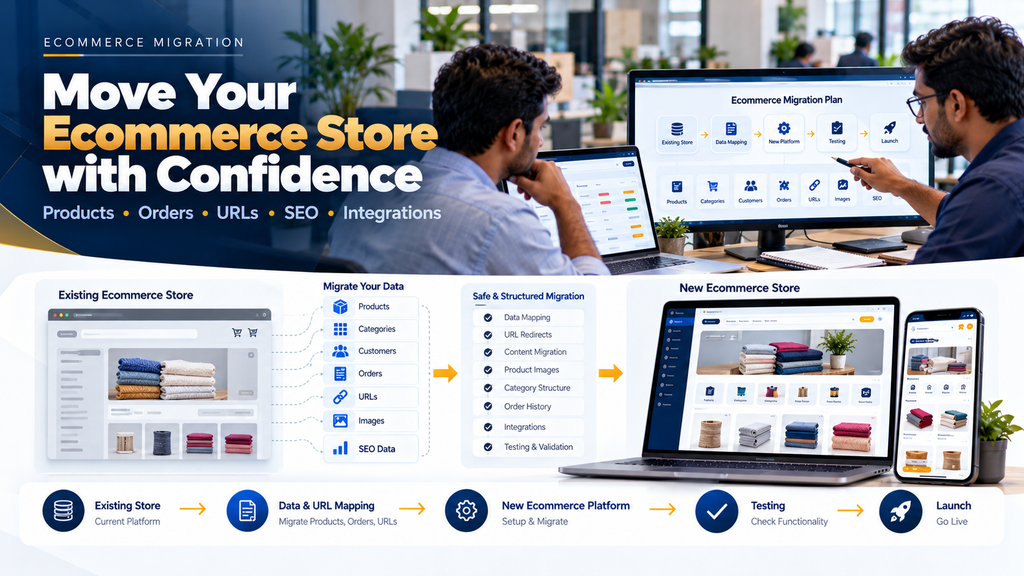
An ecommerce website can become difficult to maintain as a business grows. The existing platform may be slow, difficult to customize, expensive to operate, poorly integrated with business software or unable to support the customer experience the company now requires.
Moving to a new platform can solve some of these limitations, but ecommerce migration is more complicated than creating a new website and copying a few product pages.
Ecommerce website migration services in Erode can involve moving products, categories, images, customers, orders, content, URLs, SEO elements, analytics and integrations while preparing the new store to continue business operations.
A poorly planned migration can create missing products, broken links, incorrect redirects, customer-login problems, integration failures and search-visibility issues. A structured migration therefore needs technical, ecommerce, SEO and operational planning.
At Greap Technologies, we develop, redesign and migrate ecommerce websites for businesses in Erode and nearby areas based on their existing platform, data and business requirements.
What Is Ecommerce Website Migration?
Ecommerce website migration is the process of moving an existing online store from its current environment to a new ecommerce environment.
A migration can involve:
- Ecommerce platform
- Website technology
- Hosting infrastructure
- Domain structure
- Website design
- Product catalogue
- Customer information
- Historical orders
- Content
- URLs
- SEO metadata
- Payment integrations
- Shipping integrations
- ERP or inventory integrations
- Analytics and tracking
Not every migration requires every item above. The scope should be defined after auditing the existing store.
Why Do Businesses Migrate Ecommerce Websites?
Businesses may consider migration for different reasons.
Common situations include:
- The current website has become difficult to maintain
- The platform no longer supports required features
- Website performance needs improvement
- The store requires a redesign
- Mobile usability needs improvement
- The business needs better B2B functionality
- The catalogue has become more complex
- Existing integrations are limiting operations
- The company needs better administrative workflows
- The business wants to consolidate multiple systems
- The existing technology is no longer suitable
Ecommerce Migration Is Not Just Data Import
Moving product records from one database to another is only one part of a complete migration.
A useful migration plan should consider:
Data + URLs + SEO + Design + Functionality + Integrations + Testing + Launch + Monitoring
Typical Ecommerce Migration Process
A structured migration can follow:
Existing Store Audit → Requirements → Data Mapping → URL Mapping → New Store Development → Data Migration → Integration → Testing → Redirect Setup → Launch → Monitoring
1. Audit the Existing Ecommerce Website
Before building the replacement store, understand what exists today.
The audit can review:
- Platform
- Products
- Categories
- Customers
- Orders
- Pages
- Blog content
- URLs
- Metadata
- Images
- Integrations
- Analytics
- Tracking
- Current operational workflows
2. Understand Why the Migration Is Needed
The migration should solve clearly defined problems.
Changing platforms without identifying the existing limitations can result in rebuilding the same problems on a different technology.
3. Define the Migration Scope
Before development begins, define exactly what will move and what will not.
4. Identify Data to Preserve
Potential migration data can include:
- Product records
- Product variants
- Categories
- Product images
- Customers
- Addresses
- Historical orders
- Reviews
- Coupons
- Content pages
- Blog articles
- SEO metadata
5. Decide What Should Not Be Migrated
Migration is also an opportunity to avoid carrying unnecessary legacy data into the new system.
Examples may include outdated products, duplicate categories, obsolete pages and invalid customer records.
6. Clean Data Before Migration
Data cleanup before import can reduce problems in the new ecommerce platform.
7. Product Data Migration
Products are usually one of the largest migration components.
Product migration can involve:
- Product name
- SKU
- Description
- Category
- Price
- Images
- Specifications
- Variants
- Units
- Inventory references
- SEO information
8. Product SKU Preservation
Where existing SKUs are already used by inventory, accounting or operational systems, changing them during migration without a clear reason can create integration problems.
9. Product Variant Migration
Variants should be mapped carefully because different ecommerce platforms can represent options and variants differently.
10. Category Migration
The old category hierarchy should be reviewed rather than automatically copied.
11. Should Old Categories Always Be Preserved?
No.
If the existing catalogue architecture is confusing or outdated, migration can be an opportunity to improve it.
However, changing category structures also affects URLs and SEO, so those changes should be mapped carefully.
12. Product Image Migration
Images should be transferred and associated with the correct products and variants.
13. Image Optimization During Migration
A migration can also be an opportunity to improve image dimensions, compression and delivery where appropriate.
14. Customer Migration
Existing customer records may need to be transferred to the new ecommerce platform.
15. Customer Privacy
Customer information should be handled carefully throughout export, transformation, import, testing and backup processes.
16. Customer Password Migration
Password migration depends on how the existing and new platforms store authentication credentials.
Passwords should not be converted into insecure plaintext simply to make migration easier.
17. Password Reset Strategy
If secure password migration is technically unavailable, customers may need an appropriate password-reset or account-activation process.
18. Customer Address Migration
Billing and shipping addresses should be mapped according to the data structures supported by the destination platform.
19. Historical Order Migration
Businesses should decide whether historical orders need to appear inside the new ecommerce administration and customer accounts.
20. Why Historical Orders Matter
Historical orders may be useful for customer service, repeat ordering, reporting and operational reference.
21. Order Data Mapping
Different platforms can use different order statuses and structures.
Old order statuses should therefore be mapped intentionally rather than copied blindly.
22. Do Not Rewrite Historical Reality
Migration should preserve the meaning of historical records. Old orders should not accidentally become active orders because the new platform uses different status terminology.
23. Review Migration
If customer reviews are being retained, they should remain connected with the correct products and preserve appropriate attribution and context.
24. Content Page Migration
Important pages such as company information, delivery information, contact pages and other useful content may need migration.
25. Blog Migration
Businesses with existing SEO content should include blog URLs, titles, headings, images, links and metadata in the migration plan.
26. Ecommerce SEO Migration
SEO should be included before launch rather than treated as a task to fix after the new website goes live.
27. Create an Existing URL Inventory
Important current URLs should be identified before changing the site architecture.
This can include:
- Homepage
- Categories
- Products
- Brands
- Content pages
- Blog articles
- Other important indexable URLs
28. Preserve Valuable URLs Where Practical
If an existing URL remains accurate and compatible with the new architecture, preserving it can reduce unnecessary migration complexity.
29. URL Changes
When URLs need to change, each important old URL should be mapped to the most relevant new destination.
30. 301 Redirect Mapping
A typical redirect is:
Old URL → 301 Redirect → Relevant New URL
Redirects help users and search engines reach the replacement location after URLs change.
31. Avoid Redirecting Everything to the Homepage
Old product and category URLs should not automatically be redirected to the homepage simply because their original URLs no longer exist.
The destination should be genuinely relevant.
32. Removed Products
If a product is permanently removed, the correct handling depends on whether a useful replacement or relevant category exists.
33. Redirect Chains
A migration should avoid unnecessary sequences such as:
Old URL → Intermediate URL → Another URL → Final URL
Where possible, old URLs should point directly to the intended final destination.
34. Internal Links
Internal links should be updated to use the final new URLs rather than relying unnecessarily on redirects.
35. Canonical URLs
Canonical tags should reflect the intended new URL architecture after migration.
36. Metadata Migration
Useful existing titles and meta descriptions can be preserved or intentionally improved rather than disappearing during migration.
37. Heading Migration
Important page headings should be reviewed when templates and page structures change.
38. Product Content Preservation
A redesign should not accidentally remove useful product information simply because the visual layout is changing.
39. Structured Data Review
Structured data should reflect the content and functionality of the new ecommerce website and use appropriate supported properties.
40. XML Sitemap Update
The new website should generate or provide appropriate XML sitemaps containing intended indexable URLs.
41. Remove Old URLs From the New Sitemap
Redirected or removed URLs generally should not remain as active URLs in the new sitemap.
42. Robots Configuration
Production robots directives should be reviewed carefully before launch.
43. Development Site Indexing
Staging and development environments should be protected appropriately so unfinished copies do not become unintended search results.
44. Remove Temporary Launch Restrictions
Controls used to keep staging environments out of search should not accidentally block the intended production website after launch.
45. Search Console Considerations
Relevant search-engine webmaster tools can be used to monitor crawling and indexing after migration.
46. Analytics Migration
The new ecommerce website should have its analytics implementation reviewed before launch.
47. Preserve Measurement Continuity
Where possible, measurement should be structured so pre- and post-migration performance can be compared meaningfully.
48. Ecommerce Event Tracking
Important ecommerce events should be tested rather than assuming they continue working because the same analytics account is used.
49. Conversion Tracking
Enquiry, purchase and other important conversion tracking should be validated on the new site.
50. Third-Party Script Audit
Migration is a useful time to identify scripts that are outdated, unnecessary or no longer used.
51. Platform Migration
Businesses can migrate between ecommerce platforms when the destination better matches their requirements.
52. WooCommerce Migration
A WooCommerce store may need migration because of redesign, hosting, architecture, plugin or business-workflow requirements.
Read WooCommerce Website Development for Businesses in Erode.
53. Shopify Migration
Businesses can consider moving to or from Shopify depending on their catalogue, operational and integration requirements.
54. Shopify vs WooCommerce
Platform selection should be based on business requirements rather than assuming one platform is universally better.
Read Shopify vs WooCommerce: Which Is Better for Erode Businesses?.
55. Custom Ecommerce Migration
Businesses with specialized workflows may migrate from a packaged platform to a custom ecommerce architecture where justified by requirements.
56. Custom Platform to Standard Platform Migration
The opposite can also make sense where a business no longer requires specialized custom functionality and a maintained ecommerce platform meets its needs.
57. Do Not Choose a Platform Only Because It Is Popular
Platform selection should consider the actual catalogue, B2B workflows, integrations, administration, development resources and maintenance requirements.
58. Ecommerce Redesign and Migration
Migration and redesign often happen together.
However, changing platform, design, content and URL architecture simultaneously increases the number of variables that need testing.
59. Preserve Important Functionality During Redesign
A visually cleaner website should not remove workflows customers or staff depend on.
60. Mobile Experience
The migrated store should be tested carefully across relevant mobile screen sizes.
61. Checkout Migration
Checkout functionality should be treated as a critical migration area.
62. Checkout Testing
Testing should cover appropriate scenarios involving:
- Products
- Variants
- Quantities
- Customer accounts
- Guest checkout where supported
- Addresses
- Shipping
- Taxes
- Payments
- Order confirmation
63. Payment Gateway Migration
Payment integrations should be configured and tested according to the selected provider’s supported methods and production requirements.
64. Do Not Copy Sensitive Payment Data
Payment information should be handled according to the applicable provider architecture and security requirements rather than being manually copied between systems.
65. Shipping Integration Migration
Existing courier, shipping or transport integrations should be reviewed for compatibility with the new ecommerce environment.
66. Shipping Rules
Delivery areas, shipping methods and other applicable rules should be tested after migration.
67. Inventory Integration Migration
If inventory comes from ERP, warehouse or another system, the integration should be rebuilt or reconfigured carefully.
68. Define the Inventory Source of Truth
The migration should clearly identify which system owns physical, reserved and available inventory information.
69. Warehouse Integration
Ecommerce orders can connect with warehouse operations where the business uses an integrated fulfilment process.
Read Warehouse Management Software Development in Erode.
70. ERP Integration Migration
ERP integrations should not simply be assumed to work with the replacement ecommerce platform.
71. Review Integration APIs
Integration feasibility depends on the APIs or other supported integration methods provided by the ecommerce platform and external business systems.
72. Product Synchronization
If product information originates in ERP or another product system, ownership and synchronization rules should be documented.
73. Pricing Synchronization
B2B or dynamic pricing requires particular attention so customers receive the intended prices after migration.
74. Order Synchronization
New ecommerce orders should reach the correct operational system without duplication or missing records.
75. Integration Failure Handling
Failures should be visible and recoverable rather than silently creating inconsistent products, inventory or orders.
76. B2B Ecommerce Migration
B2B stores can require additional migration planning beyond normal consumer ecommerce.
77. Customer-Specific Pricing
Existing B2B pricing relationships should be mapped correctly if the new platform continues supporting them.
78. Dealer and Distributor Accounts
Dealer, distributor and other channel accounts should retain appropriate permissions and commercial structures where required.
79. RFQ Migration
If the old platform supports quotation workflows, determine whether historical RFQs need migration and how new requests will be managed.
80. Bulk Ordering
Quick-order, SKU-based or bulk-order workflows should be tested with representative customer scenarios.
Read Wholesale Ecommerce Website Development: B2B Features Businesses Need.
81. Marketplace Migration
Multi-vendor ecommerce migration requires additional planning because products, orders, commissions and fulfilment may belong to different sellers.
Read Multi-Vendor Ecommerce Marketplace Development in Erode.
82. Vendor Migration
Marketplace migrations may need to preserve vendor accounts, seller products, permissions and appropriate historical records.
83. Commission Migration
Existing commission rules and historical settlement information should be handled according to the marketplace’s financial architecture.
84. Security During Ecommerce Migration
Migration can temporarily create additional copies of sensitive business and customer information.
Access to exports, backups, staging environments and migration scripts should therefore be controlled.
85. Secure Data Transfer
Migration data should use appropriate secure transfer and storage methods.
86. Staging Environment Security
A staging website should not be treated as harmless simply because it is not the production domain.
87. Remove Migration Files
Temporary exports and migration files should not remain publicly accessible after they are no longer needed.
88. Access Control
Only authorized team members should have access to sensitive migration data and administrative systems.
89. Backups Before Migration
A verified backup of relevant existing systems should be available before significant migration or launch operations begin.
90. Rollback Planning
The launch plan should define what happens if a critical problem is discovered during cutover.
91. Ecommerce Migration Testing
Migration should be validated using realistic customer and administrative scenarios.
92. Product Testing
Check representative simple products, variable products, categories, images, prices and product relationships.
93. Customer Account Testing
Test registration, login, account activation or password-reset workflows and relevant customer data.
94. Order Testing
Place controlled test orders and verify that the correct records reach downstream systems.
95. Payment Testing
Payment workflows should be tested according to provider-supported testing and production procedures.
96. Shipping Testing
Verify expected delivery methods and applicable rules across representative locations and order types.
97. Redirect Testing
Important old URLs should be checked against the redirect map before and after launch.
98. Broken Link Testing
The new website should be checked for internal links pointing to missing or incorrect pages.
99. 404 Review
Unexpected missing pages should be investigated after launch rather than automatically redirecting every 404.
100. Mobile Testing
Test catalogue browsing, search, product pages, account workflows, cart and checkout across relevant screen sizes.
101. Performance Testing
Review page weight, images, scripts, caching and server performance before launch.
102. Core Web Vitals
The replacement website should aim for efficient loading, responsive interactions and stable layouts.
103. Accessibility Testing
Important navigation, forms, product controls, account interfaces and checkout elements should consider accessibility.
104. User Acceptance Testing
Realistic scenarios should be tested by representative business users before final cutover.
105. Ecommerce Migration Launch Plan
A launch should be treated as a controlled cutover rather than simply replacing website files.
106. Final Data Synchronization
If orders and customers continue changing while the replacement website is being built, a final synchronization strategy may be required.
107. Migration Freeze Window
Some projects may require a controlled period during which certain old-system changes are limited while final data is transferred.
The approach depends on the platform and business operations.
108. DNS and Domain Changes
If hosting or infrastructure changes, DNS updates should be planned as part of the launch.
109. HTTPS
The production ecommerce website should operate securely over HTTPS with correct certificate configuration.
110. Production Configuration Review
Before launch, verify that staging settings, test credentials and development restrictions are not carried into production incorrectly.
111. Post-Launch Monitoring
Migration work continues after the new store becomes publicly available.
112. Monitor Orders
Verify that real orders are being created and reaching the intended downstream systems.
113. Monitor Payments
Check that production payment workflows are behaving as expected through the appropriate provider systems.
114. Monitor Integrations
Review inventory, ERP, shipping and other synchronization processes for failures.
115. Monitor 404 Errors
Unexpected requests to missing URLs can reveal gaps in the redirect map or internal linking.
116. Monitor Search Crawling and Indexing
Review search-engine crawling and indexing signals after significant URL or platform changes.
117. Monitor Analytics
Confirm that analytics and important ecommerce events continue collecting data after launch.
118. Expect Some Search Fluctuation
Major site migrations can coincide with changes in crawling, indexing and search visibility. No responsible migration service should promise that rankings or traffic will remain completely unchanged.
The objective is to reduce avoidable migration errors and provide search engines with clear signals about the new website structure.
119. Do Not Judge Migration From One Day of Data
Post-migration performance should be reviewed using appropriate time periods and context rather than reacting to very short-term fluctuations.
120. Ecommerce Migration SEO Checklist
- Inventory important existing URLs
- Preserve URLs where appropriate
- Create old-to-new URL map
- Configure relevant 301 redirects
- Avoid unnecessary redirect chains
- Update internal links
- Review titles and descriptions
- Review headings
- Preserve useful product content
- Review canonical tags
- Review indexing directives
- Update XML sitemaps
- Review robots configuration
- Test structured data
- Test analytics
- Test conversion tracking
- Monitor crawl errors after launch
121. Common Ecommerce Migration Mistakes
- Starting without auditing the existing store
- Copying bad legacy data into the new website
- Changing every URL unnecessarily
- Launching without a redirect map
- Redirecting all removed URLs to the homepage
- Creating redirect chains
- Removing useful product content during redesign
- Losing metadata
- Forgetting blog URLs
- Ignoring customer password limitations
- Importing historical orders incorrectly
- Assuming integrations will automatically work
- Failing to define inventory ownership
- Failing to test checkout
- Using production payment credentials incorrectly
- Leaving staging restrictions on production
- Leaving sensitive migration files accessible
- Launching without backups
- Having no rollback plan
- Failing to monitor the site after launch
122. Ecommerce Migration vs Ecommerce Redesign
These terms are related but not identical.
| Ecommerce Migration | Ecommerce Redesign |
|---|---|
| Focuses on moving systems and data | Focuses on user interface and experience |
| May change platform | May remain on the same platform |
| Requires data mapping | May not require data migration |
| Often requires URL/redirect planning | URLs may remain unchanged |
| May rebuild integrations | Existing integrations may remain |
A project can include both migration and redesign.
123. Ecommerce Migration vs Hosting Migration
A hosting migration moves the website to different infrastructure while generally retaining the same ecommerce application.
A platform migration changes the underlying ecommerce platform or application architecture.
These projects have different technical risks and should not be treated as identical.
124. Ecommerce Migration Cost in Erode
There is no universal fixed price for ecommerce migration because migration complexity varies significantly.
Cost can depend on:
- Existing ecommerce platform
- Destination platform
- Number of products
- Number of variants
- Customer records
- Historical orders
- Images and files
- Content pages
- Blog content
- URL changes
- SEO migration
- Custom functionality
- B2B features
- Marketplace features
- Payment integrations
- Shipping integrations
- ERP integration
- Inventory integration
- Accounting integration
- Data cleanup
- Testing
- Launch support
125. Ecommerce Migration Timeline
The timeline depends on catalogue size, platform complexity, integrations, custom features, data quality and testing requirements.
A migration audit should be completed before estimating a reliable implementation schedule.
126. Phased Ecommerce Migration Approach
A structured project can be divided into phases:
Phase 1: Existing Store Audit + Requirements + Data Inventory + URL Inventory
Phase 2: New Architecture + UX/UI + Development + Integration Planning
Phase 3: Data Migration + SEO Mapping + Integration + Testing
Phase 4: Final Synchronization + Redirects + Launch + Monitoring
127. Questions to Ask Before Migrating an Ecommerce Website
- Why are we migrating?
- What limitations must the new platform solve?
- Which ecommerce platform do we currently use?
- Which platform are we moving to?
- How many products and variants exist?
- Which customer records need migration?
- Do historical orders need migration?
- Can customer passwords be securely migrated?
- Which URLs currently receive useful organic traffic?
- Which URLs will change?
- Which products or pages should be removed?
- Which redirects are required?
- Which payment integrations are used?
- Which shipping integrations are used?
- Where does inventory originate?
- Which ERP or accounting systems are connected?
- Which analytics and tracking systems are required?
- How will new orders during migration be handled?
- What is the rollback plan?
- Who will monitor the store after launch?
Ecommerce Website Migration Services in Erode and Nearby Areas
Businesses in Erode may need ecommerce migration when an existing store no longer matches their catalogue, customer, operational or integration requirements.
Greap Technologies provides ecommerce development and migration services for businesses in Erode and nearby areas including Perundurai, Chennimalai, Bhavani, Anthiyur, Gobichettipalayam, Sathyamangalam, Modakkurichi, Kavindapadi, Kodumudi, Nambiyur and surrounding locations.
The migration approach can be planned around the existing website, destination platform, catalogue, SEO footprint and connected business systems.
Why Consider Greap Technologies for Ecommerce Migration?
Greap Technologies approaches ecommerce migration as a combination of website development, data migration, SEO planning, integration and controlled launch.
Depending on the project, ecommerce migration services can include:
- Existing ecommerce audit
- Migration planning
- Platform evaluation
- UI/UX redesign
- Product migration
- Category migration
- Image migration
- Customer migration
- Order migration
- Content migration
- Blog migration
- SEO URL mapping
- 301 redirect implementation
- Metadata migration
- Technical SEO review
- Payment integration
- Shipping integration
- Inventory integration
- ERP integration
- Analytics implementation
- Testing
- Launch planning
- Post-launch monitoring
- Maintenance and support
Explore Greap Technologies Ecommerce Development Services or visit Greap Technologies.
Final Ecommerce Migration Checklist
- Audit existing ecommerce store
- Define migration objectives
- Select destination architecture
- Inventory existing data
- Clean product data
- Map categories
- Plan customer migration
- Plan historical order migration
- Inventory existing URLs
- Create old-to-new URL map
- Prepare redirects
- Preserve useful SEO content
- Review metadata
- Review canonical URLs
- Update internal links
- Review XML sitemaps
- Plan payment integration
- Plan shipping integration
- Plan inventory integration
- Plan ERP integration
- Configure analytics
- Test customer accounts
- Test checkout
- Test orders
- Test payments
- Test redirects
- Test mobile experience
- Create backup
- Prepare rollback plan
- Plan final synchronization
- Launch
- Monitor post-launch behaviour
Conclusion
Ecommerce website migration services in Erode should protect more than the appearance of an online store. A successful migration requires careful handling of products, customers, orders, URLs, SEO signals, integrations, analytics and operational workflows.
A structured migration journey can look like:
Audit → Requirements → Data Mapping → URL Mapping → New Store → Migration → Testing → Redirects → Launch → Monitoring
The objective is not to copy every part of the old website blindly. It is to preserve valuable data and functionality, improve areas that genuinely need improvement and provide a controlled path from the existing ecommerce environment to the new one.
Businesses planning a larger ecommerce rebuild can also review Ecommerce Development Company in Erode: Complete Guide for Business Owners. B2B businesses can review Wholesale Ecommerce Website Development: B2B Features Businesses Need.
Planning to Migrate Your Ecommerce Website in Erode?
If your current ecommerce platform is limiting your catalogue, website experience, integrations or business workflows, Greap Technologies can review the existing store and plan a structured migration based on your requirements.
Discuss Your Ecommerce Migration Project on WhatsApp
Frequently Asked Questions
1. What is ecommerce website migration?
Ecommerce website migration is the process of moving an existing online store to a new platform, technology or infrastructure while transferring the required products, customers, orders, content, URLs and integrations.
2. Can products be migrated to a new ecommerce platform?
Yes. Product names, SKUs, descriptions, categories, images, variants, specifications and other supported information can be mapped to the destination platform.
3. Can existing customers be migrated?
Customer records can often be migrated, but the exact fields and authentication process depend on the source and destination platforms.
4. Can customer passwords be migrated?
It depends on the authentication systems used by both platforms. If secure password migration is not technically supported, customers may require a password-reset or account-activation process.
5. Can previous ecommerce orders be migrated?
Historical orders can potentially be migrated when required, but order statuses, products, customers, taxes and other fields need careful mapping between the two platforms.
6. Will ecommerce migration affect SEO?
A significant migration can affect crawling, indexing and search visibility, particularly when URLs, content or site architecture change. Careful URL mapping, redirects, internal links, metadata and post-launch monitoring can reduce avoidable migration problems, but unchanged rankings cannot be guaranteed.
7. Do old URLs need redirects?
If an important old URL changes and a relevant replacement exists, an appropriate permanent redirect can help users and search engines reach the new destination.
8. Can an ecommerce website be redesigned during migration?
Yes. Migration and redesign can be completed within the same project, although changing many elements simultaneously increases the amount of testing and migration planning required.
9. Can payment and shipping integrations be migrated?
They can often be reconfigured or rebuilt on the destination platform when the providers support the required integration. Existing integrations should be reviewed rather than assumed to transfer automatically.
10. Can ERP and inventory systems remain connected after migration?
Potentially. Integration depends on the destination ecommerce platform, existing business systems and their supported APIs or other integration methods.
11. How much does ecommerce website migration cost in Erode?
Cost depends on the existing and destination platforms, catalogue size, customer and order migration, URL changes, SEO requirements, custom functionality, integrations, data quality and testing. An audit is needed before preparing a meaningful estimate.
12. Does Greap Technologies provide ecommerce website migration services in Erode?
Yes. Greap Technologies provides ecommerce development and migration services for businesses in Erode and nearby areas, with the scope planned around the existing store, destination platform, data, URLs and integrations.
Leave a Reply