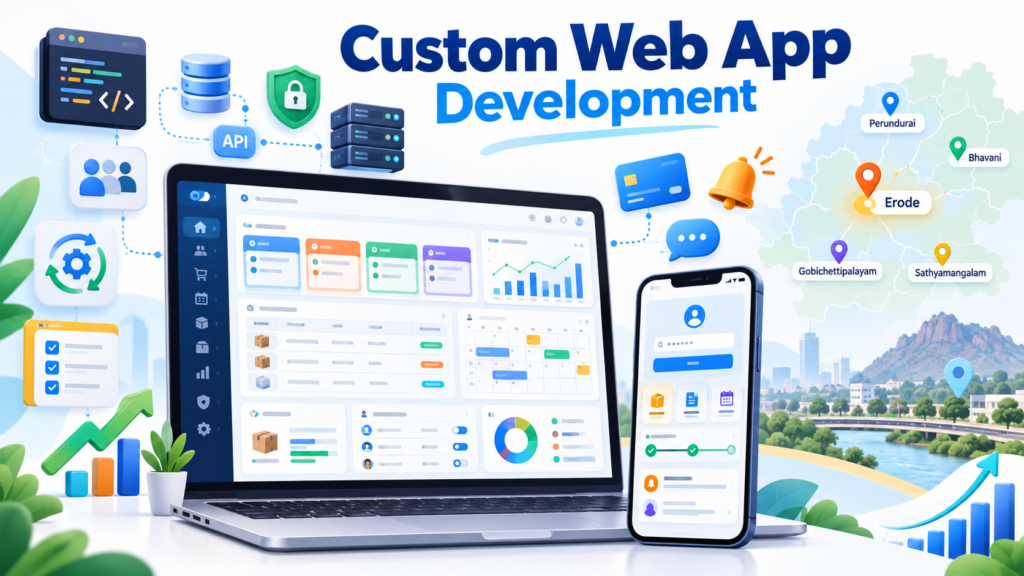
Custom web application development for Erode businesses is useful for companies that need more than a standard business website. While a website mainly presents information and helps generate enquiries, a custom web application can help manage customers, leads, orders, bookings, inventory, staff, payments, reports, approvals and business workflows through one browser-based system.
Many businesses begin with websites, spreadsheets, WhatsApp messages and manual processes. As operations grow, those tools can become difficult to manage efficiently.
For example:
- A textile company may need quotation and order tracking.
- A manufacturer may need inventory and production dashboards.
- A school may need an admission or parent portal.
- A clinic may need appointment management.
- A real estate company may need a lead and site-visit system.
- A service business may need booking, staff assignment and payment tracking.
This is where a custom web application can become useful.
At Greap Technologies, we provide custom web application development for businesses that need browser-based dashboards, portals, workflow systems, admin panels, SaaS products, integrations and business-management applications.
Quick Answer: What Is Custom Web Application Development?
Custom web application development is the process of designing and building browser-based software around a business’s specific users, workflows, data and operational requirements.
Unlike a normal informational website, a custom web application can include:
- Secure user login
- Admin dashboard
- Customer portal
- Employee portal
- Lead management
- CRM functionality
- Order management
- Booking management
- Inventory management
- Payments
- Reports
- User roles and permissions
- Notifications
- Workflow automation
- API integrations
Because the system runs through a web browser, authorized users can generally access it from compatible desktops, laptops, tablets and mobile browsers without installing traditional desktop software.
Custom Web Application Development for Erode Businesses: Overview
| Detail | Information |
|---|---|
| Service | Custom Web Application Development |
| Company | Greap Technologies |
| Location | Erode, Tamil Nadu |
| Suitable For | Growing businesses, manufacturers, retailers, institutions, service companies and startups |
| Main Goal | Digitize and manage business workflows |
| Common Modules | Users, CRM, orders, bookings, inventory, reports, payments and dashboards |
| Access | Browser-based, responsive access based on application design |
| Service Area | Erode District and relevant nearby areas |
What Is a Custom Web Application?
A custom web application is software that users access through a web browser and that is developed around a specific business requirement.
A web application can contain both a user-facing system and an administrative system.
Customer or Staff Side
- Login
- Dashboard
- Orders
- Bookings
- Documents
- Payments
- Support
- Reports
Admin Side
- User management
- Lead management
- Order management
- Booking management
- Inventory
- Reports
- Permissions
- System settings
The application can be designed around the way the business actually works instead of forcing every department into a generic software workflow.
Website vs Custom Web Application
| Business Website | Custom Web Application |
|---|---|
| Mainly presents information | Processes and manages data |
| Mostly public pages | Can contain private login areas |
| Home, About, Services, Contact | Users, Orders, Bookings, Reports, Workflows |
| Good for SEO and business visibility | Good for operations and self-service |
| Basic forms | Advanced forms, workflows and validations |
| Usually simpler architecture | Database and application logic |
| Usually lower development scope | Usually higher development scope |
A website helps people discover and understand your business.
A web application helps customers, employees or administrators perform actions and manage business processes.
Custom Web Application vs Custom Software
These terms are related but are not exactly the same.
Custom software development is the broader category.
It can include:
- Web applications
- Mobile applications
- CRM systems
- ERP systems
- Billing systems
- Inventory software
- Automation tools
- Internal applications
Custom web application development specifically focuses on software accessed through a web browser.
Businesses needing broader operational software can also read our guide on custom software development for businesses in Erode.
Why Erode Businesses May Need Custom Web Applications
Businesses often reach a point where spreadsheets, phone calls, notebooks and disconnected applications stop working efficiently.
Common problems include:
- Enquiries getting missed
- No centralized customer information
- Manual follow-up
- Repeated data entry
- Stock mismatch
- Difficult order tracking
- No staff accountability
- Slow reporting
- Manual quotation preparation
- Payment tracking difficulties
- No centralized document storage
- Multiple branches using different records
A well-planned custom web application can bring selected processes into one structured system.
Signs Your Business May Need a Custom Web Application
Consider custom development if several of these situations apply:
- Your team manages important operations in spreadsheets.
- Employees repeatedly enter the same information in different systems.
- Customer enquiries are difficult to track.
- You need different permissions for different staff.
- Management cannot get reports quickly.
- Ready-made software does not match your workflow.
- You need customers or dealers to log in.
- You need to connect multiple software systems.
- Your business needs custom approval processes.
- You want to automate repetitive operational tasks.
Benefits of Custom Web Application Development
1. Built Around Your Business Workflow
Generic software is designed for many businesses.
A custom web application can instead be planned around:
- Your departments
- Your order process
- Your sales workflow
- Your approval flow
- Your reporting requirements
- Your pricing rules
- Your customer journey
2. Centralized Business Data
Selected operational information can be brought into one system.
This may include:
- Customers
- Leads
- Orders
- Bookings
- Inventory
- Payments
- Staff
- Documents
- Reports
3. Better Lead Management
A web application can provide CRM-style lead tracking.
Lead information can include:
- Customer name
- Phone number
- Business name
- Lead source
- Requirement
- Status
- Assigned staff
- Follow-up date
- Notes
- Conversion status
This helps sales teams work from a structured pipeline rather than scattered messages.
4. Improved Team Coordination
Users can work from a shared application with clearly assigned responsibilities.
Depending on the workflow, staff may be able to:
- Update statuses
- Assign tasks
- Add notes
- Upload documents
- Track pending work
- Receive alerts
5. Business Reports
Dashboards and reports can help management understand operational data.
Reports can include:
- Leads
- Sales
- Orders
- Bookings
- Payments
- Inventory
- Staff activity
- Customers
6. Role-Based Access
Different users can be assigned different access levels based on business requirements.
Example roles:
- Super Admin
- Administrator
- Manager
- Sales
- Accounts
- Support
- Warehouse
- Dealer
- Vendor
- Customer
Permissions should follow the principle that users receive only the access necessary for their work.
7. Workflow Automation
Where suitable, repetitive tasks can be automated.
Examples include:
- Follow-up reminders
- Booking confirmations
- Order notifications
- Low-stock alerts
- Invoice creation
- Payment reminders
- Task assignments
- Status notifications
8. Easier Future Expansion
A well-planned architecture can allow additional modules to be introduced later.
Future functionality might include:
- Mobile applications
- Customer portals
- Dealer portals
- New reports
- Additional branches
- API integrations
- Additional automation
Types of Custom Web Applications for Erode Businesses
1. CRM Web Application
A CRM application helps businesses manage leads, customers and sales follow-ups.
Useful modules can include:
- Lead management
- Customer database
- Sales pipeline
- Follow-up reminders
- Staff assignment
- Notes
- Reports
See our detailed guide on CRM software development for businesses in Erode.
2. ERP Web Application
An ERP can connect multiple business functions.
Modules can include:
- Sales
- Purchases
- Inventory
- Production
- Suppliers
- Payments
- Reports
ERP scope should be defined carefully because large ERP systems can become complex projects.
3. Booking Web Application
Suitable for:
- Clinics
- Salons
- Consultants
- Training centres
- Rental companies
- Service businesses
Possible functionality:
- Service selection
- Availability
- Date/time slots
- Booking
- Confirmation
- Payment
- Rescheduling
- Admin calendar
4. Ecommerce Web Application
Useful for businesses requiring custom ecommerce workflows beyond standard store functionality.
Features can include:
- Products
- Categories
- Cart
- Checkout
- Payments
- Orders
- Customer accounts
- Inventory
- Custom pricing
- Reports
5. Admin Panel
Admin panels help businesses manage websites, mobile apps and software platforms.
Possible modules:
- Dashboard
- Users
- Content
- Products
- Orders
- Enquiries
- Reports
- Notifications
- Settings
Read more about admin panel development in Erode.
6. Customer Portal
A customer portal gives customers controlled access to selected information and actions.
It can include:
- Profile
- Orders
- Bookings
- Invoices
- Documents
- Payment history
- Support requests
7. Dealer or Distributor Portal
Useful for textile, manufacturing, wholesale and distribution businesses.
Possible functionality:
- Dealer login
- Product catalogue
- Dealer-specific pricing
- Bulk order placement
- Outstanding payments
- Order history
- Documents
- Support
8. SaaS Web Application
A SaaS application provides software functionality to users through the browser.
Possible modules include:
- User registration
- Onboarding
- Plans
- Subscriptions
- User dashboard
- Admin dashboard
- Payments
- Usage tracking
- Reports
9. Inventory Management Application
An inventory system can help track:
- Products
- SKU
- Stock inward
- Stock outward
- Suppliers
- Purchases
- Stock adjustments
- Low-stock alerts
- Stock reports
10. Workflow and Approval System
Suitable for businesses that manage processes involving several employees or departments.
Example:
Employee Creates Request
↓
Manager Reviews
↓
Accounts Approves
↓
Request Completed
↓
Activity Recorded
Important Features of a Custom Web Application
Secure Authentication
Depending on the application, authentication can include:
- Email/password login
- Password reset
- OTP authentication
- Role-based access
- Session management
- Account activation/deactivation
Admin Dashboard
The dashboard can show useful operational metrics such as:
- New leads
- Pending orders
- Bookings
- Payments
- Inventory alerts
- Recent activity
User Management
Administrators can manage:
- Users
- Roles
- Permissions
- User status
- Department access
Search and Filters
Business applications should make large datasets easy to search and filter.
Filters can include:
- Date
- Status
- Employee
- Customer
- Product
- Branch
Reports and Data Export
Depending on requirements, applications can provide:
- Dashboards
- Charts
- Filtered reports
- CSV exports
- PDF reports
Notifications
Notifications may be delivered through:
- In-app alerts
- SMS
- Supported WhatsApp integrations
- Mobile push notifications when connected to an app
API Integrations
Web applications can integrate with supported third-party platforms.
Examples include:
- Payment gateways
- SMS services
- Email platforms
- WhatsApp business integrations
- Maps
- Shipping providers
- CRM/ERP platforms
- Accounting systems
Custom Web Application Development Process
Step 1: Business Process Discovery
Start by understanding the current process.
Questions include:
- What is currently manual?
- Which departments are involved?
- Who will use the application?
- Which decisions require approvals?
- What reports are needed?
- What data must be stored?
- Which external systems need integration?
Step 2: Module and Feature Planning
Divide requirements into:
- Essential launch features
- Secondary features
- Future features
This reduces unnecessary first-version complexity.
Step 3: User Roles and Permissions
Define:
- Who can view data?
- Who can create records?
- Who can edit records?
- Who can approve actions?
- Who can access reports?
Step 4: UI/UX Planning
Design should prioritize:
- Clear navigation
- Easy forms
- Readable tables
- Fast daily actions
- Consistent controls
- Responsive access
Step 5: Database and Architecture Planning
The application architecture should account for:
- Users
- Data relationships
- Security boundaries
- Performance
- Integrations
- Future modules
Step 6: Development
Development can include:
- Frontend
- Backend
- Database
- Authentication
- APIs
- Business logic
- Reports
- Integrations
Step 7: Testing and QA
Testing should cover relevant workflows including:
- Authentication
- User roles
- Forms
- Validations
- Reports
- Integrations
- Responsive layouts
- Error handling
- Important security controls
Step 8: Deployment
The application is deployed to the selected hosting or cloud infrastructure based on its technical requirements.
Step 9: User Training
Relevant staff can be trained to use:
- Dashboard
- Daily workflows
- Reports
- Data entry
- User administration
Step 10: Maintenance and Improvements
After launch, businesses may require:
- Bug fixes
- Security updates
- Performance optimization
- New reports
- Additional integrations
- New modules
Technology for Custom Web Application Development
The correct technology stack depends on the project.
Technology decisions should consider:
- Application complexity
- Expected traffic
- Real-time requirements
- Existing business systems
- Hosting environment
- Developer maintainability
- Integration requirements
Modern web applications may use combinations of:
- React-based frontend frameworks
- Modern JavaScript frontend technologies
- Node.js or PHP-based backend frameworks
- Relational or document databases
- REST APIs
- Cloud infrastructure
The technology should be selected because it fits the business and technical requirement — not simply because it is currently popular.
Custom Web Application Development by Industry
Textile Businesses
Possible modules:
- Customers
- Dealers
- Product catalogue
- Quotations
- Orders
- Payments
- Inventory
- Reports
Manufacturing Companies
Possible modules:
- Raw materials
- Purchases
- Production
- Inventory
- Quality checks
- Dispatch
- Customers
- Reports
Schools and Colleges
Possible modules:
- Admissions
- Students
- Parents
- Attendance
- Fees
- Announcements
- Documents
- Reports
Hospitals and Clinics
Possible modules can include:
- Appointments
- Doctor schedules
- Patient accounts
- Enquiry tracking
- Payments
- Notifications
Applications handling personal health information require additional privacy, security and regulatory consideration appropriate to the data and intended use.
Real Estate Businesses
Possible modules:
- Projects
- Properties
- Leads
- Site visits
- Follow-ups
- Staff assignment
- Documents
- Reports
Retail Businesses
Possible modules:
- Products
- Inventory
- Customers
- Orders
- Payments
- Offers
- Sales reports
Restaurants
Possible modules:
- Menu
- Orders
- Tables
- Bookings
- Kitchen status
- Delivery status
- Offers
- Reports
Service Businesses
Possible modules:
- Customers
- Service requests
- Bookings
- Staff assignment
- Tasks
- Payments
- Follow-ups
- Reports
Example Custom Web Application Modules
| Module | Purpose |
|---|---|
| Admin Dashboard | Business overview and actions |
| Users | Manage employees, customers or partners |
| CRM | Manage leads and follow-ups |
| Products | Manage product catalogue |
| Orders | Track customer orders |
| Bookings | Manage appointments or reservations |
| Inventory | Track stock and movement |
| Payments | Record payment information and status |
| Reports | Analyze operational data |
| Notifications | Send alerts and reminders |
| Integrations | Connect external systems |
Custom Web Application Cost in Erode
Custom web application cost depends mainly on modules, user roles, workflow complexity, design, database requirements, APIs, integrations, reporting and testing.
| Web Application Type | Indicative Planning Range |
|---|---|
| Basic Admin / Internal Application | ₹50,000 – ₹1,50,000+ |
| CRM Web Application | ₹1,00,000 – ₹4,00,000+ |
| Booking Platform | ₹1,50,000 – ₹6,00,000+ |
| Custom Ecommerce Application | ₹1,50,000 – ₹8,00,000+ |
| ERP / Operations Platform | ₹3,00,000 – ₹15,00,000+ |
| SaaS Application | ₹5,00,000 – ₹25,00,000+ |
| Marketplace Platform | ₹5,00,000 – ₹30,00,000+ |
Important: These are only indicative business-planning ranges and are not fixed quotations or standard Erode market prices.
Final pricing depends on actual project requirements and should be estimated after requirement analysis.
Custom Web Application Security
Security should be planned as part of application architecture rather than added only after development.
Relevant controls can include:
- Secure authentication
- Role-based authorization
- Password protection
- Input validation
- Secure session handling
- HTTPS
- API authorization
- Database access controls
- Backups
- Audit/activity logs
- Error handling
- Dependency updates
The exact security requirements depend on the type of information the application processes and the risks associated with the system.
Can a Web Application Be Connected to a Mobile App?
Yes.
A common architecture can look like:
Customer Mobile App
↕
Backend APIs
↕
Database
↕
Web Admin Panel
This approach can be useful for:
- Ecommerce
- Delivery platforms
- Restaurant ordering
- Bookings
- Logistics
- Field-service applications
- Education systems
Businesses considering native mobile functionality can also explore Greap Technologies’ mobile app development services.
Should You Build a Custom Web App or Buy Ready-Made Software?
Custom development is not automatically the best choice.
Ready-Made Software Can Be Better When:
- Your workflow is common and standardized.
- An affordable product already solves most requirements.
- You need to launch quickly.
- You do not require major customization.
Custom Development Can Be Better When:
- Your workflow is unique.
- Existing tools require too much manual workaround.
- You need custom reports.
- You need custom permissions.
- You need specialized integrations.
- You need customer, dealer or employee portals.
- The software is part of your competitive advantage.
The correct decision should be based on total business value, not simply whether custom software sounds more advanced.
Start with an MVP Instead of Building Everything
For large applications, developing every requested feature in version one can increase cost, timeline and project risk.
A better approach can be to launch an MVP — Minimum Viable Product — containing only essential workflows.
Example CRM MVP
- Login
- Users
- Leads
- Follow-ups
- Sales stages
- Basic reports
Possible Phase Two
- WhatsApp integration
- Advanced reporting
- Quotation system
- Automation
- Mobile app
Custom Web Application Development Checklist
| Requirement | Priority |
|---|---|
| Requirement analysis | Essential |
| Module planning | Essential |
| User roles | Essential for multi-user apps |
| UI/UX design | Essential |
| Database architecture | Essential for data-driven apps |
| Backend development | Essential |
| Frontend development | Essential |
| Authentication | Application dependent |
| Permissions | Application dependent |
| Reports | Business dependent |
| Notifications | Business dependent |
| Payment integration | Transaction dependent |
| API integrations | Requirement dependent |
| Security controls | Essential |
| Testing | Essential |
| Deployment | Essential |
| Backups | Recommended |
| Maintenance plan | Recommended |
Common Custom Web Application Development Mistakes
1. Starting Without Requirements
Unclear requirements create scope changes, delays and unexpected development work.
2. Trying to Build Everything at Once
Separate essential functionality from future improvements.
3. Automating a Bad Process
Before developing software, simplify the existing workflow where possible.
4. Ignoring User Experience
Employees will avoid software that makes everyday work unnecessarily difficult.
5. Weak Permission Planning
User access should be planned before development.
6. Poor Database Planning
Data relationships and reporting requirements should be considered early.
7. No Security Planning
Authentication, authorization, validation and data protection should be considered from the beginning.
8. No Testing
Critical workflows should be tested before production launch.
9. No Staff Training
Even well-designed software needs proper adoption.
10. No Maintenance Budget
Custom applications change as browsers, dependencies, APIs and business requirements evolve.
Custom Web Application Development Across Erode District
Greap Technologies provides web application and custom software development support for businesses across Erode district, including:
Erode, Perundurai, Bhavani, Anthiyur, Gobichettipalayam, Sathyamangalam, Modakkurichi, Kodumudi, Nambiyur, Thalavadi, Chennimalai, Kavindapadi and relevant nearby areas.
However, web application development scope and pricing are primarily determined by functionality and complexity rather than the client’s town.
For SEO, avoid publishing near-identical pages such as:
- Custom Web Application Development in Perundurai
- Custom Web Application Development in Bhavani
- Custom Web Application Development in Gobichettipalayam
- Custom Web Application Development in Sathyamangalam
unless each page contains meaningful, genuinely unique local information.
How Greap Technologies Helps with Custom Web Application Development
Greap Technologies provides web application development services for businesses that need scalable browser-based platforms, dashboards, portals and workflow applications.
Our development support can include:
- Business requirement analysis
- Workflow mapping
- Feature planning
- UI/UX design
- Application architecture
- Frontend development
- Backend development
- Database design
- Admin dashboards
- User portals
- CRM functionality
- Booking systems
- Ecommerce applications
- SaaS development
- User roles and permissions
- Payment integrations
- API integrations
- Reports and analytics dashboards
- Testing
- Deployment
- Maintenance and enhancements
Useful Related Resources
- Web Application Development Services
- Custom Software Development
- Custom Software Development for Businesses in Erode
- CRM Software Development for Businesses in Erode
- Admin Panel Development for Websites and Apps in Erode
- Mobile App Development Services
Still Managing Important Work Through Excel and WhatsApp?
Tell Greap Technologies how your current business process works. We can help determine whether you need a CRM, admin dashboard, customer portal, booking system, ERP module or custom web application.
Why Choose Greap Technologies?
Business-First Requirement Planning
We start by understanding the current process, users, pain points and expected outcomes before defining technology.
Custom Dashboard and Portal Development
We develop administrative dashboards, internal applications, customer portals and workflow systems based on project requirements.
Frontend + Backend Development
Greap can handle customer-facing interfaces, backend logic, databases, APIs and administration systems.
Scalable Project Planning
Applications can be divided into phases so essential functionality is delivered first and future modules can be planned separately.
Integration Support
Where supported, web applications can connect with payment providers, communication tools and other business systems through APIs.
Long-Term Development Support
Additional modules, reports, integrations and improvements can be introduced as business requirements change.
Custom Web Application Development for Erode Businesses – Conclusion
Custom web application development for Erode businesses can help growing companies move from disconnected manual processes to more structured digital workflows.
A custom web application can support:
- Leads
- Customers
- Orders
- Bookings
- Inventory
- Payments
- Staff
- Reports
- Approvals
- Automation
However, custom development should only be chosen when there is a clear business requirement.
Sometimes a normal website or ready-made software is enough. In other cases, a custom CRM, portal, admin dashboard or web application can significantly improve how the business operates.
The right first step is:
Understand the Process → Identify the Problem → Define Essential Modules → Build the MVP → Measure Usage → Expand.
Greap Technologies helps businesses in Erode plan and develop browser-based systems around real operational requirements rather than unnecessary features.
Need a Custom Business System?
Share your current workflow and the problem you want to solve. Greap Technologies can help plan a practical custom web application for your business.
Frequently Asked Questions
1. What is custom web application development?
Custom web application development is the process of building browser-based software around specific business workflows, users, data and operational requirements.
2. How is a web application different from a normal website?
A website mainly presents information and generates enquiries, while a web application can process data, manage users and support workflows such as orders, bookings, inventory, payments and reports.
3. Which Erode businesses can use custom web applications?
Textile businesses, manufacturers, retailers, schools, clinics, real estate companies, restaurants, logistics companies, service businesses and startups may benefit when their workflows require custom digital management.
4. What can a custom web application include?
It can include login, dashboards, admin panels, CRM, orders, bookings, inventory, reports, payments, notifications, portals, user permissions and integrations depending on the project.
5. Does every web application need an admin panel?
No. The requirement depends on the application. Systems that manage users, content, orders, bookings or operational data commonly need an administrative interface.
6. Can a web application work on mobile phones?
Yes. A responsive web application can be designed to work across compatible desktop, tablet and mobile browsers, although highly mobile-specific workflows may still benefit from a dedicated mobile app.
7. How much does custom web application development cost in Erode?
Cost depends on modules, user roles, UI/UX, backend complexity, database requirements, integrations and testing. Small internal systems may begin around ₹50,000, while larger CRM, ERP, SaaS and marketplace platforms can cost several lakhs or more.
8. How long does custom web application development take?
Timeline depends on scope. A small internal dashboard may take several weeks, while larger CRM, ERP, marketplace or SaaS applications can require several months of design, development, testing and deployment.
9. Can a web application later connect with a mobile app?
Yes. A properly planned backend and API architecture can support web interfaces and separate mobile applications where required.
10. Can Greap Technologies build custom web applications in Erode?
Yes. Greap Technologies provides web application development for dashboards, portals, workflow systems, CRM applications, booking platforms, SaaS products, ecommerce systems and custom business applications.