Automated Lead Management System Development for Erode Businesses
Every customer enquiry represents an opportunity for a business to start a conversation. However, receiving enquiries is only one part of the sales process. Businesses also need to record customer requirements, assign responsibilities, follow up at the right time, prepare quotations and track outcomes.
When these activities are managed through notebooks, spreadsheets, personal messaging accounts and disconnected software, important information can become difficult to organize.
For example, a manufacturing company may receive product enquiries through its website, WhatsApp, email and phone calls. If different employees handle these enquiries without a shared system, managers may struggle to identify which leads are new, which have received quotations and which require follow-up.
This is where automated lead management system development in Erode can help.
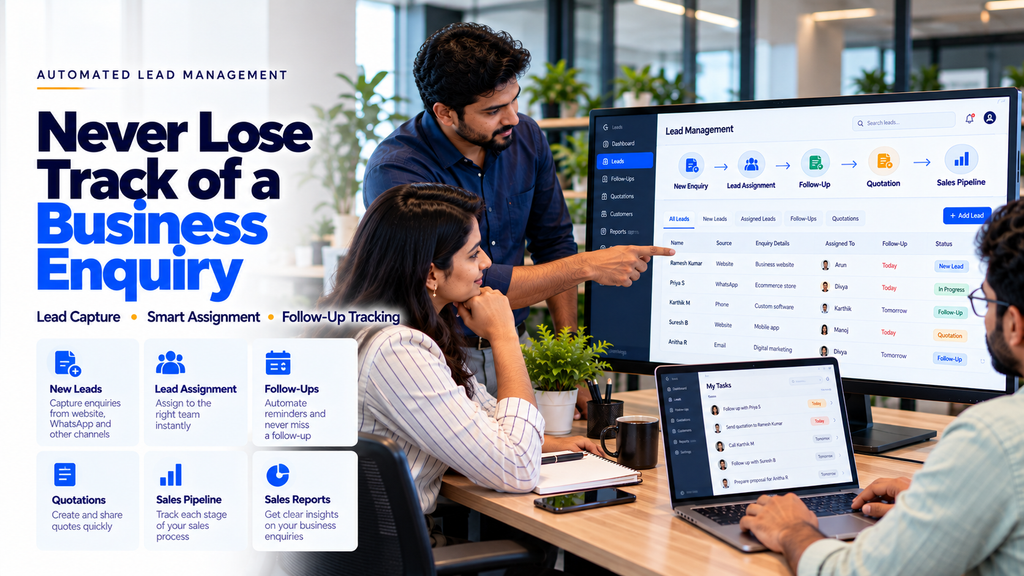
A custom lead management system can bring customer enquiries, sales assignments, follow-up tasks, quotations and pipeline reporting into a structured workflow.
For manufacturers, textile companies, wholesalers, retailers and service businesses in Erode, suitable lead management software can reduce repetitive administrative work and improve visibility into the sales process.
This guide explains how automated lead management systems work, which features businesses should consider, how integrations are developed and what affects the cost of a custom solution.
What Is an Automated Lead Management System?
An automated lead management system is software that helps businesses collect, organize, assign, monitor and follow up on potential customer enquiries.
Instead of storing lead details in separate locations, the system creates a structured record that authorized sales employees can access and update.
Depending on the implementation, the software may support:
- Website enquiry capture
- Lead registration and categorization
- Salesperson assignment
- Follow-up reminders
- Customer communication history
- Quotation management
- Sales pipeline tracking
- Lead status reporting
- CRM and business software integration
Automation helps coordinate repetitive steps, but customer relationships and sales decisions still require appropriate employee involvement.
How Does Lead Management Automation Work?
A lead management workflow generally begins when a business receives an enquiry.
Each stage can be recorded and monitored through the software.
For example, when a visitor submits a website enquiry form, the system may create a lead record and assign it to a salesperson based on predefined rules.
The salesperson can then review the enquiry, contact the customer and update the lead status.
If another discussion is needed, the system can create an internal follow-up reminder.
This helps teams maintain a consistent process without assuming that every enquiry will result in a sale.
Why Erode Businesses Need Better Lead Management
Businesses in Erode often serve customers through multiple sales and communication channels.
Depending on the industry, enquiries may arrive through:
- Business websites
- Google Business Profiles
- Phone calls
- Social media campaigns
- Online advertisements
- Existing customer referrals
- Dealer and distributor networks
When these enquiries are not recorded consistently, businesses may face challenges such as:
- Missing customer contact information
- Unclear salesperson responsibilities
- Delayed follow-up activities
- Duplicate lead records
- Difficulty tracking quotation status
- Limited sales pipeline visibility
- Time-consuming reporting
A centralized lead management system can help address these operational challenges.
1. Automated Lead Capture From Websites
A business website may contain enquiry forms, quotation request forms, appointment forms and contact forms.
These forms can be connected to a lead management system.
For example:
Useful information may include the customer’s name, contact details, service requirement and preferred communication method.
Businesses should collect only necessary information and explain how customer details will be used.
2. WhatsApp Lead Management Integration
WhatsApp is an important customer communication channel for many businesses.
With authorized WhatsApp Business Platform integrations, selected enquiry workflows may be connected to CRM or lead management software.
Potential features include:
- Creating lead records from supported conversations
- Assigning enquiries to sales employees
- Connecting messages to customer records
- Tracking follow-up tasks
- Recording lead status
Integration must follow applicable WhatsApp policies, customer consent requirements and platform limitations.
Read more about WhatsApp Business Automation Services in Erode.
3. Lead Capture From Digital Marketing Campaigns
Businesses may generate enquiries through advertising campaigns and social media.
When supported by the advertising platform, lead form submissions may be transferred to a CRM or lead management application through approved integrations.
Possible workflows include:
- Lead form submission
- Campaign source recording
- Lead assignment
- Follow-up task creation
- Lead outcome reporting
Campaign tracking should use accurate source information rather than assumed attribution.
4. Automatic Lead Assignment
Businesses with multiple sales employees may need rules for assigning new enquiries.
Assignment can be based on:
- Product category
- Service requirement
- Geographical territory
- Sales team
- Workload
- Existing customer ownership
For example, a textile enquiry may be assigned to a textile sales specialist, while a software enquiry may be routed to the software sales team.
Managers should be able to review and change assignments when necessary.
5. Automated Follow-Up Reminders
Following up with interested customers is an important part of sales management.
However, employees may handle many enquiries at the same time.
A lead management system can create reminders based on agreed follow-up dates.
Features may include:
- Follow-up scheduling
- Assigned employee notifications
- Overdue task lists
- Follow-up completion tracking
- Manager visibility
Automated internal reminders can help employees manage their workload without sending unnecessary messages to customers.
6. Lead Status Tracking
Lead status tracking helps businesses understand where each enquiry stands.
Common statuses may include:
- New Enquiry
- Assigned
- Contacted
- Requirement Discussed
- Quotation Sent
- Follow-Up Required
- Won
- Lost
- Closed
The stages should reflect the actual sales process rather than using unnecessary status categories.
7. Sales Pipeline Management
A sales pipeline provides a structured view of enquiries as they progress through the sales process.
A pipeline dashboard may show:
- New leads
- Qualified enquiries
- Quotations in progress
- Pending follow-ups
- Completed sales
- Closed enquiries
Managers can use this information to understand current workloads and identify where additional attention may be needed.
8. Lead Qualification Workflows
Not every enquiry contains enough information for the sales team to prepare a suitable response.
A lead management system may help employees record relevant details such as:
- Required product or service
- Business category
- Project scope
- Requested quantity
- Preferred timeline
- Customer contact preference
Businesses should avoid collecting unnecessary personal information.
9. Customer Communication History
When multiple employees handle the same customer, access to previous communication records can be useful.
A lead management system may maintain:
- Contact notes
- Meeting records
- Follow-up history
- Quotation records
- Lead status changes
- Assigned employee information
Access should be restricted to authorized employees.
10. Quotation Management Integration
Quotation preparation is a common step in B2B sales.
A lead management system may connect with quotation software to support:
- Quotation request creation
- Product and service selection
- Quotation draft preparation
- Manager approval
- Quotation status tracking
- Follow-up reminders
Prices, taxes, discounts and contractual terms should be verified before a quotation is finalized.
11. Sales Team Task Management
Sales employees may need to manage calls, meetings, quotations and follow-ups.
Task management features can include:
- Task assignment
- Due dates
- Task priority
- Completion status
- Internal notifications
- Manager review
These features can help teams organize their work more consistently.
12. Lead Source Tracking
Businesses may want to understand which marketing channels generate enquiries.
Lead source information may include:
- Website contact form
- Organic search
- Paid advertising
- Social media
- Customer referral
- Phone enquiry
- Direct enquiry
Source attribution should use reliable tracking information where available.
Some enquiries may have an unknown or incomplete source.
13. Duplicate Lead Detection
Customers may contact a business through multiple channels.
This can create duplicate lead records.
A lead management system may identify possible duplicates using approved matching rules.
Potential matching fields include:
- Phone number
- Email address
- Customer reference
- Business name
Automatic merging should be handled carefully to avoid combining records belonging to different customers.
14. Automated Sales Notifications
Internal notifications can help employees identify activities requiring attention.
Examples include:
- New lead assigned
- Follow-up due
- Quotation awaiting approval
- Lead reassigned
- Task overdue
- Lead status updated
Notifications should be relevant and should not overwhelm employees.
15. Sales Reporting Dashboard
A reporting dashboard can help managers review sales activities recorded in the system.
Possible reports include:
- New enquiries by period
- Leads by source
- Assigned leads by employee
- Pending follow-ups
- Quotation status
- Lead conversion rate
- Closed enquiries
Reports should use accurate system data and clearly defined calculations.
16. Lead Management Software for Manufacturing Companies
Manufacturing companies may receive enquiries from dealers, distributors, procurement teams and other businesses.
Potential requirements include:
- Product enquiry capture
- Sales territory assignment
- Quotation tracking
- Customer requirement records
- Purchase enquiry follow-ups
- Sales reporting
The system may also connect with order management software when supported integrations are available.
17. Lead Management for Textile Businesses in Erode
Textile businesses may receive enquiries relating to yarn, fabrics, garment production and wholesale supply.
A custom lead management system may help organize:
- Wholesale customer enquiries
- Product category requirements
- Quantity enquiries
- Quotation requests
- Assigned sales representatives
- Follow-up schedules
- Order enquiry status
Product specifications and commercial commitments should come from verified business information.
18. Lead Management for Wholesale and Distribution
Wholesalers and distributors may manage enquiries from retailers, dealers and business customers.
Useful features may include:
- Dealer enquiry registration
- Territory-based assignment
- Quotation tracking
- Sales follow-up reminders
- Dealer communication records
- Lead-to-order workflows
19. Lead Management for Real Estate Businesses
Real estate companies may receive enquiries through websites, advertisements, property listings and phone calls.
A suitable system can help organize:
- Property enquiries
- Customer preferences
- Agent assignment
- Site visit requests
- Follow-up tasks
- Enquiry status
Property availability and pricing should be verified through current business records.
20. Lead Management for Healthcare and Clinics
Healthcare businesses may use enquiry management software for administrative communication and appointment requests.
Potential features include:
- General enquiry registration
- Appointment request routing
- Administrative follow-ups
- Staff assignment
- Enquiry status tracking
Sensitive health information requires additional privacy safeguards and should not be unnecessarily collected in a general sales CRM.
21. Lead Management for Educational Institutions
Schools, colleges and training centers may receive enquiries about courses, admissions and institutional services.
Possible features include:
- Admission enquiry capture
- Course interest tracking
- Staff assignment
- Follow-up reminders
- Application status integration
Student information must be handled with suitable access controls.
22. Lead Management for Service Businesses
Service companies may need to manage enquiries for website development, software development, repairs, consulting or other services.
Possible workflows include:
A structured system can help employees record the current stage and next required action.
23. Custom Lead Management Software vs Spreadsheet Tracking
| Spreadsheet Tracking | Custom Lead Management System |
|---|---|
| Manual lead entry and updates | Can integrate approved lead sources |
| Follow-ups depend on manual reminders | Can create scheduled tasks |
| Limited assignment workflows | Can support role-based lead assignment |
| Reports may require manual preparation | Can generate reports from recorded data |
| Access controls depend on the spreadsheet platform | Can support application-specific permissions |
Spreadsheets may remain suitable for simple requirements. Custom software becomes more relevant when a business needs structured workflows and integrations.
24. Custom Lead Management Software vs Ready-Made CRM
Ready-made CRM products may provide useful functionality without requiring a completely custom application.
Custom software may be appropriate when businesses have specialized workflows, unique approval rules or integration requirements.
| Ready-Made CRM | Custom Lead Management Software |
|---|---|
| Predefined features | Tailored workflows |
| May offer faster setup | Requires development planning |
| Customization depends on vendor | Can support specific business rules |
| Often subscription-based | May involve development and maintenance costs |
| Integrations depend on supported connectors | Can be built around available APIs |
25. Can AI Improve Lead Management?
Artificial intelligence may support selected lead management activities.
Examples include:
- Enquiry classification
- Customer conversation summaries
- Suggested follow-up tasks
- Business knowledge search
- Sales reporting assistance
AI is not required for every lead management system.
For predictable tasks such as lead assignment, reminders and status updates, conventional software rules may be more reliable.
AI-generated recommendations should be reviewed when they affect important business decisions.
26. Automated Lead Management System Architecture
A custom lead management application may include:
- Responsive web application
- Secure backend
- Lead database
- User authentication
- Role-based permissions
- Workflow engine
- Notification system
- CRM integrations
- Reporting dashboard
- Audit logs
The architecture should be planned around the business’s actual requirements.
27. Mobile-Friendly Lead Management Software
Sales employees may need to review leads while visiting customers or working outside the office.
A responsive lead management system can support:
- Mobile lead lists
- Customer contact details
- Follow-up reminders
- Lead status updates
- Task management
- Basic reporting
Mobile interfaces should remain easy to use without unnecessary complexity.
28. User Roles and Permissions
Lead management systems often require different access levels.
Possible roles include:
- Administrator
- Sales Manager
- Sales Executive
- Team Leader
- Reporting User
Permissions should determine which records and actions each user can access.
For example, a sales executive may only need access to assigned leads, while a manager may require broader team reporting.
29. Security and Customer Data Privacy
Lead management systems may store names, contact information, communication notes and commercial requirements.
Important security practices include:
- Secure authentication
- Role-based access control
- Appropriate encryption
- Input validation
- Secure API credentials
- Audit logging
- Backup and recovery
- Data retention controls
- Vendor security reviews
Businesses should comply with applicable privacy requirements and avoid collecting unnecessary personal information.
30. Automated Lead Management Development Process
- Requirement Analysis: Understand how enquiries are currently received and managed.
- Workflow Mapping: Define lead stages, assignments and follow-ups.
- UI/UX Design: Create practical sales dashboards and lead forms.
- Database Design: Structure customer and activity records.
- Backend Development: Build lead management and workflow logic.
- Integration: Connect approved websites, CRM systems and messaging platforms.
- Testing: Verify permissions, lead routing, reminders and reporting.
- Deployment: Introduce the software to the sales team.
- Training: Explain daily usage and responsibilities.
- Maintenance: Monitor errors and improve workflows.
31. How to Measure Lead Management Performance
Businesses should define measurable indicators before implementing automation.
Possible metrics include:
- Number of new enquiries
- Time to first response
- Lead assignment time
- Follow-up completion rate
- Quotation preparation time
- Lead-to-customer conversion rate
- Duplicate lead rate
- Sales pipeline status
These metrics should be interpreted using accurate records and consistent definitions.
32. Benefits of Automated Lead Management Software
Centralized Lead Records
Customer enquiries can be organized in one system.
Improved Sales Team Coordination
Assignments and responsibilities become easier to track.
Better Follow-Up Visibility
Employees can review pending and overdue follow-up tasks.
Structured Sales Pipeline
Managers can understand the current status of enquiries.
Reduced Repetitive Administration
Suitable integrations can reduce duplicate data entry.
More Consistent Reporting
Recorded activities can support structured sales reports.
Actual business benefits depend on implementation quality, data accuracy and staff adoption.
33. Limitations of Lead Management Automation
Automation systems may also introduce challenges.
Possible limitations include:
- Incorrect lead assignment rules
- Incomplete customer data
- Integration failures
- Duplicate records
- Employee training requirements
- Maintenance costs
- Data privacy concerns
- Workflow changes over time
Businesses should plan monitoring, error handling and manual fallback procedures.
34. How Much Does Lead Management Software Development Cost in Erode?
The development cost depends on the required features and technical complexity.
Factors may include:
- Number of users
- Lead capture integrations
- Sales pipeline features
- Follow-up automation
- Quotation integration
- WhatsApp Business Platform integration
- Custom reporting
- Role-based permissions
- Data migration
- Hosting and maintenance
A basic enquiry tracking application and a complete multi-team CRM platform require different development efforts.
Businesses should request a requirements-based quotation that separates initial development from recurring operating costs.
35. How Long Does Lead Management Software Development Take?
The timeline depends on the project scope, integrations, design requirements and testing.
A simple lead tracking system may require less development effort than a platform connecting multiple enquiry sources, sales teams, quotations and ERP software.
Businesses should confirm milestones and acceptance criteria before development begins.
36. How to Choose a Lead Management Software Development Company in Erode
Before selecting a development provider, consider:
- Understanding of your sales workflow
- Custom CRM development capabilities
- Integration experience
- Mobile-friendly UI design
- Security practices
- Reporting features
- Testing procedures
- Documentation and training
- Maintenance and support arrangements
A suitable solution should be designed around the business’s actual sales process rather than unnecessary software features.
37. Automated Lead Management for Businesses Across Erode District
Businesses in Erode and surrounding locations may consider lead management automation based on their customer enquiry processes.
Relevant locations include:
- Erode
- Perundurai
- Bhavani
- Anthiyur
- Gobichettipalayam
- Sathyamangalam
- Modakkurichi
- Kodumudi
- Nambiyur
- Chennimalai
- Kavindapadi
- Ammapettai
- Arachalur
- Sivagiri
- Punjai Puliampatti
- Thalavadi
- Solar
- Surampatti
- Veerappanchatram
- Nasiyanur
Businesses should select features based on their industry, sales team structure and actual requirements.
38. Common Lead Management Mistakes
- Failing to record every enquiry consistently
- Not defining lead ownership
- Using too many unnecessary pipeline stages
- Ignoring duplicate lead records
- Failing to schedule follow-ups
- Collecting unnecessary customer information
- Using unauthorized messaging tools
- Ignoring mobile usability
- Failing to train employees
- Assuming automation guarantees sales
- Launching without realistic testing
- Failing to review sales workflows regularly
39. Automated Lead Management Implementation Checklist
- Identify enquiry sources.
- Map the current sales process.
- Define lead stages.
- Assign sales team responsibilities.
- Plan follow-up reminders.
- Identify CRM integrations.
- Review WhatsApp messaging requirements.
- Plan quotation workflows.
- Define reporting requirements.
- Configure user permissions.
- Review customer data privacy.
- Test lead capture and assignment.
- Test follow-up notifications.
- Train sales employees.
- Measure performance.
- Maintain and improve the system.
40. How Greap Technologies Can Help
Greap Technologies can help businesses discuss custom lead management requirements as part of software development, CRM integration and business automation projects.
Depending on the agreed project scope, solutions may include:
- Lead management requirement analysis
- Custom CRM software development
- Website enquiry integration
- Sales pipeline management
- Lead assignment workflows
- Follow-up reminders
- Quotation management integration
- WhatsApp Business Platform integration
- Sales task management
- Reporting dashboards
- Role-based access controls
- Testing and maintenance
Explore Greap Technologies for custom software development, CRM solutions and business automation services.
Conclusion
Automated lead management system development in Erode can help businesses organize enquiries, coordinate sales teams and track customer follow-up activities.
Potential applications include website lead capture, WhatsApp CRM integration, salesperson assignment, quotation tracking, pipeline reporting and automated task reminders.
However, successful implementation depends on clear workflows, accurate customer records, appropriate integrations, security controls and employee training.
A practical implementation approach is:
For manufacturers, textile businesses, wholesalers and service companies in Erode, starting with a clearly defined sales workflow can be a practical way to evaluate lead management automation before expanding into a larger CRM system.
Need Automated Lead Management Software for Your Business?
Greap Technologies can help you discuss lead tracking, sales automation, CRM integration and custom follow-up workflows.
Frequently Asked Questions
1. What is an automated lead management system?
It is software that helps businesses capture, assign, organize and track customer enquiries and sales follow-up activities.
2. Can lead management software capture website enquiries?
Yes. Website forms can be connected to lead management software through supported integrations.
3. Can WhatsApp enquiries be integrated with a CRM?
Selected workflows may be integrated through authorized WhatsApp Business Platform services, subject to platform policies and technical requirements.
4. Can leads be automatically assigned to salespeople?
Yes. Assignment rules can be configured based on requirements such as territory, service category or sales team.
5. Can the system remind employees about follow-ups?
Yes. Custom lead management software can create internal follow-up reminders and pending task lists.
6. Is lead management software suitable for manufacturers?
Yes. Manufacturing companies may use it to organize product enquiries, quotation requests and customer follow-ups.
7. Can lead management software connect with quotation software?
Integration may be possible through supported APIs or custom application development.
8. Does automated lead management require AI?
No. Many lead management workflows can be implemented using conventional software rules. AI may assist with selected information-processing tasks.
9. Is automated lead management software secure?
Security depends on authentication, permissions, data handling, integrations, testing and maintenance.
10. How much does lead management software development cost in Erode?
Cost depends on features, integrations, user roles, custom reporting and development complexity.
11. Can employees access lead management software on mobile?
Yes. A responsive web application can support lead tracking and task updates on smartphones and tablets.
12. Does Greap Technologies develop automated lead management software in Erode?
Greap Technologies can help assess custom lead management requirements and develop suitable CRM and sales workflow solutions according to the agreed project scope.