AI-Powered CRM Software Development for Sales Teams in Erode
Managing customer relationships is an important part of running a successful business. Sales teams need to respond to enquiries, understand customer requirements, prepare quotations, schedule follow-ups, and monitor ongoing opportunities.
As a business grows, these activities can become difficult to manage using spreadsheets, notebooks, personal messaging accounts, and disconnected software.
For example, a textile manufacturer in Erode may receive customer enquiries through its website, WhatsApp, phone calls, and existing dealer networks. Different employees may handle these conversations, prepare quotations, and update order information.
Without a centralized system, managers may struggle to identify which enquiries are new, which customers need follow-up, and which quotations are awaiting a response.
This is where AI-powered CRM software development in Erode can help.
Custom CRM software can organize customer records, sales activities, lead assignments, quotations, and follow-up tasks. Artificial intelligence can add selected capabilities such as enquiry classification, conversation summaries, knowledge search, and sales reporting assistance.
However, not every CRM feature requires AI. Reliable business rules and conventional automation remain important for tasks such as reminders, assignments, permissions, and approval workflows.
In this guide, we explain the features, benefits, development process, integrations, security requirements, and cost factors involved in building AI-powered CRM software for sales teams.
What Is AI-Powered CRM Software?
AI-powered customer relationship management software is a CRM application that combines traditional customer and sales management features with selected artificial intelligence capabilities.
A conventional CRM system helps businesses organize:
- Customer contact information
- Sales leads
- Enquiry history
- Sales pipeline stages
- Follow-up tasks
- Quotations
- Customer communication records
- Sales reports
AI may assist with tasks that involve interpreting information, identifying patterns, or preparing summaries.
The purpose is to support sales employees with useful information rather than replace their professional judgment.
How Does AI-Powered CRM Software Work?
A typical AI-powered CRM combines a customer database, sales workflows, integrations, and AI services.
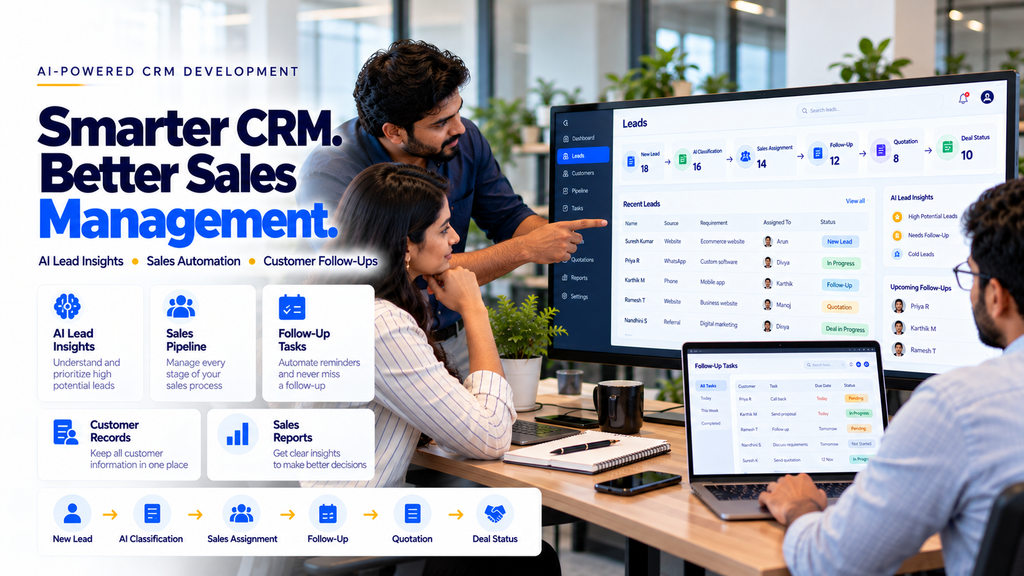
For example, when a customer submits a website enquiry, the CRM may automatically create a lead record.
An AI component may help identify whether the enquiry concerns a product, service, quotation, or support request.
Based on predefined rules, the system can assign the enquiry to the appropriate sales employee.
The employee can review the lead, contact the customer, and schedule the next action.
AI-generated classifications should be monitored and corrected when necessary.
Traditional CRM vs AI-Powered CRM
| Traditional CRM | AI-Powered CRM |
|---|---|
| Stores customer and lead records | Stores records and may assist with information analysis |
| Uses predefined sales workflows | Combines workflows with selected AI capabilities |
| Supports manual lead categorization | May suggest lead categories |
| Records communication history | May summarize approved conversation records |
| Provides standard reporting | May assist with report interpretation |
| Relies on configured business rules | Still requires business rules, validation, and human oversight |
Businesses should choose AI features based on measurable operational needs rather than adding unnecessary complexity.
Why Sales Teams in Erode Consider AI CRM Software
Businesses in Erode operate across textiles, manufacturing, wholesale distribution, retail, logistics, real estate, and professional services.
Many companies receive enquiries through several communication channels and need to coordinate sales activities across multiple employees.
Common challenges include:
- Customer information stored in separate systems
- Repeated manual data entry
- Unassigned enquiries
- Missed follow-up tasks
- Difficulty tracking quotation status
- Incomplete communication history
- Limited sales pipeline visibility
- Time-consuming management reporting
Custom CRM software can help organize these activities through structured workflows and suitable integrations.
1. Automated Lead Capture
Businesses may receive leads through websites, advertisements, approved messaging channels, email, and phone calls.
Supported integrations can transfer selected enquiry information into the CRM.
For example:
Lead capture forms should collect only information necessary for the business purpose.
2. AI-Assisted Lead Classification
Sales enquiries may contain different types of customer requirements.
AI may help categorize enquiries into groups such as:
- New product enquiry
- Quotation request
- Service enquiry
- Existing customer request
- Technical support
Classification accuracy depends on the model, available information, and testing.
Employees should be able to correct inaccurate categories.
3. AI Lead Scoring
Lead scoring is a method of prioritizing sales enquiries based on defined criteria.
Some systems use rules, while others may use statistical or AI-based models.
Potential inputs include:
- Customer-stated requirements
- Product or service interest
- Requested timeline
- Relevant sales activity
- Previous customer interactions
Lead scoring should not be treated as a guaranteed prediction of customer behavior.
Businesses should evaluate scoring accuracy, fairness, and usefulness before relying on recommendations.
4. Automated Salesperson Assignment
Lead assignment can be managed using predefined business rules.
Assignment criteria may include:
- Sales territory
- Product category
- Service category
- Existing customer ownership
- Employee availability
- Team workload
Managers should be able to review and change assignments.
5. Automated Follow-Up Reminders
Follow-up reminders can help sales employees manage their pending activities.
Possible features include:
- Follow-up date scheduling
- Pending task lists
- Overdue reminders
- Assigned employee notifications
- Completion tracking
Internal task automation is often more predictable than automatically sending customer-facing messages.
6. AI Conversation Summaries
Sales teams may have lengthy customer conversations across approved communication channels.
AI may help prepare summaries of authorized conversation records.
For example, a summary might identify:
- Customer requirement
- Discussed product or service
- Requested quotation
- Pending questions
- Next agreed action
Employees should review summaries for accuracy before using them for important decisions.
7. Customer Communication History
A CRM can maintain records of relevant customer interactions.
Potential records include:
- Enquiry notes
- Sales calls
- Meeting summaries
- Quotation history
- Follow-up tasks
- Support requests
Communication records should be accessible only to authorized employees.
8. Sales Pipeline Management
Sales pipeline management helps businesses understand the current status of potential sales opportunities.
Common pipeline stages may include:
- New Lead
- Contacted
- Requirement Discussed
- Qualified
- Quotation Sent
- Negotiation
- Won
- Lost
Pipeline stages should reflect the company’s actual sales process.
9. AI-Assisted Sales Pipeline Insights
AI may help summarize recorded sales activities and identify patterns that require attention.
Examples include:
- Leads without recent activity
- Quotations awaiting response
- Overdue follow-up tasks
- Changes in enquiry categories
- Sales pipeline summaries
Insights should be checked against underlying CRM records.
10. Quotation Management Integration
Quotation preparation is an important activity for many B2B sales teams.
CRM software may connect with quotation management systems to support:
- Quotation request creation
- Customer detail retrieval
- Quotation draft preparation
- Manager approval
- Quotation status tracking
- Follow-up reminders
Commercial terms and calculations should be validated using approved business rules.
11. AI Sales Assistant Features
An AI sales assistant may help employees find information or prepare routine drafts.
Possible applications include:
- Customer history summaries
- Product information search
- Draft follow-up messages
- Meeting summaries
- Sales activity summaries
- Internal knowledge assistance
Customer-facing communication should be reviewed when accuracy or commercial commitments are important.
12. AI-Powered CRM for Manufacturing Businesses
Manufacturers may receive enquiries from dealers, distributors, procurement teams, and business buyers.
Useful CRM features may include:
- Product enquiry management
- Customer requirement records
- Sales territory assignment
- Quotation tracking
- Follow-up reminders
- Lead-to-order integration
AI may help summarize requirements or classify enquiries when suitable information is available.
13. AI CRM for Textile Businesses in Erode
Textile companies may manage enquiries involving yarn, fabrics, garments, job work, and wholesale supply.
A custom CRM may support:
- Wholesale enquiry capture
- Customer product requirements
- Quotation management
- Salesperson assignment
- Follow-up schedules
- Customer communication history
AI-assisted features may help organize enquiry details, but product specifications and pricing should come from verified business data.
14. AI CRM for Wholesale and Distribution
Wholesalers and distributors may need to manage relationships with dealers, retailers, and business buyers.
Possible features include:
- Dealer enquiry records
- Territory-based lead assignment
- Quotation tracking
- Customer follow-ups
- Sales pipeline reporting
- Order management integration
15. AI CRM for Real Estate Sales Teams
Real estate businesses may receive property enquiries through websites, advertisements, and listing platforms.
A suitable CRM can help organize:
- Property enquiries
- Customer preferences
- Agent assignment
- Site visit scheduling
- Follow-up tasks
- Sales pipeline stages
Property availability and pricing should be verified before communication.
16. AI CRM for Service Businesses
Service businesses may need to manage enquiries, proposals, appointments, and customer relationships.
Potential applications include:
- Service enquiry capture
- Requirement discussion records
- Proposal tracking
- Follow-up reminders
- Project confirmation status
- Customer history
17. AI CRM for Field Sales Teams
Field sales employees may need access to customer information while working outside the office.
A mobile-friendly CRM may support:
- Assigned customer lists
- Visit scheduling
- Meeting notes
- Follow-up tasks
- Lead status updates
- Manager reporting
Employee location tracking, if included, should have a legitimate purpose and appropriate privacy safeguards.
18. WhatsApp Business Integration With AI CRM
Authorized WhatsApp Business Platform integrations may connect selected messaging workflows with CRM software.
Potential features include:
- Customer enquiry routing
- Lead record creation
- Conversation association
- Follow-up task generation
- Approved customer notifications
Businesses must follow applicable messaging policies, customer consent requirements, and platform restrictions.
19. Website Enquiry Integration
Website forms can be connected to CRM software through secure APIs or supported integrations.
Important considerations include:
- Form validation
- Spam prevention
- Secure data transmission
- Duplicate detection
- Customer consent
- Error handling
20. Email Integration With CRM
Selected email workflows may be connected to CRM systems using authorized integrations.
Potential features include:
- Enquiry record creation
- Customer communication history
- Task reminders
- Conversation summaries
- Sales activity reporting
Email access should follow appropriate permissions and privacy requirements.
21. CRM Integration With ERP Software
Some businesses need CRM information connected with ERP or order management systems.
Possible integrations include:
- Customer master records
- Quotation-to-order workflows
- Order status information
- Inventory availability checks
- Sales reporting
Integration feasibility depends on the existing software and available APIs.
22. CRM Integration With Accounting Software
Businesses may want selected customer and invoice information available across CRM and accounting systems.
Potential integrations include:
- Customer record synchronization
- Approved quotation information
- Invoice status visibility
- Payment follow-up tasks
Financial information should be handled through secure integrations and appropriate authorization.
23. AI-Powered Sales Reporting
Sales managers may need reports covering enquiries, quotations, follow-ups, and sales outcomes.
AI may assist with summarizing approved CRM data.
Potential reports include:
- New leads by source
- Lead status distribution
- Pending follow-ups
- Quotation status
- Salesperson activity
- Lead conversion rate
AI-generated explanations should be verified against underlying records.
24. AI Sales Forecasting
Some CRM systems use historical sales data to estimate possible future outcomes.
Forecasting may consider:
- Historical sales activity
- Opportunity stages
- Sales cycle patterns
- Recorded deal values
- Previous outcomes
Forecasts are estimates rather than guaranteed results.
Businesses should evaluate forecast accuracy and use appropriate human judgment.
25. AI CRM Knowledge Base Integration
Sales employees may need quick access to approved product and business information.
An AI knowledge assistant may help search:
- Product catalogues
- Service documentation
- Sales process guides
- Approved pricing policies
- Internal FAQs
Access controls should prevent users from retrieving information they are not authorized to view.
26. Retrieval-Augmented Generation in CRM
Retrieval-Augmented Generation, or RAG, retrieves relevant information from approved sources before an AI model generates a response.
RAG can help ground AI responses in business information, but it does not eliminate errors.
27. AI CRM vs Rule-Based Sales Automation
Many CRM workflows can be implemented using conventional software rules.
Examples include:
- Lead assignment
- Follow-up reminders
- Task creation
- Pipeline status updates
- Approval routing
AI may be useful when a task requires interpreting unstructured information or generating summaries.
Businesses should use the simplest reliable method for each requirement.
28. Essential Features of Custom AI CRM Software
| Feature | Business Purpose |
|---|---|
| Lead Management | Organize incoming enquiries |
| Contact Management | Maintain customer records |
| Sales Pipeline | Track sales stages |
| Follow-Up Automation | Create and monitor tasks |
| AI Classification | Assist with enquiry categorization |
| AI Summaries | Summarize authorized communication records |
| Quotation Integration | Connect proposals with leads |
| Reporting Dashboard | Review sales activity |
| Role-Based Permissions | Control access to records |
| Mobile-Friendly UI | Support sales teams across devices |
29. Mobile-Friendly CRM Software for Sales Teams
Sales employees may need to access customer information from smartphones or tablets.
A responsive CRM should provide:
- Readable lead lists
- Easy customer search
- Touch-friendly controls
- Follow-up task access
- Lead status updates
- Simple navigation
Mobile usability should be tested on realistic devices and screen sizes.
30. CRM User Roles and Permissions
Custom CRM software may require multiple user roles.
Examples include:
- Administrator
- Sales Manager
- Team Leader
- Sales Executive
- Reporting User
Permissions should determine which records and actions each user can access.
For example, a salesperson may only need access to assigned leads, while a manager may require team-level reporting.
31. Security Requirements for AI CRM Software
CRM applications may store customer contact details, communication records, commercial information, and internal sales data.
Important safeguards include:
- Secure authentication
- Role-based access controls
- Appropriate encryption
- Secure API credentials
- Input validation
- Audit logs
- Backup and recovery
- Data retention policies
- AI prompt injection defenses
- Monitoring and incident response
AI integrations should not bypass existing CRM permissions.
32. Customer Data Privacy in AI CRM
Businesses should understand how customer data is collected, stored, processed, and shared with external services.
Important considerations include:
- Data collection purpose
- Customer consent where required
- Data minimization
- Access permissions
- Vendor data handling
- Retention periods
- Applicable privacy requirements
Sensitive customer information should not be unnecessarily included in AI requests.
33. Preventing Incorrect AI CRM Recommendations
AI systems may generate inaccurate summaries, classifications, or recommendations.
Businesses can reduce risk by:
- Using verified data sources
- Testing realistic sales scenarios
- Validating structured outputs
- Monitoring AI errors
- Allowing employees to correct classifications
- Keeping important approvals under human control
- Maintaining fallback workflows
No AI CRM should be assumed to be error-free.
34. Custom AI CRM Development Process
- Requirement Analysis: Understand sales workflows and current challenges.
- CRM Workflow Planning: Define lead stages, tasks, and permissions.
- AI Feasibility Assessment: Identify suitable AI use cases.
- UI/UX Design: Design practical sales dashboards.
- Database Design: Structure customer and sales records.
- Backend Development: Build CRM workflows and APIs.
- AI Integration: Configure selected AI capabilities.
- System Integration: Connect approved websites, messaging, or ERP systems.
- Testing: Verify functionality, security, and AI accuracy.
- Deployment: Release the application.
- Training: Explain usage to sales employees.
- Maintenance: Monitor and improve the software.
35. How to Measure AI CRM Performance
Businesses should establish measurable goals before implementing a new CRM.
Possible metrics include:
- Lead assignment time
- Time to first response
- Follow-up completion rate
- Quotation turnaround time
- Lead conversion rate
- AI classification accuracy
- CRM adoption rate
- Duplicate lead rate
- Reporting preparation time
Results should be compared with a documented baseline.
36. Benefits of AI-Powered CRM Software
Centralized Customer Information
Sales teams can organize customer records in one system.
Improved Follow-Up Visibility
Employees can review pending and overdue tasks.
AI-Assisted Information Processing
AI can help summarize selected records and categorize enquiries.
Better Sales Team Coordination
Lead assignments and responsibilities can be tracked.
Structured Pipeline Management
Managers can review recorded sales stages.
Reporting Support
Connected data can support more consistent management reports.
Actual outcomes depend on implementation quality, data accuracy, and employee adoption.
37. Limitations of AI-Powered CRM Software
AI CRM systems also have limitations.
Potential challenges include:
- Incorrect AI classifications
- Incomplete customer records
- Integration failures
- Recurring AI service costs
- Employee training requirements
- Data privacy concerns
- AI model changes
- Maintenance requirements
Businesses should plan monitoring, error handling, and human oversight.
38. How Much Does AI CRM Software Development Cost in Erode?
Development cost depends on the project requirements.
Factors include:
- Number of CRM modules
- User roles and permissions
- Lead capture integrations
- Sales pipeline functionality
- AI features
- WhatsApp Business integration
- Quotation and ERP integration
- Custom dashboards
- Data migration
- Hosting and maintenance
Businesses should request a detailed quotation separating development costs from recurring infrastructure, AI usage, and support charges.
39. How Long Does AI CRM Development Take?
Development timelines depend on scope, integrations, data readiness, and testing.
A basic CRM with selected AI features may require less effort than a multi-department platform connecting sales, quotations, inventory, and accounting.
Milestones and acceptance criteria should be agreed upon before development begins.
40. How to Choose an AI CRM Software Development Company in Erode
Before choosing a development provider, consider:
- Understanding of your sales process
- Custom CRM development capabilities
- AI integration approach
- Data security practices
- Existing software integration experience
- Mobile-friendly UI design
- Testing and evaluation methods
- Documentation and training
- Maintenance arrangements
A suitable provider should recommend AI features only when they offer practical value.
41. AI CRM Software Development Across Erode District
Businesses operating in Erode and surrounding locations may consider custom CRM solutions based on their sales workflows.
Relevant locations include:
- Erode
- Perundurai
- Bhavani
- Anthiyur
- Gobichettipalayam
- Sathyamangalam
- Modakkurichi
- Kodumudi
- Nambiyur
- Chennimalai
- Kavindapadi
- Ammapettai
- Arachalur
- Sivagiri
- Punjai Puliampatti
- Thalavadi
- Solar
- Surampatti
- Veerappanchatram
- Nasiyanur
CRM features should be based on the company’s actual requirements rather than location alone.
42. Common AI CRM Development Mistakes
- Adding AI without a clear business requirement
- Using incomplete customer data
- Ignoring lead assignment rules
- Failing to configure follow-up workflows
- Overcomplicating sales pipeline stages
- Using unauthorized messaging integrations
- Ignoring user permissions
- Failing to validate AI recommendations
- Skipping mobile usability testing
- Ignoring recurring AI costs
- Failing to train employees
- Assuming AI guarantees higher sales
43. AI CRM Implementation Checklist
- Map the existing sales process.
- Identify lead sources.
- Define CRM stages.
- Plan lead assignment rules.
- Configure follow-up tasks.
- Identify suitable AI use cases.
- Review CRM and ERP integrations.
- Plan quotation workflows.
- Define user permissions.
- Review customer data privacy.
- Test AI classifications.
- Test lead capture integrations.
- Verify mobile usability.
- Train sales employees.
- Measure performance.
- Maintain and improve the system.
44. How Greap Technologies Can Help
Greap Technologies can help businesses discuss custom CRM requirements as part of software development, AI integration, and business automation projects.
Depending on the agreed scope, solutions may include:
- CRM requirement analysis
- Custom CRM software development
- AI lead classification
- Sales pipeline management
- Lead assignment workflows
- Follow-up automation
- AI conversation summaries
- Quotation management integration
- WhatsApp Business Platform integration
- Website enquiry integration
- Sales reporting dashboards
- Role-based access controls
- Testing and maintenance
Explore Greap Technologies for custom software development, CRM solutions, and business automation services.
Conclusion
AI-powered CRM software development in Erode can help sales teams organize customer enquiries, track opportunities, and manage follow-up activities through a centralized system.
Potential applications include lead capture, AI-assisted classification, sales assignment, quotation tracking, customer communication summaries, and reporting.
However, effective CRM development requires clear sales workflows, accurate data, secure integrations, realistic AI evaluation, and employee training.
A practical approach is:
For businesses in Erode and across Tamil Nadu, starting with a well-defined CRM workflow can be a practical way to evaluate AI features before expanding into a larger sales management platform.
Need AI-Powered CRM Software for Your Sales Team?
Greap Technologies can help you discuss custom CRM development, AI lead management, sales automation, and integration requirements.
Frequently Asked Questions
1. What is AI-powered CRM software?
AI-powered CRM software combines customer and sales management features with selected artificial intelligence capabilities such as enquiry classification, conversation summaries, and reporting assistance.
2. Can AI CRM automatically capture website leads?
Yes. Website enquiry forms can be connected to CRM software through secure integrations.
3. Can AI CRM automate sales follow-ups?
CRM systems can create follow-up tasks and reminders. Customer-facing automated messages must follow applicable platform and consent requirements.
4. Can WhatsApp be integrated with AI CRM software?
Selected workflows may be integrated through authorized WhatsApp Business Platform services, subject to technical and policy requirements.
5. Is AI CRM suitable for small businesses?
Small businesses may benefit from selected CRM automation features when the expected operational value justifies implementation and maintenance costs.
6. Can AI CRM support manufacturing sales teams?
Yes. Custom CRM software may help manage product enquiries, quotations, sales assignments, and customer follow-ups.
7. Can AI CRM predict sales?
Some systems can estimate future outcomes using historical data, but predictions are uncertain and should not be treated as guarantees.
8. Can AI CRM integrate with ERP software?
Integration may be possible when the ERP system provides suitable APIs or approved technical access.
9. Is AI-powered CRM software secure?
Security depends on authentication, permissions, encryption, integration design, testing, and ongoing maintenance.
10. How much does AI CRM software development cost in Erode?
Cost depends on CRM modules, AI features, integrations, user roles, infrastructure, and support requirements.
11. Can sales employees use AI CRM on mobile devices?
Yes. Responsive CRM applications can support customer records, follow-ups, and pipeline updates on smartphones and tablets.
12. Does Greap Technologies develop AI-powered CRM software in Erode?
Greap Technologies can help assess AI CRM requirements and develop suitable custom software solutions according to the agreed project scope.