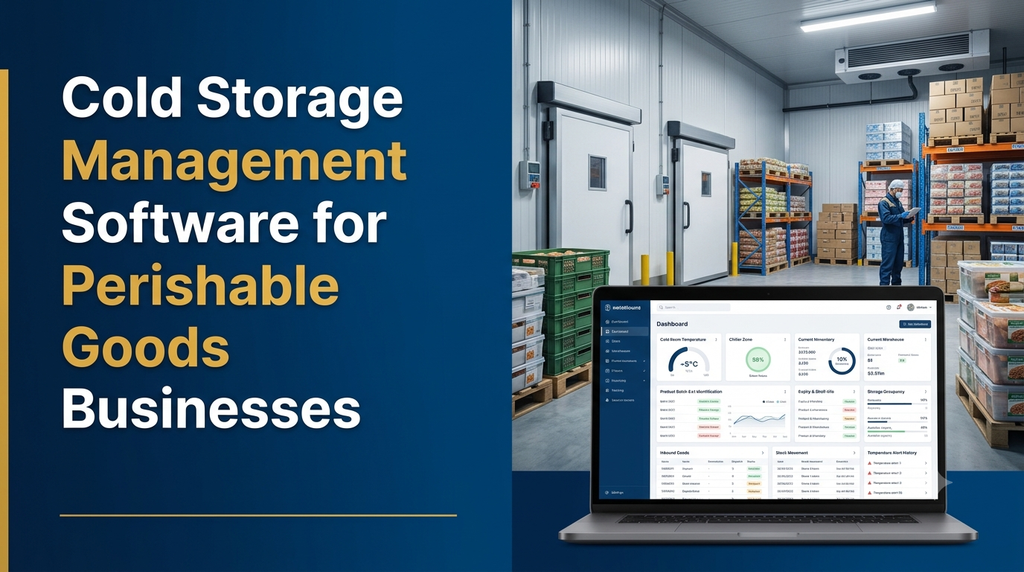
Cold storage management software helps businesses manage temperature-controlled warehouses, perishable goods inventory, storage locations, batch numbers, expiry dates, customer stock, billing and dispatch through a centralised digital platform. It can also connect temperature monitoring devices and generate alerts when recorded conditions move outside configured limits.
What Is Cold Storage Management Software?
Cold storage management software is a digital application used to manage goods stored in refrigerated warehouses, chillers, freezers and temperature-controlled rooms. It helps operators monitor stock movement and maintain records of the conditions in which products are stored.
Unlike a basic inventory application, a cold storage management system can manage additional information such as storage temperature requirements, room allocation, batch identification, shelf-life dates and temperature excursion records.
The system can be designed for different industries, including agricultural produce, dairy products, seafood, meat, frozen foods, pharmaceuticals and other temperature-sensitive goods. Each category may require different storage rules and operational workflows.
Why Do Perishable Goods Businesses Need Cold Storage Software?
Perishable goods businesses must manage more than the quantity of products entering and leaving a warehouse. They also need visibility into storage conditions, product batches, shelf life, stock ownership and dispatch priorities.
When these activities are managed through separate registers and spreadsheets, staff may need to manually combine information to understand the current inventory and storage situation.
A suitable software system can help with:
- Centralised warehouse inventory management.
- Cold room and freezer location allocation.
- Temperature monitoring and alert records.
- Batch-wise and lot-wise stock traceability.
- Expiry date and shelf-life management.
- FEFO and FIFO stock rotation.
- Customer-wise stock and storage billing.
- Goods receipt and dispatch management.
- Warehouse capacity and occupancy reports.
- Refrigeration equipment maintenance records.
Which Businesses Can Use Cold Storage Management Software?
Different businesses can use the same core warehouse platform with industry-specific configurations.
1. Agricultural Produce Cold Storage
Businesses storing fruits, vegetables and other agricultural products can manage farmer or supplier receipts, commodity categories, lot numbers, storage locations, stock movement and customer-wise inventory.
2. Dairy and Frozen Food Businesses
Dairy distributors and frozen food operators can maintain product batches, storage zones, dispatch records and shelf-life information according to their products’ handling requirements.
3. Seafood and Meat Storage
Seafood and meat businesses can use batch traceability, receipt inspection, storage allocation, temperature records and dispatch documentation to maintain operational visibility.
4. Pharmaceutical Cold Chain Businesses
Pharmaceutical storage may require specialised temperature ranges, calibrated monitoring devices, controlled access, detailed audit records and validated operational procedures. Software should be designed around the applicable product and regulatory requirements rather than relying on generic warehouse settings.
5. Third-Party Cold Storage Operators
Businesses providing storage services to multiple customers can use customer-wise inventory, storage allocation, inward and outward records, service billing and account statements.
Essential Modules in Cold Storage Management Software
1. Warehouse and Cold Room Management
The system should maintain a digital representation of the warehouse structure. This allows staff to identify available storage areas and understand where each product is located.
- Warehouse and facility master records.
- Cold room and freezer identification.
- Storage zone configuration.
- Rack, shelf, pallet and bin locations.
- Configured storage capacity.
- Available and occupied space.
- Room maintenance and availability status.
- Location-wise inventory reports.
For example, a warehouse may configure separate zones for chilled products, frozen products and other storage categories. Each zone can have its own approved operating limits and allocation rules.
2. Temperature Monitoring and Recording
Temperature monitoring is one of the most important features of a cold storage management application. The system can store temperature readings against a room, sensor, date and time.
Temperature management features may include:
- Room-wise temperature records.
- Configured minimum and maximum limits.
- Sensor identification and location mapping.
- Historical temperature graphs.
- Temperature excursion records.
- Alert notifications to authorised staff.
- Monitoring device status.
- Temperature report export.
Temperature data can be entered manually or collected from compatible sensors and monitoring devices. Automatic monitoring requires a suitable hardware connection, network availability and verified data integration.
3. Product and Inventory Management
Every product stored in a cold warehouse should have a clear inventory record. The product master can maintain information required for storage, handling and billing.
- Product name and unique product code.
- Category and product description.
- Unit of measurement.
- Storage requirement and approved temperature range.
- Batch and lot identification.
- Packaging and quantity details.
- Shelf-life and expiry information.
- Customer or stock owner reference.
The inventory module can distinguish available stock, reserved stock, damaged stock, blocked stock and products awaiting inspection.
4. Goods Receipt and Inward Management
When products arrive at the warehouse, staff need to record their details before assigning them to a storage location.
The inward module can include:
- Supplier or customer details.
- Purchase order or receipt reference.
- Product and batch information.
- Received quantity and unit.
- Manufacturing and expiry dates where applicable.
- Packaging and condition observations.
- Receipt inspection status.
- Assigned warehouse and storage location.
- Goods receipt note generation.
5. Batch, Lot and Expiry Tracking
Batch traceability helps warehouse operators identify the origin, receipt details, location and movement history of stored products.
The software can maintain batch numbers, supplier references, receipt dates, expiry dates, stock quantities and dispatch transactions. This is especially useful when multiple batches of the same product are stored in the same warehouse.
Expiry alerts can be configured for selected time periods. Staff can review products approaching their expiry dates and take action based on business procedures.
6. FEFO and FIFO Inventory Management
Stock rotation is important when handling products with limited shelf life. The software can support two commonly used methods:
- FIFO (First In, First Out): Stock received earlier is prioritised for issue or dispatch.
- FEFO (First Expired, First Out): Stock with the earliest expiry date is prioritised, subject to product suitability and business rules.
FEFO is particularly useful for inventory where expiry dates differ between batches. The application can suggest stock allocation, while authorised staff confirm that the product is suitable for dispatch.
7. Storage Allocation and Capacity Management
A warehouse may contain multiple rooms with different capacities and storage conditions. The system can help staff allocate products to suitable locations.
- Room-wise available capacity.
- Product-specific storage eligibility.
- Pallet and bin location assignment.
- Customer-wise occupied capacity.
- Stock movement between rooms.
- Location transfer history.
- Capacity utilisation reports.
Storage allocation rules should reflect actual room limits, product compatibility, handling requirements and the warehouse’s approved operating procedures.
8. Stock Movement and Warehouse Operations
Products may move between receiving areas, storage rooms, inspection areas and dispatch zones. The software should maintain a clear record of each movement.
- Inward stock movement.
- Room-to-room transfers.
- Bin and pallet transfers.
- Stock adjustments with approval.
- Damaged and blocked inventory records.
- Stock verification and reconciliation.
- Movement history by batch and product.
9. Customer and Multi-Client Stock Management
Third-party cold storage operators may hold goods belonging to many customers. The software should keep ownership records separate so that one customer’s stock is not accidentally mixed with another customer’s inventory.
- Customer registration and contact information.
- Customer-wise product inventory.
- Storage agreements and service categories.
- Customer stock statements.
- Inward and outward transaction history.
- Customer-specific access permissions.
- Outstanding charges and payment records.
10. Cold Storage Billing and Rental Management
Storage businesses may charge customers based on pallet occupancy, quantity, weight, storage duration, handling services or other agreed pricing methods.
A billing module can support:
- Customer-specific rate configuration.
- Storage period calculation.
- Inward and outward handling charges.
- Loading and unloading charges.
- Additional service charges.
- Invoice and payment records.
- Customer account statements.
- Outstanding payment reports.
Billing rules should be agreed with the business before development, especially where storage charges depend on different units, minimum periods or contractual conditions.
11. Dispatch and Outbound Management
Dispatch management connects customer requests with available inventory and warehouse operations. Before goods are released, authorised staff can verify the customer, batch, quantity and dispatch details.
- Customer dispatch requests.
- Product and batch selection.
- FEFO or FIFO stock allocation.
- Pick list and loading instructions.
- Dispatch quantity verification.
- Vehicle and transport details.
- Delivery challan and invoice references.
- Stock balance updates.
12. Refrigeration Equipment Maintenance
Cold storage operations depend on refrigeration systems, compressors, cooling equipment, electrical components and monitoring devices. The software can maintain equipment maintenance information.
- Equipment and asset master records.
- Preventive maintenance schedules.
- Service and repair history.
- Breakdown and downtime records.
- Maintenance task assignments.
- Technician and service provider details.
- Maintenance reminders and reports.
How Does Cold Storage Management Software Work?
A typical warehouse workflow starts when goods arrive and ends when the approved stock is dispatched to a customer. The software connects each stage through shared inventory and transaction records.
- Goods arrival: Record supplier or customer details, product, quantity and receipt reference.
- Initial inspection: Enter relevant condition observations and inspection status.
- Batch registration: Record lot number, expiry date and other product identifiers.
- Storage allocation: Assign a suitable temperature-controlled room and location.
- Temperature monitoring: Store readings from connected devices or authorised manual entries.
- Inventory management: Update stock balances as goods are moved, reserved or adjusted.
- Expiry review: Identify batches approaching their configured expiry dates.
- Dispatch request: Verify customer orders and available stock.
- Picking and verification: Select suitable batches and confirm quantities.
- Dispatch and billing: Record outward movement, delivery information and applicable charges.
Temperature Alerts and Cold Chain Monitoring
A temperature alert system can help warehouse staff identify recorded conditions that require attention. The system should use product-specific limits configured by authorised personnel.
Useful alert categories include:
- Temperature outside configured limits.
- Sensor communication failure.
- Monitoring device offline.
- Temperature reading not received within the expected interval.
- Repeated temperature excursions.
- Unresolved alert requiring acknowledgement.
- Equipment maintenance reminders.
Alerts can be delivered through the web dashboard, mobile notifications, email or supported messaging integrations. The application can record when an alert was generated, acknowledged and resolved.
Software alerts should form part of a documented monitoring and response process. They should not replace appropriate refrigeration controls, independent safety procedures or equipment alarms.
Cold Storage Dashboard and Management Reports
A useful dashboard should help owners and warehouse managers understand inventory, storage conditions, capacity and operational activity without manually combining multiple reports.
| Dashboard or report | Information displayed |
|---|---|
| Temperature dashboard | Room-wise readings, configured limits and alert history. |
| Inventory summary | Product, batch, customer and quantity details. |
| Room occupancy | Available and occupied storage capacity. |
| Expiry report | Products approaching their recorded expiry dates. |
| Stock movement | Inward, transfers, adjustments and outward transactions. |
| Customer stock report | Customer-wise stored goods and transaction history. |
| Billing report | Storage charges, invoices and payment status. |
| Maintenance report | Equipment service history and pending maintenance. |
| Dispatch report | Pending requests, completed deliveries and quantities. |
Cold Storage Software vs Basic Inventory Software
| Business requirement | Basic inventory software | Cold storage management software |
|---|---|---|
| Stock quantities | Usually supported. | Supported with warehouse and location tracking. |
| Temperature records | May not be available. | Can support manual or device-based monitoring. |
| Expiry management | May support basic date fields. | Can include batch-wise expiry and FEFO workflows. |
| Cold room allocation | Often limited. | Can manage rooms, zones and storage locations. |
| Temperature alerts | Usually not included. | Can generate alerts from configured readings. |
| Storage billing | May need customisation. | Can support customer-specific storage charges. |
| Equipment maintenance | May need a separate module. | Can include refrigeration maintenance records. |
Mobile App and Web Application Features
Web Application for Administrators
- Warehouse and cold room configuration.
- Customer and supplier management.
- Inventory and storage allocation.
- Temperature dashboard and alert history.
- Billing and payment management.
- Reports and user permissions.
Mobile Application for Warehouse Staff
- View assigned inward and outward tasks.
- Scan product or batch labels.
- Check storage location details.
- Record stock movement.
- Update inspection status.
- Review assigned alerts and tasks.
Customer Portal
Third-party storage businesses may provide customers with a restricted portal to view their own stored inventory, inward and outward transactions, statements and invoices.
Barcode, QR Code and IoT Integration
Advanced cold storage applications can connect warehouse identification and monitoring systems.
Barcode and QR Code Tracking
Product, batch, pallet and location labels can help employees retrieve records and update stock movements. Label materials should be suitable for the warehouse’s moisture, condensation and temperature conditions.
IoT Temperature Sensors
Compatible sensors can send readings to a gateway or monitoring platform, which can then transfer data into the warehouse application. The integration design should consider sensor accuracy, calibration, connectivity, data frequency and failure notifications.
Refrigeration System Integration
Where supported by the equipment, selected operating information can be connected to the software. The scope should be reviewed with equipment vendors and qualified technicians, particularly when the integration involves control systems.
Data Security and Operational Reliability
Cold storage systems may hold customer information, inventory records, commercial agreements, temperature history and operational documents. Businesses should include suitable protection and recovery measures.
- Role-based access and secure authentication.
- Audit logs for inventory and temperature record changes.
- Encrypted communication.
- Regular database and document backups.
- Controlled access to customer-specific records.
- Monitoring of integration and sensor communication status.
- Documented backup restoration procedures.
- Appropriate data retention and export policies.
For operations where temperature records are important for product release or compliance, the system should preserve timestamps, device identity, user actions and correction history according to the business’s record-management policy.
How Much Does Cold Storage Management Software Cost?
Development cost depends on warehouse size, number of rooms, inventory complexity, customer accounts, billing rules, temperature monitoring hardware, mobile applications and external integrations.
The following are illustrative planning estimates for custom software development in India. They are not fixed Greap quotations or guaranteed market prices.
| Software scope | Illustrative planning range |
|---|---|
| Basic cold storage inventory and inward/outward management | ₹30,000–₹55,000 |
| Inventory, batch and expiry tracking | ₹45,000–₹80,000 |
| Warehouse, room allocation and customer management | ₹60,000–₹1.1 lakh |
| Inventory, billing and warehouse operations | ₹75,000–₹1.3 lakh |
| Multi-module cold storage management platform | ₹1.2 lakh–₹2.5 lakh+ |
| Advanced platform with mobile apps and IoT integrations | ₹2.5 lakh–₹6 lakh+ |
Actual project pricing requires a detailed requirement review. Temperature sensors, gateways, networking equipment, barcode printers, hardware installation, cloud hosting, paid third-party services, data migration, taxes and ongoing maintenance may involve additional costs.
How to Choose the Right Cold Storage Software Development Company
A suitable software partner should understand warehouse operations and the additional requirements involved in temperature-controlled storage.
- Warehouse workflow: Can the team understand your inward, storage, transfer and dispatch processes?
- Temperature monitoring: Can it assess sensor compatibility and design reliable data collection?
- Batch traceability: Can the system connect receipts, storage locations and dispatch records?
- Expiry management: Can it support FEFO, product shelf life and configurable alerts?
- Billing flexibility: Can it support your actual storage and handling charge structure?
- Mobile usability: Can warehouse staff complete daily tasks with minimal data entry?
- Data protection: Are user permissions, backups and audit records included?
- Future expansion: Can the platform support additional rooms, facilities and customer accounts?
Why Consider Custom Cold Storage Software Development?
Every cold storage business has different products, room configurations, customer agreements, storage rates and operational procedures. A generic inventory application may not cover all these requirements.
Custom software allows businesses to define their own warehouse structure, temperature rules, inventory workflows, billing methods, approval processes and reports.
A practical implementation can be developed in phases:
- Begin with customer, product and warehouse management.
- Add inward, outward and inventory tracking.
- Introduce batch, expiry and storage allocation features.
- Add billing, customer statements and management reports.
- Integrate temperature sensors and monitoring devices.
- Expand with mobile applications and customer portals.
Greap Technologies provides website development, software development and digital growth solutions for businesses. A cold storage software project can begin with a discussion about warehouse structure, product categories, temperature monitoring, inventory processes and billing requirements.
Frequently Asked Questions
1. What is cold storage management software?
It is software used to manage temperature-controlled warehouse operations, including inventory, storage locations, batch tracking, temperature records, expiry management, billing and dispatch.
2. Can cold storage software monitor room temperature?
Yes. It can store manual readings or receive readings from compatible temperature sensors and monitoring devices. Automatic monitoring requires suitable hardware and integration.
3. Can the software send temperature alerts?
Yes. It can generate notifications when recorded readings move outside configured limits or when a connected monitoring device stops reporting data.
4. Can it manage multiple cold rooms and freezers?
Yes. A custom system can maintain multiple warehouses, cold rooms, freezer zones, storage locations and capacity records.
5. Does cold storage software support expiry tracking?
Yes. It can maintain batch-wise manufacturing and expiry information, generate alerts and support FEFO-based stock allocation.
6. Can it manage goods belonging to different customers?
Yes. Customer-wise stock ownership, inward and outward transactions, storage allocation and account statements can be maintained separately.
7. Can cold storage software calculate rental charges?
Yes. The billing module can calculate configured storage and handling charges based on quantity, weight, pallet occupancy, storage duration or customer agreements.
8. Can barcode and QR codes be used in cold warehouses?
Yes. Suitable labels can identify products, batches, pallets and storage locations. Label materials should be tested for the actual cold-room environment.
9. Can cold storage software work on mobile phones?
Yes. A responsive web application or dedicated mobile app can support stock movement, scanning, inspection, alerts and warehouse task updates.
10. How much does custom cold storage software cost?
Cost depends on inventory modules, warehouse locations, temperature monitoring, billing, mobile apps and integrations. A detailed requirement review is needed to prepare an accurate quotation.
Manage Perishable Goods with a Connected Cold Storage System
Cold storage management software connects warehouse inventory, storage locations, temperature records, batch traceability, expiry management, billing and dispatch. It gives business owners and warehouse teams a structured way to manage temperature-sensitive products and operational information.
If your cold storage or perishable goods business is planning to digitise warehouse operations, Greap Technologies can help you explore a custom software solution based on your business requirements.
Discuss Your Cold Storage Software Requirements
Plan a custom application for cold room management, inventory tracking, temperature monitoring, batch traceability, billing and dispatch.
Visit Greap Technologies | Discuss on WhatsApp | Call 70923 30168