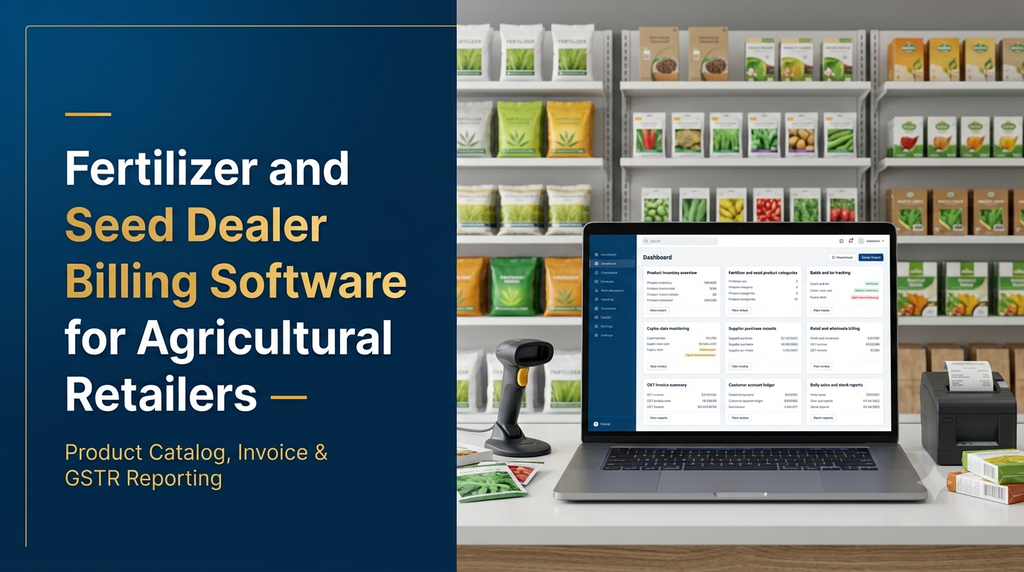
Fertilizer and seed dealer billing software helps agricultural retailers manage product sales, purchases, inventory, customer accounts and business reports from one system. It can simplify daily billing while helping shop owners track fertilizer varieties, seed batches, expiry dates, supplier transactions and stock availability.
Agricultural input shops often handle many product categories, different package sizes, seasonal demand, supplier credit and customer payments. Managing these activities through handwritten registers or disconnected spreadsheets can make it difficult to maintain accurate stock and billing records.
A purpose-built agricultural retail management system brings these operations together. Whether a business operates a single fertilizer shop in Erode or multiple agricultural supply outlets across Tamil Nadu, the software can be configured around its actual sales and inventory processes.
What Is Fertilizer and Seed Dealer Billing Software?
Fertilizer and seed dealer billing software is a retail business application designed for shops that sell agricultural inputs such as fertilizers, seeds, pesticides and other farming supplies. It combines point-of-sale billing with inventory and account management.
Unlike a basic billing application, an agricultural retail system can support product-specific details such as brand, variety, package size, batch number, manufacturing date, expiry date where applicable, purchase price and selling price.
The system can also maintain customer purchase history, supplier balances, outstanding payments and product movement records. These features help owners understand what is being sold, what needs replenishment and which transactions require attention.
Why Do Agricultural Retailers Need Dedicated Billing Software?
Fertilizer and seed businesses have inventory requirements that are not always handled well by generic retail billing systems. Different product categories may have different tracking needs, and stock records must remain connected to purchases and sales.
1. Managing many products and package sizes
A dealer may sell fertilizer bags, smaller packs, seed packets and products from several manufacturers. The software should support product units and pack sizes so that the shop can record sales and stock movements correctly.
2. Tracking batch and expiry information
Certain products require batch-level records and expiry monitoring. Maintaining these details digitally makes it easier to identify stock that needs attention and trace the source of a product during a customer enquiry.
3. Reducing billing and stock-entry errors
Manual calculations and repeated data entry can create inconsistencies. A connected billing and inventory system can update stock when an invoice is completed, subject to the business’s configured transaction rules.
4. Understanding customer balances
Some agricultural retailers sell to customers on credit or collect payments later. A customer ledger helps the business review invoices, receipts and outstanding balances without searching through multiple registers.
5. Reviewing seasonal sales
Sales patterns may change with crop cycles, local demand and seasonal purchasing. Reports can help retailers compare product movement over selected periods and plan purchases more effectively.
Essential Features of Fertilizer and Seed Dealer Software
1. Product and category management
A central product catalogue stores the details needed for billing, stock management and reporting.
- Product name and unique product code
- Brand and manufacturer details
- Category and subcategory
- Product type, variety and grade where relevant
- Pack size and unit of measurement
- Purchase price and selling price
- Tax configuration based on applicable product classification
- Barcode or internal product identifier
Categories can include fertilizers, seeds, pesticides, micronutrients, soil conditioners and agricultural accessories. The catalogue should be configurable so that retailers can add products without requiring a software change.
2. Fast retail and wholesale billing
The billing screen should make everyday transactions simple. Staff should be able to search for a product, enter the quantity, apply permitted discounts and generate an invoice.
- Quick product search and barcode scanning
- Quantity and unit selection
- Retail and wholesale price configuration
- Customer selection or walk-in customer billing
- Discount and tax calculation
- Cash, UPI, bank and other configured payment modes
- Invoice printing and PDF sharing
- Sales cancellation and return workflows with proper permissions
If the shop serves both individual farmers and bulk buyers, separate pricing rules can be configured for different customer types. These rules should be transparent and controlled by authorised users.
3. Fertilizer inventory management
Inventory management helps dealers monitor stock by product, package size, storage location and other relevant attributes.
- Opening stock and current stock
- Purchase and sales stock updates
- Stock adjustments and damaged-stock entries
- Minimum stock levels and reorder alerts
- Product-wise and category-wise stock reports
- Stock transfer between branches or locations
- Physical stock verification
The system should distinguish between available stock, reserved stock and stock that is damaged or otherwise unavailable for sale, if these states are relevant to the retailer.
4. Seed variety and batch management
Seed dealers may need to track products by variety, lot or batch. These details help staff identify the correct product and maintain traceability across purchases and sales.
- Seed brand and variety
- Lot or batch identification
- Package size and unit
- Supplier and purchase reference
- Relevant date fields and expiry information
- Stock available for each batch
- Batch-wise purchase and sales history
The system should record only the product information required for the business and applicable rules. Batch tracking does not itself establish that a product is certified or compliant.
5. Expiry and stock alerts
Where products have expiry or validity dates, the application can display upcoming dates and help staff review stock before it becomes unsuitable for sale.
- Expiry-date entry where applicable
- Upcoming-expiry notifications
- Expired or blocked stock identification
- Batch-wise stock reports
- Configurable alerts for selected product categories
Alert rules should be configurable to suit the product and business. Software reminders do not replace physical stock checks or the retailer’s responsibility to follow product-label instructions and applicable regulations.
6. Supplier and purchase management
Purchase management records goods received from manufacturers, distributors and wholesalers. It connects supplier invoices with inventory and payable balances.
- Supplier profile and contact details
- Purchase order or purchase entry
- Supplier invoice number and date
- Product quantity, rate and tax details
- Batch and expiry details where relevant
- Purchase returns and debit adjustments
- Supplier payment records
- Outstanding supplier balance
7. Customer management and credit ledger
A customer database allows dealers to maintain contact details and review transaction history. For shops that offer credit, the ledger can show invoices, receipts and outstanding balances.
- Customer name and contact information
- Invoice history
- Credit sales and payment receipts
- Outstanding balance
- Payment reminders where configured
- Customer-wise sales reports
Access to customer financial information should be restricted to authorised staff.
8. Sales returns and purchase returns
A proper return workflow records the original transaction, returned quantity, reason and resulting stock or account adjustment. This is more reliable than simply deleting a completed invoice.
9. GST-compatible invoice configuration
Retailers may require invoices with configured tax details, business information, invoice numbering and applicable product classifications. The software should support the invoicing format and tax treatment confirmed by the business’s accountant or tax professional.
Tax rates and compliance requirements can vary by product and change over time. A software provider should not assume one tax treatment for every fertilizer, seed or agricultural input.
10. Business reports and dashboard
A dashboard provides a quick view of daily business activity. Useful reports include:
- Daily, weekly and monthly sales
- Product-wise sales and purchase reports
- Current stock and low-stock items
- Batch-wise inventory
- Expiry monitoring reports
- Customer outstanding balances
- Supplier payable balances
- Payment-mode summaries
- Sales returns and purchase returns
- Branch-wise reports for multi-location businesses
How Does the Software Work in a Fertilizer Shop?
A typical daily workflow connects purchases, stock and sales so that the retailer does not need to maintain the same transaction in multiple places.
- Configure products: Add fertilizer brands, seed varieties, pack sizes, units, pricing and relevant tracking fields.
- Record purchases: Enter supplier invoices, received quantities, rates and batch details where required.
- Update inventory: Review the stock created by the purchase entry and resolve any quantity differences.
- Create customer invoices: Select products, enter quantities, apply configured pricing and complete billing.
- Record payments: Save the payment mode and any remaining customer balance.
- Review reports: Check sales, stock levels, supplier balances and pending customer payments.
Example: How Product and Batch Tracking Helps
Imagine a seed dealer receives two batches of the same seed variety from different supplier invoices. A product-only stock total may show the combined quantity, but it will not necessarily reveal which batch a particular unit belongs to.
Batch-level tracking can preserve the separate records:
| Record | Batch A | Batch B |
|---|---|---|
| Received quantity | 50 packets | 75 packets |
| Supplier reference | Purchase invoice A | Purchase invoice B |
| Sales recorded | 15 packets | 20 packets |
| Remaining quantity | 35 packets | 55 packets |
This type of record makes it easier to review stock by batch, investigate a transaction and identify the source of received goods. The actual fields should be selected according to the product and the retailer’s recordkeeping needs.
Barcode Billing and Mobile App Integration
Retailers with large catalogues may benefit from barcode-based product selection. Staff can scan a product label to retrieve its configured record instead of searching manually.
A custom system can also include a mobile application for authorised staff or owners. Depending on the business requirements, it may provide:
- Current stock and low-stock alerts
- Daily sales summaries
- Customer payment updates
- Purchase entry and stock verification
- Branch-wise performance reports
- Notifications for selected business events
Barcode scanners, receipt printers and weighing devices should be tested for compatibility before they are selected or integrated.
Cloud-Based vs Desktop Billing Software
The right deployment model depends on the shop’s connectivity, number of users, reporting needs and budget.
| Factor | Desktop-based system | Cloud-based system |
|---|---|---|
| Access | Usually tied to configured computers | Can support access from authorised devices |
| Internet | May support local operation without continuous internet | Usually needs internet for live cloud access |
| Multiple branches | May need additional infrastructure | Can support centralised multi-branch access |
| Updates | May require local installation or maintenance | Can be updated centrally |
| Backup | Depends on configured local backup process | Can use scheduled server-side backups |
A hybrid approach may be appropriate for shops that need local billing continuity and central reporting. Offline functionality must be deliberately designed, including how transactions are synchronised and how duplicate or conflicting records are handled.
Security and Data Backup Requirements
Billing software stores business-critical information such as invoices, supplier transactions, customer balances and inventory records. It should be protected through practical security controls.
- Separate login accounts for authorised users
- Role-based permissions for billing, stock and administration
- Secure communication between application and server
- Scheduled database backups
- Backup restoration testing
- Audit history for important changes
- Session management and access controls
- Secure handling of customer and supplier information
A backup is useful only if it can be restored. Retailers should understand how frequently backups are created, how long they are retained and who is responsible for recovery.
How Much Does Fertilizer and Seed Dealer Billing Software Cost?
The development cost depends on the number of modules, product-tracking requirements, number of branches, user roles, hardware integrations and whether mobile or customer-facing applications are needed.
The following figures are illustrative planning ranges for custom software development in India. They are not fixed market prices or a quotation from Greap Technologies.
| Software scope | Illustrative development range |
|---|---|
| Basic billing and product management | ₹20,000–₹40,000 |
| Billing, purchase and inventory management | ₹35,000–₹65,000 |
| Batch, expiry and supplier management | ₹45,000–₹85,000 |
| Billing, inventory, customer ledger and reports | ₹55,000–₹1.1 lakh |
| Advanced agricultural retail management system | ₹90,000–₹1.8 lakh+ |
| Multi-branch system with mobile applications and integrations | ₹1.5–₹3.5 lakh+ |
These estimates are starting points for planning. Hosting, domain registration, hardware, barcode scanners, receipt printers, SMS or messaging services, data migration, third-party licences, taxes and ongoing maintenance may be additional costs. A final estimate should follow a review of the required workflows and integrations.
How to Choose the Right Software for an Agricultural Retail Business
Before selecting an existing product or commissioning custom development, retailers should review the following requirements:
- Product flexibility: Can the system handle fertilizers, seeds and other agricultural products with different tracking fields?
- Billing speed: Can staff create invoices quickly during busy sales periods?
- Inventory accuracy: Are purchases, sales, returns and adjustments connected to stock?
- Batch records: Can relevant products be tracked by batch or lot?
- Customer accounts: Can the retailer review credit sales and receipts?
- Tax configuration: Can invoice settings be maintained according to the business’s verified requirements?
- Reporting: Are the sales and stock reports useful for daily decisions?
- Data ownership: Can the business export its records in a usable format?
- Support: Is there a clear process for software updates, backups and issue resolution?
- Scalability: Can the system support additional users, products or branches later?
Why Consider Custom Agricultural Retail Software Development?
Every agricultural retailer may follow a different purchase, pricing, billing and payment process. An off-the-shelf application may be sufficient for a shop with simple needs, while a business with batch tracking, wholesale sales, customer credit and multiple branches may need a more tailored solution.
Custom software development allows the retailer to define its own product fields, invoice workflow, user permissions, reporting format and integration requirements. Features can also be introduced in stages instead of building every advanced module at the beginning.
A practical first version might include billing, purchases, inventory and customer accounts. Batch management, mobile reporting, multi-branch operations and advanced analytics can be added as the business grows.
Fertilizer and Seed Dealer Software Development in Erode and Tamil Nadu
Agricultural input retailers across Erode district and Tamil Nadu may have different product mixes, supplier networks and customer requirements. A software system should be configured around the actual shop workflow rather than assuming that every retailer operates in the same way.
For businesses in Erode, Perundurai, Bhavani, Gobichettipalayam, Anthiyur, Sathyamangalam and nearby areas, a custom application can be planned for single-shop billing or expanded to support multiple outlets.
Greap Technologies provides website and software development services for businesses. We can help plan a custom agricultural retail application covering billing, inventory, supplier management, customer accounts and reporting based on the retailer’s requirements.
Looking for Custom Fertilizer and Seed Dealer Billing Software?
Simplify agricultural retail operations with a software solution designed around your products, billing process, stock management and business reports.
Discuss your requirements with Greap Technologies.
Visit Greap Technologies | Discuss on WhatsApp | Call 70923 30168
Frequently Asked Questions
1. What is fertilizer and seed dealer billing software?
It is a retail management application that helps fertilizer and seed dealers create invoices, manage product inventory, record purchases, track relevant batches, maintain customer accounts and generate business reports.
2. Can the software manage both fertilizer and seed products?
Yes. A custom system can support separate product categories, brands, varieties, pack sizes, units and tracking fields for fertilizers, seeds and other agricultural inputs.
3. Does agricultural shop software support GST billing?
It can support configurable invoice details and tax calculations. Product classifications and applicable tax treatment should be confirmed with a qualified tax professional before configuration.
4. Can I track seed batches and expiry dates?
Yes. The application can maintain batch or lot records and relevant date fields for products that require such tracking. It can also provide reports and configurable alerts.
5. Can the software manage supplier purchases?
Yes. Purchase entries can record supplier invoices, products, quantities, rates, tax details, batch information where applicable and payment status.
6. Can fertilizer shop software manage customer credit?
A customer ledger can record credit invoices, payments, receipts and outstanding balances. Access to financial records can be restricted to authorised users.
7. Can I use barcode scanners and receipt printers?
Yes, compatible barcode scanners and receipt printers can be integrated. The selected devices and connection methods should be tested before implementation.
8. Is cloud-based billing software suitable for a small fertilizer shop?
It can be suitable if the shop needs access from multiple devices, centralised backups or remote reporting. A desktop or hybrid solution may be preferable when internet availability is limited.
9. Can the software support multiple agricultural retail branches?
Yes. A multi-branch system can provide central product management, branch-wise stock, sales reports, user permissions and stock transfers, depending on the agreed scope.
10. How much does custom fertilizer dealer software cost?
The cost depends on billing, inventory, batch tracking, mobile applications, integrations and branch requirements. A basic custom solution may start at a lower development scope, while an advanced multi-branch platform requires a larger budget. A detailed estimate should follow a requirements review.
Conclusion
Fertilizer and seed dealer billing software can help agricultural retailers organise billing, purchases, inventory, batch records, customer accounts and business reports in one place. The most useful system is not necessarily the one with the largest feature list; it is the one that accurately supports the retailer’s everyday operations.
By starting with essential billing and stock functions and expanding when needed, agricultural retailers can build a more organised and manageable digital workflow. Greap Technologies can help businesses plan and develop custom software solutions based on their operational requirements.