Customers do not always want to communicate with an ecommerce business only through email or a contact form. They may have questions about a product before ordering, need clarification during checkout, want to know whether an order has shipped, or require support after delivery.
For businesses whose customers actively use WhatsApp, integrating ecommerce workflows with appropriate WhatsApp business messaging capabilities can create another communication channel around the customer journey.
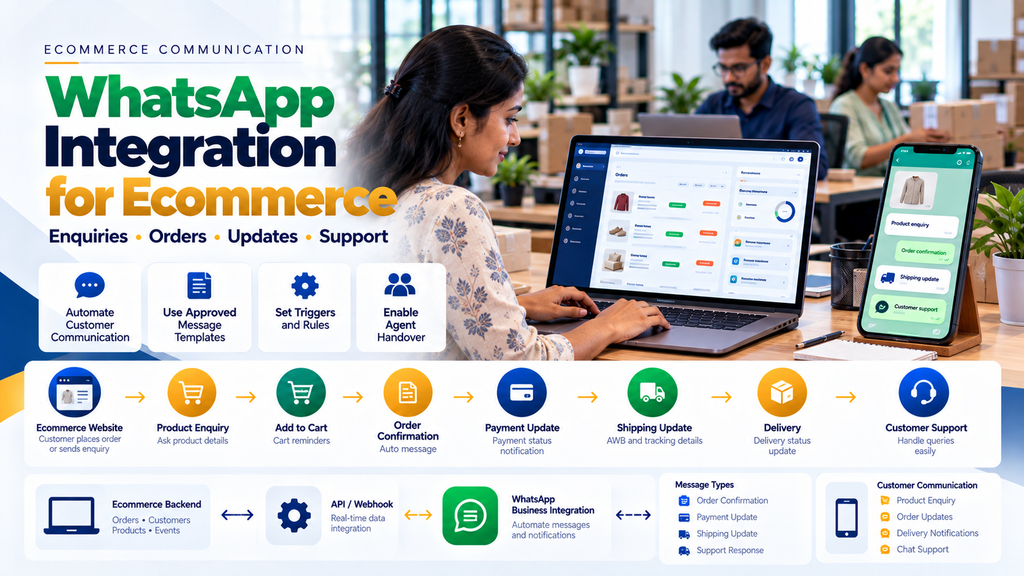
WhatsApp integration for ecommerce websites can potentially connect product enquiries, customer actions, orders, payment-related events, shipment updates and customer-support workflows with business messaging.
However, proper ecommerce WhatsApp integration is not simply adding a WhatsApp icon to every page or sending promotional messages to every phone number collected during checkout.
Businesses need to consider customer consent, message purpose, approved messaging mechanisms, current platform policies, API architecture, security, automation rules and the point at which a human support agent should take over.
This guide explains how businesses can plan WhatsApp integration as part of a structured ecommerce system.
What Is WhatsApp Integration for Ecommerce?
WhatsApp ecommerce integration connects appropriate customer-facing ecommerce workflows with supported WhatsApp business messaging capabilities.
Depending on the implementation and currently supported platform features, the integration can potentially be used for:
- Product enquiries
- Pre-purchase questions
- Customer assistance
- Order-related communication
- Payment-related notifications
- Shipping notifications
- Delivery communication
- Customer support
- Eligible cart-recovery workflows
- Post-purchase communication
WhatsApp Button vs WhatsApp API Integration
These are not the same thing.
1. Basic WhatsApp Contact Link
A basic ecommerce website can provide a link or button that allows the visitor to start a WhatsApp conversation with the business.
This can be useful for straightforward enquiries.
2. Prefilled WhatsApp Enquiry
A website can potentially prepare useful context for the customer before opening the conversation.
For example:
Product Page → WhatsApp Enquiry → Product Context
3. WhatsApp Business Messaging Integration
A more advanced architecture can connect ecommerce events with supported business messaging capabilities.
This can enable workflows beyond a simple “Chat on WhatsApp” link.
4. API-Based Ecommerce Integration
Where supported, the ecommerce backend can connect relevant business events with the messaging platform through APIs, webhooks and other approved mechanisms.
Typical Ecommerce WhatsApp Architecture
A simplified architecture can look like:
Customer → Ecommerce Website → Ecommerce Backend → Business Messaging Integration → WhatsApp → Customer
Customer replies can potentially return through:
Customer → WhatsApp → Messaging Platform → Webhook / Inbox / CRM → Business Team
The exact architecture depends on the selected implementation and currently supported business messaging features.
Why Integrate WhatsApp With an Ecommerce Website?
The main reason should be to support useful customer communication at appropriate points in the buying and post-purchase journey.
5. Product Questions
A customer may need clarification before placing an order.
6. Product Availability Enquiries
Where stock information is not clear or the product requires confirmation, WhatsApp can provide an additional enquiry route.
7. Product Specification Questions
Technical, industrial or configurable products may generate questions that are difficult to answer using only a short product description.
8. Bulk Order Enquiries
Wholesale or B2B customers may want to discuss quantities, pricing or availability before placing an order.
9. Order Communication
Customers may benefit from relevant transactional updates related to their orders.
10. Customer Support
WhatsApp can be one of the channels through which customers ask questions after ordering.
WhatsApp Product Enquiry Integration
Product pages are one of the most natural places to integrate WhatsApp.
11. Product-Level WhatsApp Button
A product page can include an enquiry action such as:
Ask About This Product
12. Pass Useful Product Context
The conversation can potentially include appropriate context such as:
- Product name
- Product URL
- SKU or product reference
- Selected variation
This can reduce the need for the customer to manually explain which product they are viewing.
13. Do Not Include Sensitive Information in Prefilled Messages
Product context should be useful without exposing confidential pricing, private account information or other sensitive data.
14. Variable Product Enquiries
If the customer selects a size, colour, configuration or other option, the website can potentially include that relevant selection in the enquiry context.
WhatsApp Integration for B2B Ecommerce
WhatsApp can be particularly useful as a communication channel around B2B ecommerce workflows where customers often require discussion before ordering.
15. Bulk Quantity Enquiry
A customer may request availability or pricing for a larger quantity.
16. Request for Quotation
A B2B ecommerce workflow may look like:
Product → RFQ → Sales Team → Quotation → Approval → Order
WhatsApp can potentially support communication around this workflow without replacing the authoritative quotation or order-management system.
17. Dealer Enquiries
Dealers may use WhatsApp to clarify products, availability or order requirements.
18. Distributor Enquiries
Distributor communication can be connected with the relevant sales or account team.
19. Keep Formal Orders in the Order System
Even when a conversation happens through WhatsApp, confirmed commercial transactions should be recorded in the appropriate ecommerce, CRM, quotation or order-management system.
WhatsApp should not become the only database containing critical order information.
WhatsApp Cart Sharing
Some ecommerce businesses may want customers to share a cart or selected products with the business.
20. Cart to WhatsApp
A simplified flow can be:
Customer Cart → Share / Enquire → WhatsApp → Sales Team
21. Useful for Assisted Selling
This can be useful when customers need confirmation before checkout.
22. Do Not Treat a Shared Cart as a Confirmed Order
A cart represents purchase intent, not necessarily a completed transaction.
23. Generate a Secure Cart Reference Where Needed
Instead of placing extensive customer or cart information directly into a message, the application can use an appropriate reference or secure link where the architecture requires it.
WhatsApp and Ecommerce Checkout
WhatsApp can complement checkout, but it should not make the ecommerce purchasing experience unnecessarily complicated.
24. Checkout Assistance
A customer who encounters a genuine problem may be given an appropriate support option.
25. Do Not Force WhatsApp for Every Customer
Customers who want to complete a straightforward online purchase should be able to use the ecommerce checkout without being forced into a messaging conversation.
26. Keep Checkout Focused
Too many competing actions around checkout can distract customers from completing their intended transaction.
WhatsApp Order Confirmation
After an ecommerce order is successfully created, the business may want to send an appropriate order-related message where permitted and configured.
27. Trigger From the Authoritative Order System
The notification should be based on the actual ecommerce order rather than an unverified frontend event.
28. Include Useful Information
Depending on the approved message structure, useful information can include:
- Order reference
- Order status
- Business support information
- Relevant secure order link
29. Avoid Unnecessary Personal Information
A notification should contain only the information necessary for its purpose.
WhatsApp and Payment Updates
Payment communication should be connected to verified payment information.
30. Payment Success
If the business sends a payment-confirmation message, it should be triggered only after the application has appropriately verified the payment state.
31. Do Not Trigger From a Browser Success Screen Alone
A frontend redirect or success page should not be treated as authoritative payment confirmation.
32. Failed Payment Communication
Where appropriate and permitted, a customer can be directed back to a legitimate ecommerce payment-retry workflow.
33. Never Request Sensitive Payment Credentials Through WhatsApp
Businesses should not ask customers to send card credentials, passwords, OTPs or other sensitive authentication information through chat.
34. Use the Ecommerce Payment System
Payment should be completed through the appropriate secure payment workflow.
Read Payment Gateway Integration for Ecommerce Websites in India.
WhatsApp Shipping Notifications
Shipping is another useful point for customer communication.
35. Order Shipped
Once the authoritative fulfilment system confirms that an order has shipped, an appropriate customer notification can potentially be triggered.
36. Tracking Link
The customer can be directed to an appropriate tracking page or supported courier tracking destination.
37. Do Not Invent Shipping Statuses
Shipment communication should use verified information from the ecommerce, warehouse or courier system.
38. Out for Delivery
Where the shipping provider exposes a reliable event, the business may use it for an appropriate customer update.
39. Delivered
Delivery communication should be based on the actual fulfilment or courier event.
Read Shipping and Courier API Integration for Ecommerce Websites.
Ecommerce Event to WhatsApp Workflow
A structured integration can look like:
Ecommerce Event → Backend Validation → Communication Rule → Approved Messaging Mechanism → Customer
This validation layer is important.
40. Not Every Ecommerce Event Needs a Message
Sending too many messages can create a poor customer experience.
41. Define Meaningful Events
Examples can include:
- Order confirmation
- Verified payment update
- Shipment created
- Out for delivery
- Delivered
- Customer-support response
42. Avoid Low-Value Notifications
Internal warehouse scans, background API events and minor operational updates usually do not need to become customer messages.
WhatsApp Business Messaging Rules
Businesses should design WhatsApp communication according to the current rules and technical requirements applicable to their messaging setup.
43. Customer Consent Matters
A phone number collected for order fulfilment should not automatically be treated as unlimited permission to send unrelated promotional communication.
44. Explain the Communication Purpose
Where the business requests WhatsApp opt-in, the customer should understand what type of messages they are agreeing to receive.
45. Respect Customer Preferences
The business should maintain appropriate communication preferences and opt-out handling according to the messaging setup and applicable requirements.
46. Do Not Buy WhatsApp Number Lists
Unsolicited bulk messaging is not a sound ecommerce communication strategy.
47. Avoid Spam-Like Automation
Automation should make customer communication more useful, not simply increase message volume.
WhatsApp Message Templates
Some business-initiated messaging scenarios can require approved message templates according to the current WhatsApp business messaging framework.
48. Transactional Message Structure
A message can be designed around a specific customer event such as an order or shipment update.
49. Dynamic Variables
Where supported, approved templates can contain appropriate dynamic information.
50. Validate Template Variables
The ecommerce backend should ensure the correct customer’s data is inserted into the correct message.
51. Do Not Insert Arbitrary Sensitive Data
Template variables should contain only information appropriate for the message purpose.
52. Template Approval and Availability Can Change
Businesses should check current platform documentation and requirements when implementing business-initiated messaging.
WhatsApp API and Webhook Architecture
Advanced ecommerce integrations can use APIs and webhooks to connect customer conversations with business systems.
53. Outbound API Request
The ecommerce backend can initiate an eligible message through the supported business messaging interface.
54. Incoming Message Webhook
Customer replies can potentially reach the business application through a supported webhook or messaging inbox.
55. Verify Incoming Requests
Webhook endpoints should follow the authentication and verification requirements of the selected messaging architecture.
56. Do Not Expose API Credentials
Secret credentials should remain in a protected server-side environment rather than frontend website code.
57. Handle API Failures
A messaging API can fail or temporarily become unavailable. The ecommerce order itself should not become invalid simply because a notification failed.
58. Communication Failure Should Be Recoverable
The system can record failed message attempts for appropriate retry or staff review.
59. Avoid Duplicate Messages
Repeated webhooks, retries or duplicate ecommerce events should not cause the customer to receive the same notification unnecessarily.
WhatsApp Integration With Ecommerce Order Management
The ecommerce order should remain the authoritative source for order information.
60. Order Created
The system records the customer order.
61. Communication Event Created
An eligible order event can create an internal notification task.
62. Message Sent
The messaging integration attempts to send the appropriate approved communication.
63. Message Status
Where supported, delivery-related messaging status can be recorded separately from the ecommerce order status.
64. Keep Order Status and Message Status Separate
A failed WhatsApp message does not mean the ecommerce order itself has failed.
Example Data Relationship
A useful conceptual model can be:
Customer → Order → Order Event → Communication Event → Message
This is safer than making messaging status control the actual ecommerce transaction.
WhatsApp Integration With CRM
Businesses receiving many enquiries may want WhatsApp conversations connected to CRM workflows.
65. Product Enquiry to Lead
An eligible customer enquiry can potentially create or update a lead record.
66. Avoid Duplicate Leads
The CRM should attempt to associate an enquiry with an existing customer or lead where appropriate rather than creating unnecessary duplicates.
67. Assign to Sales Team
Relevant enquiries can be routed to the appropriate salesperson or support queue.
68. Keep Conversation Context
Where supported and appropriate, the business team can retain enough context to understand the customer’s request.
69. CRM Should Not Become a Surveillance Tool
Conversation management should focus on customer service and business workflow rather than unnecessary employee monitoring.
Read WhatsApp CRM and Lead Follow-Up Software for Businesses in Erode.
WhatsApp Cart Recovery
Cart recovery is one of the most discussed ecommerce messaging use cases, but it should be implemented carefully.
70. What Is an Abandoned Cart?
An abandoned cart generally refers to a shopping session where products were added to a cart but the expected purchase was not completed.
71. Not Every Abandoned Cart Has a Known Customer
A website visitor may leave before providing a phone number or identifying information.
72. Do Not Attempt to Identify Anonymous Visitors Improperly
Cart recovery should use legitimately collected customer information and appropriate consent.
73. Cart Recovery Trigger
A simplified eligible workflow can look like:
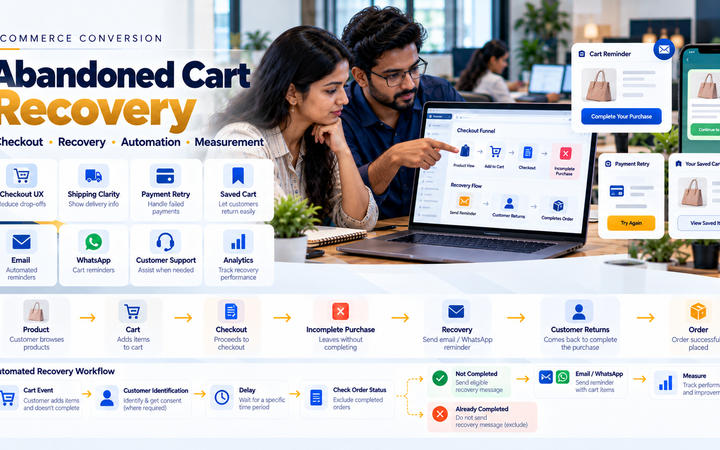
Known Customer → Cart Activity → No Completed Order → Delay / Validation → Eligible Recovery Communication
74. Check Whether an Order Was Completed Before Sending
A customer should not receive an “unfinished cart” message after successfully purchasing the products through another session or device.
75. Avoid Immediate Pressure
Cart-recovery automation should not create an aggressive or intrusive customer experience.
76. Limit Recovery Frequency
Repeated messages about the same cart can quickly become unwanted communication.
77. Cart Recovery Does Not Guarantee Sales
Businesses should evaluate the usefulness of the workflow using their own customer experience and performance data rather than assuming automated messages will automatically increase revenue.
WhatsApp Customer Support for Ecommerce
Automation is useful for structured events, but ecommerce support often requires human judgment.
78. Order Questions
Customers may ask about order status, changes or fulfilment.
79. Product Questions
Support staff may need to answer questions that cannot be handled accurately through automated responses.
80. Returns and Exchanges
WhatsApp can be a communication channel around return requests, but the actual return should be recorded in the ecommerce or return-management system.
81. Refund Questions
Support staff can explain the verified refund status without requesting sensitive financial credentials from the customer.
82. Human Agent Handover
An automated conversation should have a clear path to an appropriate human team member when the issue requires judgment or investigation.
WhatsApp Chatbot for Ecommerce
A chatbot can handle defined, low-risk customer requests where accurate information is available.
83. Product Discovery
A bot can potentially help customers navigate categories or products using structured catalogue information.
84. Order Status
A chatbot can retrieve appropriate order information after suitable customer verification.
85. Shipping Status
Verified courier or fulfilment data can be used to answer shipment-status questions.
86. Frequently Asked Questions
Structured answers can handle common questions such as shipping policies, return policies and store information.
87. Do Not Let a Bot Invent Business Policies
Automated answers should come from approved business information.
88. Do Not Let a Bot Invent Order Status
Transactional information should come from authoritative ecommerce and logistics systems.
89. Escalate Uncertain Cases
If the system cannot confidently resolve a customer’s issue, it should direct the conversation to appropriate human support.
WhatsApp Integration With Product Catalogue
Ecommerce businesses may want messaging experiences connected with product information.
90. Maintain One Authoritative Product Source
If product information originates from ecommerce or ERP software, messaging-related catalogue information should not become an independently maintained conflicting product database.
91. Product Availability
Availability shown or communicated through messaging should reflect the authoritative inventory rules of the business.
92. Pricing
Customer-facing prices should come from the appropriate pricing source.
93. B2B Customer Pricing
Customer-specific wholesale pricing should not be exposed to the wrong customer through an improperly designed messaging workflow.
WhatsApp Integration With Inventory
Inventory-related customer communication should use reliable stock information.
94. In-Stock Enquiries
The system can potentially retrieve availability from the ecommerce or inventory system.
95. Low Stock
A low-stock condition should not automatically generate misleading urgency messages.
96. Back-in-Stock Notifications
Where customers have appropriately requested such updates, the business can consider a structured notification workflow.
97. Verify Stock Before Sending
The system should avoid telling customers a product is available based on stale information.
WhatsApp Integration With Shipping APIs
Shipping and WhatsApp integrations can work together.
A structured flow can look like:
Courier Event → Shipping Integration → Ecommerce Order → Communication Rule → Customer Message
98. Keep Courier Data Authoritative
If the courier reports the physical shipment state, the messaging system should not independently guess delivery progress.
99. Normalize Shipping Events
Businesses using several courier services may first convert provider-specific tracking events into consistent internal shipment statuses.
100. Then Trigger Customer Communication
This helps avoid building different messaging logic for every courier.
WhatsApp Integration for WooCommerce
WooCommerce stores can add basic WhatsApp enquiry functionality or integrate more advanced business messaging workflows depending on the selected technology.
101. WooCommerce Product Enquiry
A WhatsApp enquiry action can be added to appropriate product pages.
102. WooCommerce Order Events
Relevant WooCommerce events can potentially trigger internal communication workflows.
103. Plugin vs Custom Integration
Businesses should evaluate whether a maintained plugin meets their requirements before creating custom functionality.
104. Review Plugin Security and Maintenance
WooCommerce extensions should be evaluated for compatibility, maintenance and the permissions they require.
Read WooCommerce Website Development for Businesses in Erode.
WhatsApp Integration for Shopify
Shopify stores can use integrations compatible with Shopify’s current app and API architecture.
105. Shopify App Integration
Businesses can evaluate appropriate supported apps based on their required ecommerce communication workflows.
106. Custom Shopify Integration
Custom functionality depends on the APIs, permissions and architecture currently available for the required use case.
107. Do Not Assume WooCommerce Plugins Work With Shopify
Each ecommerce platform requires integrations designed for its own architecture.
WhatsApp Integration for Custom Ecommerce Websites
Custom ecommerce applications can build messaging workflows around their own order, customer and fulfilment architecture.
108. Ecommerce Event Layer
The backend can produce meaningful events such as:
- Order created
- Payment verified
- Shipment created
- Out for delivery
- Delivered
- Return approved
109. Communication Rules Layer
The application determines whether an event should produce a customer message.
110. Messaging Integration Layer
The eligible communication is sent using the supported business messaging interface.
111. Customer Response Layer
Incoming customer messages can be routed to automation, CRM or human support depending on the business workflow.
Recommended Architecture
A scalable conceptual architecture can be:
Ecommerce / ERP / Shipping → Business Events → Communication Rules → WhatsApp Integration → Customer
with replies following:
Customer → WhatsApp → Messaging Integration → CRM / Support Queue → Human or Approved Automation
WhatsApp Integration Security
Messaging integrations can handle customer information and should be designed carefully.
112. Protect API Credentials
Secret tokens and credentials should remain in secure server-side configuration.
113. Do Not Place Secrets in Frontend JavaScript
Anything sent to a customer’s browser should be treated as potentially visible.
114. Protect Webhook Endpoints
Incoming webhook requests should be handled according to the verification requirements of the messaging provider.
115. Restrict Administrative Access
Only authorized staff should have access to messaging configuration and customer conversations.
116. Protect Customer Phone Numbers
Phone numbers are customer information and should not be unnecessarily exposed through website pages, logs or public APIs.
117. Minimize Stored Data
Store only the information required for legitimate ecommerce and customer-service workflows.
118. Avoid Sensitive Information in Logs
Application logs should support troubleshooting without unnecessarily duplicating complete customer conversations or personal data.
119. Customer Authentication for Order Information
A phone number alone should not automatically grant access to sensitive order or account information.
Where private information is exposed through an automated workflow, the business should use an appropriate verification approach.
WhatsApp Automation Error Handling
External messaging services can experience errors or temporary failures.
120. Message Send Failure
A failed notification should be recorded without corrupting the ecommerce order.
121. Retry Rules
Retries should be controlled so temporary failures do not produce repeated messages.
122. Permanent Failure
Where a message cannot be delivered, the system can record the result for appropriate handling.
123. Do Not Block Fulfilment Because a Notification Failed
A valid paid order should not remain unfulfilled simply because a WhatsApp notification could not be sent.
124. Monitoring
Important integration failures should be visible to the responsible technical or operations team.
WhatsApp Analytics for Ecommerce
Businesses can evaluate messaging performance without relying on vanity metrics alone.
125. Messages Triggered
Track which ecommerce events are producing communication.
126. Delivery-Related Messaging Status
Where supported, record appropriate messaging status separately from ecommerce transaction status.
127. Customer Responses
Businesses can understand which types of communication generate legitimate support conversations.
128. Support Resolution
Customer-support workflows can measure whether enquiries are resolved appropriately.
129. Cart Recovery Measurement
Where cart-recovery messaging is used, the business should measure completed orders using reliable ecommerce data rather than assuming every later purchase resulted from the WhatsApp message.
130. Avoid Misleading Attribution
A customer may interact with several marketing and sales channels before purchasing.
WhatsApp Integration for Multi-Vendor Ecommerce
Marketplace messaging requires additional access-control planning.
131. Marketplace Customer Communication
The platform should define whether communication comes from the marketplace operator, individual seller or a centralized support team.
132. Do Not Expose Customer Numbers to Every Seller by Default
Customer contact information should only be shared according to legitimate operational requirements and platform policy.
133. Seller Order Notifications
Seller-side operational notifications can be separated from customer communication.
134. Marketplace Support
A centralized support workflow can help maintain a consistent customer experience.
Read Multi-Vendor Ecommerce Marketplace Development in Erode.
WhatsApp Integration for Wholesale Ecommerce
Wholesale ecommerce frequently combines digital ordering with relationship-based sales.
135. Bulk Product Enquiries
Business buyers may ask about larger quantities before submitting an order.
136. RFQ Communication
WhatsApp can support conversation around an RFQ while the formal quotation remains in the appropriate business system.
137. Repeat Orders
A customer can discuss a repeat requirement with the sales team, but current price and availability should still be validated before creating a new order.
138. Dealer Communication
Dealer enquiries can be routed to the relevant account or sales team.
Read Wholesale Ecommerce Website Development: B2B Features Businesses Need.
WhatsApp Integration for Ecommerce Customer Journey
| Customer Stage | Possible WhatsApp Use |
|---|---|
| Product discovery | Product enquiry |
| Consideration | Questions and assisted selling |
| Cart | Eligible cart sharing or recovery |
| Order | Order-related communication |
| Payment | Verified payment-related updates |
| Fulfilment | Shipping notification |
| Delivery | Relevant delivery update |
| Post-purchase | Support or eligible follow-up |
WhatsApp Integration vs Email
WhatsApp does not necessarily need to replace email.
A business can use channels according to the type of communication and customer preferences.
| Useful for detailed communication | Useful for concise conversational communication |
| Can support longer documents and information | Can support quick customer interactions |
| Common for order records | Can complement order notifications |
| Works independently of WhatsApp | Requires appropriate WhatsApp business setup |
WhatsApp Integration vs Live Chat
Live chat and WhatsApp can also serve different purposes.
A website live-chat session usually takes place within the website, while WhatsApp can allow the conversation to continue within the customer’s messaging environment.
The appropriate channel mix depends on the customer base and support workflow.
Common WhatsApp Ecommerce Integration Mistakes
- Adding WhatsApp everywhere without a clear purpose
- Sending promotional messages without appropriate consent
- Treating checkout phone numbers as unlimited marketing permission
- Buying customer-number lists
- Sending excessive automated messages
- Triggering payment confirmation before payment verification
- Inventing shipment statuses
- Sending cart reminders after an order was completed
- Creating duplicate messages after event retries
- Putting API credentials in frontend code
- Exposing customer phone numbers
- Using WhatsApp as the only order database
- Allowing chatbots to invent product information
- Allowing bots to invent order status
- Failing to provide human escalation
- Mixing message status with order status
- Failing to monitor messaging integration errors
- Exposing private B2B pricing to the wrong customer
- Sending sensitive payment information through chat
- Assuming automation automatically increases sales
WhatsApp Ecommerce Integration Checklist
- Define the customer communication goals
- Choose basic chat or advanced API integration
- Identify meaningful ecommerce events
- Define customer opt-in requirements
- Review current messaging-platform requirements
- Define product-enquiry workflow
- Define cart-sharing workflow if required
- Define eligible cart-recovery workflow
- Define order-confirmation workflow
- Use verified payment information
- Connect verified shipping events
- Define customer-support workflow
- Plan human-agent escalation
- Protect API credentials
- Protect customer phone numbers
- Verify webhooks
- Prevent duplicate messages
- Separate message status from order status
- Define CRM integration if required
- Define inventory source of truth
- Define product and pricing source of truth
- Test order events
- Test payment events
- Test shipping events
- Test customer replies
- Test failed message handling
- Test opt-out handling where applicable
- Test mobile customer experience
- Monitor the integration after launch
WhatsApp Integration Cost for Ecommerce Websites
There is no single development cost for every ecommerce WhatsApp integration.
The cost can depend on:
- Ecommerce platform
- Basic chat-link implementation
- Business messaging architecture
- API integration
- Number of ecommerce events
- Order notifications
- Payment integration
- Shipping integration
- Cart recovery
- Customer-support inbox
- CRM integration
- Chatbot requirements
- B2B workflows
- Marketplace requirements
- Custom backend development
- Testing
- Ongoing maintenance
Messaging-provider or platform charges, where applicable, are separate from ecommerce development charges and should be checked using current provider information.
WhatsApp Ecommerce Integration Timeline
The implementation timeline depends on the required level of integration.
Adding a basic product-enquiry link is significantly different from building a custom architecture that connects ecommerce orders, payments, shipping APIs, CRM, automation and customer support.
The workflow should therefore be defined before estimating the development timeline.
WhatsApp Integration for Ecommerce Businesses in Erode
Businesses in Erode can use ecommerce WhatsApp integration for customer enquiries, B2B sales conversations, online-order communication and support when it matches their customer workflow.
This can be particularly relevant for ecommerce businesses, manufacturers, textile businesses, wholesalers, distributors and retailers that already communicate with customers through WhatsApp.
Greap Technologies works with businesses in Erode and nearby areas including Perundurai, Chennimalai, Bhavani, Anthiyur, Gobichettipalayam, Sathyamangalam, Modakkurichi, Kavindapadi, Kodumudi, Nambiyur and surrounding areas.
Why Consider Greap Technologies for Ecommerce WhatsApp Integration?
Greap Technologies can plan WhatsApp as part of the wider ecommerce and business-software architecture rather than simply placing a chat button on the website.
Depending on requirements and supported platform capabilities, development can include:
- Ecommerce website development
- WhatsApp product enquiries
- Cart-to-WhatsApp functionality
- Order-event integration
- Payment-related communication workflows
- Shipping notifications
- Delivery updates
- Customer-support workflows
- Eligible cart-recovery workflows
- API integration
- Webhook integration
- CRM integration
- Lead routing
- WooCommerce integration
- Shopify-compatible integration
- Custom ecommerce integration
- B2B ecommerce integration
- Marketplace workflows
- Testing
- Launch support
Explore Greap Technologies Ecommerce Development Services and Greap Technologies.
Conclusion
WhatsApp integration for ecommerce websites can support the customer journey from pre-purchase enquiries through order communication, shipping updates and post-purchase support.
The strongest integrations are not built around sending the maximum possible number of messages.
They are built around sending useful communication at the right point in the ecommerce workflow.
A practical architecture can be summarized as:
Ecommerce Event → Verify Business State → Check Communication Rule → Send Appropriate Message → Customer Response → Automation or Human Support
The ecommerce, payment, inventory and shipping systems should remain authoritative for their respective business data. WhatsApp should operate as a communication layer around those systems rather than becoming an uncontrolled replacement for them.
For a broader ecommerce technology stack, businesses can also read Payment Gateway Integration for Ecommerce Websites in India, Shipping and Courier API Integration for Ecommerce Websites and WhatsApp CRM and Lead Follow-Up Software for Businesses in Erode.
Need WhatsApp Integration for Your Ecommerce Website?
If your ecommerce business needs product enquiries, order communication, shipping updates, CRM integration or structured customer-support workflows through WhatsApp, Greap Technologies can review the complete customer journey before planning the integration.
Discuss Your Ecommerce WhatsApp Integration
Frequently Asked Questions
1. What is WhatsApp integration for an ecommerce website?
WhatsApp ecommerce integration connects appropriate website and customer-service workflows with supported WhatsApp business messaging capabilities for uses such as product enquiries, order communication, shipping updates and support.
2. Can customers enquire about ecommerce products through WhatsApp?
Yes. A product page can provide an enquiry action that opens a conversation with useful product context such as the product name, URL or selected option.
3. Can WhatsApp send ecommerce order confirmations?
Appropriate order-related communication can potentially be triggered from verified ecommerce events using supported business messaging mechanisms and current platform requirements.
4. Can payment updates be sent through WhatsApp?
Payment-related communication can be connected to the ecommerce workflow, but it should use payment status that has been appropriately verified by the backend rather than relying only on a browser success page.
5. Can shipping updates be sent through WhatsApp?
Yes, where an appropriate business messaging setup is used. Shipment communication should be based on verified ecommerce, warehouse or courier information.
6. Can WhatsApp be used for abandoned-cart recovery?
An eligible cart-recovery workflow may be possible when the business has legitimately collected the required customer information and has the appropriate basis for the communication. The system should also check whether the customer has already completed the order before sending a recovery message.
7. Can WhatsApp integrate with WooCommerce?
Yes. WooCommerce can support basic product-enquiry links and more advanced messaging integrations depending on the selected plugins, APIs and business requirements.
8. Can WhatsApp integrate with Shopify?
Yes, through integrations compatible with Shopify’s current app and API architecture. Available functionality depends on the selected solution and platform capabilities.
9. Can WhatsApp integrate with an ecommerce CRM?
Potentially. Customer enquiries can be connected with CRM lead or support workflows where suitable APIs and integration methods are available.
10. Can a WhatsApp chatbot provide ecommerce order tracking?
It can potentially provide appropriate order or shipping information when connected to authoritative ecommerce and logistics systems and when the customer is suitably verified for private information.
11. How much does ecommerce WhatsApp integration cost?
Development cost depends on whether the business needs a basic chat link, product enquiries, order notifications, API integration, cart recovery, shipping integration, CRM connectivity, chatbot functionality or a larger custom communication system. Applicable third-party messaging costs are separate.
12. Does Greap Technologies provide WhatsApp integration for ecommerce websites?
Yes. Greap Technologies can develop ecommerce WhatsApp workflows based on the ecommerce platform, customer journey, business systems and supported messaging capabilities required by the project.