
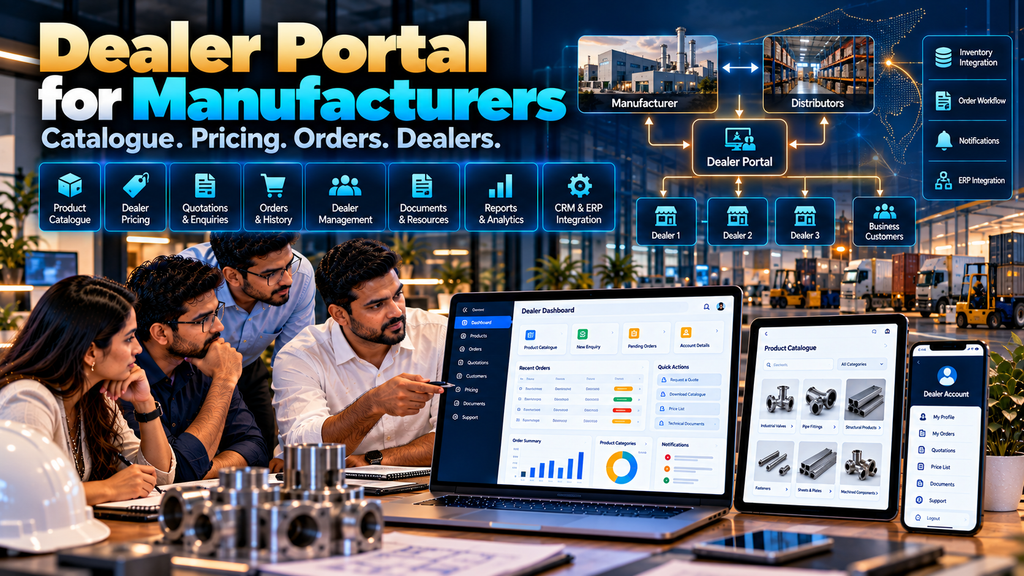
Manufacturers and distributors often manage a large amount of information between their internal teams and dealer networks.
Product catalogues, price lists, quotations, stock information, orders, documents and dealer communication may be handled through phone calls, email, spreadsheets, messaging applications and separate software systems.
As the dealer network grows, these processes can become difficult to coordinate.
Professional dealer portal development in Erode can provide authorized dealers and distributors with a secure digital platform where they can access relevant product information, pricing, documents, enquiries, orders and other approved business information.
A dealer portal should not simply copy an ecommerce website and place a login screen in front of it. B2B dealer relationships can involve account-specific pricing, minimum quantities, quotation workflows, credit arrangements, territories, approvals and integration with internal business systems.
This guide explains what manufacturers and distributors should consider when planning a dealer portal, which features may be useful, how ordering and pricing can work, and when CRM, inventory, ERP or other integrations may be appropriate.
At Greap Technologies, we develop B2B websites, dealer and distributor management systems, ecommerce platforms and custom business software for companies in Erode and nearby areas.
What Is a Dealer Portal?
A dealer portal is a secure online platform that allows approved dealers or distributors to access selected business information and perform authorized activities.
Depending on the business model, a portal can support:
- Dealer login
- Product catalogue access
- Dealer-specific information
- Authorized pricing
- Quotation requests
- Order placement
- Order history
- Order-status information
- Product documents
- Account information
- Notifications
The functionality should reflect the manufacturer’s actual dealer process.
Dealer Portal vs Public Product Catalogue Website
| Public Product Catalogue | Dealer Portal |
|---|---|
| Usually accessible without login | Restricted to authorized accounts |
| Public product information | Can include dealer-specific information |
| Public enquiries or RFQs | Can support account-based orders or enquiries |
| Usually no customer-specific pricing | Can support approved pricing rules |
| General documents | Can provide account-specific or restricted documents |
Some businesses may require both: a public website for product discovery and a private portal for authorized dealers.
Read Product Catalogue Website Development for Manufacturers in Erode.
Why Manufacturers May Need a Dealer Portal
Dealer networks can involve repeated operational tasks.
For example:
Dealer → Product Requirement → Price Confirmation → Availability Check → Order / Enquiry → Internal Processing → Status Update
If every step requires manual communication, sales and operations teams may spend significant time repeatedly sharing the same information.
A portal can centralize selected parts of this workflow where digital self-service makes sense.
Why Distributors May Need a Dealer Portal
Distributors working with many dealers may need to manage:
- Large product catalogues
- Multiple dealer accounts
- Different pricing arrangements
- Orders
- Documents
- Product updates
- Sales territories
- Account information
A well-designed portal can provide one structured interface for approved dealer interactions.
1. Start With the Existing Dealer Process
Before selecting features, document how dealers currently interact with the company.
Ask:
- How are dealers onboarded?
- How do they receive product information?
- How is pricing shared?
- How do they check products?
- How do they place orders?
- How are quotations handled?
- How are order updates communicated?
- Which documents are regularly shared?
The portal should improve appropriate parts of this process rather than digitizing unnecessary complexity.
2. Map the Dealer Journey
A dealer journey could look like:
Dealer Registration → Approval → Login → Catalogue → Pricing → Order / RFQ → Processing → Status → History
Another company may use:
Dealer Account → Catalogue → Requirement → Quotation → Approval → Order
There is no universal dealer workflow.
3. Dealer Registration
If new dealers can apply online, the portal may provide a registration form.
Relevant information could include:
- Business name
- Contact person
- Business contact information
- Location
- Business type
- Other information required for evaluation
Collect only information the company genuinely needs for onboarding.
4. Dealer Approval
Registration does not necessarily need to create an active dealer account immediately.
A workflow can be:
Application → Internal Review → Approval / Rejection → Account Activation
This allows the company to control who receives access to restricted portal information.
5. Secure Dealer Login
Approved dealers can receive secure login access.
Authentication requirements may include:
- Email or username
- Password
- Password reset
- Account status controls
- Additional authentication measures where appropriate
6. Role-Based Access
Not every portal user should automatically receive access to every feature.
Roles might include:
- Dealer user
- Distributor user
- Sales representative
- Regional manager
- Administrator
Permissions should reflect actual responsibilities.
7. Dealer Dashboard
After login, the dashboard can provide quick access to relevant information.
Depending on the business, this might include:
- Product catalogue
- Recent orders
- Open enquiries
- Quotation status
- Documents
- Account details
- Notifications
A dashboard should prioritize useful actions rather than displaying unnecessary charts.
8. Product Catalogue
A dealer portal can provide access to an organized product catalogue.
The catalogue may contain:
- Categories
- Subcategories
- Products
- Product images
- Descriptions
- Specifications
- Variants
- Documents
9. Product Search
Dealers working with large catalogues should be able to find products efficiently.
Search may support relevant fields such as:
- Product name
- SKU
- Model number
- Category
- Other meaningful product identifiers
10. Product Filters
Filters can help dealers narrow large product lists using relevant attributes such as:
- Category
- Brand where applicable
- Size
- Material
- Application
- Product family
11. Dealer-Specific Product Visibility
Some businesses may not offer every product to every dealer.
Where required, product visibility can potentially depend on:
- Dealer type
- Region
- Distribution arrangement
- Product authorization
These rules should be clearly defined before development.
12. Dealer Pricing
Pricing is one of the areas where dealer portals can differ significantly from public ecommerce websites.
Depending on the commercial model, pricing might involve:
- Standard dealer pricing
- Dealer groups
- Pricing tiers
- Product-specific arrangements
- Quantity-based pricing
- Contract pricing
Pricing logic should reflect the company’s approved commercial rules.
13. Customer-Specific Pricing
Where required, an authorized dealer account may have pricing that differs from another account.
This requires careful management of:
- Dealer identity
- Product pricing
- Pricing validity
- Permissions
- Integration with source systems where applicable
14. Do Not Hard-Code Complex Pricing Without Planning
If pricing changes frequently or comes from an ERP or other business system, manually maintaining duplicate pricing in several places can create inconsistencies.
The correct architecture depends on where the authoritative pricing data is maintained.
15. Minimum Order Quantity
B2B products may have minimum order quantities.
The portal can display or enforce approved MOQ rules where appropriate.
16. Quantity-Based Pricing
Some manufacturers or distributors use different prices at different order quantities.
For example, pricing logic can be associated with predefined quantity tiers where that matches the company’s commercial model.
The actual pricing rules should come from the business.
17. Request for Quotation
Not every B2B product is suitable for direct online ordering.
A dealer portal can support an RFQ process:
Product → Quantity → Requirement → RFQ → Internal Review → Quotation
18. Multi-Product RFQ
Dealers can potentially select several products and submit them together as one quotation request.
This can be useful for larger procurement requirements.
19. Quotation History
Where the business process supports it, dealers may be able to view relevant previous quotations and their status.
Access should be limited to the appropriate dealer account.
20. Dealer Ordering
Businesses with established product and pricing rules may allow authorized dealers to place orders through the portal.
A flow might be:
Login → Catalogue → Select Product → Quantity → Review → Submit Order
21. Quick Order
Experienced dealers may already know product codes.
A quick-order interface can allow them to enter SKUs and quantities without browsing the entire catalogue.
22. Bulk Order Entry
For large dealer orders, businesses may consider structured bulk-entry workflows.
The exact implementation depends on product data and validation requirements.
23. Repeat Orders
Dealers who regularly purchase the same products may benefit from a reorder option based on previous eligible orders.
Current pricing, availability and business rules should still be validated when the new order is created.
24. Order History
A dealer account can provide access to its relevant order history.
Information may include:
- Order reference
- Date
- Products
- Quantity
- Current status
- Documents where appropriate
25. Order Status
Where supported by internal systems, dealers can view meaningful order-status information.
Status terminology should match the actual operational workflow.
26. Avoid Fake Real-Time Status
If order information is synchronized periodically, it should not be presented as real-time data.
The interface should accurately describe how current the information is where that distinction matters.
27. Inventory Visibility
Some businesses may want dealers to see inventory information.
Before implementing this, decide:
- Whether exact quantities should be visible
- Whether only availability status should be shown
- Whether inventory is real-time
- Whether data is periodically synchronized
- Whether certain products should hide inventory
28. Warehouse Integration
Where suitable systems exist, dealer orders may connect with warehouse processes.
A possible workflow is:
Dealer Order → Internal Approval → Warehouse Processing → Dispatch → Status Update
Read Warehouse Management Software Development in Erode.
29. Product Documents
Dealers often need access to approved product resources.
The portal can potentially provide:
- Product catalogues
- Datasheets
- Technical documents
- Installation guides
- Approved marketing materials
- Other dealer resources
30. Restricted Documents
Some documents may be intended only for specific dealer groups.
Role- or account-based access can be used where appropriate.
31. Keep Dealer Documents Current
Outdated price lists, product specifications or brochures can create operational problems.
Define who is responsible for updating documents and removing obsolete versions.
32. Dealer Announcements
A portal can provide approved business announcements such as:
- New product information
- Catalogue updates
- Policy updates
- Operational notices
Announcements should be targeted and useful rather than overwhelming dealers with unnecessary notifications.
33. Notifications
Notifications may be used for relevant events such as:
- Account approval
- Quotation update
- Order confirmation
- Order-status change
- Document availability
Delivery channels and frequency should be selected according to the business workflow.
34. Email Notifications
Email can be used for transactional notifications and account communication where appropriate.
Templates should clearly explain the event and the action, if any, required from the dealer.
35. Business Messaging Integration
Where the business needs messaging workflows, integrations should use official supported business messaging technologies and follow applicable platform requirements.
A portal should not depend on unofficial automation methods that may be unreliable or inconsistent with platform rules.
36. Dealer Profile
Authorized dealers can have account profiles containing approved business information.
Depending on requirements, this might include:
- Business name
- Contact information
- Billing information
- Shipping information
- Account preferences
37. Multiple Users per Dealer
Larger dealer organizations may need more than one portal user.
For example:
- Owner
- Purchasing user
- Accounts user
- Branch user
Permissions can be defined according to the manufacturer’s requirements.
38. Dealer Branches
Some dealer organizations operate multiple branches.
The portal architecture can support branch-level information where required, such as delivery locations or authorized users.
39. Sales Representative Access
Internal sales representatives may need portal or management-system access to support assigned dealers.
Their permissions should be separated appropriately from dealer permissions.
40. Dealer Assignment
Dealers can potentially be associated with relevant sales representatives, regions or business units.
This can support routing of enquiries and follow-up.
41. Territory Management
Companies with defined sales territories may use region information within their dealer-management workflow.
Territory rules should reflect actual business arrangements rather than being inferred automatically.
42. Dealer Enquiry Management
Dealer enquiries can be captured and routed to appropriate internal teams.
A workflow might look like:
Dealer → Enquiry → Assigned Team → Follow-Up → Resolution
43. CRM Integration
A dealer portal can potentially integrate with a CRM to support account and communication workflows.
Depending on requirements, integration might involve:
- Dealer records
- Contacts
- Enquiries
- Sales assignments
- Follow-up information
Integration feasibility depends on supported APIs, permissions and system architecture.
Read WhatsApp CRM and Lead Follow-Up Software for Businesses in Erode.
44. ERP Integration
For some manufacturers and distributors, the ERP is the primary source of product, pricing, customer, inventory or order information.
A dealer portal can potentially exchange approved information with the ERP.
Possible areas include:
- Dealer accounts
- Products
- Pricing
- Inventory
- Orders
- Order status
Actual integration depends on the ERP’s technical capabilities and the data the business wants to expose.
45. Define the Source of Truth
When multiple systems contain the same information, determine which system owns each data type.
For example:
| Data | Possible Authoritative System |
|---|---|
| Product Master | ERP / Product System |
| Dealer Account | ERP / CRM / Dealer System |
| Pricing | Approved Pricing / ERP System |
| Inventory | ERP / Warehouse System |
| Lead Follow-Up | CRM |
The actual source should be defined according to the company’s architecture.
46. Avoid Maintaining the Same Data Everywhere
Duplicating product, price or inventory information across unrelated systems can create synchronization problems.
Where practical, integrations should be designed around clearly defined authoritative data sources.
47. Dealer Portal and B2B Ecommerce
A dealer portal can include B2B ecommerce functionality when dealers need to place digital orders.
Potential features can include:
- Business accounts
- Dealer-specific pricing
- MOQ rules
- Bulk quantities
- Quick ordering
- Repeat ordering
- Purchase-order workflows
- Account-based checkout
Read B2B Ecommerce Website Development for Wholesalers and Manufacturers in Erode.
48. Dealer Portal vs B2B Ecommerce Website
| Dealer Portal | B2B Ecommerce Website |
|---|---|
| Focuses on dealer relationship and account workflows | Focuses strongly on digital product ordering |
| Can include documents and account information | Typically emphasizes catalogue, pricing and purchasing |
| Ordering can be optional | Ordering is usually central |
| Can support enquiries and quotations | Can support checkout or account ordering |
A single platform can combine both when the business requires it.
49. Dealer Portal and Distributor Management Software
A dealer portal is the external interface used by dealers, while distributor or dealer management software can include broader internal workflows.
The internal system may manage:
- Dealer records
- Territories
- Orders
- Sales assignments
- Approvals
- Reports
Read Dealer and Distributor Management Software Development in Erode.
50. Mobile-Friendly Dealer Portal
Dealers may access the portal from offices, shops, warehouses or while travelling for legitimate business activity.
The portal should therefore work appropriately across mobile, tablet and desktop devices.
51. Responsive Product Catalogue
Product cards, categories, search and filters should remain usable on smaller screens.
Large specification tables may require responsive layouts or controlled horizontal scrolling.
52. Mobile Ordering
If dealers place orders through smartphones, product selection, quantity entry and order review should be designed for touch interaction.
53. Dealer Portal UI/UX
A dealer portal is a working business interface rather than only a marketing website.
Prioritize:
- Clear navigation
- Fast product discovery
- Readable pricing
- Simple order workflows
- Clear status information
- Useful account information
54. Avoid Dashboard Clutter
A portal does not need ten charts simply because dashboards can display charts.
Show information that helps the dealer complete actual tasks.
55. Portal Performance
Performance becomes important when the portal includes large catalogues, product images, filters and integrations.
Development should consider:
- Efficient database queries
- Pagination
- Search architecture
- Image optimization
- Caching where appropriate
- API performance
56. Dealer Portal Security
A dealer portal can contain non-public business information, so security should be considered throughout the project.
Depending on requirements, controls may include:
- HTTPS
- Secure authentication
- Strong password handling
- Role-based access
- Authorization checks
- Session controls
- Input validation
- Secure file handling
- Logging
- Software updates
- Backups
57. Authorization Is Different From Login
A successful login confirms that a user has authenticated.
The application must also verify what that user is authorized to access.
For example, Dealer A should not be able to retrieve Dealer B’s orders simply by changing an identifier in a request.
58. Protect Dealer-Specific Pricing
Account-specific pricing should be returned only after appropriate authorization checks.
Do not rely solely on hiding information in the user interface.
59. Protect Business Documents
Restricted documents should use appropriate access controls rather than being publicly accessible through easily shareable URLs when confidentiality is required.
60. Audit Trail
For important business actions, an audit trail can record relevant events such as:
- Account changes
- Order submissions
- Approvals
- Status changes
- Other defined administrative actions
Audit requirements should be determined according to the business process.
61. Data Privacy
Collect only business and personal information required for legitimate portal functionality.
Define appropriate access, retention and deletion practices according to the company’s requirements and applicable obligations.
62. Backups and Recovery
The business should understand:
- What data is backed up
- How frequently
- Where backups are stored
- How restoration is performed
Backup requirements depend on how frequently portal data changes and how critical the system is to operations.
63. Analytics
Portal analytics can help businesses understand how approved users interact with the system.
Useful operational measurements might include:
- Product searches
- Frequently accessed catalogue sections
- RFQ submissions
- Order submissions
- Portal errors
Metrics should be selected to improve the system and business process rather than to create unnecessary surveillance of individual users.
64. Management Reports
Depending on requirements, management reports can summarize business information such as:
- Orders by period
- Dealer order activity
- Product demand
- Open quotations
- Order status
Reports should be interpreted within the business context rather than treated as automatic judgments about individual dealer quality.
65. Dealer Portal Maintenance
A dealer portal requires ongoing maintenance after launch.
This can include:
- Security updates
- Bug fixes
- Backup monitoring
- Performance improvements
- Browser compatibility
- Integration maintenance
- Feature enhancements
66. Product Data Maintenance
The company should define responsibility for updating:
- Products
- Categories
- Specifications
- Images
- Documents
- Pricing rules
67. Integration Maintenance
External APIs and business systems can change over time.
CRM, ERP, inventory, messaging and other integrations may therefore require monitoring and future updates.
68. Scalability
A portal should be designed for reasonable expected growth.
Growth might involve:
- More dealers
- More portal users
- More products
- More orders
- Additional branches
- Additional regions
- New integrations
Scalability requirements should be based on realistic business needs rather than assuming unlimited scale is required from day one.
69. Start With an MVP When Appropriate
A manufacturer does not always need every possible dealer feature in the first release.
An initial version might focus on:
- Dealer accounts
- Secure login
- Product catalogue
- Dealer pricing
- RFQ or order submission
- Order history
- Documents
Additional functionality can be introduced after the core workflow has been validated.
70. Dealer Portal Development Cost in Erode
There is no universal fixed cost for dealer portal development.
Cost can depend on:
- Dealer-account structure
- Roles and permissions
- Catalogue complexity
- Pricing rules
- RFQ functionality
- Ordering workflows
- Approval workflows
- Inventory visibility
- Documents
- CRM integration
- ERP integration
- Warehouse integration
- Notifications
- Reporting
- Data migration
- Security requirements
A basic dealer catalogue portal and a deeply integrated B2B ordering platform represent very different project scopes.
71. Compare Scope Instead of Only Price
Two dealer portal quotations may differ because one includes only login and catalogue functionality while another includes custom pricing, orders, ERP integration, permissions, migration and ongoing support.
Compare deliverables and exclusions before comparing only the final amount.
72. Dealer Portal Development Timeline
Timeline depends on factors such as:
- Requirement complexity
- Catalogue size
- Pricing logic
- Order workflows
- Approval requirements
- Integrations
- Existing data quality
- Testing
- User acceptance
73. Dealer Portal Development Process
A structured process can follow:
Business Process Study → Requirements → Data & Integration Review → Portal Architecture → UI/UX → Development → Integration → Testing → User Acceptance → Deployment → Support
74. Requirement Analysis
Document important business rules before development.
These can include:
- Who qualifies as a dealer
- How accounts are approved
- Which products each dealer can see
- How pricing works
- How orders are placed
- Whether approvals are required
- Where inventory comes from
- Where orders should go
75. Integration Review
If existing software is involved, identify:
- System names
- Available APIs
- Authentication methods
- Required data
- Synchronization frequency
- Data ownership
- Technical limitations
76. UI/UX Design
Important portal screens can include:
- Login
- Dashboard
- Product catalogue
- Product page
- RFQ
- Cart or order review
- Order history
- Documents
- Account profile
77. Development and Integration
After workflows and designs are approved, portal functionality and required integrations can be implemented according to the agreed scope.
78. Testing
Testing should cover important scenarios such as:
- Authentication
- Authorization
- Dealer-specific data
- Product search
- Pricing
- RFQ
- Order submission
- Approvals
- Order history
- Documents
- Notifications
- Mobile layouts
- Integrations
79. User Acceptance Testing
Business users should verify that the portal matches agreed operational workflows before full deployment.
Testing with representative dealer scenarios can identify workflow issues that purely technical testing may not reveal.
80. Dealer Training and Onboarding
If the portal changes how dealers interact with the company, provide appropriate onboarding.
This may include:
- Account activation instructions
- Quick-start guide
- Order instructions
- Support contact
How to Choose a Dealer Portal Development Company in Erode
Dealer portal development combines website, software, data and business-process requirements.
When evaluating a development company, consider whether it can understand:
- Manufacturer and distributor workflows
- B2B product catalogues
- Dealer account management
- Pricing rules
- RFQ and ordering workflows
- Role-based permissions
- CRM and ERP integrations
- Responsive portal development
- Security
- Maintenance and support
Read Software Development Company in Erode: Services, Cost and How to Choose.
Questions to Ask Before Developing a Dealer Portal
- Who will use the dealer portal?
- How will dealers be registered and approved?
- Do different dealer types need different access?
- Can different dealers see different products?
- Where does product information come from?
- How is dealer pricing calculated?
- Where is the authoritative price maintained?
- Do dealers need RFQs, direct orders or both?
- Are order approvals required?
- Should dealers see inventory?
- Is inventory real-time or synchronized?
- Can dealers access order history?
- Which documents should be available?
- Does the portal need CRM integration?
- Does it need ERP integration?
- What roles and permissions are required?
- What data needs to be migrated?
- How will backups work?
- Who will maintain products and pricing?
- What support is required after launch?
Dealer Portal Development Checklist
| Area | What to Define |
|---|---|
| Dealers | Account types, approval and access rules |
| Catalogue | Products, categories, search and filters |
| Pricing | Dealer groups, tiers or account-specific rules |
| RFQ | Quotation-request workflow |
| Orders | Ordering, approvals, history and status |
| Inventory | Visibility and source of inventory information |
| Documents | Public and restricted dealer resources |
| Permissions | Dealer, internal and administrator roles |
| Integrations | CRM, ERP, warehouse and other systems |
| Security | Authentication, authorization and data protection |
| Support | Maintenance, monitoring and future enhancements |
Common Dealer Portal Development Mistakes
- Building before documenting the dealer process
- Treating a dealer portal exactly like retail ecommerce
- Using one pricing rule when the business has several pricing models
- Duplicating product and price data across systems without a source-of-truth plan
- Showing inaccurate inventory as real-time
- Creating complicated dashboards with little operational value
- Using weak authorization controls
- Exposing one dealer’s information to another dealer
- Ignoring mobile usability
- Automating a poorly defined approval process
- Adding every possible feature to the first version
- Ignoring dealer onboarding
- Ignoring integration maintenance
- Not defining post-launch ownership and support
Dealer Portal Development for Erode Manufacturers and Distributors
Manufacturers and distributors in Erode may operate through dealer networks across Tamil Nadu, India or other markets.
A dealer portal can be designed around the company’s actual distribution model rather than around generic assumptions about how dealers should work.
Greap Technologies provides website and software development services for businesses in Erode and nearby areas including Perundurai, Bhavani, Gobichettipalayam, Sathyamangalam, Anthiyur, Chennimalai, Modakkurichi, Kavindapadi, Kodumudi, Nambiyur and surrounding locations.
Why Consider Greap Technologies for Dealer Portal Development?
Greap Technologies develops websites and custom software systems around business workflows.
Depending on requirements, a dealer portal project can include:
- Dealer registration
- Approval workflows
- Secure dealer login
- Role-based access
- Dealer dashboard
- Product catalogue
- Product search and filtering
- Dealer-specific product visibility
- Dealer-specific pricing
- MOQ and quantity rules
- RFQ functionality
- Online dealer ordering
- Quick order
- Repeat ordering
- Order history
- Order-status information
- Product documents
- Dealer profiles
- CRM integration
- ERP integration
- Inventory integration
- Warehouse integration
- Notifications
- Reporting
- Responsive development
- Maintenance and support
The exact solution should be defined after understanding the dealer network, pricing structure, product catalogue, ordering process and existing business software.
Explore Website Development Services, Ecommerce Development Services, SEO Services and Greap Technologies.
Final Checklist Before Starting a Dealer Portal
- Map the existing dealer workflow
- Define dealer types
- Define registration and approval
- Define user roles
- Prepare product data
- Define product visibility
- Document pricing rules
- Define MOQ rules
- Choose RFQ, ordering or both
- Define order approvals
- Decide inventory visibility
- Define required documents
- Identify CRM requirements
- Identify ERP requirements
- Identify warehouse requirements
- Define notifications
- Define security requirements
- Prepare migration data
- Plan dealer onboarding
- Plan ongoing maintenance
Conclusion
Effective dealer portal development for manufacturers and distributors in Erode starts with understanding how the dealer network actually operates.
A useful portal can connect the major parts of the dealer journey:
Dealer Login → Product Catalogue → Pricing → RFQ / Order → Status → History
For businesses with integrated systems, the workflow can extend further:
Dealer Portal → Order → ERP → Warehouse → Dispatch → Status
or:
Dealer Portal → RFQ → CRM → Quotation → Approval → Order
The objective is not to automate every dealer interaction. The objective is to identify repetitive, structured processes that benefit from digital access while keeping sales teams involved where human discussion, negotiation or technical evaluation is important.
Manufacturers should therefore define dealer roles, catalogue structure, pricing rules, ordering processes, data ownership and integration requirements before development begins.
Looking for Dealer Portal Development in Erode?
If your manufacturing or distribution business needs a secure dealer portal for product catalogues, dealer pricing, RFQs, orders, documents or business-system integrations, Greap Technologies can discuss your workflow and plan an appropriate solution.
Discuss Your Dealer Portal on WhatsApp
Frequently Asked Questions
1. What is a dealer portal?
A dealer portal is a secure digital platform that gives authorized dealers access to selected product, pricing, quotation, ordering, document and account functionality based on the manufacturer’s or distributor’s business process.
2. Who can use a dealer portal?
Depending on the system, users can include authorized dealers, distributors, dealer employees, internal sales representatives, managers and administrators with different permissions.
3. Can different dealers see different prices?
Yes, when the business has defined dealer-specific or group-based pricing rules. The system should apply those rules only to authorized accounts.
4. Can dealers place orders online?
Yes. A portal can support dealer ordering when products, pricing, quantity rules and the internal order workflow are sufficiently defined.
5. Can a dealer portal support quotation requests instead of direct orders?
Yes. Manufacturers with negotiated or requirement-dependent pricing can use RFQ workflows instead of, or alongside, direct ordering.
6. Can dealers see stock availability?
Potentially. Inventory visibility depends on the business rules and the availability and accuracy of inventory data. The portal should clearly distinguish real-time information from periodically synchronized information.
7. Can a dealer portal integrate with ERP software?
Potentially. Integration depends on the ERP’s APIs or other supported integration methods, permissions, architecture and the information that needs to be exchanged.
8. Can a dealer portal connect with a CRM?
Yes, where suitable integration capabilities are available. Dealer records, enquiries and follow-up workflows can potentially connect with a CRM.
9. Is a dealer portal the same as dealer management software?
Not necessarily. A dealer portal is usually the dealer-facing interface, while dealer management software may include broader internal processes such as dealer records, territories, approvals, sales assignments, orders and reporting. They can also be parts of the same system.
10. Can a dealer portal work on mobile phones?
Yes. A responsive dealer portal can support catalogue browsing, enquiries, ordering and account functionality across supported mobile, tablet and desktop devices.
11. How much does dealer portal development cost in Erode?
Cost depends on account structure, catalogue size, pricing rules, RFQ and ordering workflows, permissions, integrations, data migration, reporting, security and other requirements. A detailed scope is needed before estimating a custom portal.
12. Does Greap Technologies develop dealer portals in Erode?
Yes. Greap Technologies provides custom website and software development solutions for manufacturers, distributors and other businesses in Erode and nearby areas.